This is the multi-page printable view of this section. .
Architecture
- 1: Nodes
- 2: Infrastructure
- 3: PGSQL Arch
Pigsty uses a modular architecture and declarative interface. Combine modules to meet your requirements.
- Use one or more modules from the modular design.
- Describe the environment with a configuration inventory and parameters. Apply it with Ansible playbooks.
- Run Pigsty on physical or virtual nodes with a compatible OS.
Modules
Pigsty uses a modular design with six main default modules: PGSQL, INFRA, NODE, ETCD, REDIS, and MINIO.
PGSQL: Self-healing HA Postgres clusters powered by Patroni, Pgbouncer, HAproxy, PgBackrest, and more.INFRA: Local software repo, Nginx, Grafana, Victoria, AlertManager, Blackbox Exporter—the complete observability stack.NODE: Tune nodes to desired state—hostname, timezone, NTP, ssh, sudo, haproxy, docker, vector, keepalived.ETCD: Distributed key-value store as DCS for HA Postgres clusters: consensus leader election/config management/service discovery.REDIS: Redis servers supporting standalone primary-replica, sentinel, and cluster modes with full monitoring.MINIO: S3-compatible simple object storage that can serve as an optional backup destination for PG databases.
Combine modules through declarative configuration. For host monitoring, install INFRA on infrastructure nodes and NODE on managed nodes. Install ETCD and PGSQL across multiple nodes to form an HA PostgreSQL cluster automatically. You can reuse Pigsty infrastructure for custom modules; see REDIS and MINIO as examples. Compatibility modes, such as PostgreSQL Mongo mode, combine standard PGSQL and Docker APP workflows.
Every module requires NODE. Install it first on managed nodes. By default, NODE uses the local software repository and thus has a weak dependency on INFRA. The deploy.yml playbook bootstraps administration/infrastructure nodes with INFRA to resolve this circular dependency.
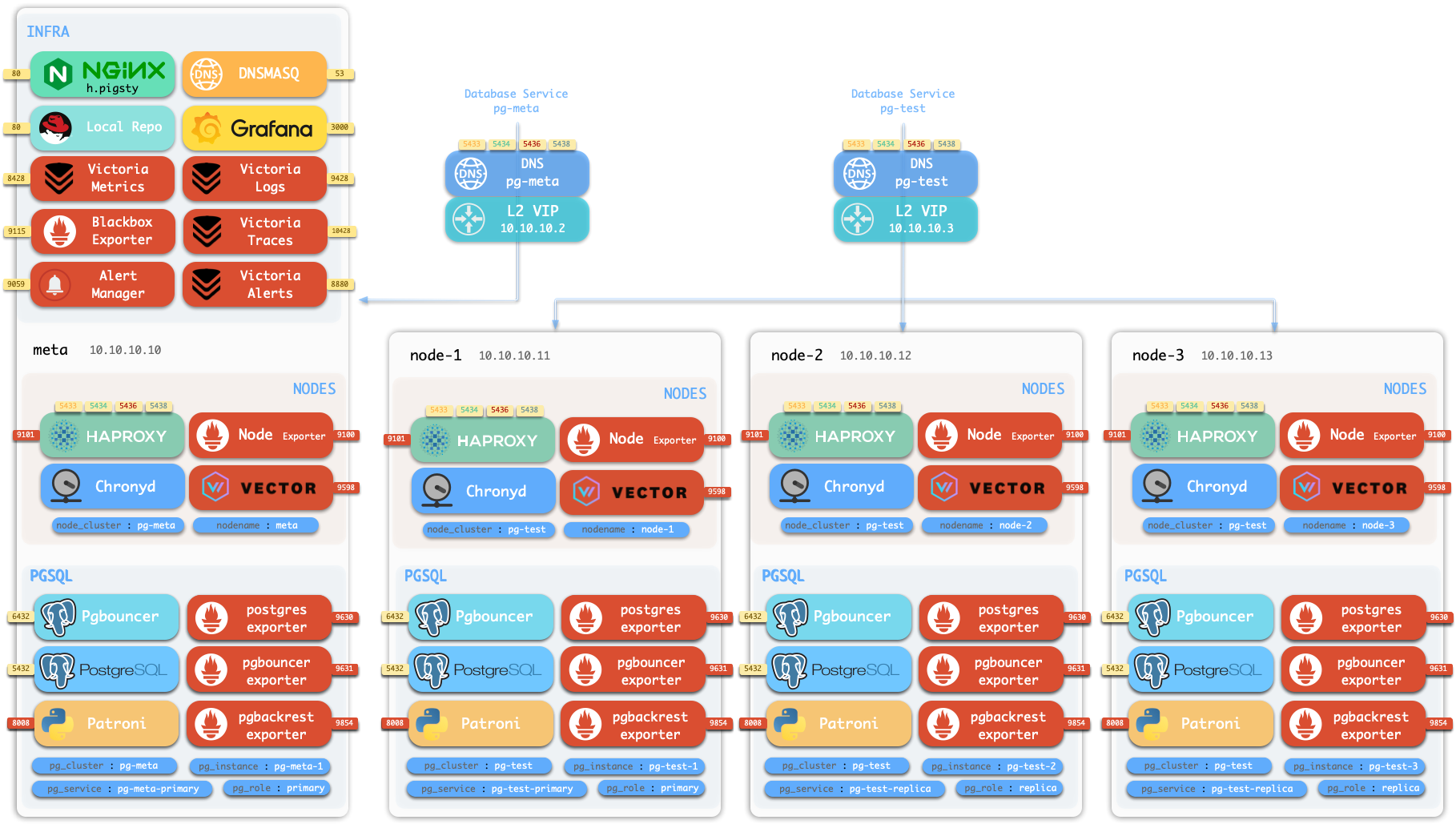
Standalone Installation
By default, Pigsty installs on one physical or virtual node. deploy.yml installs INFRA, ETCD, PGSQL, and optional MINIO on the current node. Monitoring includes VictoriaMetrics, VictoriaLogs, VictoriaTraces, Grafana, Alertmanager, and Blackbox Exporter. A standalone PostgreSQL instance serves as the CMDB: cluster pg-meta, database meta.
This node has monitoring, visualization, and PostgreSQL with automatic PITR configuration. One node cannot provide HA. Use it for development, tests, demonstrations, and data visualization or analysis. It can also serve as an administration node for additional nodes.
Monitoring
Use the standalone meta node as an administration node and monitoring center for additional nodes and database servers.
You can use Pigsty monitoring independently. It configures VictoriaMetrics/Grafana with dashboards for host nodes and PostgreSQL databases. A small configuration enables production monitoring and alerts for existing hosts and databases, including those managed outside Pigsty.

HA PostgreSQL Clusters
Pigsty lets you operate your own production HA PostgreSQL RDS service in your chosen environment.
To create an HA cluster, describe it in configuration and run the playbook:
In less than 10 minutes, the cluster has service access, monitoring, backup PITR, and HA configured.
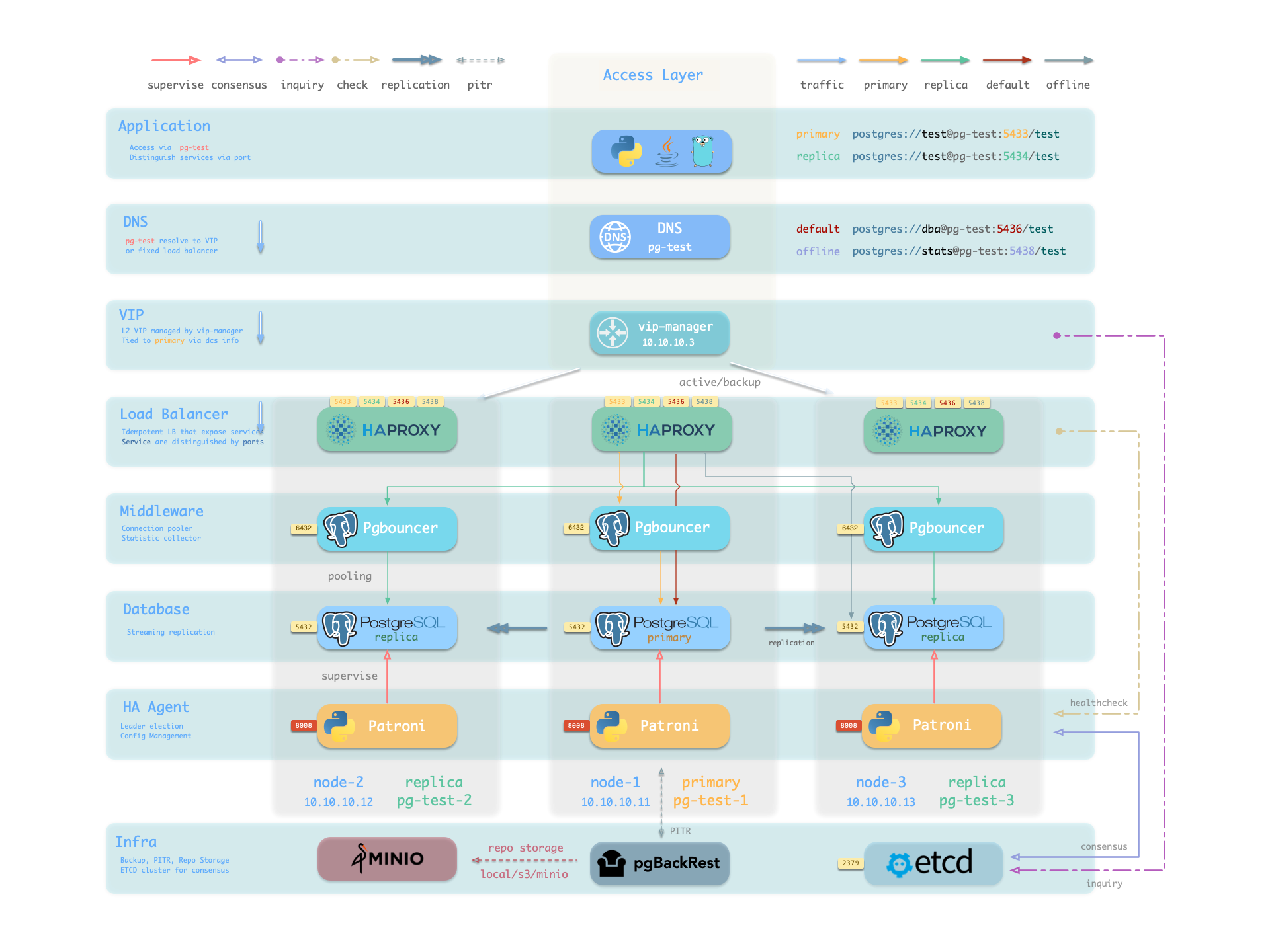
Patroni, etcd, and HAProxy provide automatic recovery from hardware failure. By default, primary failover completes within 45 seconds. HAProxy uses Patroni health checks to route read/write traffic to the new primary and avoid split brain. Clients need no configuration change or application restart. Replica failures and planned switchovers cause only a brief interruption to the current query.
pgBackRest and optional Silo provide local and cloud PITR for software failures, human errors, and datacenter disasters. They also support cross-region replication and disaster recovery after datacenter failure.
1 - Nodes
A node represents hardware resources and an operating system. It can be a physical server, virtual machine, container, or pod.
A node needs a Linux OS, systemd, and standard CPU, memory, disk, and network resources.
Install modules on nodes. The installed modules determine the node type:
| Type | Description |
|---|---|
| Regular Node | A node managed by Pigsty |
| ADMIN Node | The node that runs Ansible to issue management commands |
| INFRA Node | Nodes with the INFRA module installed |
| ETCD Node | Nodes with the ETCD module for DCS |
| MINIO Node | Nodes with the MINIO module for object storage |
| PGSQL Node | Nodes with the PGSQL module installed |
| … | Nodes with other modules… |
In a single-node deployment, one node has all roles: regular, administration, infrastructure, ETCD, and database.
Regular Node
Use node.yml to configure managed nodes to the target state. A regular node can run these services:
| Component | Port | Description | Status |
|---|---|---|---|
node_exporter | 9100 | Host metrics exporter | Enabled |
haproxy | 9101 | HAProxy load balancer (admin port) | Enabled |
vector | 9598 | Log collection agent | Enabled |
docker | 9323 | Container runtime support | Optional |
keepalived | n/a | L2 VIP for node cluster | Optional |
keepalived_exporter | 9650 | Keepalived status monitor | Optional |
node_exporter, vector, and haproxy are enabled by default. They export host metrics, collect logs, and balance traffic. Docker, keepalived, and keepalived_exporter are optional.
ADMIN Node
A deployment has exactly one administration node that runs Ansible playbooks and issues deployment or management commands.
This node has ssh/sudo access to every other node. Restrict access carefully. See Security Model: Trust Boundaries for its trusted access and critical assets.
During single-node installation and configuration, the current node becomes the administration node. A laptop with Ansible and SSH access to all managed nodes can also serve this role. This is not recommended for production.
For example, a laptop managing a cloud Pigsty VM is the administration node.
Production installations usually reserve 1–2 DBA machines for administration. With limited resources, INFRA nodes can also perform administration. All infrastructure nodes have Ansible by default.
INFRA Node
A Pigsty deployment may have 1 or more INFRA nodes; large production environments typically have 2-3.
The infra group in the inventory defines which nodes are INFRA nodes. These nodes run the INFRA module with these components:
| Component | Port | Description |
|---|---|---|
nginx | 80/443 | Web UI, local software repository |
grafana | 3000 | Visualization platform |
victoriaMetrics | 8428 | Time-series database (metrics) |
victoriaLogs | 9428 | Log collection server |
victoriaTraces | 10428 | Trace collection server |
vmalert | 8880 | Alerting and derived metrics |
alertmanager | 9059 | Alert aggregation and routing |
blackbox_exporter | 9115 | Blackbox probing (ping nodes/VIPs) |
dnsmasq | 53 | Internal DNS resolution |
chronyd | 123 | NTP time server |
ansible | - | Playbook execution |
Nginx provides the module Web UI and software repository. Services on multiple infrastructure nodes are independent. Each Grafana can access all monitoring data sources.
Pigsty is licensed under Apache-2.0, though embedded Grafana component uses AGPLv3.
ETCD Node
The ETCD module provides Distributed Consensus Service (DCS) for PostgreSQL high availability.
The etcd group in the inventory defines ETCD nodes. These nodes run etcd servers on two ports:
| Component | Port | Description |
|---|---|---|
etcd | 2379 | ETCD key-value store (client port) |
etcd | 2380 | ETCD cluster peer communication |
MINIO Node
The MINIO module provides optional backup storage for PostgreSQL.
The minio inventory group defines MINIO module nodes. In v4.5.0, these nodes run Silo servers on:
| Component | Port | Description |
|---|---|---|
silo | 9000 | S3 API endpoint |
silo | 9001 | Silo admin console |
PGSQL Node
A PGSQL node has the PGSQL module. Each node runs one PostgreSQL instance, giving a 1:1 mapping.
node_id_from_pg lets a PGSQL node use its PostgreSQL instance name. The default is true.
PGSQL nodes run these additional components beyond regular node services:
| Component | Port | Description | Status |
|---|---|---|---|
postgres | 5432 | PostgreSQL database server | Enabled |
pgbouncer | 6432 | PgBouncer connection pool | Enabled |
patroni | 8008 | Patroni HA management | Enabled |
pg_exporter | 9630 | PostgreSQL metrics exporter | Enabled |
pgbouncer_exporter | 9631 | PgBouncer metrics exporter | Enabled |
pgbackrest_exporter | 9854 | pgBackRest metrics exporter | Enabled |
vip-manager | n/a | Binds L2 VIP to cluster primary | Optional |
{{ pg_cluster }}-primary | 5433 | HAProxy service: pooled read/write | Enabled |
{{ pg_cluster }}-replica | 5434 | HAProxy service: pooled read-only | Enabled |
{{ pg_cluster }}-default | 5436 | HAProxy service: primary direct connection | Enabled |
{{ pg_cluster }}-offline | 5438 | HAProxy service: offline read | Enabled |
{{ pg_cluster }}-<service> | 543x | HAProxy service: custom PostgreSQL services | Custom |
vip-manager runs only when a PG VIP is configured. Define custom services through pg_services. haproxy exposes them on additional ports.
Node Relationships
Regular nodes normally select an INFRA node with admin_ip. For example, global admin_ip = 10.10.10.10 directs nodes to services at that address.
Parameters that reference ${admin_ip}:
| Parameter | Module | Default Value | Description |
|---|---|---|---|
repo_endpoint | INFRA | http://${admin_ip}:80 | Software repo URL |
repo_upstream.baseurl | INFRA | http://${admin_ip}/pigsty | Local repo baseurl |
infra_portal.endpoint | INFRA | ${admin_ip}:<port> | Nginx proxy backend |
dns_records | INFRA | ["${admin_ip} i.pigsty", ...] | DNS records |
node_default_etc_hosts | NODE | ["${admin_ip} i.pigsty"] | Default static DNS |
node_etc_hosts | NODE | - | Custom static DNS |
node_dns_servers | NODE | ["${admin_ip}"] | Dynamic DNS servers |
node_ntp_servers | NODE | - | NTP servers (optional) |
The administration node usually also provides infrastructure. With multiple infrastructure nodes, the first usually administers the environment and others provide backups.
Large deployments can separate administration from infrastructure. For example, use 1–2 small DBA-managed administration hosts and 2–3 high-capacity physical monitoring servers.
Typical node counts by deployment scale:
| Scale | ADMIN | INFRA | ETCD | MINIO | PGSQL |
|---|---|---|---|---|---|
| Single-node | 1 | 1 | 1 | 0 | 1 |
| 3-node | 1 | 3 | 3 | 0 | 3 |
| Small prod | 1 | 2 | 3 | 0 | N |
| Large prod | 2 | 3 | 5 | 4+ | N |
2 - Infrastructure
Production HA PostgreSQL needs monitoring, alerts, logs, time synchronization, DNS, and software repositories. The INFRA module provides these services. It is optional but strongly recommended.
Overview
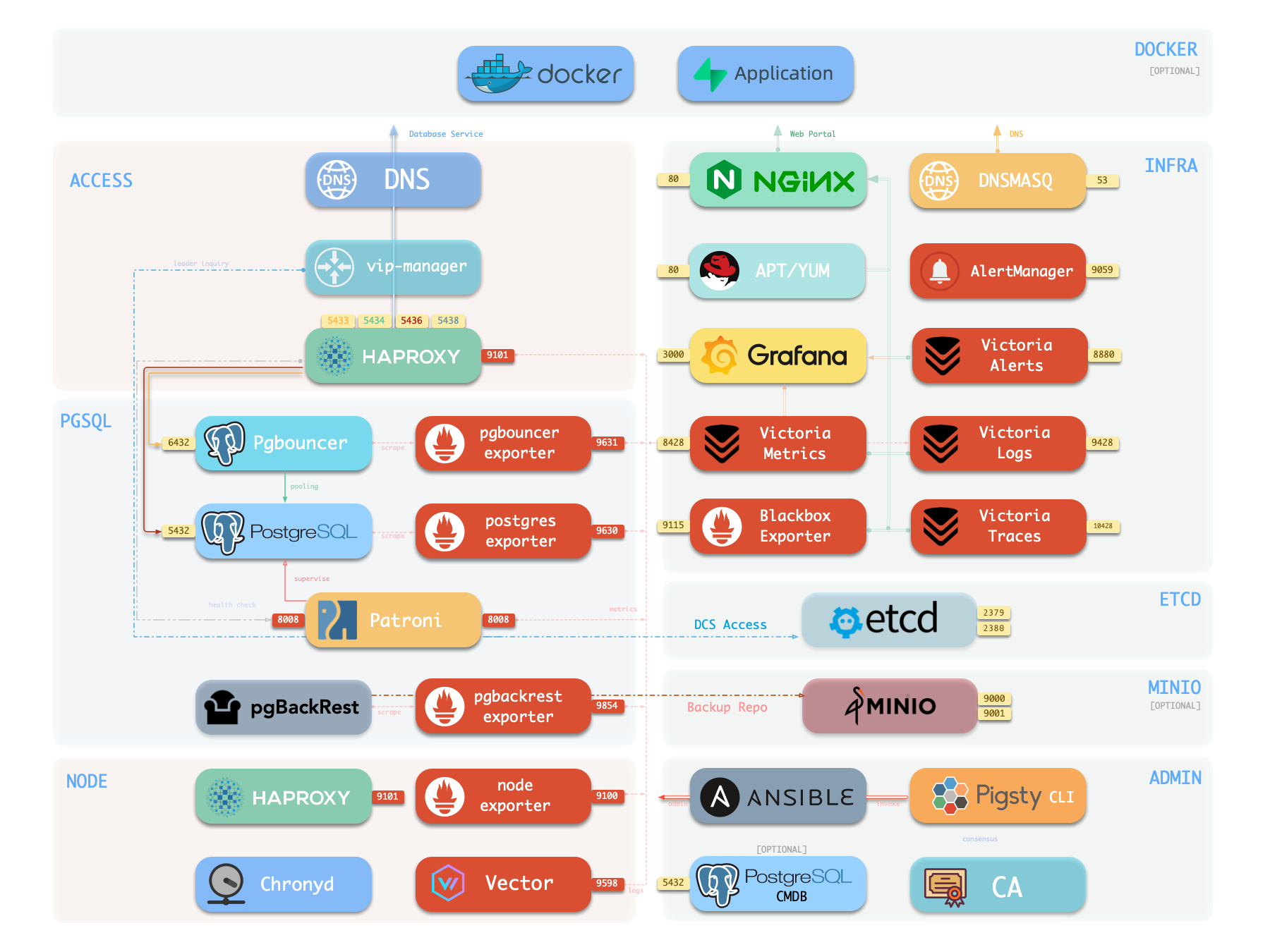
The following single-node deployment diagram shows INFRA components on the right:
| Component | Type | Description |
|---|---|---|
| Nginx | Web Server | Unified entry for WebUI, local repo, reverse proxy for internal services |
| Repo | Software Repo | APT/DNF repository with all RPM/DEB packages needed for deployment |
| Grafana | Visualization | Displays metrics, logs, and traces; hosts dashboards, reports, and custom data apps |
| VictoriaMetrics | Time Series DB | Scrapes all metrics, Prometheus API compatible, provides VMUI query interface |
| VictoriaLogs | Log Platform | Centralized log storage; all nodes run Vector by default, pushing logs here |
| VictoriaTraces | Tracing | Collects slow SQL, service traces, and other tracing data |
| VMAlert | Eval Rule/Alert | Evaluates alerting rules, pushes events to Alertmanager |
| AlertManager | Alert Manager | Aggregates alerts, dispatches notifications via email, Webhook, etc. |
| BlackboxExporter | Blackbox Probe | Probes reachability of IPs/VIPs/URLs |
| DNSMASQ | DNS Service | Provides DNS resolution for domains used within Pigsty [Optional] |
| Chronyd | Time Sync | Provides NTP time synchronization to ensure consistent time across nodes [Optional] |
| CA | Certificate | Issues encryption certificates within the environment |
| Ansible | Orchestration | Batch, declarative, agentless tool for managing large numbers of servers |
Nginx
Nginx provides access to Pigsty WebUI services. HTTP and HTTPS use 80 and 443 by default. See the Live Demo.
| IP Access (replace) | Domain (HTTP) | Domain (HTTPS) | Public Demo |
|---|---|---|---|
http://10.10.10.10 | http://i.pigsty | https://i.pigsty | https://demo.pigsty.io |
Nginx exposes the Grafana, VictoriaMetrics (VMUI), AlertManager, and HAProxy web interfaces. It also serves the local software repository and other static files.
Nginx configures local web servers or reverse proxy servers based on definitions in infra_portal.
The default administration homepage is i.pigsty. Its endpoints proxy these components:
| Endpoint | Component | Native Port | Notes | Public Demo |
|---|---|---|---|---|
/ | Nginx | 80/443 | Homepage, local repo, file server | demo.pigsty.io |
/ui/ | Grafana | 3000 | Grafana dashboard entry | demo.pigsty.io/ui/ |
/vmetrics/ | VictoriaMetrics | 8428 | Time series DB Web UI | demo.pigsty.io/vmetrics/ |
/vlogs/ | VictoriaLogs | 9428 | Log DB Web UI | demo.pigsty.io/vlogs/ |
/vtraces/ | VictoriaTraces | 10428 | Tracing Web UI | demo.pigsty.io/vtraces/ |
/vmalert/ | VMAlert | 8880 | Alert rule management | demo.pigsty.io/vmalert/ |
/alertmgr/ | AlertManager | 9059 | Alert management Web UI | demo.pigsty.io/alertmgr/ |
/blackbox/ | Blackbox | 9115 | Blackbox probe |
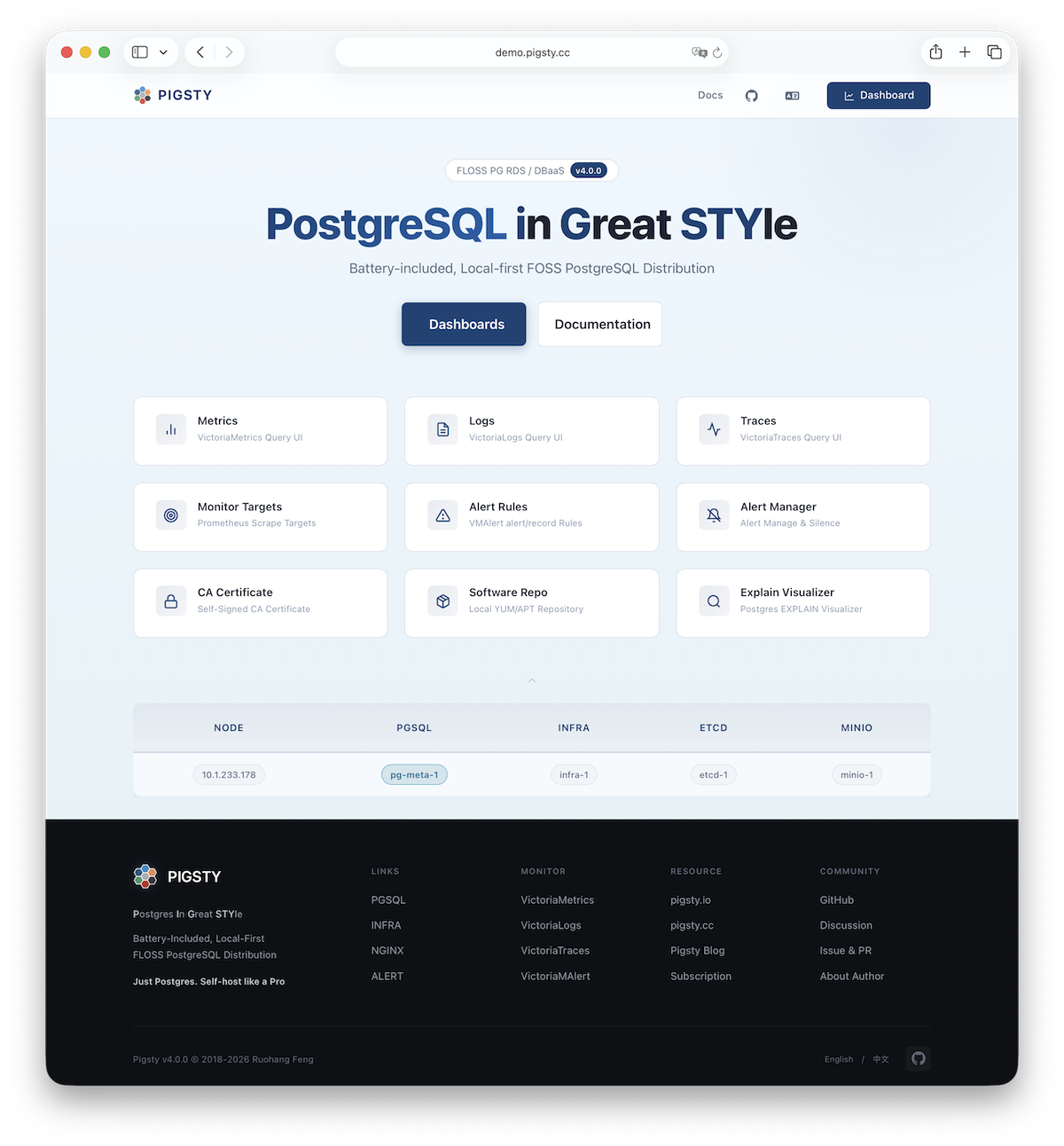
Configure Nginx as a file server or reverse proxy. HTTPS supports self-signed and publicly trusted certificates.
For more information, see: Tutorial: Nginx—Expose Web Services via Proxy and Tutorial: Certbot—Request and Renew HTTPS Certificates
Repo
During installation, Pigsty creates a local software repository on the infrastructure node to speed later installations. See the Live Demo.
The default directory is /www/pigsty. Nginx serves it at /pigsty:
| IP Access (replace) | Domain (HTTP) | Domain (HTTPS) | Public Demo |
|---|---|---|---|
http://10.10.10.10/pigsty | http://i.pigsty/pigsty | https://i.pigsty/pigsty | https://demo.pigsty.io/pigsty |
For offline installation, copy a prepared local software repository into the target environment. If /www/pigsty/repo_complete exists, deployment skips upstream downloads and uses that repository. sow generates this file as a completion marker and SHA-256 manifest. To force a rebuild, run ./infra.yml -t repo_build -e repo_build=true.
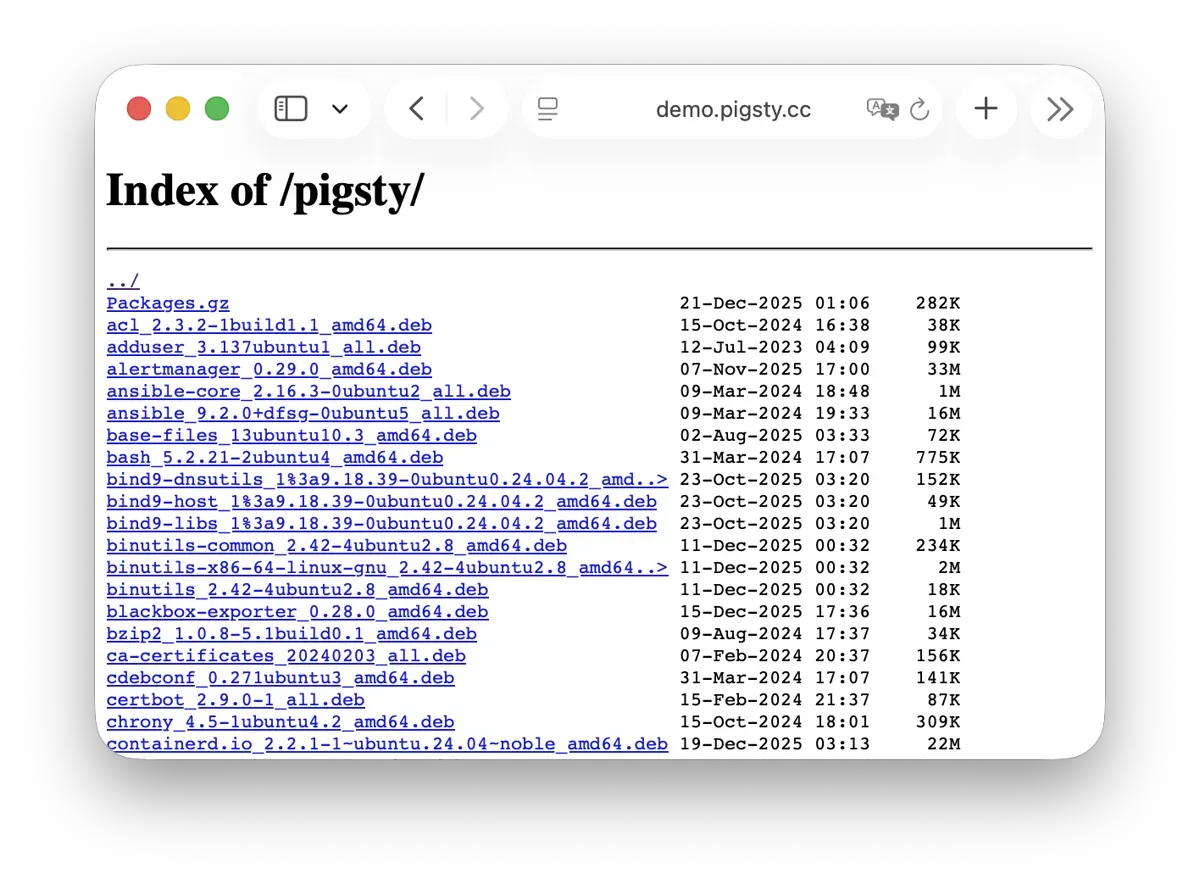
For more information, see: Config: INFRA - REPO
Grafana
Grafana visualizes Pigsty metrics, logs, and other monitoring data. See the Live Demo.
Grafana listens on port 3000 by default and is proxied via Nginx at the /ui path:
| IP Access (replace) | Domain (HTTP) | Domain (HTTPS) | Public Demo |
|---|---|---|---|
http://10.10.10.10/ui | http://i.pigsty/ui | https://i.pigsty/ui | https://demo.pigsty.io/ui |
Pigsty includes dashboards for VictoriaMetrics, Logs, and Traces. URL links let you move between summary and detail views for diagnosis.
Grafana also supports low-code visualization. Pigsty installs ECharts, victoriametrics-datasource, and victorialogs-datasource plugins by default. Vector/Victoria data sources use the names vmetrics-*, vlogs-*, and vtraces-* for custom dashboards.
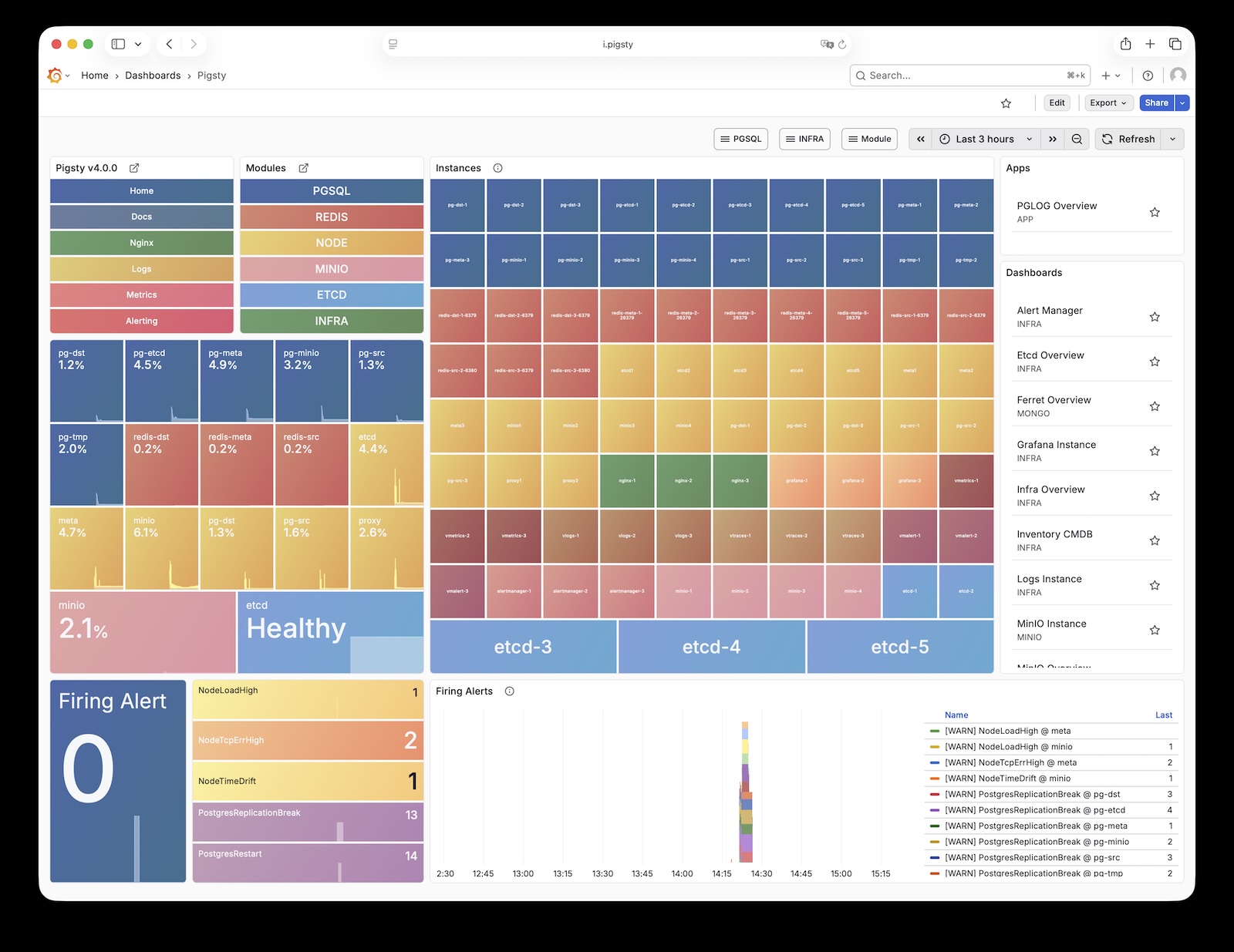
For more information, see: Config: INFRA - GRAFANA.
VictoriaMetrics
VictoriaMetrics collects and stores Pigsty monitoring metrics as time-series data. See the Live Demo.
The default port is 8428. Access it through Nginx at /vmetrics or the p.pigsty domain:
| IP Access (replace) | Domain (HTTP) | Domain (HTTPS) | Public Demo |
|---|---|---|---|
http://10.10.10.10/vmetrics | http://p.pigsty | https://i.pigsty/vmetrics | https://demo.pigsty.io/vmetrics |
VictoriaMetrics supports the Prometheus API, PromQL, remote read/write protocols, and the Alertmanager API. Its VMUI supports direct queries for metric exploration. It also supplies data to Grafana.
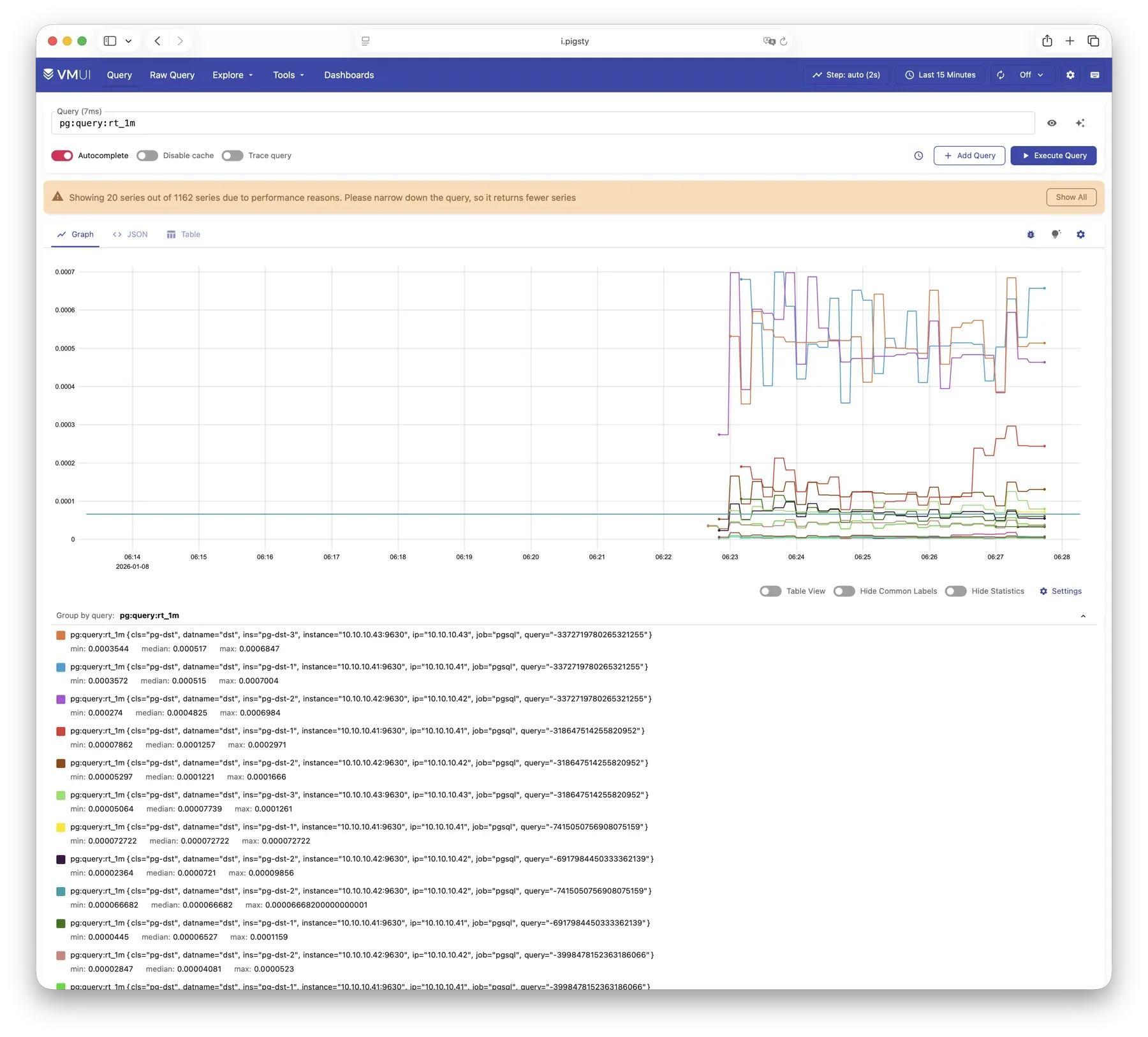
For more information, see: Config: INFRA - VMETRICS
VictoriaLogs
VictoriaLogs centrally stores structured logs from all Pigsty nodes. See the Live Demo.
It listens on port 9428 by default, mounted at Nginx /vlogs path:
| IP Access (replace) | Domain (HTTP) | Domain (HTTPS) | Public Demo |
|---|---|---|---|
http://10.10.10.10/vlogs | http://i.pigsty/vlogs | https://i.pigsty/vlogs | https://demo.pigsty.io/vlogs |
Managed nodes run Vector by default. It collects system, PostgreSQL, Patroni, Pgbouncer, and other logs, structures them, and sends them to VictoriaLogs. The built-in Web UI supports search and filtering. Use the Grafana victorialogs-datasource plugin for visual analysis.
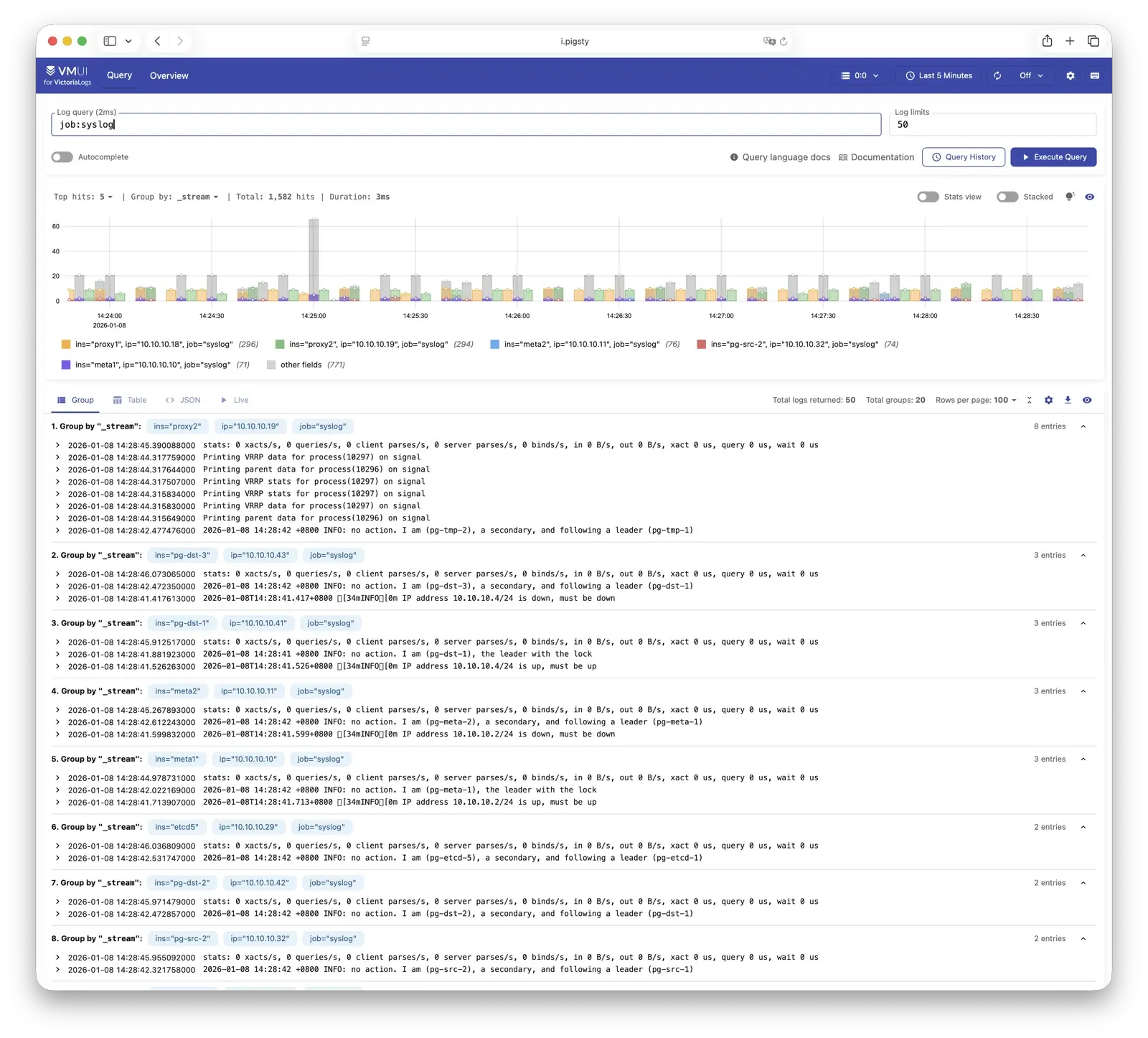
For more information, see: Config: INFRA - VLOGS
VictoriaTraces
VictoriaTraces is used for collecting trace data and slow SQL records. Live Demo
It listens on port 10428 by default, mounted at Nginx /vtraces path:
| IP Access (replace) | Domain (HTTP) | Domain (HTTPS) | Public Demo |
|---|---|---|---|
http://10.10.10.10/vtraces | http://i.pigsty/vtraces | https://i.pigsty/vtraces | https://demo.pigsty.io/vtraces |
VictoriaTraces provides a Jaeger-compatible interface for service traces and slow SQL queries. Use it with Grafana to locate performance limits and trace their causes.
For more information, see: Config: INFRA - VTRACES
VMAlert
VMAlert evaluates alert rules and sends triggered events to Alertmanager. See the Live Demo.
It listens on port 8880 by default, mounted at Nginx /vmalert path:
| IP Access (replace) | Domain (HTTP) | Domain (HTTPS) | Public Demo |
|---|---|---|---|
http://10.10.10.10/vmalert | http://i.pigsty/vmalert | https://i.pigsty/vmalert | https://demo.pigsty.io/vmalert |
VMAlert periodically evaluates rules against VictoriaMetrics data. Pigsty includes rules for common failures in PGSQL, NODE, REDIS, and other modules.
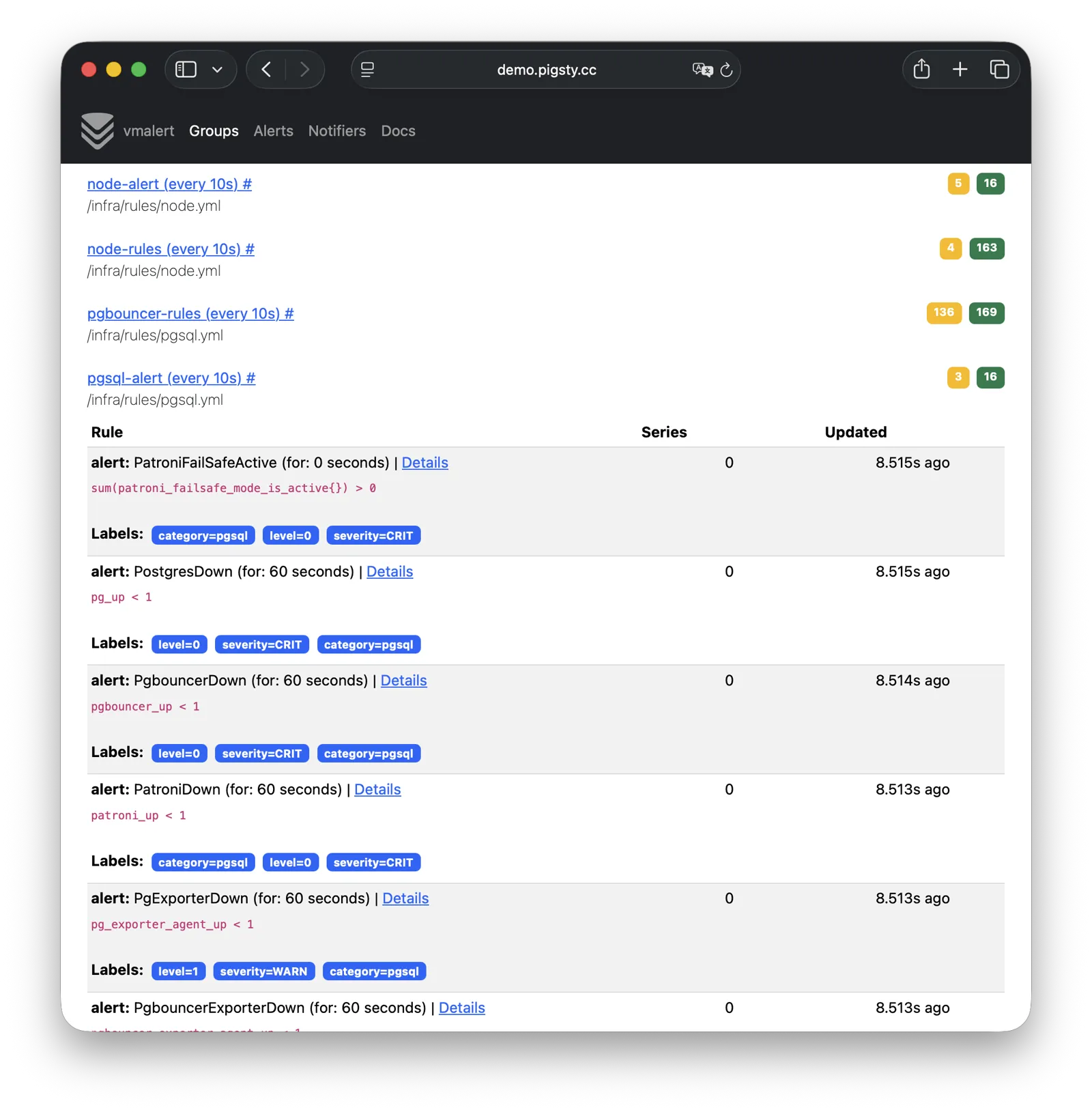
For more information, see: Config: INFRA - VMALERT
AlertManager
AlertManager handles alert event aggregation, deduplication, grouping, and dispatch. Live Demo
It listens on port 9059 by default, mounted at Nginx /alertmgr path, and also accessible via the a.pigsty domain:
| IP Access (replace) | Domain (HTTP) | Domain (HTTPS) | Public Demo |
|---|---|---|---|
http://10.10.10.10/alertmgr | http://a.pigsty | https://i.pigsty/alertmgr | https://demo.pigsty.io/alertmgr |
AlertManager supports email, Webhook, Slack, PagerDuty, WeChat Work, and other notification channels. Routing rules select destinations by severity and module. Silencing and inhibition are also supported.
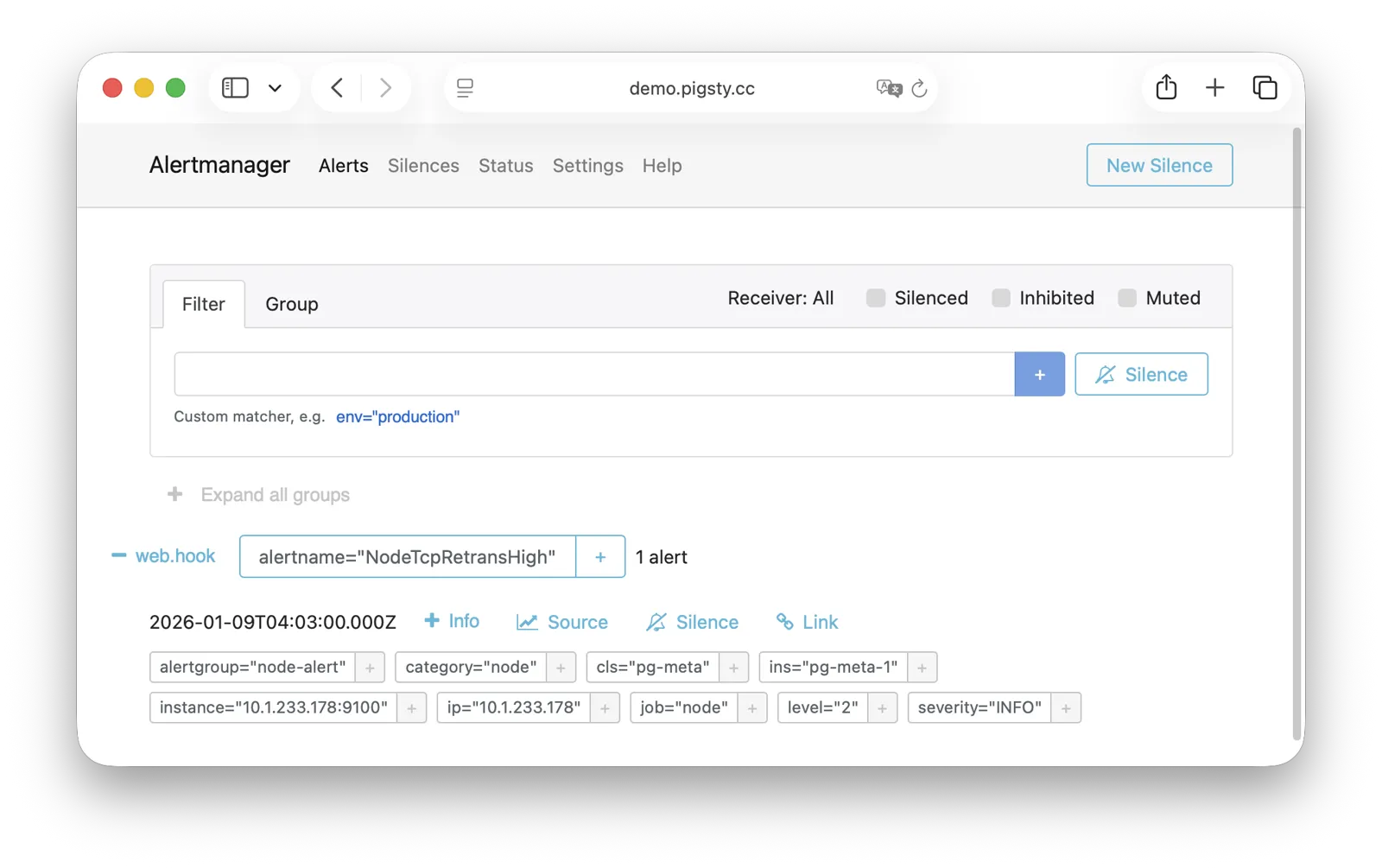
For more information, see: Config: INFRA - AlertManager
BlackboxExporter
Blackbox Exporter probes targets to check reachability.
It listens on port 9115 by default, mounted at Nginx /blackbox path:
| IP Access (replace) | Domain (HTTP) | Domain (HTTPS) | Public Demo |
|---|---|---|---|
http://10.10.10.10/blackbox | http://i.pigsty/blackbox | https://i.pigsty/blackbox | https://demo.pigsty.io/blackbox |
Probe methods include ICMP Ping, TCP ports, and HTTP/HTTPS endpoints. Check VIP reachability, service ports, and external dependencies to determine the scope of a failure.
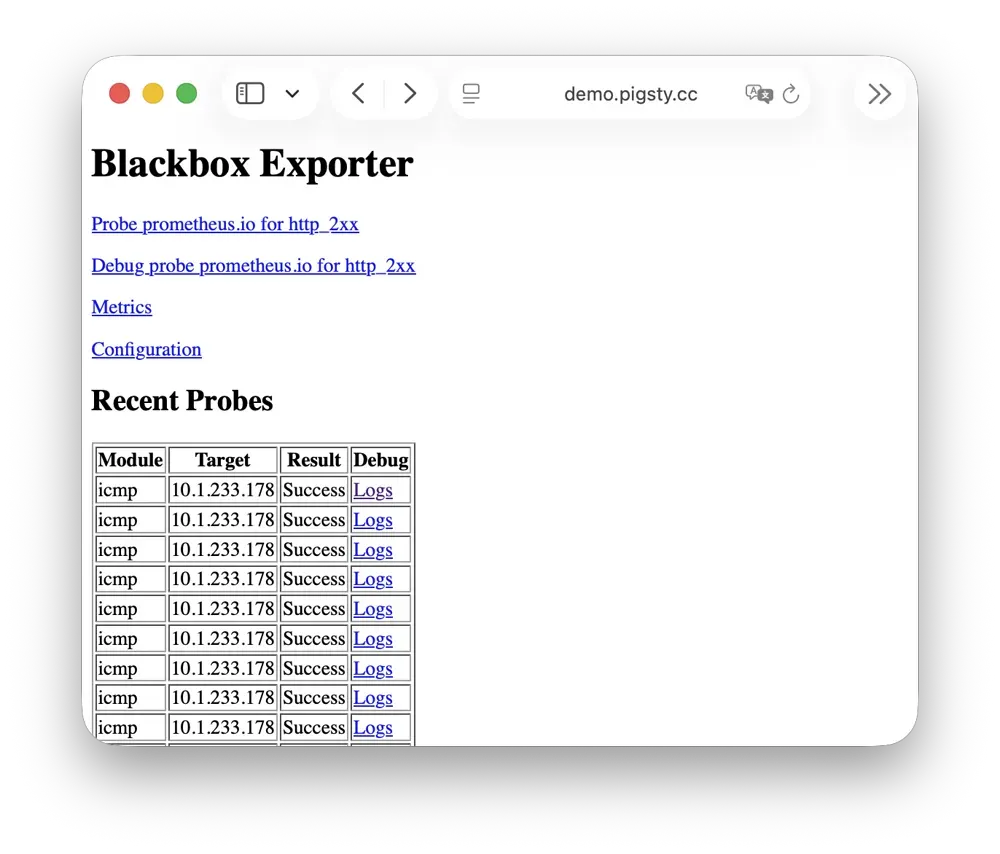
For more information, see: Config: INFRA - BLACKBOX
Ansible
Ansible runs Pigsty deployment, configuration, and management playbooks.
Installation adds Ansible to the administration/infrastructure node. Declarative configuration specifies the target state. Idempotent playbooks can run repeatedly to reach that state without additional side effects.
Ansible provides:
- Agentless execution: Connect through SSH without installing an agent on managed nodes.
- Declarative configuration: Describe the target state; configuration also documents it.
- Idempotent operations: Repeated runs produce consistent results and can retry partial failures.
For more information, see: Playbooks: Pigsty Playbook
DNSMASQ
DNSMASQ provides DNS resolution on INFRA nodes, resolving domain names to their corresponding IP addresses.
DNSMASQ listens on port 53 (UDP/TCP) by default, providing DNS resolution for all nodes. Records are stored in the /etc/dnsmasq.d/pigsty directory.
Other modules register domain names with DNSMASQ during deployment. Client nodes can use infrastructure nodes as DNS servers and access services by name. DNS is optional; Pigsty also works without it.
dns_records: Default DNS records written to INFRA nodesnode_dns_servers: Configure DNS servers for nodes, defaults to INFRA node viaadmin_ip(can also be disabled)
For more information, see: Config: INFRA - DNS and Tutorial: DNS—Configure Domain Resolution
Chronyd
Chronyd synchronizes node clocks through NTP. Its time-source service uses UDP port 123 by default.
Distributed systems need synchronized clocks. Logs need comparable timestamps, certificate checks need accurate time, and PostgreSQL streaming replication is sensitive to clock drift. In isolated networks, other nodes can synchronize to an infrastructure node acting as their NTP server.
All nodes run chronyd by default, using public pool.ntp.org servers. The Node module manages chronyd. In isolated networks, use admin_ip to select the INFRA node as the internal time source.
For more information, see: Config: NODE - TIME
INFRA Node vs Regular Node
In Pigsty, the relationship between nodes and infrastructure is a weak circular dependency: node_monitor → infra → node
NODE does not itself require INFRA. Its node_monitor functions require the infrastructure monitoring platform and services.
infra.yml and deploy resolve this dependency through these steps:
- Initialize NODE on regular nodes. Skip monitoring because the infrastructure is not ready.
- Initialize INFRA on the INFRA node to provide monitoring.
- Configure monitoring on regular nodes to connect to that platform.
Alternatively, use phased deployment: initialize infrastructure nodes before regular nodes.
How Are Nodes Coupled to Infrastructure?
Regular nodes use admin_ip to select an INFRA node for infrastructure services.
For example, global admin_ip = 10.10.10.10 normally directs all nodes to infrastructure at that address.
Change this address to switch infrastructure providers for many nodes. These parameters may reference ${admin_ip}:
| Parameter | Module | Default Value | Description |
|---|---|---|---|
repo_endpoint | INFRA | http://${admin_ip}:80 | Software repo URL |
repo_upstream.baseurl | INFRA | http://${admin_ip}/pigsty | Local repo baseurl |
infra_portal.endpoint | INFRA | ${admin_ip}:<port> | Nginx proxy backend |
dns_records | INFRA | ["${admin_ip} i.pigsty", ...] | DNS records |
node_default_etc_hosts | NODE | ["${admin_ip} i.pigsty"] | Default static DNS |
node_etc_hosts | NODE | [] | Custom static DNS |
node_dns_servers | NODE | ["${admin_ip}"] | Dynamic DNS servers |
node_ntp_servers | NODE | ["pool pool.ntp.org iburst"] | NTP servers (optional) |
For example, local uses the Nginx software repository at admin_ip:80/pigsty. DNS uses DNSMASQ at admin_ip:53. Both choices are optional. Nodes can install from Internet repositories, as most single-node templates do. They can also leave DNS unconfigured because Pigsty does not require it.
INFRA Node vs ADMIN Node
The ADMIN node usually also serves as the INFRA node, including in single-node deployments. With multiple infrastructure nodes, the first infra member usually administers the environment and others provide backups. You can also separate the roles.
For example, large production deployments can use 1–2 small DBA-managed VMs for administration. Use 2–3 high-capacity physical servers, or more, for monitoring infrastructure. Set admin_ip to an infrastructure node address. The parameter retains its historical name from when administration and infrastructure roles were combined.
For local management of cloud nodes, install Ansible on your laptop and select cloud servers as managed targets. The laptop is the administration node. Cloud servers provide infrastructure.
Multiple INFRA Nodes
One infrastructure node usually meets the requirements. Failure of its INFRA module does not interrupt database services on other nodes.
For higher monitoring and alerting availability, use multiple infrastructure nodes. Two nodes can provide redundancy and monitor each other. A distributed Victoria cluster can use more nodes for horizontal scaling without a fixed limit.
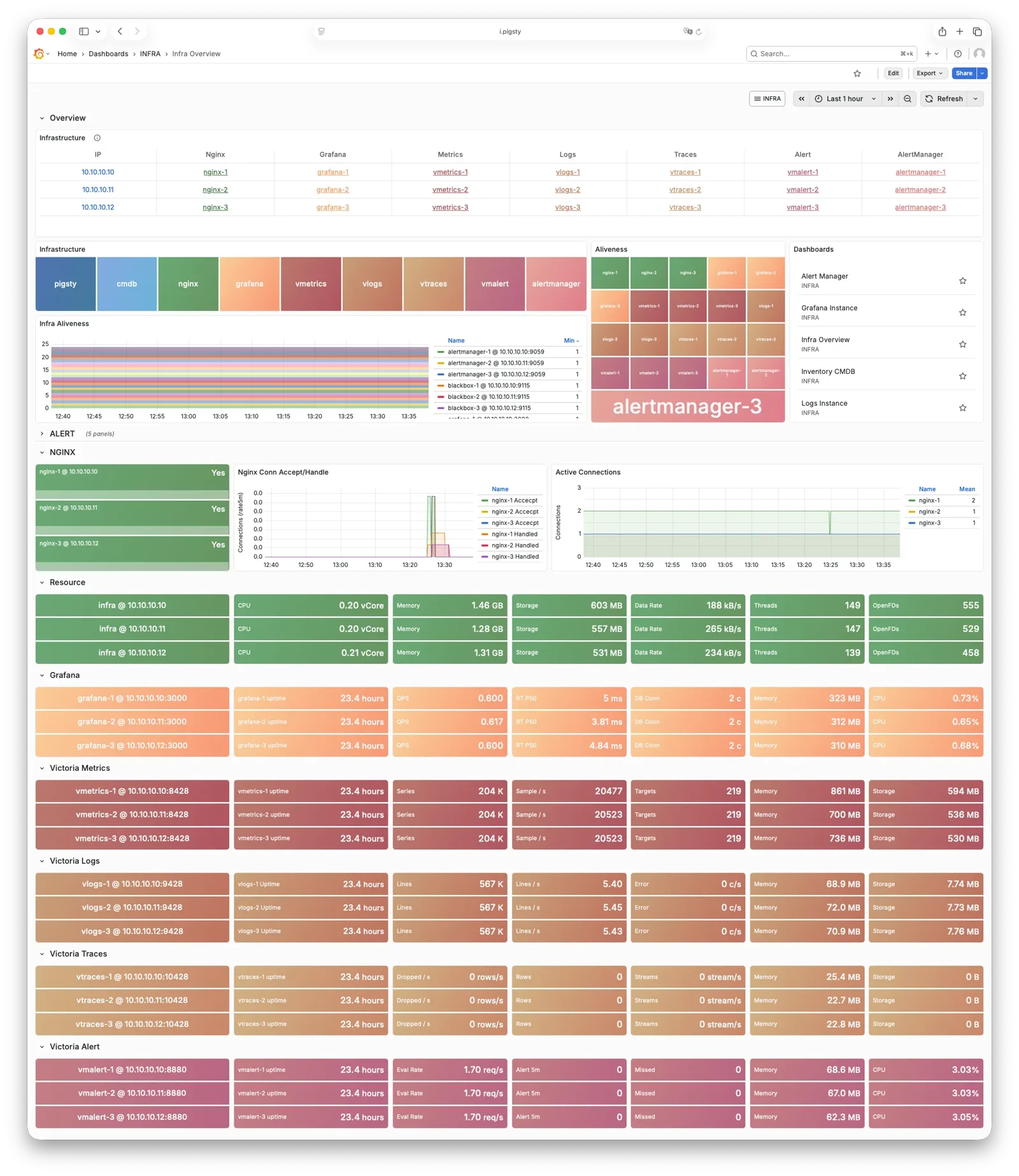
Each infrastructure node operates independently. Nginx uses local services, and VictoriaMetrics collects metrics from every environment service. Nodes send logs to all VictoriaLogs endpoints by default. Grafana is the exception: each instance registers every VictoriaMetrics, Logs, Traces, and PostgreSQL instance as a data source. Thus, each Grafana can access all monitoring data.
Dashboard and data-source changes affect only the Grafana instance you edit. For shared configuration, use a PostgreSQL database as Grafana storage. See Configure Grafana High Availability.
3 - PGSQL Arch
PGSQL organizes PostgreSQL as clusters. Each cluster is a logical group of database instances connected through primary-replica relationships.
Overview
The PGSQL module combines these components for production HA clusters:
| Component | Type | Description |
|---|---|---|
postgres | Database | Open-source relational database engine for PGSQL |
patroni | HA | Manages PostgreSQL, coordinates failover, leader election, config changes |
pgbouncer | Pool | Lightweight connection pooling middleware, reduces overhead, adds flexibility |
pgbackrest | Backup | Full/incremental backup and WAL archiving, supports local and object storage |
pg_exporter | Metrics | Exports PostgreSQL monitoring metrics in a Prometheus-compatible format |
pgbouncer_exporter | Metrics | Exports Pgbouncer connection pool metrics |
pgbackrest_exporter | Metrics | Exports backup status metrics |
vip-manager | VIP | Binds L2 VIP to current primary node for transparent failover [Optional] |
Enable vip-manager when needed. PGSQL also uses components from other modules:
| Component | Module | Type | Description |
|---|---|---|---|
haproxy | NODE | LB | Exposes service ports, routes traffic to primary or replicas |
vector | NODE | Logging | Collects PostgreSQL, Patroni, Pgbouncer logs and ships to center |
etcd | ETCD | DCS | Distributed consistent store for cluster metadata and leader info |
The PGSQL module combines the PostgreSQL engine with supporting services. Patroni and Etcd provide HA. pgBackRest and optional Silo provide backups. HAProxy, Pgbouncer, and vip-manager provide access. Exporters and Vector provide monitoring.
You can select other database kernels and extensions. The diagram represents the engine as a CPU and the complete service as a computer.
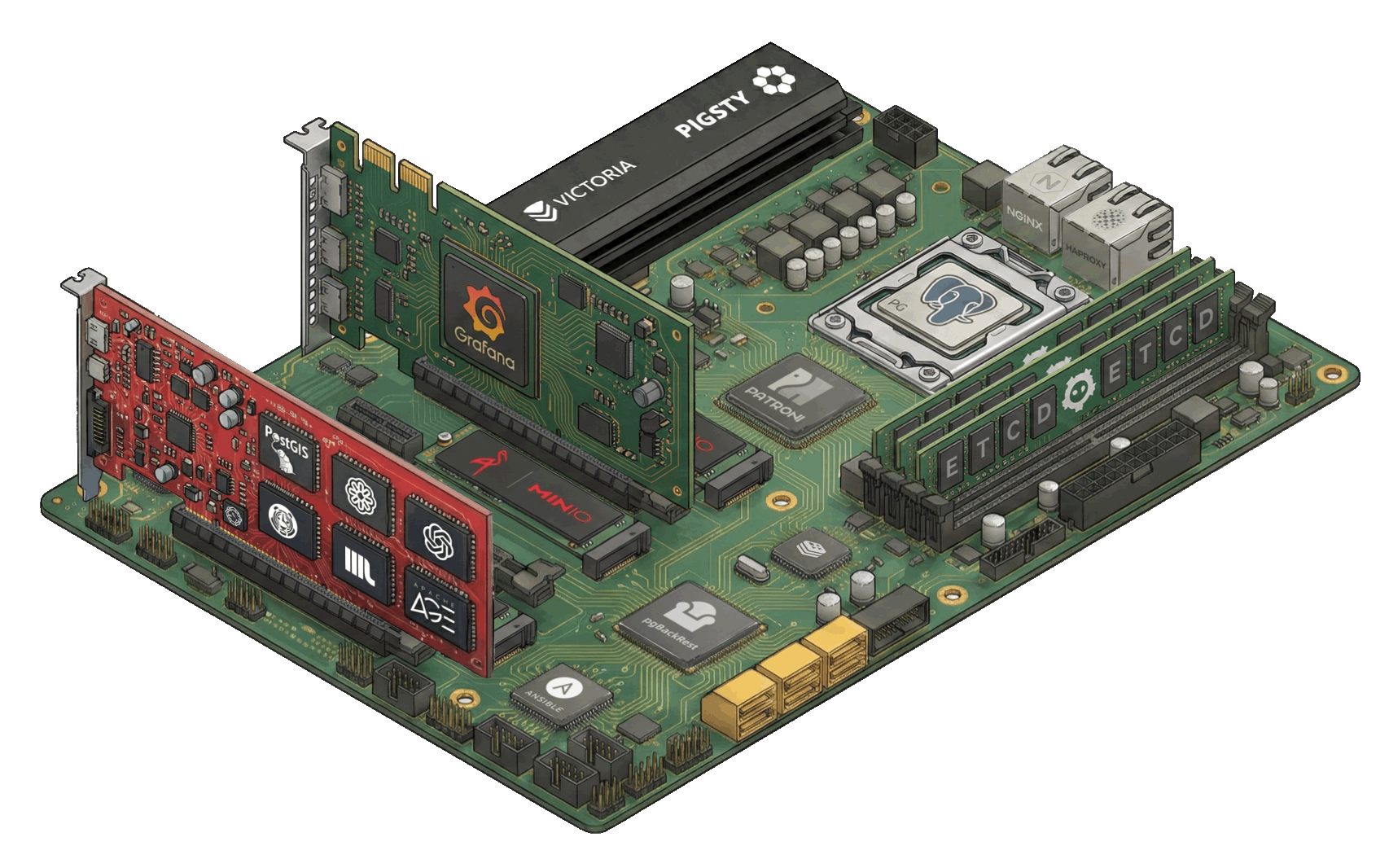
| Subsystem | Components | Function |
|---|---|---|
| HA Subsystem | Patroni + etcd | Failure detection, auto-failover, config management |
| Access Subsystem | HAProxy + Pgbouncer + vip-manager | Service exposure, load balancing, pooling, VIP |
| Backup Subsystem | pgBackRest (+ Silo) | Full/incremental backup, WAL archiving, PITR |
| Observability Subsystem | pg_exporter / pgbouncer_exporter / pgbackrest_exporter + Vector | Metrics collection, log aggregation |
Component Interaction
- Cluster DNS is resolved by DNSMASQ on infra nodes
- Cluster VIP is managed by vip-manager, which binds
pg_vip_addressto the cluster primary node.- vip-manager gets cluster leader info written by patroni from the etcd cluster
- Cluster services are exposed by HAProxy on nodes, different services distinguished by node ports (543x).
- HAProxy port 9101: Monitoring metrics & statistics & admin page
- HAProxy port 5433: Routes to primary pgbouncer: read-write service
- HAProxy port 5434: Routes to replica pgbouncer: read-only service
- HAProxy port 5436: Routes to primary postgres: default service
- HAProxy port 5438: Routes to offline postgres: offline service
- HAProxy routes traffic based on health check info from patroni.
- Pgbouncer is connection pooling middleware, listening on port 6432 by default, buffering connections, exposing additional metrics, and providing extra flexibility.
- PostgreSQL listens on port 5432, providing relational database services
- Installing PGSQL module on multiple nodes with the same cluster name automatically forms an HA cluster via streaming replication
- PostgreSQL process is managed by patroni by default.
- Patroni listens on port 8008 by default, supervising PostgreSQL server processes
- pg_exporter exposes postgres monitoring metrics on port 9630
- pgbouncer_exporter exposes pgbouncer metrics on port 9631
- pgBackRest uses local backup repository by default (
pgbackrest_method=local)- If using
local(default), pgBackRest creates local repository underpg_fs_bkupon primary node - If using
minio, pgBackRest creates the backup repository on dedicated Silo or an external S3 service
- If using
- Vector collects Postgres-related logs (postgres, pgbouncer, patroni, pgbackrest)
HA Subsystem
Patroni and etcd provide the HA subsystem. They detect failures, coordinate failover, and manage configuration.
Operation: Patroni manages each local PostgreSQL process. It writes the leader, members, and configuration to etcd. After primary failure, Patroni coordinates an election and promotes the healthiest replica. Recovery is automatic, with RTO typically below 45 seconds.
Key Interactions:
- PostgreSQL: Starts, stops, reloads PG as parent process, controls its lifecycle
- etcd: External dependency, writes/watches leader key for distributed consensus and failure detection
- HAProxy: Provides health checks via REST API (
:8008), reporting instance role - vip-manager: Watches leader key in etcd, auto-migrates VIP
For more information, see: High Availability and Config: PGSQL - PG_BOOTSTRAP
Access Subsystem
HAProxy, Pgbouncer, and vip-manager expose services, route traffic, and pool connections.
There are multiple access methods. A typical traffic path is: Client → DNS/VIP → HAProxy (543x) → Pgbouncer (6432) → PostgreSQL (5432)
| Layer | Component | Port | Role |
|---|---|---|---|
| L2 VIP | vip-manager | - | Binds L2 VIP to primary (optional) |
| L4 Load Bal | HAProxy | 543x | Service exposure, load balancing, health checks |
| L7 Pool | Pgbouncer | 6432 | Connection reuse, session management, transaction pooling |
Service Ports:
5433primary: Read-write service, routes to primary Pgbouncer5434replica: Read-only service, routes to replica Pgbouncer5436default: Default service, direct to primary (bypasses pool)5438offline: Offline service, direct to offline replica (ETL/analytics)
Key Features:
- HAProxy uses Patroni REST API to determine instance role, auto-routes traffic
- Pgbouncer uses transaction-level pooling, absorbs connection spikes, reduces PG connection overhead
- vip-manager watches etcd leader key, auto-migrates VIP during failover
For more information, see: Service Access and Config: PGSQL - PG_ACCESS
Backup Subsystem
pgBackRest provides backups and PITR. Optional Silo or external S3 storage can serve as the remote repository.
Backup Types:
- Full backup: Complete database copy
- Incremental/differential backup: Only backs up changed data blocks
- WAL archiving: Continuous transaction log archiving, enables any point-in-time recovery
Storage Backends:
local(default): Local disk, backups stored atpg_fs_bkupmount pointminio: S3-compatible object storage, supports centralized backup management and off-site DR
Key Interactions:
- pgBackRest → PostgreSQL: Executes backup commands, manages WAL archiving
- pgBackRest → Patroni: Recovery can bootstrap replicas as new primary or standby
- pgbackrest_exporter → VictoriaMetrics: Exports backup status metrics through the Prometheus-compatible protocol to monitor backup health
For more information, see: PITR, Backup & Recovery, and Config: PGSQL - PG_BACKUP
Observability Subsystem
Three Exporters collect metrics, and Vector collects logs.
| Component | Port | Target | Key Metrics |
|---|---|---|---|
| pg_exporter | 9630 | PostgreSQL | Sessions, transactions, replication lag, buffer hits |
| pgbouncer_exporter | 9631 | Pgbouncer | Pool utilization, wait queue, hit rate |
| pgbackrest_exporter | 9854 | pgBackRest | Latest backup time, size, type |
| vector | 9598 | postgres/patroni/pgbouncer logs | Structured log stream |
Data Flow:
- Metrics: Exporter → VictoriaMetrics (INFRA) → Grafana dashboards
- Logs: Vector → VictoriaLogs (INFRA) → Grafana log queries
pg_exporter and pgbouncer_exporter use local Unix sockets, independently of HA topology. Slim installation can disable them.
For more information, see: Config: PGSQL - PG_MONITOR
PostgreSQL
PostgreSQL is the PGSQL database engine. It listens on 5432 by default, with one instance per node.
Pigsty supports PostgreSQL 14–18 through binary packages from the PGDG repository. You can replace the default engine with a PG-compatible kernel. Up to 600 extensions are available.
Patroni manages PostgreSQL processes for HA by default. A single-node cluster has one primary. Additional nodes automatically join as replicas and receive changes through real-time physical replication. Replicas serve read-only traffic and can automatically replace a failed primary.
You can access PostgreSQL directly, or through HAProxy and Pgbouncer connection pool.
For more information, see: Config: PGSQL - PG_BOOTSTRAP
Patroni
Patroni is the PostgreSQL HA control component, listening on port 8008 by default.
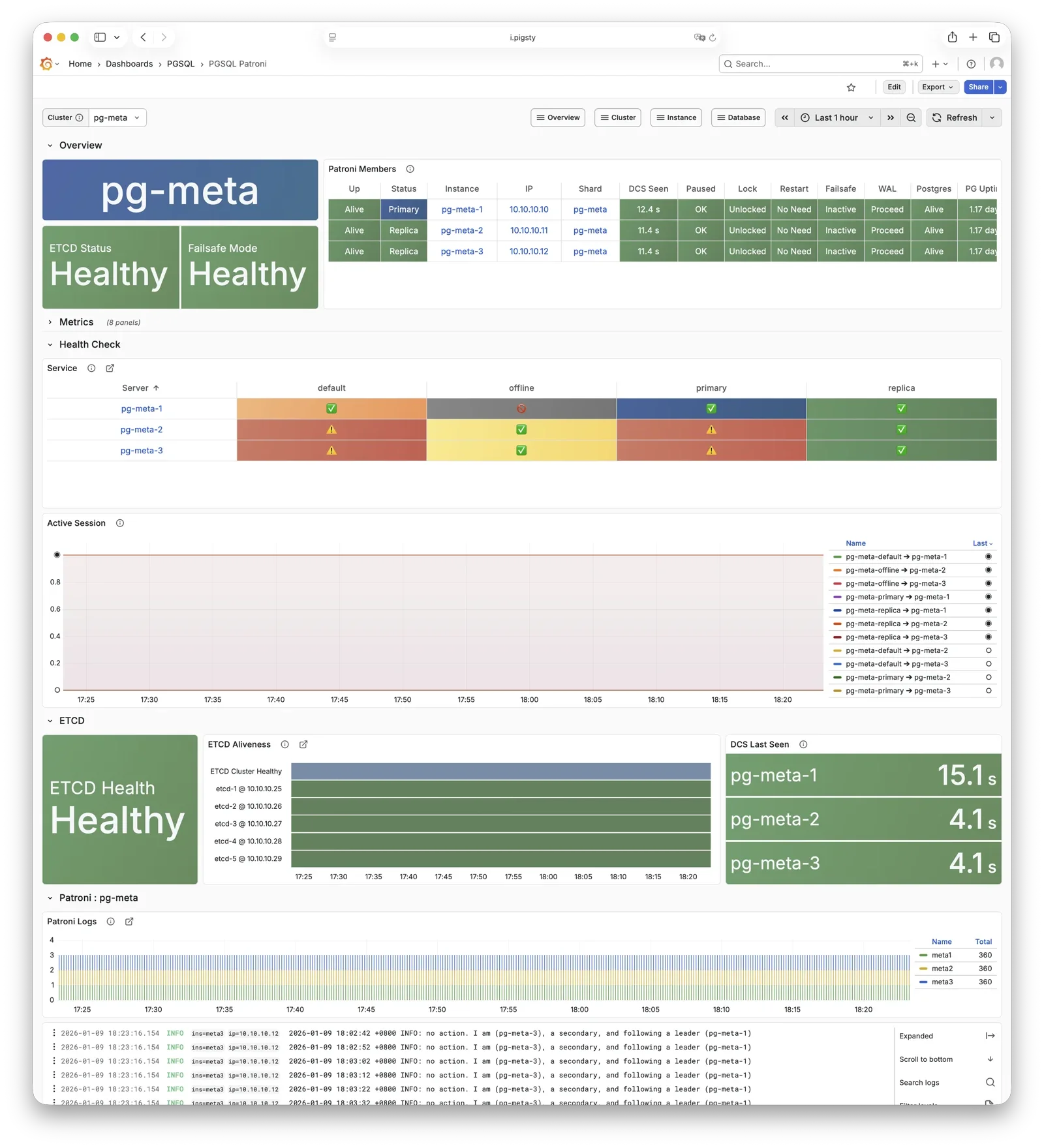
Patroni manages PostgreSQL startup, shutdown, configuration, and health. It writes leader and member records to etcd. It coordinates failover, replication factor, and parameter changes. Its REST API serves HAProxy, monitoring, and administrators.
HAProxy checks Patroni endpoints to identify instance roles and route primary or replica traffic. vip-manager watches the etcd leader key and moves the VIP when the primary changes.
For more information, see: Config: PGSQL - PG_BOOTSTRAP
Pgbouncer
Pgbouncer provides connection pooling on port 6432 by default. Each node has one Pgbouncer instance for its PostgreSQL instance.
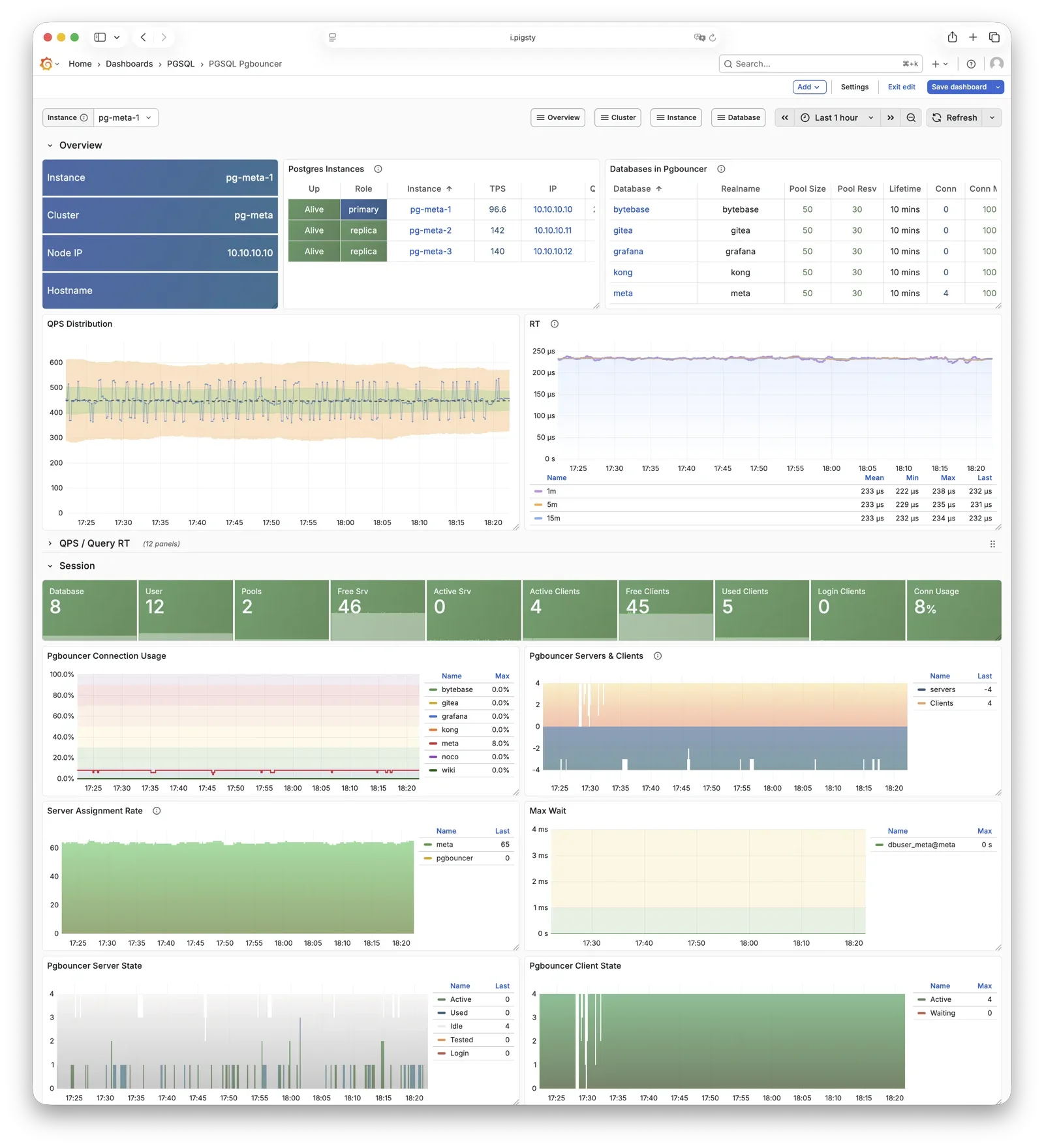
Pgbouncer is stateless and connects to local PostgreSQL through a Unix socket. Its default transaction pooling handles connection bursts, stabilizes session counts, and reduces lock contention. This improves performance under high concurrency.
By default, read/write 5433 and read-only 5434 traffic use Pgbouncer. Default 5436 and offline 5438 services connect directly to PostgreSQL.
pgbouncer_poolmode defaults to transaction. Disable pooling with pgbouncer_enabled.
For more information, see: Config: PGSQL - PG_ACCESS
pgBackRest
pgBackRest provides full, incremental, and differential PostgreSQL backups and WAL archiving.
Pigsty uses pgBackRest for PITR to any time within the backup retention window.
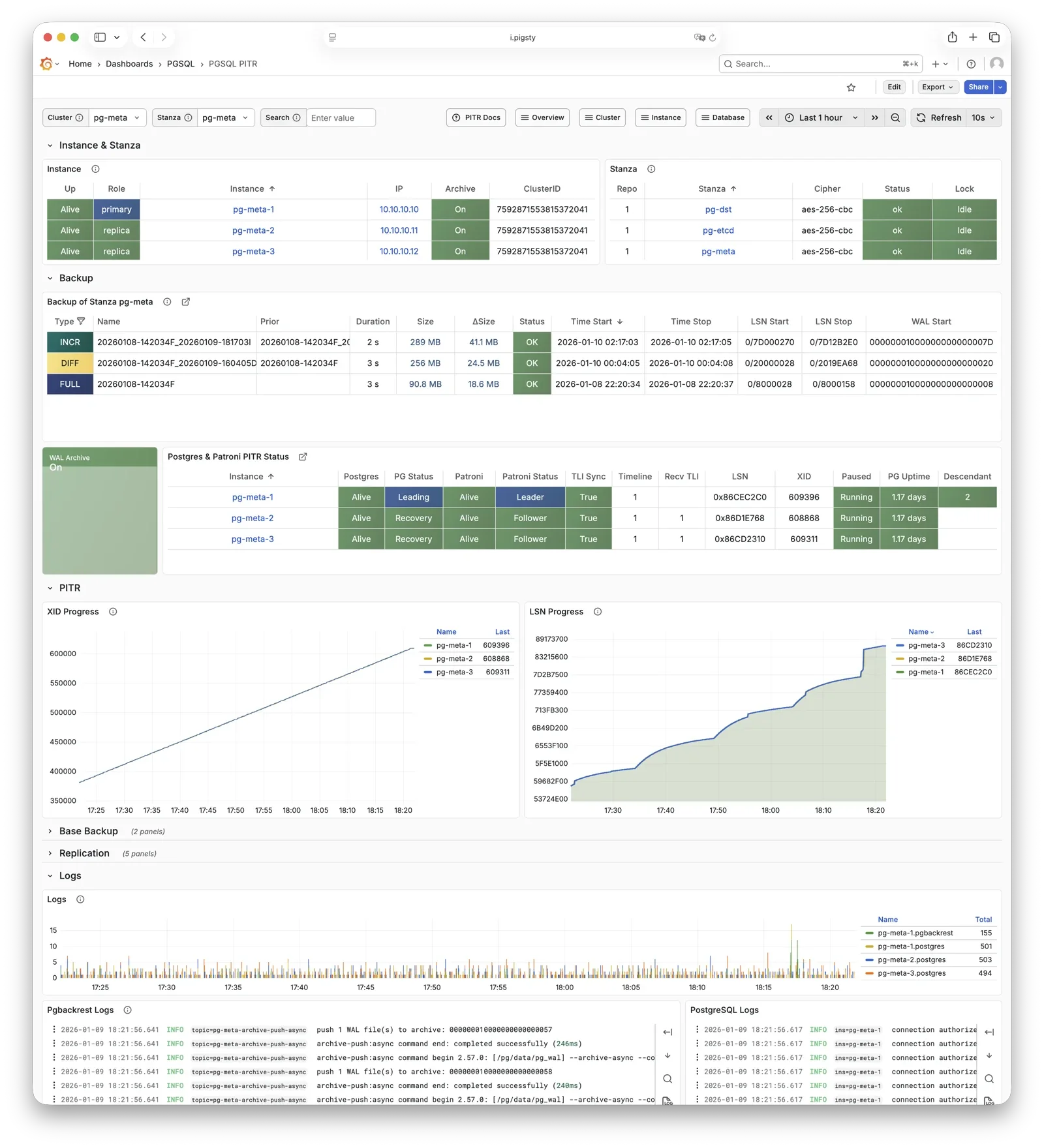
pgBackRest coordinates with PostgreSQL for backups and archiving. By default, it creates a repository on the primary: pgbackrest_method = local. Configure Silo or external S3 storage for centralized backup management.
pgbackrest_init_backup can trigger the first full backup after initialization. Recovery integrates with Patroni to initialize replicas as new primaries or standbys.
For more information, see: Backup & Recovery and Config: PGSQL - PG_BACKUP
HAProxy
HAProxy is the service entry point and load balancer, exposing multiple database service ports.
| Port | Service | Target | Description |
|---|---|---|---|
9101 | Admin | - | HAProxy statistics and admin page |
5433 | primary | Primary Pgbouncer | Read-write service, routes to primary pool |
5434 | replica | Replica Pgbouncer | Read-only service, routes to replica pool |
5436 | default | Primary Postgres | Default service, direct to primary (bypasses pool) |
5438 | offline | Offline Postgres | Offline service, direct to offline replica (ETL/analytics) |
HAProxy checks Patroni REST endpoints to identify roles and route primary or replica traffic. pg_default_services and pg_services define services.
By default, local HAProxy instances expose services. For higher traffic, use pg_service_provider to select a dedicated HAProxy node group.
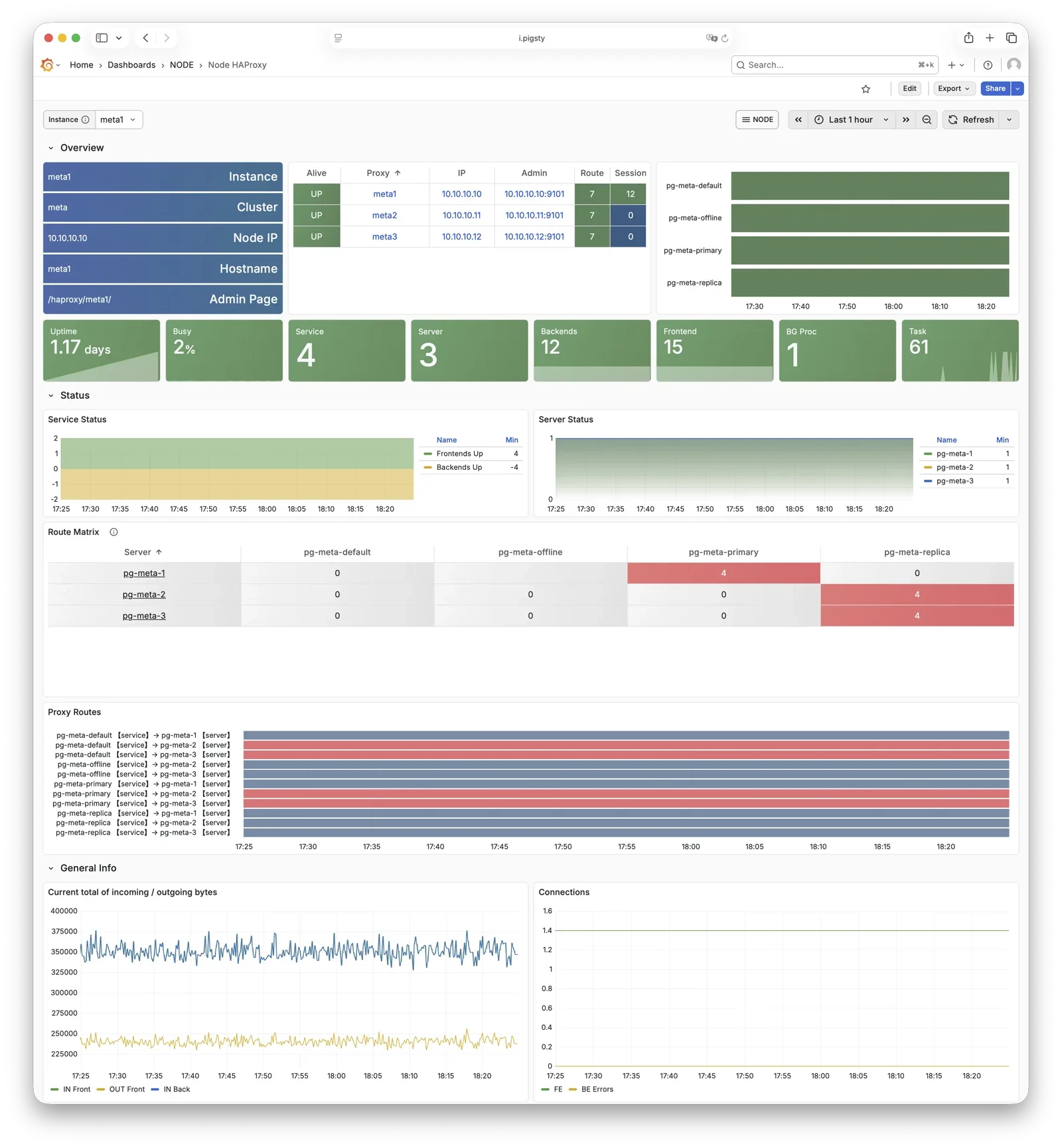
For more information, see: Service Access and Config: PGSQL - PG_ACCESS
vip-manager
vip-manager binds L2 VIP to the current primary node. This is an optional component; enable it if your network supports L2 VIP.
vip-manager runs on each PG node. It watches the leader key that Patroni writes to etcd. It binds pg_vip_address to the primary network interface. During failover, it releases the old binding and immediately binds the VIP to the new primary.
Enable this optional component with pg_vip_enabled. All nodes must share one VLAN or VIP migration fails. Public clouds usually do not support L2 VIP. Use it for on-premises or private cloud deployments.
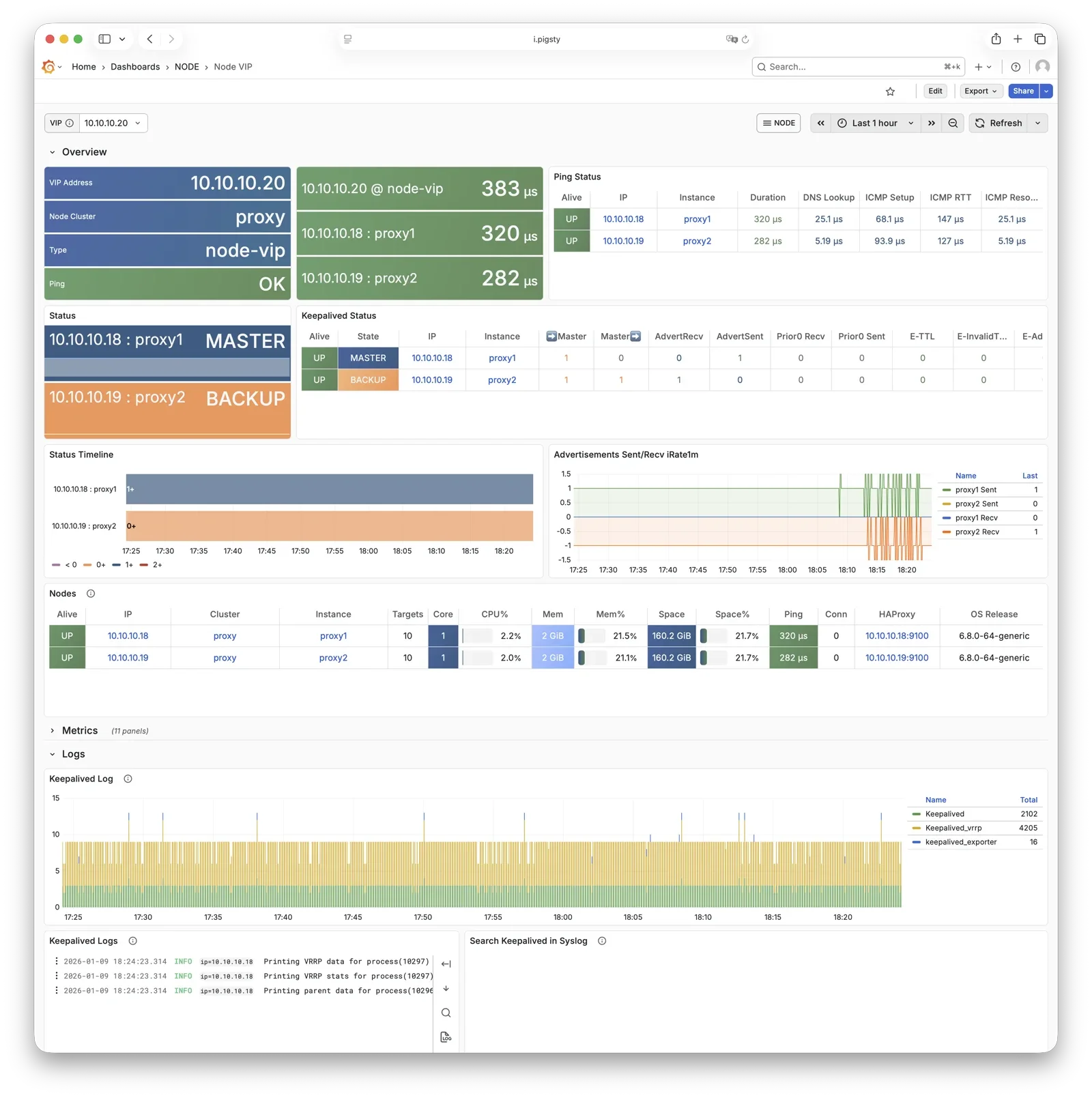
For more information, see: Tutorial: VIP Configuration and Config: PGSQL - PG_ACCESS
pg_exporter
pg_exporter exports PostgreSQL monitoring metrics, listening on port 9630 by default.
pg_exporter connects to local PostgreSQL through a Unix socket. It exports sessions, buffer hits, replication lag, transaction rates, and other metrics. VictoriaMetrics on infrastructure nodes collects them.
Set collection rules with pg_exporter_config. Use pg_exporter_auto_discovery for automatic database discovery. pg_exporter_cache_ttls controls different cache lifetimes.
Disable this component through parameters. Slim installation leaves it disabled.
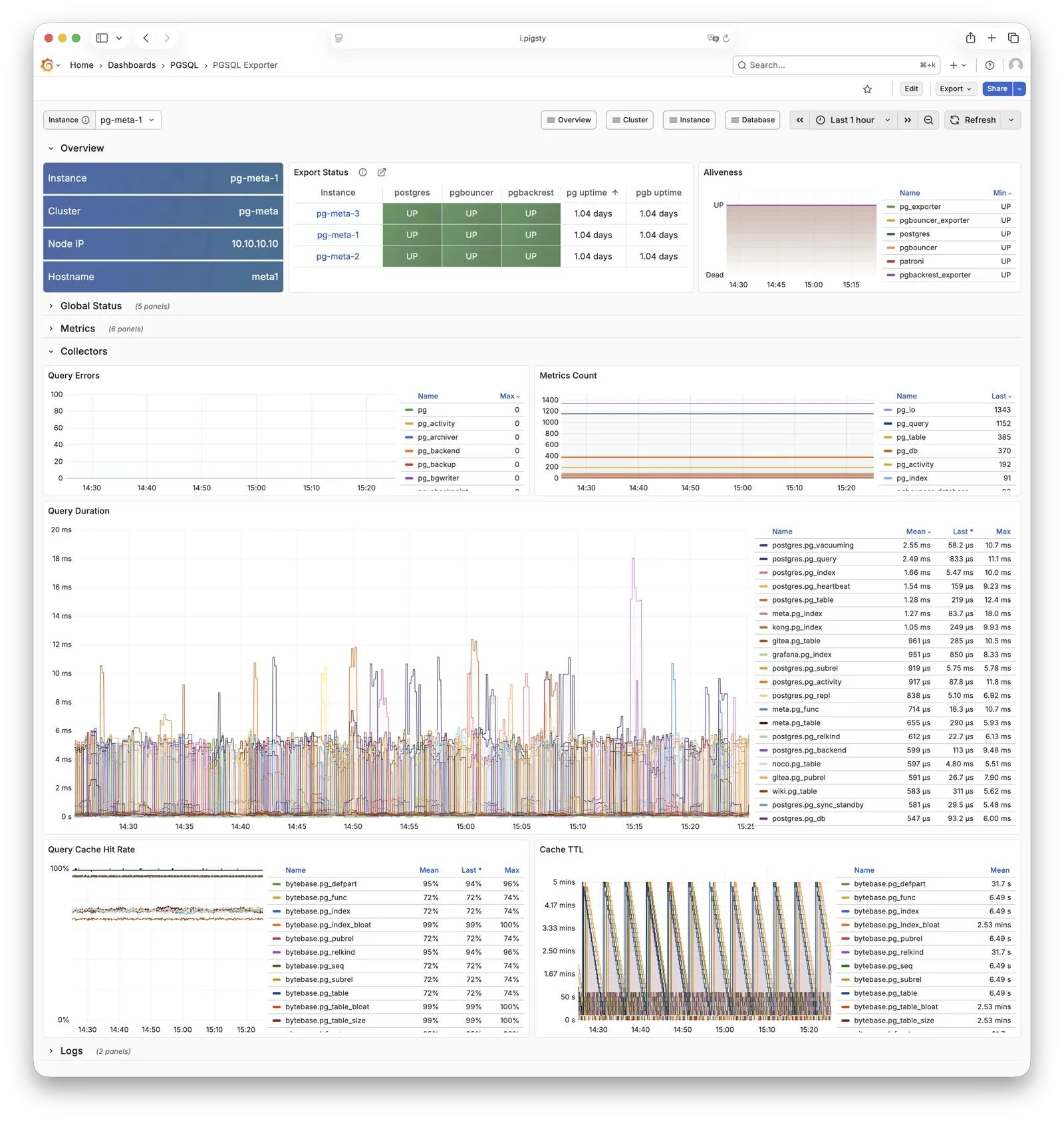
For more information, see: Config: PGSQL - PG_MONITOR
pgbouncer_exporter
pgbouncer_exporter exports Pgbouncer connection pool metrics, listening on port 9631 by default.
pgbouncer_exporter uses the pg_exporter binary with separate metric configuration. It supports pgbouncer 1.8–1.25+. Pgbouncer statistics views provide pool utilization, wait queue, and hit rate metrics.
Disabling Pgbouncer also disables its exporter. Slim installation leaves the exporter disabled.
For more information, see: Config: PGSQL - PG_MONITOR
pgbackrest_exporter
pgbackrest_exporter exports backup status metrics, listening on port 9854 by default.
pgbackrest_exporter reads pgBackRest status to report the latest backup time, size, type, and other metrics. Alert rules can detect expired or failed backups. Large repositories or many backups can make collection expensive. The default collection interval is 2 minutes, so a completed backup can take 2 minutes to appear in monitoring.
For more information, see: Config: PGSQL - PG_MONITOR
etcd
etcd is a distributed consistent store (DCS), providing cluster metadata storage and leader election capability for Patroni.
The separate ETCD module manages etcd. PGSQL relies on it for HA. Patroni stores cluster state, leader information, and configuration there so nodes can reach consensus. vip-manager reads the leader key to move the VIP automatically.
For more information, see: ETCD Module
vector
The NODE module deploys Vector to collect PostgreSQL-related logs efficiently.
Vector reads node log directories for PostgreSQL, Pgbouncer, Patroni, and pgBackRest. It sends structured records to infrastructure-node VictoriaLogs for central storage and queries.
For more information, see: NODE Module