Skip to content

This is the multi-page printable view of this section. .

Return to the regular view of this page.

Infra as Code

Pigsty uses Infrastructure as Code (IaC) philosophy to manage all components, providing declarative management for large-scale clusters.

Pigsty uses IaC and GitOps. Describe the environment in a declarative inventory. Apply it with idempotent playbooks.

Declare the target state with parameters. Playbooks can repeatedly adjust nodes to that state. This resembles Kubernetes CRDs and Operators, implemented through Ansible on physical servers and VMs.

Pigsty was designed to manage large PostgreSQL deployments. Its target was to reproduce more than 100 database clusters, PG/Redis services, and monitoring on prepared servers within ten minutes. Manual GUI operations cannot complete that work in the available time. CLI-based IaC provides precise, efficient control.

pigsty.yml describes the deployment state. Production, staging, test, and development environments use the same deployment logic. Their inventories define the differences.

Store this configuration in Git for version history and auditing. You can also store it in PostgreSQL CMDB tables as infrastructure data. Integrate either method with existing workflows.

IaC supports enterprise operators, individual developers, and smaller organizations. Default values avoid the need to understand every parameter. Start a single-node database with zero configuration. Add two IP addresses for an enterprise HA PostgreSQL cluster.


Declare Modules

This default example installs INFRA, NODE, ETCD, and PGSQL on 10.10.10.10.

# monitoring, alerting, DNS, NTP and other infrastructure cluster...
infra: { hosts: { 10.10.10.10: { infra_seq: 1 } } }

# minio cluster, s3 compatible object storage
minio: { hosts: { 10.10.10.10: { minio_seq: 1 } }, vars: { minio_cluster: minio } }

# etcd cluster, used as DCS for PostgreSQL high availability
etcd: { hosts: { 10.10.10.10: { etcd_seq: 1 } }, vars: { etcd_cluster: etcd } }

# PGSQL example cluster: pg-meta
pg-meta: { hosts: { 10.10.10.10: { pg_seq: 1, pg_role: primary } }, vars: { pg_cluster: pg-meta } }

Run these playbooks to install the modules:

./infra.yml -l 10.10.10.10  # Initialize infra module on node 10.10.10.10
./etcd.yml  -l 10.10.10.10  # Initialize etcd module on node 10.10.10.10
./minio.yml -l 10.10.10.10  # Initialize minio module on node 10.10.10.10
./pgsql.yml -l 10.10.10.10  # Initialize pgsql module on node 10.10.10.10

Declare Clusters

Install PGSQL on multiple nodes to declare a PostgreSQL cluster as one service unit:

For a three-node HA cluster using streaming replication, add this definition to all.children in pigsty.yml. The three nodes must already be managed by Pigsty.

pg-test:
  hosts:
    10.10.10.11: { pg_seq: 1, pg_role: primary }
    10.10.10.12: { pg_seq: 2, pg_role: replica }
    10.10.10.13: { pg_seq: 3, pg_role: offline }
  vars:  { pg_cluster: pg-test }

After defining the cluster, create it with playbooks:
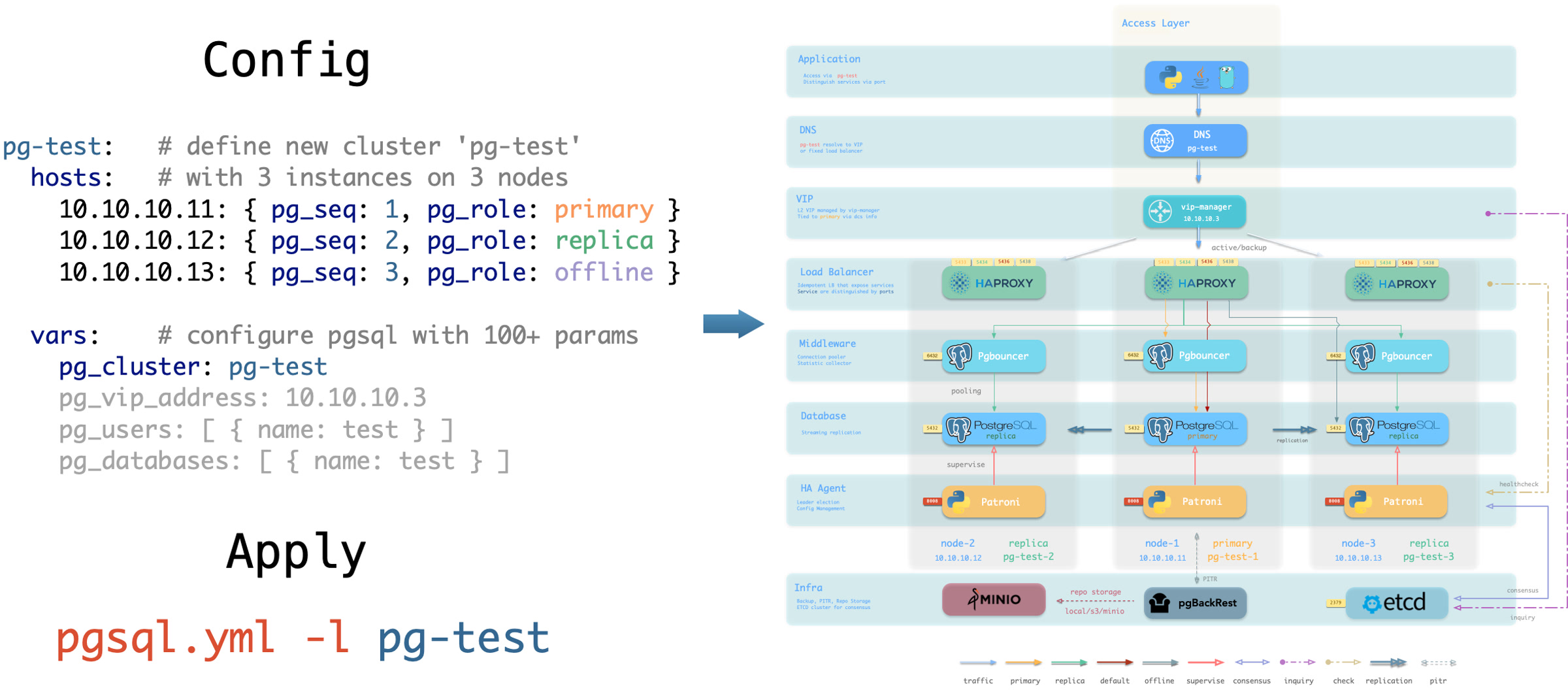
bin/pgsql-add pg-test   # Create the pg-test cluster
pigsty-iac.jpg

Instance roles include primary, replica, offline, delayed, and synchronous standby. Cluster types include standby, Citus, Redis, MINIO (Silo), and Etcd.


Customize Cluster Content

Declare databases, users, services, and HBA rules inside each cluster. This example customizes the default pg-meta single-node cluster:

It declares six business databases and seven business users. It adds a standby service for reads without replication delay, additional pg_hba rules, a primary L2 VIP, and a custom backup strategy.

pg-meta:
  hosts: { 10.10.10.10: { pg_seq: 1, pg_role: primary , pg_offline_query: true } }
  vars:
    pg_cluster: pg-meta
    pg_databases:                       # define business databases on this cluster, array of database definition
      - name: meta                      # REQUIRED, `name` is the only mandatory field of a database definition
        baseline: cmdb.sql              # optional, database sql baseline path, (relative path among ansible search path, e.g files/)
        pgbouncer: true                 # optional, add this database to pgbouncer database list? true by default
        schemas: [pigsty]               # optional, additional schemas to be created, array of schema names
        extensions:                     # optional, additional extensions to be installed: array of `{name[,schema]}`
          - { name: postgis , schema: public }
          - { name: timescaledb }
        comment: pigsty meta database   # optional, comment string for this database
        owner: postgres                # optional, database owner, postgres by default
        template: template1            # optional, which template to use, template1 by default
        encoding: UTF8                 # optional, database encoding, UTF8 by default. (MUST same as template database)
        locale: C                      # optional, database locale, C by default.  (MUST same as template database)
        lc_collate: C                  # optional, database collate, C by default. (MUST same as template database)
        lc_ctype: C                    # optional, database ctype, C by default.   (MUST same as template database)
        tablespace: pg_default         # optional, default tablespace, 'pg_default' by default.
        allowconn: true                # optional, allow connection, true by default. false will disable connect at all
        revokeconn: false              # optional, revoke public connection privilege. false by default. (leave connect with grant option to owner)
        register_datasource: true      # optional, register this database to grafana datasources? true by default
        connlimit: -1                  # optional, database connection limit, default -1 disable limit
        pool_auth_user: dbuser_meta    # optional, all connection to this pgbouncer database will be authenticated by this user
        pool_mode: transaction         # optional, pgbouncer pool mode at database level, default transaction
        pool_size: 64                  # optional, pgbouncer pool size at database level, default 64
        pool_reserve: 32          # optional, pgbouncer pool size reserve at database level, default 32
        pool_size_min: 0               # optional, pgbouncer pool size min at database level, default 0
        pool_connlimit: 100          # optional, max database connections at database level, default 100
      - { name: grafana  ,owner: dbuser_grafana  ,revokeconn: true ,comment: grafana primary database }
      - { name: bytebase ,owner: dbuser_bytebase ,revokeconn: true ,comment: bytebase primary database }
      - { name: kong     ,owner: dbuser_kong     ,revokeconn: true ,comment: kong the api gateway database }
      - { name: gitea    ,owner: dbuser_gitea    ,revokeconn: true ,comment: gitea meta database }
      - { name: wiki     ,owner: dbuser_wiki     ,revokeconn: true ,comment: wiki meta database }
    pg_users:                           # define business users/roles on this cluster, array of user definition
      - name: dbuser_meta               # REQUIRED, `name` is the only mandatory field of a user definition
        password: DBUser.Meta           # optional, password, can be a scram-sha-256 hash string or plain text
        login: true                     # optional, can log in, true by default  (new biz ROLE should be false)
        superuser: false                # optional, is superuser? false by default
        createdb: false                 # optional, can create database? false by default
        createrole: false               # optional, can create role? false by default
        inherit: true                   # optional, can this role use inherited privileges? true by default
        replication: false              # optional, can this role do replication? false by default
        bypassrls: false                # optional, can this role bypass row level security? false by default
        pgbouncer: true                 # optional, add this user to pgbouncer user-list? false by default (production user should be true explicitly)
        connlimit: -1                   # optional, user connection limit, default -1 disable limit
        expire_in: 3650                 # optional, now + n days when this role is expired (OVERWRITE expire_at)
        expire_at: '2030-12-31'         # optional, YYYY-MM-DD 'timestamp' when this role is expired  (OVERWRITTEN by expire_in)
        comment: pigsty admin user      # optional, comment string for this user/role
        roles: [dbrole_admin]           # optional, belonged roles. default roles are: dbrole_{admin,readonly,readwrite,offline}
        parameters: {}                  # optional, role level parameters with `ALTER ROLE SET`
        pool_mode: transaction          # optional, pgbouncer pool mode at user level, transaction by default
        pool_connlimit: -1              # optional, max database connections at user level, default -1 disable limit
      - {name: dbuser_view     ,password: DBUser.Viewer   ,pgbouncer: true ,roles: [dbrole_readonly], comment: read-only viewer for meta database}
      - {name: dbuser_grafana  ,password: DBUser.Grafana  ,pgbouncer: true ,roles: [dbrole_admin]    ,comment: admin user for grafana database   }
      - {name: dbuser_bytebase ,password: DBUser.Bytebase ,pgbouncer: true ,roles: [dbrole_admin]    ,comment: admin user for bytebase database  }
      - {name: dbuser_kong     ,password: DBUser.Kong     ,pgbouncer: true ,roles: [dbrole_admin]    ,comment: admin user for kong api gateway   }
      - {name: dbuser_gitea    ,password: DBUser.Gitea    ,pgbouncer: true ,roles: [dbrole_admin]    ,comment: admin user for gitea service      }
      - {name: dbuser_wiki     ,password: DBUser.Wiki     ,pgbouncer: true ,roles: [dbrole_admin]    ,comment: admin user for wiki.js service    }
    pg_services:                        # extra services in addition to pg_default_services, array of service definition
      # standby service will route {ip|name}:5435 to sync replica's pgbouncer (5435->6432 standby)
      - name: standby                   # required, service name, the actual svc name will be prefixed with `pg_cluster`, e.g: pg-meta-standby
        port: 5435                      # required, service exposed port (work as kubernetes service node port mode)
        ip: "*"                         # optional, service bind ip address, `*` for all ip by default
        selector: "[]"                  # required, service member selector, use JMESPath to filter inventory
        dest: default                   # optional, destination port, default|postgres|pgbouncer|<port_number>, 'default' by default
        check: /sync                    # optional, health check url path, / by default
        backup: "[? pg_role == `primary`]"  # backup server selector
        maxconn: 3000                   # optional, max allowed front-end connection
        balance: roundrobin             # optional, haproxy load balance algorithm (roundrobin by default, other: leastconn)
        options: 'inter 3s fastinter 1s downinter 5s rise 3 fall 3 on-marked-down shutdown-sessions slowstart 30s maxconn 3000 maxqueue 128 weight 100'
    pg_hba_rules:
      - {user: dbuser_view , db: all ,addr: infra ,auth: pwd ,title: 'allow grafana dashboard access cmdb from infra nodes'}
    pg_vip_enabled: true
    pg_vip_address: 10.10.10.2/24
    pg_vip_interface: eth1
    pg_crontab:  # full backup daily at 1am (installed in the postgres user crontab)
      - '00 01 * * * /pg/bin/pg-backup full'

Declare Access Control

Declarative configuration also controls access permissions. This example customizes security for pg-meta:

The three-node crit.yml template prioritizes consistency and zero-loss failover. It enables L2 VIP and restricts database and pool listeners to loopback, internal, and VIP addresses. It enables TLS for the Patroni API and PgBouncer. HBA rules require SSL for database access. $libdir/passwordcheck in pg_libs enforces the password policy.

A separate pg-meta-delay cluster follows pg-meta with a one-hour delay for emergency recovery after data deletion.

pg-meta:      # 3 instance postgres cluster `pg-meta`
  hosts:
    10.10.10.10: { pg_seq: 1, pg_role: primary }
    10.10.10.11: { pg_seq: 2, pg_role: replica }
    10.10.10.12: { pg_seq: 3, pg_role: replica , pg_offline_query: true }
  vars:
    pg_cluster: pg-meta
    pg_conf: crit.yml
    pg_users:
      - { name: dbuser_meta , password: DBUser.Meta   , pgbouncer: true , roles: [ dbrole_admin ] , comment: pigsty admin user }
      - { name: dbuser_view , password: DBUser.Viewer , pgbouncer: true , roles: [ dbrole_readonly ] , comment: read-only viewer for meta database }
    pg_databases:
      - {name: meta ,baseline: cmdb.sql ,comment: pigsty meta database ,schemas: [pigsty] ,extensions: [{name: postgis, schema: public}, {name: timescaledb}]}
    pg_default_service_dest: postgres
    pg_services:
      - { name: standby ,src_ip: "*" ,port: 5435 , dest: default ,selector: "[]" , backup: "[? pg_role == `primary`]" }
    pg_vip_enabled: true
    pg_vip_address: 10.10.10.2/24
    pg_vip_interface: eth1
    pg_listen: '${ip},${vip},${lo}'
    patroni_ssl_enabled: true
    pgbouncer_sslmode: require
    pgbackrest_method: minio
    pg_libs: 'timescaledb, $libdir/passwordcheck, pg_stat_statements, auto_explain' # add passwordcheck extension to enforce strong password
    pg_default_roles:                 # default roles and users in postgres cluster
      - { name: dbrole_readonly  ,login: false ,comment: role for global read-only access     }
      - { name: dbrole_offline   ,login: false ,comment: role for restricted read-only access }
      - { name: dbrole_readwrite ,login: false ,roles: [dbrole_readonly]               ,comment: role for global read-write access }
      - { name: dbrole_admin     ,login: false ,roles: [pg_monitor, dbrole_readwrite]  ,comment: role for object creation }
      - { name: postgres     ,superuser: true  ,expire_in: 7300                        ,comment: system superuser }
      - { name: replicator ,replication: true  ,expire_in: 7300 ,roles: [pg_monitor, dbrole_readonly]   ,comment: system replicator }
      - { name: dbuser_dba   ,superuser: true  ,expire_in: 7300 ,roles: [dbrole_admin]  ,pgbouncer: true ,pool_mode: session, pool_connlimit: 16 , comment: pgsql admin user }
      - { name: dbuser_monitor ,roles: [pg_monitor] ,expire_in: 7300 ,pgbouncer: true ,parameters: {log_min_duration_statement: 1000 } ,pool_mode: session ,pool_connlimit: 8 ,comment: pgsql monitor user }
    pg_default_hba_rules:             # postgres host-based auth rules by default
      - {user: '${dbsu}'    ,db: all         ,addr: local     ,auth: ident ,title: 'dbsu access via local os user ident'  }
      - {user: '${dbsu}'    ,db: replication ,addr: local     ,auth: ident ,title: 'dbsu replication from local os ident' }
      - {user: '${repl}'    ,db: replication ,addr: localhost ,auth: ssl   ,title: 'replicator replication from localhost'}
      - {user: '${repl}'    ,db: replication ,addr: intra     ,auth: ssl   ,title: 'replicator replication from intranet' }
      - {user: '${repl}'    ,db: postgres    ,addr: intra     ,auth: ssl   ,title: 'replicator postgres db from intranet' }
      - {user: '${monitor}' ,db: all         ,addr: localhost ,auth: pwd   ,title: 'monitor from localhost with password' }
      - {user: '${monitor}' ,db: all         ,addr: infra     ,auth: ssl   ,title: 'monitor from infra host with password'}
      - {user: '${admin}'   ,db: all         ,addr: infra     ,auth: ssl   ,title: 'admin @ infra nodes with pwd & ssl'   }
      - {user: '${admin}'   ,db: all         ,addr: world     ,auth: cert  ,title: 'admin @ everywhere with ssl & cert'   }
      - {user: '+dbrole_readonly',db: all    ,addr: localhost ,auth: ssl   ,title: 'pgbouncer read/write via local socket'}
      - {user: '+dbrole_readonly',db: all    ,addr: intra     ,auth: ssl   ,title: 'read/write biz user via password'     }
      - {user: '+dbrole_offline' ,db: all    ,addr: intra     ,auth: ssl   ,title: 'allow etl offline tasks from intranet'}
    pgb_default_hba_rules:            # pgbouncer host-based authentication rules
      - {user: '${dbsu}'    ,db: pgbouncer   ,addr: local     ,auth: peer  ,title: 'dbsu local admin access with os ident'}
      - {user: 'all'        ,db: all         ,addr: localhost ,auth: pwd   ,title: 'allow all user local access with pwd' }
      - {user: '${monitor}' ,db: pgbouncer   ,addr: intra     ,auth: ssl   ,title: 'monitor access via intranet with pwd' }
      - {user: '${monitor}' ,db: all         ,addr: world     ,auth: deny  ,title: 'reject all other monitor access addr' }
      - {user: '${admin}'   ,db: all         ,addr: intra     ,auth: ssl   ,title: 'admin access via intranet with pwd'   }
      - {user: '${admin}'   ,db: all         ,addr: world     ,auth: deny  ,title: 'reject all other admin access addr'   }
      - {user: 'all'        ,db: all         ,addr: intra     ,auth: ssl   ,title: 'allow all user intra access with pwd' }

# OPTIONAL delayed cluster for pg-meta
pg-meta-delay:                    # delayed instance for pg-meta (1 hour ago)
  hosts: { 10.10.10.13: { pg_seq: 1, pg_role: primary, pg_upstream: 10.10.10.10, pg_delay: 1h } }
  vars: { pg_cluster: pg-meta-delay }

Citus Distributed Cluster

This configuration declares a four-node Citus cluster:

all:
  children:
    pg-citus0: # citus coordinator, pg_group = 0
      hosts: { 10.10.10.10: { pg_seq: 1, pg_role: primary } }
      vars: { pg_cluster: pg-citus0 , pg_group: 0 }
    pg-citus1: # citus data node 1
      hosts: { 10.10.10.11: { pg_seq: 1, pg_role: primary } }
      vars: { pg_cluster: pg-citus1 , pg_group: 1 }
    pg-citus2: # citus data node 2
      hosts: { 10.10.10.12: { pg_seq: 1, pg_role: primary } }
      vars: { pg_cluster: pg-citus2 , pg_group: 2 }
    pg-citus3: # citus data node 3, with an extra replica
      hosts:
        10.10.10.13: { pg_seq: 1, pg_role: primary }
        10.10.10.14: { pg_seq: 2, pg_role: replica }
      vars: { pg_cluster: pg-citus3 , pg_group: 3 }
  vars:                               # global parameters for all citus clusters
    pg_mode: citus                    # pgsql cluster mode: citus
    pg_shard: pg-citus                # citus shard name: pg-citus
    patroni_citus_db: meta            # citus distributed database name
    pg_dbsu_password: DBUser.Postgres # all dbsu password access for citus cluster
    pg_users: [ { name: dbuser_meta ,password: DBUser.Meta ,pgbouncer: true ,roles: [ dbrole_admin ] } ]
    pg_databases: [ { name: meta ,extensions: [ { name: citus }, { name: postgis }, { name: timescaledb } ] } ]
    pg_hba_rules:
      - { user: 'all' ,db: all  ,addr: 127.0.0.1/32 ,auth: ssl ,title: 'all user ssl access from localhost' }
      - { user: 'all' ,db: all  ,addr: intra        ,auth: ssl ,title: 'all user ssl access from intranet'  }

Redis Clusters

These examples declare Redis primary-replica, sentinel, and Redis Cluster deployments:

redis-ms: # redis classic primary & replica
  hosts: { 10.10.10.10: { redis_node: 1 , redis_instances: { 6379: { }, 6380: { replica_of: '10.10.10.10 6379' } } } }
  vars: { redis_cluster: redis-ms ,redis_password: 'redis.ms' ,redis_max_memory: 64MB }

redis-meta: # redis sentinel x 3
  hosts: { 10.10.10.11: { redis_node: 1 , redis_instances: { 26379: { } ,26380: { } ,26381: { } } } }
  vars:
    redis_cluster: redis-meta
    redis_password: 'redis.meta'
    redis_mode: sentinel
    redis_max_memory: 16MB
    redis_sentinel_monitor: # primary list for redis sentinel, use cls as name, primary ip:port
      - { name: redis-ms, host: 10.10.10.10, port: 6379 ,password: redis.ms, quorum: 2 }

redis-test: # redis native cluster: 3m x 3s
  hosts:
    10.10.10.12: { redis_node: 1 ,redis_instances: { 6379: { } ,6380: { } ,6381: { } } }
    10.10.10.13: { redis_node: 2 ,redis_instances: { 6379: { } ,6380: { } ,6381: { } } }
  vars: { redis_cluster: redis-test ,redis_password: 'redis.test' ,redis_mode: cluster, redis_max_memory: 32MB }

ETCD Cluster

This configuration declares a three-node Etcd cluster:

etcd: # dcs service for postgres/patroni ha consensus
  hosts:  # 1 node for testing, 3 or 5 for production
    10.10.10.10: { etcd_seq: 1 }  # etcd_seq required
    10.10.10.11: { etcd_seq: 2 }  # assign from 1 ~ n
    10.10.10.12: { etcd_seq: 3 }  # three-member cluster keeps an odd voter count
  vars: # cluster level parameter override roles/etcd
    etcd_cluster: etcd  # mark etcd cluster name etcd
    etcd_safeguard: false # safeguard against purging
    etcd_clean: true # purge etcd during init process

MINIO (Silo) Cluster

This configuration declares a three-node Silo cluster. Inventory groups and parameters retain MINIO compatibility names:

minio:
  hosts:
    10.10.10.10: { minio_seq: 1 }
    10.10.10.11: { minio_seq: 2 }
    10.10.10.12: { minio_seq: 3 }
  vars:
    minio_cluster: minio
    minio_type: silo
    minio_data: '/data{1...2}'          # use two disks per node
    minio_node: '${minio_cluster}-${minio_seq}.pigsty' # node name pattern
    haproxy_services:
      - name: minio                     # [required] service name, must be unique
        port: 9002                      # [required] service port, must be unique
        options:
          - option httpchk
          - option http-keep-alive
          - http-check send meth OPTIONS uri /minio/health/live
          - http-check expect status 200
        servers:
          - { name: minio-1 ,ip: 10.10.10.10 , port: 9000 , options: 'check-ssl ca-file /etc/pki/ca.crt check port 9000' }
          - { name: minio-2 ,ip: 10.10.10.11 , port: 9000 , options: 'check-ssl ca-file /etc/pki/ca.crt check port 9000' }
          - { name: minio-3 ,ip: 10.10.10.12 , port: 9000 , options: 'check-ssl ca-file /etc/pki/ca.crt check port 9000' }

1 - Inventory

Describe your infrastructure and clusters using declarative configuration files

Each Pigsty deployment has an inventory that describes the infrastructure and database clusters.


Configuration File

By default, Pigsty uses Ansible YAML configuration format. The inventory is a single file, pigsty.yml.

~/pigsty
  ^---- pigsty.yml   # <---- Default configuration file

Edit this file to customize the deployment. Alternatively, use the configure wizard to generate it automatically.


Configuration Structure

The inventory uses Ansible YAML configuration format. It contains global parameters in all.vars and groups in all.children.

Define clusters in all.children. Define infrastructure settings in all.vars, as this example shows:

all:                  # Top-level object: all
  vars: {...}         # Global parameters
  children:           # Group definitions
    infra:            # Group definition: 'infra'
      hosts: {...}        # Group members: 'infra'
      vars:  {...}        # Group parameters: 'infra'
    etcd:    {...}    # Group definition: 'etcd'
    pg-meta: {...}    # Group definition: 'pg-meta'
    pg-test: {...}    # Group definition: 'pg-test'
    redis-test: {...} # Group definition: 'redis-test'
    # ...

Cluster Definition

Each Ansible group can represent a cluster. Examples include node, PostgreSQL, Redis, Etcd, and Silo clusters.

A cluster definition contains members (hosts) and parameters (vars). Define members in <cls>.hosts. Set configuration parameters in <cls>.vars. This example defines a three-node HA PostgreSQL cluster:

all:
  children:    # Ansible group list
    pg-test:   # Ansible group name
      hosts:   # Ansible group instances (cluster members)
        10.10.10.11: { pg_seq: 1, pg_role: primary } # Host 1
        10.10.10.12: { pg_seq: 2, pg_role: replica } # Host 2
        10.10.10.13: { pg_seq: 3, pg_role: offline } # Host 3
      vars:    # Ansible group variables (cluster parameters)
        pg_cluster: pg-test

Cluster vars override global parameters. Instance vars override both cluster and global parameters.


Splitting Configuration

For a large deployment, you can split the inventory into multiple files. This can also help organize and maintain configuration.

inventory/
β”œβ”€β”€ hosts.yml              # Host and cluster definitions
β”œβ”€β”€ group_vars/
β”‚   β”œβ”€β”€ all.yml            # Global default variables (corresponds to all.vars)
β”‚   β”œβ”€β”€ infra.yml          # infra group variables
β”‚   β”œβ”€β”€ etcd.yml           # etcd group variables
β”‚   └── pg-meta.yml        # pg-meta cluster variables
└── host_vars/
    β”œβ”€β”€ 10.10.10.10.yml    # Specific host variables
    └── 10.10.10.11.yml

Put cluster members in hosts.yml. Put cluster configuration parameters in the corresponding files under group_vars.


Switching Configuration

When you run a playbook, use -i to temporarily select a different inventory.

./pgsql.yml -i another_config.yml
./infra.yml -i nginx_config.yml

Ansible also accepts local yaml|ini configuration files, a CMDB, or other dynamic configuration scripts.

The ansible.cfg file in the Pigsty home directory sets the default inventory to pigsty.yml in that directory. You can change this setting.

[defaults]
inventory = pigsty.yml

You can store the inventory in a CMDB metabase to integrate it with existing systems.

2 - Configure

Use the configure script to automatically generate recommended configuration files based on your environment.

The configure configuration wizard generates pigsty.yml for your current environment.

This script is optional. If you know how to configure Pigsty, edit pigsty.yml directly and skip the wizard.


Quick Start

Enter the Pigsty source directory and run ./configure to start the wizard. Without arguments, it uses the meta single-node template:

cd ~/pigsty
./configure          # Interactive configuration wizard, auto-detect environment and generate config

The command starts with the selected template. It detects the current node IP address and region, then generates pigsty.yml for that environment.

demo/configure.cast β€” /demo/configure.cast

Features

The configure script makes these adjustments from your environment and input. By default, it generates pigsty.yml in the Pigsty directory.

  • Detect the current node IP address. If the node has multiple addresses, ask you to select a primary IP address as its identity.
  • Replace 10.10.10.10 in the template with this address. Set admin_ip to the same value.
  • Detect the region. Set region to default for global software repositories or china for Chinese mirrors.
  • For instances with fewer than four vCPUs, use the tiny template for node_tune and pg_conf. This reduces resource use.
  • With -v, change pg_version and pg18-* package-group aliases to the specified major version. Exclude the fixed-kernel templates mssql, polar, and pg19.
  • With -g, replace recognized default passwords with strong random passwords. This is strongly recommended. Review other values against the Default Credentials Checklist.
  • For PG major versions β‰₯ 17, prefer the built-in C.UTF-8 locale, or the OS-supported C.UTF-8.
  • Check that the core deployment dependency ansible is available.
  • Check that the deployment target accepts SSH connections and can run commands with sudo. Use -s to skip these checks.

Usage Examples

# Basic usage
./configure                       # Interactive configuration wizard
./configure -i 10.10.10.10        # Specify primary IP address

# Specify configuration template
./configure -c meta               # Use default single-node template (default)
./configure -c rich               # Use feature-rich single-node template
./configure -c slim               # Use minimal template (PGSQL + ETCD only)
./configure -c ha/full            # Use 4-node HA sandbox template
./configure -c ha/trio            # Use 3-node HA template
./configure -c supabase           # Use Supabase self-hosted template
./configure -c app/immich         # Use Immich photo-management template

# Specify PostgreSQL version
./configure -v 18                 # Use PostgreSQL 18
./configure -v 16                 # Use PostgreSQL 16
./configure -c rich -v 15         # rich template + PG 15
./configure -c pg19               # Use the dedicated PostgreSQL 19 Beta template

# Region and proxy
./configure -r china              # Use Chinese mirrors
./configure -r europe             # Use European mirrors
./configure -x                    # Import current proxy environment variables

# Skip and automation
./configure -s                    # Skip IP detection, keep placeholder
./configure -n -i 10.10.10.10     # Non-interactive mode with specified IP
./configure -c ha/full -s         # 4-node template, skip IP replacement

# Security enhancement
./configure -g                    # Generate random passwords
./configure -c meta -g -i 10.10.10.10  # Complete production configuration

# Specify output and SSH port
./configure -o prod.yml           # Output to prod.yml
./configure -p 2222               # Use SSH port 2222

Command Arguments

./configure
    [-c|--conf <template>]      # Configuration template name (meta|rich|slim|ha/full|...)
    [-i|--ip <ipaddr>]          # Specify primary IP address
    [-v|--version <pgver>]      # PostgreSQL major version (14|15|16|17|18|19)
    [-r|--region <region>]      # Upstream software repo region (default|china|europe)
    [-o|--output <file>]        # Output configuration file path (default: pigsty.yml)
    [-s|--skip]                 # Skip IP address detection and replacement
    [-x|--proxy]                # Import proxy settings from environment variables
    [-n|--non-interactive]      # Non-interactive mode (don't ask any questions)
    [-p|--port <port>]          # Specify SSH port
    [-g|--generate]             # Generate random passwords
    [-h|--help]                 # Display help information

Argument Details

ArgumentDescription
-c, --confGenerate config from conf/<template>.yml, supports subdirectories like ha/full
-i, --ipReplace placeholder 10.10.10.10 in config template with specified IP
-v, --versionSpecify PostgreSQL major version (14-19); PG19 is Beta, so prefer the dedicated pg19 template
-r, --regionSet software repo mirror region: default, china (Chinese mirrors), europe (European)
-o, --outputOutput path, default pigsty.yml; relative paths use Pigsty home, absolute paths are used as given
-s, --skipSkip IP probing, target SSH/Sudo checks, and effective IP replacement; keep 10.10.10.10
-x, --proxyWrite current environment proxy variables (HTTP_PROXY, HTTPS_PROXY, ALL_PROXY, NO_PROXY) to config
-n, --non-interactiveNon-interactive mode; a single/demo IP is auto-selected, while ambiguous multi-IP hosts require -i
-p, --portSSH port used by readiness checks only; it does not write ansible_port into the generated config
-g, --generateGenerate random values for passwords in config file, improving security (strongly recommended)

Execution Flow

The configure script detects and configures settings in this order:

β”Œβ”€β”€β”€β”€β”€β”€β”€β”€β”€β”€β”€β”€β”€β”€β”€β”€β”€β”€β”€β”€β”€β”€β”€β”€β”€β”€β”€β”€β”€β”€β”€β”€β”€β”€β”€β”€β”€β”€β”€β”€β”€β”€β”€β”€β”€β”€β”€β”€β”€β”€β”€β”€β”€β”€β”€β”€β”€β”€β”€β”€β”€β”
β”‚                  configure Execution Flow                   β”‚
β”œβ”€β”€β”€β”€β”€β”€β”€β”€β”€β”€β”€β”€β”€β”€β”€β”€β”€β”€β”€β”€β”€β”€β”€β”€β”€β”€β”€β”€β”€β”€β”€β”€β”€β”€β”€β”€β”€β”€β”€β”€β”€β”€β”€β”€β”€β”€β”€β”€β”€β”€β”€β”€β”€β”€β”€β”€β”€β”€β”€β”€β”€β”€
β”‚                                                             β”‚
β”‚  1. check_region          Detect network region (GFW check) β”‚
β”‚         ↓                                                   β”‚
β”‚  2. check_version         Validate PostgreSQL version       β”‚
β”‚         ↓                                                   β”‚
β”‚  3. check_kernel          Detect OS kernel (Linux/Darwin)   β”‚
β”‚         ↓                                                   β”‚
β”‚  4. check_machine         Detect CPU arch (x86_64/aarch64)  β”‚
β”‚         ↓                                                   β”‚
β”‚  5. check_package_manager Detect package manager (dnf/yum/apt) β”‚
β”‚         ↓                                                   β”‚
β”‚  6. check_vendor_version  Detect OS distro and version      β”‚
β”‚         ↓                                                   β”‚
β”‚  7. check_sudo            Detect passwordless sudo          β”‚
β”‚         ↓                                                   β”‚
β”‚  8. check_ssh             Detect passwordless SSH to self   β”‚
β”‚         ↓                                                   β”‚
β”‚  9. check_proxy_env       Handle proxy environment vars     β”‚
β”‚         ↓                                                   β”‚
β”‚ 10. check_ipaddr          Detect/input primary IP address   β”‚
β”‚         ↓                                                   β”‚
β”‚ 11. check_admin           Validate admin SSH + Sudo access  β”‚
β”‚         ↓                                                   β”‚
β”‚ 12. check_conf            Select configuration template     β”‚
β”‚         ↓                                                   β”‚
β”‚ 13. check_config          Generate configuration file       β”‚
β”‚         ↓                                                   β”‚
β”‚ 14. check_utils           Check if Ansible etc. installed   β”‚
β”‚         ↓                                                   β”‚
β”‚     βœ“ Configuration complete, output pigsty.yml             β”‚
β”‚                                                             β”‚
β””β”€β”€β”€β”€β”€β”€β”€β”€β”€β”€β”€β”€β”€β”€β”€β”€β”€β”€β”€β”€β”€β”€β”€β”€β”€β”€β”€β”€β”€β”€β”€β”€β”€β”€β”€β”€β”€β”€β”€β”€β”€β”€β”€β”€β”€β”€β”€β”€β”€β”€β”€β”€β”€β”€β”€β”€β”€β”€β”€β”€β”€β”˜

Automatic Behaviors

Region Detection

The script tests network access to detect mainland China behind the GFW:

# The actual probe uses HTTPS with a two-second total timeout
curl -I -s --max-time 2 https://www.google.com
  • If Google is reachable, use region: default repositories.
  • If Google is unreachable but https://pigsty.cc is reachable, set region: china.
  • If neither endpoint is reachable, use region: default and warn that internet access is unavailable.
  • To set the region manually, use -r.

IP Address Handling

The script selects the primary IP address in this order:

  1. Command line argument: Use the address specified with -i.
  2. Single IP detection: If the node has only one IP address, select it automatically.
  3. Demo IP detection: If 10.10.10.10 exists, select it automatically for the sandbox environment.
  4. Interactive input: If multiple addresses remain, ask you to select or enter one.
[WARN] Multiple IP address candidates found:
    (1) 192.168.1.100   inet 192.168.1.100/24 scope global eth0
    (2) 10.10.10.10     inet 10.10.10.10/24 scope global eth1
[ IN ] INPUT primary_ip address (of current meta node, e.g 10.10.10.10):
=> 10.10.10.10

Low-End Hardware Optimization

If the script detects fewer than four CPU cores (1–3), it changes these settings:

[WARN] replace oltp template with tiny due to cpu < 4

These settings support operation on virtual machines with limited resources.

Locale Settings

The script enables C.UTF-8 as the default locale if either condition applies:

  • PostgreSQL version is β‰₯ 17, with built-in Locale Provider support.
  • The operating system supports the C.UTF-8 or C.utf8 locale.
pg_locale: C.UTF-8
pg_lc_collate: C.UTF-8
pg_lc_ctype: C.UTF-8

China Region Special Handling

For region china, the script automatically enables:

  • docker_registry_mirrors for faster Docker downloads through mirrors.
  • PIP_MIRROR_URL for faster Python downloads through mirrors.

Password Generation

With -g, the script generates a random 24-character string for each of these passwords:

Password ParameterDescription
grafana_admin_passwordGrafana admin password
pg_admin_passwordPostgreSQL admin password
pg_monitor_passwordPostgreSQL monitor user password
pg_replication_passwordPostgreSQL replication user password
patroni_passwordPatroni API password
haproxy_admin_passwordHAProxy admin password
minio_secret_keySilo Root Secret
etcd_root_passwordETCD Root password

It also replaces the following placeholder passwords:

  • DBUser.Meta β†’ random password
  • DBUser.Viewer β†’ random password
  • S3User.Backup β†’ random password
  • S3User.Meta β†’ random password
  • S3User.Data β†’ random password
  • DBUser.Supa β†’ random password
  • Vibe.Coding β†’ random password
$ ./configure -g
[INFO] generating random passwords...
    grafana_admin_password   : xK9mL2nP4qR7sT1vW3yZ5bD8
    pg_admin_password        : aB3cD5eF7gH9iJ1kL2mN4oP6
    ...
[INFO] random passwords generated, check and save them

Configuration Templates

The script reads templates from conf/. Set -c to a relative path without the .yml suffix, such as ha/full or app/immich.

Core Templates

TemplateDescription
metaDefault template: Single-node installation with INFRA + NODE + ETCD + PGSQL
richFeature-rich version: Includes almost all extensions, Silo, local repo
slimMinimal version: PostgreSQL + ETCD only, no monitoring infrastructure
fatComplete version: rich base with more extensions installed
pgsqlPure PostgreSQL template
pg19Single-node PostgreSQL 19 Beta evaluation template
infraPure infrastructure template

HA Templates (ha/)

TemplateDescription
ha/dual2-node HA cluster
ha/trio3-node HA cluster
ha/full4-node complete sandbox environment
ha/safeSecurity-hardened HA configuration
ha/octoCompact 8-node HA simulation
ha/simu20-node production simulation environment
ha/citus13-node Citus distributed cluster

Application Templates

TemplateDescription
supabaseSupabase self-hosted configuration
app/difyDify AI platform configuration
app/odooOdoo ERP configuration
app/electricElectric sync engine configuration
app/insforgeInsforge backend platform configuration
app/hindsightHindsight application configuration
app/teableTeable table database configuration
app/mattermostMattermost collaboration platform configuration
app/maybeMaybe finance application configuration
app/registryDocker Registry configuration
app/immichImmich photo and video management
app/jumpserverJumpServer bastion host

Special Kernel Templates

TemplateDescription
ivoryIvorySQL: Oracle-compatible PostgreSQL
mssqlBabelfish: SQL Server-compatible PostgreSQL
polarPolarDB: Alibaba Cloud open-source distributed PostgreSQL
ha/citusCitus: Distributed PostgreSQL HA cluster
mysqlOpenHalo: MySQL protocol-compatible PostgreSQL
pgtdePercona PostgreSQL Server: transparent encryption
orioleOrioleDB: Next-generation storage engine
agensAgensGraph: graph database kernel
pgedgepgEdge: distributed PostgreSQL kernel
mongoMongoDB-compatible stack template

Demo and Build Templates

TemplateDescription
vibeVibe Coding development environment
dockerRun Pigsty inside a Docker container
demo/bareMinimal readable single-node example
demo/elFull parameter example for EL distributions
demo/debianFull parameter example for Debian/Ubuntu
demo/demoMulti-module demo environment
demo/kernelTen-node database-kernel matrix
demo/redisRedis replica, Sentinel, and native Cluster demo
demo/minioMulti-node, multi-drive Silo demo (source default)
demo/kafkaKafka KRaft development and secure-cluster demo
demo/mysqlNative MySQL 8.4 pilot demo
demo/remoteRemote PostgreSQL/RDS monitoring example
demo/saasLegacy single-node SaaS component bundle
demo/woolSmall cloud-instance example for China
build/ossCross-distribution open-source package build env
build/devThree-node development and build environment

Output Example

$ ./configure
configure pigsty v4.5.0 begin
[ OK ] region = china
[ OK ] kernel  = Linux
[ OK ] machine = x86_64
[ OK ] package = rpm,dnf
[ OK ] vendor  = rocky (Rocky Linux)
[ OK ] version = 9 (9.5)
[ OK ] sudo = vagrant ok
[ OK ] ssh = [email protected] ok
[WARN] Multiple IP address candidates found:
    (1) 192.168.121.193	    inet 192.168.121.193/24 brd 192.168.121.255 scope global dynamic noprefixroute eth0
    (2) 10.10.10.10	    inet 10.10.10.10/24 brd 10.10.10.255 scope global noprefixroute eth1
[ OK ] primary_ip = 10.10.10.10 (from demo)
[ OK ] admin = [email protected] ok
[ OK ] mode = meta (el9)
[ OK ] locale  = C.UTF-8
[ OK ] ansible = ready
[ OK ] pigsty configured
[WARN] don't forget to check it and change passwords!
proceed with ./deploy.yml

Environment Variables

The script supports the following environment variables:

Environment VariableDescriptionDefault
PIGSTY_HOMEPigsty installation directory~/pigsty
METADB_URLMetabase connection URLservice=meta
HTTP_PROXYHTTP proxy-
HTTPS_PROXYHTTPS proxy-
ALL_PROXYUniversal proxy-
NO_PROXYProxy whitelistBuilt-in default

Notes

  1. Passwordless access: Before you run configure, the current user must have passwordless sudo and passwordless SSH access to localhost. The bootstrap script can configure both.

  2. IP address selection: Select an internal IP as the primary address. Do not select a public IP or 127.0.0.1.

  3. Password security: In production, always change default passwords. Use -g to randomize recognized credentials. Review the Default Credentials Checklist for remaining values.

  4. Configuration review: After the script completes, review the generated pigsty.yml. Check that it meets your requirements.

  5. Multiple executions: You can run configure again to regenerate configuration. Each run overwrites the existing pigsty.yml.

  6. macOS limitations: On macOS, the script skips some Linux checks and uses placeholder IP 10.10.10.10. macOS can serve only as an administration node.


FAQ

How to use a custom configuration template?

Place your configuration file in the conf/ directory, then specify it with the -c argument:

cp my-config.yml ~/pigsty/conf/myconf.yml
./configure -c myconf

How to generate different configurations for multiple clusters?

Use the -o argument to specify different output files:

./configure -c ha/full -o cluster-a.yml
./configure -c ha/trio -o cluster-b.yml

Then specify the configuration file when running playbooks:

./deploy.yml -i cluster-a.yml

How to handle multiple IPs in non-interactive mode?

You must explicitly specify the IP address using the -i argument:

./configure -n -i 10.10.10.10

How to keep the placeholder IP in the template?

Use the -s argument to skip IP replacement:

./configure -c ha/full -s   # Keep 10.10.10.10 placeholder

  • Inventory: Understand the Ansible inventory structure
  • Parameters: Understand Pigsty parameter hierarchy and priority
  • Templates: View all available configuration templates
  • Installation: Understand the complete installation process
  • Metabase: Use PostgreSQL as a dynamic configuration source

3 - Parameters

Fine-tune Pigsty customization using configuration parameters

Use inventory parameters to customize infrastructure settings and database configuration.


Parameter List

The current source and reference pages list 373 public parameters across 10 official modules. See Reference - Parameter List for the complete list. The native MySQL 8.4 pilot module has 13 additional public parameters. They are listed separately and excluded from this total.

ModuleGroupsParamsDescription
PGSQL9124PostgreSQL high-availability cluster configuration
INFRA1073Software repositories and Victoria observability infrastructure
NODE1173Node initialization, system tuning, and operations baseline
ETCD213ETCD cluster and removal protection parameters
MINIO222Silo deployment, observability, and removal parameters
REDIS222Redis/Valkey deployment and removal parameters
DOCKER18Docker engine parameters
JUICE12JuiceFS instance and cache parameters
VIBE118Code/Jupyter/Node.js/Claude/Codex configuration
KAFKA218Kafka deployment and removal-protection parameters

Parameter Form

Parameters are key-value pairs that describe entities. A key is a string. A value can be a boolean, string, number, array, or object.

all:                            # <------- Top-level object: all
  vars:
    admin_ip: 10.10.10.10       # <------- Global configuration parameter
  children:
    pg-meta:                    # <------- pg-meta group
      vars:
        pg_cluster: pg-meta     # <------- Cluster-level parameter
      hosts:
        10.10.10.10:            # <------- Host node IP
          pg_seq: 1
          pg_role: primary      # <------- Instance-level parameter

Parameter Priority

Set parameters at these levels, listed from highest to lowest priority:

LevelLocationDescriptionPriority
CLI-e command line argumentPassed via command lineHighest (5)
Host/Instance<group>.hosts.<host>Parameters specific to a single hostHigher (4)
Group/Cluster<group>.varsParameters shared by hosts in group/clusterMedium (3)
Globalall.varsParameters shared by all hostsLower (2)
Default<roles>/default/main.ymlRole implementation defaultsLowest (1)

These examples show parameter priority:

  • Set -e grafana_clean=true on the playbook command line to erase Grafana data.
  • Set host variable pg_role to override the PostgreSQL instance role.
  • Set group variable pg_cluster to override the PostgreSQL cluster name.
  • Set global variable node_ntp_servers to specify NTP servers.
  • If you do not set pg_version, Pigsty uses the pgsql role default, 18.

Except for identity parameters, all parameters have defaults. You do not need to set them explicitly.


Identity Parameters

Identity parameters identify entities. They have no defaults and must be set explicitly, with the exception below.

ModuleIdentity Parameters
PGSQLpg_cluster, pg_seq, pg_role, …
NODEnodename, node_cluster
ETCDetcd_cluster, etcd_seq
MINIOminio_cluster, minio_seq
REDISredis_cluster, redis_node, redis_instances
INFRAinfra_seq

etcd_cluster is an exception. It defaults to etcd. Set minio_cluster explicitly in each object storage cluster’s variables. It no longer has a default. Do not set it in all.vars: this marks every host as a MINIO module member.

4 - Conf Templates

Use pre-made configuration templates to quickly generate configuration files adapted to your environment

The inventory defines the deployment through declarative configuration. Customize its pigsty.yml file for your requirements.

New users can start with ready-to-use templates for common deployment scenarios.

Each template is a predefined pigsty.yml file with defaults for a specific scenario.

Select a template, then change it to meet your requirements.


Using Templates

The optional configure wizard generates an inventory from your environment and input, with suitable defaults.

Use ./configure -c <conf> to select a template. <conf> is relative to conf; the .yml suffix is optional.

./configure                     # Default to meta.yml configuration template
./configure -c meta             # Explicitly specify meta.yml single-node template
./configure -c rich             # Use feature-rich template with all extensions and Silo
./configure -c slim             # Use minimal single-node template

# Use different database kernels
./configure -c pgsql            # Native PostgreSQL kernel, basic features (14~18)
./configure -c pg19             # PostgreSQL 19 Beta trial template
./configure -c mssql            # Babelfish kernel, SQL Server protocol compatible (17/18)
./configure -c polar            # PolarDB PG kernel, Aurora/RAC style (17)
./configure -c ivory            # IvorySQL kernel, Oracle syntax compatible (18)
./configure -c mysql            # OpenHalo kernel, MySQL compatible (14)
./configure -c pgtde            # Percona PostgreSQL Server transparent encryption (18)
./configure -c oriole           # OrioleDB kernel, OLTP enhanced (16~18)
./configure -c agens            # AgensGraph graph database kernel (17)
./configure -c pgedge           # pgEdge distributed database kernel (15~18, default 18)
./configure -c ha/citus         # Citus distributed HA PostgreSQL (14~18)
./configure -c supabase         # Supabase self-hosted configuration (15~18)

# Use multi-node HA templates
./configure -c ha/dual          # Use 2-node HA template
./configure -c ha/trio          # Use 3-node HA template
./configure -c ha/full          # Use 4-node HA template

If no template is specified, Pigsty defaults to the meta.yml single-node configuration template.


Template List

Main Templates

Use these templates to install Pigsty on one server:

TemplateDescription
meta.ymlDefault template, single-node PostgreSQL online installation
rich.ymlFeature-rich template with local repo, Silo, and more examples
slim.ymlMinimal template, PostgreSQL only without monitoring and infrastructure

Database Kernel Templates

Templates for various database management systems and kernels:

TemplateDescription
pgsql.ymlNative PostgreSQL kernel, basic features (14~18)
pg19.ymlPostgreSQL 19 Beta trial template
mssql.ymlBabelfish kernel, SQL Server protocol compatible (17/18)
polar.ymlPolarDB PG kernel, Aurora/RAC style (17)
ivory.ymlIvorySQL kernel, Oracle syntax compatible (18)
mysql.ymlOpenHalo kernel, MySQL compatible (14)
pgtde.ymlPercona PostgreSQL Server transparent encryption (18)
oriole.ymlOrioleDB kernel, OLTP enhanced (16~18)
agens.ymlAgensGraph graph database kernel (17)
pgedge.ymlpgEdge distributed database kernel (15~18, default 18)
supabase.ymlSupabase self-hosted configuration (15~18)

You can add more nodes later or use HA templates to plan your cluster from the start.


HA Templates

Use these templates for a deployment with multiple nodes and high availability:

TemplateDescription
dual.yml2-node semi-HA deployment
trio.yml3-node standard HA deployment
full.yml4-node standard deployment
safe.yml4-node security-enhanced deployment with delayed replica
octo.ymlCompact 8-node HA simulation
simu.yml20-node production environment simulation
ha/citus.ymlCitus distributed HA PostgreSQL (14~18)

Application Templates

Use these templates to run applications with Docker:

TemplateDescription
supabase.ymlStart single-node Supabase
odoo.ymlStart Odoo ERP system
dify.ymlStart Dify AI workflow system
electric.ymlStart Electric sync engine
insforge.ymlStart Insforge backend platform
hindsight.ymlStart Hindsight application
mattermost.ymlStart Mattermost collaboration platform
teable.ymlStart Teable spreadsheet database
maybe.ymlStart Maybe finance app
registry.ymlStart Docker Registry

Demo Templates

Pigsty also provides these demonstration templates:

TemplateDescription
el.ymlFull-parameter config file for EL 8/9 systems
debian.ymlFull-parameter config file for Debian/Ubuntu systems
remote.ymlExample config for monitoring remote PostgreSQL clusters or RDS
redis.ymlRedis cluster example configuration
minio.yml4-node multi-drive Silo cluster example (source default)
kafka.ymlKafka dynamic KRaft example with a single-node dev cluster and a three-node secure cluster
mysql.ymlNative MySQL 8.4 single-node/three-node pilot example; distinct from OpenHalo conf/mysql.yml
demo.ymlConfiguration file for Pigsty public demo site
fat.ymlSingle-node config with local repo and full feature set
infra.ymlDeploy only the infrastructure modules
vibe.ymlVibe Coding / AI application development template
mongo.ymlFerretDB / MongoDB-compatible example
docker.ymlDocker application host template

Build Templates

Use these templates for development and testing:

TemplateDescription
build/oss.ymlOpen source build config for EL 9/10, Debian 12/13, Ubuntu 22.04/24.04/26.04
build/dev.ymlDevelopment and testing build config

5 - Use CMDB as Config Inventory

Use PostgreSQL as a CMDB metabase to store Ansible inventory.

Use a PostgreSQL metabase as a dynamic configuration source instead of static YAML files.


Overview

A CMDB (Configuration Management Database) stores configuration in database tables.

By default, Pigsty uses static pigsty.yml as the Ansible inventory.

A static file is simple. Larger deployments can need finer control, concurrent editing, and external integration beyond one file’s practical limits.

FeatureStatic YAML FileCMDB Metabase
QueryingManual search/grepSQL queries with any conditions, aggregation analysis
VersioningDepends on Git or manual backupDatabase transactions, audit logs, time-travel snapshots
Access ControlFile system permissions, coarse-grainedPostgreSQL fine-grained access control
Concurrent EditingRequires file locking or merge conflictsDatabase transactions naturally support concurrency
External IntegrationRequires YAML parsingStandard SQL interface, easy integration with any language
ScalabilityDifficult to maintain when file becomes too largeScales to physical limits
Dynamic GenerationStatic file, changes require manual applicationImmediate effect, real-time configuration changes

The sample pg-meta.meta database baseline defines the CMDB schema.


How It Works

CMDB replaces the static inventory with an executable script that returns JSON, as Ansible supports. Enabling CMDB creates inventory.sh:

#!/bin/bash
psql ${METADB_URL} -AXtwc 'SELECT text FROM pigsty.inventory;'

Whenever Ansible reads the inventory, this script queries pigsty.inventory in PostgreSQL and returns JSON.

The architecture is:

flowchart LR
    conf["bin/inventory_conf"]
    tocmdb["bin/inventory_cmdb"]
    load["bin/inventory_load"]
    ansible["πŸš€ Ansible"]

    subgraph static["πŸ“„ Static Config Mode"]
        yml[("pigsty.yml")]
    end

    subgraph dynamic["πŸ—„οΈ CMDB Dynamic Mode"]
        sh["inventory.sh"]
        cmdb[("PostgreSQL CMDB")]
    end

    conf -->|"switch"| yml
    yml -->|"load config"| load
    load -->|"write"| cmdb
    tocmdb -->|"switch"| sh
    sh --> cmdb

    yml --> ansible
    cmdb --> ansible

Data Model

The CMDB database schema is defined in files/cmdb.sql, with all objects in the pigsty schema.

Core Tables

TableDescriptionPrimary Key
pigsty.groupCluster/group definitions, corresponds to Ansible groupscls
pigsty.hostHost definitions, belongs to a group(cls, ip)
pigsty.global_varGlobal variables, corresponds to all.varskey
pigsty.group_varGroup variables, corresponds to all.children.<cls>.vars(cls, key)
pigsty.host_varHost variables, host-level variables(cls, ip, key)
pigsty.default_varDefault variable definitions, stores parameter metadatakey
pigsty.jobJob records table, records executed tasksid

Table Structure Details

Cluster Table pigsty.group

CREATE TABLE pigsty.group (
    cls     TEXT PRIMARY KEY,        -- Cluster name, primary key
    ctime   TIMESTAMPTZ DEFAULT now(), -- Creation time
    mtime   TIMESTAMPTZ DEFAULT now()  -- Modification time
);

Host Table pigsty.host

CREATE TABLE pigsty.host (
    cls    TEXT NOT NULL REFERENCES pigsty.group(cls),  -- Parent cluster
    ip     INET NOT NULL,                               -- Host IP address
    ctime  TIMESTAMPTZ DEFAULT now(),
    mtime  TIMESTAMPTZ DEFAULT now(),
    PRIMARY KEY (cls, ip)
);

Global Variables Table pigsty.global_var

CREATE TABLE pigsty.global_var (
    key   TEXT PRIMARY KEY,           -- Variable name
    value JSONB NULL,                 -- Variable value (JSON format)
    mtime TIMESTAMPTZ DEFAULT now()   -- Modification time
);

Group Variables Table pigsty.group_var

CREATE TABLE pigsty.group_var (
    cls   TEXT NOT NULL REFERENCES pigsty.group(cls),
    key   TEXT NOT NULL,
    value JSONB NULL,
    mtime TIMESTAMPTZ DEFAULT now(),
    PRIMARY KEY (cls, key)
);

Host Variables Table pigsty.host_var

CREATE TABLE pigsty.host_var (
    cls   TEXT NOT NULL,
    ip    INET NOT NULL,
    key   TEXT NOT NULL,
    value JSONB NULL,
    mtime TIMESTAMPTZ DEFAULT now(),
    PRIMARY KEY (cls, ip, key),
    FOREIGN KEY (cls, ip) REFERENCES pigsty.host(cls, ip)
);

Core Views

These views expose configuration data:

ViewDescription
pigsty.inventoryCore view: Generates Ansible dynamic inventory JSON
pigsty.raw_configRaw configuration in JSON format
pigsty.global_configGlobal config view, merges defaults and global vars
pigsty.group_configGroup config view, includes host list and group vars
pigsty.host_configHost config view, merges group and host-level vars
pigsty.pg_clusterPostgreSQL cluster view
pigsty.pg_instancePostgreSQL instance view
pigsty.pg_databasePostgreSQL database definition view
pigsty.pg_usersPostgreSQL user definition view
pigsty.pg_servicePostgreSQL service definition view
pigsty.pg_hbaPostgreSQL HBA rules view
pigsty.pg_remoteRemote PostgreSQL instance view

pigsty.inventory converts database configuration to Ansible inventory JSON:

SELECT text FROM pigsty.inventory;

Utility Scripts

Use these three scripts to manage the CMDB:

ScriptFunction
bin/inventory_loadLoad YAML configuration file into PostgreSQL database
bin/inventory_cmdbSwitch configuration source to CMDB (dynamic inventory script)
bin/inventory_confSwitch configuration source to static config file pigsty.yml

inventory_load

Parse a YAML configuration file and import it into the CMDB:

bin/inventory_load                     # Load default pigsty.yml to default CMDB
bin/inventory_load -p /path/to/conf.yml  # Specify configuration file path
bin/inventory_load -d "postgres://..."   # Specify database connection URL
bin/inventory_load -n myconfig           # Specify configuration name

The script performs these operations:

  1. Clears existing data in the pigsty schema
  2. Parses the YAML configuration file
  3. Writes global variables to the global_var table
  4. Writes cluster definitions to the group table
  5. Writes cluster variables to the group_var table
  6. Writes host definitions to the host table
  7. Writes host variables to the host_var table

Environment Variables

  • PIGSTY_HOME: Pigsty installation directory, defaults to ~/pigsty
  • METADB_URL: Database connection URL, defaults to service=meta

inventory_cmdb

Switch Ansible to use CMDB as the configuration source:

bin/inventory_cmdb

The script performs these operations:

  1. Creates dynamic inventory script ${PIGSTY_HOME}/inventory.sh
  2. Modifies ansible.cfg to set inventory to inventory.sh

The generated inventory.sh contains:

#!/bin/bash
psql ${METADB_URL} -AXtwc 'SELECT text FROM pigsty.inventory;'

inventory_conf

Switch back to a static YAML configuration file:

bin/inventory_conf

The script modifies ansible.cfg to set inventory back to pigsty.yml.


Usage Workflow

First-time CMDB Setup

  1. Initialize the CMDB schema. Pigsty installation usually does this automatically:
psql -f ~/pigsty/files/cmdb.sql
  1. Load configuration into the database:
bin/inventory_load
  1. Switch to CMDB mode:
bin/inventory_cmdb
  1. Verify configuration:
ansible all --list-hosts          # List all hosts
ansible-inventory --list          # View complete inventory

Query Configuration

After you enable CMDB, use SQL to query the configuration:

-- View all clusters
SELECT cls FROM pigsty.group;

-- View all hosts in a cluster
SELECT ip FROM pigsty.host WHERE cls = 'pg-meta';

-- View global variables
SELECT key, value FROM pigsty.global_var;

-- View cluster variables
SELECT key, value FROM pigsty.group_var WHERE cls = 'pg-meta';

-- View all PostgreSQL clusters
SELECT cls, name, pg_databases, pg_users FROM pigsty.pg_cluster;

-- View all PostgreSQL instances
SELECT cls, ins, ip, seq, role FROM pigsty.pg_instance;

-- View all database definitions
SELECT cls, datname, owner, encoding FROM pigsty.pg_database;

-- View all user definitions
SELECT cls, name, login, superuser FROM pigsty.pg_users;

Modify Configuration

Use SQL to change the configuration directly:

-- Add new cluster
INSERT INTO pigsty.group (cls) VALUES ('pg-new');

-- Add cluster variable
INSERT INTO pigsty.group_var (cls, key, value)
VALUES ('pg-new', 'pg_cluster', '"pg-new"');

-- Add host
INSERT INTO pigsty.host (cls, ip) VALUES ('pg-new', '10.10.10.20');

-- Add host variables
INSERT INTO pigsty.host_var (cls, ip, key, value)
VALUES ('pg-new', '10.10.10.20', 'pg_seq', '1'),
       ('pg-new', '10.10.10.20', 'pg_role', '"primary"');

-- Modify global variable
UPDATE pigsty.global_var SET value = '"new-value"' WHERE key = 'some_param';

-- Delete cluster (cascades to hosts and variables)
DELETE FROM pigsty.group WHERE cls = 'pg-old';

Configuration changes are immediately available. You do not need to reload or restart a service.

Switch Back to Static Configuration

Switch back to a static configuration file:

bin/inventory_conf

Advanced Usage

Export Configuration

Export CMDB configuration to YAML format:

psql service=meta -AXtwc "SELECT jsonb_pretty(jsonb_build_object('all', jsonb_build_object('children', children, 'vars', vars))) FROM pigsty.raw_config;"

Or use the ansible-inventory command:

ansible-inventory --list --yaml > exported_config.yml

Configuration Auditing

Track configuration changes using the mtime field:

-- View recently modified global variables
SELECT key, value, mtime FROM pigsty.global_var
ORDER BY mtime DESC LIMIT 10;

-- View changes after a specific time
SELECT * FROM pigsty.group_var
WHERE mtime > '2024-01-01'::timestamptz;

Integration with External Systems

CMDB uses standard PostgreSQL. You can integrate it with these systems:

  • Web Management Interface: Expose configuration data through a REST API, such as PostgREST.
  • CI/CD Pipelines: Read and write database data directly from deployment scripts.
  • Monitoring & Alerting: Generate monitoring rules from configuration data.
  • ITSM Systems: Synchronize data with enterprise CMDB systems.

Considerations

  1. Data Consistency: After you change configuration, run the corresponding Ansible playbooks again to apply it to the environment.

  2. Backup: CMDB configuration data is critical. Back it up regularly.

  3. Permissions: Set appropriate CMDB database access permissions to prevent accidental changes.

  4. Transactions: Make batch configuration changes in a transaction. This permits rollback if an error occurs.

  5. Connection Pooling: inventory.sh opens a new connection each time it runs. Consider connection pooling if Ansible runs frequently.


Summary

Use CMDB for large cluster deployments, complex queries, external integration, or fine-grained access control. PostgreSQL stores the configuration and provides database functions to manage it.

FeatureDescription
StoragePostgreSQL pigsty schema
Dynamic Inventoryinventory.sh script
Config Loadbin/inventory_load
Switch to CMDBbin/inventory_cmdb
Switch to YAMLbin/inventory_conf
Core Viewpigsty.inventory