This is the multi-page printable view of this section. .
Module: ETCD
- 1: Configuration
- 2: Parameters
- 3: Administration
- 4: Playbook
- 5: Monitoring
- 6: Metrics
- 7: FAQ
ETCD is a distributed, reliable key-value store for critical system configuration data.
Pigsty uses etcd as a DCS (Distributed Config Store). It is critical for PostgreSQL high availability and automatic failover.
The ETCD module depends on NODE. The PGSQL module requires ETCD. Install NODE to manage nodes before you install ETCD.
Deploy the ETCD cluster before any PGSQL cluster. For PostgreSQL high availability, patroni and vip-manager depend on etcd. They use it for HA and to bind the L2 VIP to the primary.
flowchart LR
    subgraph PGSQL [PGSQL]
        patroni[Patroni]
        vip[VIP Manager]
    end

    subgraph ETCD [ETCD]
        etcd[DCS Service]
    end

    subgraph NODE [NODE]
        node[Software Repo]
    end

    PGSQL -->|depends| ETCD -->|depends| NODE

    style PGSQL fill:#3E668F,stroke:#2d4a66,color:#fff
    style ETCD fill:#5B9CD5,stroke:#4178a8,color:#fff
    style NODE fill:#FCDB72,stroke:#d4b85e,color:#333

    style patroni fill:#2d4a66,stroke:#1e3347,color:#fff
    style vip fill:#2d4a66,stroke:#1e3347,color:#fff
    style etcd fill:#4178a8,stroke:#2d5a7a,color:#fff
    style node fill:#d4b85e,stroke:#b89a4a,color:#333
One etcd cluster serves multiple PostgreSQL clusters in each Pigsty deployment.
Pigsty enables RBAC by default. Each PostgreSQL cluster uses separate credentials to isolate tenants. Administrators use the etcd root user, which has full permissions over all PostgreSQL clusters.
1 - Configuration
Before deployment, define the etcd cluster in the configuration inventory. Typical choices are:
- One Node: No HA, suitable for dev, test, demo, or standalone deployments using external S3 backup for PITR
- Three Nodes: Basic HA, tolerates 1 node failure, suitable for small-medium prod
- Five Nodes: Better HA, tolerates 2 node failures, suitable for large prod
An etcd cluster can have an even number of members. It has the same failure tolerance as a cluster with one fewer member. The extra member increases deployment and quorum costs. Thus, production clusters usually have one, three, or five members. Clusters with more than five members are uncommon.
| Cluster Size | Quorum | Fault Tolerance | Use Case |
|---|---|---|---|
| 1 node | 1 | 0 | Dev, test, demo |
| 3 nodes | 2 | 1 | Small-medium prod |
| 5 nodes | 3 | 2 | Large prod |
| 7 nodes | 4 | 3 | Special HA requirements |
One Node
To define a single etcd instance in Pigsty, use one line of configuration:
All single-node configuration templates include this line. The configuration process replaces placeholder IP 10.10.10.10 with the current admin node IP.
Only etcd_seq and etcd_cluster are required. Together, these parameters uniquely identify each etcd instance.
Three Nodes
The most common configuration has 3 etcd nodes. It tolerates 1 node failure and is suitable for small and medium production environments.
Example: Pigsty’s 3-node templates trio and safe use 3-node etcd:
Five Nodes
A 5-node cluster tolerates 2 node failures. It is suitable for large production environments.
Example: Pigsty’s production simulation template ha/simu uses a 5-node etcd cluster:
Services Using etcd
Services using etcd in Pigsty:
| Service | Purpose | Config File |
|---|---|---|
| Patroni | PG HA, stores cluster state and config | /etc/patroni/patroni.yml |
| VIP-Manager | Binds L2 VIP on PG clusters | /etc/default/vip-manager.yml |
After a permanent etcd membership change, reload the related service configurations. This updates the endpoints that services use to access etcd.
Update Patroni’s etcd endpoint ref:
Update VIP-Manager’s etcd endpoint ref (only for PGSQL L2 VIP):
RBAC Authentication Config
Since v4.0, Pigsty enables etcd RBAC authentication by default. Related parameters:
| Parameter | Description | Default |
|---|---|---|
etcd_root_password | etcd root password | Etcd.Root |
pg_etcd_password | Patroni’s password for etcd | Empty (uses cluster name) |
Production recommendations:
Filesystem Layout
The module creates these directories and files on target hosts:
| Path | Purpose | Permissions |
|---|---|---|
/etc/etcd/ | Config dir | 0750, etcd:etcd |
/etc/etcd/etcd.conf | Main config file | 0644, etcd:etcd |
/etc/etcd/etcd.pass | Root password file | 0640, root:etcd |
/etc/etcd/ca.crt | CA cert | 0644, etcd:etcd |
/etc/etcd/server.crt | Server cert | 0644, etcd:etcd |
/etc/etcd/server.key | Server private key | 0600, etcd:etcd |
/var/lib/etcd/ | Backup data dir | 0770, etcd:etcd |
/data/etcd/ | Main data dir (configurable) | 0700, etcd:etcd |
/etc/profile.d/etcdctl.sh | Client env vars | 0644, root:root |
/etc/systemd/system/etcd.service | Systemd service | 0644, root:root |
2 - Parameters
The ETCD module has 13 parameters, divided into two sections:
ETCD: 10 parameters for etcd cluster deployment and configurationETCD_REMOVE: 3 parameters for controlling etcd cluster removal
Since Pigsty v3.6, etcd.yml does not handle removal. Removal parameters belong to the separate etcd_remove role. Since v4.0, Pigsty enables RBAC authentication by default and provides the etcd_root_password parameter.
Parameter Overview
Use the ETCD parameter group to deploy and configure etcd clusters. It controls instance identification, cluster name, data directory, ports, and authentication password.
| Parameter | Type | Level | Description |
|---|---|---|---|
etcd_seq | int | I | etcd instance identifier, REQUIRED |
etcd_cluster | string | C | etcd cluster name, fixed to etcd by default |
etcd_learner | bool | I/A | initialize etcd instance as learner? |
etcd_data | path | C | etcd data directory, /data/etcd by default |
etcd_port | port | C | etcd client port, 2379 by default |
etcd_peer_port | port | C | etcd peer port, 2380 by default |
etcd_init | enum | C | etcd initial cluster state, new or existing |
etcd_election_timeout | int | C | etcd election timeout, 1000ms by default |
etcd_heartbeat_interval | int | C | etcd heartbeat interval, 100ms by default |
etcd_root_password | password | G | etcd root user password for RBAC authentication |
The ETCD_REMOVE parameter group controls etcd cluster removal behavior, including safeguard protection, data cleanup, and package uninstallation.
| Parameter | Type | Level | Description |
|---|---|---|---|
etcd_safeguard | bool | G/C/A | unconditionally refuse removal when true |
etcd_rm_data | bool | G/C/A | remove etcd data during removal? default is true |
etcd_rm_pkg | bool | G/C/A | uninstall etcd packages during removal? default is false |
ETCD
This section contains parameters for the etcd role,
which are used by the etcd.yml playbook.
Parameters are defined in roles/etcd/defaults/main.yml
etcd_seq
Parameter: etcd_seq, Type: int, Level: I
etcd instance identifier. This parameter is required. You must assign a unique identifier to each etcd instance.
Here is an example of a 3-node etcd cluster with identifiers 1 through 3:
etcd_cluster
Parameter: etcd_cluster, Type: string, Level: C
etcd cluster & group name, default value is the hard-coded etcd.
You can modify this parameter when you want to deploy an additional etcd cluster for backup purposes.
etcd_learner
Parameter: etcd_learner, Type: bool, Level: I/A
Specifies whether to initialize the etcd instance as a learner. The default is false.
If this parameter is true, Pigsty initializes the instance as a learner. A learner cannot vote in etcd cluster elections.
Use Cases:
- Cluster Expansion: Add members as learners to preserve the current quorum requirements until data synchronization completes.
- Safe Migration: During a rolling upgrade or migration, add the member as a learner. Confirm data synchronization before you promote it.
Workflow:
- Set
etcd_learner: trueto initialize the new member as a learner - Wait for data synchronization to complete (check with
etcdctl endpoint status) - Use
etcdctl member promote <member_id>to promote it to a full member
Learners do not count toward cluster quorum. A 3-node cluster with 1 learner has 2 voting members. It cannot tolerate a voting member failure.
etcd_data
Parameter: etcd_data, Type: path, Level: C
etcd data directory, default is /data/etcd.
etcd_port
Parameter: etcd_port, Type: port, Level: C
etcd client port, default is 2379.
etcd_peer_port
Parameter: etcd_peer_port, Type: port, Level: C
etcd peer port, default is 2380.
etcd_init
Parameter: etcd_init, Type: enum, Level: C
Initial etcd cluster state. Set it to new or existing. The default is new.
Option Values:
| Value | Description | Use Case |
|---|---|---|
new | Create a new etcd cluster | Initial deployment, cluster rebuild |
existing | Join an existing etcd cluster | Cluster expansion, adding new members |
Important Notes:
When adding new members to an existing etcd cluster, you must set etcd_init=existing. Otherwise, the new instance attempts to create a separate cluster. This causes split-brain or initialization failure.
Usage Examples:
etcd_election_timeout
Parameter: etcd_election_timeout, Type: int, Level: C
etcd election timeout, default is 1000 (milliseconds), i.e., 1 second.
etcd_heartbeat_interval
Parameter: etcd_heartbeat_interval, Type: int, Level: C
etcd heartbeat interval, default is 100 (milliseconds).
etcd_root_password
Parameter: etcd_root_password, Type: password, Level: G
etcd root user password for RBAC authentication, default value is Etcd.Root.
Since v4.0, Pigsty has enabled etcd RBAC (Role-Based Access Control) authentication by default. During cluster initialization, the etcd_auth task automatically creates the root user and enables authentication.
Password Storage Location:
- Password is stored in
/etc/etcd/etcd.passfile - File permissions are
0640(owned by root, readable by etcd group) - The etcdctl environment script
/etc/profile.d/etcdctl.shautomatically reads this file
Integration with Other Components:
- Patroni uses the
pg_etcd_passwordparameter to configure the password for connecting to etcd - If
pg_etcd_passwordis empty, Patroni will use the cluster name as password (not recommended) - VIP-Manager also requires the same authentication credentials to connect to etcd
Security Recommendations:
In production environments, it is strongly recommended to change the default password Etcd.Root. Set it in global or cluster configuration:
Run configure -g to generate and replace etcd_root_password automatically.
ETCD_REMOVE
This section contains parameters for the etcd_remove role,
which are action flags used by the etcd-rm.yml playbook.
Parameters are defined in roles/etcd_remove/defaults/main.yml
etcd_safeguard
Parameter: etcd_safeguard, Type: bool, Level: G/C/A
Removal safeguard. The default is false. If set to true, etcd-rm.yml aborts before deregistration, cluster departure, service shutdown, or data deletion. This static boolean switch does not check whether the instance is running.
Override it explicitly with -e etcd_safeguard=false.
Recommended Settings:
| Environment | Recommended | Description |
|---|---|---|
| Dev/Test | false | Convenient for rapid rebuilding and testing |
| Production | true | Prevents service interruption from accidental operations |
In emergencies, you can override the configuration with command-line parameters:
etcd_rm_data
Parameter: etcd_rm_data, Type: bool, Level: G/C/A
Specifies whether to delete etcd data and configuration files during removal. The default is true.
If enabled, etcd-rm.yml deletes these files and directories when it removes a cluster or member:
/etc/etcd/- Configuration directory (including certificates and password files)/var/lib/etcd/- Alternate data directory{{ etcd_data }}- Primary data directory (default/data/etcd)/etc/systemd/system/etcd.service- Systemd service unit file/etc/profile.d/etcdctl.sh- Client environment script/etc/vector/etcd.yaml- Vector log collection config
Use Cases:
| Scenario | Recommended | Description |
|---|---|---|
| Complete removal | true (default) | Full cleanup, free disk space |
| Stop service only | false | Preserve data for troubleshooting or recovery |
etcd_rm_pkg
Parameter: etcd_rm_pkg, Type: bool, Level: G/C/A
Specifies whether to uninstall etcd packages during removal. The default is false.
If enabled, etcd-rm.yml uninstalls etcd packages when it removes a cluster or member.
Use Cases:
| Scenario | Recommended | Description |
|---|---|---|
| Normal removal | false (default) | Keep packages for quick redeployment |
| Complete cleanup | true | Full uninstall, save disk space |
Usually, you do not need to uninstall etcd packages. If you keep them, subsequent redeployments are faster because no download or installation is necessary.
3 - Administration
Use these standard procedures to administer etcd:
- Create Cluster: Initialize an etcd cluster
- Destroy Cluster: Destroy an etcd cluster
- CLI Environment: Configure etcd client to access server cluster
- RBAC Authentication: Use etcd RBAC auth
- Reload Config: Update etcd server member list for clients
- Add Member: Add new member to existing etcd cluster
- Remove Member: Remove member from etcd cluster
- Utility Scripts: Simplify ops with
bin/etcd-addandbin/etcd-rm
For more, refer to FAQ: ETCD.
Create Cluster
Define etcd cluster in config inventory:
Run etcd.yml playbook:
Since v3.6, etcd.yml installs clusters and adds members. It does not remove them. Use the dedicated etcd-rm.yml for all removals.
For production etcd clusters, enable the safeguard etcd_safeguard to prevent accidental deletion.
Destroy Cluster
Use the dedicated etcd-rm.yml playbook to destroy an Etcd cluster. The default etcd_rm_data: true deletes local data and configuration. First, confirm that no PostgreSQL cluster still uses it as DCS. Verify a recent backup and check the exact target name.
Or use utility script:
The removal playbook respects etcd_safeguard. If this parameter is true, the playbook aborts before any cluster-leave, deregistration, service-stop, or file-deletion operation. The default is false. The absence of an explicit override does not confirm removal.
Before you remove the etcd cluster, make sure no PostgreSQL cluster uses it as DCS. Otherwise, PostgreSQL HA will fail.
CLI Environment
Pigsty uses the etcd v3 API by default. Etcd v3.6+ removed the v2 API. Pigsty automatically configures /etc/profile.d/etcdctl.sh on etcd nodes. The shell loads this environment script at login.
Example client env config:
Since v4.0, Pigsty enables RBAC authentication for etcd by default. User authentication is still required:
After you configure the client environment, run etcd CRUD operations:
RBAC Authentication
Since v4.0, Pigsty enables etcd RBAC authentication by default. During cluster initialization, the etcd_auth task creates the root user and enables authentication.
Set the root user password with etcd_root_password. The default is Etcd.Root. Pigsty stores it in /etc/etcd/etcd.pass with 0640 permissions. Root owns the file, and the etcd group can read it.
We strongly recommend that you change the default password in production:
Client auth methods:
Patroni and etcd auth:
Patroni uses pg_etcd_password as the etcd connection password. If it is empty, Patroni uses the cluster name as the password. We do not recommend this default. In production, set a separate etcd password for each PostgreSQL cluster.
Reload Config
After you add or remove etcd members, update the service endpoint references. Update these etcd references in Pigsty:
| Config Location | Config File | Update Method |
|---|---|---|
| etcd member config | /etc/etcd/etcd.conf | ./etcd.yml -t etcd_conf |
| etcdctl env vars | /etc/profile.d/etcdctl.sh | ./etcd.yml -t etcd_config |
| Patroni DCS config | /etc/patroni/patroni.yml | ./pgsql.yml -t pg_conf |
| VIP-Manager config | /etc/default/vip-manager.yml | ./pgsql.yml -t pg_vip_config |
Refresh etcd member config:
Refresh etcdctl client env:
Update Patroni DCS endpoint config:
Update VIP-Manager endpoint config (only for PGSQL L2 VIP):
After bin/etcd-add or bin/etcd-rm completes, the script shows commands to refresh the configuration.
Add Member
ETCD Reference: Add a member
Recommended: Utility Script
Use bin/etcd-add script to add new members to existing etcd cluster:
The script attempts these operations in order:
- Validates the IP address
- Sets
etcd_init=existingautomatically and runs theetcd.ymlplaybook - Provides safety warnings and countdown
- Shows configuration refresh commands after completion
Manual: Step-by-Step
Add new member to existing etcd cluster:
- Update config inventory: Add new instance to
etcdgroup - Notify cluster: Run
etcdctl member add(optional, playbook auto-does this) - Initialize new member: Run playbook with
etcd_init=existingparameter - Promote member: Promote learner to full member (optional, required when using
etcd_learner=true) - Reload config: Update etcd endpoint references for all clients
When you add members, you must set etcd_init=existing. Otherwise, the new instance creates a new cluster instead of joining the existing cluster.
This example starts with a single-instance etcd cluster:
Add new member using utility script (recommended):
For manual addition, first run etcdctl member add. This announces the new learner instance etcd-2 to the existing etcd cluster:
Run etcdctl member list or em list. The new member appears with the unstarted state:
Run the etcd.yml playbook to initialize the new instance, etcd-2. When the playbook completes, the new member is running:
After the new member initializes and runs stably, promote it from learner to follower:
The new member is now part of the cluster. Reload the configuration so all clients can find it.
Repeat these steps to add more members. Production environments need at least 3 members.
Remove Member
Recommended: Utility Script
Use bin/etcd-rm script to remove members from etcd cluster:
The script automatically performs these operations:
- Gracefully removes members from cluster
- Stops and disables etcd service
- Cleans up data and config files
- Deregisters from monitoring system
The underlying removal role tolerates some leave and cleanup errors. After the script finishes, inspect etcdctl member list, endpoint health, and remaining quorum. Also inspect the actual service and data-directory state on the target.
Manual: Step-by-Step
Remove member instance from etcd cluster:
- Keep the member in the inventory: The removal playbook needs its
etcd_seq, cluster members, and connection endpoints - Clean up the instance: Run
etcd-rm.ymlagainst the target. It attemptsmember removeand stops the service. It then cleans up according to the removal flags. - Update the inventory: Comment out or delete the member only after the playbook succeeds
- Reload references: Follow Reload Config for the remaining etcd members and the Patroni/VIP-Manager endpoints
Do not delete the target from the inventory before you run the removal playbook. Without the target, the hosts: etcd scope in etcd-rm.yml cannot select it. The playbook also cannot get the instance identity or cluster endpoints from the inventory.
You do not need to repeat etcdctl member remove before or after the playbook.
Example: 3-node etcd cluster, remove instance 3.
Method 1: Utility script (recommended)
The script attempts to remove the member, stop the service, and clean up data. Afterwards, still inspect the member list, quorum, and target files as described above.
Method 2: Manual
First keep the member to be removed in the inventory, then run the removal playbook:
The playbook attempts these operations in order:
- Get member list, find corresponding member ID
- Execute
etcdctl member removeto kick from cluster - Stop etcd service
- Clean up data and config files
The playbook queries the member ID and runs member remove automatically. Do this manually only when troubleshooting:
After manual member removal, keep the target in the inventory. Run ./etcd-rm.yml -l 10.10.10.12 to stop, deregister, and clean it up. The leave step skips a member that is already removed.
Confirm that the member has left the live cluster and the remaining members retain quorum. Also confirm that the target service and files have the expected state. Only then delete 10.10.10.12 from the inventory. Follow Reload Config to update the remaining etcd members and all client references.
Repeat these steps to remove more members. Combine this procedure with Add Member for rolling upgrades and migrations of the etcd cluster.
Utility Scripts
v3.6+ provides utility scripts to simplify etcd cluster scaling:
bin/etcd-add
Add new members to existing etcd cluster:
Script features:
- Validates IP addresses in config inventory
- Auto-sets
etcd_init=existingparameter - Executes
etcd.ymlplaybook to complete member addition - Shows configuration refresh commands after completion
bin/etcd-rm
Remove members or entire cluster from etcd:
Script features:
- Provides safety warnings and confirmation countdown
- Auto-executes
etcd-rm.ymlplaybook - Gracefully removes members from cluster
- Cleans up data and config files
Manage Etcd Password
The etcd_root_password parameter defines the password of the etcd root user.
To change it, use an INFRA node or ETCD node that can reach an etcd endpoint. Run this command as the admin user:
Update every reference to the etcd root password. Include the Patroni client configuration on INFRA nodes and the etcdctl client environment:
4 - Playbook
The ETCD module provides two core playbooks. Use etcd.yml to install and configure etcd clusters. Use etcd-rm.yml to remove clusters or members.
Since Pigsty v3.6, the etcd.yml playbook focuses on cluster installation and member addition. The dedicated etcd-rm.yml playbook handles all removals through the etcd_remove role.
etcd.yml
Playbook source: etcd.yml
This playbook installs and configures an etcd cluster on the hardcoded etcd group. Then it starts the etcd service.
The following subtasks are available in etcd.yml:
etcd_assert: Validate etcd identity parameters (etcd_seqmust be defined as a non-negative integer)etcd_install: Install etcd packagesetcd_dir: Create etcd data and configuration directoriesetcd_config: Generate etcd configurationetcd_conf: Generate etcd main config file/etc/etcd/etcd.confetcd_cert: Generate etcd TLS certificates (CA, server cert, private key)
etcd_member: Add new member to existing cluster (only runs whenetcd_init=existing)etcd_launch: Launch etcd serviceetcd_auth: Enable RBAC authentication (create root user and enable auth)etcd_register: Register etcd to VictoriaMetrics monitoring
etcd-rm.yml
Playbook source: etcd-rm.yml
A dedicated playbook for removing etcd clusters or individual members. The following subtasks are available in etcd-rm.yml:
etcd_safeguard: Check safeguard and abort if enabledetcd_pause: Pause for 3 seconds, allowing user to abort with Ctrl-Cetcd_deregister: Remove etcd registration from VictoriaMetrics monitoring targetsetcd_leave: Try graceful leaving etcd cluster before purgeetcd_svc: Stop and disable etcd service with systemdetcd_data: Remove etcd data (disable withetcd_rm_data=false)etcd_pkg: Uninstall etcd packages (enable withetcd_rm_pkg=true)
The removal playbook uses the etcd_remove role with the following configurable parameters:
etcd_safeguard: Prevents accidental removal when set totrueetcd_rm_data: Controls whether ETCD data is deleted (default:true)etcd_rm_pkg: Controls whether ETCD packages are uninstalled (default:false)
etcd_safeguard defaults to false, while etcd_rm_data defaults to true. A full etcd-rm.yml run first attempts to remove the target from the cluster. It deregisters the target and stops its service. It then deletes local etcd data, configuration, unit files, and the client environment file.
The playbook ignores some leave and cleanup errors and does not prove that the remaining members retain quorum. Always use an exact -l target. Verify a recent backup, the member list, and remaining quorum.
Demo

Cheatsheet
Etcd Installation & Configuration:
Etcd Removal & Cleanup:
Convenience Scripts:
Safeguard
The ETCD module provides a safeguard against accidental deletion. Control it with etcd_safeguard. The default is false, which disables the safeguard.
After you initialize a production etcd cluster, we recommend that you enable the safeguard. This helps prevent accidental deletion of existing instances:
If etcd_safeguard is true, etcd-rm.yml aborts before any deregistration, cluster-leave, service-stop, or deletion action. This boolean guard does not check whether the instance is running. Override it with a command-line parameter:
After a real run, inspect etcdctl member list, endpoint health, and remaining quorum, regardless of the safeguard value. A successful task status does not verify the runtime state.
5 - Monitoring
Dashboards
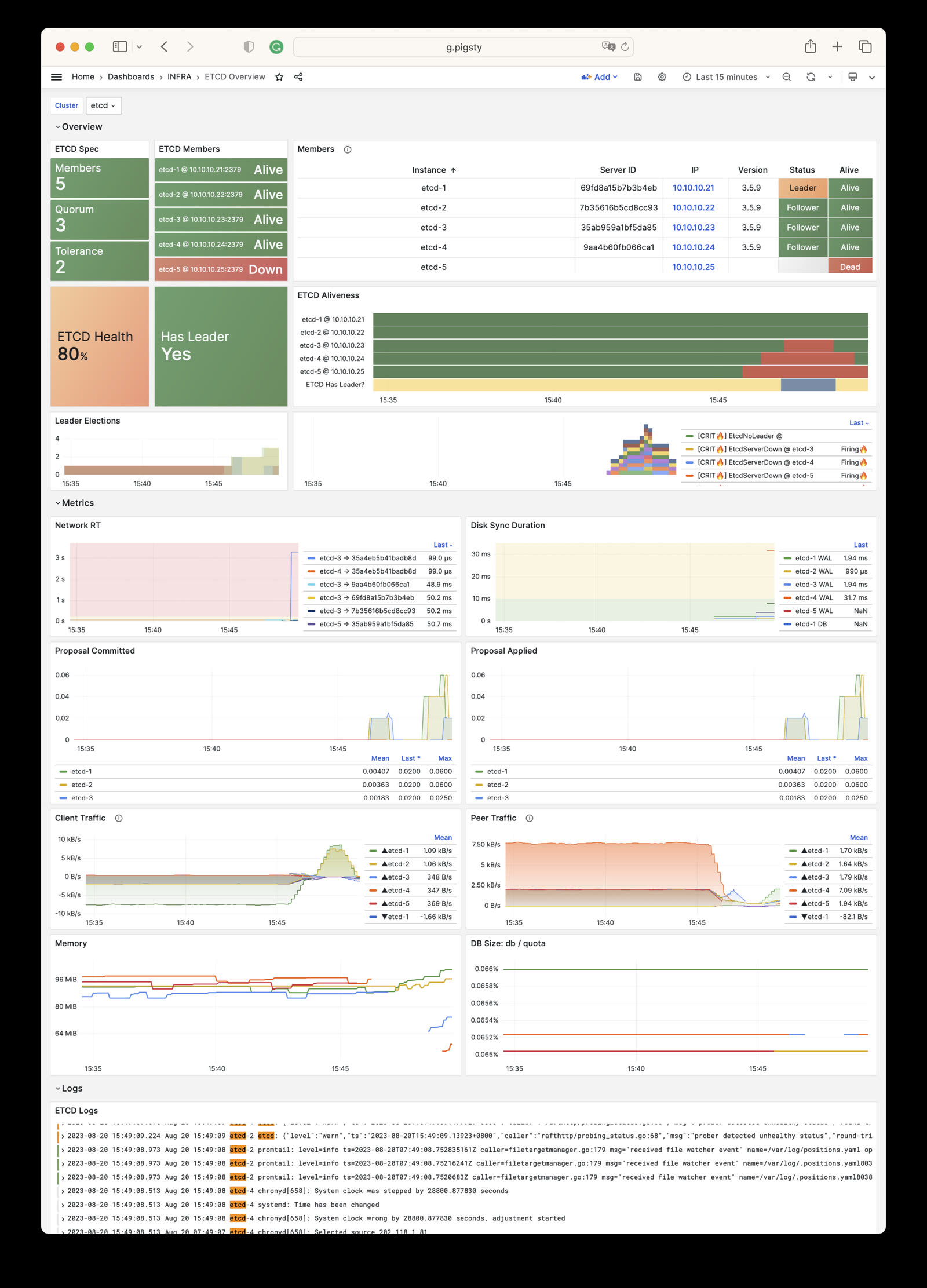
The ETCD module provides one monitoring dashboard: Etcd Overview.
ETCD Overview Dashboard
ETCD Overview: Overview of ETCD cluster
The dashboard shows key ETCD status information. The ETCD Aliveness panel shows the overall cluster service status.
Red bands indicate instance downtime. A blue-gray area below the bands indicates that the cluster is unavailable.
Alert Rules
Pigsty provides five preset alert rules for etcd, defined in files/victoria/rules/etcd.yml:
EtcdServerDown: etcd node down, CRIT alertEtcdNoLeader: etcd cluster no leader, CRIT alertEtcdQuotaFull: etcd quota > 90%, WARN alertEtcdNetworkPeerRTSlow: etcd network latency slow, INFO alertEtcdWalFsyncSlow: etcd disk fsync slow, INFO alert
The following excerpt matches the current rule source. Pigsty currently includes only the etcd-overview dashboard. Comments for the two latency alerts refer to /ui/d/etcd-instance, but these targets do not exist. Use /ui/d/etcd-overview to inspect cluster state. This known error in the source comments does not affect the alert expressions.
6 - Metrics
This snapshot records 177 monitoring metric families for the ETCD module. The metrics present at runtime vary with package version, enabled collectors, and target state.
| Metric Name | Type | Labels | Description |
|---|---|---|---|
| etcd:ins:backend_commit_rt_p99_5m | Unknown | cls, ins, instance, job, ip | N/A |
| etcd:ins:disk_fsync_rt_p99_5m | Unknown | cls, ins, instance, job, ip | N/A |
| etcd:ins:network_peer_rt_p99_1m | Unknown | cls, To, ins, instance, job, ip | N/A |
| etcd_cluster_version | gauge | cls, cluster_version, ins, instance, job, ip | Running version. 1 = ‘cluster_version’ label with current version |
| etcd_debugging_auth_revision | gauge | cls, ins, instance, job, ip | Current auth store revision. |
| etcd_debugging_disk_backend_commit_rebalance_duration_seconds_bucket | Unknown | cls, ins, instance, job, le, ip | N/A |
| etcd_debugging_disk_backend_commit_rebalance_duration_seconds_count | Unknown | cls, ins, instance, job, ip | N/A |
| etcd_debugging_disk_backend_commit_rebalance_duration_seconds_sum | Unknown | cls, ins, instance, job, ip | N/A |
| etcd_debugging_disk_backend_commit_spill_duration_seconds_bucket | Unknown | cls, ins, instance, job, le, ip | N/A |
| etcd_debugging_disk_backend_commit_spill_duration_seconds_count | Unknown | cls, ins, instance, job, ip | N/A |
| etcd_debugging_disk_backend_commit_spill_duration_seconds_sum | Unknown | cls, ins, instance, job, ip | N/A |
| etcd_debugging_disk_backend_commit_write_duration_seconds_bucket | Unknown | cls, ins, instance, job, le, ip | N/A |
| etcd_debugging_disk_backend_commit_write_duration_seconds_count | Unknown | cls, ins, instance, job, ip | N/A |
| etcd_debugging_disk_backend_commit_write_duration_seconds_sum | Unknown | cls, ins, instance, job, ip | N/A |
| etcd_debugging_lease_granted_total | counter | cls, ins, instance, job, ip | Total granted leases. |
| etcd_debugging_lease_renewed_total | counter | cls, ins, instance, job, ip | Renewed leases seen by leader. |
| etcd_debugging_lease_revoked_total | counter | cls, ins, instance, job, ip | Revoked leases. |
| etcd_debugging_lease_ttl_total_bucket | Unknown | cls, ins, instance, job, le, ip | N/A |
| etcd_debugging_lease_ttl_total_count | Unknown | cls, ins, instance, job, ip | N/A |
| etcd_debugging_lease_ttl_total_sum | Unknown | cls, ins, instance, job, ip | N/A |
| etcd_debugging_mvcc_compact_revision | gauge | cls, ins, instance, job, ip | Last compaction revision in store. |
| etcd_debugging_mvcc_current_revision | gauge | cls, ins, instance, job, ip | Current store revision. |
| etcd_debugging_mvcc_db_compaction_keys_total | counter | cls, ins, instance, job, ip | DB keys compacted. |
| etcd_debugging_mvcc_db_compaction_last | gauge | cls, ins, instance, job, ip | Last db compaction unix time. Resets to 0 on start. |
| etcd_debugging_mvcc_db_compaction_pause_duration_milliseconds_bucket | Unknown | cls, ins, instance, job, le, ip | N/A |
| etcd_debugging_mvcc_db_compaction_pause_duration_milliseconds_count | Unknown | cls, ins, instance, job, ip | N/A |
| etcd_debugging_mvcc_db_compaction_pause_duration_milliseconds_sum | Unknown | cls, ins, instance, job, ip | N/A |
| etcd_debugging_mvcc_db_compaction_total_duration_milliseconds_bucket | Unknown | cls, ins, instance, job, le, ip | N/A |
| etcd_debugging_mvcc_db_compaction_total_duration_milliseconds_count | Unknown | cls, ins, instance, job, ip | N/A |
| etcd_debugging_mvcc_db_compaction_total_duration_milliseconds_sum | Unknown | cls, ins, instance, job, ip | N/A |
| etcd_debugging_mvcc_events_total | counter | cls, ins, instance, job, ip | Events sent by this member. |
| etcd_debugging_mvcc_index_compaction_pause_duration_milliseconds_bucket | Unknown | cls, ins, instance, job, le, ip | N/A |
| etcd_debugging_mvcc_index_compaction_pause_duration_milliseconds_count | Unknown | cls, ins, instance, job, ip | N/A |
| etcd_debugging_mvcc_index_compaction_pause_duration_milliseconds_sum | Unknown | cls, ins, instance, job, ip | N/A |
| etcd_debugging_mvcc_keys_total | gauge | cls, ins, instance, job, ip | Total keys. |
| etcd_debugging_mvcc_pending_events_total | gauge | cls, ins, instance, job, ip | Pending events to send. |
| etcd_debugging_mvcc_range_total | counter | cls, ins, instance, job, ip | Ranges seen by this member. |
| etcd_debugging_mvcc_slow_watcher_total | gauge | cls, ins, instance, job, ip | Unsynced slow watchers. |
| etcd_debugging_mvcc_total_put_size_in_bytes | gauge | cls, ins, instance, job, ip | Total put kv size seen by this member. |
| etcd_debugging_mvcc_watch_stream_total | gauge | cls, ins, instance, job, ip | Watch streams. |
| etcd_debugging_mvcc_watcher_total | gauge | cls, ins, instance, job, ip | Watchers. |
| etcd_debugging_server_lease_expired_total | counter | cls, ins, instance, job, ip | Expired leases. |
| etcd_debugging_snap_save_marshalling_duration_seconds_bucket | Unknown | cls, ins, instance, job, le, ip | N/A |
| etcd_debugging_snap_save_marshalling_duration_seconds_count | Unknown | cls, ins, instance, job, ip | N/A |
| etcd_debugging_snap_save_marshalling_duration_seconds_sum | Unknown | cls, ins, instance, job, ip | N/A |
| etcd_debugging_snap_save_total_duration_seconds_bucket | Unknown | cls, ins, instance, job, le, ip | N/A |
| etcd_debugging_snap_save_total_duration_seconds_count | Unknown | cls, ins, instance, job, ip | N/A |
| etcd_debugging_snap_save_total_duration_seconds_sum | Unknown | cls, ins, instance, job, ip | N/A |
| etcd_debugging_store_expires_total | counter | cls, ins, instance, job, ip | Expired keys. |
| etcd_debugging_store_reads_total | counter | cls, action, ins, instance, job, ip | Reads (get/getRecursive) to this member. |
| etcd_debugging_store_watch_requests_total | counter | cls, ins, instance, job, ip | Incoming watch requests (new/reestablished). |
| etcd_debugging_store_watchers | gauge | cls, ins, instance, job, ip | Active watchers. |
| etcd_debugging_store_writes_total | counter | cls, action, ins, instance, job, ip | Writes (set/compareAndDelete) to this member. |
| etcd_disk_backend_commit_duration_seconds_bucket | Unknown | cls, ins, instance, job, le, ip | N/A |
| etcd_disk_backend_commit_duration_seconds_count | Unknown | cls, ins, instance, job, ip | N/A |
| etcd_disk_backend_commit_duration_seconds_sum | Unknown | cls, ins, instance, job, ip | N/A |
| etcd_disk_backend_defrag_duration_seconds_bucket | Unknown | cls, ins, instance, job, le, ip | N/A |
| etcd_disk_backend_defrag_duration_seconds_count | Unknown | cls, ins, instance, job, ip | N/A |
| etcd_disk_backend_defrag_duration_seconds_sum | Unknown | cls, ins, instance, job, ip | N/A |
| etcd_disk_backend_snapshot_duration_seconds_bucket | Unknown | cls, ins, instance, job, le, ip | N/A |
| etcd_disk_backend_snapshot_duration_seconds_count | Unknown | cls, ins, instance, job, ip | N/A |
| etcd_disk_backend_snapshot_duration_seconds_sum | Unknown | cls, ins, instance, job, ip | N/A |
| etcd_disk_defrag_inflight | gauge | cls, ins, instance, job, ip | Defrag active. 1 = active, 0 = not. |
| etcd_disk_wal_fsync_duration_seconds_bucket | Unknown | cls, ins, instance, job, le, ip | N/A |
| etcd_disk_wal_fsync_duration_seconds_count | Unknown | cls, ins, instance, job, ip | N/A |
| etcd_disk_wal_fsync_duration_seconds_sum | Unknown | cls, ins, instance, job, ip | N/A |
| etcd_disk_wal_write_bytes_total | gauge | cls, ins, instance, job, ip | WAL bytes written. |
| etcd_grpc_proxy_cache_hits_total | gauge | cls, ins, instance, job, ip | Cache hits. |
| etcd_grpc_proxy_cache_keys_total | gauge | cls, ins, instance, job, ip | Keys/ranges cached. |
| etcd_grpc_proxy_cache_misses_total | gauge | cls, ins, instance, job, ip | Cache misses. |
| etcd_grpc_proxy_events_coalescing_total | counter | cls, ins, instance, job, ip | Events coalescing. |
| etcd_grpc_proxy_watchers_coalescing_total | gauge | cls, ins, instance, job, ip | Current watchers coalescing. |
| etcd_mvcc_db_open_read_transactions | gauge | cls, ins, instance, job, ip | Open read transactions. |
| etcd_mvcc_db_total_size_in_bytes | gauge | cls, ins, instance, job, ip | DB physical bytes allocated. |
| etcd_mvcc_db_total_size_in_use_in_bytes | gauge | cls, ins, instance, job, ip | DB logical bytes in use. |
| etcd_mvcc_delete_total | counter | cls, ins, instance, job, ip | Deletes seen by this member. |
| etcd_mvcc_hash_duration_seconds_bucket | Unknown | cls, ins, instance, job, le, ip | N/A |
| etcd_mvcc_hash_duration_seconds_count | Unknown | cls, ins, instance, job, ip | N/A |
| etcd_mvcc_hash_duration_seconds_sum | Unknown | cls, ins, instance, job, ip | N/A |
| etcd_mvcc_hash_rev_duration_seconds_bucket | Unknown | cls, ins, instance, job, le, ip | N/A |
| etcd_mvcc_hash_rev_duration_seconds_count | Unknown | cls, ins, instance, job, ip | N/A |
| etcd_mvcc_hash_rev_duration_seconds_sum | Unknown | cls, ins, instance, job, ip | N/A |
| etcd_mvcc_put_total | counter | cls, ins, instance, job, ip | Puts seen by this member. |
| etcd_mvcc_range_total | counter | cls, ins, instance, job, ip | Ranges seen by this member. |
| etcd_mvcc_txn_total | counter | cls, ins, instance, job, ip | Txns seen by this member. |
| etcd_network_active_peers | gauge | cls, ins, Local, instance, job, ip, Remote | Active peer connections. |
| etcd_network_client_grpc_received_bytes_total | counter | cls, ins, instance, job, ip | gRPC client bytes received. |
| etcd_network_client_grpc_sent_bytes_total | counter | cls, ins, instance, job, ip | gRPC client bytes sent. |
| etcd_network_peer_received_bytes_total | counter | cls, ins, instance, job, ip, From | Peer bytes received. |
| etcd_network_peer_round_trip_time_seconds_bucket | Unknown | cls, To, ins, instance, job, le, ip | N/A |
| etcd_network_peer_round_trip_time_seconds_count | Unknown | cls, To, ins, instance, job, ip | N/A |
| etcd_network_peer_round_trip_time_seconds_sum | Unknown | cls, To, ins, instance, job, ip | N/A |
| etcd_network_peer_sent_bytes_total | counter | cls, To, ins, instance, job, ip | Peer bytes sent. |
| etcd_server_apply_duration_seconds_bucket | Unknown | cls, version, ins, instance, job, le, success, ip, op | N/A |
| etcd_server_apply_duration_seconds_count | Unknown | cls, version, ins, instance, job, success, ip, op | N/A |
| etcd_server_apply_duration_seconds_sum | Unknown | cls, version, ins, instance, job, success, ip, op | N/A |
| etcd_server_client_requests_total | counter | client_api_version, cls, ins, instance, type, job, ip | Client requests per version. |
| etcd_server_go_version | gauge | cls, ins, instance, job, server_go_version, ip | Go version running. 1 = ‘server_go_version’ label with current version. |
| etcd_server_has_leader | gauge | cls, ins, instance, job, ip | Leader exists. 1 = exists, 0 = not. |
| etcd_server_health_failures | counter | cls, ins, instance, job, ip | Failed health checks. |
| etcd_server_health_success | counter | cls, ins, instance, job, ip | Successful health checks. |
| etcd_server_heartbeat_send_failures_total | counter | cls, ins, instance, job, ip | Leader heartbeat send failures (likely overloaded from slow disk). |
| etcd_server_id | gauge | cls, ins, instance, job, server_id, ip | Server/member ID (hex). 1 = ‘server_id’ label with current ID. |
| etcd_server_is_leader | gauge | cls, ins, instance, job, ip | Member is leader. 1 if is, 0 otherwise. |
| etcd_server_is_learner | gauge | cls, ins, instance, job, ip | Member is learner. 1 if is, 0 otherwise. |
| etcd_server_leader_changes_seen_total | counter | cls, ins, instance, job, ip | Leader changes seen. |
| etcd_server_learner_promote_successes | counter | cls, ins, instance, job, ip | Successful learner promotions while this member is leader. |
| etcd_server_proposals_applied_total | gauge | cls, ins, instance, job, ip | Consensus proposals applied. |
| etcd_server_proposals_committed_total | gauge | cls, ins, instance, job, ip | Consensus proposals committed. |
| etcd_server_proposals_failed_total | counter | cls, ins, instance, job, ip | Failed proposals seen. |
| etcd_server_proposals_pending | gauge | cls, ins, instance, job, ip | Pending proposals to commit. |
| etcd_server_quota_backend_bytes | gauge | cls, ins, instance, job, ip | Backend storage quota bytes. |
| etcd_server_read_indexes_failed_total | counter | cls, ins, instance, job, ip | Failed read indexes seen. |
| etcd_server_slow_apply_total | counter | cls, ins, instance, job, ip | Slow apply requests (likely overloaded from slow disk). |
| etcd_server_slow_read_indexes_total | counter | cls, ins, instance, job, ip | Pending read indexes not in sync with leader or timed out read index requests. |
| etcd_server_snapshot_apply_in_progress_total | gauge | cls, ins, instance, job, ip | 1 if server applying incoming snapshot. 0 if none. |
| etcd_server_version | gauge | cls, server_version, ins, instance, job, ip | Version running. 1 = ‘server_version’ label with current version. |
| etcd_snap_db_fsync_duration_seconds_bucket | Unknown | cls, ins, instance, job, le, ip | N/A |
| etcd_snap_db_fsync_duration_seconds_count | Unknown | cls, ins, instance, job, ip | N/A |
| etcd_snap_db_fsync_duration_seconds_sum | Unknown | cls, ins, instance, job, ip | N/A |
| etcd_snap_db_save_total_duration_seconds_bucket | Unknown | cls, ins, instance, job, le, ip | N/A |
| etcd_snap_db_save_total_duration_seconds_count | Unknown | cls, ins, instance, job, ip | N/A |
| etcd_snap_db_save_total_duration_seconds_sum | Unknown | cls, ins, instance, job, ip | N/A |
| etcd_snap_fsync_duration_seconds_bucket | Unknown | cls, ins, instance, job, le, ip | N/A |
| etcd_snap_fsync_duration_seconds_count | Unknown | cls, ins, instance, job, ip | N/A |
| etcd_snap_fsync_duration_seconds_sum | Unknown | cls, ins, instance, job, ip | N/A |
| etcd_up | Unknown | cls, ins, instance, job, ip | N/A |
| go_gc_duration_seconds | summary | cls, ins, instance, job, quantile, ip | GC pause duration summary. |
| go_gc_duration_seconds_count | Unknown | cls, ins, instance, job, ip | N/A |
| go_gc_duration_seconds_sum | Unknown | cls, ins, instance, job, ip | N/A |
| go_goroutines | gauge | cls, ins, instance, job, ip | Goroutines. |
| go_info | gauge | cls, version, ins, instance, job, ip | Go environment info. |
| go_memstats_alloc_bytes | gauge | cls, ins, instance, job, ip | Bytes allocated and in use. |
| go_memstats_alloc_bytes_total | counter | cls, ins, instance, job, ip | Bytes allocated, even if freed. |
| go_memstats_buck_hash_sys_bytes | gauge | cls, ins, instance, job, ip | Bytes used by profiling bucket hash table. |
| go_memstats_frees_total | counter | cls, ins, instance, job, ip | Frees. |
| go_memstats_gc_cpu_fraction | gauge | cls, ins, instance, job, ip | GC CPU fraction since program started. |
| go_memstats_gc_sys_bytes | gauge | cls, ins, instance, job, ip | Bytes used for GC system metadata. |
| go_memstats_heap_alloc_bytes | gauge | cls, ins, instance, job, ip | Heap bytes allocated and in use. |
| go_memstats_heap_idle_bytes | gauge | cls, ins, instance, job, ip | Heap bytes waiting to be used. |
| go_memstats_heap_inuse_bytes | gauge | cls, ins, instance, job, ip | Heap bytes in use. |
| go_memstats_heap_objects | gauge | cls, ins, instance, job, ip | Allocated objects. |
| go_memstats_heap_released_bytes | gauge | cls, ins, instance, job, ip | Heap bytes released to OS. |
| go_memstats_heap_sys_bytes | gauge | cls, ins, instance, job, ip | Heap bytes obtained from system. |
| go_memstats_last_gc_time_seconds | gauge | cls, ins, instance, job, ip | Seconds since 1970 of last GC. |
| go_memstats_lookups_total | counter | cls, ins, instance, job, ip | Pointer lookups. |
| go_memstats_mallocs_total | counter | cls, ins, instance, job, ip | Mallocs. |
| go_memstats_mcache_inuse_bytes | gauge | cls, ins, instance, job, ip | Bytes in use by mcache structures. |
| go_memstats_mcache_sys_bytes | gauge | cls, ins, instance, job, ip | Bytes used for mcache structures from system. |
| go_memstats_mspan_inuse_bytes | gauge | cls, ins, instance, job, ip | Bytes in use by mspan structures. |
| go_memstats_mspan_sys_bytes | gauge | cls, ins, instance, job, ip | Bytes used for mspan structures from system. |
| go_memstats_next_gc_bytes | gauge | cls, ins, instance, job, ip | Heap bytes when next GC will take place. |
| go_memstats_other_sys_bytes | gauge | cls, ins, instance, job, ip | Bytes used for other system allocations. |
| go_memstats_stack_inuse_bytes | gauge | cls, ins, instance, job, ip | Bytes in use by stack allocator. |
| go_memstats_stack_sys_bytes | gauge | cls, ins, instance, job, ip | Bytes obtained from system for stack allocator. |
| go_memstats_sys_bytes | gauge | cls, ins, instance, job, ip | Bytes obtained from system. |
| go_threads | gauge | cls, ins, instance, job, ip | OS threads created. |
| grpc_server_handled_total | counter | cls, ins, instance, job, grpc_code, grpc_method, grpc_type, ip, grpc_service | RPCs completed on server. |
| grpc_server_msg_received_total | counter | cls, ins, instance, job, grpc_type, grpc_method, ip, grpc_service | RPC stream messages received on server. |
| grpc_server_msg_sent_total | counter | cls, ins, instance, job, grpc_type, grpc_method, ip, grpc_service | gRPC stream messages sent on server. |
| grpc_server_started_total | counter | cls, ins, instance, job, grpc_type, grpc_method, ip, grpc_service | RPCs started on server. |
| os_fd_limit | gauge | cls, ins, instance, job, ip | FD limit. |
| os_fd_used | gauge | cls, ins, instance, job, ip | Used FDs. |
| process_cpu_seconds_total | counter | cls, ins, instance, job, ip | User + system CPU seconds. |
| process_max_fds | gauge | cls, ins, instance, job, ip | Max FDs. |
| process_open_fds | gauge | cls, ins, instance, job, ip | Open FDs. |
| process_resident_memory_bytes | gauge | cls, ins, instance, job, ip | Resident memory bytes. |
| process_start_time_seconds | gauge | cls, ins, instance, job, ip | Start time (unix epoch seconds). |
| process_virtual_memory_bytes | gauge | cls, ins, instance, job, ip | Virtual memory bytes. |
| process_virtual_memory_max_bytes | gauge | cls, ins, instance, job, ip | Max virtual memory bytes. |
| promhttp_metric_handler_requests_in_flight | gauge | cls, ins, instance, job, ip | Current scrapes. |
| promhttp_metric_handler_requests_total | counter | cls, ins, instance, job, ip, code | Scrapes by HTTP status code. |
| scrape_duration_seconds | Unknown | cls, ins, instance, job, ip | N/A |
| scrape_samples_post_metric_relabeling | Unknown | cls, ins, instance, job, ip | N/A |
| scrape_samples_scraped | Unknown | cls, ins, instance, job, ip | N/A |
| scrape_series_added | Unknown | cls, ins, instance, job, ip | N/A |
| up | Unknown | cls, ins, instance, job, ip | N/A |
7 - FAQ
What is etcd’s role in Pigsty?
etcd is a distributed, reliable key-value store for critical system data. Pigsty uses etcd as the DCS (Distributed Config Store) for Patroni. It stores PostgreSQL HA status.
Patroni uses etcd for cluster failure detection, automatic failover, primary-replica switchover, and cluster configuration management.
etcd is critical for PostgreSQL HA. Its own availability requires a reachable majority. Production deployments normally put three or five voting members in independent failure domains.
What’s the appropriate etcd cluster size?
If at least half the etcd instances are unavailable, the cluster becomes unavailable and refuses service.
A 3-node cluster tolerates 1 node failure while the other 2 nodes continue to serve requests. A 5-node cluster tolerates 2 node failures.
Learner instances do not count as voting members. A 3-node cluster with 1 learner has only 2 voting members. It cannot tolerate a voting member failure.
Use an odd number of instances in production. We recommend 3 or 5 nodes for production reliability.
Impact of etcd unavailability?
An etcd failure affects the PostgreSQL control plane. Existing PostgreSQL clusters continue to run, but Patroni management operations fail.
During the failure, PostgreSQL HA cannot perform automatic failover. You cannot use patronictl for operations such as configuration changes or manual failover.
Ansible playbooks for database creation, user creation, and HBA or Service configuration updates are not affected. You can operate PostgreSQL clusters directly during an etcd failure.
This behavior applies to Patroni >=3.0 (Pigsty >=2.0). With older Patroni versions (<3.0, Pigsty 1.x), an etcd or consul failure has a severe global effect. All PostgreSQL primaries become replicas and reject writes. Thus, an etcd failure causes a global PostgreSQL failure. The DCS Failsafe feature in Patroni 3.0 significantly improves this behavior.
What data does etcd store?
By default, Pigsty uses etcd as Patroni’s DCS. It stores coordination data, including leader leases, member state, and dynamic configuration. Pigsty does not store application data in etcd.
Patroni creates and manages this DCS data. During controlled maintenance, it can normally reconstruct coordination state from a healthy PostgreSQL cluster. However, etcd has state, and direct DCS deletion has risks.
An etcd rebuild interrupts automatic failover and patronictl management. It also clears the current DCS state. Before a rebuild, inspect the Patroni topology, current primary, remaining quorum, and recent backups. Use a documented recovery procedure during a maintenance window.
If etcd also stores K8s metadata or other custom data, back up this data yourself. Restore it after cluster recovery.
Recover from etcd failure?
By default, Pigsty uses etcd only as the Patroni DCS. A service restart preserves DCS data. A full cluster rebuild clears coordination state and leaves PostgreSQL HA without DCS quorum until recovery.
First, diagnose the failure and recover existing members. Rebuild only after you verify the topology, backups, and recovery procedure.
To restart the etcd cluster:
If a full reset/rebuild is necessary, do it during a maintenance window. Then verify etcdctl endpoint health, etcdctl member list, and patronictl list:
Back up custom etcd data before recovery. Restore it after recovery.
Etcd maintenance considerations?
Do not let etcd reach its storage limit.
Pigsty enables etcd auto-compaction by default. The current backend quota is 8 GiB. This is usually sufficient, but you should monitor actual usage.
In the etcd data model, each write creates a new version. Frequent writes increase the database size, even if there are only a few keys. When etcd reaches its capacity limit, it rejects writes and PostgreSQL HA fails.
The default Pigsty etcd configuration includes these optimizations:
For details, see the official etcd maintenance guide.
For Pigsty versions before v2.6, enable automatic etcd garbage collection manually.
Enable etcd auto garbage collection?
For Pigsty v2.0-v2.5, enable etcd auto-compaction in production. This prevents unavailability caused by the storage quota.
Edit the etcd configuration template, roles/etcd/templates/etcd.conf:
Set the related PostgreSQL clusters to maintenance mode. Then redeploy etcd with ./etcd.yml.
This change increases the default quota from 2 GiB to 16 GiB. It retains writes from the last 24 hours to prevent unlimited growth.
Where is PG HA data stored in etcd?
Patroni uses the pg_namespace prefix for all metadata keys. The default prefix is /pg. The PostgreSQL cluster name follows this prefix.
For example, the pg-meta cluster stores metadata under /pg/pg-meta:
Sample data:
Use external existing etcd cluster?
The configuration inventory uses the hardcoded etcd group. Its members serve as DCS servers for PGSQL. You can initialize this group with etcd.yml or use an existing external cluster.
To use external etcd, define the cluster as usual. Skip etcd.yml because the cluster already exists and does not require deployment.
The external etcd cluster certificate must use the same CA as Pigsty. Otherwise, clients cannot use Pigsty’s self-signed certificates.
Add new member to existing etcd cluster?
For the full procedure, see Add member to etcd cluster.
Recommended: Utility script
Manual method:
We recommend that you add one member at a time.
Remove member from existing etcd cluster?
For the full procedure, see Remove member from etcd cluster.
Recommended: Utility script
Manual method:
etcd-rm.yml includes the etcdctl member remove step. Do not repeat this step before or after the normal procedure. Run member remove manually only for troubleshooting.
Keep the target in the inventory. You can still run the removal playbook once to stop, deregister, and clean up the target locally. Then verify the remaining quorum.
Configure etcd RBAC authentication?
Since v4.0, Pigsty enables etcd RBAC authentication by default. Set the root password with etcd_root_password. The default is Etcd.Root.
Production recommendation: Change the default password.
Client authentication:
See RBAC Authentication.