This is the multi-page printable view of this section. .
Module: MINIO
- 1: Usage
- 2: Configuration
- 3: Parameters
- 4: Playbook
- 5: Administration
- 6: Monitoring and Alerting
- 7: Metrics
- 8: FAQ
MINIO is Pigsty’s compatibility module name for S3-compatible object storage. The current role deploys Silo, and minio_type accepts only silo.
Silo preserves the MinIO S3/Admin APIs, MINIO_* environment variables, disk format, and mcli client interface. It can serve as a PostgreSQL pgBackRest backup repository.
The module name, parameter prefix, and monitoring job retain the MINIO / minio_* namespace. This preserves compatibility with existing inventories and operational entry points.
minio and rustfs are no longer valid minio_type values and fail during identity validation. Before you upgrade a MinIO cluster managed by an older release, complete a backup. Validate MinIO-to-Silo compatibility and rehearse rollback. Do not treat package replacement as an already-accepted data migration. External MinIO, RustFS, or other S3 services can still serve as pgBackRest repositories. The current MINIO role does not manage them.
MINIO is an optional module. When using it as a pgBackRest S3 repository, deploy it before the PGSQL module. TLS certificates and the host baseline come from the NODE / CA capabilities.
Quick Start
The following inventory explicitly defines a single-node Silo cluster. Both minio_cluster and minio_seq are required identity parameters. Production inventories should explicitly set minio_type: silo.
The inventory group name may differ from minio_cluster. Roles calculate actual membership from each host’s minio_cluster identity. Do not define minio_cluster in all.vars. This would make every host an object-storage member.
After deployment, use these entry points:
- S3 API:
https://sss.pigsty:9000(configure DNS or/etc/hostsexplicitly for the domain) - Administration UI:
https://<node-ip>:9001 - Command line:
mcli ls sss/(a preconfigured alias is written on the admin node and cluster members)
The default administrator credentials are minioadmin / S3User.MinIO. They are for demos only and must be changed before production deployment.
Deployment Modes
Silo uses the following Pigsty inventory deployment modes:
| Mode | Description | Use Cases |
|---|---|---|
| Single-Node Single-Disk (SNSD) | Single node, one data directory | Development, testing, demos |
| Single-Node Multi-Disk (SNMD) | Single node, multiple disks | Resource-constrained small deployments |
| Multi-Node Single-Disk (MNSD) | Multiple nodes, one data drive per node | Compact HA deployments |
| Multi-Node Multi-Disk (MNMD) | Multiple nodes with multiple disks per node | Recommended for production |
minio_data is always a directory path. Distributed and multi-drive deployments require these paths to reside on non-root, persistent filesystems. For example, /data/minio can be a subdirectory of a separately mounted /data filesystem. It cannot be only a directory on the root filesystem.
The multi-pool expansion semantics of minio_volumes come from the MinIO-compatible interface retained by Silo. Validate operations and rollback against the actual Silo version before production scaling.
Core Capabilities
- Compatible interface: Silo retains
minio_*parameters, the S3 port, TLS, and themcliprovisioning flow - HA topologies: Supports single-node, multi-node single-drive, and multi-node multi-drive deployments, with multiple independent clusters in one inventory
- Backup repository: Can serve as a remote pgBackRest S3 repository
- Security baseline: Enables HTTPS by default and uses the Pigsty CA to issue a certificate for every instance
- Observability: Scrapes Silo metrics through
/minio/metrics/v3and provides Grafana dashboards and alerts - Operational compatibility: Module name, target directories, monitoring labels, and client aliases retain the MINIO namespace
1 - Usage
First, configure Silo and deploy it with the playbook. Then use this page to access its compatible S3 and mcli interfaces.
Deploy Cluster
First, define a single-node, single-disk object-storage cluster in the config inventory and explicitly pin its engine:
Then, run the minio.yml playbook provided by Pigsty against the defined group (here minio):
deploy.yml automatically creates predefined Silo clusters. You do not need to run minio.yml again manually.
For a production multi-node deployment, read Pigsty’s configuration documentation and verify the operational constraints of the Silo version you deploy.
Access Cluster
Production environments should access object storage through a domain name and HTTPS. This is also the default configuration. If you explicitly set minio_https to false, HTTP is available instead. In either case, ensure that the object-storage service domain (default sss.pigsty) points to the service node or load balancer.
- You can add static resolution records in
node_etc_hosts, or manually modify the/etc/hostsfile - You can add a record on the internal DNS server if you already have an existing DNS service
- If you have enabled the DNS server on Infra nodes, you can add records in
dns_records
For production, we recommend the first method: static DNS records. This removes the dependency on dynamic DNS.
Point the S3 service domain to the IP address and service port of a Silo node or load balancer.
Pigsty uses sss.pigsty as the default S3 service domain and serves it on port 9000. The role does not automatically create a global DNS record for minio_domain. Configure resolution explicitly as described above.
Some examples deploy HAProxy on the Silo cluster to expose the service. These templates use 9002 as the common service port.
Adding Alias
To access the Silo cluster with the mcli client, first configure a server alias:
A full minio.yml run configures the default alias if minio_provision is enabled. The role writes it for the Ansible execution user on every Infra node. It also writes it on every actual object-storage member found through minio_cluster. A host in both sets receives the configuration only once.
For the full mcli command reference, see the upstream MinIO Client documentation.
The password S3User.MinIO in the above examples is the Pigsty default. If you modified minio_secret_key during deployment, please use your actual configured password.
User Management
You can manage Silo application users with mcli. Default provisioning creates pgbackrest, s3user_meta, and s3user_data. The example below creates one additional user. It attaches the generated policy for the default data bucket:
Bucket Management
You can perform CRUD operations on buckets in Silo:
Object Management
You can also perform CRUD operations on objects within buckets. For details, please refer to the official documentation: Object Management
Using rclone
The Pigsty repository provides rclone, a convenient multi-cloud object-storage client that can access Silo.
If Silo uses HTTPS, which is the default, make sure the client trusts Pigsty’s CA certificate (/etc/pki/ca.crt). Alternatively, add no_check_certificate = true to the rclone configuration to skip certificate verification. We do not recommend this alternative for production.
Configure Backup Repository
In Pigsty, the MINIO module’s primary use case is as an S3 backup repository for pgBackRest.
When you set pgbackrest_method to minio, the PGSQL module uses the S3-compatible repository preset with that name. Silo deployed by the MINIO module works directly with this preset.
If you use a multi-node Silo cluster behind a load balancer, adjust s3_endpoint and storage_port accordingly.
2 - Configuration
Before deploying the MINIO module, define a Silo object-storage cluster in the config inventory. The current role requires minio_type: silo and supports these inventory deployment modes:
- Single-Node Single-Disk: SNSD: Single-node single-disk mode, can use any directory as a data disk, for development, testing, and demo only.
- Single-Node Multi-Disk: SNMD: Compromise mode, using multiple disks (>=2) on a single server, only when resources are extremely limited.
- Multi-Node Single-Disk: MNSD: Multiple servers with one independent data drive each, providing compact node-level high availability.
- Multi-Node Multi-Disk: MNMD: Multi-node multi-disk mode, standard production deployment with the best reliability, but requires multiple servers.
Use SNSD for development and testing. Three-node MNSD provides compact HA with limited resources. Use MNMD for production environments that need more capacity, throughput, and drive redundancy. SNMD handles drive failures within one server but cannot tolerate losing the server.
Silo can also use multi-pool deployment for expansion, or you can deploy multiple clusters.
In a multi-node cluster, any member can serve the S3 API. We recommend load balancing and high-availability service access in front of the cluster.
Backend Selection
minio_type remains as a selector for future backends. The current deployment and removal roles accept only silo. This value maps to the silo package, silo.service, /etc/default/silo, and ~/.minio/certs/.
To support migration in place, silo.service first reads the legacy /etc/default/minio file. It then reads /etc/default/silo, which has higher priority. It also conflicts with the old minio.service. New deployments should maintain only the Silo configuration file.
Legacy inventories with minio_type: minio or minio_type: rustfs fail identity validation. Before upgrading an existing MinIO deployment, validate MinIO-to-Silo data compatibility, backups, and rollback. The MinIO topology terms and upstream links below describe interfaces that Silo retains. The current role does not install the minio package.
Core Parameters
Pigsty uses minio_volumes to describe members and disks. It renders this value as Silo’s MINIO_VOLUMES. The role derives this value from inventory by default and also allows an explicit override.
- Single-Node Single-Disk:
minio_volumespoints to a regular local directory derived fromminio_data, defaulting to/data/minio. - Single-Node Multi-Disk:
minio_volumespoints to a sequence of local mount points derived fromminio_data, for example/data{1...4}. - Multi-Node Single-Disk:
minio_volumespoints to one data path on each server, for examplehttps://minio-{1...3}.pigsty:9000/data/minio. - Multi-Node Multi-Disk:
minio_volumespoints to mount points across multiple servers, automatically generated from two parts:- First, use
minio_datato specify the disk mount point sequence for each cluster member/data{1...4} - Also use
minio_nodeto specify the node naming pattern${minio_cluster}-${minio_seq}.pigsty
- First, use
- Multi-Pool: Explicitly set
minio_volumesto assign nodes to each storage pool.
Storage Paths and Mounts
minio_data is a filesystem directory, not a raw block device. First, format and mount a local disk, cloud volume, separate partition, or LVM logical volume. Give Silo the mount point or a directory under it. Do not put /dev/sdb in minio_data.
The MINIO role creates data directories and sets ownership and permissions. It does not format production storage or configure persistent mounts. Topologies impose different requirements on the backing filesystem:
- Single-node single-disk may use a regular directory on the root filesystem, but only for development, testing, and demos.
- Every path in a single-node multi-disk deployment should map to a separate filesystem. Multiple directories on one drive do not create multiple drive failure domains.
- Multi-node distributed Silo detects and rejects data paths on the root filesystem with
drive is part of root drive, will not be used.
Therefore, /data/minio may be a regular subdirectory when /data is a separately mounted persistent filesystem. If /data is merely a directory under /, it does not satisfy the distributed-storage requirement. A bind mount backed by the root filesystem does not create a new drive failure domain either.
Inspect the actual mounts before deployment:
The second command should report a separate /data or /data/minio mount rather than /. Configure persistent production mounts in /etc/fstab or with an equivalent mechanism. Drives in the same storage pool should have similar capacities.
Single-Node Single-Disk
SNSD mode, compatible topology reference: MinIO Single-Node Single-Drive
In Pigsty, defining a singleton Silo instance is straightforward:
Single-node mode requires minio_seq and minio_cluster. Together, these parameters uniquely identify each object-storage instance.
Single-node single-disk mode is for development only. You can use a regular data directory. Set its path with minio_data. The default is /data/minio.
We strongly recommend that you access Silo through a domain name with static resolution. For example, minio_domain defaults to sss.pigsty. Add static resolution for this name on all nodes to access the service.
Use single-node single-disk mode only for development, testing, and demos. It cannot tolerate hardware failure or provide multi-disk performance improvements. For production, use Multi-Node Multi-Disk mode.
Single-Node Multi-Disk
SNMD mode, compatible topology reference: MinIO Single-Node Multi-Drive
For multiple disks on one node, follow a procedure similar to Single-Node Single-Disk. Set minio_data to {{ prefix }}{x...y}. This pattern defines a series of disk mount points.
Every SNMD data path must reside on a separate filesystem. If multiple paths resolve to the same filesystem, Silo refuses to treat them as separate drives. We recommend XFS for production. If XFS tools are unavailable, the Vagrant test setup can prepare ext4 data drives.
For example, the Vagrant object-storage sandbox defines a single-node Silo cluster with four disks: /data1, /data2, /data3, and /data4. Before starting Silo, mount them correctly and format them with xfs:
Disk mounting is part of server provisioning and beyond Pigsty’s scope. Mounted disks should be written to /etc/fstab for auto-mounting after server restart.
SNMD uses multiple disks on one machine to increase performance and capacity. It can tolerate some disk failures.
However, SNMD cannot tolerate failure of the entire node. You also cannot add nodes at runtime. We do not recommend SNMD for production unless you have a specific reason.
Multi-Node Single-Disk
MNSD uses one data drive on each of several servers. The following inventory defines a three-node, single-drive Silo cluster. The ha/trio template uses the same storage topology:
The role generates https://minio-{1...3}.pigsty:9000/data/minio. The three paths reside on different servers. On each server, /data/minio must use a non-root, persistent filesystem.
A three-drive set uses EC:1 by default. Silo splits each object into two data shards and one parity shard. Both read and write quorum are two. Thus, one node or one data drive can be unavailable.
With equal-size drives, usable capacity is about two-thirds of raw capacity before filesystem and metadata overhead. The smallest drive limits capacity.
This compact HA topology uses resources efficiently. It removes the single object-storage node as a failure point. Each node still has only one data drive. Use Multi-Node Multi-Disk when capacity, throughput, or per-node drive redundancy requirements are higher.
An existing single-node storage pool cannot be converted in place by adding two members. Create a new three-node cluster. Migrate the objects and change the client endpoints.
Multi-Node Multi-Disk
MNMD mode, compatible topology reference: MinIO Multi-Node Multi-Drive
Set minio_data to specify disks, as in Single-Node Multi-Disk mode. Also set minio_node to specify the node naming pattern.
For example, the following configuration defines a four-node Silo cluster with four disks per node:
The minio_node parameter specifies the internal node-name pattern. The MINIO module uses it to generate a unique name for each node. The default is ${minio_cluster}-${minio_seq}.pigsty. Here, ${minio_cluster} is the cluster name, and ${minio_seq} is the node sequence number.
Pigsty automatically writes instance names to /etc/hosts on each Silo node. Cluster members use these names to identify and reach each other.
Here, the derived minio_volumes is https://minio-{1...4}.pigsty:9000/data{1...4}. It identifies four drives on each of four nodes. The role writes it to Silo’s compatible environment variable.
You can set minio_volumes directly on the object-storage cluster to override the automatically generated value.
However, this is usually not necessary as Pigsty will automatically generate it based on the config inventory.
Multi-Pool
Silo retains the compatible ability to scale by adding new storage pools. In Pigsty, explicitly set minio_volumes to assign nodes to each pool.
For example, start with the Silo cluster from the Multi-Node Multi-Disk example. Add another four-node storage pool.
You need to directly override the minio_volumes parameter:
Here, the two space-separated values represent two storage pools, each with four nodes and four disks per node. For details, see Administration: Cluster Expansion.
Multiple Clusters
You can deploy new nodes as an independent Silo cluster. The following configuration declares two object-storage clusters with different identities:
minio_cluster has no default and must be defined for every cluster. Each cluster must use distinct minio_alias, minio_domain, and minio_endpoint values. Otherwise, shared client aliases and domains on INFRA nodes overwrite each other.
The Ansible group name can differ from minio_cluster. Roles find members across the inventory by identity.
Expose Service
Silo serves the S3 API on port 9000 by default. A multi-node cluster can be accessed through any member.
The NODE module manages service access. This section provides a basic introduction.
High-availability access to a multi-node object-storage cluster can use L2 VIP or HAProxy. For example, bind an L2 VIP with keepalived. You can also use the haproxy component from NODE to expose the S3 service.
The configuration above enables HAProxy on every Silo node. It exposes S3 on port 9002 and binds a Layer 2 VIP to the cluster.
Resolve sss.pigsty to VIP 10.10.10.9 and access port 9002. If a node fails, the VIP moves to another node.
Also update global domain resolution and minio_endpoint. This makes the mcli alias on management nodes use the new endpoint:
Dedicated Load Balancer
Pigsty allows using a dedicated load balancer server group instead of the cluster itself to run VIP and HAProxy. For example, the ha/simu template uses this approach.
Point sss.pigsty to the load balancer. Update minio_endpoint so the mcli alias on management nodes uses that endpoint:
Access Service
To access the Silo service exposed through HAProxy from PGSQL, add a repository definition to pgbackrest_repo:
Expose Console
Silo provides an administration UI on port 9001 by default, controlled by minio_admin_port.
Exposing the administration interface externally may pose security risks. If required, add Silo to infra_portal and refresh the Nginx configuration.
DO NOT expose an unencrypted object-storage administration UI in production.
You will usually need an m.pigsty record in DNS or local /etc/hosts to access the Silo administration page.
If you use Pigsty’s self-signed CA instead of a public CA, you usually need to trust the CA or certificate manually. This removes the browser’s “insecure” warning.
3 - Parameters
The MINIO module exposes 22 public parameters in two groups:
MINIO: 19 parameters for deploying Silo object-storage clustersMINIO_REMOVE: 3 parameters controlling object-storage cluster removal
Since Pigsty v3.6, the minio.yml playbook no longer includes removal functionality. Removal-related parameters have been migrated to the dedicated minio_remove role and minio-rm.yml playbook.
Parameter Overview
The MINIO group configures a Silo object-storage cluster, including identity, storage paths, ports, credentials, and bucket/user provisioning.
| Parameter | Type | Level | Description |
|---|---|---|---|
minio_type | enum | G/C | Reserved backend selector; currently accepts only silo |
minio_seq | int | I | minio instance identifier, REQUIRED |
minio_cluster | string | C | Required object-storage cluster identity |
minio_user | username | C | minio os user, minio by default |
minio_https | bool | G/C | Enable HTTPS for object storage? true by default |
minio_node | string | C | minio node name pattern |
minio_data | path | C | minio data dir, use {x...y} for multiple disks |
minio_volumes | string | C | minio core parameter for nodes and disks, auto-gen |
minio_domain | string | G | minio external domain, sss.pigsty by default |
minio_port | port | C | minio service port, 9000 by default |
minio_admin_port | port | C | minio console port, 9001 by default |
minio_access_key | username | C | root access key, minioadmin by default |
minio_secret_key | password | C | root secret key, S3User.MinIO by default |
minio_extra_vars | string | C | extra environment variables for minio server |
minio_provision | bool | G/C | run minio provisioning tasks? true by default |
minio_alias | string | G | minio client alias for the deployment |
minio_endpoint | string | C | endpoint for the minio client alias |
minio_buckets | bucket[] | C | list of minio buckets to be created |
minio_users | user[] | C | list of minio users to be created |
The MINIO_REMOVE group controls object-storage cluster removal, including safeguards, data cleanup, and package removal.
| Parameter | Type | Level | Description |
|---|---|---|---|
minio_safeguard | bool | G/C/A | prevent accidental removal? false by default |
minio_rm_data | bool | G/C/A | remove Silo data during removal? true by default |
minio_rm_pkg | bool | G/C/A | uninstall Silo and mcli? false by default |
The minio_volumes and minio_endpoint are auto-generated parameters, but you can explicitly override them.
Defaults
MINIO: 19 public parameters, defined in roles/minio/defaults/main.yml
MINIO_REMOVE: 3 parameters, defined in roles/minio_remove/defaults/main.yml
MINIO
This section contains parameters for the minio role,
used by the minio.yml playbook.
minio_type
Parameter: minio_type, Type: enum, Level: G/C
Reserved object-storage backend selector. The default and only currently accepted value is silo. Silo retains the MinIO S3/Admin APIs, MINIO_* environment variables, and disk format.
minio and rustfs are no longer valid values and fail during role identity validation. Before you upgrade a legacy MinIO cluster to v4.5, independently validate backups, MinIO-to-Silo data compatibility, and rollback. This parameter does not migrate data.
Both the deployment and removal roles default minio_type to silo. A minio-rm.yml run still requires minio_cluster and minio_seq. It still uses minio_safeguard and the data/package cleanup switches. The engine default does not bypass these removal guards.
minio_seq
Parameter: minio_seq, Type: int, Level: I
Object-storage instance identifier. This identity parameter is required and has no default. You must assign it manually.
We recommend that you start at 1 and increment by 1. Never reuse a previously assigned sequence number.
The sequence number, together with the cluster name minio_cluster, uniquely identifies each object-storage instance (e.g., minio-1).
In multi-node deployments, sequence numbers are also used to generate node names, which are written to the /etc/hosts file for static resolution.
minio_cluster
Parameter: minio_cluster, Type: string, Level: C
Object-storage cluster name. This parameter is required and has no default. Use it to distinguish membership and monitoring identity when deploying multiple clusters.
The cluster name, together with the sequence number minio_seq, uniquely identifies each object-storage instance.
For example, with cluster name minio and sequence 1, the instance name is minio-1.
The role finds members across the inventory through each host’s minio_cluster value. The Ansible group name can differ from the cluster identity.
Define this parameter explicitly in the object-storage group’s cluster variables. Do not define it in all.vars. That would make every host a MINIO module member.
For multiple clusters, also set distinct minio_alias, minio_domain, and minio_endpoint values to avoid shared aliases and domain-name conflicts.
minio_user
Parameter: minio_user, Type: username, Level: C
Object-storage operating system user, default is minio.
Silo runs as this user, and its certificates are stored under ~/.minio/certs/.
minio_https
Parameter: minio_https, Type: bool, Level: G/C
Specifies whether to enable HTTPS for object storage. The default is true.
Pigsty’s default pgBackRest minio repository preset uses HTTPS. It validates the certificate with /etc/pki/ca.crt. Keep this parameter true when you use the defaults.
pgBackRest itself does not require HTTPS. If you explicitly switch to HTTP, also update the storage TLS options in pgbackrest_repo. A change to this parameter alone is insufficient.
If HTTPS is enabled, Pigsty automatically issues certificates for the selected server. The certificates include minio_domain and the IP addresses of each node.
minio_node
Parameter: minio_node, Type: string, Level: C
Object-storage node-name pattern used for multi-node single-disk and multi-node multi-disk deployments.
The default is ${minio_cluster}-${minio_seq}.pigsty. This combines the instance name with the .pigsty suffix.
The domain pattern specified here generates node names, which are written to /etc/hosts on all Silo nodes.
minio_data
Parameter: minio_data, Type: path, Level: C
Silo data directory, default value: /data/minio. Set this parameter to a filesystem directory, not a raw block device such as /dev/sdb. The MINIO role creates the directory and sets its permissions. It does not format or mount production data drives.
Single-node single-disk may use a regular directory on the root filesystem for development. Multi-node single-disk, multi-node multi-disk, and single-node multi-disk deployments should use independent, persistent, non-root filesystems. Distributed Silo rejects data paths on the root filesystem.
/data/minio may be a subdirectory of a separately mounted /data filesystem. If /data is only a directory under /, it is still on the root drive. For multiple drives, use {x...y} notation to specify mount points, such as /data{1...4}/minio. Each expanded path should map to a separate filesystem.
See Configuration: Storage Paths and Mounts for the complete requirements and verification commands.
minio_volumes
Parameter: minio_volumes, Type: string, Level: C
Silo core volume parameter. It is unset by default and generated with this rule:
- In single-node deployment (single or multi-drive),
minio_volumesdirectly uses theminio_datavalue. - In multi-node deployment,
minio_volumesusesminio_node,minio_port, andminio_datato generate multi-node addresses. - In multi-pool deployment, you typically need to explicitly specify and override
minio_volumesto define multiple node pool addresses.
When specifying this parameter, ensure the values are consistent with minio_node, minio_port, and minio_data.
minio_domain
Parameter: minio_domain, Type: string, Level: G
Silo service domain name, default is sss.pigsty.
Clients can access the Silo S3 service through this domain. The role includes this name in the certificate SAN (Subject Alternative Name). It does not automatically create a DNS record for minio_domain.
Add an explicit record through node_etc_hosts or dns_records. For one node, point the record to the Silo node IP. For multiple nodes, point it to a load-balancer VIP.
minio_port
Parameter: minio_port, Type: port, Level: C
Silo service port, default is 9000.
This is the Silo S3 API listening port. Clients access object storage through this port, which is also used for inter-node communication in multi-node deployments.
minio_admin_port
Parameter: minio_admin_port, Type: port, Level: C
Silo console port, default is 9001.
This is the listening port for Silo’s web management console, available at https://<minio-ip>:9001.
To expose the Silo console through Nginx, add it to infra_portal. The console requires HTTPS and WebSocket support.
minio_access_key
Parameter: minio_access_key, Type: username, Level: C
Root access key (username), default is minioadmin.
This is the Silo super-administrator username with full access to every bucket and object. Change this default in production.
minio_secret_key
Parameter: minio_secret_key, Type: password, Level: C
Root secret key (password), default is S3User.MinIO.
This is the Silo super-administrator password, used together with minio_access_key.
Default passwords create a security risk. Change this password in production.
Tip: ./configure -g randomizes default passwords recognized by the configuration wizard. See the Default Credentials Checklist for the complete scope.
minio_extra_vars
Parameter: minio_extra_vars, Type: string, Level: C
Extra environment variables passed to Silo. Silo retains the MINIO_* variable names.
Default is an empty string. You can use multiline strings to pass multiple environment variables:
minio_provision
Parameter: minio_provision, Type: bool, Level: G/C
Specifies whether to run Silo provisioning tasks. The default is true.
When enabled, Pigsty automatically creates the buckets and users defined in minio_buckets and minio_users.
Set this to false if you don’t need automatic provisioning of these resources.
minio_alias
Parameter: minio_alias, Type: string, Level: G
mcli client alias for the local Silo cluster, default value: sss.
If minio_provision is enabled, Pigsty writes this alias to the mcli configuration file (~/.mcli/config.json). It uses the Ansible execution user on every Infra node and Silo member. A host in both groups receives the configuration only once. You can then use mcli <alias> commands directly, for example mcli ls sss/.
If deploying multiple Silo clusters, specify a different alias for each cluster to avoid conflicts.
minio_endpoint
Parameter: minio_endpoint, Type: string, Level: C
Endpoint for the client alias. If specified, minio_endpoint overrides the automatic <scheme>://<minio_domain>:<minio_port> endpoint. For example, use https://sss.pigsty:9002. This override applies to aliases on Infra nodes and Silo members.
The role runs this command as the Ansible execution user on Infra nodes and Silo members.
minio_buckets
Parameter: minio_buckets, Type: bucket[], Level: C
List of Silo buckets to create by default:
Three default buckets are created with different purposes and policies:
pgsqlbucket: Used by default for PostgreSQL pgBackREST backup storage.metabucket: Open bucket with versioning enabled, suitable for storing important metadata requiring version management.databucket: Open bucket for other purposes, e.g., Supabase templates may use this bucket for business data.
Each bucket has a corresponding access policy with the same name. For example, the pgsql policy has full access to the pgsql bucket, and so on.
Add the lock flag to a bucket definition to enable object locking. This prevents accidental object deletion.
minio_users
Parameter: minio_users, Type: user[], Level: C
List of Silo users to create, default value:
The default configuration creates three users corresponding to three default buckets:
pgbackrest: For PostgreSQL pgBackREST backups, with access to thepgsqlbucket.s3user_meta: For accessing themetabucket.s3user_data: For accessing thedatabucket.
Tip: ./configure -g will automatically replace these passwords in the configuration template if they appear as defaults.
MINIO_REMOVE
This section contains parameters for the minio_remove role,
used by the minio-rm.yml playbook.
minio_safeguard
Parameter: minio_safeguard, Type: bool, Level: G/C/A
Safeguard switch to prevent accidental deletion, default value is false.
When enabled, the minio-rm.yml playbook aborts and refuses to remove the Silo cluster, protecting it against accidental deletion.
We recommend that you enable this safeguard in production. It helps prevent data loss from accidental operations:
minio_rm_data
Parameter: minio_rm_data, Type: bool, Level: G/C/A
Specifies whether to delete Silo data and configuration during removal. The default is true.
When enabled, the minio-rm.yml playbook deletes data directories, /etc/default/silo, the .minio user directory, and /etc/systemd/system/silo.service. If set to false, it preserves data and configuration. It does not prevent service deregistration, shutdown, or disabling.
minio_rm_pkg
Parameter: minio_rm_pkg, Type: bool, Level: G/C/A
Specifies whether to uninstall Silo packages during removal. The default is false.
When enabled, the minio-rm.yml playbook uninstalls silo and mcli. This option is disabled by default so the packages remain available for later use.
4 - Playbook
The MINIO module provides two built-in playbooks:
minio.yml: Install and configure Silominio-rm.yml: Remove Silo, its configuration, and optionally its data
minio.yml
minio.yml runs with hosts: all, but its pre-tasks skip hosts where minio_cluster is undefined. The role then validates that:
minio_clusteris defined and non-emptyminio_seqis defined and is a non-negative integerminio_typemust equalsilo
Thus, minio_cluster determines module membership. Invalid minio_seq or minio_type values cause identity validation to fail. Do not define minio_cluster in all.vars.
The main task tags are:
minio-id: Validate identity and compute actual members, node names, and volume parameters fromminio_clusteracross the inventoryminio_install: Create theminioOS user, install Silo andmcli, and prepare data directoriesminio_os_userminio_pkgminio_dir
minio_config: Render/etc/default/silo,/etc/systemd/system/silo.service, certificates, and DNSminio_confminio_certminio_dns
minio_launch: Start or restartsilo.serviceminio_register: Write VictoriaMetrics FileSD targetsminio_provision: Have the cluster’s first member provisionmclialiases, buckets, and users once
If you run minio.yml again, it can restart a running object-storage service. It does not proactively rebuild data. Schedule production runs according to the cluster’s failure budget.
minio-rm.yml
minio-rm.yml uses the same minio_cluster membership gate and identity validation, then runs:
minio_safeguard: Accidental-removal protection, defaultfalseminio_pause: Pause for 3 seconds so you can abort with Ctrl+Cminio_deregister: Remove VictoriaMetrics targets and DNS recordsminio_svc: Stop and disable the Silo serviceminio_data: Delete data and configuration according tominio_rm_dataminio_pkg: Uninstall Silo andmcliaccording tominio_rm_pkg
minio_rm_data defaults to true. A full removal run deletes every expanded minio_data directory. Before running it, verify minio_cluster, minio_seq, minio_type: silo, and all disk mount paths. To retire only the service while retaining data, explicitly pass -e minio_rm_data=false.
Deployment and removal both default minio_type to silo. Both roles reject other values.
The removal examples pass this value explicitly for review of the package, service, certificate directory, and data paths. It does not add an interactive confirmation step.
Cheatsheet
If the group name differs from minio_cluster, give -l an Ansible group or host pattern. It does not take the logical cluster name. Use a limit expression that covers every intended member.
Safeguard
For production clusters, enable accidental-removal protection in cluster variables:
After carefully verifying the target and backups, explicitly override it when destruction is required:
Demo

5 - Administration
Create Cluster
To create a cluster, define it in the config inventory and run the minio.yml playbook.
The configuration above defines an SNSD Single-Node Single-Disk Silo cluster. Create it with:
Remove Cluster
To destroy a cluster, run the dedicated minio-rm.yml playbook:
The removal role also defaults minio_type to silo. It rejects other values. The examples still spell it out so the backend, cluster identity, and paths are visible during review.
Since Pigsty v3.6, the dedicated minio-rm.yml playbook handles cluster removal instead of minio.yml. The old minio_clean task is deprecated.
The removal playbook attempts these operations in order:
- Deregisters object-storage targets from VictoriaMetrics monitoring
- Removes records from the DNS service on INFRA nodes
- Stops and disables
silo.service - Deletes data directories and Silo configuration (
minio_rm_data, enabled by default) - Uninstalls Silo and
mclipackages (minio_rm_pkg, disabled by default)
The playbook tolerates errors. The return status alone does not verify the final service, data, DNS, and monitoring state. Inspect each item after a real run.
Expand Cluster
This section uses the MinIO-compatible administration interfaces retained by Silo. Before a production operation, verify the constraints of the exact Silo version and complete a dedicated rehearsal.
Silo cannot directly change the node or disk count of an existing storage pool. To expand, add a new pool.
This example starts with a four-node Silo cluster. It doubles capacity by adding a new four-node storage pool.
First, add four nodes to the Silo cluster definition. Assign sequence numbers 5 to 8. Set minio_volumes to define these four nodes as a new storage pool.
Step 2: Add these nodes to Pigsty:
Step 3: On the new nodes, use the Ansible playbook to install and prepare Silo:
Step 4: On the entire cluster, use the Ansible playbook to reconfigure Silo:
This step updates the
MINIO_VOLUMESconfiguration on the existing four nodes
Step 5: Restart the entire Silo cluster at once (do not use a rolling restart):
Step 6 (optional): If you are using a load balancer, make sure the load balancer configuration is updated. For example, add the new four nodes to the load balancer configuration:
Then, run the haproxy subtask of the node.yml playbook to update the load balancer configuration:
If you use L2 VIP for reliable load balancer access, you also need to add new nodes (if any) to the existing NODE VIP group:
Shrink Cluster
Silo cannot directly reduce the node or disk count of an existing storage pool. To shrink at the pool level, add a new pool, drain the old pool into it, and then retire the old pool.
Upgrade Cluster
First, download the new silo and mcli packages to the local repository on the INFRA node. Then rebuild repository metadata with SOW:
Next, upgrade the Silo server and compatible mcli client:
Finally, have the role restart the complete Silo cluster:
A package upgrade applies to a cluster that already runs Silo. Migration from legacy MinIO to Silo requires separate data-compatibility validation, backups, a maintenance window, and a rehearsed rollback plan. Do not use this upgrade procedure for migration.
Node Failure Recovery
Disk Failure Recovery
Manage Silo Passwords
minio_secret_key, which defaults to S3User.MinIO, is the Silo root password. It is rendered to /etc/default/silo.
After changing it, refresh configuration and restart the entire cluster:
To change a regular Silo user password, such as pgbackrest, run this on a node that can access Silo:
Then update every consumer of that password. For example, if pgBackRest uses the minio S3-compatible repository preset, refresh its configuration with:
6 - Monitoring and Alerting
Administration UI
Silo provides an administration UI through minio_admin_port, which defaults to 9001. Access it directly at https://<node-ip>:9001.
Some configuration templates also expose the administration entry point at m.pigsty. Login credentials come from minio_access_key and minio_secret_key.
Object storage uses HTTPS certificates issued by the Pigsty CA by default. Browsers and container clients must trust that CA. Do not substitute disabled certificate verification for a correct trust configuration in production.
Collection Paths
Silo retains the stable job="minio", cls, ins, ip, and instance identity labels and uses flavor="silo":
| Backend | Metric Path | Target and Labels |
|---|---|---|
| Silo | VictoriaMetrics scrapes https://<instance>:9000/minio/metrics/v3 | job=minio, flavor=silo |
Each instance’s FileSD target is written to /infra/targets/minio/<minio_cluster>-<minio_seq>.yml.
Silo registers one Metrics V3 root endpoint. It exposes cluster, system, API, and aggregated usage metrics.
Pigsty drops samples with a non-empty bucket label. It does not register separate per-bucket or replication endpoints. These limits control the number of time series.
Grafana Dashboards
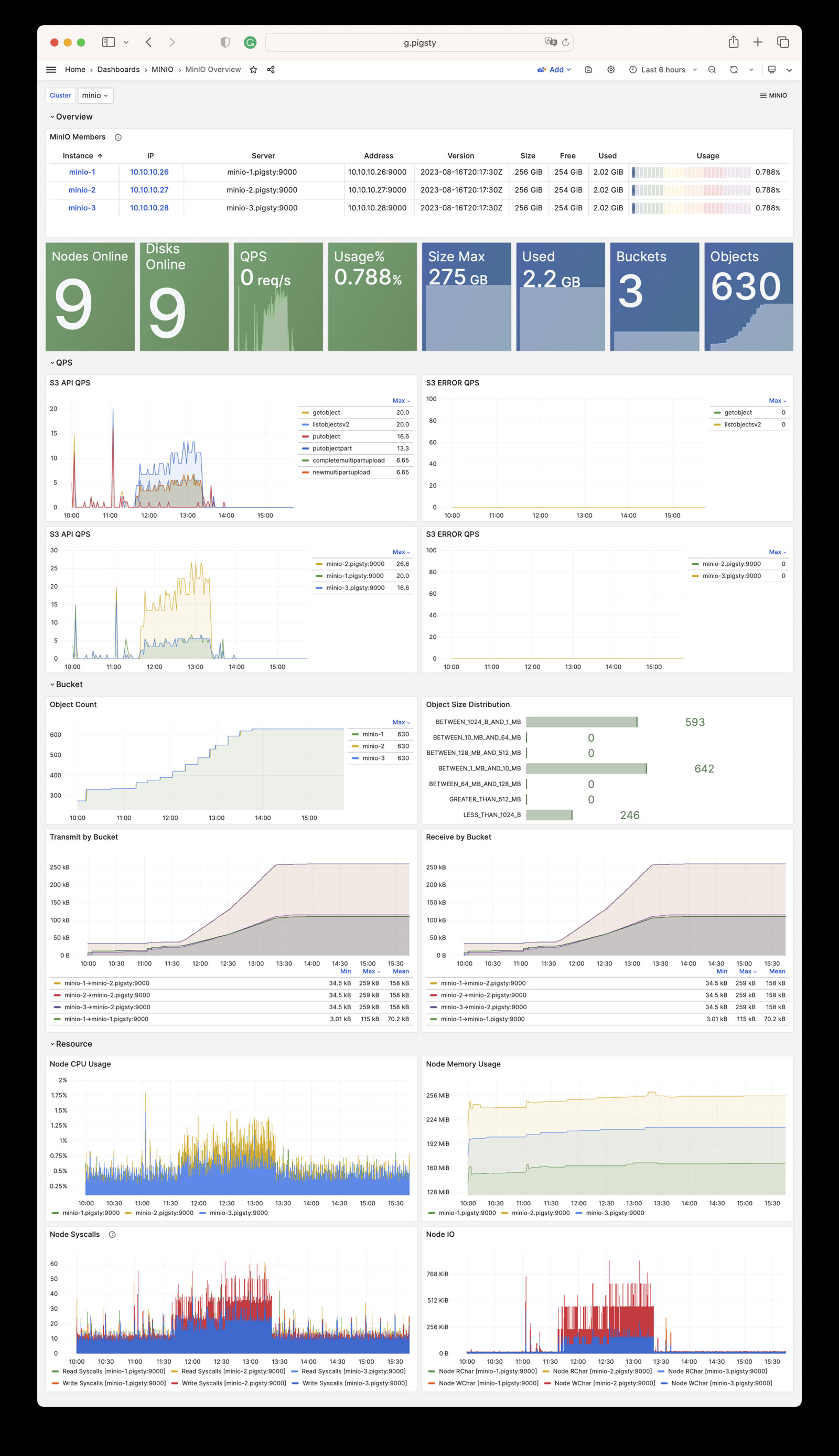
Pigsty provides the compatibility-named MinIO Overview / MinIO Instance dashboards for Silo Metrics V3 data, system logs, and instance state.
Alert Rules
The current files/victoria/rules/minio.yml defines five alerts for Silo:
| Alert | Condition Summary | Severity |
|---|---|---|
MinioServerDown | minio_up < 1 for 1 minute | CRIT |
MinioNodeOffline | Five-minute average offline-node count above 0 for 3 minutes | WARN |
MinioDiskOffline | Five-minute average offline-drive count above 0 for 3 minutes | WARN |
MinioErasureSetUnhealthy | Any erasure set’s overall health below 1 for 1 minute | CRIT |
MinioClusterCapacityHigh | Usable capacity utilization above 90% for 15 minutes | WARN |
Key expressions use Metrics V3 names:
7 - Metrics
The MINIO module collects Silo metrics through /minio/metrics/v3. The metric set varies with the server version and enabled features. This page describes the stable interfaces used by current dashboards and alerts. A complete scrape from one version is not a permanent interface contract.
Stable Identity Labels
All object-storage targets use these Pigsty labels:
| Label | Meaning | Example |
|---|---|---|
job | Fixed module namespace | minio |
flavor | Actual backend | silo |
cls | minio_cluster identity | minio |
ins | <minio_cluster>-<minio_seq> instance identity | minio-1 |
ip | Inventory management address | 10.10.10.10 |
instance | Metric target address | 10.10.10.10:9000 |
Queries and recording rules should prefer the stable cls, ins, and ip identity labels.
Silo Metrics V3
Each Silo instance exposes only the V3 root endpoint, /minio/metrics/v3. Current key metrics are:
| Category | Key Metrics | Meaning |
|---|---|---|
| Liveness | minio_up | Pigsty scrape/health state for the instance |
| Nodes | minio_cluster_health_nodes_online_count, minio_cluster_health_nodes_offline_count | Online and offline nodes |
| Drives | minio_cluster_health_drives_online_count, minio_cluster_health_drives_offline_count | Online and offline drives |
| Capacity | minio_cluster_health_capacity_raw_total_bytes | Raw total capacity |
| Capacity | minio_cluster_health_capacity_usable_total_bytes, minio_cluster_health_capacity_usable_free_bytes | Usable total and free capacity |
| Objects | minio_cluster_usage_objects_count, minio_cluster_usage_objects_total_bytes | Object count and used bytes |
| Buckets | minio_cluster_usage_objects_buckets_count | Aggregated bucket count |
| Erasure coding | minio_cluster_erasure_set_overall_health, minio_cluster_erasure_set_overall_write_quorum | Erasure-set health and write quorum |
| API | minio_api_requests_total, minio_api_requests_errors_total, minio_api_requests_4xx_errors_total | API requests and errors |
| API | minio_api_requests_inflight_total, minio_api_requests_incoming_total | In-flight and incoming requests |
| Traffic | minio_api_requests_traffic_received_bytes, minio_api_requests_traffic_sent_bytes | Received and sent bytes |
| Latency | minio_api_requests_ttfb_seconds_distribution | Time-to-first-byte distribution |
| Process | minio_system_process_cpu_total_seconds, minio_system_process_resident_memory_bytes | Process CPU and resident memory |
| System | minio_system_drive_free_bytes, minio_system_drive_used_bytes, minio_system_drive_health | Per-drive capacity and health |
| Audit | minio_audit_total_messages | Audit-message count |
During scraping, Pigsty drops samples with a non-empty bucket label. It does not register dedicated per-bucket or replication endpoints. This policy controls the number of time series.
If you need per-bucket metrics, evaluate the time-series volume before you add a custom scrape job.
8 - FAQ
Which backend does the MINIO module deploy by default?
In v4.5.0, the current source deploys only Silo. The only valid minio_type value is silo. MINIO remains the module name for compatibility. This name does not indicate that the MinIO server is running.
- Explicitly set
minio_type: silofor new clusters. - Both
minio_type: minioandminio_type: rustfsfail during identity validation. - External MinIO, RustFS, or other S3 services can still serve as pgBackRest repositories. The current MINIO role does not manage them.
- Before upgrading a MinIO cluster managed by an older release, validate the MinIO-to-Silo data compatibility, backup, and rollback procedure.
Why does the Pigsty repository still carry MinIO or RustFS packages?
Upstream MinIO switched to source-only distribution on 2025-10-15. It put the repository in maintenance mode on 2025-12-03 and archived it on 2026-04-25.
Source-only distribution ended publication of all new prebuilt community binaries, including RPM and DEB packages.
Pigsty therefore previously maintained its own MinIO fork and packages. MinIO CVE-2025-62506 affects releases before RELEASE.2025-10-15T17-29-55Z. That release fixes the vulnerability. Both Pigsty’s later MinIO fork and the current Silo code include the fix.
The Pigsty Infra repository still provides MinIO/RustFS RPM and DEB packages and their build scripts. However, the v4.5 MINIO module does not support those backends. The current role accepts only Silo. Deploy and maintain other services separately.
Why is HTTPS enabled for object storage by default?
Pigsty’s default pgBackRest minio repository configuration uses HTTPS to protect backup traffic. It verifies the certificate through /etc/pki/ca.crt.
pgBackRest also permits HTTP. If you explicitly select HTTP, update the TLS options in pgbackrest_repo and disable minio_https. The server-side switch alone is insufficient.
Getting an invalid certificate error when accessing Silo from containers?
Pigsty’s private CA issues the default object-storage server certificate. The server certificate is not self-signed. Container images usually do not trust the private CA. Thus, clients such as mcli, rclone, and AWS CLI report an invalid certificate chain.
For a Node.js application, mount the Pigsty CA certificate in the container. Specify its path with NODE_EXTRA_CA_CERTS:
If Silo does not serve as a pgBackRest repository, you can disable HTTPS and use HTTP. Assess the risk of cleartext transport.
Can a Silo data path be a regular directory?
minio_data takes a directory path, not a raw disk device. /data/minio can be a regular subdirectory. For multiple nodes or drives, its backing storage must be an independent, persistent, non-root filesystem.
- If
/datais mounted from a separate local disk, cloud volume, partition, or LVM logical volume,/data/miniois valid. - If
/data/minioresides on the root filesystem, distributed Silo identifies it as a root drive. It rejects the path withdrive is part of root drive, will not be used. - Every path in a single-node multi-drive deployment should map to a separate filesystem. Multiple directories on one drive do not emulate multiple drives.
- Only single-node single-disk may use a regular directory directly on the root filesystem, and only for development, testing, or non-critical use.
Inspect the backing mounts with:
See Configuration: Storage Paths and Mounts for details and Multi-Node Single-Disk for the three-node topology.
How do I add new members to an existing Silo cluster?
Plan Silo cluster capacity before deployment because adding a storage pool requires a global restart.
Scale the cluster by adding a group of server nodes as a new storage pool.
You cannot directly change the node or disk count of an existing storage pool. To expand, add a new pool.
For the procedure, see Pigsty’s Expand Cluster guide. The upstream Expand MinIO Deployment reference describes the compatible interface that Silo retains.
How do I remove a Silo cluster?
Starting with Pigsty v3.6, cluster removal uses the dedicated minio-rm.yml playbook:
The removal role also defaults minio_type to silo. It rejects other values. The examples still spell it out so the operator can review it together with cluster identity and paths before deletion.
minio_rm_data defaults to true, and the removal role tolerates some cleanup errors. Before a real run, verify the exact -l target and a recent backup. After the run, inspect the service, data directories, DNS records, and monitoring targets. The playbook return status alone does not confirm cleanup.
If you have enabled minio_safeguard protection, you need to explicitly override it to perform removal:
What’s the difference between mcli and mc commands?
Pigsty distributes the compatible MinIO client as the mcli command and package. Upstream uses mc. The Pigsty name avoids a conflict with the Midnight Commander file manager.
The mcli client retains the mc CLI. Its exact version can change with Pigsty packaging. See the MinIO Client documentation for the command reference.
How do I monitor Silo cluster status?
Pigsty provides out-of-the-box monitoring for Silo. Dashboard and metric names retain MinIO-compatible naming:
- Grafana Dashboards: MinIO Overview and MinIO Instance
- Alerting Rules: MinIO-compatible server-down, node-offline, and disk-offline alerts
- Silo Built-in Console: Access via
https://<minio-ip>:9001
For details, see Monitoring.