Skip to content

This is the multi-page printable view of this section. .

Return to the regular view of this page.

Misc

Miscellaneous Topics

1 - Service / Access

Separate read and write operations, route traffic correctly, and deliver PostgreSQL cluster capabilities reliably.

Separate read and write operations, route traffic correctly, and deliver PostgreSQL cluster capabilities reliably.

A service exposes database cluster capabilities to clients. It hides the details of the underlying cluster.

Services provide stable access in production, including after automatic failover in high-availability clusters. Single-node users usually do not need services.


Single-Node Users

Services are intended for production environments. Personal users and single-node clusters can connect directly through an instance name or IP address.

For example, Pigsty’s default single-node pg-meta.meta database can be connected directly using three different users:

psql postgres://dbuser_dba:[email protected]/meta     # Connect directly with DBA superuser
psql postgres://dbuser_meta:[email protected]/meta   # Connect with default business admin user
psql postgres://dbuser_view:DBUser.Viewer@pg-meta/meta     # Connect with default read-only user via instance domain name

Service Overview

Production environments use primary-replica clusters with replication. Exactly one instance, the primary, leads the cluster and accepts writes. Replicas continuously fetch change logs from the primary to keep their data consistent. Replicas also handle read-only requests, which substantially reduces primary load in workloads with many reads. Thus, separating write requests from read-only requests is common.

For frequent short connections, Pgbouncer pools requests to reduce the cost of connection and backend process creation. Operations such as ETL and database changes need direct connections that bypass the pool. Failures in high-availability clusters can trigger failover and change the primary. Write traffic must follow the new primary automatically. Services represent these access requirements: separate reads and writes, pooled or direct connections, and automatic routing after failover.

Typically, database clusters must provide this most basic service:

  • Read-Write Service (primary): Can read and write to the database

For production database clusters, at least these two services should be provided:

  • Read-Write Service (primary): Write data: can only be carried by the primary.
  • Read-Only Service (replica): Read data: can be carried by replicas, or by the primary if there are no replicas

In addition, depending on specific business scenarios, there may be other services, such as:

  • Default Direct Service (default): Allows (admin) users to access the database directly, bypassing the connection pool
  • Offline Replica Service (offline): Dedicated replicas that do not handle online read-only traffic, used for ETL and analytical queries
  • Standby Replica Service (standby): Read-only service without replication lag, handled by sync standby/primary for read-only queries
  • Delayed Replica Service (delayed): Access old data from the same cluster at a previous point in time, handled by delayed replica

Default Services

By default, Pigsty provides four services for each PostgreSQL cluster:

ServicePortDescription
primary5433Production read-write, connects to primary connection pool (6432)
replica5434Production read-only, connects to replica connection pool (6432)
default5436Admin, ETL writes, direct access to primary (5432)
offline5438OLAP, ETL, personal users, interactive queries

Taking the default pg-meta cluster as an example, it provides four default services:

psql postgres://dbuser_meta:DBUser.Meta@pg-meta:5433/meta   # pg-meta-primary : production read-write via primary pgbouncer(6432)
psql postgres://dbuser_meta:DBUser.Meta@pg-meta:5434/meta   # pg-meta-replica : production read-only via replica pgbouncer(6432)
psql postgres://dbuser_dba:DBUser.DBA@pg-meta:5436/meta     # pg-meta-default : direct connection via primary postgres(5432)
psql postgres://dbuser_stats:DBUser.Stats@pg-meta:5438/meta # pg-meta-offline : direct connection via offline postgres(5432)

You can see how these four services work from the sample cluster architecture diagram:
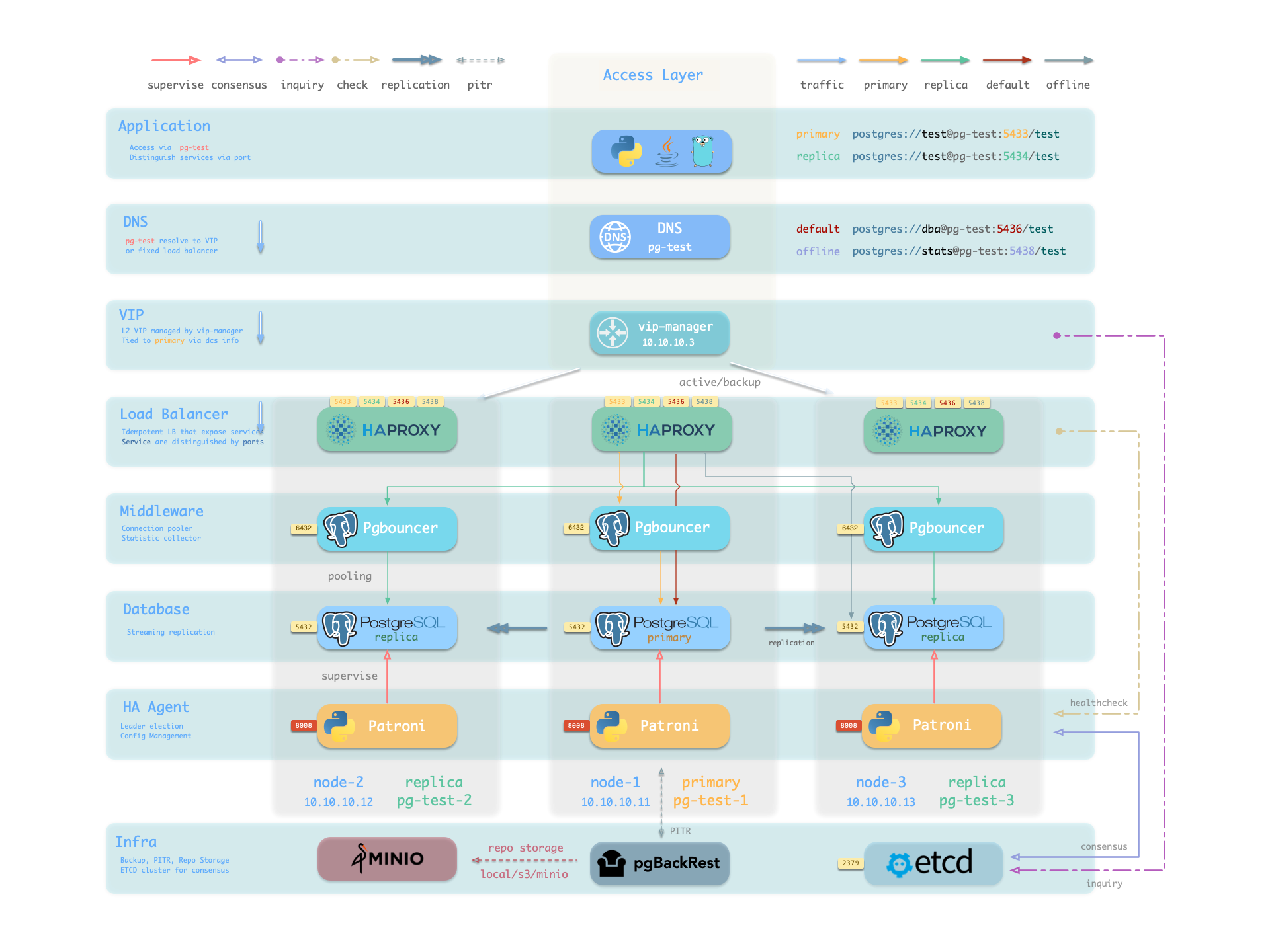
pigsty-ha.png

pg_dns_target controls the DNS target of pg-meta. The default, auto, selects the L2 VIP when enabled. Otherwise, it selects the IP address of the inventory primary. VIP is disabled by default. See Accessing Services.


Service Implementation

Pigsty implements services with HAProxy on nodes. Different ports identify different services.

Pigsty enables HAProxy on each managed node, including database nodes. Database nodes have primary or replica roles, but each node exposes the same services. With the correct service port, you can access the primary read-write service through a replica node. Thus, access to any cluster instance gives access to all cluster services.

This design is similar to Kubernetes NodePort services. Each Pigsty service has two core elements:

  1. Access endpoints exposed through NodePort (port number, where to access?)
  2. Target instances selected through Selectors (instance list, who carries the load?)

Pigsty provides services up to the cluster HAProxy endpoint. Clients can reach these load balancers in several ways. See Accessing Services.

Declare all services in configuration files. For example, pg_default_services defines the default PostgreSQL services:

pg_default_services:
- { name: primary ,port: 5433 ,dest: default  ,check: /primary   ,selector: "[]" }
- { name: replica ,port: 5434 ,dest: default  ,check: /read-only ,selector: "[]" , backup: "[? pg_role == `primary` || pg_role == `offline` ]" }
- { name: default ,port: 5436 ,dest: postgres ,check: /primary   ,selector: "[]" }
- { name: offline ,port: 5438 ,dest: postgres ,check: /replica   ,selector: "[? pg_role == `offline` || pg_offline_query ]" , backup: "[? pg_role == `replica` && !pg_offline_query]"}

Define additional services in pg_services. Both pg_default_services and pg_services are arrays of service definition objects.


Defining Services

Pigsty allows you to define your own services:

  • pg_default_services: Services uniformly exposed by all PostgreSQL clusters, four by default.
  • pg_services: Additional PostgreSQL services, can be defined at global or cluster level as needed.
  • haproxy_services: Directly customize HAProxy service content, can be used for accessing other components

For PostgreSQL clusters, you usually need only the first two parameters. Each service generates a configuration file on every related HAProxy instance: /etc/haproxy/conf.d/<pg_cluster>-<service>.cfg. The following custom standby service provides read-only access without replication lag. Add its definition to pg_services:

- name: standby                   # Required, service name, final svc name uses `pg_cluster` as prefix, e.g.: pg-meta-standby
  port: 5435                      # Required, exposed service port (as kubernetes service node port mode)
  ip: "*"                         # Optional, IP address the service binds to, all IP addresses by default
  selector: "[]"                  # Required, service member selector, uses JMESPath to filter configuration manifest
  backup: "[? pg_role == `primary`]"  # Optional, service member selector (backup), instances selected here only carry the service when all default selector instances are down
  dest: default                   # Optional, target port, default|postgres|pgbouncer|<port_number>, defaults to 'default', meaning pg_default_service_dest decides
  check: /sync                    # Optional, health check URL path, defaults to /, here uses Patroni API: /sync, only sync standby and primary return 200 healthy status code
  maxconn: 5000                   # Optional, maximum number of allowed frontend connections, defaults to 5000
  balance: roundrobin             # Optional, haproxy load balancing algorithm (defaults to roundrobin, other options: leastconn)
  options: 'inter 3s fastinter 1s downinter 5s rise 3 fall 3 on-marked-down shutdown-sessions slowstart 30s maxconn 3000 maxqueue 128 weight 100'

For the three-node pg-test example cluster, Pigsty generates /etc/haproxy/conf.d/pg-test-standby.cfg from this definition:

#---------------------------------------------------------------------
# service: pg-test-standby @ 10.10.10.11:5435
#---------------------------------------------------------------------
# service instances 10.10.10.11, 10.10.10.13, 10.10.10.12
# service backups   10.10.10.11
listen pg-test-standby
    bind *:5435            # <--- Binds port 5435 on all IP addresses
    mode tcp               # <--- Load balancer works on TCP protocol
    maxconn 5000           # <--- Maximum connections 5000, can be increased as needed
    balance roundrobin     # <--- Load balancing algorithm is rr round-robin, can also use leastconn
    option httpchk         # <--- Enable HTTP health check
    option http-keep-alive # <--- Keep HTTP connection
    http-check send meth OPTIONS uri /sync   # <---- Here uses /sync, Patroni health check API, only sync standby and primary return 200 healthy status code
    http-check expect status 200             # <---- Health check return code 200 means normal
    default-server inter 3s fastinter 1s downinter 5s rise 3 fall 3 on-marked-down shutdown-sessions slowstart 30s maxconn 3000 maxqueue 128 weight 100
    # servers: selector "[]" includes all three pg-test instances as pg-test-standby backends; /sync admits only the primary and synchronous standby.
    server pg-test-1 10.10.10.11:6432 check port 8008 weight 100 backup  # <----- Only primary satisfies condition pg_role == `primary`, selected by backup selector
    server pg-test-3 10.10.10.13:6432 check port 8008 weight 100         #        Therefore serves as service fallback instance: normally doesn't handle requests, only handles read-only requests when all other replicas fail, thus maximally avoiding read-write service being affected by read-only service
    server pg-test-2 10.10.10.12:6432 check port 8008 weight 100         #

The selector: "[]" expression includes all three pg-test instances in the pg-test-standby backend list. However, the Patroni /sync health check returns HTTP 200 only for the primary and synchronous standby. Only those instances can handle requests. The primary also matches pg_role == primary, so the backup selector marks it as a backup server. It handles requests only when no synchronous standby can do so.


Primary Service

The Primary service provides cluster read-write access on port 5433. It is a critical production service. Its definition is:

- { name: primary ,port: 5433 ,dest: default  ,check: /primary   ,selector: "[]" }
  • selector: "[]" includes all cluster members in the Primary service.
  • Only the primary passes check: /primary and receives traffic.
  • dest: default makes pg_default_service_dest control the destination.
  • Pigsty replaces the dest value default with pg_default_service_dest, whose default is pgbouncer.
  • Thus, the default destination is the primary connection pool on pgbouncer_port, normally 6432.

Set pg_default_service_dest to postgres to bypass the connection pool. The Primary service then connects directly to pg_port, normally 5432. Use this setting when you do not need pooling.

Example: haproxy configuration for pg-test-primary
listen pg-test-primary
    bind *:5433         # <--- primary service defaults to port 5433
    mode tcp
    maxconn 5000
    balance roundrobin
    option httpchk
    option http-keep-alive
    http-check send meth OPTIONS uri /primary # <--- primary service defaults to Patroni RestAPI /primary health check
    http-check expect status 200
    default-server inter 3s fastinter 1s downinter 5s rise 3 fall 3 on-marked-down shutdown-sessions slowstart 30s maxconn 3000 maxqueue 128 weight 100
    # servers
    server pg-test-1 10.10.10.11:6432 check port 8008 weight 100
    server pg-test-3 10.10.10.13:6432 check port 8008 weight 100
    server pg-test-2 10.10.10.12:6432 check port 8008 weight 100

Patroni high availability ensures that no more than one instance passes the /primary health check at a time. Thus, the Primary service always routes traffic to the primary.

The Primary service also protects traffic routing during a split-brain condition. For example, kill -9 can stop primary Patroni without a watchdog. HAProxy sends traffic only when Patroni is alive and reports primary status. This protection is unavailable with a direct database connection.


Replica Service

The Replica service provides read-only access on port 5434. It is the next most important production service after Primary. Its definition is:

- { name: replica ,port: 5434 ,dest: default  ,check: /read-only ,selector: "[]" , backup: "[? pg_role == `primary` || pg_role == `offline` ]" }
  • selector: "[]" includes all cluster members in the Replica service.
  • All instances can pass check: /read-only and receive traffic.
  • The backup selector [? pg_role == 'primary' || pg_role == 'offline' ] marks the primary and offline replicas as backups.
  • The primary or offline replicas receive traffic only when all normal replicas are down.
  • dest: default makes pg_default_service_dest control the destination.
  • Pigsty replaces the dest value default with pg_default_service_dest, whose default is pgbouncer, as for the Primary service.
  • Thus, the default destination is the replica connection pool on pgbouncer_port, normally 6432.
Example: haproxy configuration for pg-test-replica
listen pg-test-replica
    bind *:5434
    mode tcp
    maxconn 5000
    balance roundrobin
    option httpchk
    option http-keep-alive
    http-check send meth OPTIONS uri /read-only
    http-check expect status 200
    default-server inter 3s fastinter 1s downinter 5s rise 3 fall 3 on-marked-down shutdown-sessions slowstart 30s maxconn 3000 maxqueue 128 weight 100
    # servers
    server pg-test-1 10.10.10.11:6432 check port 8008 weight 100 backup
    server pg-test-3 10.10.10.13:6432 check port 8008 weight 100
    server pg-test-2 10.10.10.12:6432 check port 8008 weight 100

The Replica service first sends read-only requests to available dedicated replicas. It sends them to the primary only when all replicas are down. For a two-node primary-replica cluster, this means it uses the replica while available and the primary when the replica fails.

The Replica service uses dedicated Offline instances only when all dedicated read-only instances are down. This separates fast online queries from slow offline queries to reduce interference.


Default Service

The Default service provides services on port 5436. It is a variant of the Primary service.

The Default service always bypasses the connection pool and connects directly to primary PostgreSQL. Use it for administration connections, ETL writes, and change data capture (CDC).

- { name: default ,port: 5436 ,dest: postgres ,check: /primary   ,selector: "[]" }

If pg_default_service_dest is postgres, Default and Primary have the same behavior. Only their names and ports differ. In this case, you can remove Default from the default services.

Example: haproxy configuration for pg-test-default
listen pg-test-default
    bind *:5436         # <--- Except for listening port/target port and service name, other configurations are exactly the same as primary service
    mode tcp
    maxconn 5000
    balance roundrobin
    option httpchk
    option http-keep-alive
    http-check send meth OPTIONS uri /primary
    http-check expect status 200
    default-server inter 3s fastinter 1s downinter 5s rise 3 fall 3 on-marked-down shutdown-sessions slowstart 30s maxconn 3000 maxqueue 128 weight 100
    # servers
    server pg-test-1 10.10.10.11:5432 check port 8008 weight 100
    server pg-test-3 10.10.10.13:5432 check port 8008 weight 100
    server pg-test-2 10.10.10.12:5432 check port 8008 weight 100

Offline Service

The Offline service listens on port 5438 and connects directly to PostgreSQL without the pool. Use it for slow queries, analytical queries, ETL reads, and personal interactive queries:

- { name: offline ,port: 5438 ,dest: postgres ,check: /replica   ,selector: "[? pg_role == `offline` || pg_offline_query ]" , backup: "[? pg_role == `replica` && !pg_offline_query]"}

Offline routes traffic directly to dedicated offline replicas. It can also use normal read-only instances with the pg_offline_query flag.

  • The selector includes replicas with pg_role = offline and normal read-only instances with pg_offline_query = true.
  • Dedicated offline replicas do not handle Replica service requests by default. This separates fast and slow requests. Flagged normal replicas do handle those requests.
  • The backup selector includes normal replicas without the offline flag. They handle Offline traffic when dedicated or flagged offline instances fail.
  • /replica returns HTTP 200 only for replicas. It rejects the primary, even when the primary is the only remaining cluster instance.
  • Neither selector includes the primary. Thus, Offline traffic never reaches or affects the primary.
Example: haproxy configuration for pg-test-offline
listen pg-test-offline
    bind *:5438
    mode tcp
    maxconn 5000
    balance roundrobin
    option httpchk
    option http-keep-alive
    http-check send meth OPTIONS uri /replica
    http-check expect status 200
    default-server inter 3s fastinter 1s downinter 5s rise 3 fall 3 on-marked-down shutdown-sessions slowstart 30s maxconn 3000 maxqueue 128 weight 100
    # servers
    server pg-test-3 10.10.10.13:5432 check port 8008 weight 100
    server pg-test-2 10.10.10.12:5432 check port 8008 weight 100 backup

Offline provides restricted read-only access for personal interactive queries, slow analytical or ETL queries, and long transactions.

The Offline service needs special handling after a switchover. The HAProxy /replica health check automatically rejects the new primary. However, selector uses static pg_role and pg_offline_query inventory labels. In a two-node primary-replica cluster, only the replica may serve Offline queries. A switchover can then leave no eligible backend temporarily. Reloading an unchanged inventory does not add the old primary to the backend list.

First update the inventory labels or pg_offline_query for the new plan, then reload services. Alternatively, switch the primary back.

For a simple business model, you can remove Default and Offline. Use Primary and Replica to connect directly to the database.


Reload Services

Reload services after changes to cluster membership, service definitions, static selector labels, or relative weights. Patroni health checks handle normal Primary and Replica switchovers automatically. These switchovers need no separate reload.

bin/pgsql-svc <cls> [ip...]         # Reload services for lb cluster or lb instance
# ./pgsql.yml -t pg_service         # Actual ansible task for reloading services

Accessing Services

Pigsty provides services up to the cluster HAProxy endpoint. Clients can reach these load balancers in several ways.

The typical approach is to use DNS or VIP access, binding them to all or any number of load balancers in the cluster.
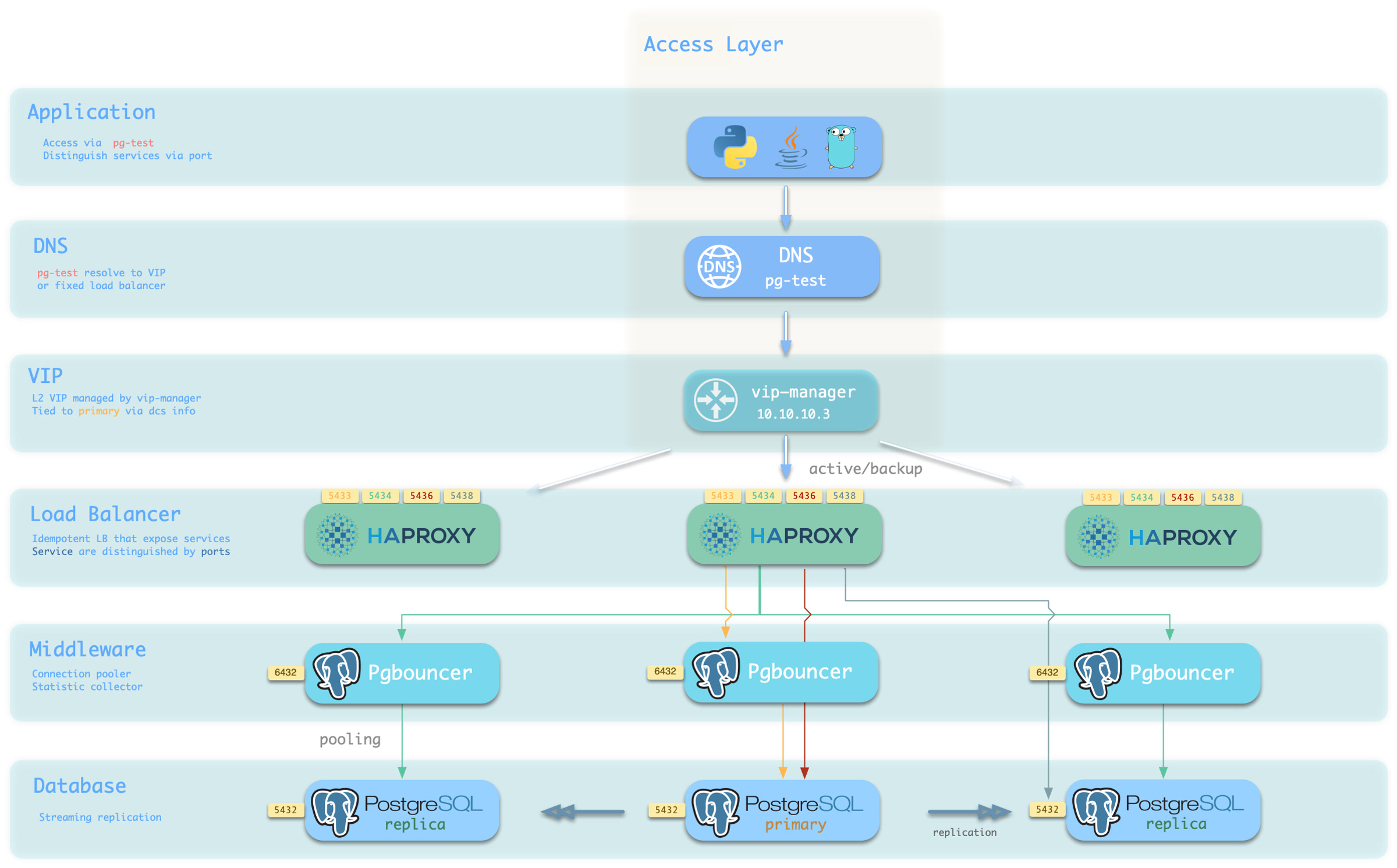
pigsty-access.jpg

You can use different host & port combinations, which provide PostgreSQL services in different ways.

Host

TypeExampleDescription
Cluster Domainpg-testAccess via cluster domain name (resolved by dnsmasq @ infra node)
Cluster VIP Address10.10.10.3Access via L2 VIP address managed by vip-manager, bound to primary node
Instance Hostnamepg-test-1Access via any instance hostname (resolved by dnsmasq @ infra node)
Instance IP Address10.10.10.11Access any instance’s IP address

Port

Pigsty uses different ports to distinguish pg services

PortServiceTypeDescription
5432postgresDatabaseDirect access to postgres server
6432pgbouncerMiddlewareAccess postgres via connection pool middleware
5433primaryServiceAccess primary pgbouncer (or postgres)
5434replicaServiceAccess replica pgbouncer (or postgres)
5436defaultServiceAccess primary postgres
5438offlineServiceAccess offline postgres

Combinations

# Access via cluster domain name (the examples below assume L2 VIP is enabled; without it, auto targets the inventory primary IP)
postgres://test@pg-test:5432/test # DNS -> L2 VIP -> Primary direct connection
postgres://test@pg-test:6432/test # DNS -> L2 VIP -> Primary connection pool -> Primary
postgres://test@pg-test:5433/test # DNS -> L2 VIP -> HAProxy -> Primary connection pool -> Primary
postgres://test@pg-test:5434/test # DNS -> L2 VIP -> HAProxy -> Replica connection pool -> Replica
postgres://dbuser_dba@pg-test:5436/test # DNS -> L2 VIP -> HAProxy -> Primary direct connection (for admin)
postgres://dbuser_stats@pg-test:5438/test # DNS -> L2 VIP -> HAProxy -> Offline direct connection (for ETL/personal queries)

# Direct access via cluster VIP
postgres://[email protected]:5432/test # L2 VIP -> Primary direct access
postgres://[email protected]:6432/test # L2 VIP -> Primary connection pool -> Primary
postgres://[email protected]:5433/test # L2 VIP -> HAProxy -> Primary connection pool -> Primary
postgres://[email protected]:5434/test # L2 VIP -> HAProxy -> Replica connection pool -> Replica
postgres://[email protected]:5436/test # L2 VIP -> HAProxy -> Primary direct connection (for admin)
postgres://[email protected]:5438/test # L2 VIP -> HAProxy -> Offline direct connection (for ETL/personal queries)

# Specify any cluster instance name directly
postgres://test@pg-test-1:5432/test # DNS -> Database instance direct connection (single instance access)
postgres://test@pg-test-1:6432/test # DNS -> Connection pool -> Database
postgres://test@pg-test-1:5433/test # DNS -> HAProxy -> Connection pool -> Database read/write
postgres://test@pg-test-1:5434/test # DNS -> HAProxy -> Connection pool -> Database read-only
postgres://dbuser_dba@pg-test-1:5436/test # DNS -> HAProxy -> Database direct connection
postgres://dbuser_stats@pg-test-1:5438/test # DNS -> HAProxy -> Database offline read/write

# Specify any cluster instance IP directly
postgres://[email protected]:5432/test # Database instance direct connection (direct instance specification, no automatic traffic distribution)
postgres://[email protected]:6432/test # Connection pool -> Database
postgres://[email protected]:5433/test # HAProxy -> Connection pool -> Database read/write
postgres://[email protected]:5434/test # HAProxy -> Connection pool -> Database read-only
postgres://[email protected]:5436/test # HAProxy -> Database direct connection
postgres://[email protected]:5438/test # HAProxy -> Database offline read/write

# Smart client: automatic read-write separation
postgres://[email protected]:6432,10.10.10.12:6432,10.10.10.13:6432/test?target_session_attrs=primary
postgres://[email protected]:6432,10.10.10.12:6432,10.10.10.13:6432/test?target_session_attrs=prefer-standby

Overriding Services

You can override service defaults in several ways. A common requirement is for Primary and Replica to bypass Pgbouncer and connect directly to PostgreSQL.

Set pg_default_service_dest to postgres. Services with svc.dest='default' then use postgres instead of the default pgbouncer destination.

If Primary already connects to PostgreSQL, Default is redundant. You can remove it.

If you do not need to distinguish personal interactive queries from slow analytical or ETL queries, you can remove Offline. Remove it from pg_default_services.

If replicas do not need to handle online read-only traffic, you can remove Replica from the default list.


Delegating Services

Pigsty exposes PostgreSQL services through HAProxy on nodes. All HAProxy instances in a cluster use the same service definitions.

You can instead delegate PostgreSQL services to a specific node group, such as a dedicated HAProxy load balancer cluster.

Override pg_default_services and set pg_service_provider to the proxy group name.

This example exposes the PostgreSQL Primary service on port 10013 through the proxy HAProxy node group.

pg_service_provider: proxy       # Use load balancer from `proxy` group on port 10013
pg_default_services:  [{ name: primary ,port: 10013 ,dest: postgres  ,check: /primary   ,selector: "[]" }]

Use a unique port for each delegated service in the proxy cluster.

An example of using a dedicated load balancer cluster is provided in the 20-node production environment simulation sandbox: conf/ha/simu.yml

2 - Access Control

Entry points for PostgreSQL access-control concepts, configuration, and administration.

Pigsty access-control documentation is organized by purpose:

dbrole_offline provides independent read-only object privileges. It does not restrict instance scope automatically. To allow access only on offline instances, set role: offline explicitly on the corresponding HBA rule. Verify the generated pg_hba.conf on both online and offline instances.

3 - User / Role

Users/roles refer to logical objects within a database cluster created using the SQL commands CREATE USER/ROLE.

In this context, users refer to logical objects within a database cluster created using the SQL commands CREATE USER/ROLE.

In PostgreSQL, users belong to the database cluster, rather than a specific database. Create business users before you create business databases.


Defining Users

Pigsty defines roles and users in database clusters through two configuration parameters:

  • pg_default_roles: Defines globally unified roles and users
  • pg_users: Defines business users and roles at the database cluster level

The first parameter defines roles and users shared across the environment. The second defines business roles and users for individual clusters. Both use arrays of user definition objects.

You can define multiple users and roles. Pigsty creates global objects first, then cluster-level objects, following array order within each group. Thus, later users can belong to roles defined earlier.

Here is the business user definition for the default cluster pg-meta in the Pigsty demo environment:

pg-meta:
  hosts: { 10.10.10.10: { pg_seq: 1, pg_role: primary } }
  vars:
    pg_cluster: pg-meta
    pg_users:
      - {name: dbuser_meta     ,password: DBUser.Meta     ,pgbouncer: true ,roles: [dbrole_admin]    ,comment: pigsty admin user }
      - {name: dbuser_view     ,password: DBUser.Viewer   ,pgbouncer: true ,roles: [dbrole_readonly] ,comment: read-only viewer for meta database }
      - {name: dbuser_grafana  ,password: DBUser.Grafana  ,pgbouncer: true ,roles: [dbrole_admin]    ,comment: admin user for grafana database    }
      - {name: dbuser_bytebase ,password: DBUser.Bytebase ,pgbouncer: true ,roles: [dbrole_admin]    ,comment: admin user for bytebase database   }
      - {name: dbuser_kong     ,password: DBUser.Kong     ,pgbouncer: true ,roles: [dbrole_admin]    ,comment: admin user for kong api gateway    }
      - {name: dbuser_gitea    ,password: DBUser.Gitea    ,pgbouncer: true ,roles: [dbrole_admin]    ,comment: admin user for gitea service       }
      - {name: dbuser_wiki     ,password: DBUser.Wiki     ,pgbouncer: true ,roles: [dbrole_admin]    ,comment: admin user for wiki.js service     }
      - {name: dbuser_noco     ,password: DBUser.Noco     ,pgbouncer: true ,roles: [dbrole_admin]    ,comment: admin user for nocodb service      }

Each user/role definition is an object that may include the following fields. Using dbuser_meta as an example:

- name: dbuser_meta               # Required, `name` is the only mandatory field in user definition
  password: DBUser.Meta           # Optional, password can be scram-sha-256 hash string or plaintext
  login: true                     # Optional, can login by default
  superuser: false                # Optional, default is false, is this a superuser?
  createdb: false                 # Optional, default is false, can create databases?
  createrole: false               # Optional, default is false, can create roles?
  inherit: true                   # Optional, by default this role can use inherited privileges?
  replication: false              # Optional, default is false, can this role perform replication?
  bypassrls: false                # Optional, default is false, can this role bypass row-level security?
  pgbouncer: true                 # Optional, default is false, add this user to pgbouncer user list? (production users using connection pool should explicitly set to true)
  connlimit: -1                   # Optional, user connection limit, default -1 disables limit
  expire_in: 3650                 # Optional, this role expires: calculated from creation + n days (higher priority than expire_at)
  expire_at: '2030-12-31'         # Optional, when this role expires, use YYYY-MM-DD format string to specify a date (lower priority than expire_in)
  comment: pigsty admin user      # Optional, description and comment string for this user/role
  roles: [dbrole_admin]           # Optional, default roles are: dbrole_{admin,readonly,readwrite,offline}
  parameters: {}                  # Optional, use `ALTER ROLE SET` to configure role-level database parameters for this role
  pool_mode: transaction          # Optional, pgbouncer pool mode defaulting to transaction, user level
  pool_connlimit: 100             # Optional, user-level max pool connections; omitted inherits global default 100
  search_path: public             # Optional, key-value configuration parameters per postgresql documentation (e.g., use pigsty as default search_path)
  • The only required field is name. Use a valid username that is unique within the PostgreSQL cluster.
  • Roles do not need a password. Business users with login access usually need one.
  • password accepts plaintext, scram-sha-256, or md5 hash strings. Avoid plaintext passwords.
  • Pigsty creates users and roles in array order. Define roles and groups before their members.
  • login, superuser, createdb, createrole, inherit, replication, and bypassrls are Boolean flags.
  • pgbouncer is disabled by default. To add business users to the pool user list, explicitly set it to true.

ACL System

Pigsty provides a built-in access control / ACL model. Assign its default business roles to users as required:

  • dbrole_readwrite: Role with global read-write access (production accounts primarily used by business should have database read-write privileges)
  • dbrole_readonly: Role with global read-only access (if other businesses need read-only access, use this role)
  • dbrole_admin: Role with DDL privileges (business administrators, scenarios requiring table creation in applications)
  • dbrole_offline: Independent read-only role for ad hoc queries, ETL, and analytics; restrict its instance scope explicitly through HBA

To define your own ACL system, consider these parameters and templates:


Creating Users

During the cluster initialization PROVISION phase, Pigsty creates users and roles one at a time. It uses the definitions in pg_default_roles and pg_users. To create users on an existing cluster, use bin/pgsql-user. Add the definition to all.children.<cls>.pg_users, then run:

bin/pgsql-user <cls> <username>    # pgsql-user.yml -l <cls> -e username=<username>

The user creation playbook is always idempotent, unlike the database creation playbook. If the target user exists, Pigsty changes its attributes to match the configuration. Thus, you can usually repeat the playbook on existing clusters.

Please Use Playbooks to Create Users

Manual business user creation is not recommended, especially with the default Pgbouncer connection pool. If you create users manually, you must maintain the Pgbouncer user list and keep it consistent with PostgreSQL. The bin/pgsql-user tool and pgsql-user.yml playbook also add users to the Pgbouncer user list.


Modifying Users

The method for modifying PostgreSQL user attributes is the same as Creating Users.

First, change the required attributes in the user definition. Then run this command to apply them:

bin/pgsql-user <cls> <username>    # pgsql-user.yml -l <cls> -e username=<username>

User modification changes attributes with ALTER USER; it does not delete users. It also keeps existing privileges and groups. It uses GRANT to add new roles.


Pgbouncer Users

Pigsty enables Pgbouncer connection pooling and manages its users by default.

Pigsty adds all users in pg_users that explicitly have the pgbouncer: true flag to the pgbouncer user list.

Users in the Pgbouncer connection pool are listed in /etc/pgbouncer/userlist.txt:

"postgres" ""
"dbuser_wiki" "SCRAM-SHA-256$4096:+77dyhrPeFDT/TptHs7/7Q==$KeatuohpKIYzHPCt/tqBu85vI11o9mar/by0hHYM2W8=:X9gig4JtjoS8Y/o1vQsIX/gY1Fns8ynTXkbWOjUfbRQ="
"dbuser_view" "SCRAM-SHA-256$4096:DFoZHU/DXsHL8MJ8regdEw==$gx9sUGgpVpdSM4o6A2R9PKAUkAsRPLhLoBDLBUYtKS0=:MujSgKe6rxcIUMv4GnyXJmV0YNbf39uFRZv724+X1FE="
"dbuser_monitor" "SCRAM-SHA-256$4096:fwU97ZMO/KR0ScHO5+UuBg==$CrNsmGrx1DkIGrtrD1Wjexb/aygzqQdirTO1oBZROPY=:L8+dJ+fqlMQh7y4PmVR/gbAOvYWOr+KINjeMZ8LlFww="
"dbuser_meta" "SCRAM-SHA-256$4096:leB2RQPcw1OIiRnPnOMUEg==$eyC+NIMKeoTxshJu314+BmbMFpCcspzI3UFZ1RYfNyU=:fJgXcykVPvOfro2MWNkl5q38oz21nSl1dTtM65uYR1Q="
"dbuser_kong" "SCRAM-SHA-256$4096:bK8sLXIieMwFDz67/0dqXQ==$P/tCRgyKx9MC9LH3ErnKsnlOqgNd/nn2RyvThyiK6e4=:CDM8QZNHBdPf97ztusgnE7olaKDNHBN0WeAbP/nzu5A="
"dbuser_grafana" "SCRAM-SHA-256$4096:HjLdGaGmeIAGdWyn2gDt/Q==$jgoyOB8ugoce+Wqjr0EwFf8NaIEMtiTuQTg1iEJs9BM=:ed4HUFqLyB4YpRr+y25FBT7KnlFDnan6JPVT9imxzA4="
"dbuser_gitea" "SCRAM-SHA-256$4096:l1DBGCc4dtircZ8O8Fbzkw==$tpmGwgLuWPDog8IEKdsaDGtiPAxD16z09slvu+rHE74=:pYuFOSDuWSofpD9OZhG7oWvyAR0PQjJBffgHZLpLHds="
"dbuser_dba" "SCRAM-SHA-256$4096:zH8niABU7xmtblVUo2QFew==$Zj7/pq+ICZx7fDcXikiN7GLqkKFA+X5NsvAX6CMshF0=:pqevR2WpizjRecPIQjMZOm+Ap+x0kgPL2Iv5zHZs0+g="
"dbuser_bytebase" "SCRAM-SHA-256$4096:OMoTM9Zf8QcCCMD0svK5gg==$kMchqbf4iLK1U67pVOfGrERa/fY818AwqfBPhsTShNQ=:6HqWteN+AadrUnrgC0byr5A72noqnPugItQjOLFw0Wk="

User-level connection pool parameters are maintained in a separate file: /etc/pgbouncer/useropts.txt, for example:

dbuser_dba                  = pool_mode=session max_user_connections=16
dbuser_monitor              = pool_mode=session max_user_connections=8

When you create a database, Pigsty refreshes the Pgbouncer database list. An online reload applies the changes without affecting existing connections.

Pgbouncer runs as the same dbsu as PostgreSQL. The default is the postgres operating system user. As dbsu, use the pgb alias for Pgbouncer administration.

When you create users, Pigsty refreshes userlist.txt and useropts.txt automatically. An online reload applies these pool user changes, normally without affecting existing connections.

Use pgbouncer_auth_query to authenticate pool users with dynamic queries. This is an alternative when you do not want to manage pool users directly.

4 - Database

Database refers to the logical object created using the SQL command CREATE DATABASE within a database cluster.

In this context, Database refers to the logical object created using the SQL command CREATE DATABASE within a database cluster.

A PostgreSQL server can serve multiple databases at the same time. In Pigsty, define the required databases in the cluster configuration.

Pigsty customizes the default template database, template1. It creates default schemas, installs default extensions, and configures default privileges. New databases inherit these settings from template1 by default.

By default, Pigsty adds each business database to the Pgbouncer connection pool with a 1:1 mapping. pg_exporter automatically discovers all business databases and monitors their objects.


Define Database

Define business databases in the cluster parameter pg_databases. This parameter is an array of database definition objects. Pigsty creates databases in definition order. Thus, a later database can use an earlier database as its template.

Below is the database definition for the default pg-meta cluster in the Pigsty demo environment:

pg-meta:
  hosts: { 10.10.10.10: { pg_seq: 1, pg_role: primary } }
  vars:
    pg_cluster: pg-meta
    pg_databases:
      - { name: meta ,baseline: cmdb.sql ,comment: pigsty meta database ,schemas: [pigsty] ,extensions: [{name: postgis, schema: public}, {name: timescaledb}]}
      - { name: grafana  ,owner: dbuser_grafana  ,revokeconn: true ,comment: grafana primary database }
      - { name: bytebase ,owner: dbuser_bytebase ,revokeconn: true ,comment: bytebase primary database }
      - { name: kong     ,owner: dbuser_kong     ,revokeconn: true ,comment: kong the api gateway database }
      - { name: gitea    ,owner: dbuser_gitea    ,revokeconn: true ,comment: gitea meta database }
      - { name: wiki     ,owner: dbuser_wiki     ,revokeconn: true ,comment: wiki meta database }
      - { name: noco     ,owner: dbuser_noco     ,revokeconn: true ,comment: nocodb database }

Each database definition is an object. The following meta definition shows the available fields:

- name: meta                      # REQUIRED, `name` is the only mandatory field of a database definition
  baseline: cmdb.sql              # optional, database sql baseline path (relative path among ansible search path, e.g. files/)
  pgbouncer: true                 # optional, add this database to pgbouncer database list? true by default
  schemas: [pigsty]               # optional, additional schemas to be created, array of schema names
  extensions:                     # optional, additional extensions to be installed: array of extension objects
    - { name: postgis , schema: public }  # can specify which schema to install the extension in, or leave it unspecified (will install in the first schema of search_path)
    - { name: timescaledb }               # for example, some extensions create and use fixed schemas, so no schema specification is needed.
  comment: pigsty meta database   # optional, comment string for this database
  owner: postgres                 # optional, database owner, postgres by default
  template: template1             # optional, which template to use, template1 by default, target must be a template database
  encoding: UTF8                  # optional, database encoding, UTF8 by default (MUST same as template database)
  locale: C                       # optional, database locale, C by default (MUST same as template database)
  lc_collate: C                   # optional, database collate, C by default (MUST same as template database), no reason not to recommend changing.
  lc_ctype: C                     # optional, database ctype, C by default (MUST same as template database)
  tablespace: pg_default          # optional, default tablespace, 'pg_default' by default
  allowconn: true                 # optional, allow connection, true by default. false will disable connect at all
  revokeconn: false               # optional, revoke public connection privilege. false by default, when set to true, CONNECT privilege will be revoked from users other than owner and admin
  register_datasource: true       # optional, register this database to grafana datasources? true by default, explicitly set to false to skip registration
  connlimit: -1                   # optional, database connection limit, default -1 disable limit, set to positive integer will limit connections
  pool_auth_user: dbuser_meta     # optional, all connections to this pgbouncer database will be authenticated using this user (only useful when pgbouncer_auth_query is enabled)
  pool_mode: transaction          # optional, pgbouncer pool mode at database level, default transaction
  pool_size: 50                   # optional, pgbouncer pool size at database level, default 50
  pool_reserve: 30                # optional, pgbouncer reserve pool at database level, default 30
  pool_size_min: 0                # optional, pgbouncer pool size min at database level, default 0
  pool_connlimit: 100             # optional, max database connections at database level, default 100

The only required field is name. It should be a valid database name that is unique within the PostgreSQL cluster. Other parameters have defaults.

  • name: Database name, required.
  • baseline: SQL file path (Ansible search path, usually in files), used to initialize database content.
  • owner: Database owner, default is postgres
  • template: Template used when creating the database, default is template1
  • encoding: Database default character encoding, default is UTF8, default is consistent with the instance. It is recommended not to configure and modify.
  • locale: Database default locale, default is C, it is recommended not to configure, keep consistent with the instance.
  • lc_collate: Database default locale string collation, default is same as instance setting, it is recommended not to modify, must be consistent with template database. It is strongly recommended not to configure, or configure to C.
  • lc_ctype: Database default LOCALE, default is same as instance setting, it is recommended not to modify or set, must be consistent with template database. It is recommended to configure to C or en_US.UTF8.
  • allowconn: Whether to allow connection to the database, default is true, not recommended to modify.
  • revokeconn: Whether to revoke connection privilege to the database? Default is false. If true, PUBLIC CONNECT privilege on the database will be revoked. Only default users (dbsu|monitor|admin|replicator|owner) can connect. In addition, admin|owner will have GRANT OPTION, can grant connection privileges to other users.
  • tablespace: Tablespace associated with the database, default is pg_default.
  • connlimit: Database connection limit, default is -1, meaning no limit.
  • extensions: Object array, each object defines an extension in the database, and the schema in which it is installed.
  • parameters: KV object, each KV defines a parameter that needs to be modified for the database through ALTER DATABASE.
  • pgbouncer: Boolean option, whether to add this database to Pgbouncer. All databases will be added to Pgbouncer list unless explicitly specified as pgbouncer: false.
  • comment: Database comment information.
  • pool_auth_user: When pgbouncer_auth_query is enabled, all connections to this pgbouncer database will use the user specified here to execute authentication queries. You need to use a user with access to the pg_shadow table.
  • pool_mode: Database level pgbouncer pool mode, default is transaction, i.e., transaction pooling. If left empty, will use pgbouncer_poolmode parameter as default value.
  • pool_size: Database-level Pgbouncer default pool size, default 50.
  • pool_reserve: Database-level Pgbouncer reserve pool, default 30; when the regular pool is exhausted, at most this many burst connections can be added.
  • pool_size_min: Database level pgbouncer pool size min, default is 0
  • pool_connlimit: Database level pgbouncer connection pool max database connections, default is 100

By default, new databases use template1 as their template. During PG_PROVISION, Pigsty configures this template with extensions, schemas, and default privileges. New databases inherit this configuration unless you explicitly select another template.

For database access privileges, see Access Control: Database Isolation.


Create Database

Pigsty creates databases defined in pg_databases during cluster initialization. To create a database on an existing cluster, use bin/pgsql-db. Add the definition to all.children.<cls>.pg_databases, then run:

bin/pgsql-db <cls> <dbname>    # pgsql-db.yml -l <cls> -e dbname=<dbname>

Here are some considerations when creating a new database:

The database creation playbook is idempotent by default. However, a baseline script can change this behavior. Do not usually repeat the playbook on an existing database unless you know that its baseline SQL is also idempotent.

Manual database creation is not recommended, especially with the default Pgbouncer connection pool. If you create databases manually, you must maintain the Pgbouncer database list and keep it consistent with PostgreSQL. The pgsql-db tool and pgsql-db.yml playbook also add new databases to the Pgbouncer database list.

If the database owner differs from the default dbsu, postgres, verify that the owner user exists first. Always create users before you create databases.


Pgbouncer Database

By default, Pigsty enables one Pgbouncer connection pool for each PostgreSQL instance. The pool connects through the /var/run/postgresql Unix socket.

Connection pools can improve performance for short connections and reduce concurrency contention. They prevent excessive connections from overloading the database. They also provide more options during database migration.

By default, Pigsty adds all databases from pg_databases to the Pgbouncer database list. To exclude a database, set pgbouncer: false in its definition.

The Pgbouncer database list is in /etc/pgbouncer/database.txt. This file includes pool parameters from each database definition:

meta                        = host=/var/run/postgresql mode=session
grafana                     = host=/var/run/postgresql mode=transaction
bytebase                    = host=/var/run/postgresql auth_user=dbuser_meta
kong                        = host=/var/run/postgresql pool_size=32 reserve_pool=64
gitea                       = host=/var/run/postgresql min_pool_size=10
wiki                        = host=/var/run/postgresql
noco                        = host=/var/run/postgresql
mongo                       = host=/var/run/postgresql

When you create databases, Pigsty refreshes the Pgbouncer database list. An online configuration reload applies the changes, normally without affecting existing connections.

Pgbouncer runs as the same dbsu as PostgreSQL. The default is the postgres operating system user. As dbsu, use the pgb alias for Pgbouncer administration.

To route a managed Pgbouncer database to another node, edit /etc/pgbouncer/database.txt. Then reload the configuration and rebuild existing server connections:

# Change only mydb's backend target
sed -i -E '/^mydb[[:space:]]*=/ s#host=[^[:space:]]+#host=10.10.10.12#' /etc/pgbouncer/database.txt
pgb -c "RELOAD;"
pgb -c "RECONNECT mydb;"
pgb -c "WAIT_CLOSE mydb;"

The current pgb-route helper edits only /etc/pgbouncer/pgbouncer.ini. Pigsty stores managed database routes in the included database.txt file. Thus, this helper does not change managed routes.

5 - Authentication / HBA

Detailed explanation of Host-Based Authentication (HBA) in Pigsty.

Detailed explanation of Host-Based Authentication (HBA) in Pigsty.

Authentication supports Access Control and Default Privileges. PostgreSQL supports several authentication methods.

This page describes HBA, or Host-Based Authentication. HBA rules specify which users can access each database, from which locations, and with which authentication methods.


Client Authentication

Users must authenticate before they connect to a PostgreSQL database. By default, they use a password.

You can put the password in the connection string, but this is not secure. Alternatively, use the PGPASSWORD environment variable or a .pgpass file. For details, see psql and PostgreSQL Connection Strings.

psql 'host=<host> port=<port> dbname=<dbname> user=<username> password=<password>'
psql postgres://<username>:<password>@<host>:<port>/<dbname>
PGPASSWORD=<password>; psql -U <username> -h <host> -p <port> -d <dbname>

For example, to connect to Pigsty’s default meta database, you can use the following connection strings:

psql 'host=10.10.10.10 port=5432 dbname=meta user=dbuser_dba password=DBUser.DBA'
psql postgres://dbuser_dba:[email protected]:5432/meta
PGPASSWORD=DBUser.DBA; psql -U dbuser_dba -h 10.10.10.10 -p 5432 -d meta

By default, Pigsty enables server-side SSL encryption but does not verify client SSL certificates. To use client certificates, set PGSSLCERT and PGSSLKEY, or the sslkey and sslcert connection parameters.

psql 'postgres://dbuser_dba:[email protected]:5432/meta?sslkey=/path/to/dbuser_dba.key&sslcert=/path/to/dbuser_dba.crt'

Use cert.yml to sign client certificates with the local CA. Set the certificate CN to the username.


Defining HBA

In Pigsty, there are four parameters related to HBA rules:

Each parameter is an array of HBA rule objects. A rule object can use either of these forms:

1. Raw Form

The raw form of HBA is almost identical to the PostgreSQL pg_hba.conf format:

- title: allow intranet password access
  role: common
  rules:
    - host   all  all  10.0.0.0/8      md5
    - host   all  all  172.16.0.0/12   md5
    - host   all  all  192.168.0.0/16  md5

The rules field is an array of strings. Each string contains one raw HBA rule. The generated file uses title as a comment to explain the following rules.

The role field selects the instance roles to which the rule applies. Pigsty adds the rule when the instance pg_role matches role.

  • role: common: Add the rule to all instances.
  • role: primary: Add the rule only to primary instances.
  • role: replica: Add the rule only to replica instances.
  • role: offline: Add the rule to offline instances where pg_role = offline or pg_offline_query = true.

2. Alias Form

The alias form simplifies HBA rule maintenance. It replaces rules with the addr, auth, user, and db fields. The title and role fields still apply.

- addr: 'intra'    # world|intra|infra|admin|local|localhost|cluster|<cidr>
  auth: 'pwd'      # trust|pwd|ssl|cert|deny|<official auth method>
  user: 'all'      # all|${dbsu}|${repl}|${admin}|${monitor}|<user>|<group>
  db: 'all'        # all|replication|....
  rules: []        # raw hba string precedence over above all
  title: allow intranet password access
  • addr: where - Which IP address ranges are affected by this rule?
    • world: All IP addresses
    • intra: All intranet IP address ranges: '10.0.0.0/8', '172.16.0.0/12', '192.168.0.0/16'
    • infra: IP addresses of Infra nodes
    • admin: IP addresses of admin_ip management nodes
    • local: Local Unix Socket
    • localhost: Local Unix Socket and TCP 127.0.0.1/32 loopback address
    • cluster: IP addresses of all members in the same PostgreSQL cluster
    • <cidr>: A specific CIDR address block or IP address
  • auth: how - What authentication method does this rule specify?
    • deny: Deny access
    • trust: Trust directly, no authentication required
    • pwd: Password authentication, uses md5 or scram-sha-256 authentication based on the pg_pwd_enc parameter
    • sha/scram-sha-256: Force use of scram-sha-256 password authentication.
    • md5: md5 password authentication, but can also be compatible with scram-sha-256 authentication, not recommended.
    • ssl: On top of password authentication pwd, require SSL to be enabled
    • ssl-md5: On top of password authentication md5, require SSL to be enabled
    • ssl-sha: On top of password authentication sha, require SSL to be enabled
    • os/ident: Use ident authentication with the operating system user identity
    • peer: Use peer authentication method, similar to os ident
    • cert: Use client SSL certificate-based authentication, certificate CN is the username
  • user: who: Which users are affected by this rule?
  • db: which: Which databases are affected by this rule?
    • all: All databases
    • replication: Allow replication connections (not specifying a specific database)
    • A specific database

3. Definition Location

Usually, global HBA rules belong in all.vars. To change the defaults, copy them from conf/ha/full.yml to all.vars, then edit them.

Cluster-specific HBA rules are defined in the database cluster-level configuration:

Here are some examples of cluster HBA rule definitions:

pg-meta:
  hosts: { 10.10.10.10: { pg_seq: 1, pg_role: primary } }
  vars:
    pg_cluster: pg-meta
    pg_hba_rules:
      - { user: dbuser_view ,db: all    ,addr: infra        ,auth: pwd  ,title: 'Allow dbuser_view password access to all databases from infrastructure nodes'}
      - { user: all         ,db: all    ,addr: 100.0.0.0/8  ,auth: pwd  ,title: 'Allow all users password access to all databases from K8S network'          }
      - { user: '${admin}'  ,db: world  ,addr: 0.0.0.0/0    ,auth: cert ,title: 'Allow admin user to login from anywhere with client certificate'       }

Reloading HBA

HBA rules are static configuration. Reload them after changes to apply the new rules. The default rules usually need no reload for role or membership changes because they do not depend on those values.

Some HBA rules restrict access by instance role or cluster membership. Adding or removing instances, or failover, can change where these rules apply. In these cases, reload HBA to apply the latest changes.

To reload postgres/pgbouncer hba rules:

bin/pgsql-hba <cls>                 # Reload hba rules for cluster `<cls>`
bin/pgsql-hba <cls> ip1 ip2...      # Reload hba rules for specific instances

The underlying Ansible playbook commands actually executed are:

./pgsql.yml -l <cls> -e pg_reload=true -t pg_hba,pg_reload
./pgsql.yml -l <cls> -e pg_reload=true -t pgbouncer_hba,pgbouncer_reload

Default HBA

Pigsty provides default HBA rules with sufficient security for most uses. The rules use the alias form to make their purpose clear.

pg_default_hba_rules:             # postgres global default HBA rules 
  - {user: '${dbsu}'    ,db: all         ,addr: local     ,auth: ident ,title: 'dbsu access via local os user ident'  }
  - {user: '${dbsu}'    ,db: replication ,addr: local     ,auth: ident ,title: 'dbsu replication from local os ident' }
  - {user: '${repl}'    ,db: replication ,addr: localhost ,auth: pwd   ,title: 'replicator replication from localhost'}
  - {user: '${repl}'    ,db: replication ,addr: intra     ,auth: pwd   ,title: 'replicator replication from intranet' }
  - {user: '${repl}'    ,db: postgres    ,addr: intra     ,auth: pwd   ,title: 'replicator postgres db from intranet' }
  - {user: '${monitor}' ,db: all         ,addr: localhost ,auth: pwd   ,title: 'monitor from localhost with password' }
  - {user: '${monitor}' ,db: all         ,addr: infra     ,auth: pwd   ,title: 'monitor from infra host with password'}
  - {user: '${admin}'   ,db: all         ,addr: infra     ,auth: ssl   ,title: 'admin @ infra nodes with pwd & ssl'   }
  - {user: '${admin}'   ,db: all         ,addr: world     ,auth: ssl   ,title: 'admin @ everywhere with ssl & pwd'   }
  - {user: '+dbrole_readonly',db: all    ,addr: localhost ,auth: pwd   ,title: 'pgbouncer read/write via local socket'}
  - {user: '+dbrole_readonly',db: all    ,addr: intra     ,auth: pwd   ,title: 'read/write biz user via password'     }
  - {user: '+dbrole_offline' ,db: all    ,addr: intra     ,auth: pwd   ,title: 'allow etl offline tasks from intranet'}
pgb_default_hba_rules:            # pgbouncer global default HBA rules 
  - {user: '${dbsu}'    ,db: pgbouncer   ,addr: local     ,auth: peer  ,title: 'dbsu local admin access with os ident'}
  - {user: 'all'        ,db: all         ,addr: localhost ,auth: pwd   ,title: 'allow all user local access with pwd' }
  - {user: '${monitor}' ,db: pgbouncer   ,addr: intra     ,auth: pwd   ,title: 'monitor access via intranet with pwd' }
  - {user: '${monitor}' ,db: all         ,addr: world     ,auth: deny  ,title: 'reject all other monitor access addr' }
  - {user: '${admin}'   ,db: all         ,addr: intra     ,auth: pwd   ,title: 'admin access via intranet with pwd'   }
  - {user: '${admin}'   ,db: all         ,addr: world     ,auth: deny  ,title: 'reject all other admin access addr'   }
  - {user: 'all'        ,db: all         ,addr: intra     ,auth: pwd   ,title: 'allow all user intra access with pwd' }
Example: Rendered pg_hba.conf
#==============================================================#
# File      :   pg_hba.conf
# Desc      :   Postgres HBA Rules for pg-meta-1 [primary]
# Time      :   2023-01-11 15:19
# Host      :   pg-meta-1 @ 10.10.10.10:5432
# Path      :   /pg/data/pg_hba.conf
# Note      :   ANSIBLE MANAGED, DO NOT CHANGE!
# Author    :   Ruohang Feng ([email protected])
# License   :   Apache-2.0
#==============================================================#

# addr alias
# local     : /var/run/postgresql
# admin     : 10.10.10.10
# infra     : 10.10.10.10
# intra     : 10.0.0.0/8, 172.16.0.0/12, 192.168.0.0/16

# user alias
# dbsu    :  postgres
# repl    :  replicator
# monitor :  dbuser_monitor
# admin   :  dbuser_dba

# dbsu access via local os user ident [default]
local    all                postgres                              ident

# dbsu replication from local os ident [default]
local    replication        postgres                              ident

# replicator replication from localhost [default]
local    replication        replicator                            scram-sha-256
host     replication        replicator         127.0.0.1/32       scram-sha-256

# replicator replication from intranet [default]
host     replication        replicator         10.0.0.0/8         scram-sha-256
host     replication        replicator         172.16.0.0/12      scram-sha-256
host     replication        replicator         192.168.0.0/16     scram-sha-256

# replicator postgres db from intranet [default]
host     postgres           replicator         10.0.0.0/8         scram-sha-256
host     postgres           replicator         172.16.0.0/12      scram-sha-256
host     postgres           replicator         192.168.0.0/16     scram-sha-256

# monitor from localhost with password [default]
local    all                dbuser_monitor                        scram-sha-256
host     all                dbuser_monitor     127.0.0.1/32       scram-sha-256

# monitor from infra host with password [default]
host     all                dbuser_monitor     10.10.10.10/32     scram-sha-256

# admin @ infra nodes with pwd & ssl [default]
hostssl  all                dbuser_dba         10.10.10.10/32     scram-sha-256

# admin @ everywhere with ssl & pwd [default]
hostssl  all                dbuser_dba         0.0.0.0/0          scram-sha-256

# pgbouncer read/write via local socket [default]
local    all                +dbrole_readonly                      scram-sha-256
host     all                +dbrole_readonly   127.0.0.1/32       scram-sha-256

# read/write biz user via password [default]
host     all                +dbrole_readonly   10.0.0.0/8         scram-sha-256
host     all                +dbrole_readonly   172.16.0.0/12      scram-sha-256
host     all                +dbrole_readonly   192.168.0.0/16     scram-sha-256

# allow etl offline tasks from intranet [default]
host     all                +dbrole_offline    10.0.0.0/8         scram-sha-256
host     all                +dbrole_offline    172.16.0.0/12      scram-sha-256
host     all                +dbrole_offline    192.168.0.0/16     scram-sha-256

# allow application database intranet access [common] [DISABLED]
#host    kong            dbuser_kong         10.0.0.0/8          md5
#host    bytebase        dbuser_bytebase     10.0.0.0/8          md5
#host    grafana         dbuser_grafana      10.0.0.0/8          md5
Example: Rendered pgb_hba.conf
#==============================================================#
# File      :   pgb_hba.conf
# Desc      :   Pgbouncer HBA Rules for pg-meta-1 [primary]
# Time      :   2023-01-11 15:28
# Host      :   pg-meta-1 @ 10.10.10.10:5432
# Path      :   /etc/pgbouncer/pgb_hba.conf
# Note      :   ANSIBLE MANAGED, DO NOT CHANGE!
# Author    :   Ruohang Feng ([email protected])
# License   :   Apache-2.0
#==============================================================#

# PGBOUNCER HBA RULES FOR pg-meta-1 @ 10.10.10.10:6432
# ansible managed: 2023-01-11 14:30:58

# addr alias
# local     : /var/run/postgresql
# admin     : 10.10.10.10
# infra     : 10.10.10.10
# intra     : 10.0.0.0/8, 172.16.0.0/12, 192.168.0.0/16

# user alias
# dbsu    :  postgres
# repl    :  replicator
# monitor :  dbuser_monitor
# admin   :  dbuser_dba

# dbsu local admin access with os ident [default]
local    pgbouncer          postgres                              peer

# allow all user local access with pwd [default]
local    all                all                                   scram-sha-256
host     all                all                127.0.0.1/32       scram-sha-256

# monitor access via intranet with pwd [default]
host     pgbouncer          dbuser_monitor     10.0.0.0/8         scram-sha-256
host     pgbouncer          dbuser_monitor     172.16.0.0/12      scram-sha-256
host     pgbouncer          dbuser_monitor     192.168.0.0/16     scram-sha-256

# reject all other monitor access addr [default]
host     all                dbuser_monitor     0.0.0.0/0          reject

# admin access via intranet with pwd [default]
host     all                dbuser_dba         10.0.0.0/8         scram-sha-256
host     all                dbuser_dba         172.16.0.0/12      scram-sha-256
host     all                dbuser_dba         192.168.0.0/16     scram-sha-256

# reject all other admin access addr [default]
host     all                dbuser_dba         0.0.0.0/0          reject

# allow all user intra access with pwd [default]
host     all                all                10.0.0.0/8         scram-sha-256
host     all                all                172.16.0.0/12      scram-sha-256
host     all                all                192.168.0.0/16     scram-sha-256

Security Hardening

For higher security, use the hardened conf/ha/safe.yml template. It uses these default HBA rules:

pg_default_hba_rules:             # postgres host-based auth rules by default
  - {user: '${dbsu}'    ,db: all         ,addr: local     ,auth: ident ,title: 'dbsu access via local os user ident'  }
  - {user: '${dbsu}'    ,db: replication ,addr: local     ,auth: ident ,title: 'dbsu replication from local os ident' }
  - {user: '${repl}'    ,db: replication ,addr: localhost ,auth: ssl   ,title: 'replicator replication from localhost'}
  - {user: '${repl}'    ,db: replication ,addr: intra     ,auth: ssl   ,title: 'replicator replication from intranet' }
  - {user: '${repl}'    ,db: postgres    ,addr: intra     ,auth: ssl   ,title: 'replicator postgres db from intranet' }
  - {user: '${monitor}' ,db: all         ,addr: localhost ,auth: pwd   ,title: 'monitor from localhost with password' }
  - {user: '${monitor}' ,db: all         ,addr: infra     ,auth: ssl   ,title: 'monitor from infra host with password'}
  - {user: '${admin}'   ,db: all         ,addr: infra     ,auth: ssl   ,title: 'admin @ infra nodes with pwd & ssl'   }
  - {user: '${admin}'   ,db: all         ,addr: world     ,auth: cert  ,title: 'admin @ everywhere with ssl & cert'   }
  - {user: '+dbrole_readonly',db: all    ,addr: localhost ,auth: ssl   ,title: 'pgbouncer read/write via local socket'}
  - {user: '+dbrole_readonly',db: all    ,addr: intra     ,auth: ssl   ,title: 'read/write biz user via password'     }
  - {user: '+dbrole_offline' ,db: all    ,addr: intra     ,auth: ssl   ,title: 'allow etl offline tasks from intranet'}
pgb_default_hba_rules:            # pgbouncer host-based authentication rules
  - {user: '${dbsu}'    ,db: pgbouncer   ,addr: local     ,auth: peer  ,title: 'dbsu local admin access with os ident'}
  - {user: 'all'        ,db: all         ,addr: localhost ,auth: pwd   ,title: 'allow all user local access with pwd' }
  - {user: '${monitor}' ,db: pgbouncer   ,addr: intra     ,auth: ssl   ,title: 'monitor access via intranet with pwd' }
  - {user: '${monitor}' ,db: all         ,addr: world     ,auth: deny  ,title: 'reject all other monitor access addr' }
  - {user: '${admin}'   ,db: all         ,addr: intra     ,auth: ssl   ,title: 'admin access via intranet with pwd'   }
  - {user: '${admin}'   ,db: all         ,addr: world     ,auth: deny  ,title: 'reject all other admin access addr'   }
  - {user: 'all'        ,db: all         ,addr: intra     ,auth: ssl   ,title: 'allow all user intra access with pwd' }

See Authentication for methods and default boundaries, and Security Considerations for production hardening.