Skip to content

This is the multi-page printable view of this section. .

Return to the regular view of this page.

Monitoring

Overview of Pigsty’s monitoring system architecture and how to monitor existing PostgreSQL instances

    This page describes the Pigsty monitoring architecture, including metrics, logs, and target management. It also explains how to monitor existing PostgreSQL clusters and remote RDS services.


    Monitoring Overview

    Pigsty uses these observability components for PostgreSQL monitoring:

    • Grafana displays metrics and provides PostgreSQL data sources.
    • VictoriaMetrics collects PostgreSQL, Pgbouncer, Patroni, HAProxy, and node metrics.
    • VictoriaLogs stores PostgreSQL, Pgbouncer, Patroni, pgBackRest, and host component logs.
    • Included Grafana dashboards cover all PostgreSQL operations. The set changes with each release. Use the live demo and this page’s dashboard links.

    Metrics

    The pg_exporter configuration defines all PostgreSQL monitoring metrics: roles/pg_monitor/templates/pg_exporter.yml. VictoriaMetrics and vmalert recording and alerting rules process them further: files/victoria/rules/pgsql.yml.

    Pigsty attaches three identity labels to all metrics and logs: cls, ins, and ip. It also uses metrics from Pgbouncer, host nodes (NODE), and load balancers. Where possible, these metrics use the same labels so you can compare related data.

    - { cls: pg-meta, ins: pg-meta-1, ip: 10.10.10.10 }
    - { cls: pg-test, ins: pg-test-1, ip: 10.10.10.11 }
    - { cls: pg-test, ins: pg-test-2, ip: 10.10.10.12 }
    - { cls: pg-test, ins: pg-test-3, ip: 10.10.10.13 }

    Logs

    Vector collects PostgreSQL-related logs and sends them to VictoriaLogs on infrastructure nodes for storage and queries.

    Target Management

    Each VictoriaMetrics monitoring target instance has a static file in /infra/targets/pgsql/. This example defines pg-meta-1:

    # pg-meta-1 [primary] @ 10.10.10.10
    - labels: { cls: pg-meta, ins: pg-meta-1, ip: 10.10.10.10 }
      targets:
        - 10.10.10.10:9630    # <--- pg_exporter for PostgreSQL metrics
        - 10.10.10.10:9631    # <--- pgbouncer_exporter for PgBouncer metrics
        - 10.10.10.10:8008    # <--- Patroni metrics (when API SSL is not enabled)
        - 10.10.10.10:9854    # <--- pgbackrest_exporter for backup metrics

    If patroni_ssl_enabled is enabled globally, Patroni uses HTTPS scrape endpoints. Pigsty writes these targets separately to /infra/targets/patroni/<ins>.yml. For RDS monitoring, targets are in /infra/targets/pgrds/ and are managed by cluster.

    bin/pgsql-rm and pgsql-rm.yml remove the corresponding monitoring targets when they remove a cluster. You can also run:

    bin/pgmon-rm <cls|ins>    # Remove monitoring targets from all infra nodes

    pgsql-monitor.yml and bin/pgmon-add create remote RDS targets in /infra/targets/pgrds/<cls>.yml.


    Monitoring Modes

    Pigsty provides three monitoring modes to suit different monitoring needs.

    Item \ LevelL1L2L3
    NameBasicManagedStandard
    AbbrRDSMANAGEDFULL
    ScenarioConnection string only, e.g., RDSExisting DB, nodes manageableInstances created by Pigsty
    PGCAT Features✅ Fully Available✅ Fully Available✅ Fully Available
    PGSQL Features✅ PG metrics only✅ PG & node metrics only✅ Full Features
    Connection Pool Metrics❌ Not Available⚠️ Optional✅ Pre-installed
    Load Balancer Metrics❌ Not Available⚠️ Optional✅ Pre-installed
    PGLOG Features❌ Not Available⚠️ Optional✅ Pre-installed
    PG Exporter⚠️ On infra nodes✅ On DB nodes✅ On DB nodes
    Node Exporter❌ Not deployed✅ On DB nodes✅ On DB nodes
    Intrusiveness✅ Non-intrusive⚠️ Install Exporter⚠️ Fully managed by Pigsty
    Monitor Existing Instances✅ Supported✅ Supported❌ For Pigsty-managed only
    Monitoring Users & ViewsManual setupManual setupAuto-created by Pigsty
    Deployment Playbookbin/pgmon-add <cls>Partial pgsql.yml/node.ymlpgsql.yml
    Required PermissionsConnectable PGURL from infraSSH & sudo on DB nodesSSH & sudo on DB nodes
    Feature SummaryPGCAT + PGRDSMost featuresFull features

    Pigsty automatically monitors fully managed databases with all supported features. They usually need no extra configuration. For existing PostgreSQL clusters or RDS services, use managed deployment if Pigsty can access the nodes through SSH and sudo. This gives monitoring similar to a native Pigsty deployment. If you have only a PGURL connection string, use basic mode.


    Monitor Existing Cluster

    If Pigsty can manage the target database nodes, deploy monitoring components there with the pg_exporter task in pgsql.yml. This requires ssh access and sudo privileges. Use pgbouncer and pgbouncer_exporter from the same playbook to deploy connection pools and pool monitoring. Use node_exporter, haproxy, and vector from node.yml for host monitoring, load balancing, and log collection. These components provide the same monitoring features as native Pigsty database instances.

    Define existing clusters in the same way as Pigsty-managed clusters. Run only the required pgsql.yml tasks, rather than the complete playbook.

    ./node.yml  -l <cls> -t node_repo,node_pkg           # Add YUM repos from INFRA nodes and install packages on host nodes
    ./node.yml  -l <cls> -t node_exporter,node_register  # Configure host monitoring and add to VictoriaMetrics
    ./node.yml  -l <cls> -t vector                       # Configure host log collection and send to VictoriaLogs
    ./pgsql.yml -l <cls> -t pg_exporter,pg_register      # Configure PostgreSQL monitoring and register with VictoriaMetrics/Grafana

    For an existing cluster, manually create monitoring users, schemas, and extensions in the target database.


    Monitor RDS

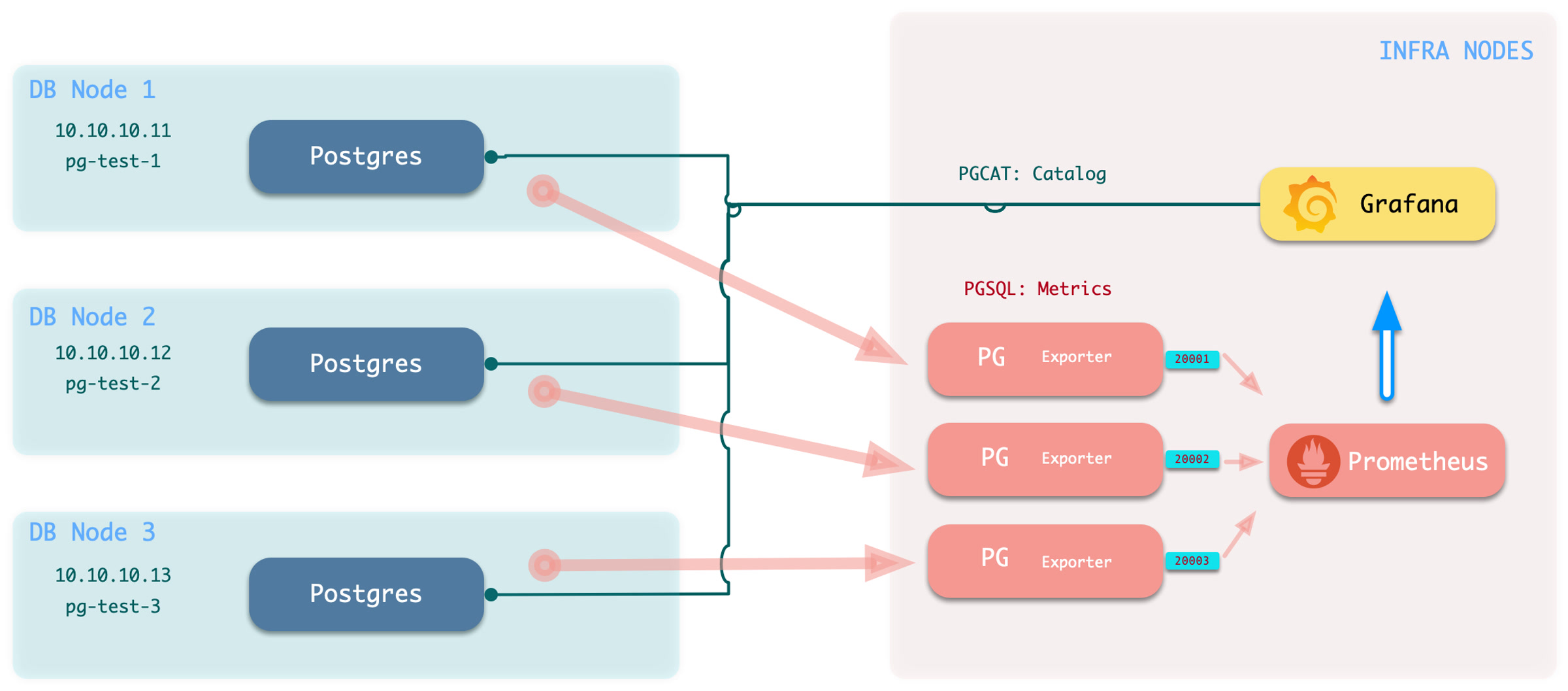
    If you have only a PGURL connection string, follow this section. Pigsty deploys PG Exporters on INFRA nodes to collect remote database metrics:

    ------ infra ------
    |                 |
    | victoria-metrics|            v---- pg-foo-1 ----v
    |       ^         |  metrics   |         ^        |
    |   pg_exporter <-|------------|----  postgres    |
    |   (port: 20001) |            | 10.10.10.10:5432 |
    |       ^         |            ^------------------^
    |       ^         |                      ^
    |       ^         |            v---- pg-foo-2 ----v
    |       ^         |  metrics   |         ^        |
    |   pg_exporter <-|------------|----  postgres    |
    |   (port: 20002) |            | 10.10.10.11:5433 |
    -------------------            ^------------------^

    This mode provides database metrics and current status from the data catalog. It does not provide host, connection pool, load balancer, or high-availability component metrics. Pigsty provides two dashboards for PostgreSQL metrics: PGRDS Cluster and PGRDS Instance. Overview and database monitoring use the existing dashboards. Because Pigsty cannot manage RDS, configure monitoring objects on the target database first.

    Limitations when monitoring external Postgres instances
    • PgBouncer connection pool metrics are not available
    • Patroni high availability component metrics are not available
    • Host node monitoring metrics are not available, including node HAProxy and Keepalived metrics
    • Log collection and log-derived metrics are not available

    The following example uses the sandbox. Treat pg-meta as the RDS instance pg-foo-1, and pg-test as the RDS cluster pg-bar.

    1. Create monitoring schemas, users, and permissions on the target. Refer to Monitor Setup for details

    2. Declare the cluster in the configuration inventory. For example, if we want to monitor “remote” pg-meta & pg-test clusters:

      infra:            # Infra cluster for proxies, monitoring, alerts, etc.
        hosts: { 10.10.10.10: { infra_seq: 1 } }
        vars:           # Install pg_exporter on group 'infra' for remote postgres RDS
          pg_exporters: # List all remote instances here, assign a unique unused local port for k
            20001: { pg_cluster: pg-foo, pg_seq: 1, pg_host: 10.10.10.10 , pg_databases: [{ name: meta }] } # Register meta database as Grafana datasource
      
            20002: { pg_cluster: pg-bar, pg_seq: 1, pg_host: 10.10.10.11 , pg_port: 5432 } # Different connection string methods
            20003: { pg_cluster: pg-bar, pg_seq: 2, pg_host: 10.10.10.12 , pg_exporter_url: 'postgres://dbuser_monitor:[email protected]:5432/postgres?sslmode=disable'}
            20004: { pg_cluster: pg-bar, pg_seq: 3, pg_host: 10.10.10.13 , pg_monitor_username: dbuser_monitor, pg_monitor_password: DBUser.Monitor }

      Pigsty registers databases from pg_databases as PostgreSQL data sources in Grafana for PGCAT dashboards. If you do not need PGCAT or Grafana registration, set pg_databases to an empty array or leave it blank.

      pigsty-monitor.jpg
    3. Execute the add monitoring command: bin/pgmon-add <clsname>

      bin/pgmon-add pg-foo  # Bring pg-foo cluster into monitoring
      bin/pgmon-add pg-bar  # Bring pg-bar cluster into monitoring
    4. To remove remote cluster monitoring targets, use bin/pgmon-rm <clsname>

      bin/pgmon-rm pg-foo  # Remove pg-foo from Pigsty monitoring
      bin/pgmon-rm pg-bar  # Remove pg-bar from Pigsty monitoring

    Use additional parameters to override default pg_exporter options. This example monitors Aliyun RDS for PostgreSQL and PolarDB:

    Example: Monitoring Aliyun RDS for PostgreSQL and PolarDB

    For details, refer to: remote.yml

    infra:            # Infra cluster for proxies, monitoring, alerts, etc.
      hosts: { 10.10.10.10: { infra_seq: 1 } }
      vars:
        pg_exporters:   # List all remote RDS PG instances to be monitored here
    
          20001:        # Assign a unique unused local port for local monitoring agent, this is a PolarDB primary
            pg_cluster: pg-polar                  # RDS cluster name (identity parameter, manually assigned name in monitoring system)
            pg_seq: 1                             # RDS instance number (identity parameter, manually assigned name in monitoring system)
            pg_host: pc-2ze379wb1d4irc18x.polardbpg.rds.aliyuncs.com # RDS host address
            pg_port: 1921                         # RDS port (from console connection info)
            pg_exporter_auto_discovery: true      # Enable new database auto-discovery
            pg_exporter_include_database: 'test'  # Only monitor databases in this list (comma-separated)
            pg_monitor_username: dbuser_monitor   # Monitoring username, overrides global config
            pg_monitor_password: DBUser_Monitor   # Monitoring password, overrides global config
            pg_databases: [{ name: test }]        # List of databases to enable PGCAT for, only name field needed, set register_datasource to false to not register
    
          20002:       # This is a PolarDB standby
            pg_cluster: pg-polar                  # RDS cluster name (identity parameter, manually assigned name in monitoring system)
            pg_seq: 2                             # RDS instance number (identity parameter, manually assigned name in monitoring system)
            pg_host: pe-2ze7tg620e317ufj4.polarpgmxs.rds.aliyuncs.com # RDS host address
            pg_port: 1521                         # RDS port (from console connection info)
            pg_exporter_auto_discovery: true      # Enable new database auto-discovery
            pg_exporter_include_database: 'test,postgres'  # Only monitor databases in this list (comma-separated)
            pg_monitor_username: dbuser_monitor   # Monitoring username
            pg_monitor_password: DBUser_Monitor   # Monitoring password
            pg_databases: [ { name: test } ]        # List of databases to enable PGCAT for, only name field needed, set register_datasource to false to not register
    
          20004: # This is a basic single-node RDS for PostgreSQL instance
            pg_cluster: pg-rds                    # RDS cluster name (identity parameter, manually assigned name in monitoring system)
            pg_seq: 1                             # RDS instance number (identity parameter, manually assigned name in monitoring system)
            pg_host: pgm-2zern3d323fe9ewk.pg.rds.aliyuncs.com  # RDS host address
            pg_port: 5432                         # RDS port (from console connection info)
            pg_exporter_auto_discovery: true      # Enable new database auto-discovery
            pg_exporter_include_database: 'rds'   # Only monitor databases in this list (comma-separated)
            pg_monitor_username: dbuser_monitor   # Monitoring username
            pg_monitor_password: DBUser_Monitor   # Monitoring password
            pg_databases: [ { name: rds } ]       # List of databases to enable PGCAT for, only name field needed, set register_datasource to false to not register
    
          20005: # This is a high-availability RDS for PostgreSQL cluster primary
            pg_cluster: pg-rdsha                  # RDS cluster name (identity parameter, manually assigned name in monitoring system)
            pg_seq: 1                             # RDS instance number (identity parameter, manually assigned name in monitoring system)
            pg_host: pgm-2ze3d35d27bq08wu.pg.rds.aliyuncs.com  # RDS host address
            pg_port: 5432                         # RDS port (from console connection info)
            pg_exporter_include_database: 'rds'   # Only monitor databases in this list (comma-separated)
            pg_databases: [ { name: rds }, {name : test} ]  # Include these two databases in PGCAT management, register as Grafana datasources
    
          20006: # This is a high-availability RDS for PostgreSQL cluster read-only instance (standby)
            pg_cluster: pg-rdsha                  # RDS cluster name (identity parameter, manually assigned name in monitoring system)
            pg_seq: 2                             # RDS instance number (identity parameter, manually assigned name in monitoring system)
            pg_host: pgr-2zexqxalk7d37edt.pg.rds.aliyuncs.com  # RDS host address
            pg_port: 5432                         # RDS port (from console connection info)
            pg_exporter_include_database: 'rds'   # Only monitor databases in this list (comma-separated)
            pg_databases: [ { name: rds }, {name : test} ]  # Include these two databases in PGCAT management, register as Grafana datasources

    Monitor Setup

    Before you monitor an existing RDS or self-managed PostgreSQL instance, configure the target database for Pigsty access.

    To monitor an external PostgreSQL instance, provide a connection string that can access the instance or cluster. A business user or superuser connection string can work. However, use a dedicated monitoring user to avoid exposing other privileges.

    • Monitor User: The default username is dbuser_monitor, which should belong to the pg_monitor role group or have access to relevant views
    • Monitor Authentication: Default password authentication is used; ensure HBA policies allow the monitoring user to access databases from the admin node or DB node locally
    • Monitor Schema: Fixed schema name monitor is used for installing additional monitoring views and extension plugins; optional but recommended
    • Monitor Extension: Strongly recommended to enable the built-in monitoring extension pg_stat_statements
    • Monitor Views: Monitoring views are optional but can provide additional metric support

    Monitor User

    Using the default monitoring user dbuser_monitor as an example, create the following user on the target database cluster.

    CREATE USER dbuser_monitor;                                       -- Create monitoring user
    COMMENT ON ROLE dbuser_monitor IS 'system monitor user';          -- Comment on monitoring user
    GRANT pg_monitor TO dbuser_monitor;                               -- Grant pg_monitor privilege to monitoring user, otherwise some metrics cannot be collected
    
    ALTER USER dbuser_monitor PASSWORD 'DBUser.Monitor';              -- Modify monitoring user password as needed (strongly recommended! but keep consistent with Pigsty config)
    ALTER USER dbuser_monitor SET log_min_duration_statement = 1000;  -- Recommended to avoid logs filling up with monitoring slow queries
    ALTER USER dbuser_monitor SET search_path = monitor,public;       -- Recommended to ensure pg_stat_statements extension works properly

    The monitoring username and password must match pg_monitor_username and pg_monitor_password.


    Monitor Authentication

    Add these rules to pg_hba.conf. They allow the monitoring user to access all databases from localhost and the administration node with password authentication:

    # allow local role monitor with password
    local   all  dbuser_monitor                    md5
    host    all  dbuser_monitor  127.0.0.1/32      md5
    host    all  dbuser_monitor  <admin_machine_IP>/32 md5

    If RDS does not allow HBA configuration, allow the internal IP address of the machine that runs Pigsty.


    Monitor Schema

    The monitoring schema is optional. Core Pigsty monitoring works without it. However, creating this schema is strongly recommended.

    CREATE SCHEMA IF NOT EXISTS monitor;               -- Create dedicated monitoring schema
    GRANT USAGE ON SCHEMA monitor TO dbuser_monitor;   -- Allow monitoring user to use it

    Monitor Extension

    The monitoring extension is optional. However, enabling pg_stat_statements is strongly recommended because it supplies important query performance data.

    Add this extension to shared_preload_libraries to enable it. Changing this parameter requires a database restart.

    CREATE EXTENSION IF NOT EXISTS "pg_stat_statements" WITH SCHEMA "monitor";

    Install this extension in the default administration database, postgres. Some RDS services do not allow a monitoring schema in postgres. In this case, install pg_stat_statements in the default public schema. Configure the monitoring user search_path as shown above so it can find the pg_stat_statements view.

    CREATE EXTENSION IF NOT EXISTS "pg_stat_statements";
    ALTER USER dbuser_monitor SET search_path = monitor,public; -- Recommended to ensure pg_stat_statements extension works properly

    Monitor Views

    Monitoring views provide common preprocessed query results. They also control access to metrics that need high privileges, such as shared memory allocation. This makes these metrics easier to query and use. Creating the views in every monitored database is strongly recommended.

    Monitoring schema and monitoring view definitions

    The SQL below is provided to explain the monitored objects. The complete definitions rendered by current Pigsty are authoritative in roles/pgsql/templates/pg-init-template.sql, which also includes additional hardening for secure search paths and privilege boundaries.

    ----------------------------------------------------------------------
    -- Table bloat estimate : monitor.pg_table_bloat
    ----------------------------------------------------------------------
    DROP VIEW IF EXISTS monitor.pg_table_bloat CASCADE;
    CREATE OR REPLACE VIEW monitor.pg_table_bloat AS
    SELECT CURRENT_CATALOG AS datname, nspname, relname , tblid , bs * tblpages AS size,
           CASE WHEN tblpages - est_tblpages_ff > 0 THEN (tblpages - est_tblpages_ff)/tblpages::FLOAT ELSE 0 END AS ratio
    FROM (
             SELECT ceil( reltuples / ( (bs-page_hdr)*fillfactor/(tpl_size*100) ) ) + ceil( toasttuples / 4 ) AS est_tblpages_ff,
                    tblpages, fillfactor, bs, tblid, nspname, relname, is_na
             FROM (
                      SELECT
                          ( 4 + tpl_hdr_size + tpl_data_size + (2 * ma)
                              - CASE WHEN tpl_hdr_size % ma = 0 THEN ma ELSE tpl_hdr_size % ma END
                              - CASE WHEN ceil(tpl_data_size)::INT % ma = 0 THEN ma ELSE ceil(tpl_data_size)::INT % ma END
                              ) AS tpl_size, (heappages + toastpages) AS tblpages, heappages,
                          toastpages, reltuples, toasttuples, bs, page_hdr, tblid, nspname, relname, fillfactor, is_na
                      FROM (
                               SELECT
                                   tbl.oid AS tblid, ns.nspname , tbl.relname, tbl.reltuples,
                                   tbl.relpages AS heappages, coalesce(toast.relpages, 0) AS toastpages,
                                   coalesce(toast.reltuples, 0) AS toasttuples,
                                   coalesce(substring(array_to_string(tbl.reloptions, ' ') FROM 'fillfactor=([0-9]+)')::smallint, 100) AS fillfactor,
                                   current_setting('block_size')::numeric AS bs,
                                   CASE WHEN version()~'mingw32' OR version()~'64-bit|x86_64|ppc64|ia64|amd64' THEN 8 ELSE 4 END AS ma,
                                   24 AS page_hdr,
                                   23 + CASE WHEN MAX(coalesce(s.null_frac,0)) > 0 THEN ( 7 + count(s.attname) ) / 8 ELSE 0::int END
                                       + CASE WHEN bool_or(att.attname = 'oid' and att.attnum < 0) THEN 4 ELSE 0 END AS tpl_hdr_size,
                                   sum( (1-coalesce(s.null_frac, 0)) * coalesce(s.avg_width, 0) ) AS tpl_data_size,
                                   bool_or(att.atttypid = 'pg_catalog.name'::regtype)
                                       OR sum(CASE WHEN att.attnum > 0 THEN 1 ELSE 0 END) <> count(s.attname) AS is_na
                               FROM pg_attribute AS att
                                        JOIN pg_class AS tbl ON att.attrelid = tbl.oid
                                        JOIN pg_namespace AS ns ON ns.oid = tbl.relnamespace
                                        LEFT JOIN pg_stats AS s ON s.schemaname=ns.nspname AND s.tablename = tbl.relname AND s.inherited=false AND s.attname=att.attname
                                        LEFT JOIN pg_class AS toast ON tbl.reltoastrelid = toast.oid
                               WHERE NOT att.attisdropped AND tbl.relkind = 'r' AND nspname NOT IN ('pg_catalog','information_schema')
                               GROUP BY 1,2,3,4,5,6,7,8,9,10
                           ) AS s
                  ) AS s2
         ) AS s3
    WHERE NOT is_na;
    COMMENT ON VIEW monitor.pg_table_bloat IS 'postgres table bloat estimate';
    
    GRANT SELECT ON monitor.pg_table_bloat TO pg_monitor;
    
    ----------------------------------------------------------------------
    -- Index bloat estimate : monitor.pg_index_bloat
    ----------------------------------------------------------------------
    DROP VIEW IF EXISTS monitor.pg_index_bloat CASCADE;
    CREATE OR REPLACE VIEW monitor.pg_index_bloat AS
    SELECT CURRENT_CATALOG AS datname, nspname, idxname AS relname, tblid, idxid, relpages::BIGINT * bs AS size,
           COALESCE((relpages - ( reltuples * (6 + ma - (CASE WHEN index_tuple_hdr % ma = 0 THEN ma ELSE index_tuple_hdr % ma END)
                                                   + nulldatawidth + ma - (CASE WHEN nulldatawidth % ma = 0 THEN ma ELSE nulldatawidth % ma END))
                                      / (bs - pagehdr)::FLOAT  + 1 )), 0) / relpages::FLOAT AS ratio
    FROM (
             SELECT nspname,idxname,indrelid AS tblid,indexrelid AS idxid,
                    reltuples,relpages,
                    current_setting('block_size')::INTEGER                                                               AS bs,
                    (CASE WHEN version() ~ 'mingw32' OR version() ~ '64-bit|x86_64|ppc64|ia64|amd64' THEN 8 ELSE 4 END)  AS ma,
                    24                                                                                                   AS pagehdr,
                    (CASE WHEN max(COALESCE(pg_stats.null_frac, 0)) = 0 THEN 2 ELSE 6 END)                               AS index_tuple_hdr,
                    sum((1.0 - COALESCE(pg_stats.null_frac, 0.0)) *
                        COALESCE(pg_stats.avg_width, 1024))::INTEGER                                                     AS nulldatawidth
             FROM pg_attribute
                      JOIN (
                 SELECT pg_namespace.nspname,
                        ic.relname                                                   AS idxname,
                        ic.reltuples,
                        ic.relpages,
                        pg_index.indrelid,
                        pg_index.indexrelid,
                        tc.relname                                                   AS tablename,
                        regexp_split_to_table(pg_index.indkey::TEXT, ' ') :: INTEGER AS attnum,
                        pg_index.indexrelid                                          AS index_oid
                 FROM pg_index
                          JOIN pg_class ic ON pg_index.indexrelid = ic.oid
                          JOIN pg_class tc ON pg_index.indrelid = tc.oid
                          JOIN pg_namespace ON pg_namespace.oid = ic.relnamespace
                          JOIN pg_am ON ic.relam = pg_am.oid
                 WHERE pg_am.amname = 'btree' AND ic.relpages > 0 AND nspname NOT IN ('pg_catalog', 'information_schema')
             ) ind_atts ON pg_attribute.attrelid = ind_atts.indexrelid AND pg_attribute.attnum = ind_atts.attnum
                      JOIN pg_stats ON pg_stats.schemaname = ind_atts.nspname
                 AND ((pg_stats.tablename = ind_atts.tablename AND pg_stats.attname = pg_get_indexdef(pg_attribute.attrelid, pg_attribute.attnum, TRUE))
                     OR (pg_stats.tablename = ind_atts.idxname AND pg_stats.attname = pg_attribute.attname))
             WHERE pg_attribute.attnum > 0
             GROUP BY 1, 2, 3, 4, 5, 6
         ) est;
    COMMENT ON VIEW monitor.pg_index_bloat IS 'postgres index bloat estimate (btree-only)';
    
    GRANT SELECT ON monitor.pg_index_bloat TO pg_monitor;
    
    ----------------------------------------------------------------------
    -- Relation Bloat : monitor.pg_bloat
    ----------------------------------------------------------------------
    DROP VIEW IF EXISTS monitor.pg_bloat CASCADE;
    CREATE OR REPLACE VIEW monitor.pg_bloat AS
    SELECT coalesce(ib.datname, tb.datname)                                                   AS datname,
           coalesce(ib.nspname, tb.nspname)                                                   AS nspname,
           coalesce(ib.tblid, tb.tblid)                                                       AS tblid,
           coalesce(tb.nspname || '.' || tb.relname, ib.nspname || '.' || ib.tblid::RegClass) AS tblname,
           tb.size                                                                            AS tbl_size,
           CASE WHEN tb.ratio < 0 THEN 0 ELSE round(tb.ratio::NUMERIC, 6) END                 AS tbl_ratio,
           (tb.size * (CASE WHEN tb.ratio < 0 THEN 0 ELSE tb.ratio::NUMERIC END)) ::BIGINT    AS tbl_wasted,
           ib.idxid,
           ib.nspname || '.' || ib.relname                                                    AS idxname,
           ib.size                                                                            AS idx_size,
           CASE WHEN ib.ratio < 0 THEN 0 ELSE round(ib.ratio::NUMERIC, 5) END                 AS idx_ratio,
           (ib.size * (CASE WHEN ib.ratio < 0 THEN 0 ELSE ib.ratio::NUMERIC END)) ::BIGINT    AS idx_wasted
    FROM monitor.pg_index_bloat ib
             FULL OUTER JOIN monitor.pg_table_bloat tb ON ib.tblid = tb.tblid;
    
    COMMENT ON VIEW monitor.pg_bloat IS 'postgres relation bloat detail';
    GRANT SELECT ON monitor.pg_bloat TO pg_monitor;
    
    ----------------------------------------------------------------------
    -- monitor.pg_index_bloat_human
    ----------------------------------------------------------------------
    DROP VIEW IF EXISTS monitor.pg_index_bloat_human CASCADE;
    CREATE OR REPLACE VIEW monitor.pg_index_bloat_human AS
    SELECT idxname                            AS name,
           tblname,
           idx_wasted                         AS wasted,
           pg_size_pretty(idx_size)           AS idx_size,
           round(100 * idx_ratio::NUMERIC, 2) AS idx_ratio,
           pg_size_pretty(idx_wasted)         AS idx_wasted,
           pg_size_pretty(tbl_size)           AS tbl_size,
           round(100 * tbl_ratio::NUMERIC, 2) AS tbl_ratio,
           pg_size_pretty(tbl_wasted)         AS tbl_wasted
    FROM monitor.pg_bloat
    WHERE idxname IS NOT NULL;
    COMMENT ON VIEW monitor.pg_index_bloat_human IS 'postgres index bloat info in human-readable format';
    GRANT SELECT ON monitor.pg_index_bloat_human TO pg_monitor;
    
    
    ----------------------------------------------------------------------
    -- monitor.pg_table_bloat_human
    ----------------------------------------------------------------------
    DROP VIEW IF EXISTS monitor.pg_table_bloat_human CASCADE;
    CREATE OR REPLACE VIEW monitor.pg_table_bloat_human AS
    SELECT tblname                                          AS name,
           idx_wasted + tbl_wasted                          AS wasted,
           pg_size_pretty(idx_wasted + tbl_wasted)          AS all_wasted,
           pg_size_pretty(tbl_wasted)                       AS tbl_wasted,
           pg_size_pretty(tbl_size)                         AS tbl_size,
           tbl_ratio,
           pg_size_pretty(idx_wasted)                       AS idx_wasted,
           pg_size_pretty(idx_size)                         AS idx_size,
           round(idx_wasted::NUMERIC * 100.0 / idx_size, 2) AS idx_ratio
    FROM (SELECT datname,
                 nspname,
                 tblname,
                 coalesce(max(tbl_wasted), 0)                         AS tbl_wasted,
                 coalesce(max(tbl_size), 1)                           AS tbl_size,
                 round(100 * coalesce(max(tbl_ratio), 0)::NUMERIC, 2) AS tbl_ratio,
                 coalesce(sum(idx_wasted), 0)                         AS idx_wasted,
                 coalesce(sum(idx_size), 1)                           AS idx_size
          FROM monitor.pg_bloat
          WHERE tblname IS NOT NULL
          GROUP BY 1, 2, 3
         ) d;
    COMMENT ON VIEW monitor.pg_table_bloat_human IS 'postgres table bloat info in human-readable format';
    GRANT SELECT ON monitor.pg_table_bloat_human TO pg_monitor;
    
    
    ----------------------------------------------------------------------
    -- Activity Overview: monitor.pg_session
    ----------------------------------------------------------------------
    DROP VIEW IF EXISTS monitor.pg_session CASCADE;
    CREATE OR REPLACE VIEW monitor.pg_session AS
    SELECT coalesce(datname, 'all') AS datname, numbackends, active, idle, ixact, max_duration, max_tx_duration, max_conn_duration
    FROM (
             SELECT datname,
                    count(*)                                         AS numbackends,
                    count(*) FILTER ( WHERE state = 'active' )       AS active,
                    count(*) FILTER ( WHERE state = 'idle' )         AS idle,
                    count(*) FILTER ( WHERE state = 'idle in transaction'
                        OR state = 'idle in transaction (aborted)' ) AS ixact,
                    max(extract(epoch from now() - state_change))
                    FILTER ( WHERE state = 'active' )                AS max_duration,
                    max(extract(epoch from now() - xact_start))      AS max_tx_duration,
                    max(extract(epoch from now() - backend_start))   AS max_conn_duration
             FROM pg_stat_activity
             WHERE backend_type = 'client backend'
               AND pid <> pg_backend_pid()
             GROUP BY ROLLUP (1)
             ORDER BY 1 NULLS FIRST
         ) t;
    COMMENT ON VIEW monitor.pg_session IS 'postgres activity group by session';
    GRANT SELECT ON monitor.pg_session TO pg_monitor;
    
    
    ----------------------------------------------------------------------
    -- Sequential Scan: monitor.pg_seq_scan
    ----------------------------------------------------------------------
    DROP VIEW IF EXISTS monitor.pg_seq_scan CASCADE;
    CREATE OR REPLACE VIEW monitor.pg_seq_scan AS
    SELECT schemaname                                                        AS nspname,
           relname,
           seq_scan,
           seq_tup_read,
           seq_tup_read / seq_scan                                           AS seq_tup_avg,
           idx_scan,
           n_live_tup + n_dead_tup                                           AS tuples,
           round(n_live_tup * 100.0::NUMERIC / (n_live_tup + n_dead_tup), 2) AS live_ratio
    FROM pg_stat_user_tables
    WHERE seq_scan > 0
      and (n_live_tup + n_dead_tup) > 0
    ORDER BY seq_scan DESC;
    COMMENT ON VIEW monitor.pg_seq_scan IS 'table that have seq scan';
    GRANT SELECT ON monitor.pg_seq_scan TO pg_monitor;
    Function for viewing shared memory allocation (PG13 and above)
    DROP FUNCTION IF EXISTS monitor.pg_shmem() CASCADE;
    CREATE OR REPLACE FUNCTION monitor.pg_shmem() RETURNS SETOF
        pg_shmem_allocations SET search_path = '' AS $$ SELECT * FROM pg_shmem_allocations;$$ LANGUAGE SQL SECURITY DEFINER;
    COMMENT ON FUNCTION monitor.pg_shmem() IS 'security wrapper for system view pg_shmem';
    REVOKE ALL ON FUNCTION monitor.pg_shmem() FROM PUBLIC;
    REVOKE ALL ON FUNCTION monitor.pg_shmem() FROM dbrole_readonly;
    REVOKE ALL ON FUNCTION monitor.pg_shmem() FROM dbrole_offline;
    GRANT EXECUTE ON FUNCTION monitor.pg_shmem() TO pg_monitor;