This is the multi-page printable view of this section. .
Module: REDIS
- 1: Configuration
- 2: Parameters
- 3: Playbook
- 4: Administration
- 5: Monitoring
- 6: Metrics
- 7: FAQ
REDIS is Pigsty’s Redis-compatible cache module. Select Redis or Valkey with redis_type. The default remains redis. Both engines support primary-replica replication, Sentinel, and native cluster mode. They share configuration paths, instance service names, monitoring, and log entry points.
The role installs the selected engine and redis-exporter. Instance processes use redis-server / redis-cli or valkey-server / valkey-cli, respectively. A change to redis_type changes packages and binaries. It does not automatically validate data formats, replication topology, or rollback. Rehearse any engine change on an existing cluster. Use the same engine throughout a logical cluster.
The default Redis package remains on the 7.2 BSD branch. Patch versions can differ between operating-system repositories. Use the target repository metadata as the authoritative source.
1 - Configuration
Concept
The Redis entity model is similar to the PostgreSQL model. It includes Cluster and Instance entities. Here, Cluster does not mean native Redis Cluster mode.
REDIS uses a single-node multi-instance deployment. PGSQL uses a 1:1 deployment. Multiple Redis instances typically share one physical or virtual node to use multiple CPU cores. Thus, the procedures to configure and administer Redis instances differ slightly from PGSQL.
In Pigsty, each Redis node belongs to one cluster. You cannot deploy instances from two different Redis clusters on the same node.
You can still deploy multiple independent Redis primary-replica instances on one node. Some restrictions apply. For example, instances on the same node cannot use different passwords.
Choose the server implementation with redis_type: redis by default, or valkey. Set it consistently at cluster level. The role changes packages and the *-server / *-cli binaries. It retains /etc/redis, /data/redis, instance systemd unit names, and the redis monitoring namespace. Validate data compatibility and rollback independently before changing an existing cluster’s engine.
Identity Parameters
Redis identity parameters are required parameters when defining a Redis cluster.
| Name | Attribute | Description | Example |
|---|---|---|---|
redis_cluster | REQUIRED, cluster level | Cluster name | redis-test |
redis_node | REQUIRED, node level | Node sequence number | 1,2 |
redis_instances | REQUIRED, node level | Instance definition | { 6001 : {} ,6002 : {}} |
redis_cluster: Redis cluster name, serves as the top-level namespace for cluster resources.redis_node: Redis node number, an integer unique within the cluster to distinguish different nodes.redis_instances: JSON object where keys are instance port numbers and values are JSON objects containing other instance configurations.
Redis Mode
There are three different working modes for Redis, specified by the redis_mode parameter:
standalone: Default standalone master-slave modecluster: Redis native distributed cluster modesentinel: Sentinel mode, providing high availability for standalone master-slave Redis
Here are three examples of Redis cluster definitions:
- A 1-node, one master & one slave Redis Standalone cluster:
redis-ms - A 1-node, 3-instance Redis Sentinel cluster:
redis-sentinel - A 2-node, 6-instance Redis Cluster:
redis-cluster
These examples omit redis_type and therefore use the default Redis engine. To deploy Valkey, add redis_type: valkey to the cluster’s vars. Do not mix engines within one logical cluster.
Limitations
- A Redis node can belong to only one Redis cluster. You cannot assign it to two clusters at the same time.
- On each Redis node, you need to assign a unique port number to each Redis instance to avoid port conflicts.
- A Redis cluster typically uses the same password for all instances. All instances on one node must share a password because redis_exporter supports only one.
- Redis Cluster includes HA. For standalone master-slave HA, configure Sentinel manually. Pigsty does not know whether you have deployed Sentinel.
- Use Sentinel to configure HA for standalone Redis. For details, see Administration - Configure HA with Sentinel.
Typical Configuration Examples
Here are some common Redis configuration examples for different scenarios:
Cache Cluster (Pure In-Memory)
For pure caching scenarios with no data persistence requirements:
Session Store Cluster
For web application session storage with some persistence needs:
Message Queue Cluster
For simple message queue scenarios requiring higher data reliability:
High Availability Master-Slave Cluster
Master-slave cluster with Sentinel automatic failover:
Large-Scale Native Cluster
For high-volume, high-throughput scenarios using native distributed cluster:
Security Hardening Configuration
Recommended security configuration for production environments:
2 - Parameters
The REDIS module has 22 parameters: 19 for Redis/Valkey deployment and configuration, and 3 for removal.
Parameter Overview
Use the REDIS parameter group to deploy and configure Redis clusters. It controls identity, instance definitions, operating mode, memory, persistence, and monitoring.
| Parameter | Type | Level | Description |
|---|---|---|---|
redis_cluster | string | C | Redis cluster name, required identity parameter |
redis_instances | dict | I | Redis instance definitions on this node |
redis_node | int | I | Redis node number, unique positive integer in cluster |
redis_fs_main | path | C | Redis main data directory, /data/redis by default |
redis_exporter_enabled | bool | C | Enable Redis Exporter? |
redis_exporter_port | port | C | Redis Exporter listen port |
redis_exporter_options | string | C/I | Redis Exporter CLI arguments |
redis_type | enum | G/C | Server engine: redis (default) or valkey |
redis_mode | enum | C | Redis mode: standalone, cluster, sentinel |
redis_conf | string | C | Redis config template, except sentinel |
redis_bind_address | ip | C | Redis bind address, defaults to 0.0.0.0; empty uses host IP |
redis_max_memory | size | C/I | Max memory for each Redis instance |
redis_mem_policy | enum | C | Redis memory eviction policy |
redis_password | password | C | Redis password, empty disables password |
redis_rdb_save | string[] | C | Redis RDB save directives, empty list disables RDB |
redis_aof_enabled | bool | C | Enable Redis AOF? |
redis_rename_commands | dict | C | Rename dangerous Redis commands |
redis_cluster_replicas | int | C | Replicas per master in Redis native cluster |
redis_sentinel_monitor | master[] | C | Master list for Redis Sentinel to monitor |
The REDIS_REMOVE parameter group controls Redis instance removal behavior.
| Parameter | Type | Level | Description |
|---|---|---|---|
redis_safeguard | bool | G/C/A | Refuse removal unconditionally when true |
redis_rm_data | bool | G/C/A | Remove Redis data directory when removing? |
redis_rm_pkg | bool | G/C/A | Uninstall the selected engine and redis-exporter? |
The REDIS module contains 19 deployment parameters and 3 removal parameters.
redis_cluster
Parameter: redis_cluster, Type: string, Level: C
Redis cluster name. This identity parameter is required. Set it explicitly at the cluster level. It defines the namespace for cluster resources.
Use the naming pattern [a-z][a-z0-9-]* to meet identity constraints. We recommend the redis- prefix.
redis_node
Parameter: redis_node, Type: int, Level: I
Redis node sequence number. This identity parameter is required. Set it explicitly at the node (Host) level.
Use a positive integer that is unique in the cluster to identify the node. Assign sequence numbers starting at 0 or 1.
redis_instances
Parameter: redis_instances, Type: dict, Level: I
Redis instance definitions for the current node. This parameter is required. Set it explicitly at the node (Host) level.
Format is a JSON key-value object where keys are numeric port numbers and values are instance-specific JSON configuration items.
Each Redis instance listens on a unique port on its node. The replica_of field in instance configuration sets the upstream master address to establish replication:
redis_fs_main
Parameter: redis_fs_main, Type: path, Level: C
Main data directory for Redis, default is /data/redis.
Deployment does not allow the legacy value /data (redis role identity assert fails fast). For backward compatibility during removal, redis-rm.yml treats redis_fs_main=/data as /data/redis.
The data directory is owned by the redis OS user. See FHS: Redis for internal structure details.
redis_exporter_enabled
Parameter: redis_exporter_enabled, Type: bool, Level: C
Specifies whether to enable Redis Exporter. It is enabled by default.
Pigsty deploys one exporter per Redis node. It listens on redis_exporter_port, which defaults to 9121. It scrapes metrics from all Redis instances on the node.
If set to false, roles/redis/tasks/exporter.yml still renders configuration files. It skips startup of the redis_exporter systemd service. The redis_exporter_launch task uses when: redis_exporter_enabled|bool. This permits manually configured exporters to remain.
The redis_register task still writes the node’s VictoriaMetrics file-discovery target. If you do not provide an exporter on the same port, adjust this target to prevent continuous scrape failures.
redis_exporter_port
Parameter: redis_exporter_port, Type: port, Level: C
Redis Exporter listen port, default value: 9121
redis_exporter_options
Parameter: redis_exporter_options, Type: string, Level: C/I
Extra Redis Exporter CLI arguments. The default is an empty string. The role writes them to /etc/default/redis_exporter; see roles/redis/tasks/exporter.yml.
The systemd service uses ExecStart=/bin/redis_exporter $REDIS_EXPORTER_OPTS to append REDIS_EXPORTER_OPTS. Use these arguments for extra scrape targets or filtering behavior.
redis_type
Parameter: redis_type, Type: enum, Level: G/C
Select the server implementation used by the REDIS module. Allowed values are redis and valkey. The default is redis.
The role installs the package with the selected name. Instance systemd units call /bin/redis-server / /bin/redis-cli or /bin/valkey-server / /bin/valkey-cli.
Configuration paths, data directories, instance service names, exporter behavior, and monitoring labels retain the redis namespace. This preserves compatibility with existing inventories and operational entry points.
Set the same value for every member at cluster level. A change to redis_type changes only the selected package and binaries. It does not validate cross-version RDB/AOF, replication, Sentinel, or Cluster compatibility. Rehearse the change and prepare a rollback before switching an existing cluster.
redis_mode
Parameter: redis_mode, Type: enum, Level: C
Redis cluster operating mode, three options: standalone, cluster, sentinel. Default: standalone
standalone: Default, independent Redis master-slave modecluster: Redis native cluster modesentinel: Redis high availability component: Sentinel
When using standalone mode, Pigsty sets up Redis replication based on the replica_of parameter.
When using cluster mode, Pigsty creates a native Redis cluster using all defined instances based on the redis_cluster_replicas parameter.
When redis_mode=sentinel, redis.yml runs the redis-ha phase to distribute targets from redis_sentinel_monitor to all sentinels. If redis_mode=cluster, it also runs redis-join. This uses the engine’s redis-cli or valkey-cli to run --cluster create.
Both phases run automatically during a normal ./redis.yml -l <cluster>. You can also select them with -t redis-ha or -t redis-join.
redis_conf
Parameter: redis_conf, Type: string, Level: C
Redis config template path, except for Sentinel.
Default: redis.conf, a template file at roles/redis/templates/redis.conf.
To use your own Redis configuration template, put it in templates/. Set this parameter to the template filename.
Note: Redis Sentinel uses a different template file: roles/redis/templates/redis-sentinel.conf.
redis_bind_address
Parameter: redis_bind_address, Type: ip, Level: C
IP address Redis server binds to. Empty string uses the hostname defined in the inventory.
Default: 0.0.0.0, binding to all available IPv4 addresses on the host.
For security in production environments, bind only to internal IPs by setting this to empty string ''.
If empty, roles/redis/templates/redis.conf uses inventory_hostname to render bind <ip>. This binds Redis to the management address in the inventory.
redis_max_memory
Parameter: redis_max_memory, Type: size, Level: C/I
Maximum memory for each Redis instance, default: 1GB.
redis_mem_policy
Parameter: redis_mem_policy, Type: enum, Level: C
Redis memory eviction policy, default: allkeys-lru
noeviction: Don’t save new values when memory limit is reached; only applies to primary when using replicationallkeys-lru: Keep most recently used keys; remove least recently used (LRU) keysallkeys-lfu: Keep frequently used keys; remove least frequently used (LFU) keysvolatile-lru: Remove least recently used keys with expire field setvolatile-lfu: Remove least frequently used keys with expire field setallkeys-random: Randomly remove keys to make space for new datavolatile-random: Randomly remove keys with expire field setvolatile-ttl: Remove keys with expire field set and shortest remaining TTL
See Redis Eviction Policy for details.
redis_password
Parameter: redis_password, Type: password, Level: C/N
Redis password. Empty string disables password, which is the default behavior.
redis_exporter supports only one redis_password per node. This is usually sufficient because Pigsty does not permit two different Redis clusters on one node.
Pigsty automatically writes this password to /etc/default/redis_exporter as REDIS_PASSWORD=.... The redis-ha and redis-join tasks select redis-cli / valkey-cli and pass the password through REDISCLI_AUTH. This keeps the password out of command-line arguments.
Use a strong password in production environments
redis_rdb_save
Parameter: redis_rdb_save, Type: string[], Level: C
Redis RDB save directives. Use empty list to disable RDB.
Default is ["1200 1"]: dump dataset to disk every 20 minutes if at least 1 key changed.
See Redis Persistence for details.
redis_aof_enabled
Parameter: redis_aof_enabled, Type: bool, Level: C
Specifies whether to enable Redis AOF. The default is false, which disables AOF.
redis_rename_commands
Parameter: redis_rename_commands, Type: dict, Level: C
Rename dangerous Redis commands. A k:v dictionary where old is the command to rename and new is the new name.
Default: {}. You can hide dangerous commands like FLUSHDB and FLUSHALL. Example:
redis_cluster_replicas
Parameter: redis_cluster_replicas, Type: int, Level: C
Number of replicas per master/primary in Redis native cluster. Default: 1, meaning one replica per master.
redis_sentinel_monitor
Parameter: redis_sentinel_monitor, Type: master[], Level: C
List of masters for Redis Sentinel to monitor, used only on sentinel clusters. Each managed master is defined as:
name and host are required. The port, password, and quorum fields are optional.
quorum sets the number of Sentinels that must agree on master failure. This is typically more than half of the Sentinel instances. The default is 1.
Since Pigsty 4.0, you can add remove: true to an entry. The redis-ha phase then runs only SENTINEL REMOVE <name>. Use this to remove unneeded targets.
REDIS_REMOVE
The redis-rm.yml playbook calls the redis_remove role. These parameters control how that role removes Redis instances.
redis_safeguard
Parameter: redis_safeguard, Type: bool, Level: G/C/A
Redis deletion safeguard, default false. When set to true, redis-rm.yml aborts before deregistration, service shutdown, or deletion. This is a static Boolean switch and does not probe whether a Redis instance is running.
Override with CLI argument -e redis_safeguard=false to force removal.
redis_rm_data
Parameter: redis_rm_data, Type: bool, Level: G/C/A
Specifies whether to delete the data directory when removing Redis instances. The default is true.
The data directory (default /data/redis/, i.e. redis_fs_main) contains Redis RDB and AOF files. If not removed, newly deployed Redis instances will load data from these backup files.
Set to false to preserve data directories for later recovery.
redis_rm_pkg
Parameter: redis_rm_pkg, Type: bool, Level: G/C/A
Specifies whether node removal also uninstalls the engine selected by redis_type and the redis-exporter package. The default is false. Single-instance removal with redis_port never uninstalls shared packages.
Usually, package removal is unnecessary. Enable this option only for complete node cleanup.
3 - Playbook
The REDIS module provides two playbooks for deploying/removing Redis clusters/nodes/instances:
redis.yml: Deploy Redis cluster/node/instanceredis-rm.yml: Remove Redis cluster/node/instance
redis.yml
The redis.yml playbook for deploying Redis contains the following subtasks:
Operation Levels
redis.yml supports three operation levels. Use -l to limit the target scope. Use -e redis_port=<port> to select one instance:
| Level | Parameters | Description |
|---|---|---|
| Cluster | -l <cluster> | Deploy all nodes and instances of the entire Redis cluster |
| Node | -l <ip> | Deploy all Redis instances on the specified node |
| Instance | -l <ip> -e redis_port=<port> | Deploy only a single instance on the specified node |
Cluster-Level Operations
Deploy an entire Redis cluster, including all instances on all nodes:
Cluster-level operations will:
- Install Redis or Valkey according to
redis_type, plusredis-exporter, on all nodes - Create redis user and directory structure on all nodes
- Start redis_exporter on all nodes
- Deploy and start all defined Redis instances
- Register all instances to the monitoring system
- If
sentinelmode, configure sentinel monitoring targets - If
clustermode, form the native cluster
Node-Level Operations
Deploy only all Redis instances on the specified node:
Node-level operations are useful for:
- Scaling up by adding new nodes to an existing cluster
- Redeploying all instances on a specific node
- Reinitializing after node failure recovery
Note: Node-level commands still enter the
redis-ha/redis-joinmode checks. Sentinel mode refreshes managed targets. In cluster mode, the playbook uses the selected CLI to check the seed instance forcluster_state:ok. It exits for a healthy cluster. Otherwise, it runs--cluster create. This check does not scale out an existing native cluster. For that operation, runredis-cli/valkey-cli --cluster add-nodeandreshardmanually.
Instance-Level Operations
Use the -e redis_port=<port> parameter to operate on a single instance:
Instance-level operations are useful for:
- Adding new instances to an existing node
- Redeploying a single failed instance
- Updating a single instance’s configuration
When redis_port is specified:
- Only renders the config file for that port
- Only starts/restarts the systemd service for that port
- Rewrites the node’s monitoring registration file (content comes from the full
redis_instancesdefinition) - Does not start/stop
redis_exporteror reload Vector log config - Does not affect other Redis instance processes on the same node
Common Tags
Use the -t <tag> parameter to selectively execute certain tasks:
Idempotency
You can repeat most tasks in redis.yml. Before native-cluster initialization, check the topology state:
- Re-running
redis_node/redis_exporter/redis_instance/redis_registeroverwrites config and restarts instances - Re-running
redis-hareappliesSENTINEL REMOVE/MONITORbased onredis_sentinel_monitor redis-joinfirst checks the seed instance forcluster_state:ok. It exits for a healthy cluster. The check does not repair incomplete or damaged topologies or perform scale-out. Do not use it as a general add-node/reshard operation.
Tip: To update configuration without restarting all instances, use
-t redis_config. Then manually restart the required instances.
Redis/Valkey units use Type=notify. During startup, systemd waits up to 1800s for readiness. This lets large RDB/AOF loads and recovery finish.
After a timeout, first inspect instance logs, data size, disk I/O, and memory. Do not extend data deletion or force a stop solely because of the timeout.
redis-rm.yml
The redis-rm.yml playbook for removing Redis contains the following subtasks:
Tag-scoped execution follows the data/package switches. The -t redis tag always enters the instance-stop phase. The -t redis_data tag stops instances only if redis_rm_data=true. The -t redis_pkg tag stops them only if redis_rm_pkg=true.
Thus, -t redis_data -e redis_rm_data=false does not stop Redis. Neither does -t redis_pkg -e redis_rm_pkg=false. The selected tag alone is insufficient. Before a real removal, verify the exact same -l, tags, and extra variables.
Operation Levels
redis-rm.yml also supports three operation levels:
| Level | Parameters | Description |
|---|---|---|
| Cluster | -l <cluster> | Remove all nodes and instances of the entire Redis cluster |
| Node | -l <ip> | Remove all Redis instances on the specified node |
| Instance | -l <ip> -e redis_port=<port> | Remove only a single instance on the specified node |
Cluster-Level Removal
Remove an entire Redis cluster:
Cluster-level removal will:
- Deregister all instances on all nodes from the monitoring system
- Stop redis_exporter on all nodes
- Stop and disable all Redis instances
- Delete all data directories (if
redis_rm_data=true) - Uninstall the engine selected by
redis_typeandredis-exporter(ifredis_rm_pkg=true)
Node-Level Removal
Remove only all Redis instances on the specified node:
Node-level removal is useful for:
- Scaling down by removing an entire node
- Cleanup before node decommission
- Preparation before node migration
Node-level removal will:
- Deregister all instances on that node from the monitoring system
- Stop redis_exporter on that node
- Stop all Redis instances on that node
- Delete all data directories on that node
- Delete Vector logging config on that node
Instance-Level Removal
Use the -e redis_port=<port> parameter to remove a single instance:
Instance-level removal is useful for:
- Removing a single replica from a node
- Removing instances no longer needed
- Removing the original primary after failover
Behavioral differences when redis_port is specified:
| Component | Node-Level (no redis_port) | Instance-Level (with redis_port) |
|---|---|---|
| Monitoring registration | Delete entire node’s registration file | Only remove that instance from registration file |
| redis_exporter | Stop and disable | No operation (other instances still need it) |
| Redis instances | Stop all instances | Only stop the specified port’s instance |
| Data directory | Delete entire redis_fs_main (default: /data/redis/) | Only delete redis_fs_main/<cluster>-<node>-<port>/ (if redis_fs_main=/data, removal is compat-mapped to /data/redis) |
| Vector config | Delete /etc/vector/redis.yaml | No operation (other instances still need it) |
| Packages | Optionally uninstall | No operation |
Control Parameters
redis-rm.yml provides the following control parameters:
| Parameter | Default | Description |
|---|---|---|
redis_safeguard | false | Safety guard; when true, refuses to execute removal |
redis_rm_data | true | Whether to delete data directories (RDB/AOF files) |
redis_rm_pkg | false | Whether to uninstall the selected engine and redis-exporter |
Usage examples:
redis_safeguard defaults to false, while redis_rm_data defaults to true. The removal playbook also tolerates several service-stop, deregistration, data-deletion, and package-removal errors. After a real run, inspect the target processes, data directories, and monitoring registration. The playbook return status alone does not confirm completion.
Safeguard Mechanism
When a cluster has redis_safeguard: true configured, redis-rm.yml will refuse to execute:
Explicit override is required to execute:
Quick Reference
Deployment Quick Reference
Removal Quick Reference
Wrapper Scripts
Pigsty provides convenient wrapper scripts:
Demo
Initialize Redis cluster with Redis playbook:

4 - Administration
Use these standard operating procedures (SOPs) to administer Redis.
The REDIS module defaults to redis_type: redis. With redis_type: valkey, the server and client commands become valkey-server and valkey-cli. The examples use the default redis-cli. For Valkey clusters, use valkey-cli instead. Playbooks choose the correct CLI automatically.
Basic Operations
High Availability
Scaling & Migration
Troubleshooting
For more questions, please refer to FAQ: REDIS.
Initialize Redis
You can use the redis.yml playbook to initialize Redis clusters, nodes, or instances:
You can also use wrapper scripts to initialize:
Remove Redis
You can use the redis-rm.yml playbook to remove Redis clusters, nodes, or instances:
redis_rm_data defaults to true. Verify RDB/AOF backups and the current primary/replica, Sentinel, or cluster topology. Then have the operator confirm the exact target. The commands below perform the corresponding removal directly.
You can also use wrapper scripts to remove Redis clusters/nodes/instances:
Reconfigure Redis
You can partially run the redis.yml playbook to reconfigure Redis clusters, nodes, or instances:
Note that Redis cannot reload configuration online. You must restart Redis using the launch task to make configuration changes take effect.
Using Redis Client
Use redis-cli with the default Redis engine. Valkey uses valkey-cli with the same arguments:
Use redis-benchmark to evaluate Redis performance or generate test load.
Configure Redis Replica
https://redis.io/commands/replicaof/
Configure HA with Sentinel
Use Redis Sentinel to provide automatic high availability for standalone master-slave clusters. For details, see the official Sentinel documentation.
In the four-node sandbox environment, the redis-meta Sentinel cluster can manage multiple standalone Redis master-slave clusters.
For example, redis-ms has one master and one slave. On each Sentinel instance, add the target with SENTINEL MONITOR. Set its password with SENTINEL SET. This configures high availability:
If you want to remove a Redis master-slave cluster managed by Sentinel, use SENTINEL REMOVE <name>.
You can use the redis_sentinel_monitor parameter defined on the Sentinel cluster to automatically configure the list of masters managed by Sentinel.
The redis-ha stage in redis.yml renders /tmp/<cluster>.monitor on each Sentinel instance from this list. It then runs SENTINEL REMOVE followed by SENTINEL MONITOR. This keeps Sentinel management state consistent with the inventory.
To remove a target without adding it again, set remove: true on its monitor object. The playbook then skips registration after SENTINEL REMOVE.
Use the following command to refresh the managed master list on the Redis Sentinel cluster:
Initialize Redis Native Cluster
When redis_mode is cluster, redis.yml also runs the redis-join stage. It uses the CLI selected by redis_type. The command is --cluster create --cluster-yes ... --cluster-replicas {{ redis_cluster_replicas }}. This joins all inventory instances into a native cluster.
This step runs automatically during initial deployment. A later ./redis.yml -l <cluster> -t redis-join first checks the seed instance for cluster_state:ok. It exits if the cluster is healthy.
This check does not add nodes, reshard data, or repair a partially initialized topology. Verify the topology state before you run this stage separately.
Scale Up Redis Nodes
Scale Up Standalone Cluster
When adding new nodes/instances to an existing Redis master-slave cluster, first add the new definition in the inventory:
Then deploy only the new node:
Scale Up Native Cluster
Adding new nodes to a Redis native cluster requires additional steps:
Scale Up Sentinel Cluster
After adding new instances to a Sentinel cluster, you should complete both instance deployment and target refresh:
Scale Down Redis Nodes
Scale Down Standalone Cluster
Scale Down Native Cluster
Backup and Restore
Manual Backup
Data Restore
Using AOF Persistence
If you need higher data safety, enable AOF:
Redeploy to apply AOF configuration:
Common Issue Diagnosis
Connection Troubleshooting
Memory Troubleshooting
Performance Troubleshooting
Replication Troubleshooting
Performance Tuning
Memory Optimization
Persistence Optimization
Connection Pool Recommendations
When connecting to Redis from client applications:
- Use connection pooling to avoid frequent connection creation
- Set reasonable timeout values (recommended 1-3 seconds)
- Enable TCP keepalive
- For high-concurrency scenarios, consider using Pipeline for batch operations
Key Monitoring Metrics
Monitor these metrics through Grafana dashboards:
- Memory usage: Pay attention when
redis:ins:mem_usage> 80% - CPU usage: Pay attention when
redis:ins:cpu_usage> 70% - QPS: Watch for spikes and abnormal fluctuations
- Response time: Investigate when
redis:ins:rt> 1ms - Connection count: Monitor connection growth trends
- Replication lag: Important for master-slave replication scenarios
5 - Monitoring
Dashboards
The REDIS module provides 3 monitoring dashboards:
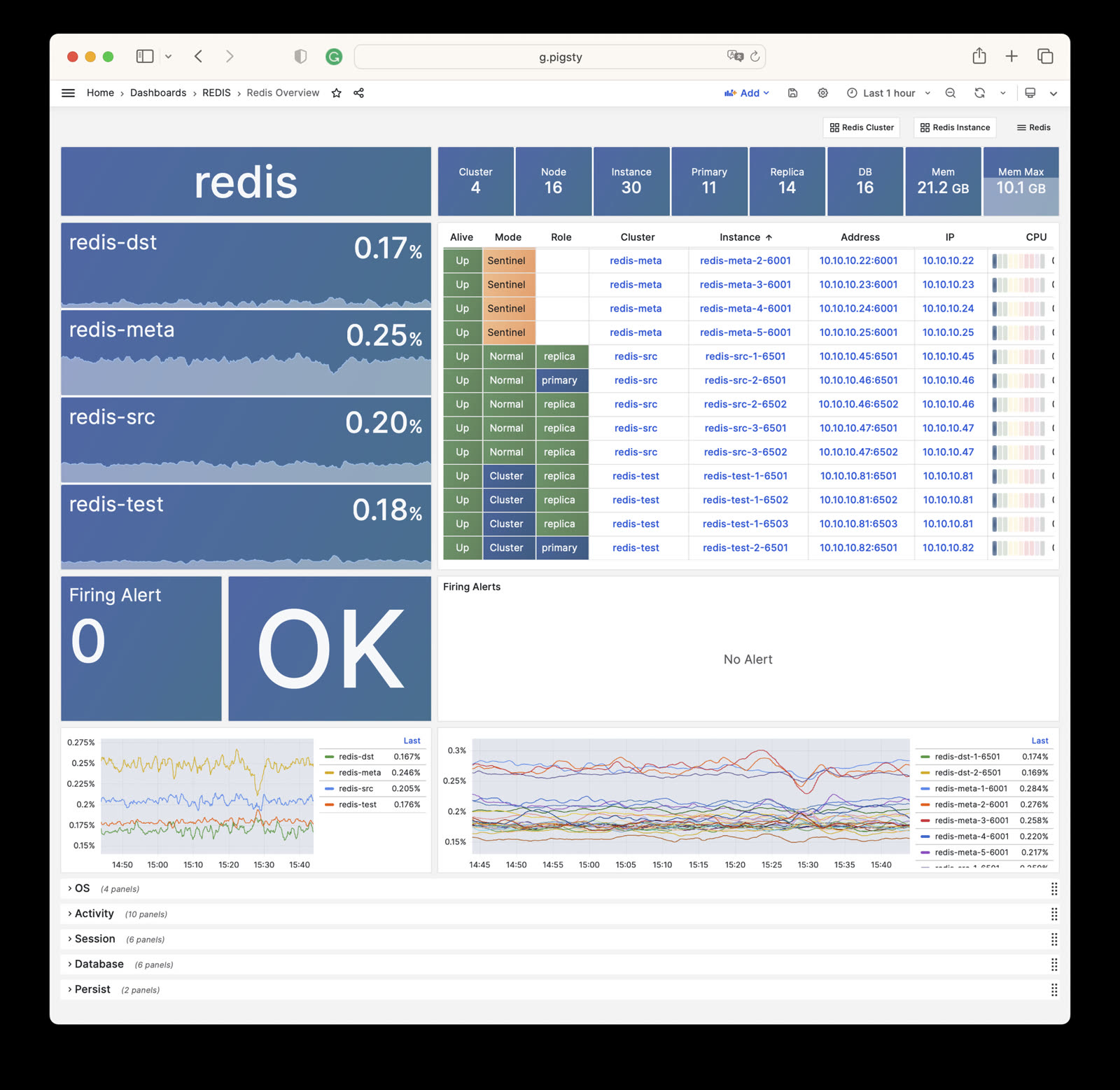
- Redis Overview: Overview of all Redis clusters
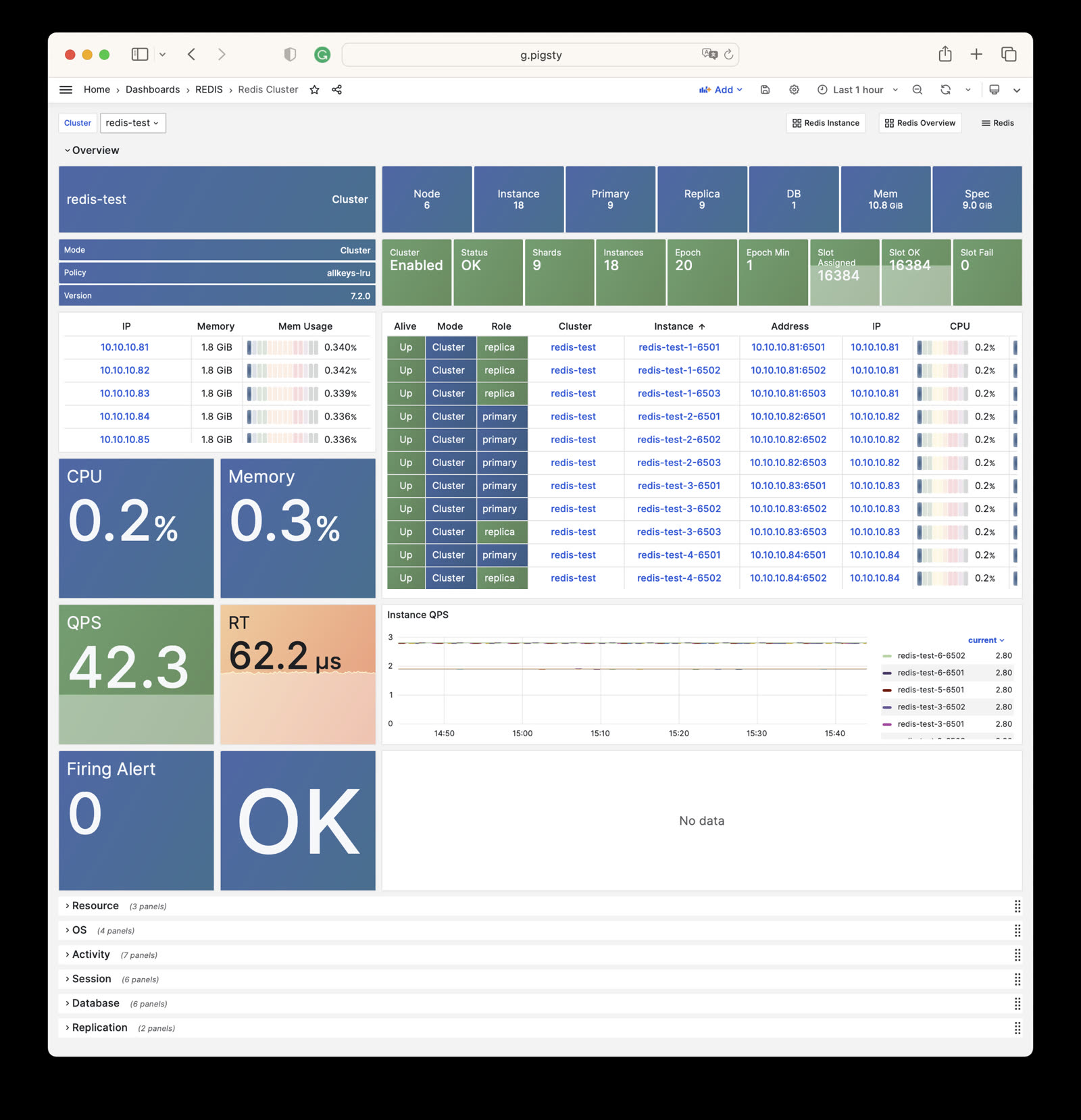
- Redis Cluster: Details of a single Redis cluster
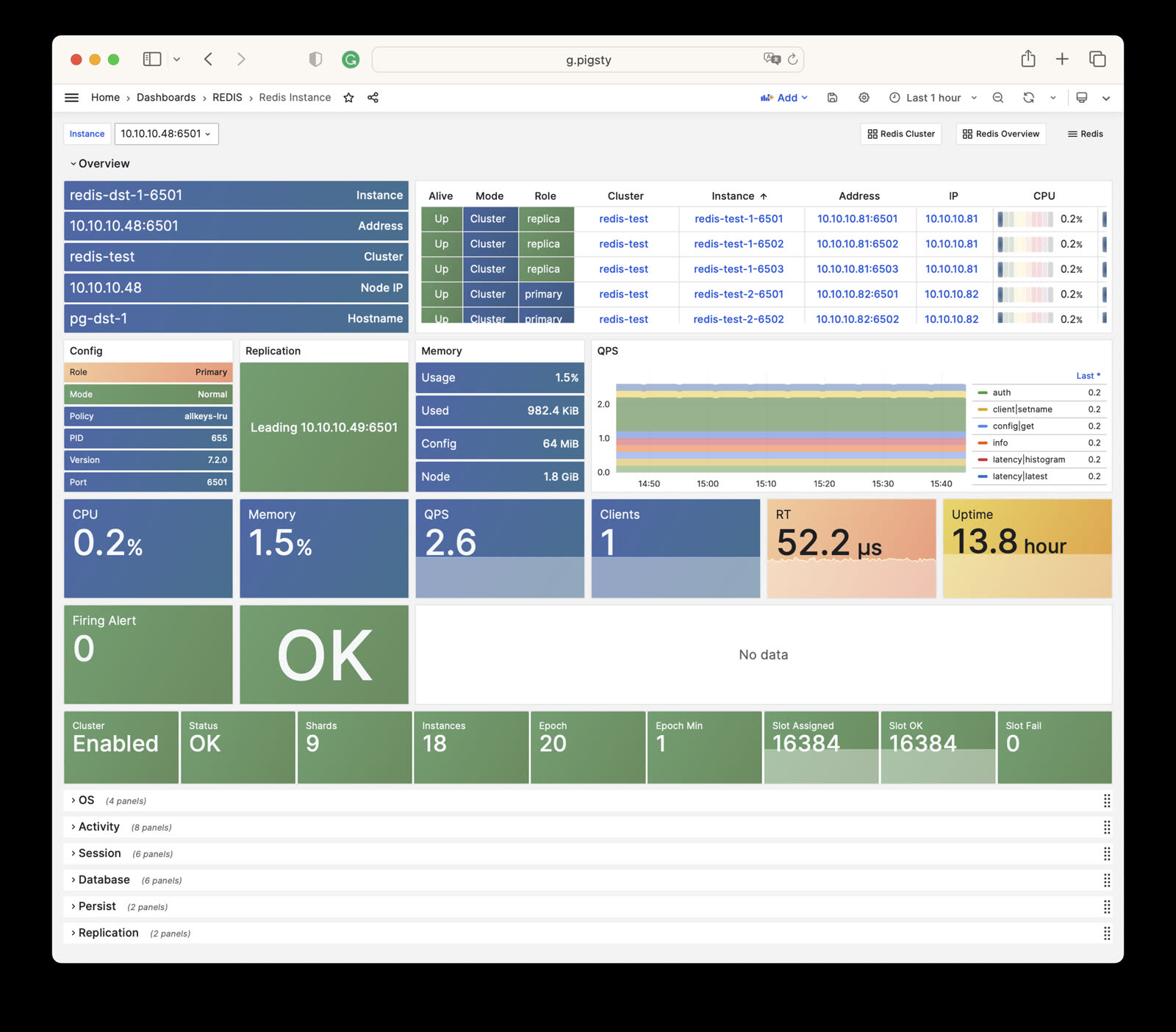
- Redis Instance: Details of a single Redis instance
Monitoring
Pigsty provides three monitoring dashboards for the REDIS module:
Redis Overview
Redis Overview: Overview of all Redis clusters/instances
Redis Cluster
Redis Cluster: Details of a single Redis cluster
Redis Instance
Redis Instance: Details of a single Redis instance
Alert Rules
Pigsty provides the following six predefined alert rules for Redis, defined in files/victoria/rules/redis.yml:
RedisDown: Redis instance is downRedisRejectConn: Redis instance rejecting connectionsRedisRTHigh: Redis instance response time is too highRedisCPUHigh: Redis instance CPU usage is too highRedisMemHigh: Redis instance memory usage is too highRedisQPSHigh: Redis instance QPS is too high
The rule expr defines the actual alert thresholds:
- Response time:
>160µsfor 1 minute. - CPU and memory usage:
>70%for 1 minute. - QPS:
>32000for 5 minutes.
The excerpt below copies the current rule file exactly. Its CPU, memory, and QPS descriptions still show the old 60%, 80%, and 16000 thresholds. The RedisRTHigh comment incorrectly names pg:ins:query_rt. These comments do not change the actual expressions.
6 - Metrics
This page is a snapshot of 275 monitoring metric categories for the REDIS module. The actual runtime metric set varies with package version, enabled collectors, and target state.
| Metric Name | Type | Labels | Description |
|---|---|---|---|
| ALERTS | Unknown | cls, ip, level, severity, instance, category, ins, alertname, job, alertstate | N/A |
| ALERTS_FOR_STATE | Unknown | cls, ip, level, severity, instance, category, ins, alertname, job | N/A |
| redis:cls:aof_rewrite_time | Unknown | cls, job | N/A |
| redis:cls:blocked_clients | Unknown | cls, job | N/A |
| redis:cls:clients | Unknown | cls, job | N/A |
| redis:cls:cmd_qps | Unknown | cls, cmd, job | N/A |
| redis:cls:cmd_rt | Unknown | cls, cmd, job | N/A |
| redis:cls:cmd_time | Unknown | cls, cmd, job | N/A |
| redis:cls:conn_rate | Unknown | cls, job | N/A |
| redis:cls:conn_reject | Unknown | cls, job | N/A |
| redis:cls:cpu_sys | Unknown | cls, job | N/A |
| redis:cls:cpu_sys_child | Unknown | cls, job | N/A |
| redis:cls:cpu_usage | Unknown | cls, job | N/A |
| redis:cls:cpu_usage_child | Unknown | cls, job | N/A |
| redis:cls:cpu_user | Unknown | cls, job | N/A |
| redis:cls:cpu_user_child | Unknown | cls, job | N/A |
| redis:cls:fork_time | Unknown | cls, job | N/A |
| redis:cls:key_evict | Unknown | cls, job | N/A |
| redis:cls:key_expire | Unknown | cls, job | N/A |
| redis:cls:key_hit | Unknown | cls, job | N/A |
| redis:cls:key_hit_rate | Unknown | cls, job | N/A |
| redis:cls:key_miss | Unknown | cls, job | N/A |
| redis:cls:mem_max | Unknown | cls, job | N/A |
| redis:cls:mem_usage | Unknown | cls, job | N/A |
| redis:cls:mem_usage_max | Unknown | cls, job | N/A |
| redis:cls:mem_used | Unknown | cls, job | N/A |
| redis:cls:net_traffic | Unknown | cls, job | N/A |
| redis:cls:qps | Unknown | cls, job | N/A |
| redis:cls:qps_mu | Unknown | cls, job | N/A |
| redis:cls:qps_realtime | Unknown | cls, job | N/A |
| redis:cls:qps_sigma | Unknown | cls, job | N/A |
| redis:cls:rt | Unknown | cls, job | N/A |
| redis:cls:rt_mu | Unknown | cls, job | N/A |
| redis:cls:rt_sigma | Unknown | cls, job | N/A |
| redis:cls:rx | Unknown | cls, job | N/A |
| redis:cls:size | Unknown | cls, job | N/A |
| redis:cls:tx | Unknown | cls, job | N/A |
| redis:env:blocked_clients | Unknown | job | N/A |
| redis:env:clients | Unknown | job | N/A |
| redis:env:cmd_qps | Unknown | cmd, job | N/A |
| redis:env:cmd_rt | Unknown | cmd, job | N/A |
| redis:env:cmd_time | Unknown | cmd, job | N/A |
| redis:env:conn_rate | Unknown | job | N/A |
| redis:env:conn_reject | Unknown | job | N/A |
| redis:env:cpu_usage | Unknown | job | N/A |
| redis:env:cpu_usage_child | Unknown | job | N/A |
| redis:env:key_evict | Unknown | job | N/A |
| redis:env:key_expire | Unknown | job | N/A |
| redis:env:key_hit | Unknown | job | N/A |
| redis:env:key_hit_rate | Unknown | job | N/A |
| redis:env:key_miss | Unknown | job | N/A |
| redis:env:mem_usage | Unknown | job | N/A |
| redis:env:net_traffic | Unknown | job | N/A |
| redis:env:qps | Unknown | job | N/A |
| redis:env:qps_mu | Unknown | job | N/A |
| redis:env:qps_realtime | Unknown | job | N/A |
| redis:env:qps_sigma | Unknown | job | N/A |
| redis:env:rt | Unknown | job | N/A |
| redis:env:rt_mu | Unknown | job | N/A |
| redis:env:rt_sigma | Unknown | job | N/A |
| redis:env:rx | Unknown | job | N/A |
| redis:env:tx | Unknown | job | N/A |
| redis:ins | Unknown | cls, id, instance, ins, job | N/A |
| redis:ins:blocked_clients | Unknown | cls, ip, instance, ins, job | N/A |
| redis:ins:clients | Unknown | cls, ip, instance, ins, job | N/A |
| redis:ins:cmd_qps | Unknown | cls, cmd, ip, instance, ins, job | N/A |
| redis:ins:cmd_rt | Unknown | cls, cmd, ip, instance, ins, job | N/A |
| redis:ins:cmd_time | Unknown | cls, cmd, ip, instance, ins, job | N/A |
| redis:ins:conn_rate | Unknown | cls, ip, instance, ins, job | N/A |
| redis:ins:conn_reject | Unknown | cls, ip, instance, ins, job | N/A |
| redis:ins:cpu_sys | Unknown | cls, ip, instance, ins, job | N/A |
| redis:ins:cpu_sys_child | Unknown | cls, ip, instance, ins, job | N/A |
| redis:ins:cpu_usage | Unknown | cls, ip, instance, ins, job | N/A |
| redis:ins:cpu_usage_child | Unknown | cls, ip, instance, ins, job | N/A |
| redis:ins:cpu_user | Unknown | cls, ip, instance, ins, job | N/A |
| redis:ins:cpu_user_child | Unknown | cls, ip, instance, ins, job | N/A |
| redis:ins:key_evict | Unknown | cls, ip, instance, ins, job | N/A |
| redis:ins:key_expire | Unknown | cls, ip, instance, ins, job | N/A |
| redis:ins:key_hit | Unknown | cls, ip, instance, ins, job | N/A |
| redis:ins:key_hit_rate | Unknown | cls, ip, instance, ins, job | N/A |
| redis:ins:key_miss | Unknown | cls, ip, instance, ins, job | N/A |
| redis:ins:lsn_rate | Unknown | cls, ip, instance, ins, job | N/A |
| redis:ins:mem_usage | Unknown | cls, ip, instance, ins, job | N/A |
| redis:ins:net_traffic | Unknown | cls, ip, instance, ins, job | N/A |
| redis:ins:qps | Unknown | cls, ip, instance, ins, job | N/A |
| redis:ins:qps_mu | Unknown | cls, ip, instance, ins, job | N/A |
| redis:ins:qps_realtime | Unknown | cls, ip, instance, ins, job | N/A |
| redis:ins:qps_sigma | Unknown | cls, ip, instance, ins, job | N/A |
| redis:ins:rt | Unknown | cls, ip, instance, ins, job | N/A |
| redis:ins:rt_mu | Unknown | cls, ip, instance, ins, job | N/A |
| redis:ins:rt_sigma | Unknown | cls, ip, instance, ins, job | N/A |
| redis:ins:rx | Unknown | cls, ip, instance, ins, job | N/A |
| redis:ins:tx | Unknown | cls, ip, instance, ins, job | N/A |
| redis:node:ip | Unknown | cls, ip, instance, ins, job | N/A |
| redis:node:mem_alloc | Unknown | cls, ip, job | N/A |
| redis:node:mem_total | Unknown | cls, ip, job | N/A |
| redis:node:mem_used | Unknown | cls, ip, job | N/A |
| redis:node:qps | Unknown | cls, ip, job | N/A |
| redis_active_defrag_running | gauge | cls, ip, instance, ins, job | active_defrag_running metric |
| redis_allocator_active_bytes | gauge | cls, ip, instance, ins, job | allocator_active_bytes metric |
| redis_allocator_allocated_bytes | gauge | cls, ip, instance, ins, job | allocator_allocated_bytes metric |
| redis_allocator_frag_bytes | gauge | cls, ip, instance, ins, job | allocator_frag_bytes metric |
| redis_allocator_frag_ratio | gauge | cls, ip, instance, ins, job | allocator_frag_ratio metric |
| redis_allocator_resident_bytes | gauge | cls, ip, instance, ins, job | allocator_resident_bytes metric |
| redis_allocator_rss_bytes | gauge | cls, ip, instance, ins, job | allocator_rss_bytes metric |
| redis_allocator_rss_ratio | gauge | cls, ip, instance, ins, job | allocator_rss_ratio metric |
| redis_aof_current_rewrite_duration_sec | gauge | cls, ip, instance, ins, job | aof_current_rewrite_duration_sec metric |
| redis_aof_enabled | gauge | cls, ip, instance, ins, job | aof_enabled metric |
| redis_aof_last_bgrewrite_status | gauge | cls, ip, instance, ins, job | aof_last_bgrewrite_status metric |
| redis_aof_last_cow_size_bytes | gauge | cls, ip, instance, ins, job | aof_last_cow_size_bytes metric |
| redis_aof_last_rewrite_duration_sec | gauge | cls, ip, instance, ins, job | aof_last_rewrite_duration_sec metric |
| redis_aof_last_write_status | gauge | cls, ip, instance, ins, job | aof_last_write_status metric |
| redis_aof_rewrite_in_progress | gauge | cls, ip, instance, ins, job | aof_rewrite_in_progress metric |
| redis_aof_rewrite_scheduled | gauge | cls, ip, instance, ins, job | aof_rewrite_scheduled metric |
| redis_blocked_clients | gauge | cls, ip, instance, ins, job | blocked_clients metric |
| redis_client_recent_max_input_buffer_bytes | gauge | cls, ip, instance, ins, job | client_recent_max_input_buffer_bytes metric |
| redis_client_recent_max_output_buffer_bytes | gauge | cls, ip, instance, ins, job | client_recent_max_output_buffer_bytes metric |
| redis_clients_in_timeout_table | gauge | cls, ip, instance, ins, job | clients_in_timeout_table metric |
| redis_cluster_connections | gauge | cls, ip, instance, ins, job | cluster_connections metric |
| redis_cluster_current_epoch | gauge | cls, ip, instance, ins, job | cluster_current_epoch metric |
| redis_cluster_enabled | gauge | cls, ip, instance, ins, job | cluster_enabled metric |
| redis_cluster_known_nodes | gauge | cls, ip, instance, ins, job | cluster_known_nodes metric |
| redis_cluster_messages_received_total | gauge | cls, ip, instance, ins, job | cluster_messages_received_total metric |
| redis_cluster_messages_sent_total | gauge | cls, ip, instance, ins, job | cluster_messages_sent_total metric |
| redis_cluster_my_epoch | gauge | cls, ip, instance, ins, job | cluster_my_epoch metric |
| redis_cluster_size | gauge | cls, ip, instance, ins, job | cluster_size metric |
| redis_cluster_slots_assigned | gauge | cls, ip, instance, ins, job | cluster_slots_assigned metric |
| redis_cluster_slots_fail | gauge | cls, ip, instance, ins, job | cluster_slots_fail metric |
| redis_cluster_slots_ok | gauge | cls, ip, instance, ins, job | cluster_slots_ok metric |
| redis_cluster_slots_pfail | gauge | cls, ip, instance, ins, job | cluster_slots_pfail metric |
| redis_cluster_state | gauge | cls, ip, instance, ins, job | cluster_state metric |
| redis_cluster_stats_messages_meet_received | gauge | cls, ip, instance, ins, job | cluster_stats_messages_meet_received metric |
| redis_cluster_stats_messages_meet_sent | gauge | cls, ip, instance, ins, job | cluster_stats_messages_meet_sent metric |
| redis_cluster_stats_messages_ping_received | gauge | cls, ip, instance, ins, job | cluster_stats_messages_ping_received metric |
| redis_cluster_stats_messages_ping_sent | gauge | cls, ip, instance, ins, job | cluster_stats_messages_ping_sent metric |
| redis_cluster_stats_messages_pong_received | gauge | cls, ip, instance, ins, job | cluster_stats_messages_pong_received metric |
| redis_cluster_stats_messages_pong_sent | gauge | cls, ip, instance, ins, job | cluster_stats_messages_pong_sent metric |
| redis_commands_duration_seconds_total | counter | cls, cmd, ip, instance, ins, job | Total amount of time in seconds spent per command |
| redis_commands_failed_calls_total | counter | cls, cmd, ip, instance, ins, job | Total number of errors prior command execution per command |
| redis_commands_latencies_usec_bucket | Unknown | cls, cmd, ip, le, instance, ins, job | N/A |
| redis_commands_latencies_usec_count | Unknown | cls, cmd, ip, instance, ins, job | N/A |
| redis_commands_latencies_usec_sum | Unknown | cls, cmd, ip, instance, ins, job | N/A |
| redis_commands_processed_total | counter | cls, ip, instance, ins, job | commands_processed_total metric |
| redis_commands_rejected_calls_total | counter | cls, cmd, ip, instance, ins, job | Total number of errors within command execution per command |
| redis_commands_total | counter | cls, cmd, ip, instance, ins, job | Total number of calls per command |
| redis_config_io_threads | gauge | cls, ip, instance, ins, job | config_io_threads metric |
| redis_config_maxclients | gauge | cls, ip, instance, ins, job | config_maxclients metric |
| redis_config_maxmemory | gauge | cls, ip, instance, ins, job | config_maxmemory metric |
| redis_connected_clients | gauge | cls, ip, instance, ins, job | connected_clients metric |
| redis_connected_slave_lag_seconds | gauge | cls, ip, slave_ip, instance, slave_state, ins, slave_port, job | Lag of connected slave |
| redis_connected_slave_offset_bytes | gauge | cls, ip, slave_ip, instance, slave_state, ins, slave_port, job | Offset of connected slave |
| redis_connected_slaves | gauge | cls, ip, instance, ins, job | connected_slaves metric |
| redis_connections_received_total | counter | cls, ip, instance, ins, job | connections_received_total metric |
| redis_cpu_sys_children_seconds_total | counter | cls, ip, instance, ins, job | cpu_sys_children_seconds_total metric |
| redis_cpu_sys_main_thread_seconds_total | counter | cls, ip, instance, ins, job | cpu_sys_main_thread_seconds_total metric |
| redis_cpu_sys_seconds_total | counter | cls, ip, instance, ins, job | cpu_sys_seconds_total metric |
| redis_cpu_user_children_seconds_total | counter | cls, ip, instance, ins, job | cpu_user_children_seconds_total metric |
| redis_cpu_user_main_thread_seconds_total | counter | cls, ip, instance, ins, job | cpu_user_main_thread_seconds_total metric |
| redis_cpu_user_seconds_total | counter | cls, ip, instance, ins, job | cpu_user_seconds_total metric |
| redis_db_keys | gauge | cls, ip, instance, ins, db, job | Total number of keys by DB |
| redis_db_keys_expiring | gauge | cls, ip, instance, ins, db, job | Total number of expiring keys by DB |
| redis_defrag_hits | gauge | cls, ip, instance, ins, job | defrag_hits metric |
| redis_defrag_key_hits | gauge | cls, ip, instance, ins, job | defrag_key_hits metric |
| redis_defrag_key_misses | gauge | cls, ip, instance, ins, job | defrag_key_misses metric |
| redis_defrag_misses | gauge | cls, ip, instance, ins, job | defrag_misses metric |
| redis_dump_payload_sanitizations | counter | cls, ip, instance, ins, job | dump_payload_sanitizations metric |
| redis_errors_total | counter | cls, ip, err, instance, ins, job | Total number of errors per error type |
| redis_evicted_keys_total | counter | cls, ip, instance, ins, job | evicted_keys_total metric |
| redis_expired_keys_total | counter | cls, ip, instance, ins, job | expired_keys_total metric |
| redis_expired_stale_percentage | gauge | cls, ip, instance, ins, job | expired_stale_percentage metric |
| redis_expired_time_cap_reached_total | gauge | cls, ip, instance, ins, job | expired_time_cap_reached_total metric |
| redis_exporter_build_info | gauge | cls, golang_version, ip, commit_sha, instance, version, ins, job, build_date | redis exporter build_info |
| redis_exporter_last_scrape_connect_time_seconds | gauge | cls, ip, instance, ins, job | exporter_last_scrape_connect_time_seconds metric |
| redis_exporter_last_scrape_duration_seconds | gauge | cls, ip, instance, ins, job | exporter_last_scrape_duration_seconds metric |
| redis_exporter_last_scrape_error | gauge | cls, ip, instance, ins, job | The last scrape error status. |
| redis_exporter_scrape_duration_seconds_count | Unknown | cls, ip, instance, ins, job | N/A |
| redis_exporter_scrape_duration_seconds_sum | Unknown | cls, ip, instance, ins, job | N/A |
| redis_exporter_scrapes_total | counter | cls, ip, instance, ins, job | Current total redis scrapes. |
| redis_instance_info | gauge | cls, ip, os, role, instance, run_id, redis_version, tcp_port, process_id, ins, redis_mode, maxmemory_policy, redis_build_id, job | Information about the Redis instance |
| redis_io_threaded_reads_processed | counter | cls, ip, instance, ins, job | io_threaded_reads_processed metric |
| redis_io_threaded_writes_processed | counter | cls, ip, instance, ins, job | io_threaded_writes_processed metric |
| redis_io_threads_active | gauge | cls, ip, instance, ins, job | io_threads_active metric |
| redis_keyspace_hits_total | counter | cls, ip, instance, ins, job | keyspace_hits_total metric |
| redis_keyspace_misses_total | counter | cls, ip, instance, ins, job | keyspace_misses_total metric |
| redis_last_key_groups_scrape_duration_milliseconds | gauge | cls, ip, instance, ins, job | Duration of the last key group metrics scrape in milliseconds |
| redis_last_slow_execution_duration_seconds | gauge | cls, ip, instance, ins, job | The amount of time needed for last slow execution, in seconds |
| redis_latency_percentiles_usec | summary | cls, cmd, ip, instance, quantile, ins, job | A summary of latency percentile distribution per command |
| redis_latency_percentiles_usec_count | Unknown | cls, cmd, ip, instance, ins, job | N/A |
| redis_latency_percentiles_usec_sum | Unknown | cls, cmd, ip, instance, ins, job | N/A |
| redis_latest_fork_seconds | gauge | cls, ip, instance, ins, job | latest_fork_seconds metric |
| redis_lazyfree_pending_objects | gauge | cls, ip, instance, ins, job | lazyfree_pending_objects metric |
| redis_loading_dump_file | gauge | cls, ip, instance, ins, job | loading_dump_file metric |
| redis_master_last_io_seconds_ago | gauge | cls, ip, master_host, instance, ins, job, master_port | Master last io seconds ago |
| redis_master_link_up | gauge | cls, ip, master_host, instance, ins, job, master_port | Master link status on Redis slave |
| redis_master_repl_offset | gauge | cls, ip, instance, ins, job | master_repl_offset metric |
| redis_master_sync_in_progress | gauge | cls, ip, master_host, instance, ins, job, master_port | Master sync in progress |
| redis_mem_clients_normal | gauge | cls, ip, instance, ins, job | mem_clients_normal metric |
| redis_mem_clients_slaves | gauge | cls, ip, instance, ins, job | mem_clients_slaves metric |
| redis_mem_fragmentation_bytes | gauge | cls, ip, instance, ins, job | mem_fragmentation_bytes metric |
| redis_mem_fragmentation_ratio | gauge | cls, ip, instance, ins, job | mem_fragmentation_ratio metric |
| redis_mem_not_counted_for_eviction_bytes | gauge | cls, ip, instance, ins, job | mem_not_counted_for_eviction_bytes metric |
| redis_memory_max_bytes | gauge | cls, ip, instance, ins, job | memory_max_bytes metric |
| redis_memory_used_bytes | gauge | cls, ip, instance, ins, job | memory_used_bytes metric |
| redis_memory_used_dataset_bytes | gauge | cls, ip, instance, ins, job | memory_used_dataset_bytes metric |
| redis_memory_used_lua_bytes | gauge | cls, ip, instance, ins, job | memory_used_lua_bytes metric |
| redis_memory_used_overhead_bytes | gauge | cls, ip, instance, ins, job | memory_used_overhead_bytes metric |
| redis_memory_used_peak_bytes | gauge | cls, ip, instance, ins, job | memory_used_peak_bytes metric |
| redis_memory_used_rss_bytes | gauge | cls, ip, instance, ins, job | memory_used_rss_bytes metric |
| redis_memory_used_scripts_bytes | gauge | cls, ip, instance, ins, job | memory_used_scripts_bytes metric |
| redis_memory_used_startup_bytes | gauge | cls, ip, instance, ins, job | memory_used_startup_bytes metric |
| redis_migrate_cached_sockets_total | gauge | cls, ip, instance, ins, job | migrate_cached_sockets_total metric |
| redis_module_fork_in_progress | gauge | cls, ip, instance, ins, job | module_fork_in_progress metric |
| redis_module_fork_last_cow_size | gauge | cls, ip, instance, ins, job | module_fork_last_cow_size metric |
| redis_net_input_bytes_total | counter | cls, ip, instance, ins, job | net_input_bytes_total metric |
| redis_net_output_bytes_total | counter | cls, ip, instance, ins, job | net_output_bytes_total metric |
| redis_number_of_cached_scripts | gauge | cls, ip, instance, ins, job | number_of_cached_scripts metric |
| redis_process_id | gauge | cls, ip, instance, ins, job | process_id metric |
| redis_pubsub_channels | gauge | cls, ip, instance, ins, job | pubsub_channels metric |
| redis_pubsub_patterns | gauge | cls, ip, instance, ins, job | pubsub_patterns metric |
| redis_pubsubshard_channels | gauge | cls, ip, instance, ins, job | pubsubshard_channels metric |
| redis_rdb_bgsave_in_progress | gauge | cls, ip, instance, ins, job | rdb_bgsave_in_progress metric |
| redis_rdb_changes_since_last_save | gauge | cls, ip, instance, ins, job | rdb_changes_since_last_save metric |
| redis_rdb_current_bgsave_duration_sec | gauge | cls, ip, instance, ins, job | rdb_current_bgsave_duration_sec metric |
| redis_rdb_last_bgsave_duration_sec | gauge | cls, ip, instance, ins, job | rdb_last_bgsave_duration_sec metric |
| redis_rdb_last_bgsave_status | gauge | cls, ip, instance, ins, job | rdb_last_bgsave_status metric |
| redis_rdb_last_cow_size_bytes | gauge | cls, ip, instance, ins, job | rdb_last_cow_size_bytes metric |
| redis_rdb_last_save_timestamp_seconds | gauge | cls, ip, instance, ins, job | rdb_last_save_timestamp_seconds metric |
| redis_rejected_connections_total | counter | cls, ip, instance, ins, job | rejected_connections_total metric |
| redis_repl_backlog_first_byte_offset | gauge | cls, ip, instance, ins, job | repl_backlog_first_byte_offset metric |
| redis_repl_backlog_history_bytes | gauge | cls, ip, instance, ins, job | repl_backlog_history_bytes metric |
| redis_repl_backlog_is_active | gauge | cls, ip, instance, ins, job | repl_backlog_is_active metric |
| redis_replica_partial_resync_accepted | gauge | cls, ip, instance, ins, job | replica_partial_resync_accepted metric |
| redis_replica_partial_resync_denied | gauge | cls, ip, instance, ins, job | replica_partial_resync_denied metric |
| redis_replica_resyncs_full | gauge | cls, ip, instance, ins, job | replica_resyncs_full metric |
| redis_replication_backlog_bytes | gauge | cls, ip, instance, ins, job | replication_backlog_bytes metric |
| redis_second_repl_offset | gauge | cls, ip, instance, ins, job | second_repl_offset metric |
| redis_sentinel_master_ckquorum_status | gauge | cls, ip, message, instance, ins, master_name, job | Master ckquorum status |
| redis_sentinel_master_ok_sentinels | gauge | cls, ip, instance, ins, master_address, master_name, job | The number of okay sentinels monitoring this master |
| redis_sentinel_master_ok_slaves | gauge | cls, ip, instance, ins, master_address, master_name, job | The number of okay slaves of the master |
| redis_sentinel_master_sentinels | gauge | cls, ip, instance, ins, master_address, master_name, job | The number of sentinels monitoring this master |
| redis_sentinel_master_setting_ckquorum | gauge | cls, ip, instance, ins, master_address, master_name, job | Show the current ckquorum config for each master |
| redis_sentinel_master_setting_down_after_milliseconds | gauge | cls, ip, instance, ins, master_address, master_name, job | Show the current down-after-milliseconds config for each master |
| redis_sentinel_master_setting_failover_timeout | gauge | cls, ip, instance, ins, master_address, master_name, job | Show the current failover-timeout config for each master |
| redis_sentinel_master_setting_parallel_syncs | gauge | cls, ip, instance, ins, master_address, master_name, job | Show the current parallel-syncs config for each master |
| redis_sentinel_master_slaves | gauge | cls, ip, instance, ins, master_address, master_name, job | The number of slaves of the master |
| redis_sentinel_master_status | gauge | cls, ip, master_status, instance, ins, master_address, master_name, job | Master status on Sentinel |
| redis_sentinel_masters | gauge | cls, ip, instance, ins, job | The number of masters this sentinel is watching |
| redis_sentinel_running_scripts | gauge | cls, ip, instance, ins, job | Number of scripts in execution right now |
| redis_sentinel_scripts_queue_length | gauge | cls, ip, instance, ins, job | Queue of user scripts to execute |
| redis_sentinel_simulate_failure_flags | gauge | cls, ip, instance, ins, job | Failures simulations |
| redis_sentinel_tilt | gauge | cls, ip, instance, ins, job | Sentinel is in TILT mode |
| redis_slave_expires_tracked_keys | gauge | cls, ip, instance, ins, job | slave_expires_tracked_keys metric |
| redis_slave_info | gauge | cls, ip, master_host, instance, read_only, ins, job, master_port | Information about the Redis slave |
| redis_slave_priority | gauge | cls, ip, instance, ins, job | slave_priority metric |
| redis_slave_repl_offset | gauge | cls, ip, master_host, instance, ins, job, master_port | Slave replication offset |
| redis_slowlog_last_id | gauge | cls, ip, instance, ins, job | Last id of slowlog |
| redis_slowlog_length | gauge | cls, ip, instance, ins, job | Total slowlog |
| redis_start_time_seconds | gauge | cls, ip, instance, ins, job | Start time of the Redis instance since unix epoch in seconds. |
| redis_target_scrape_request_errors_total | counter | cls, ip, instance, ins, job | Errors in requests to the exporter |
| redis_total_error_replies | counter | cls, ip, instance, ins, job | total_error_replies metric |
| redis_total_reads_processed | counter | cls, ip, instance, ins, job | total_reads_processed metric |
| redis_total_system_memory_bytes | gauge | cls, ip, instance, ins, job | total_system_memory_bytes metric |
| redis_total_writes_processed | counter | cls, ip, instance, ins, job | total_writes_processed metric |
| redis_tracking_clients | gauge | cls, ip, instance, ins, job | tracking_clients metric |
| redis_tracking_total_items | gauge | cls, ip, instance, ins, job | tracking_total_items metric |
| redis_tracking_total_keys | gauge | cls, ip, instance, ins, job | tracking_total_keys metric |
| redis_tracking_total_prefixes | gauge | cls, ip, instance, ins, job | tracking_total_prefixes metric |
| redis_unexpected_error_replies | counter | cls, ip, instance, ins, job | unexpected_error_replies metric |
| redis_up | gauge | cls, ip, instance, ins, job | Information about the Redis instance |
| redis_uptime_in_seconds | gauge | cls, ip, instance, ins, job | uptime_in_seconds metric |
| scrape_duration_seconds | Unknown | cls, ip, instance, ins, job | N/A |
| scrape_samples_post_metric_relabeling | Unknown | cls, ip, instance, ins, job | N/A |
| scrape_samples_scraped | Unknown | cls, ip, instance, ins, job | N/A |
| scrape_series_added | Unknown | cls, ip, instance, ins, job | N/A |
| up | Unknown | cls, ip, instance, ins, job | N/A |
7 - FAQ
ABORT due to redis_safeguard enabled
This means the Redis instance you are trying to remove has the safeguard enabled. If redis_safeguard is true, redis-rm.yml always refuses to run. The switch does not check whether an instance is running.
First, confirm the exact -l/redis_port target, a recent backup, and the redis_rm_data setting. Then use -e redis_safeguard=false to override the protection and run removal. This switch only disables the guard. It does not verify the target or recovery capability.
How to add a new Redis instance on a node?
Use bin/redis-add <ip> <port> to deploy a new Redis instance on the node.
How to remove a specific instance from a node?
Use bin/redis-rm <ip> <port> to remove a single Redis instance from the node.
How do I choose Redis or Valkey?
Current source defaults to redis_type: redis and also supports explicit redis_type: valkey. The role installs the corresponding redis or valkey package. Instance units use the matching redis-server / valkey-server and CLI binaries. Configuration paths, instance service names, monitoring job, and parameter prefixes retain the redis namespace.
The default Redis package remains on the 7.2 BSD branch. Patch versions vary by operating-system channel. Use the actual repository metadata as the authoritative source.
An engine switch to Valkey does not automatically migrate an existing cluster. First, verify RDB/AOF compatibility with the target version. Also verify replication, Sentinel/Cluster behavior, and a rollback procedure.