This is the multi-page printable view of this section. Click here to print.
Database
- Claude Code Quick Start: Using Alternative LLMs at 1/10 the Cost
- Data 2025: Year in Review with Mike Stonebraker
- What Database Does AI Agent Need?
- MySQL and Baijiu: The Internet’s Obedience Test
- Victoria: The Observability Stack That Slaps the Industry
- MinIO Is Dead. Who Picks Up the Pieces?
- MinIO is Dead
- When Answers Become Abundant, Questions Become the New Currency
- On Trusting Open-Source Supply Chains
- Don't Run Docker Postgres for Production!
- DDIA 2nd Edition, Chinese Translation
- Column: Database Guru
- Dongchedi Just Exposed “Smart Driving.” Where’s Our Dongku-Di?
- Google AI Toolbox: Production-Ready Database MCP is Here?
- Where Will Databases and DBAs Go in the AI Era?
- Stop Arguing, The AI Era Database Has Been Settled
- Open Data Standards: Postgres, OTel, and Iceberg
- The Lost Decade of Small Data
- Scaling Postgres to the Next Level at OpenAI
- How Many Shops Has etcd Torched?
- In the AI Era, Software Starts at the Database
- MySQL vs. PostgreSQL @ 2025
- Database Planet Collision: When PG Falls for DuckDB
- Comparing Oracle and PostgreSQL Transaction Systems
- Database as Business Architecture
- 7 Databases in 7 Weeks (2025)
- Solving Poker 24 with a Single SQL Query
- Self-Hosting Supabase on PostgreSQL
- Modern Hardware for Future Databases
- Can MySQL Still Catch Up with PostgreSQL?
- Open-Source "Tyrant" Linus's Purge
- Optimize Bio Cores First, CPU Cores Second
- MongoDB Has No Future: Good Marketing Can't Save a Rotten Mango
- MongoDB: Now Powered by PostgreSQL?
- Switzerland Mandates Open-Source for Government Software
- MySQL is dead, Long live PostgreSQL!
- CVE-2024-6387 SSH Vulnerability Fix
- Can Oracle Still Save MySQL?
- Oracle Finally Killed MySQL
- MySQL Performance Declining: Where is Sakila Going?
- Can Chinese Domestic Databases Really Compete?
- The $20 Brother PolarDB: What Should Databases Actually Cost?
- Redis Going Non-Open-Source is a Disgrace to "Open-Source" and Public Cloud
- How Can MySQL's Correctness Be This Garbage?
- Database in K8S: Pros & Cons
- Are Specialized Vector Databases Dead?
- Are Databases Really Being Strangled?
- Which EL-Series OS Distribution Is Best?
- What Kind of Self-Reliance Do Infrastructure Software Need?
- Back to Basics: Tech Reflection Chronicles
- Database Demand Hierarchy Pyramid
- Are Microservices a Bad Idea?
- NewSQL: Distributive Nonsens
- Time to Say Goodbye to GPL
- Is running postgres in docker a good idea?
- Understanding Time - Leap Years, Leap Seconds, Time and Time Zones
- Understanding Character Encoding Principles
- Concurrency Anomalies Explained
- Blockchain and Distributed Databases
- Consistency: An Overloaded Term
- Why Study Database Principles
Claude Code Quick Start: Using Alternative LLMs at 1/10 the Cost

How to install and use Claude Code? How to achieve similar results at 1/10 of Claude’s cost with alternative models? A one-liner to get CC up and running! Read more
Data 2025: Year in Review with Mike Stonebraker

A conversation between Mike Stonebraker (Turing Award Winner, Creator of PostgreSQL), Andy Pavlo (Carnegie Mellon), and the DBOS team. Read more
What Database Does AI Agent Need?

The bottleneck for AI Agents isnt in database engines but in upper-layer integration. Muscle memory, associative memory, and trial-and-error courage will be key. Read more
MySQL and Baijiu: The Internet’s Obedience Test

MySQL is to the internet what baijiu is to China: harsh, hard to swallow, yet worshipped because culture demands obedience. Both are loyalty tests—will you endure discomfort to fit in? Read more
Victoria: The Observability Stack That Slaps the Industry

VictoriaMetrics is brutally efficient—using a fraction of Prometheus + Loki’s resources for multiples of the performance. Pigsty v4 swaps to the Victoria stack; here’s the beta for anyone eager to try it. Read more
MinIO Is Dead. Who Picks Up the Pieces?

MinIO just entered maintenance mode. What replaces it? Can RustFS step in? I tested the contenders so you don’t have to. Read more
MinIO is Dead

MinIO announces it is entering maintenance mode, the dragon-slayer has become the dragon – how MinIO transformed from an open-source S3 alternative to just another commercial software company Read more
When Answers Become Abundant, Questions Become the New Currency

Your ability to ask questions—and your taste in what to ask—determines your position in the AI era. When answers become commodities, good questions become the new wealth. We are living in the moment this prophecy comes true. Read more
On Trusting Open-Source Supply Chains

In serious production you can’t rely on an upstream that explicitly says “no guarantees.” When someone says “don’t count on me,” the right answer is “then I’ll run it myself.” Read more
Don't Run Docker Postgres for Production!

Tons of users running the official docker postgres image got burned during recent minor version upgrades. A friendly reminder: think twice before containerizing production databases. Read more
DDIA 2nd Edition, Chinese Translation

The second edition of Designing Data-Intensive Applications has released ten chapters. I translated them into Chinese and rebuilt a clean Hugo/Hextra web version for the community. Read more
Column: Database Guru

The database world is full of hype and marketing fog. This column cuts through it with blunt commentary on industry trends and product reality. Read more
Dongchedi Just Exposed “Smart Driving.” Where’s Our Dongku-Di?

Imagine a “closed-course” shootout for domestic databases and clouds, the way Dongchedi just humiliated 30+ autonomous cars. This industry needs its own stress test. Read more
Google AI Toolbox: Production-Ready Database MCP is Here?

Google recently launched a database MCP toolbox, perhaps the first production-ready solution. Read more
Where Will Databases and DBAs Go in the AI Era?

Who will be revolutionized first - OLTP or OLAP? Integration vs specialization, how to choose? Where will DBAs go in the AI era? Feng’s views from the HOW 2025 conference roundtable, organized and published. Read more
Stop Arguing, The AI Era Database Has Been Settled

The database for the AI era has been settled. Capital markets are making intensive moves on PostgreSQL targets, with PG having become the default database for the AI era. Read more
Open Data Standards: Postgres, OTel, and Iceberg
Author: Paul Copplestone (Supabase CEO) | Original: Open Data Standards: Postgres, OTel, and Iceberg

Three emerging standards in the data world: Postgres, OpenTelemetry, and Iceberg. Postgres is already the de facto standard. Read more
The Lost Decade of Small Data
Author: Hannes Mühleisen (DuckDB Labs) | Original: The Lost Decade of Small Data

If DuckDB had launched in 2012, the great migration to distributed analytics might never have happened. Data isn’t that big after all. Read more
Scaling Postgres to the Next Level at OpenAI
At PGConf.Dev 2025, Bohan Zhang from OpenAI shared a session titled Scaling Postgres to the next level at OpenAI, giving us a peek into the database usage of a top-tier unicorn.
“At OpenAl, we’ve proven that PostgreSQL can scale to support massive read-heavy workloads - even without sharding - using a single primary writer”
—— Bohan Zhang from OpenAI, PGConf.Dev 2025

Bohan Zhang is a member of the OpenAI Infra team, student of Andy Pavlo, and co-found OtterTune with him.
This article is based on Bohan’s presentation at the conference. with chinese translation/commentary by Ruohang Feng (Vonng): Author of Pigsty. The original chinese version is available on WeChat Column and Pigsty CN Blog.
Hacker News Discussion: OpenAI: Scaling Postgres to the Next Level
Background
Postgres is the backbone of our most critical systems at OpenAl. If Postgres goes down, many of OpenAI’s key features go down with it — and there’s plenty of precedent for this. PostgreSQL-related failures have caused several ChatGPT outages in the past.

OpenAI uses managed PostgreSQL databases on Azure, without sharding. Instead, they employ a classic primary-replica replication architecture with one primary and over dozens of read replicas. For a service with several hundred million active users like OpenAI, scalability is a major concern.
Challenges
In OpenAI’s PostgreSQL architecture, read scalability is excellent, but “write requests” have become the primary bottleneck. OpenAI has already made many optimizations here, such as offloading write workloads wherever possible and avoiding placing new business logic into the main database.

PostgreSQL’s MVCC design has some known issues, such as table and index bloat. Tuning autovacuum is complex, and every write generates a completely new version of a row. Index access might also require additional heap fetches for visibility checks. These design choices create challenges for scaling read replicas: for instance, more WAL typically leads to greater replication lag, and as the number of replicas grows, network bandwidth can become the new bottleneck.
Measures
To tackle these issues, we’ve made efforts on multiple fronts:
Reduce Load on Primary
The first optimization is to smooth out write spikes on the primary and minimize its load as much as possible, for example:
- Offloading all possible writes.
- Avoiding unnecessary writes at the application level.
- Using lazy writes to smooth out write bursts.
- Controlling the rate of data backfilling.
Additionally, OpenAI offloads as many read requests as possible to replicas. The few read requests that cannot be moved from the primary because they are part of read-write transactions are required to be as efficient as possible.

Query Optimization
The second area is query-level optimization. Since long-running transactions can block garbage collection and consume resources, they use timeout settings to prevent long “idle in transaction” states and set session, statement, and client-level timeouts. They also optimized some multi-way JOIN queries (e.g., joining 12 tables at once). The talk specifically mentioned that using ORMs can easily lead to inefficient queries and should be used with caution.

Mitigating Single Points of Failure
The primary is a single point of failure; if it goes down, writes are blocked. In contrast, we have many read-only replicas. If one fails, applications can still read from others. In fact, many critical requests are read-only, so even if the primary goes down, they can continue to serve reads.
Furthermore, we’ve distinguished between low-priority and high-priority requests. For high-priority requests, OpenAI allocates dedicated read-only replicas to prevent them from being impacted by low-priority ones.

Schema Management
The fourth measure is to allow only lightweight schema changes on this cluster. This means:
- Creating new tables or adding new workloads to it is not allowed.
- Adding or removing columns is allowed (with a 5-second timeout), but any operation that requires a full table rewrite is forbidden.
- Creating or removing indexes is allowed, but must be done using
CONCURRENTLY.
Another issue mentioned was that persistent long-running queries (>1s) would continuously block schema changes, eventually causing them to fail. The solution was to have the application optimize or move these slow queries to replicas.

Results
- Scaled PostgreSQL on Azure to millions of QPS, supporting OpenAI’s critical services.
- Added dozens of replicas without increasing replication lag.
- Deployed read-only replicas to different geographical regions while maintaining low latency.
- Only one SEV0 incident related to PostgreSQL in the past nine months.
- Still have plenty of room for future growth.

“At OpenAl, we’ve proven that PostgreSQL can scale to support massive read-heavy workloads - even without sharding - using a single primary writer”
Case Studies
OpenAI also shared a few case studies of failures they’ve faced. The first was a cascading failure caused by a redis outage.

The second incident was more interesting: extremely high CPU usage triggered a bug where the WALSender process kept spin-looping instead of sending WAL to replicas, even after CPU levels returned to normal. This led to increased replication lag.

Feature Suggestions
Finally, Bohan raised some questions and feature suggestions to the PostgreSQL developer community:
First, regarding disabling indexes. Unused indexes cause write amplification and extra maintenance overhead. They want to remove useless indexes, but to minimize risk, they wish for a feature to “disable” an index. This would allow them to monitor performance metrics to ensure everything is fine before actually dropping it.

Second is about RT observability. Currently, pg_stat_statement only provides the average response time for each query type, but doesn’t directly offer latency metrics like p95 or p99. They hope for more histogram-like and percentile latency metrics.

The third point is about schema changes. They want PostgreSQL to record a history of schema change events, such as adding/removing columns and other DDL operations.

The fourth case is about the semantics of monitoring views. They found a session with state = 'active' and wait_event = 'ClientRead' that lasted for over two hours. This means a connection remained active long after query_start, and such connections can’t be killed by the idle_in_transaction_timeout. They wanted to know if this is a bug and how to resolve it.

Finally, a suggestion for optimizing PostgreSQL’s default parameters. The default values are too conservative. Could better defaults be used, or perhaps a heuristic-based configuration rule?
Vonng’s Commentary
Although PGConf.Dev 2025 is primarily focused on development, you often see use case presentations from users, like this one from OpenAI on their PostgreSQL scaling practices. These topics are actually quite interesting for core developers, as many of them don’t have a clear picture of how PostgreSQL is used in extreme scenarios, and these talks are very helpful.

Since late 2017, I managed dozens of PostgreSQL clusters at Tantan, which was one of the largest and most complex PG deployments in the Chinese internet scene: dozens of PG clusters with around 2.5 million QPS. Back then, our largest core primary had a 1-primary-33-replica setup, with a single cluster handling around 400K QPS. The bottleneck was also on single-database writes, which we eventually solved with application-side sharding, similar to Instagram’s approach.
You could say I’ve encountered all the problems and used all the solutions OpenAI mentioned in their talk. Of course, the difference is that today’s top-tier hardware is orders of magnitude better than it was eight years ago. This allows a startup like OpenAI to serve its entire business with a single PostgreSQL cluster without sharding. This is undoubtedly another powerful piece of evidence for the argument that “Distributed Databases Are a False Need”.
During the Q&A, I learned that OpenAI uses managed PostgreSQL on Azure with the highest available server hardware specs. They have dozens of replicas, including some in different geographical regions, and this behemoth cluster handles a total of about millions QPS. They use Datadog for monitoring, and the services access the RDS cluster from Kubernetes through a business-side PgBouncer connection pool.
As a strategic customer, the Azure PostgreSQL team provides them with dedicated support. But it’s clear that even with top-tier cloud database services, the customer needs to have sufficient knowledge and skill on the application and operations side. Even with the brainpower of OpenAI, they still stumble on some of the practical driving lessons of PostgreSQL.
During the social event after the conference, I had a great chat with Bohan and two other database founders until the wee hours. The off-the-record discussions were fascinating, but I can’t disclose more here, haha.

Vonng’s Q&A
Regarding the questions and feature requests Bohan raised, I can offer some answers here.
Most of the features OpenAI wants already exist in the PostgreSQL ecosystem, they just might not be available in the vanilla PG kernel or in a managed cloud database environment.
On Disabling Indexes
PostgreSQL actually has a “feature” to disable indexes. You just need to update the indisvalid field in the pg_index system catalog to false. The planner will then stop using the index, but it will continue to be maintained during DML operations. In principle, there’s nothing wrong with this, as concurrent index creation uses these two flags (isready, isvalid). It’s not black magic.
However, I can understand why OpenAI can’t use this method: it’s an undocumented “internal detail” rather than a formal feature. But more importantly, cloud databases usually don’t grant superuser privileges, so you just can’t update the system catalog like this.
But back to the original need — fear of accidentally deleting an index. There’s a simpler solution: just confirm from monitoring view (pg_stat_all_indexes) that the index isn’t being used on either the primary or the replicas. If you know an index hasn’t been used for a long time, you can safely delete it.
Monitoring index switch with Pigsty PGSQL TABLES Dashboard

-- Create a new index
CREATE UNIQUE INDEX CONCURRENTLY pgbench_accounts_pkey2 ON pgbench_accounts USING BTREE(aid);

-- Mark the original index as invalid (not used), but still maintained. planner will not use it.
UPDATE pg_index SET indisvalid = false WHERE indexrelid = 'pgbench_accounts_pkey'::regclass;
On Observability
Actually, pg_stat_statements provides the mean and stddev metrics, which you can use with properties of the normal distribution to estimate percentile metrics. But this is only a rough estimate, and you need to reset the counters periodically, otherwise the effectiveness of the full historical statistics will degrade over time.

RT Distribution with PGSQL QUERY Dashboard from PGSS
PGSS is unlikely to provide P95, P99 RT percentile metrics anytime soon, because it would increase the extension’s memory footprint by several dozen times. While that’s not a big deal for modern servers, it could be an issue in extremely conservative environments. I asked the maintainer of PGSS about this at the Unconference, and it’s unlikely to happen in the short term. I also asked Jelte, the maintainer of Pgbouncer, if this could be solved at the connection pool level, and a feature like that is not coming soon either.
However, there are other solutions to this problem. First, the pg_stat_monitor extension explicitly provides detailed percentile RT metrics, but you have to consider the performance impact of collecting these metrics on the cluster. A universal, non-intrusive method with no database performance overhead is to add query RT monitoring directly at the application’s Data Access Layer (DAL), but this requires cooperation and effort from the application side.
Also, using eBPF for side-channel collection of RT metrics is a great idea, but considering they’re using managed PostgreSQL on Azure, they won’t have server access, so that path is likely blocked.
On Schema Change History
Actually, PostgreSQL’s logging already provides this option. You just need to set log_statement to ddl (or the more advanced mod or all), and all DDL logs will be preserved. The pgaudit extension also provides similar functionality.
But I suspect what they really want isn’t DDL logs, but something like a system view that can be queried via SQL. In that case, another option is CREATE EVENT TRIGGER. You can use an event trigger to log DDL events directly into a data table. The pg_ddl_historization extension provides a more convenient way to do this, and I’ve compiled and packaged this extension as well.
Creating an event trigger also requires superuser privileges. AWS RDS has some special handling to allow this, but it seems that PostgreSQL on Azure does not support it.
On Monitoring View Semantics
In OpenAI’s example, pg_stat_activity.state = active means the backend process is still within the lifecycle of a single SQL statement. The WaitEvent = ClientRead means the process is on the CPU waiting for data from the client. When both appear together, a typical example is an idle COPY FROM STDIN, but it could also be TCP blocking or being stuck between BIND / EXECUTE. So it’s hard to say if it’s a bug without knowing what the connection is actually doing.
Some might argue that waiting for client I/O should be considered “idle” from a CPU perspective. But state tracks the execution state of the statement itself, not whether the CPU is busy. state = 'active' means the PostgreSQL backend considers “this statement is not yet finished.” Resources like row locks, buffer pins, snapshots, and file handles are considered “in use.” This doesn’t mean it’s running on the CPU. When the process is running on the CPU in a loop waiting for client data, the wait event is ClientRead. When it yields the CPU and “waits” in the background, the wait event is NULL.
But back to the problem itself, there are other solutions. For example, in Pigsty, when accessing PostgreSQL through HAProxy, we set a connection timeout at the LB level for the primary service, defaulting to 24 hours. More stringent environments would have a shorter timeout, like 1 hour. This means any connection lasting over an hour would be terminated. Of course, this also needs to be configured with a corresponding max lifetime in the application-side connection pool, to proactively close connections rather than having them be cut off. For offline, read-only services, this parameter can be omitted to allow for ultra-long queries that might run for two or three days. This provides a safety net for these active-but-waiting-on-I/O situations.
But I also doubt whether Azure PostgreSQL offers this kind of control.
On Default Parameters
PostgreSQL’s default parameters are quite conservative. For example, it defaults to using 128 MB of memory (the minimum can be set to 128 KB!). On the bright side, this allows its default configuration to run in almost any environment. On the downside, I’ve actually seen a case of a production system with 1TB of physical memory running with the 128 MB default… (thanks to double buffering, it actually ran for a long time).
But overall, I think conservative defaults aren’t a bad thing. This issue can be solved in a more flexible, dynamic configuration process. RDS and Pigsty both provide pretty good initial parameter heuristic config rules, which fully address this problem. But this feature could indeed be added to the PG command-line tools, for example, having initdb automatically detect CPU/memory count, disk size, and storage type and set optimized parameter values accordingly.
Self-hosted PostgreSQL?
The challenges OpenAI raised are not really from PostgreSQL itself, but from the additional limitations of managed cloud services. One solution is to use the IaaS layer and self-host a PostgreSQL cluster on instances with local NVMe SSD storage to bypass these restrictions.
In fact, my project Pigsty built for ourselves to solve PostgreSQL challenges at a similar scale. It scales well, having supported Tantan’s 25K vCPU PostgreSQL cluster and 2.5M QPS. It includes solutions for all the problems mentioned above, and even for many that OpenAI hasn’t encountered yet. And in a self-hosting manner, open-source, free, and ready to use out of the box.
If OpenAI is interested, I’d certainly be happy to provide some help. But I think when you’re in a phase of hyper-growth, fiddling with database infra is probably not a high-priority item. Fortunately, they still have excellent PostgreSQL DBAs who can continue to forge these paths.
References
[1] HackerNews OpenAI: Scaling Postgres to the Next Level: https://news.ycombinator.com/item?id=44071418#44072781
[2] PostgreSQL is eating the database world: https://pigsty.io/pg/pg-eat-db-world
[3] Chinese: Scaling Postgres to the Next Level at OpenAI https://pigsty.cc/db/openai-pg/
[4] The part of PostgreSQL we hate the most: https://www.cs.cmu.edu/~pavlo/blog/2023/04/the-part-of-postgresql-we-hate-the-most.html
[5] PGConf.Dev 2025: https://2025.pgconf.dev/schedule.html
[6] Schedule: Scaling Postgres to the next level at OpenAI: https://www.pgevents.ca/events/pgconfdev2025/schedule/session/433-scaling-postgres-to-the-next-level-at-openai/
[7] Bohan Zhang: https://www.linkedin.com/in/bohan-zhang-52b17714b
[8] Ruohang Feng / Vonng: https://github.com/Vonng/
[9] Pigsty: https://pigsty.io
[10] Instagram’s Sharding IDs: https://instagram-engineering.com/sharding-ids-at-instagram-1cf5a71e5a5c
[11] Reclaim hardware bouns: https://pigsty.io/cloud//bonus/
[12] Distributed Databases Are a False Need: https://pigsty.io/db/distributive-bullshit/
How Many Shops Has etcd Torched?

Plenty. If you’re rolling your own Kubernetes, odds are you’ll crash because etcd ships with a 2 GB time bomb. Read more
In the AI Era, Software Starts at the Database

Future software = Agent + Database. No middle tiers, just agents issuing CRUD. Database skills age well, and PostgreSQL is poised to be the agent-era default. Read more
MySQL vs. PostgreSQL @ 2025

A 2025 reality check on where PostgreSQL stands relative to MySQL across features, performance, quality, and ecosystem. Read more
Database Planet Collision: When PG Falls for DuckDB

If you ask me, we’re on the brink of a cosmic collision in database-land, and Postgres + DuckDB is the meteor we should all be watching. Read more
Comparing Oracle and PostgreSQL Transaction Systems

The PG community has started punching up: Cybertec’s Laurenz Albe breaks down how Oracle’s transaction system stacks against PostgreSQL. Read more
Database as Business Architecture

Databases are the core of business architecture, but what happens if we go further and let databases become the business architecture itself? Read more
7 Databases in 7 Weeks (2025)

Is PostgreSQL the king of boring databases? Here are seven databases worth studying in 2025: PostgreSQL, SQLite, DuckDB, ClickHouse, FoundationDB, TigerBeetle, and CockroachDB—each deserving a week of deep exploration. Read more
Solving Poker 24 with a Single SQL Query

An interesting but tricky puzzle: solving the 24 game with SQL. The PostgreSQL solution. Read more
Self-Hosting Supabase on PostgreSQL
Supabase is great, own your own Supabase is even better. Here’s a comprehensive tutorial for self-hosting production-grade supabase on local/cloud VM/BMs.
What is Supabase?
Supabase is an open-source Firebase alternative, a Backend as a Service (BaaS).
Supabase wraps PostgreSQL kernel and vector extensions, alone with authentication, realtime subscriptions, edge functions, object storage, and instant REST and GraphQL APIs from your postgres schema. It let you skip most backend work, requiring only database design and frontend skills to ship quickly.
Currently, Supabase may be the most popular open-source project in the PostgreSQL ecosystem, boasting over 74,000 stars on GitHub. And become quite popular among developers, and startups, since they have a generous free plan, just like cloudflare & neon.
Why Self-Hosting?
Supabase’s slogan is: “Build in a weekend, Scale to millions”. It has great cost-effectiveness in small scales (4c8g) indeed. But there is no doubt that when you really grow to millions of users, some may choose to self-hosting their own Supabase —— for functionality, performance, cost, and other reasons.
That’s where Pigsty comes in. Pigsty provides a complete one-click self-hosting solution for Supabase. Self-hosted Supabase can enjoy full PostgreSQL monitoring, IaC, PITR, and high availability capability,
You can run the latest PostgreSQL 17(,16,15,14) kernels, (supabase is using the 15 currently), alone with 390 PostgreSQL extensions out-of-the-box. Run on mainstream Linus OS distros with production grade HA PostgreSQL, MinIO, Prometheus & Grafana Stack for observability, and Nginx for reverse proxy.
TIME: timescaledb timescaledb_toolkit timeseries periods temporal_tables emaj table_version pg_cron pg_later pg_background
GIS: postgis postgis_topology postgis_raster postgis_sfcgal postgis_tiger_geocoder address_standardizer address_standardizer_data_us pgrouting pointcloud pointcloud_postgis h3 h3_postgis q3c ogr_fdw geoip pg_polyline pg_geohash mobilitydb earthdistance
RAG: vector vectorscale vectorize pg_similarity smlar pg_summarize pg_tiktoken pgml pg4ml
FTS: pg_search pg_bigm zhparser hunspell_cs_cz hunspell_de_de hunspell_en_us hunspell_fr hunspell_ne_np hunspell_nl_nl hunspell_nn_no hunspell_pt_pt hunspell_ru_ru hunspell_ru_ru_aot fuzzystrmatch pg_trgm
OLAP: citus citus_columnar columnar pg_analytics pg_duckdb pg_mooncake duckdb_fdw pg_parquet pg_fkpart pg_partman plproxy pg_strom tablefunc
FEAT: age hll rum pg_graphql pg_jsonschema jsquery pg_hint_plan hypopg index_advisor plan_filter imgsmlr pg_ivm pgmq pgq pg_cardano rdkit bloom
LANG: pg_tle plv8 pllua hstore_pllua plluau hstore_plluau plprql pldbgapi plpgsql_check plprofiler plsh pljava plr pgtap faker dbt2 pltcl pltclu plperl bool_plperl hstore_plperl jsonb_plperl plperlu bool_plperlu jsonb_plperlu hstore_plperlu plpgsql plpython3u jsonb_plpython3u ltree_plpython3u hstore_plpython3u
TYPE: prefix semver unit md5hash asn1oid roaringbitmap pgfaceting pg_sphere country currency pgmp numeral pg_rational uint uint128 ip4r uri pgemailaddr acl debversion pg_rrule timestamp9 chkpass isn seg cube ltree hstore citext xml2
FUNC: topn gzip zstd http pg_net pg_smtp_client pg_html5_email_address pgsql_tweaks pg_extra_time timeit count_distinct extra_window_functions first_last_agg tdigest aggs_for_vecs aggs_for_arrays arraymath quantile lower_quantile pg_idkit pg_uuidv7 permuteseq pg_hashids sequential_uuids pg_math random base36 base62 pg_base58 floatvec financial pgjwt pg_hashlib shacrypt cryptint pguecc pgpcre icu_ext pgqr envvar pg_protobuf url_encode refint autoinc insert_username moddatetime tsm_system_time dict_xsyn tsm_system_rows tcn uuid-ossp btree_gist btree_gin intarray intagg dict_int unaccent
ADMIN: pg_repack pg_squeeze pg_dirtyread pgfincore pgdd ddlx prioritize pg_checksums pg_readonly safeupdate pg_permissions pgautofailover pg_catcheck pre_prepare pgcozy pg_orphaned pg_crash pg_cheat_funcs pg_savior table_log pg_fio pgpool_adm pgpool_recovery pgpool_regclass pgagent vacuumlo pg_prewarm oid2name lo basic_archive basebackup_to_shell old_snapshot adminpack amcheck pg_surgery
STAT: pg_profile pg_show_plans pg_stat_kcache pg_stat_monitor pg_qualstats pg_store_plans pg_track_settings pg_wait_sampling system_stats meta pgnodemx pg_proctab pg_sqlog bgw_replstatus pgmeminfo toastinfo explain_ui pg_relusage pg_top pagevis powa pageinspect pgrowlocks sslinfo pg_buffercache pg_walinspect pg_freespacemap pg_visibility pgstattuple auto_explain pg_stat_statements
SEC: passwordcheck_cracklib supautils pgsodium supabase_vault pg_session_jwt anon pg_tde pgsmcrypto pgaudit pgauditlogtofile pg_auth_mon credcheck pgcryptokey pg_jobmon logerrors login_hook set_user pg_snakeoil pgextwlist pg_auditor sslutils noset sepgsql auth_delay pgcrypto passwordcheck
FDW: wrappers multicorn odbc_fdw jdbc_fdw mysql_fdw oracle_fdw tds_fdw db2_fdw sqlite_fdw pgbouncer_fdw mongo_fdw redis_fdw redis kafka_fdw hdfs_fdw firebird_fdw aws_s3 log_fdw dblink file_fdw postgres_fdw
SIM: orafce pgtt session_variable pg_statement_rollback pg_dbms_metadata pg_dbms_lock pg_dbms_job babelfishpg_common babelfishpg_tsql babelfishpg_tds babelfishpg_money pgmemcache
ETL: pglogical pglogical_origin pglogical_ticker pgl_ddl_deploy pg_failover_slots wal2json wal2mongo decoderbufs decoder_raw test_decoding mimeo repmgr pg_fact_loader pg_bulkload
Since most of the supabase maintained extensions are not available in the official PGDG repo, we have compiled all the RPM/DEBs for these extensions and put them in the Pigsty repo: pg_graphql, pg_jsonschema, wrappers, index_advisor, pg_net, vault, pgjwt, supautils, pg_plan_filter,
Everything is under your control, you have the ability and freedom to scale PGSQL, MinIO, and Supabase itself. And take full advantage of the performance and cost advantages of modern hardware like Gen5 NVMe SSD.
All you need is prepare a VM with several commands and wait for 10 minutes….
Get Started
First, download & install pigsty as usual, with the supa config template:
 curl -fsSL https://repo.pigsty.io/get | bash
./bootstrap          # install deps (ansible)
./configure -c supa  # use supa config template (IMPORTANT: CHANGE PASSWORDS!)
./install.yml        # install pigsty, create ha postgres & minio clusters
Please change the
pigsty.ymlconfig file according to your need before deploying Supabase. (Credentials) For dev/test/demo purposes, we will just skip that, and comes back later.
Then, run the supabase.yml to launch stateless part of supabase.
./supabase.yml # launch stateless supabase containers with docker compose
You can access the supabase API / Web UI through the 8000/8443 directly.
with configured DNS, or a local /etc/hosts entry, you can also use the default supa.pigsty domain name via the 80/443 infra portal.
Credentials for Supabase Studio:
supabase:pigsty

Architecture
Pigsty’s supabase is based on the Supabase Docker Compose Template, with some slight modifications to fit-in Pigsty’s default ACL model.
The stateful part of this template is replaced by Pigsty’s managed PostgreSQL cluster and MinIO cluster. The container part are stateless, so you can launch / destroy / run multiple supabase containers on the same stateful PGSQL / MINIO cluster simultaneously to scale out.
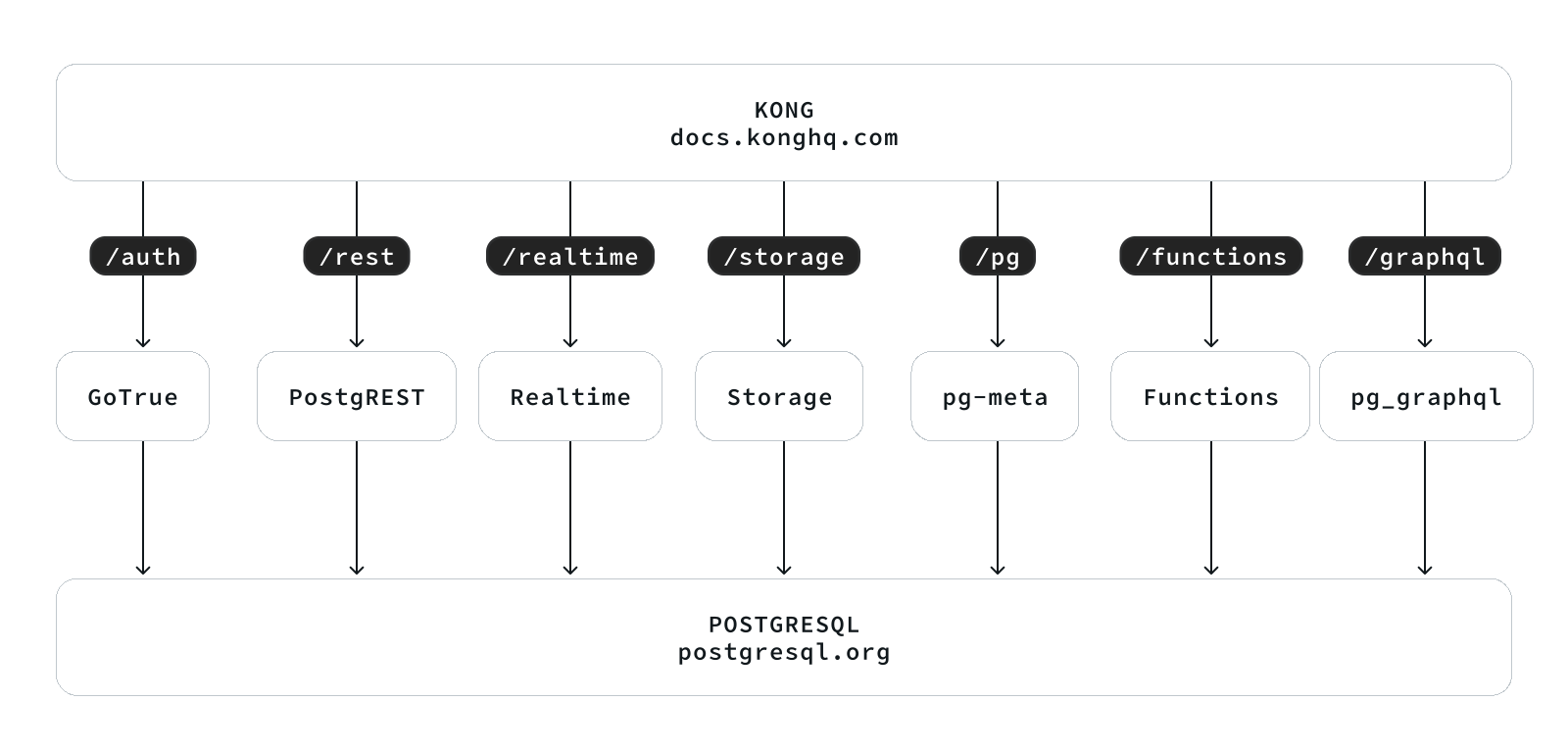
The built-in supa.yml config template will create a single-node supabase, with a singleton PostgreSQL and SNSD MinIO server.
You can use Multinode PostgreSQL Clusters and MNMD MinIO Clusters / external S3 service instead in production, we will cover that later.
Config Detail
Here are checklists for self-hosting
- Hardware: necessary VM/BM resources, one node at least, 3-4 are recommended for HA.
- Linux OS: Linux x86_64 server with fresh installed Linux, check compatible distro
- Network: Static IPv4 address which can be used as node identity
- Admin User: nopass ssh & sudo are recommended for admin user
- Conf Template: Use the
supaconfig template, if you don’t know how to manually configure pigsty
The built-in supa.yml config template is shown below.
The supa Config Template
all:
  children:

    # infra cluster for proxy, monitor, alert, etc..
    infra: { hosts: { 10.10.10.10: { infra_seq: 1 } } }

    # etcd cluster for ha postgres
    etcd: { hosts: { 10.10.10.10: { etcd_seq: 1 } }, vars: { etcd_cluster: etcd } }

    # minio cluster, s3 compatible object storage
    minio: { hosts: { 10.10.10.10: { minio_seq: 1 } }, vars: { minio_cluster: minio } }

    # pg-meta, the underlying postgres database for supabase
    pg-meta:
      hosts: { 10.10.10.10: { pg_seq: 1, pg_role: primary } }
      vars:
        pg_cluster: pg-meta
        pg_users:
          # supabase roles: anon, authenticated, dashboard_user
          - { name: anon           ,login: false }
          - { name: authenticated  ,login: false }
          - { name: dashboard_user ,login: false ,replication: true ,createdb: true ,createrole: true }
          - { name: service_role   ,login: false ,bypassrls: true }
          # supabase users: please use the same password
          - { name: supabase_admin             ,password: 'DBUser.Supa' ,pgbouncer: true ,inherit: true   ,roles: [ dbrole_admin ] ,superuser: true ,replication: true ,createdb: true ,createrole: true ,bypassrls: true }
          - { name: authenticator              ,password: 'DBUser.Supa' ,pgbouncer: true ,inherit: false  ,roles: [ dbrole_admin, authenticated ,anon ,service_role ] }
          - { name: supabase_auth_admin        ,password: 'DBUser.Supa' ,pgbouncer: true ,inherit: false  ,roles: [ dbrole_admin ] ,createrole: true }
          - { name: supabase_storage_admin     ,password: 'DBUser.Supa' ,pgbouncer: true ,inherit: false  ,roles: [ dbrole_admin, authenticated ,anon ,service_role ] ,createrole: true }
          - { name: supabase_functions_admin   ,password: 'DBUser.Supa' ,pgbouncer: true ,inherit: false  ,roles: [ dbrole_admin ] ,createrole: true }
          - { name: supabase_replication_admin ,password: 'DBUser.Supa' ,replication: true ,roles: [ dbrole_admin ]}
          - { name: supabase_read_only_user    ,password: 'DBUser.Supa' ,bypassrls: true ,roles: [ dbrole_readonly, pg_read_all_data ] }
        pg_databases:
          - name: postgres
            baseline: supabase.sql
            owner: supabase_admin
            comment: supabase postgres database
            schemas: [ extensions ,auth ,realtime ,storage ,graphql_public ,supabase_functions ,_analytics ,_realtime ]
            extensions:
              - { name: pgcrypto  ,schema: extensions  } # 1.3   : cryptographic functions
              - { name: pg_net    ,schema: extensions  } # 0.9.2 : async HTTP
              - { name: pgjwt     ,schema: extensions  } # 0.2.0 : json web token API for postgres
              - { name: uuid-ossp ,schema: extensions  } # 1.1   : generate universally unique identifiers (UUIDs)
              - { name: pgsodium        }                # 3.1.9 : pgsodium is a modern cryptography library for Postgres.
              - { name: supabase_vault  }                # 0.2.8 : Supabase Vault Extension
              - { name: pg_graphql      }                # 1.5.9 : pg_graphql: GraphQL support
              - { name: pg_jsonschema   }                # 0.3.3 : pg_jsonschema: Validate json schema
              - { name: wrappers        }                # 0.4.3 : wrappers: FDW collections
              - { name: http            }                # 1.6   : http: allows web page retrieval inside the database.
              - { name: pg_cron         }                # 1.6   : pg_cron: Job scheduler for PostgreSQL
              - { name: timescaledb     }                # 2.17  : timescaledb: Enables scalable inserts and complex queries for time-series data
              - { name: pg_tle          }                # 1.2   : pg_tle: Trusted Language Extensions for PostgreSQL
              - { name: vector          }                # 0.8.0 : pgvector: the vector similarity search
        # supabase required extensions
        pg_libs: 'pg_stat_statements, plpgsql, plpgsql_check, pg_cron, pg_net, timescaledb, auto_explain, pg_tle, plan_filter'
        pg_extensions: # extensions to be installed on this cluster
          - supabase   # essential extensions for supabase
          - timescaledb postgis pg_graphql pg_jsonschema wrappers pg_search pg_analytics pg_parquet plv8 duckdb_fdw pg_cron pg_timetable pgqr
          - supautils pg_plan_filter passwordcheck plpgsql_check pgaudit pgsodium pg_vault pgjwt pg_ecdsa pg_session_jwt index_advisor
          - pgvector pgvectorscale pg_summarize pg_tiktoken pg_tle pg_stat_monitor hypopg pg_hint_plan pg_http pg_net pg_smtp_client pg_idkit
        pg_parameters:
          cron.database_name: postgres
          pgsodium.enable_event_trigger: off
        pg_hba_rules: # supabase hba rules, require access from docker network
          - { user: all ,db: postgres  ,addr: intra         ,auth: pwd ,title: 'allow supabase access from intranet'    }
          - { user: all ,db: postgres  ,addr: 172.17.0.0/16 ,auth: pwd ,title: 'allow access from local docker network' }
        node_crontab: [ '00 01 * * * postgres /pg/bin/pg-backup full' ] # make a full backup every 1am

    # launch supabase stateless part with docker compose: ./supabase.yml
    supabase:
      hosts:
        10.10.10.10: { supa_seq: 1 }  # instance id
      vars:
        supa_cluster: supa            # cluster name
        docker_enabled: true          # enable docker

        # use these to pull docker images via proxy and mirror registries
        #docker_registry_mirrors: ['https://docker.xxxxx.io']
        #proxy_env:   # add [OPTIONAL] proxy env to /etc/docker/daemon.json configuration file
        #  no_proxy: "localhost,127.0.0.1,10.0.0.0/8,192.168.0.0/16,*.pigsty,*.aliyun.com,mirrors.*,*.myqcloud.com,*.tsinghua.edu.cn"
        #  #all_proxy: http://user:pass@host:port

        # these configuration entries will OVERWRITE or APPEND to /opt/supabase/.env file (src template: app/supabase/.env)
        # check https://github.com/pgsty/pigsty/blob/main/app/supabase/.env for default values
        supa_config:

          # IMPORTANT: CHANGE JWT_SECRET AND REGENERATE CREDENTIAL ACCORDING!!!!!!!!!!!
          # https://supabase.com/docs/guides/self-hosting/docker#securing-your-services
          jwt_secret: your-super-secret-jwt-token-with-at-least-32-characters-long
          anon_key: eyJhbGciOiJIUzI1NiIsInR5cCI6IkpXVCJ9.eyAgCiAgICAicm9sZSI6ICJhbm9uIiwKICAgICJpc3MiOiAic3VwYWJhc2UtZGVtbyIsCiAgICAiaWF0IjogMTY0MTc2OTIwMCwKICAgICJleHAiOiAxNzk5NTM1NjAwCn0.dc_X5iR_VP_qT0zsiyj_I_OZ2T9FtRU2BBNWN8Bu4GE
          service_role_key: eyJhbGciOiJIUzI1NiIsInR5cCI6IkpXVCJ9.eyAgCiAgICAicm9sZSI6ICJzZXJ2aWNlX3JvbGUiLAogICAgImlzcyI6ICJzdXBhYmFzZS1kZW1vIiwKICAgICJpYXQiOiAxNjQxNzY5MjAwLAogICAgImV4cCI6IDE3OTk1MzU2MDAKfQ.DaYlNEoUrrEn2Ig7tqibS-PHK5vgusbcbo7X36XVt4Q
          dashboard_username: supabase
          dashboard_password: pigsty

          # postgres connection string (use the correct ip and port)
          postgres_host: 10.10.10.10
          postgres_port: 5436             # access via the 'default' service, which always route to the primary postgres
          postgres_db: postgres
          postgres_password: DBUser.Supa  # password for supabase_admin and multiple supabase users

          # expose supabase via domain name
          site_url: http://supa.pigsty
          api_external_url: http://supa.pigsty
          supabase_public_url: http://supa.pigsty

          # if using s3/minio as file storage
          s3_bucket: supa
          s3_endpoint: https://sss.pigsty:9000
          s3_access_key: supabase
          s3_secret_key: S3User.Supabase
          s3_force_path_style: true
          s3_protocol: https
          s3_region: stub
          minio_domain_ip: 10.10.10.10  # sss.pigsty domain name will resolve to this ip statically

          # if using SMTP (optional)
          #smtp_admin_email: [email protected]
          #smtp_host: supabase-mail
          #smtp_port: 2500
          #smtp_user: fake_mail_user
          #smtp_pass: fake_mail_password
          #smtp_sender_name: fake_sender
          #enable_anonymous_users: false


  vars:
    version: v3.1.0                   # pigsty version string
    admin_ip: 10.10.10.10             # admin node ip address
    region: default                   # upstream mirror region: default|china|europe
    node_tune: oltp                   # node tuning specs: oltp,olap,tiny,crit
    pg_conf: oltp.yml                 # pgsql tuning specs: {oltp,olap,tiny,crit}.yml
    infra_portal:                     # domain names and upstream servers
      home         : { domain: h.pigsty }
      grafana      : { domain: g.pigsty ,endpoint: "${admin_ip}:3000" , websocket: true }
      prometheus   : { domain: p.pigsty ,endpoint: "${admin_ip}:9090" }
      alertmanager : { domain: a.pigsty ,endpoint: "${admin_ip}:9093" }
      minio        : { domain: m.pigsty ,endpoint: "10.10.10.10:9001", https: true, websocket: true }
      blackbox     : { endpoint: "${admin_ip}:9115" }
      loki         : { endpoint: "${admin_ip}:3100" }  # expose supa studio UI and API via nginx
      supa         : { domain: supa.pigsty ,endpoint: "10.10.10.10:8000", websocket: true }

    #----------------------------------#
    # Credential: CHANGE THESE PASSWORDS
    #----------------------------------#
    #grafana_admin_username: admin
    grafana_admin_password: pigsty
    #pg_admin_username: dbuser_dba
    pg_admin_password: DBUser.DBA
    #pg_monitor_username: dbuser_monitor
    pg_monitor_password: DBUser.Monitor
    #pg_replication_username: replicator
    pg_replication_password: DBUser.Replicator
    #patroni_username: postgres
    patroni_password: Patroni.API
    #haproxy_admin_username: admin
    haproxy_admin_password: pigsty

    # use minio as supabase file storage, single node single driver mode for demonstration purpose
    minio_access_key: minioadmin      # root access key, `minioadmin` by default
    minio_secret_key: minioadmin      # root secret key, `minioadmin` by default
    minio_buckets: [ { name: pgsql }, { name: supa } ]
    minio_users:
      - { access_key: dba , secret_key: S3User.DBA, policy: consoleAdmin }
      - { access_key: pgbackrest , secret_key: S3User.Backup,   policy: readwrite }
      - { access_key: supabase   , secret_key: S3User.Supabase, policy: readwrite }
    minio_endpoint: https://sss.pigsty:9000    # explicit overwrite minio endpoint with haproxy port
    node_etc_hosts: ["10.10.10.10 sss.pigsty"] # domain name to access minio from all nodes (required)

    # use minio as default backup repo for PostgreSQL
    pgbackrest_method: minio          # pgbackrest repo method: local,minio,[user-defined...]
    pgbackrest_repo:                  # pgbackrest repo: https://pgbackrest.org/configuration.html#section-repository
      local:                          # default pgbackrest repo with local posix fs
        path: /pg/backup              # local backup directory, `/pg/backup` by default
        retention_full_type: count    # retention full backups by count
        retention_full: 2             # keep 2, at most 3 full backup when using local fs repo
      minio:                          # optional minio repo for pgbackrest
        type: s3                      # minio is s3-compatible, so s3 is used
        s3_endpoint: sss.pigsty       # minio endpoint domain name, `sss.pigsty` by default
        s3_region: us-east-1          # minio region, us-east-1 by default, useless for minio
        s3_bucket: pgsql              # minio bucket name, `pgsql` by default
        s3_key: pgbackrest            # minio user access key for pgbackrest
        s3_key_secret: S3User.Backup  # minio user secret key for pgbackrest
        s3_uri_style: path            # use path style uri for minio rather than host style
        path: /pgbackrest             # minio backup path, default is `/pgbackrest`
        storage_port: 9000            # minio port, 9000 by default
        storage_ca_file: /pg/cert/ca.crt  # minio ca file path, `/pg/cert/ca.crt` by default
        bundle: y                     # bundle small files into a single file
        cipher_type: aes-256-cbc      # enable AES encryption for remote backup repo
        cipher_pass: pgBackRest       # AES encryption password, default is 'pgBackRest'
        retention_full_type: time     # retention full backup by time on minio repo
        retention_full: 14            # keep full backup for last 14 days

    # download docker and supabase related extensions
    pg_version: 17
    repo_modules: node,pgsql,infra,docker
    repo_packages: [node-bootstrap, infra-package, infra-addons, node-package1, node-package2, pgsql-utility, docker ]
    repo_extra_packages:
      - pgsql-main
      - supabase   # essential extensions for supabase
      - timescaledb postgis pg_graphql pg_jsonschema wrappers pg_search pg_analytics pg_parquet plv8 duckdb_fdw pg_cron pg_timetable pgqr
      - supautils pg_plan_filter passwordcheck plpgsql_check pgaudit pgsodium pg_vault pgjwt pg_ecdsa pg_session_jwt index_advisor
      - pgvector pgvectorscale pg_summarize pg_tiktoken pg_tle pg_stat_monitor hypopg pg_hint_plan pg_http pg_net pg_smtp_client pg_idkit
For advanced topics, we may need to modify the configuration file to fit our needs.
- Security Enhancement
- Domain Name and HTTPS
- Sending Mail with SMTP
- MinIO or External S3
- True High Availability
Security Enhancement
For security reasons, you should change the default passwords in the pigsty.yml config file.
grafana_admin_password:pigsty, Grafana admin passwordpg_admin_password:DBUser.DBA, PGSQL superuser passwordpg_monitor_password:DBUser.Monitor, PGSQL monitor user passwordpg_replication_password:DBUser.Replicator, PGSQL replication user passwordpatroni_password:Patroni.API, Patroni HA Agent Passwordhaproxy_admin_password:pigsty, Load balancer admin passwordminio_access_key:minioadmin, MinIO root usernameminio_secret_key:minioadmin, MinIO root password
Supabase will use PostgreSQL & MinIO as its backend, so also change the following passwords for supabase business users:
pg_users: password for supabase business users in postgresminio_users:minioadmin, MinIO business user’s password
The pgbackrest will take backups and WALs to MinIO, so also change the following passwords reference
pgbackrest_repo: refer to the
PLEASE check the Supabase Self-Hosting: Generate API Keys to generate supabase credentials:
jwt_secret: a secret key with at least 40 charactersanon_key: a jwt token generate for anonymous users, based onjwt_secretservice_role_key: a jwt token generate for elevated service roles, based onjwt_secretdashboard_username: supabase studio web portal username,supabaseby defaultdashboard_password: supabase studio web portal password,pigstyby default
If you have chanaged the default password for PostgreSQL and MinIO, you have to update the following parameters as well:
postgres_password, according topg_userss3_access_keyands3_secret_key, according tominio_users
Domain Name and HTTPS
For local or intranet use, you can connect directly to Kong port on http://<IP>:8000 or 8443 for https.
This works but isn’t ideal. Using a domain with HTTPS is strongly recommended when serving Supabase to the public.
Pigsty has a Nginx server installed & configured on the admin node to act as a reverse proxy for all web based service. which is configured via the infra_portal parameter.
all:
  vars:     # global vars
    #.....
    infra_portal:  # domain names and upstream servers
      home         : { domain: h.pigsty }
      grafana      : { domain: g.pigsty ,endpoint: "${admin_ip}:3000" , websocket: true }
      prometheus   : { domain: p.pigsty ,endpoint: "${admin_ip}:9090" }
      alertmanager : { domain: a.pigsty ,endpoint: "${admin_ip}:9093" }
      minio        : { domain: m.pigsty ,endpoint: "10.10.10.10:9001", https: true, websocket: true }
      blackbox     : { endpoint: "${admin_ip}:9115" }
      loki         : { endpoint: "${admin_ip}:3100" }  # expose supa studio UI and API via nginx
      supa         : { domain: supa.pigsty ,endpoint: "10.10.10.10:8000", websocket: true }
On the client side, you can use the domain supa.pigsty to access the Supabase Studio management interface.
You can add this domain to your local /etc/hosts file or use a local DNS server to resolve it to the server’s external IP address.
To use a real domain with HTTPS, you will need to modify the all.vars.infra_portal.supa with updated domain name (such as supa.pigsty.cc here).
You can obtain a free HTTPS certificate from Let’s Encrypt, and just put the cert/key files in the specified path.
#supa : { domain: supa.pigsty ,endpoint: "10.10.10.10:8000", websocket: true }  # add your HTTPS certs/keys and specify the path
supa  : { domain: supa.pigsty.cc ,endpoint: "10.10.10.10:8000", websocket: true ,cert: /etc/cert/suap.pigsty.cc.crt ,key: /etc/cert/supa.pigsty.cc.key }
To reload the new configuration after installation, use the infra.yml playbook:
./infra.yml -t nginx_config,nginx_launch # reload nginx config
You also have to update the all.children.supabase.vars.supa_config to tell supabase to use the new domain name:
all:
  children:           # clusters
    supabase:         # supabase group
      vars:           # supabase param
        supa_config:  # supabase config

          # update supabase domain names here
          site_url: http://supa.pigsty.cc
          api_external_url: http://supa.pigsty.cc
          supabase_public_url: http://supa.pigsty.cc
And reload the supabase service to apply the new configuration:
./supabase.yml -t supa_config,supa_launch # reload supabase config
Sending Mail with SMTP
Some Supabase features require email. For production use, I’d recommend using an external SMTP service. Since self-hosted SMTP servers often result in rejected or spam-flagged emails.
To do this, modify the Supabase configuration and add SMTP credentials:
all:
  children:
    supabase:
      vars:
        supa_config:
          smtp_host: smtpdm.aliyun.com:80
          smtp_port: 80
          smtp_user: [email protected]
          smtp_pass: your_email_user_password
          smtp_sender_name: MySupabase
          smtp_admin_email: [email protected]
          enable_anonymous_users: false
And don’t forget to reload the supabase service with ./supabase.yml -t supa_config,supa_launch
MinIO or External S3
Pigsty’s self-hosting supabase will use a local SNSD MinIO server, which is used by Supabase itself for object storage, and by PostgreSQL for backups. For production use, you should consider using a HA MNMD MinIO cluster or an external S3 compatible service instead.
We recommend using an external S3 when:
- you just have one single server available, then external s3 gives you a minimal disaster recovery guarantee, with RTO in hours and RPO in MBs.
- you are operating in the cloud, then using S3 directly is recommended rather than wrap expensively EBS with MinIO
The
terraform/spec/aliyun-meta-s3.tfprovides an example of how to provision a single node alone with an S3 bucket.
To use an external S3 compatible service, you’ll have to update two related references in the pigsty.yml config.
For example, to use Aliyun OSS as the object storage for Supabase, you can modify the all.children.supabase.vars.supa_config to point to the Aliyun OSS bucket:
all:
  children:
    supabase:
      vars:
        supa_config:
          s3_bucket: pigsty-oss
          s3_endpoint: https://oss-cn-beijing-internal.aliyuncs.com
          s3_access_key: xxxxxxxxxxxxxxxx
          s3_secret_key: xxxxxxxxxxxxxxxx
          s3_force_path_style: false
          s3_protocol: https
          s3_region: oss-cn-beijing
Reload the supabase service with ./supabase.yml -t supa_config,supa_launch again.
The next reference is in the PostgreSQL backup repo:
all:
  vars:
    # use minio as default backup repo for PostgreSQL
    pgbackrest_method: minio          # pgbackrest repo method: local,minio,[user-defined...]
    pgbackrest_repo:                  # pgbackrest repo: https://pgbackrest.org/configuration.html#section-repository
      local:                          # default pgbackrest repo with local posix fs
        path: /pg/backup              # local backup directory, `/pg/backup` by default
        retention_full_type: count    # retention full backups by count
        retention_full: 2             # keep 2, at most 3 full backup when using local fs repo
      minio:                          # optional minio repo for pgbackrest
        type: s3                      # minio is s3-compatible, so s3 is used

        # update your credentials here
        s3_endpoint: oss-cn-beijing-internal.aliyuncs.com
        s3_region: oss-cn-beijing
        s3_bucket: pigsty-oss
        s3_key: xxxxxxxxxxxxxx
        s3_key_secret: xxxxxxxx
        s3_uri_style: host

        path: /pgbackrest             # minio backup path, default is `/pgbackrest`
        storage_port: 9000            # minio port, 9000 by default
        storage_ca_file: /pg/cert/ca.crt  # minio ca file path, `/pg/cert/ca.crt` by default
        bundle: y                     # bundle small files into a single file
        cipher_type: aes-256-cbc      # enable AES encryption for remote backup repo
        cipher_pass: pgBackRest       # AES encryption password, default is 'pgBackRest'
        retention_full_type: time     # retention full backup by time on minio repo
        retention_full: 14            # keep full backup for last 14 days
After updating the pgbackrest_repo, you can reset the pgBackrest backup with ./pgsql.yml -t pgbackrest.
True High Availability
The default single-node deployment (with external S3) provide a minimal disaster recovery guarantee, with RTO in hours and RPO in MBs.
To achieve RTO < 30s and zero data loss, you need a multi-node high availability cluster with at least 3-nodes.
Which involves high availability for these components:
- ETCD: DCS requires at least three nodes to tolerate one node failure.
- PGSQL: PGSQL synchronous commit mode recommends at least three nodes.
- INFRA: It’s good to have two or three copies of observability stack.
- Supabase itself can also have multiple replicas to achieve high availability.
We recommend you to refer to the trio and safe config to upgrade your cluster to three nodes or more.
In this case, you also need to modify the access points for PostgreSQL and MinIO to use the DNS / L2 VIP / HAProxy HA access points.
all:
  children:
    supabase:
      hosts:
        10.10.10.10: { supa_seq: 1 }
        10.10.10.11: { supa_seq: 2 }
        10.10.10.12: { supa_seq: 3 }
      vars:
        supa_cluster: supa            # cluster name
        supa_config:
          postgres_host: 10.10.10.2             # use the PG L2 VIP
          postgres_port: 5433                   # use the 5433 port to access the primary instance through pgbouncer
          s3_endpoint: https://sss.pigsty:9002  # If you are using MinIO through the haproxy lb port 9002
          minio_domain_ip: 10.10.10.3           # use the L2 VIP binds to all proxy nodes
The 3-Node HA Supabase Config Template
all:

  #==============================================================#
  # Clusters, Nodes, and Modules
  #==============================================================#
  children:

    # infra cluster for proxy, monitor, alert, etc..
    infra:
      hosts:
        10.10.10.10: { infra_seq: 1 ,nodename: infra-1 }
        10.10.10.11: { infra_seq: 2 ,nodename: infra-2, repo_enabled: false, grafana_enabled: false }
        10.10.10.12: { infra_seq: 3 ,nodename: infra-3, repo_enabled: false, grafana_enabled: false }
      vars:

        vip_enabled: true
        vip_vrid: 128
        vip_address: 10.10.10.3
        vip_interface: eth1
        haproxy_services:
          - name: minio                    # [REQUIRED] service name, unique
            port: 9002                     # [REQUIRED] service port, unique
            balance: leastconn             # [OPTIONAL] load balancer algorithm
            options:                       # [OPTIONAL] minio health check
              - option httpchk
              - option http-keep-alive
              - http-check send meth OPTIONS uri /minio/health/live
              - http-check expect status 200
            servers:
              - { name: minio-1 ,ip: 10.10.10.10 ,port: 9000 ,options: 'check-ssl ca-file /etc/pki/ca.crt check port 9000' }
              - { name: minio-2 ,ip: 10.10.10.11 ,port: 9000 ,options: 'check-ssl ca-file /etc/pki/ca.crt check port 9000' }
              - { name: minio-3 ,ip: 10.10.10.12 ,port: 9000 ,options: 'check-ssl ca-file /etc/pki/ca.crt check port 9000' }


    etcd: # dcs service for postgres/patroni ha consensus
      hosts: # 1 node for testing, 3 or 5 for production
        10.10.10.10: { etcd_seq: 1 }  # etcd_seq required
        10.10.10.11: { etcd_seq: 2 }  # assign from 1 ~ n
        10.10.10.12: { etcd_seq: 3 }  # odd number please
      vars: # cluster level parameter override roles/etcd
        etcd_cluster: etcd  # mark etcd cluster name etcd
        etcd_safeguard: false # safeguard against purging
        etcd_clean: true # purge etcd during init process

    # minio cluster 4-node
    minio:
      hosts:
        10.10.10.10: { minio_seq: 1 , nodename: minio-1 }
        10.10.10.11: { minio_seq: 2 , nodename: minio-2 }
        10.10.10.12: { minio_seq: 3 , nodename: minio-3 }
      vars:
        minio_cluster: minio
        minio_data: '/data{1...4}'
        minio_buckets: [ { name: pgsql }, { name: supa } ]
        minio_users:
          - { access_key: dba , secret_key: S3User.DBA, policy: consoleAdmin }
          - { access_key: pgbackrest , secret_key: S3User.Backup,   policy: readwrite }
          - { access_key: supabase   , secret_key: S3User.Supabase, policy: readwrite }

    # pg-meta, the underlying postgres database for supabase
    pg-meta:
      hosts:
        10.10.10.10: { pg_seq: 1, pg_role: primary }
        10.10.10.11: { pg_seq: 2, pg_role: replica }
        10.10.10.12: { pg_seq: 3, pg_role: replica }
      vars:
        pg_cluster: pg-meta
        pg_users:
          # supabase roles: anon, authenticated, dashboard_user
          - { name: anon           ,login: false }
          - { name: authenticated  ,login: false }
          - { name: dashboard_user ,login: false ,replication: true ,createdb: true ,createrole: true }
          - { name: service_role   ,login: false ,bypassrls: true }
          # supabase users: please use the same password
          - { name: supabase_admin             ,password: 'DBUser.Supa' ,pgbouncer: true ,inherit: true   ,roles: [ dbrole_admin ] ,superuser: true ,replication: true ,createdb: true ,createrole: true ,bypassrls: true }
          - { name: authenticator              ,password: 'DBUser.Supa' ,pgbouncer: true ,inherit: false  ,roles: [ dbrole_admin, authenticated ,anon ,service_role ] }
          - { name: supabase_auth_admin        ,password: 'DBUser.Supa' ,pgbouncer: true ,inherit: false  ,roles: [ dbrole_admin ] ,createrole: true }
          - { name: supabase_storage_admin     ,password: 'DBUser.Supa' ,pgbouncer: true ,inherit: false  ,roles: [ dbrole_admin, authenticated ,anon ,service_role ] ,createrole: true }
          - { name: supabase_functions_admin   ,password: 'DBUser.Supa' ,pgbouncer: true ,inherit: false  ,roles: [ dbrole_admin ] ,createrole: true }
          - { name: supabase_replication_admin ,password: 'DBUser.Supa' ,replication: true ,roles: [ dbrole_admin ]}
          - { name: supabase_read_only_user    ,password: 'DBUser.Supa' ,bypassrls: true ,roles: [ dbrole_readonly, pg_read_all_data ] }
        pg_databases:
          - name: postgres
            baseline: supabase.sql
            owner: supabase_admin
            comment: supabase postgres database
            schemas: [ extensions ,auth ,realtime ,storage ,graphql_public ,supabase_functions ,_analytics ,_realtime ]
            extensions:
              - { name: pgcrypto  ,schema: extensions  } # 1.3   : cryptographic functions
              - { name: pg_net    ,schema: extensions  } # 0.9.2 : async HTTP
              - { name: pgjwt     ,schema: extensions  } # 0.2.0 : json web token API for postgres
              - { name: uuid-ossp ,schema: extensions  } # 1.1   : generate universally unique identifiers (UUIDs)
              - { name: pgsodium        }                # 3.1.9 : pgsodium is a modern cryptography library for Postgres.
              - { name: supabase_vault  }                # 0.2.8 : Supabase Vault Extension
              - { name: pg_graphql      }                # 1.5.9 : pg_graphql: GraphQL support
              - { name: pg_jsonschema   }                # 0.3.3 : pg_jsonschema: Validate json schema
              - { name: wrappers        }                # 0.4.3 : wrappers: FDW collections
              - { name: http            }                # 1.6   : http: allows web page retrieval inside the database.
              - { name: pg_cron         }                # 1.6   : pg_cron: Job scheduler for PostgreSQL
              - { name: timescaledb     }                # 2.17  : timescaledb: Enables scalable inserts and complex queries for time-series data
              - { name: pg_tle          }                # 1.2   : pg_tle: Trusted Language Extensions for PostgreSQL
              - { name: vector          }                # 0.8.0 : pgvector: the vector similarity search
        # supabase required extensions
        pg_libs: 'pg_stat_statements, plpgsql, plpgsql_check, pg_cron, pg_net, timescaledb, auto_explain, pg_tle, plan_filter'
        pg_extensions: # extensions to be installed on this cluster
          - supabase   # essential extensions for supabase
          - timescaledb postgis pg_graphql pg_jsonschema wrappers pg_search pg_analytics pg_parquet plv8 duckdb_fdw pg_cron pg_timetable pgqr
          - supautils pg_plan_filter passwordcheck plpgsql_check pgaudit pgsodium pg_vault pgjwt pg_ecdsa pg_session_jwt index_advisor
          - pgvector pgvectorscale pg_summarize pg_tiktoken pg_tle pg_stat_monitor hypopg pg_hint_plan pg_http pg_net pg_smtp_client pg_idkit
        pg_parameters:
          cron.database_name: postgres
          pgsodium.enable_event_trigger: off
        pg_hba_rules: # supabase hba rules, require access from docker network
          - { user: all ,db: postgres  ,addr: intra         ,auth: pwd ,title: 'allow supabase access from intranet'    }
          - { user: all ,db: postgres  ,addr: 172.17.0.0/16 ,auth: pwd ,title: 'allow access from local docker network' }
        pg_vip_enabled: true
        pg_vip_address: 10.10.10.2/24
        pg_vip_interface: eth1
        node_crontab: [ '00 01 * * * postgres /pg/bin/pg-backup full' ] # make a full backup every 1am


    # launch supabase stateless part with docker compose: ./supabase.yml
    supabase:
      hosts:
        10.10.10.10: { supa_seq: 1 }  # instance 1
        10.10.10.11: { supa_seq: 2 }  # instance 2
        10.10.10.12: { supa_seq: 3 }  # instance 3
      vars:
        supa_cluster: supa            # cluster name
        docker_enabled: true          # enable docker

        # use these to pull docker images via proxy and mirror registries
        #docker_registry_mirrors: ['https://docker.xxxxx.io']
        #proxy_env:   # add [OPTIONAL] proxy env to /etc/docker/daemon.json configuration file
        #  no_proxy: "localhost,127.0.0.1,10.0.0.0/8,192.168.0.0/16,*.pigsty,*.aliyun.com,mirrors.*,*.myqcloud.com,*.tsinghua.edu.cn"
        #  #all_proxy: http://user:pass@host:port

        # these configuration entries will OVERWRITE or APPEND to /opt/supabase/.env file (src template: app/supabase/.env)
        # check https://github.com/pgsty/pigsty/blob/main/app/supabase/.env for default values
        supa_config:

          # IMPORTANT: CHANGE JWT_SECRET AND REGENERATE CREDENTIAL ACCORDING!!!!!!!!!!!
          # https://supabase.com/docs/guides/self-hosting/docker#securing-your-services
          jwt_secret: your-super-secret-jwt-token-with-at-least-32-characters-long
          anon_key: eyJhbGciOiJIUzI1NiIsInR5cCI6IkpXVCJ9.eyAgCiAgICAicm9sZSI6ICJhbm9uIiwKICAgICJpc3MiOiAic3VwYWJhc2UtZGVtbyIsCiAgICAiaWF0IjogMTY0MTc2OTIwMCwKICAgICJleHAiOiAxNzk5NTM1NjAwCn0.dc_X5iR_VP_qT0zsiyj_I_OZ2T9FtRU2BBNWN8Bu4GE
          service_role_key: eyJhbGciOiJIUzI1NiIsInR5cCI6IkpXVCJ9.eyAgCiAgICAicm9sZSI6ICJzZXJ2aWNlX3JvbGUiLAogICAgImlzcyI6ICJzdXBhYmFzZS1kZW1vIiwKICAgICJpYXQiOiAxNjQxNzY5MjAwLAogICAgImV4cCI6IDE3OTk1MzU2MDAKfQ.DaYlNEoUrrEn2Ig7tqibS-PHK5vgusbcbo7X36XVt4Q
          dashboard_username: supabase
          dashboard_password: pigsty

          # postgres connection string (use the correct ip and port)
          postgres_host: 10.10.10.3       # use the pg_vip_address rather than single node ip
          postgres_port: 5433             # access via the 'default' service, which always route to the primary postgres
          postgres_db: postgres
          postgres_password: DBUser.Supa  # password for supabase_admin and multiple supabase users

          # expose supabase via domain name
          site_url: http://supa.pigsty
          api_external_url: http://supa.pigsty
          supabase_public_url: http://supa.pigsty

          # if using s3/minio as file storage
          s3_bucket: supa
          s3_endpoint: https://sss.pigsty:9002
          s3_access_key: supabase
          s3_secret_key: S3User.Supabase
          s3_force_path_style: true
          s3_protocol: https
          s3_region: stub
          minio_domain_ip: 10.10.10.3   # sss.pigsty domain name will resolve to this l2 vip that bind to all nodes

          # if using SMTP (optional)
          #smtp_admin_email: [email protected]
          #smtp_host: supabase-mail
          #smtp_port: 2500
          #smtp_user: fake_mail_user
          #smtp_pass: fake_mail_password
          #smtp_sender_name: fake_sender
          #enable_anonymous_users: false


  #==============================================================#
  # Global Parameters
  #==============================================================#
  vars:
    version: v3.1.0                   # pigsty version string
    admin_ip: 10.10.10.10             # admin node ip address
    region: china                     # upstream mirror region: default|china|europe
    node_tune: oltp                   # node tuning specs: oltp,olap,tiny,crit
    pg_conf: oltp.yml                 # pgsql tuning specs: {oltp,olap,tiny,crit}.yml
    infra_portal:                     # domain names and upstream servers
      home         : { domain: h.pigsty }
      grafana      : { domain: g.pigsty ,endpoint: "${admin_ip}:3000" , websocket: true }
      prometheus   : { domain: p.pigsty ,endpoint: "${admin_ip}:9090" }
      alertmanager : { domain: a.pigsty ,endpoint: "${admin_ip}:9093" }
      minio        : { domain: m.pigsty ,endpoint: "10.10.10.10:9001", https: true, websocket: true }
      blackbox     : { endpoint: "${admin_ip}:9115" }
      loki         : { endpoint: "${admin_ip}:3100" }  # expose supa studio UI and API via nginx
      supa         : { domain: supa.pigsty ,endpoint: "10.10.10.10:8000", websocket: true }

    #----------------------------------#
    # Credential: CHANGE THESE PASSWORDS
    #----------------------------------#
    #grafana_admin_username: admin
    grafana_admin_password: pigsty
    #pg_admin_username: dbuser_dba
    pg_admin_password: DBUser.DBA
    #pg_monitor_username: dbuser_monitor
    pg_monitor_password: DBUser.Monitor
    #pg_replication_username: replicator
    pg_replication_password: DBUser.Replicator
    #patroni_username: postgres
    patroni_password: Patroni.API
    #haproxy_admin_username: admin
    haproxy_admin_password: pigsty

    # use minio as supabase file storage, single node single driver mode for demonstration purpose
    minio_access_key: minioadmin      # root access key, `minioadmin` by default
    minio_secret_key: minioadmin      # root secret key, `minioadmin` by default
    minio_buckets: [ { name: pgsql }, { name: supa } ]
    minio_users:
      - { access_key: dba , secret_key: S3User.DBA, policy: consoleAdmin }
      - { access_key: pgbackrest , secret_key: S3User.Backup,   policy: readwrite }
      - { access_key: supabase   , secret_key: S3User.Supabase, policy: readwrite }
    minio_endpoint: https://sss.pigsty:9000    # explicit overwrite minio endpoint with haproxy port
    node_etc_hosts: ["10.10.10.3 sss.pigsty"] # domain name to access minio from all nodes (required)

    # use minio as default backup repo for PostgreSQL
    pgbackrest_method: minio          # pgbackrest repo method: local,minio,[user-defined...]
    pgbackrest_repo:                  # pgbackrest repo: https://pgbackrest.org/configuration.html#section-repository
      local:                          # default pgbackrest repo with local posix fs
        path: /pg/backup              # local backup directory, `/pg/backup` by default
        retention_full_type: count    # retention full backups by count
        retention_full: 2             # keep 2, at most 3 full backup when using local fs repo
      minio:                          # optional minio repo for pgbackrest
        type: s3                      # minio is s3-compatible, so s3 is used
        s3_endpoint: sss.pigsty       # minio endpoint domain name, `sss.pigsty` by default
        s3_region: us-east-1          # minio region, us-east-1 by default, useless for minio
        s3_bucket: pgsql              # minio bucket name, `pgsql` by default
        s3_key: pgbackrest            # minio user access key for pgbackrest
        s3_key_secret: S3User.Backup  # minio user secret key for pgbackrest
        s3_uri_style: path            # use path style uri for minio rather than host style
        path: /pgbackrest             # minio backup path, default is `/pgbackrest`
        storage_port: 9002            # minio port, 9000 by default
        storage_ca_file: /pg/cert/ca.crt  # minio ca file path, `/pg/cert/ca.crt` by default
        bundle: y                     # bundle small files into a single file
        cipher_type: aes-256-cbc      # enable AES encryption for remote backup repo
        cipher_pass: pgBackRest       # AES encryption password, default is 'pgBackRest'
        retention_full_type: time     # retention full backup by time on minio repo
        retention_full: 14            # keep full backup for last 14 days

    # download docker and supabase related extensions
    pg_version: 17
    repo_modules: node,pgsql,infra,docker
    repo_packages: [node-bootstrap, infra-package, infra-addons, node-package1, node-package2, pgsql-utility, docker ]
    repo_extra_packages:
      - pgsql-main
      - supabase   # essential extensions for supabase
      - timescaledb postgis pg_graphql pg_jsonschema wrappers pg_search pg_analytics pg_parquet plv8 duckdb_fdw pg_cron pg_timetable pgqr
      - supautils pg_plan_filter passwordcheck plpgsql_check pgaudit pgsodium pg_vault pgjwt pg_ecdsa pg_session_jwt index_advisor
      - pgvector pgvectorscale pg_summarize pg_tiktoken pg_tle pg_stat_monitor hypopg pg_hint_plan pg_http pg_net pg_smtp_client pg_idkit
Modern Hardware for Future Databases
Author: Alex Miller (Snowflake, Apple, Google) | Original: Modern Hardware for Future Databases

A survey on how hardware developments affect database design, covering key advancements in networking, storage, and computing. Read more
Can MySQL Still Catch Up with PostgreSQL?
Author: Peter Zaitsev (Percona Founder) | Original: Can MySQL Catch Up with PostgreSQL?

Percona founder Peter Zaitsev discusses whether MySQL can still keep up with PostgreSQL. His views largely represent the MySQL community’s perspective. Read more
Open-Source "Tyrant" Linus's Purge

The Linux community is essentially imperial — and Linus himself is the earliest and most successful technical dictator. People are used to Linus’s generosity but forget this point. Read more
Optimize Bio Cores First, CPU Cores Second

Programmers are expensive, scarce biological computing cores, the anchor point of software costs — please prioritize optimizing biological cores before optimizing CPU cores. Read more
MongoDB Has No Future: Good Marketing Can't Save a Rotten Mango

MongoDB has a terrible track record on integrity, lackluster products and technology, gets beaten by PG in correctness, performance, and functionality, with collapsing developer reputation, declining popularity, stock price halving, and expanding losses. Provocative marketing against PG can’t save it with “good marketing.” Read more
MongoDB: Now Powered by PostgreSQL?

MongoDB 3.2’s analytics subsystem turned out to be an embedded PostgreSQL database? A whistleblowing story from MongoDB’s partner about betrayal and disillusionment. Read more
Switzerland Mandates Open-Source for Government Software

Switzerland’s government leads the way with open source legislation, showing IT developing countries how to ensure software sovereignty and control. True autonomy and control stem from “open source communities,” not some “nationalist” style “domestic software.” Read more
MySQL is dead, Long live PostgreSQL!

This July, MySQL 9.0 was finally released—a full eight years after its last major version, 8.0 (@2016-09). Read more
CVE-2024-6387 SSH Vulnerability Fix
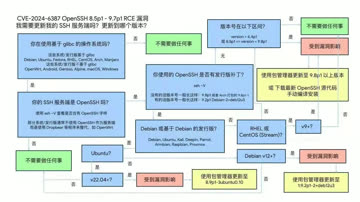
This vulnerability affects EL9, Ubuntu 22.04, Debian 12. Users should promptly update OpenSSH to fix this vulnerability. Read more
Can Oracle Still Save MySQL?
Author: Peter Zaitsev (Percona Founder) | Original: Can Oracle Save MySQL?

Percona founder Peter Zaitsev publicly expressed disappointment with MySQL and Oracle, criticizing the declining performance with newer versions. Read more
Oracle Finally Killed MySQL
Author: Peter Zaitsev (Percona Founder) | Original: Is Oracle Finally Killing MySQL?

Peter Zaitsev, founder of Percona, criticizes how Oracle’s actions and inactions have killed MySQL. About 15 years after acquiring Sun and MySQL. Read more
MySQL Performance Declining: Where is Sakila Going?
Author: Marco Tusa (Percona) | Original: Sakila, Where Are You Going?

Higher MySQL versions mean worse performance? Percona monitoring shows slow migration from 5.7 to 8.x. PostgreSQL is pulling ahead. Read more
Can Chinese Domestic Databases Really Compete?

Friends often ask me, can Chinese domestic databases really compete? To be honest, it’s a question that offends people. So let’s try speaking with data - I hope the charts provided in this article can help readers understand the database ecosystem landscape and establish more accurate proportional awareness. Read more
The $20 Brother PolarDB: What Should Databases Actually Cost?

Today we discuss the fair pricing of commercial databases, open-source databases, cloud databases, and domestic Chinese databases. Read more
Redis Going Non-Open-Source is a Disgrace to "Open-Source" and Public Cloud

Redis “going non-open source” is not a disgrace to Redis, but a disgrace to “open source/OSI” and even more so to public cloud. What truly matters has always been software freedom, while open source is just one means to achieve software freedom. Read more
How Can MySQL's Correctness Be This Garbage?

MySQL’s transaction ACID has flaws and doesn’t match documentation promises. This may lead to serious correctness issues - use with caution. Read more
Database in K8S: Pros & Cons
Whether databases should be housed in Kubernetes/Docker remains highly controversial. While Kubernetes (k8s) excels in managing stateless applications, it has fundamental drawbacks with stateful services, especially databases like PostgreSQL and MySQL.
In the previous article, “Databases in Docker: Good or Bad,” we discussed the pros and cons of containerizing databases. Today, let’s delve into the trade-offs in orchestrating databases in K8S and explore why it’s not a wise decision.
Summary
Kubernetes (k8s) is an exceptional container orchestration tool aimed at helping developers better manage a vast array of complex stateless applications. Despite its offerings like StatefulSet, PV, PVC, and LocalhostPV for supporting stateful services (i.e., databases), these features are still insufficient for running production-level databases that demand higher reliability.
Databases are more like “pets” than “cattle” and require careful nurturing. Treating databases as “cattle” in K8S essentially turns external disk/file system/storage services into new “database pets.” Running databases on EBS/network storage presents significant disadvantages in reliability and performance. However, using high-performance local NVMe disks will make the database bound to nodes and non-schedulable, negating the primary purpose of putting them in K8S.
Placing databases in K8S results in a “lose-lose” situation - K8S loses its simplicity in statelessness, lacking the flexibility to quickly relocate, schedule, destroy, and rebuild like purely stateless use. On the other hand, databases suffer several crucial attributes: reliability, security, performance, and complexity costs, in exchange for limited “elasticity” and utilization - something virtual machines can also achieve. For users outside public cloud vendors, the disadvantages far outweigh the benefits.
The “cloud-native frenzy,” exemplified by K8S, has become a distorted phenomenon: adopting k8s for the sake of k8s. Engineers add extra complexity to increase their irreplaceability, while managers fear being left behind by the industry and getting caught up in deployment races. Using tanks for tasks that could be done with bicycles, to gain experience or prove oneself, without considering if the problem needs such “dragon-slaying” techniques - this kind of architectural juggling will eventually lead to adverse outcomes.
Until the reliability and performance of the network storage surpass local storage, placing databases in K8S is an unwise choice. There are other ways to seal the complexity of database management, such as RDS and open-source RDS solutions like Pigsty, which are based on bare Metal or bare OS. Users should make wise decisions based on their situations and needs, carefully weighing the pros and cons.
The Status Quo
K8S excels in orchestrating stateless application services but was initially limited to stateful services. Despite not being the intended purpose of K8S and Docker, the community’s zeal for expansion has been unstoppable. Evangelists depict K8S as the next-generation cloud operating system, asserting that databases will inevitably become regular applications within Kubernetes. Various abstractions have emerged to support stateful services: StatefulSet, PV, PVC, and LocalhostPV.
Countless cloud-native enthusiasts have attempted to migrate existing databases into K8S, resulting in a proliferation of CRDs and Operators for databases. Taking PostgreSQL as an example, there are already more than ten different K8S deployment solutions available: PGO, StackGres, CloudNativePG, PostgresOperator, PerconaOperator, CYBERTEC-pg-operator, TemboOperator, Kubegres, KubeDB, KubeBlocks, and so on. The CNCF landscape rapidly expands, turning into a playground of complexity.
However, complexity is a cost. With “cost reduction” becoming mainstream, voices of reflection have begun to emerge. Could-Exit Pioneers like DHH, who deeply utilized K8S in public clouds, abandoned it due to its excessive complexity during the transition to self-hosted open-source solutions, relying only on Docker and a Ruby tool named Kamal as alternatives. Many began to question whether stateful services like databases suit Kubernetes.
K8S itself, in its effort to support stateful applications, has become increasingly complex, straying from its original intention as a container orchestration platform. Tim Hockin, a co-founder of Kubernetes, also voiced his rare concerns at this year’s KubeCon in “K8s is Cannibalizing Itself!”: “Kubernetes has become too complex; it needs to learn restraint, or it will stop innovating and lose its base.”
Lose-Lose Situation
In the cloud-native realm, the analogy of “pets” versus “cattle” is often used for illustrating stateful services. “Pets,” like databases, need careful and individual care, while “cattle” represent disposable, stateless applications (Disposability).
Cloud Native Applications 12 Factors: Disposability
One of the leading architectural goals of K8S is to treat what can be treated as cattle as cattle. The attempt to “separate storage from computation” in databases follows this strategy: splitting stateful database services into state storage outside K8S and pure computation inside K8S. The state is stored on the EBS/cloud disk/distributed storage service, allowing the “stateless” database part to be freely created, destroyed, and scheduled in K8S.
Unfortunately, databases, especially OLTP databases, heavily depend on disk hardware, and network storage’s reliability and performance still lag behind local disks by orders of magnitude. Thus, K8S offers the LocalhostPV option, allowing containers to use data volumes directly lies on the host operating system, utilizing high-performance/high-reliability local NVMe disk storage.
However, this presents a dilemma: should one use subpar cloud disks and tolerate poor database reliability/performance for K8S’s scheduling and orchestration capabilities? Or use high-performance local disks tied to host nodes, virtually losing all flexible scheduling abilities? The former is like stuffing an anchor into K8S’s small boat, slowing overall speed and agility; the latter is like anchoring and pinning the ship to a specific point.
Running a stateless K8S cluster is simple and reliable, as is running a stateful database on a physical machine’s bare operating system. Mixing the two, however, results in a lose-lose situation: K8S loses its stateless flexibility and casual scheduling abilities, while the database sacrifices core attributes like reliability, security, efficiency, and simplicity in exchange for elasticity, resource utilization, and Day1 delivery speed that are not fundamentally important to databases.
A vivid example of the former is the performance optimization of PostgreSQL@K8S, which KubeBlocks contributed. K8S experts employed various advanced methods to solve performance issues that did not exist on bare metal/bare OS at all. A fresh case of the latter is Didi’s K8S architecture juggling disaster; if it weren’t for putting the stateful MySQL in K8S, would rebuilding a stateless K8S cluster and redeploying applications take 12 hours to recover?
Pros and Cons
For serious technology decisions, the most crucial aspect is weighing the pros and cons. Here, in the order of “quality, security, performance, cost,” let’s discuss the technical trade-offs of placing databases in K8S versus classic bare metal/VM deployments. I don’t want to write a comprehensive paper that covers everything. Instead, I’ll throw some specific questions for consideration and discussion.
Quality
K8S, compared to physical deployments, introduces additional failure points and architectural complexity, increasing the blast radius and significantly prolonging the average recovery time of failures. In “Is it a Good Idea to Put Databases into Docker?”, we provided an argument about reliability, which can also apply to Kubernetes — K8S and Docker introduce additional and unnecessary dependencies and failure points to databases, lacking community failure knowledge accumulation and reliability track record (MTTR/MTBF).
In the cloud vendor classification system, K8S belongs to PaaS, while RDS belongs to a more fundamental layer, IaaS. Database services have higher reliability requirements than K8S; for instance, many companies’ cloud management platforms rely on an additional CMDB database. Where should this database be placed? You shouldn’t let K8S manage things it depends on, nor should you add unnecessary extra dependencies. The Alibaba Cloud global epic failure and Didi’s K8S architecture juggling disaster have taught us this lesson. Moreover, maintaining a separate database system inside K8S when there’s already one outside is even more unjustifiable.
Security
The database in a multi-tenant environment introduces additional attack surfaces, bringing higher risks and more complex audit compliance challenges. Does K8S make your database more secure? Maybe the complexity of K8S architecture juggling will deter script kiddies unfamiliar with K8S, but for real attackers, more components and dependencies often mean a broader attack surface.
In “BrokenSesame Alibaba Cloud PostgreSQL Vulnerability Technical Details”, security personnel escaped to the K8S host node using their own PostgreSQL container and accessed the K8S API and other tenants’ containers and data. This is clearly a K8S-specific issue — the risk is real, such attacks have occurred, and even Alibaba Cloud, a local cloud industry leader, has been compromised.
Source: The Attacker Perspective - Insights From Hacking Alibaba Cloud
Performance
As stated in “Is it a Good Idea to Put Databases into Docker?”, whether it’s additional network overhead, Ingress bottlenecks, or underperforming cloud disks, all negatively impact database performance. For example, as revealed in “PostgreSQL@K8s Performance Optimization” — you need a considerable level of technical prowess to make database performance in K8S barely match that on bare metal.
Note: Latency is measured in ms, not µs — a significant performance difference.
Another misconception about efficiency is resource utilization. Unlike offline analytical businesses, critical online OLTP databases should not aim to increase resource utilization but rather deliberately lower it to enhance system reliability and user experience. If there are many fragmented businesses, resource utilization can be improved through PDB/shared database clusters. K8S’s advocated elasticity efficiency is not unique to it — KVM/EC2 can also effectively address this issue.
In terms of cost, K8S and various Operators provide a decent abstraction, encapsulating some of the complexity of database management, which is attractive for teams without DBAs. However, the complexity reduced by using it to manage databases pales in comparison to the complexity introduced by using K8S itself. For instance, random IP address drifts and automatic Pod restarts may not be a big issue for stateless applications, but for databases, they are intolerable — many companies have had to attempt to modify kubelet to avoid this behavior, thereby introducing more complexity and maintenance costs.
As stated in “From Reducing Costs and Smiles to Reducing Costs and Efficiency” “Reducing Complexity Costs” section: Intellectual power is hard to accumulate spatially: when a database encounters problems, it needs database experts to solve them; when Kubernetes has problems, it needs K8S experts to look into them; however, when you put a database into Kubernetes, complexities combine, the state space explodes, but the intellectual bandwidth of individual database experts and K8S experts is hard to stack — you need a dual expert to solve the problem, and such experts are undoubtedly much rarer and more expensive than pure database experts. Such architectural juggling is enough to cause major setbacks for most teams, including top public clouds/big companies, in the event of a failure.
The Cloud-Native Frenzy
An interesting question arises: if K8S is unsuitable for stateful databases, why are so many companies, including big players, rushing to do this? The reasons are not technical.
Google open-sourced its K8S battleship, modeled after its internal Borg spaceship, and managers, fearing being left behind, rushed to adopt it, thinking using K8S would put them on par with Google. Ironically, Google doesn’t use K8S; it was more likely to disrupt AWS and mislead the industry. However, most companies don’t have the manpower like Google to operate such a battleship. More importantly, their problems might need a simple vessel. Running MySQL + PHP, PostgreSQL + Go/Python on bare metal has already taken many companies to IPO.
Under modern hardware conditions, the complexity of most applications throughout their lifecycle doesn’t justify using K8S. Yet, the “cloud-native” frenzy, epitomized by K8S, has become a distorted phenomenon: adopting k8s just for the sake of k8s. Some engineers are looking for “advanced” and “cool” technologies used by big companies to fulfill their personal goals like job hopping or promotions or to increase their job security by adding complexity, not considering if these “dragon-slaying” techniques are necessary for solving their problems.
The cloud-native landscape is filled with fancy projects. Every new development team wants to introduce something new: Helm today, Kubevela tomorrow. They talk big about bright futures and peak efficiency, but in reality, they create a mountain of architectural complexities and a playground for “YAML Boys” - tinkering with the latest tech, inventing concepts, earning experience and reputation at the expense of users who bear the complexity and maintenance costs.
CNCF Landscape: A sprawling ecosystem of complexity
The cloud-native movement’s philosophy is compelling - democratizing the elastic scheduling capabilities of public clouds for every user. K8S indeed excels in stateless applications. However, excessive enthusiasm has led K8S astray from its original intent and direction - simply doing well in orchestrating stateless applications, burdened by the ill-conceived support for stateful applications.
Making Wise Decisions
Years ago, when I first encountered K8S, I too was fervent —— It was at TanTan. We had over twenty thousand cores and hundreds of database clusters, and I was eager to try putting databases in Kubernetes and testing all the available Operators. However, after two to three years of extensive research and architectural design, I calmed down and abandoned this madness. Instead, I architected our database service based on bare metal/operating systems. For us, the benefits K8S brought to databases were negligible compared to the problems and hassles it introduced.
Should databases be put into K8S? It depends: for public cloud vendors who thrive on overselling resources, elasticity and utilization are crucial, which are directly linked to revenue and profit, While reliability and performance take a back seat - after all, an availability below three nines means compensating 25% monthly credit. But for most user, including ourselves, these trade-offs hold different: One-time Day1 Setup, elasticity, and resource utilization aren’t their primary concerns; reliability, performance, Day2 Operation costs, these core database attributes are what matter most.
We open-sourced our database service architecture — an out-of-the-box PostgreSQL distribution and a local-first RDS alternative: Pigsty. We didn’t choose the so-called “build once, run anywhere” approach of K8S and Docker. Instead, we adapted to different OS distros & major versions, and used Ansible to achieve a K8S CRD IaC-like API to seal management complexity. This was arduous, but it was the right thing to do - the world does not need another clumsy attempt at putting PostgreSQL into K8S. Still, it does need a production database service architecture that maximizes hardware performance and reliability.
Pigsty vs StackGres: Different approaches to PostgreSQL deployment
Perhaps one day, when the reliability and performance of distributed network storage surpass local storage and mainstream databases have some native support for storage-computation separation, things might change again — K8S might become suitable for databases. But for now, I believe putting serious production OLTP databases into K8S is immature and inappropriate. I hope readers will make wise choices on this matter.
Reference
Database in Docker: Is that a good idea?
《What can we learn from DiDi’s Epic k8s Failure》
Are Specialized Vector Databases Dead?

Vector storage and retrieval is a real need, but specialized vector databases are already dead. Small needs are solved by OpenAI directly, standard needs are captured by existing mature databases with vector extensions. The ecological niche left for specialized vector databases might support one company, but trying to build an industry around AI stories is impossible. Read more
Are Databases Really Being Strangled?

Many “domestic databases” are just shoddy, inferior products that can’t be helped. Xinchuang domestic OS/databases are essentially IT pre-made meals in schools. Users hold their noses while migrating, developers pretend to work hard, and everyone plays along with leaders who neither understand nor care about technology. The infrastructure software industry isn’t being strangled by anyone - the real chokehold comes from the so-called “insiders.” Read more
Which EL-Series OS Distribution Is Best?

RHEL-series OS distribution compatibility level: RHEL = Rocky ≈ Anolis > Alma > Oracle » Euler. Recommend using RockyLinux 8.8, or Anolis 8.8 for domestic requirements. Read more
What Kind of Self-Reliance Do Infrastructure Software Need?

When we talk about self-reliance and control, what are we really talking about? Operational self-reliance vs. R&D self-reliance - what nations/users truly need is the former, not flashy “self-research”. Read more
Back to Basics: Tech Reflection Chronicles

The cost-cutting imperative has triggered a reevaluation of all technologies, including databases. This series critiques hot DB technologies and poses fundamental questions about their trade-offs: Are cloud databases, distributed databases, microservices, and containerization real needs or false hype? Read more
Database Demand Hierarchy Pyramid

Similar to Maslow’s hierarchy of needs, user demands for databases also have a progressive hierarchy: physiological needs, safety needs, belonging needs, esteem needs, cognitive needs, aesthetic needs, self-actualization needs, and transcendence needs. Read more
Are Microservices a Bad Idea?
Author: DHH (David Heinemeier Hansson) | Original: Even Amazon can’t make sense of serverless or microservices

Even Amazon’s SOA paradigm team admits microservices and Serverless have problems. Prime Video team switched to monolith, saving 90% operational costs. Read more
NewSQL: Distributive Nonsens

As hardware technology advances, the capacity and performance of standalone databases have reached unprecedented heights. which makes distributed (TP) databases appear utterly powerless, much like the “data middle platform,” donning the emperor’s new clothes in a state of self-deception. Read more
Time to Say Goodbye to GPL
Author: Martin Kleppmann (DDIA Author) | Original: It’s time to say goodbye to the GPL

DDIA author Martin Kleppmann argues we should move away from GPL licenses. In the 2020s, the enemy of computing freedom is cloud software. Read more
Is running postgres in docker a good idea?

Thou shalt not run a prod database inside a container Read more
Understanding Time - Leap Years, Leap Seconds, Time and Time Zones

A proper understanding of time is very helpful for correctly handling time-related issues in work and life. For example, time representation and processing in computers, as well as time handling in databases and programming languages. Read more
Understanding Character Encoding Principles

Without understanding the basic principles of character encoding, even simple string operations like comparison, sorting, and random access can easily lead you into pitfalls. This article attempts to clarify these issues through a comprehensive explanation. Read more
Concurrency Anomalies Explained

Concurrent programs are hard to write correctly and even harder to write well. Many programmers simply throw these problems at the database… But even the most sophisticated databases won’t help if you don’t understand concurrency anomalies and isolation levels. Read more
Blockchain and Distributed Databases

The technical essence, functionality, and evolution of blockchain is distributed databases. Specifically, it’s a Byzantine Fault Tolerant (resistant to malicious node attacks) distributed (leaderless replication) database. Read more
Consistency: An Overloaded Term

The term “consistency” is heavily overloaded, representing different concepts in different contexts. For example, the C in ACID and the C in CAP actually refer to different concepts. Read more
Why Study Database Principles

Those who only know how to code are just programmers; learn databases well, and you can at least make a living; but for excellent engineers, merely using databases is far from enough. Read more