PGSQL Arch
The PGSQL module organizes PostgreSQL in production as clusters—logical entities composed of a group of database instances associated by primary-replica relationships.
Overview
The PGSQL module includes the following components, working together to provide production-grade PostgreSQL HA cluster services:
| Component | Type | Description |
|---|---|---|
postgres | Database | The world’s most advanced open-source relational database, PGSQL core |
patroni | HA | Manages PostgreSQL, coordinates failover, leader election, config changes |
pgbouncer | Pool | Lightweight connection pooling middleware, reduces overhead, adds flexibility |
pgbackrest | Backup | Full/incremental backup and WAL archiving, supports local and object storage |
pg_exporter | Metrics | Exports PostgreSQL monitoring metrics for Prometheus scraping |
pgbouncer_exporter | Metrics | Exports Pgbouncer connection pool metrics |
pgbackrest_exporter | Metrics | Exports backup status metrics |
vip-manager | VIP | Binds L2 VIP to current primary node for transparent failover [Optional] |
The vip-manager is an on-demand component. Additionally, PGSQL uses components from other modules:
| Component | Module | Type | Description |
|---|---|---|---|
haproxy | NODE | LB | Exposes service ports, routes traffic to primary or replicas |
vector | NODE | Logging | Collects PostgreSQL, Patroni, Pgbouncer logs and ships to center |
etcd | ETCD | DCS | Distributed consistent store for cluster metadata and leader info |
By analogy, the PostgreSQL database kernel is the CPU, while the PGSQL module packages it as a complete computer. Patroni and Etcd form the HA subsystem, pgBackRest and MinIO form the backup subsystem. HAProxy, Pgbouncer, and vip-manager form the access subsystem. Various Exporters and Vector build the observability subsystem; finally, you can swap different kernel CPUs and extension cards.
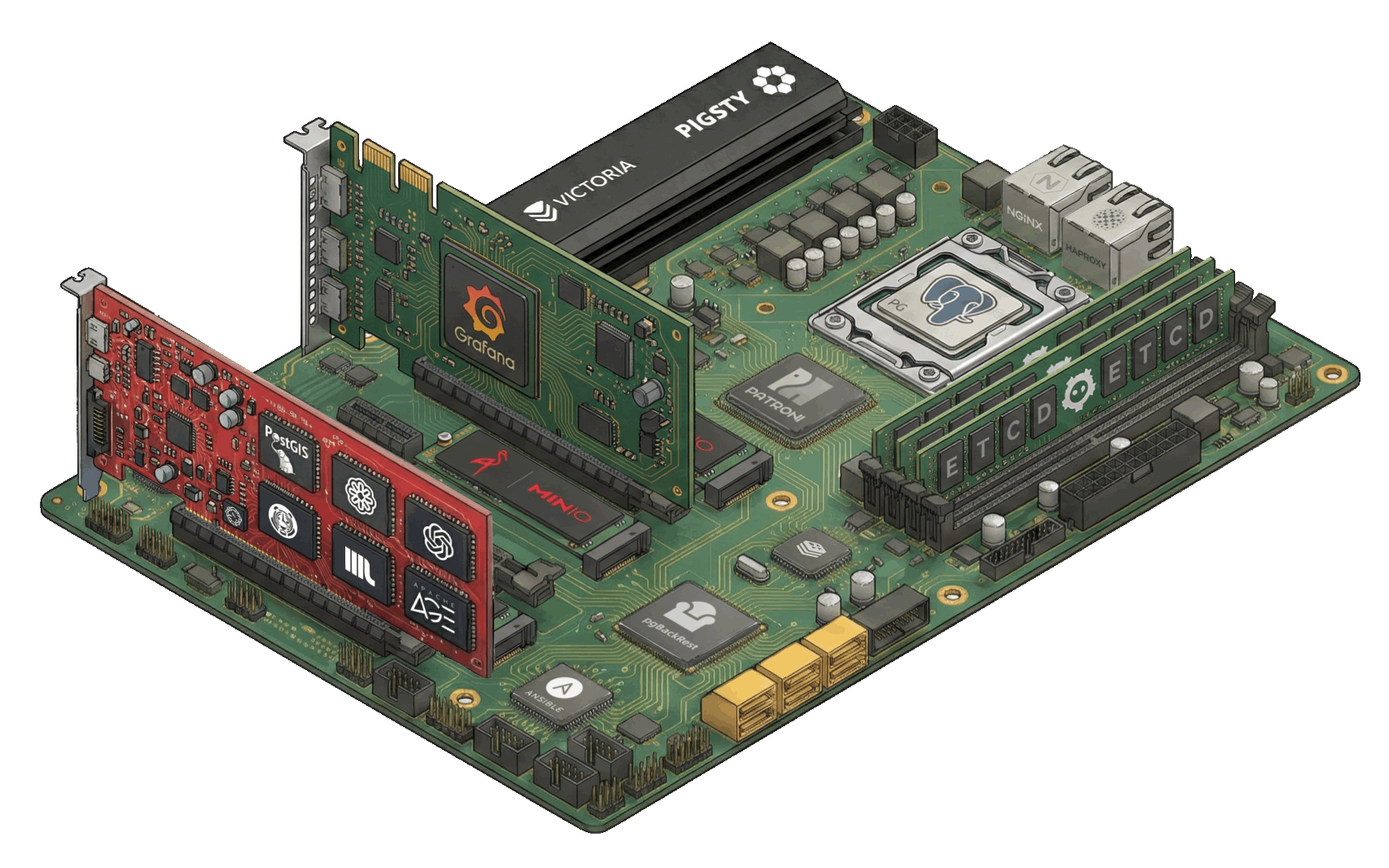
| Subsystem | Components | Function |
|---|---|---|
| HA Subsystem | Patroni + etcd | Failure detection, auto-failover, config management |
| Access Subsystem | HAProxy + Pgbouncer + vip-manager | Service exposure, load balancing, pooling, VIP |
| Backup Subsystem | pgBackRest (+ MinIO) | Full/incremental backup, WAL archiving, PITR |
| Observability Subsystem | pg_exporter / pgbouncer_exporter / pgbackrest_exporter + Vector | Metrics collection, log aggregation |
Component Interaction
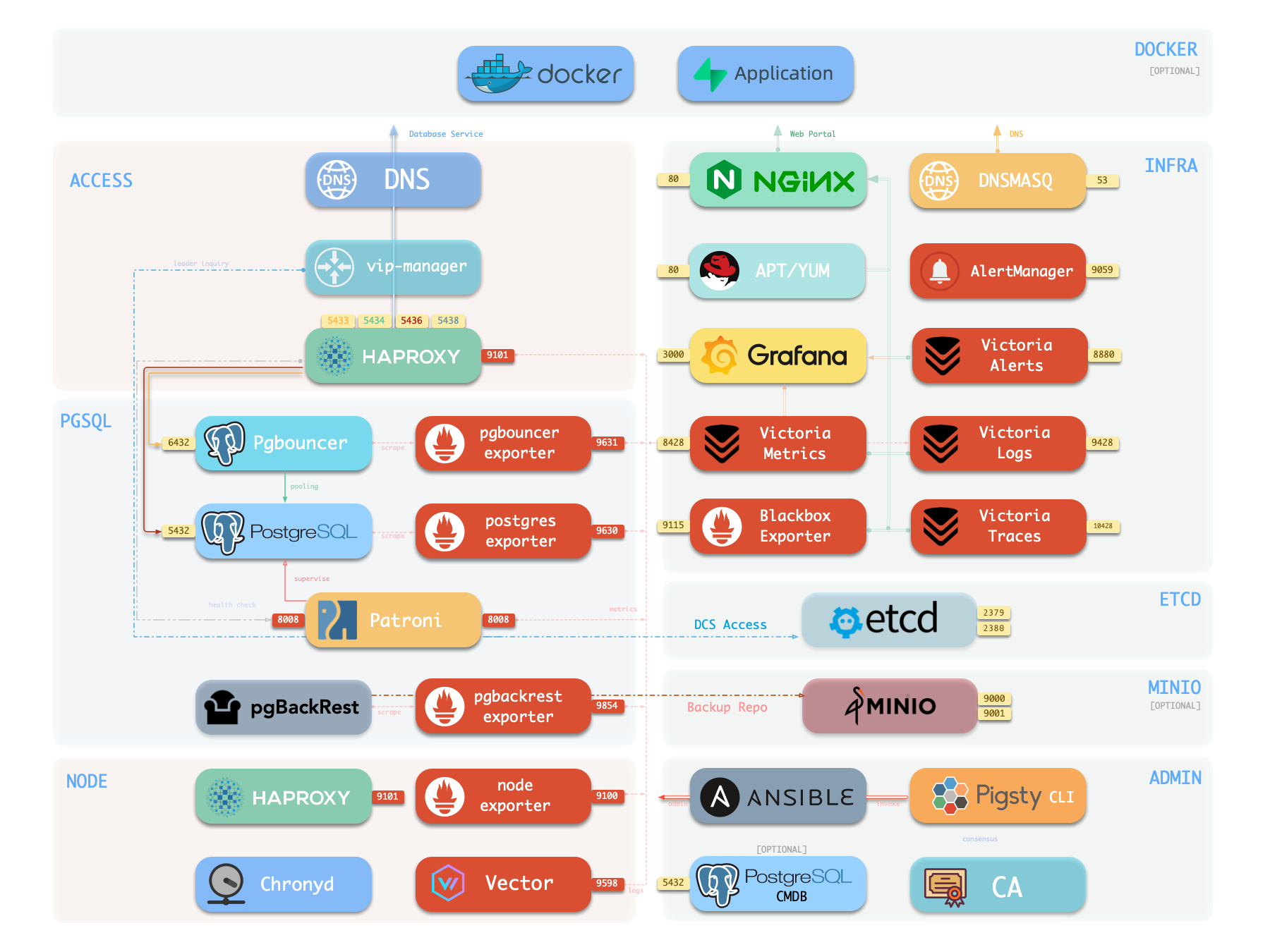
- Cluster DNS is resolved by DNSMASQ on infra nodes
- Cluster VIP is managed by vip-manager, which binds
pg_vip_addressto the cluster primary node.- vip-manager gets cluster leader info written by patroni from the etcd cluster
- Cluster services are exposed by HAProxy on nodes, different services distinguished by node ports (543x).
- HAProxy port 9101: Monitoring metrics & statistics & admin page
- HAProxy port 5433: Routes to primary pgbouncer: read-write service
- HAProxy port 5434: Routes to replica pgbouncer: read-only service
- HAProxy port 5436: Routes to primary postgres: default service
- HAProxy port 5438: Routes to offline postgres: offline service
- HAProxy routes traffic based on health check info from patroni.
- Pgbouncer is connection pooling middleware, listening on port 6432 by default, buffering connections, exposing additional metrics, and providing extra flexibility.
- PostgreSQL listens on port 5432, providing relational database services
- Installing PGSQL module on multiple nodes with the same cluster name automatically forms an HA cluster via streaming replication
- PostgreSQL process is managed by patroni by default.
- Patroni listens on port 8008 by default, supervising PostgreSQL server processes
- pg_exporter exposes postgres monitoring metrics on port 9630
- pgbouncer_exporter exposes pgbouncer metrics on port 9631
- pgBackRest uses local backup repository by default (
pgbackrest_method=local)- If using
local(default), pgBackRest creates local repository underpg_fs_bkupon primary node - If using
minio, pgBackRest creates backup repository on dedicated MinIO cluster
- If using
- Vector collects Postgres-related logs (postgres, pgbouncer, patroni, pgbackrest)
HA Subsystem
The HA subsystem consists of Patroni and etcd, responsible for PostgreSQL cluster failure detection, automatic failover, and configuration management.
How it works: Patroni runs on each node, managing the local PostgreSQL process and writing cluster state (leader, members, config) to etcd. When the primary fails, Patroni coordinates election via etcd, promoting the healthiest replica to new primary. The entire process is automatic, with RTO typically under 45 seconds.
Key Interactions:
- PostgreSQL: Starts, stops, reloads PG as parent process, controls its lifecycle
- etcd: External dependency, writes/watches leader key for distributed consensus and failure detection
- HAProxy: Provides health checks via REST API (
:8008), reporting instance role - vip-manager: Watches leader key in etcd, auto-migrates VIP
For more information, see: High Availability and Config: PGSQL - PG_BOOTSTRAP
Access Subsystem
The access subsystem consists of HAProxy, Pgbouncer, and vip-manager, responsible for service exposure, traffic routing, and connection pooling.
There are multiple access methods. A typical traffic path is: Client → DNS/VIP → HAProxy (543x) → Pgbouncer (6432) → PostgreSQL (5432)
| Layer | Component | Port | Role |
|---|---|---|---|
| L2 VIP | vip-manager | - | Binds L2 VIP to primary (optional) |
| L4 Load Bal | HAProxy | 543x | Service exposure, load balancing, health checks |
| L7 Pool | Pgbouncer | 6432 | Connection reuse, session management, transaction pooling |
Service Ports:
5433primary: Read-write service, routes to primary Pgbouncer5434replica: Read-only service, routes to replica Pgbouncer5436default: Default service, direct to primary (bypasses pool)5438offline: Offline service, direct to offline replica (ETL/analytics)
Key Features:
- HAProxy uses Patroni REST API to determine instance role, auto-routes traffic
- Pgbouncer uses transaction-level pooling, absorbs connection spikes, reduces PG connection overhead
- vip-manager watches etcd leader key, auto-migrates VIP during failover
For more information, see: Service Access and Config: PGSQL - PG_ACCESS
Backup Subsystem
The backup subsystem consists of pgBackRest (optionally with MinIO as remote repository), responsible for data backup and point-in-time recovery (PITR).
Backup Types:
- Full backup: Complete database copy
- Incremental/differential backup: Only backs up changed data blocks
- WAL archiving: Continuous transaction log archiving, enables any point-in-time recovery
Storage Backends:
local(default): Local disk, backups stored atpg_fs_bkupmount pointminio: S3-compatible object storage, supports centralized backup management and off-site DR
Key Interactions:
- pgBackRest → PostgreSQL: Executes backup commands, manages WAL archiving
- pgBackRest → Patroni: Recovery can bootstrap replicas as new primary or standby
- pgbackrest_exporter → Prometheus: Exports backup status metrics, monitors backup health
For more information, see: PITR, Backup & Recovery, and Config: PGSQL - PG_BACKUP
Observability Subsystem
The observability subsystem consists of three Exporters and Vector, responsible for metrics collection and log aggregation.
| Component | Port | Target | Key Metrics |
|---|---|---|---|
| pg_exporter | 9630 | PostgreSQL | Sessions, transactions, replication lag, buffer hits |
| pgbouncer_exporter | 9631 | Pgbouncer | Pool utilization, wait queue, hit rate |
| pgbackrest_exporter | 9854 | pgBackRest | Latest backup time, size, type |
| vector | 9598 | postgres/patroni/pgbouncer logs | Structured log stream |
Data Flow:
- Metrics: Exporter → VictoriaMetrics (INFRA) → Grafana dashboards
- Logs: Vector → VictoriaLogs (INFRA) → Grafana log queries
pg_exporter / pgbouncer_exporter connect to target services via local Unix socket, decoupled from HA topology. In slim install mode, these components can be disabled.
For more information, see: Config: PGSQL - PG_MONITOR
PostgreSQL
PostgreSQL is the PGSQL module core, listening on port 5432 by default for relational database services, deployed 1:1 with nodes.
Pigsty currently supports PostgreSQL 14-18 (lifecycle major versions), installed via binary packages from the PGDG official repo. Pigsty also allows you to use other PG kernel forks to replace the default PostgreSQL kernel, and install up to 507 extension plugins on top of the PG kernel.
PostgreSQL processes are managed by default by the HA agent—Patroni. When a cluster has only one node, that instance is the primary; when the cluster has multiple nodes, other instances automatically join as replicas: through physical replication, syncing data changes from the primary in real-time. Replicas can handle read-only requests and automatically take over when the primary fails.
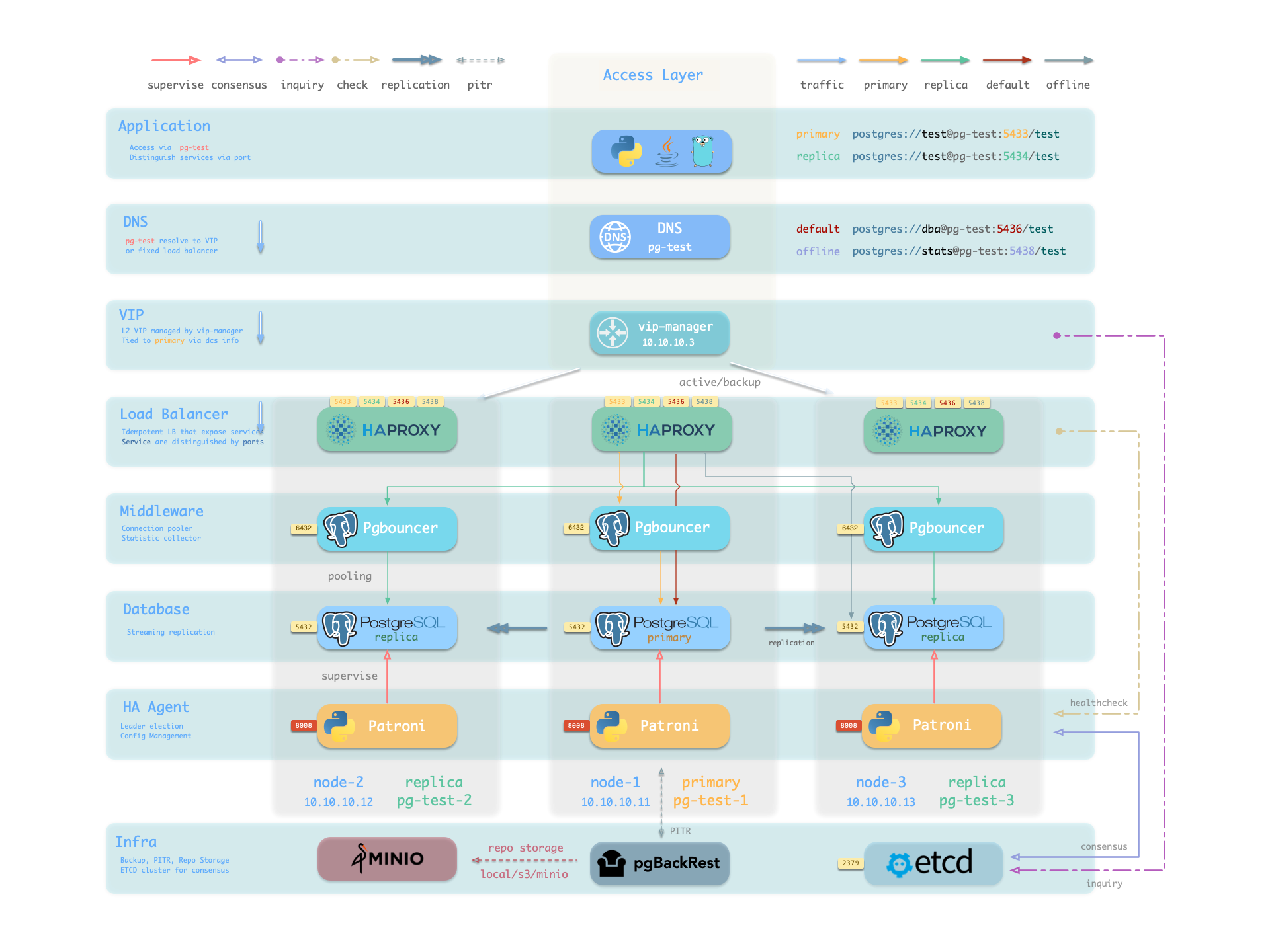
You can access PostgreSQL directly, or through HAProxy and Pgbouncer connection pool.
For more information, see: Config: PGSQL - PG_BOOTSTRAP
Patroni
Patroni is the PostgreSQL HA control component, listening on port 8008 by default.
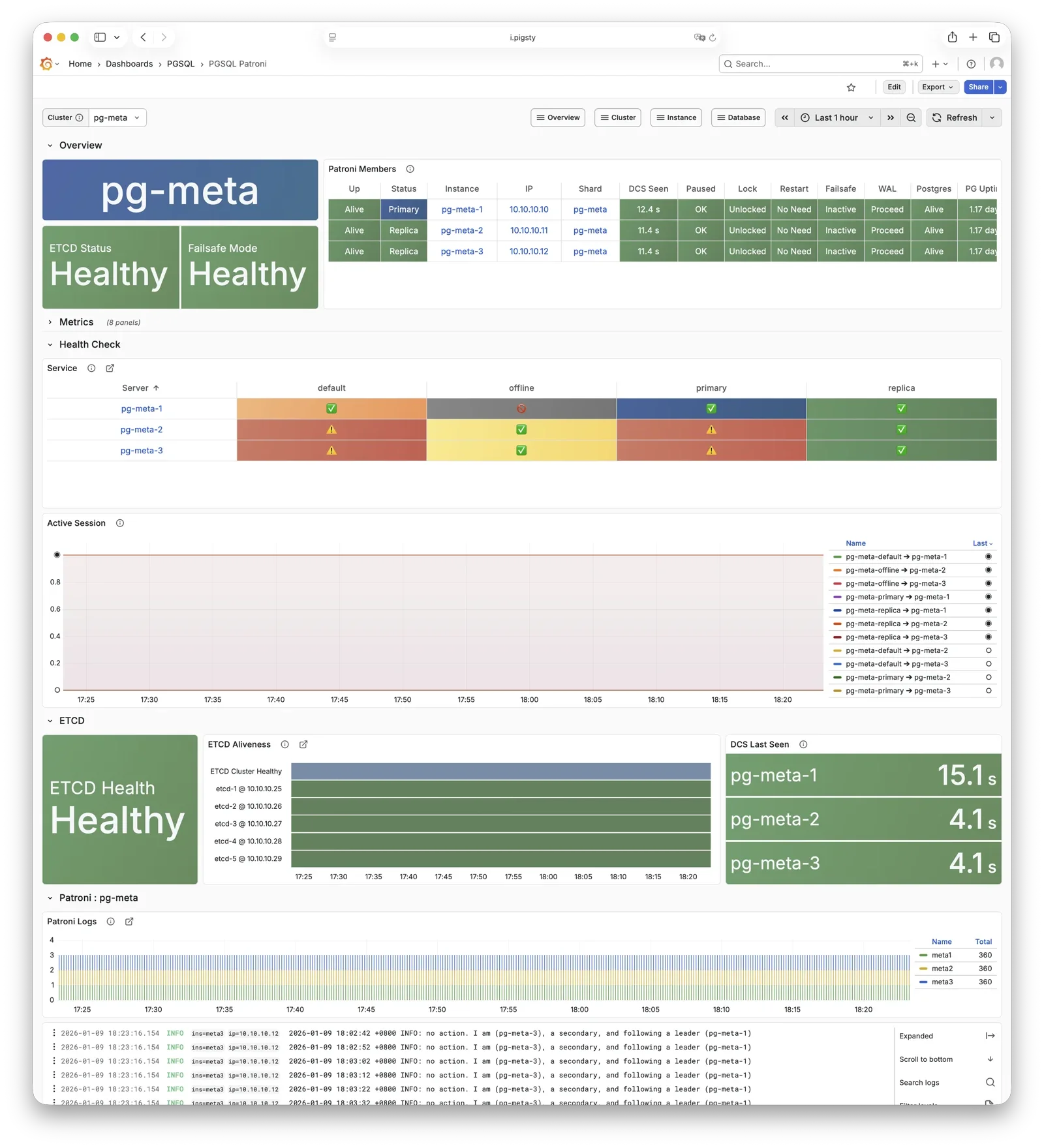
Patroni takes over PostgreSQL startup, shutdown, configuration, and health status, writing leader and member information to etcd. It handles automatic failover, maintains replication factor, coordinates parameter changes, and provides a REST API for HAProxy, monitoring, and administrators.
HAProxy uses Patroni health check endpoints to determine instance roles and route traffic to the correct primary or replica. vip-manager monitors the leader key in etcd and automatically migrates the VIP when the primary changes.
For more information, see: Config: PGSQL - PG_BOOTSTRAP
Pgbouncer
Pgbouncer is a lightweight connection pooling middleware, listening on port 6432 by default, deployed 1:1 with PostgreSQL database and node.
Pgbouncer runs statelessly on each instance, connecting to PostgreSQL via local Unix socket, using Transaction Pooling by default for pool management, absorbing burst client connections, stabilizing database sessions, reducing lock contention, and significantly improving performance under high concurrency.
Pigsty routes production traffic (read-write service 5433 / read-only service 5434) through Pgbouncer by default,
while only the default service (5436) and offline service (5438) bypass the pool for direct PostgreSQL connections.
Pool mode is controlled by pgbouncer_poolmode, defaulting to transaction (transaction-level pooling).
Connection pooling can be disabled via pgbouncer_enabled.
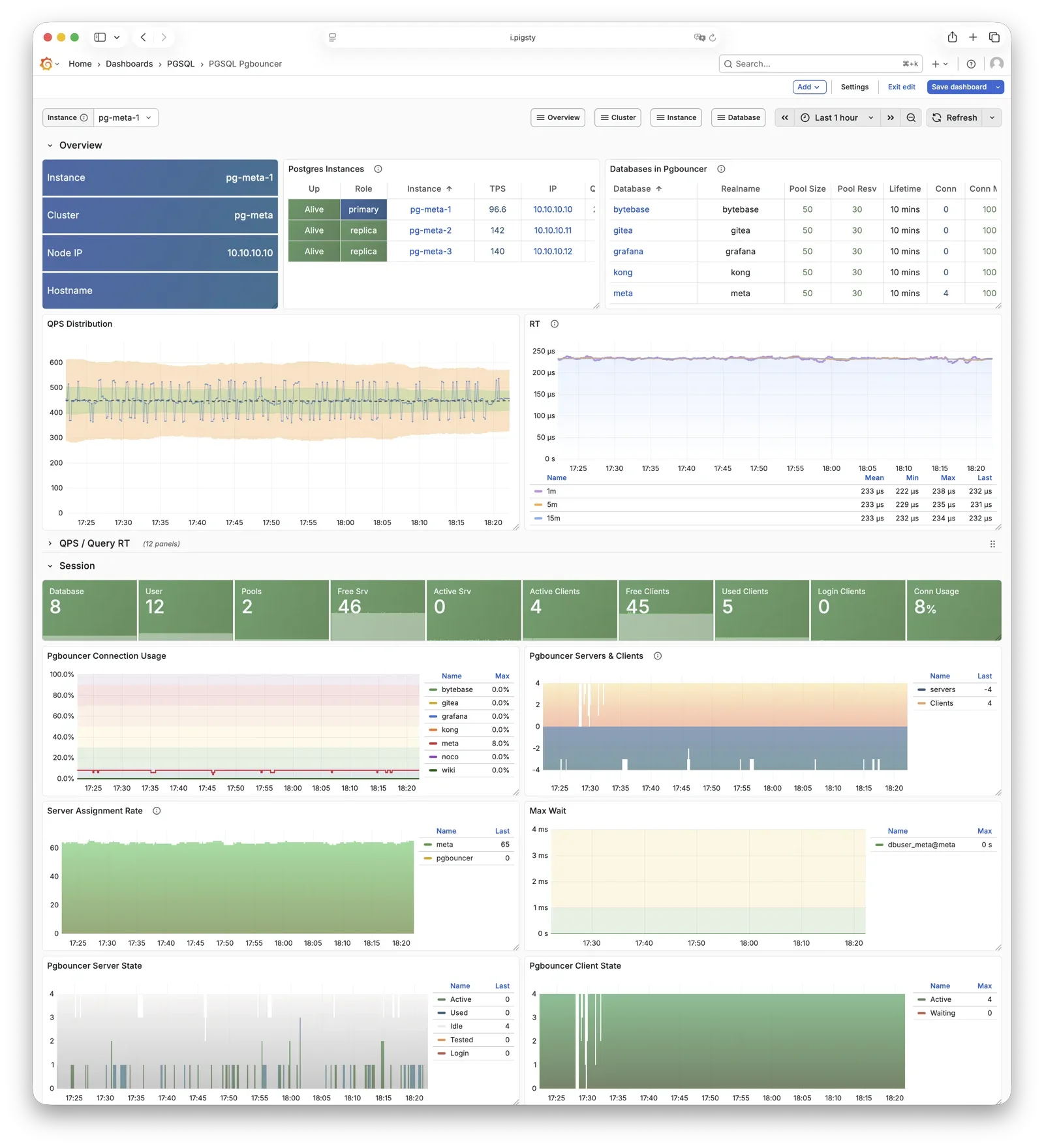
For more information, see: Config: PGSQL - PG_ACCESS
pgBackRest
pgBackRest is a professional PostgreSQL backup/recovery tool, one of the strongest in the PG ecosystem, supporting full/incremental/differential backup and WAL archiving.
Pigsty uses pgBackRest for PostgreSQL PITR capability, allowing you to roll back clusters to any point within the backup retention window.
pgBackRest works with PostgreSQL to create backup repositories on the primary, executing backup and archive tasks.
By default, it uses local backup repository (pgbackrest_method = local),
but can be configured for MinIO or other object storage for centralized backup management.
After initialization, pgbackrest_init_backup can automatically trigger the first full backup.
Recovery integrates with Patroni, supporting bootstrapping replicas as new primaries or standbys.
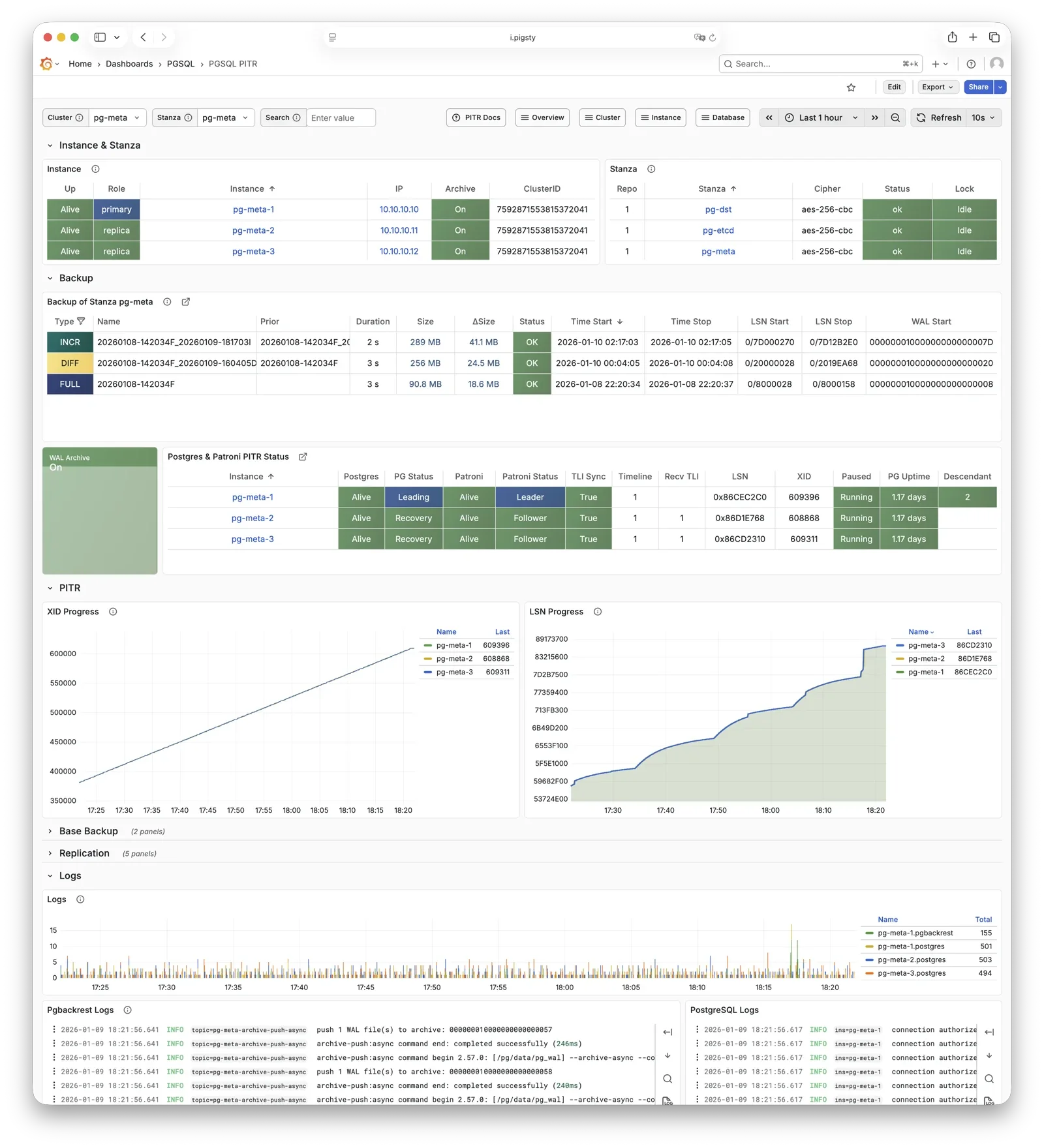
For more information, see: Backup & Recovery and Config: PGSQL - PG_BACKUP
HAProxy
HAProxy is the service entry point and load balancer, exposing multiple database service ports.
| Port | Service | Target | Description |
|---|---|---|---|
9101 | Admin | - | HAProxy statistics and admin page |
5433 | primary | Primary Pgbouncer | Read-write service, routes to primary pool |
5434 | replica | Replica Pgbouncer | Read-only service, routes to replica pool |
5436 | default | Primary Postgres | Default service, direct to primary (bypasses pool) |
5438 | offline | Offline Postgres | Offline service, direct to offline replica (ETL/analytics) |
HAProxy uses Patroni REST API health checks to determine instance roles and route traffic to the appropriate primary or replica.
Service definitions are composed from pg_default_services and pg_services.
A dedicated HAProxy node group can be specified via pg_service_provider to handle higher traffic;
by default, HAProxy on local nodes publishes services.
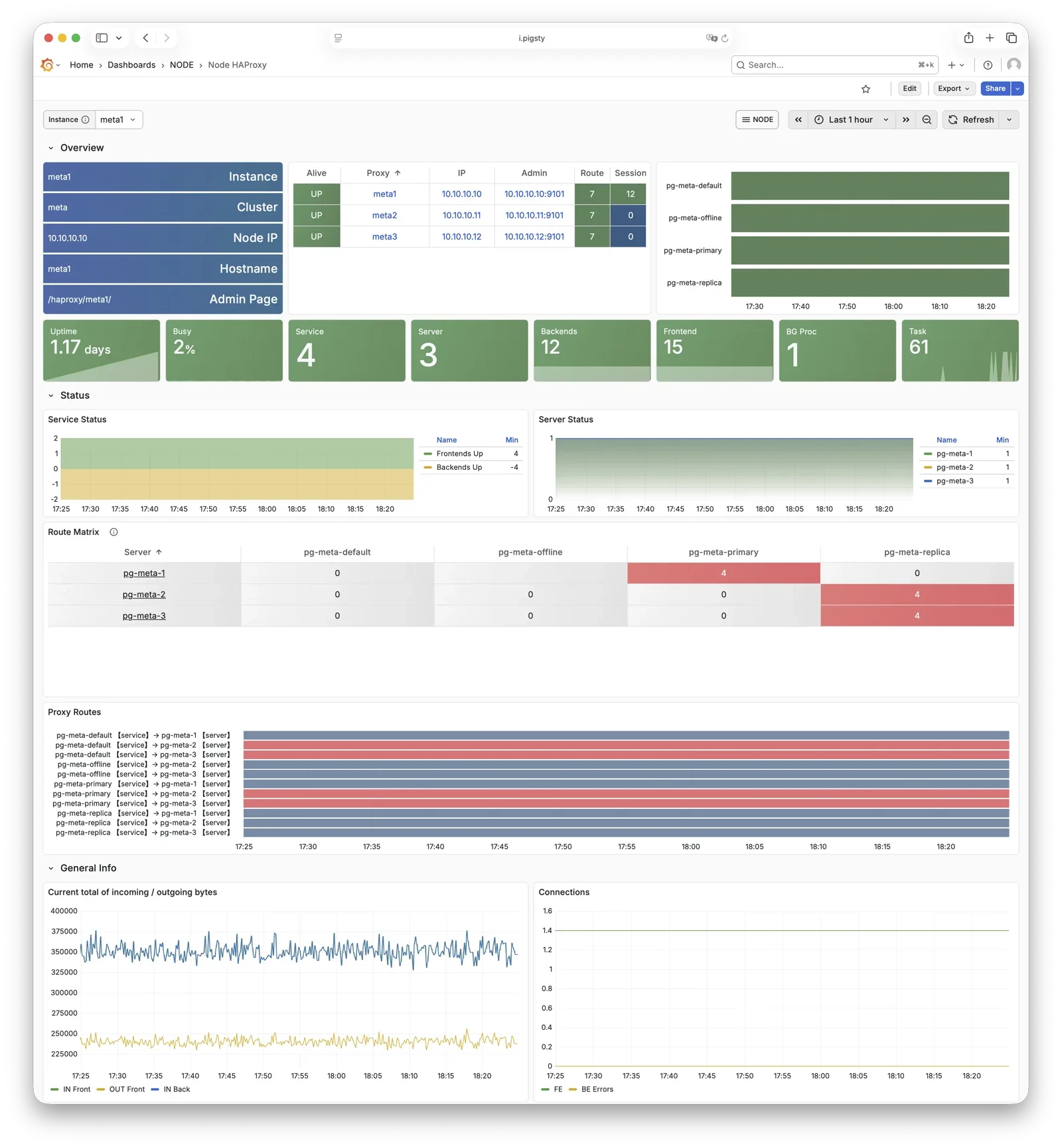
For more information, see: Service Access and Config: PGSQL - PG_ACCESS
vip-manager
vip-manager binds L2 VIP to the current primary node. This is an optional component; enable it if your network supports L2 VIP.
vip-manager runs on each PG node, monitoring the leader key written by Patroni in etcd,
and binds pg_vip_address to the current primary node’s network interface.
When cluster failover occurs, vip-manager immediately releases the VIP from the old primary and rebinds it on the new primary, switching traffic to the new primary.
This component is optional, enabled via pg_vip_enabled.
When enabled, ensure all nodes are in the same VLAN; otherwise, VIP migration will fail.
Public cloud networks typically don’t support L2 VIP; it’s recommended only for on-premises and private cloud environments.
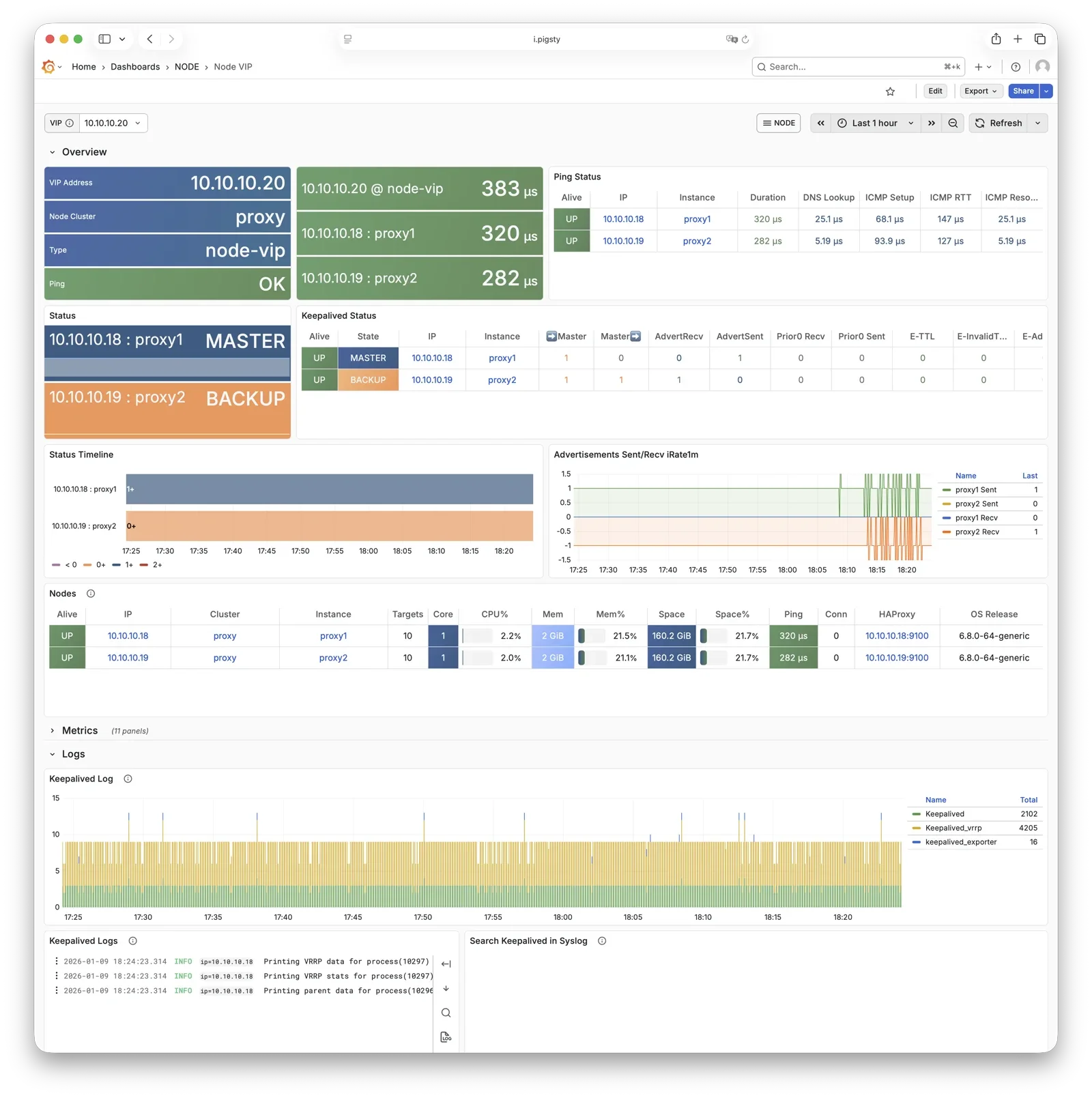
For more information, see: Tutorial: VIP Configuration and Config: PGSQL - PG_ACCESS
pg_exporter
pg_exporter exports PostgreSQL monitoring metrics, listening on port 9630 by default.
pg_exporter runs on each PG node, connecting to PostgreSQL via local Unix socket, exporting rich metrics covering sessions, buffer hits, replication lag, transaction rates, etc., scraped by VictoriaMetrics on INFRA nodes.
Collection configuration is specified by pg_exporter_config,
with support for automatic database discovery (pg_exporter_auto_discovery),
and tiered cache strategies via pg_exporter_cache_ttls.
You can disable this component via parameters; in slim install, this component is not enabled.
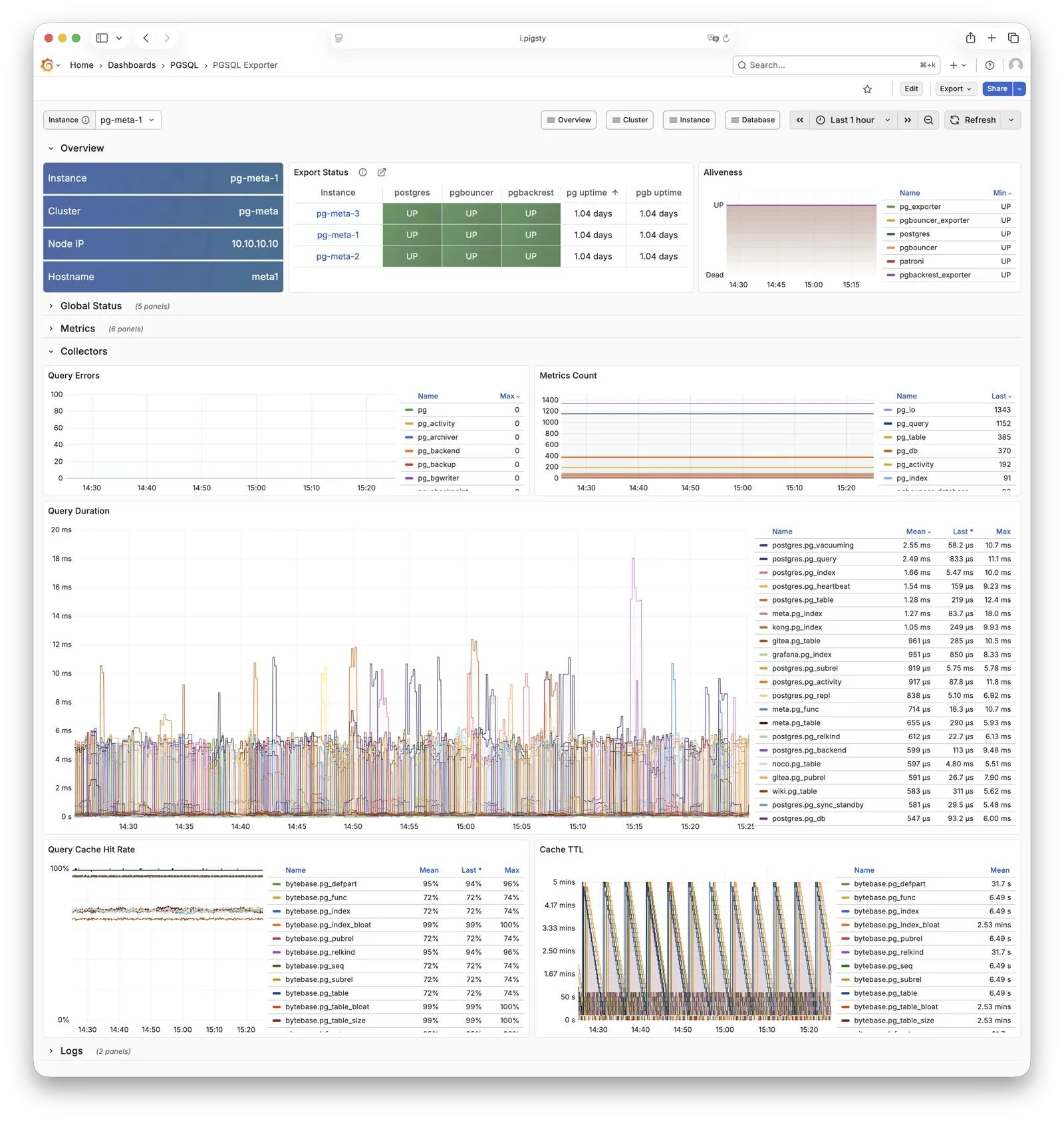
For more information, see: Config: PGSQL - PG_MONITOR
pgbouncer_exporter
pgbouncer_exporter exports Pgbouncer connection pool metrics, listening on port 9631 by default.
pgbouncer_exporter uses the same pg_exporter binary but with a dedicated metrics config file, supporting pgbouncer 1.8-1.25+.
pgbouncer_exporter reads Pgbouncer statistics views, providing pool utilization, wait queue, and hit rate metrics.
If Pgbouncer is disabled, this component is also disabled. In slim install, this component is not enabled.
For more information, see: Config: PGSQL - PG_MONITOR
pgbackrest_exporter
pgbackrest_exporter exports backup status metrics, listening on port 9854 by default.
pgbackrest_exporter parses pgBackRest status, generating metrics for most recent backup time, size, type, etc. Combined with alerting policies, it quickly detects expired or failed backups, ensuring data safety. Note that when there are many backups or using large network repositories, collection overhead can be significant, so pgbackrest_exporter has a default 2-minute collection interval. In the worst case, you may see the latest backup status in the monitoring system 2 minutes after a backup completes.
For more information, see: Config: PGSQL - PG_MONITOR
etcd
etcd is a distributed consistent store (DCS), providing cluster metadata storage and leader election capability for Patroni.
etcd is deployed and managed by the independent ETCD module, not part of the PGSQL module itself, but critical for PostgreSQL HA. Patroni writes cluster state, leader info, and config parameters to etcd; all nodes reach consensus through etcd. vip-manager also reads the leader key from etcd to enable automatic VIP migration.
For more information, see: ETCD Module
vector
Vector is a high-performance log collection component, deployed by the NODE module, responsible for collecting PostgreSQL-related logs.
Vector runs on nodes, tracking PostgreSQL, Pgbouncer, Patroni, and pgBackRest log directories, sending structured logs to VictoriaLogs on INFRA nodes for centralized storage and querying.
For more information, see: NODE Module
Feedback
Was this page helpful?
Thanks for the feedback! Please let us know how we can improve.
Sorry to hear that. Please let us know how we can improve.