Service Access
Split read and write operations, route traffic correctly, and deliver PostgreSQL cluster capabilities reliably.
A service exposes database cluster capabilities through a stable interface that hides the underlying cluster details.
Services provide stable production access, especially during HA failover. Personal users usually do not need this abstraction.
Personal Users
Services are mainly for production. Personal users with one node can connect directly through the instance name or IP address.
For example, connect to the default single-node pg-meta.meta database with any of these three users:
Service Overview
Production clusters commonly use primary-replica replication. Exactly one primary accepts writes. Replicas continuously receive its change logs and can serve read-only requests. This reduces primary load for read-heavy workloads. Separate write requests from read-only requests to use this capacity.
Pgbouncer reduces connection and backend-process overhead for frequent short connections. ETL and change operations can bypass the pool for direct access. Failover changes the primary, so write traffic must follow the new leader automatically. The Service abstraction combines read/write separation, pooled or direct access, and automatic failover routing.
Every database cluster needs this basic service:
- Read-write service (primary): Can read from and write to the database
Production clusters should provide at least these two services:
- Read-write service (primary): Write data: Can only be served by the primary.
- Read-only service (replica): Read data: Can be served by replicas; falls back to primary when no replicas are available
Depending on the workload, add services such as:
- Default direct service (default): Let administrators bypass the connection pool.
- Offline replica service (offline): Use a dedicated replica for ETL and analytics, separate from online reads.
- Sync replica service (standby): Serve reads without replication delay from a synchronous standby or primary.
- Delayed replica service (delayed): Read earlier cluster data from delayed replicas.
Access Services
Pigsty provides service access up to the cluster HAProxy endpoints. Clients can reach these load balancers in several ways.
Typically, DNS or a VIP points to one or more cluster load balancers.
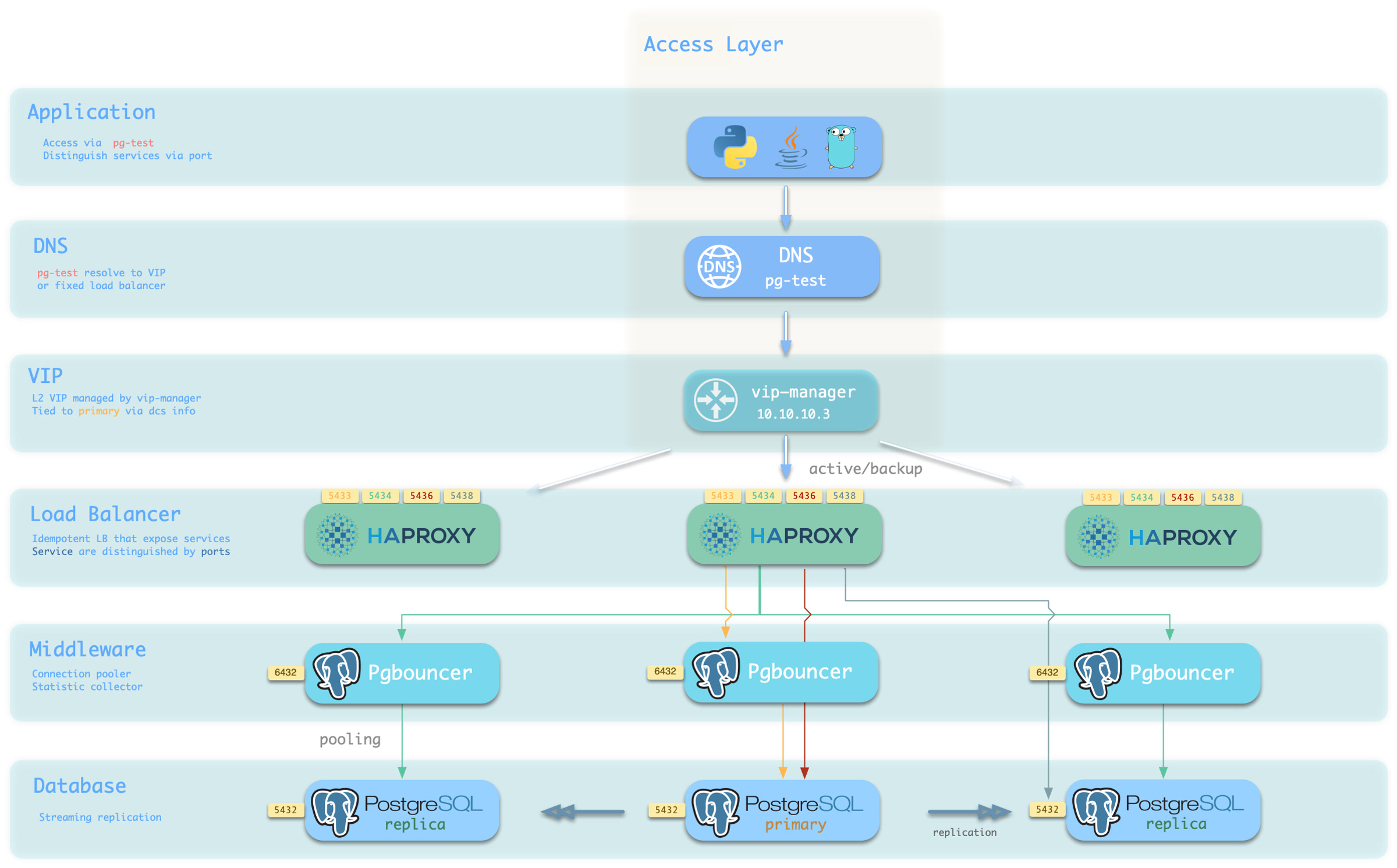
Choose a host and port combination for the required access method.
Host
| Type | Sample | Description |
|---|---|---|
| Cluster Domain Name | pg-test | Resolved by dnsmasq on INFRA nodes; with pg_dns_target: auto, points to the VIP when enabled, otherwise to the primary IP |
| Cluster VIP Address | 10.10.10.3 | When pg_vip_enabled is enabled, an L2 VIP managed by vip-manager and bound to the primary node |
| Instance Hostname | pg-test-1 | Access via any instance hostname (resolved by dnsmasq @ infra nodes) |
| Instance IP Address | 10.10.10.11 | Access any instance’s IP address |
Port
Different ports select different PostgreSQL services.
| Port | Service | Type | Description |
|---|---|---|---|
| 5432 | postgres | Database | Direct access to postgres server |
| 6432 | pgbouncer | Middleware | Access postgres through connection pool middleware |
| 5433 | primary | Service | Access primary pgbouncer (or postgres) |
| 5434 | replica | Service | Access replica pgbouncer (or postgres) |
| 5436 | default | Service | Access primary postgres |
| 5438 | offline | Service | Access offline postgres |
Combinations
Was this page helpful?
Thanks—your feedback helps us improve this page.
What got in the way? (optional)