E-R Model of PostgreSQL Cluster
The PGSQL module organizes PostgreSQL in production as clusters—logical entities composed of a group of database instances associated by primary-replica relationships.
Each cluster is an autonomous business unit consisting of at least one primary instance, exposing capabilities through services.
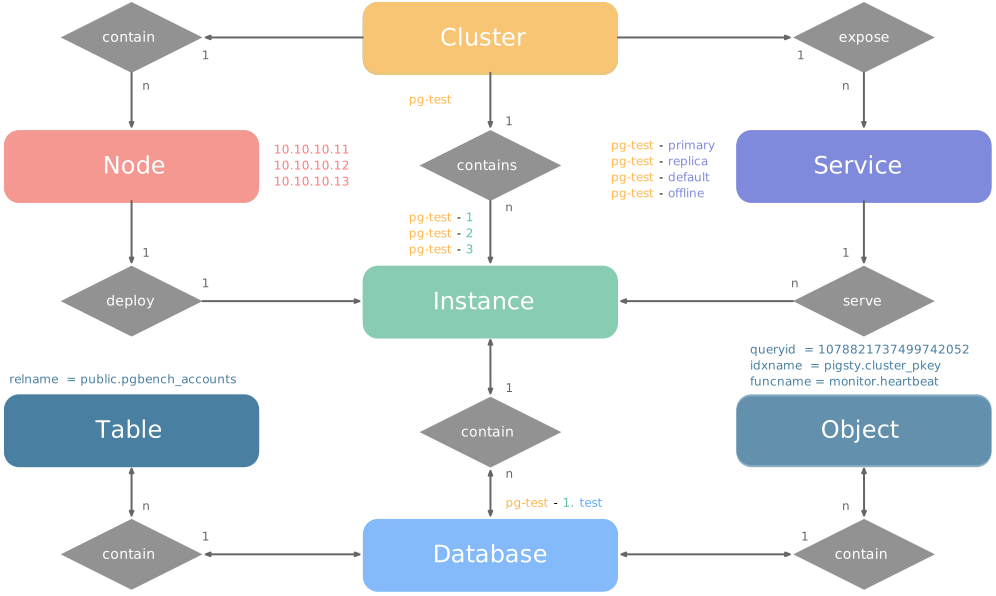
There are four core entities in Pigsty’s PGSQL module:
- Cluster: An autonomous PostgreSQL business unit serving as the top-level namespace for other entities.
- Service: A named abstraction that exposes capabilities, routes traffic, and exposes services using node ports.
- Instance: A single PostgreSQL server consisting of running processes and database files on a single node.
- Node: A hardware resource abstraction running Linux + Systemd environment—can be bare metal, VM, container, or Pod.
Along with two business entities—“Database” and “Role”—these form the complete logical view as shown below:
Examples
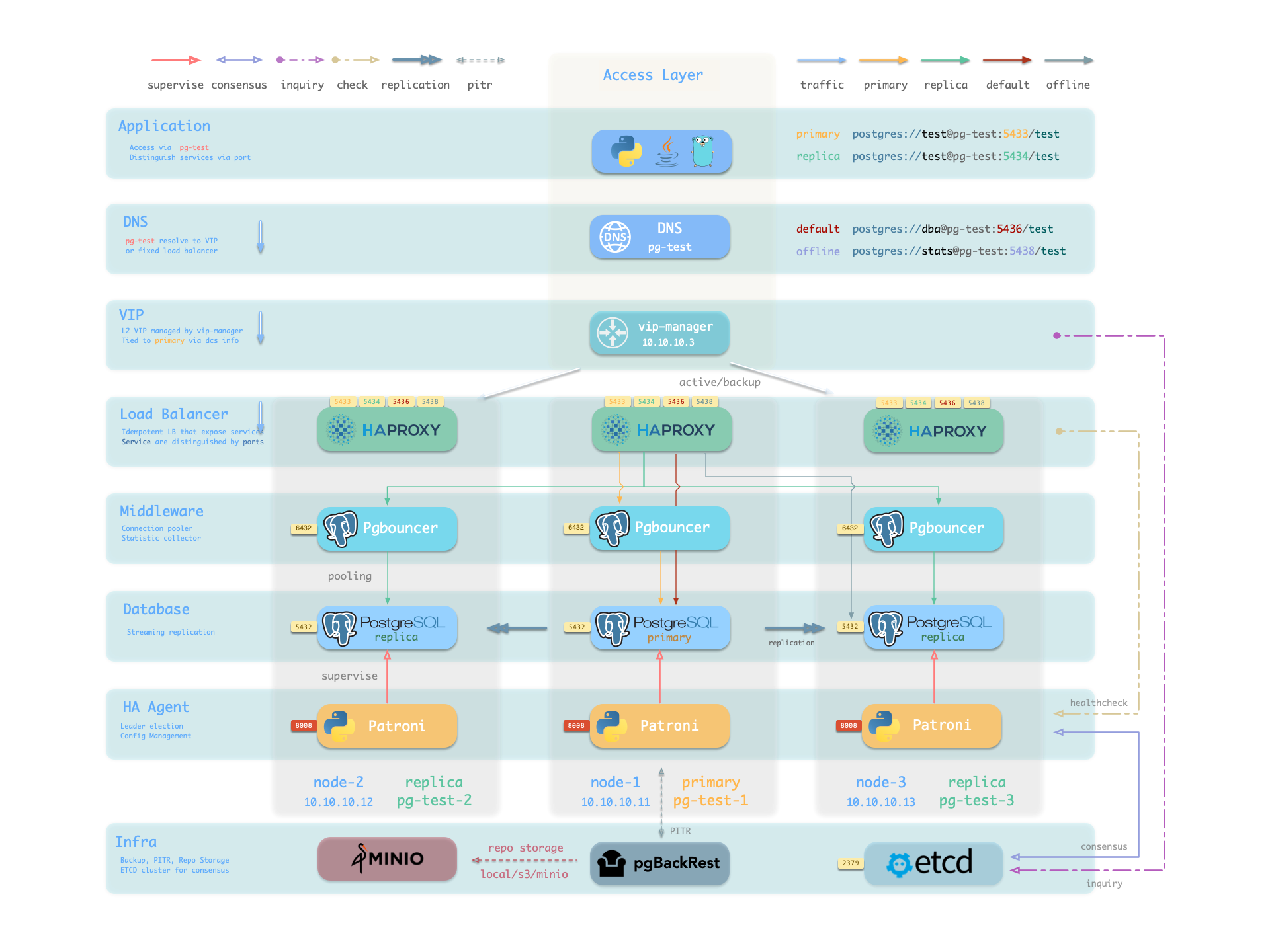
Let’s look at two concrete examples. Using the four-node Pigsty sandbox, there’s a three-node pg-test cluster:
    pg-test:
      hosts:
        10.10.10.11: { pg_seq: 1, pg_role: primary }
        10.10.10.12: { pg_seq: 2, pg_role: replica }
        10.10.10.13: { pg_seq: 3, pg_role: replica }
      vars: { pg_cluster: pg-test }
The above config fragment defines a high-availability PostgreSQL cluster with these related entities:
| Cluster | Description |
|---|---|
pg-test | PostgreSQL 3-node HA cluster |
| Instance | Description |
pg-test-1 | PostgreSQL instance #1, default primary |
pg-test-2 | PostgreSQL instance #2, initial replica |
pg-test-3 | PostgreSQL instance #3, initial replica |
| Service | Description |
pg-test-primary | Read-write service (routes to primary pgbouncer) |
pg-test-replica | Read-only service (routes to replica pgbouncer) |
pg-test-default | Direct read-write service (routes to primary postgres) |
pg-test-offline | Offline read service (routes to dedicated postgres) |
| Node | Description |
node-1 | 10.10.10.11 Node #1, hosts pg-test-1 PG instance |
node-2 | 10.10.10.12 Node #2, hosts pg-test-2 PG instance |
node-3 | 10.10.10.13 Node #3, hosts pg-test-3 PG instance |
Identity Parameters
Pigsty uses the PG_ID parameter group to assign deterministic identities to each PGSQL module entity. Three parameters are required:
| Parameter | Type | Level | Description | Format |
|---|---|---|---|---|
pg_cluster | string | Cluster | PG cluster name, required | Valid DNS name, regex [a-zA-Z0-9-]+ |
pg_seq | int | Instance | PG instance number, required | Natural number, starting from 0 or 1, unique within cluster |
pg_role | enum | Instance | PG instance role, required | Enum: primary, replica, offline |
With cluster name defined at cluster level and instance number/role assigned at instance level, Pigsty automatically generates unique identifiers for each entity based on rules:
| Entity | Generation Rule | Example |
|---|---|---|
| Instance | {{ pg_cluster }}-{{ pg_seq }} | pg-test-1, pg-test-2, pg-test-3 |
| Service | {{ pg_cluster }}-{{ pg_role }} | pg-test-primary, pg-test-replica, pg-test-offline |
| Node | Explicitly specified or borrowed from PG | pg-test-1, pg-test-2, pg-test-3 |
Because Pigsty adopts a 1:1 exclusive deployment model for nodes and PG instances, by default the host node identifier borrows from the PG instance identifier (node_id_from_pg).
You can also explicitly specify nodename to override, or disable nodename_overwrite to use the current default.
Sharding Identity Parameters
When using multiple PostgreSQL clusters (sharding) to serve the same business, two additional identity parameters are used: pg_shard and pg_group.
In this case, this group of PostgreSQL clusters shares the same pg_shard name with their own pg_group numbers, like this Citus cluster:
In this case, pg_cluster cluster names are typically composed of: {{ pg_shard }}{{ pg_group }}, e.g., pg-citus0, pg-citus1, etc.
all:
  children:
    pg-citus0: # citus shard 0
      hosts: { 10.10.10.10: { pg_seq: 1, pg_role: primary } }
      vars: { pg_cluster: pg-citus0 , pg_group: 0 }
    pg-citus1: # citus shard 1
      hosts: { 10.10.10.11: { pg_seq: 1, pg_role: primary } }
      vars: { pg_cluster: pg-citus1 , pg_group: 1 }
    pg-citus2: # citus shard 2
      hosts: { 10.10.10.12: { pg_seq: 1, pg_role: primary } }
      vars: { pg_cluster: pg-citus2 , pg_group: 2 }
    pg-citus3: # citus shard 3
      hosts: { 10.10.10.13: { pg_seq: 1, pg_role: primary } }
      vars: { pg_cluster: pg-citus3 , pg_group: 3 }
Pigsty provides dedicated monitoring dashboards for horizontal sharding clusters, making it easy to compare performance and load across shards, but this requires using the above entity naming convention.
There are also other identity parameters for special scenarios, such as pg_upstream for specifying backup clusters/cascading replication upstream, gp_role for Greenplum cluster identity,
pg_exporters for external monitoring instances, pg_offline_query for offline query instances, etc. See PG_ID parameter docs.
Monitoring Label System
Pigsty provides an out-of-box monitoring system that uses the above identity parameters to identify various PostgreSQL entities.
pg_up{cls="pg-test", ins="pg-test-1", ip="10.10.10.11", job="pgsql"}
pg_up{cls="pg-test", ins="pg-test-2", ip="10.10.10.12", job="pgsql"}
pg_up{cls="pg-test", ins="pg-test-3", ip="10.10.10.13", job="pgsql"}
For example, the cls, ins, ip labels correspond to cluster name, instance name, and node IP—the identifiers for these three core entities.
They appear along with the job label in all native monitoring metrics collected by VictoriaMetrics and VictoriaLogs log streams.
The job name for collecting PostgreSQL metrics is fixed as pgsql;
The job name for monitoring remote PG instances is fixed as pgrds.
The job name for collecting PostgreSQL CSV logs is fixed as postgres;
The job name for collecting pgbackrest logs is fixed as pgbackrest, other PG components collect logs via job: syslog.
Additionally, some entity identity labels appear in specific entity-related monitoring metrics, such as:
datname: Database name, if a metric belongs to a specific database.relname: Table name, if a metric belongs to a specific table.idxname: Index name, if a metric belongs to a specific index.funcname: Function name, if a metric belongs to a specific function.seqname: Sequence name, if a metric belongs to a specific sequence.query: Query fingerprint, if a metric belongs to a specific query.
Feedback
Was this page helpful?
Thanks for the feedback! Please let us know how we can improve.
Sorry to hear that. Please let us know how we can improve.