E-R Model of PostgreSQL Cluster
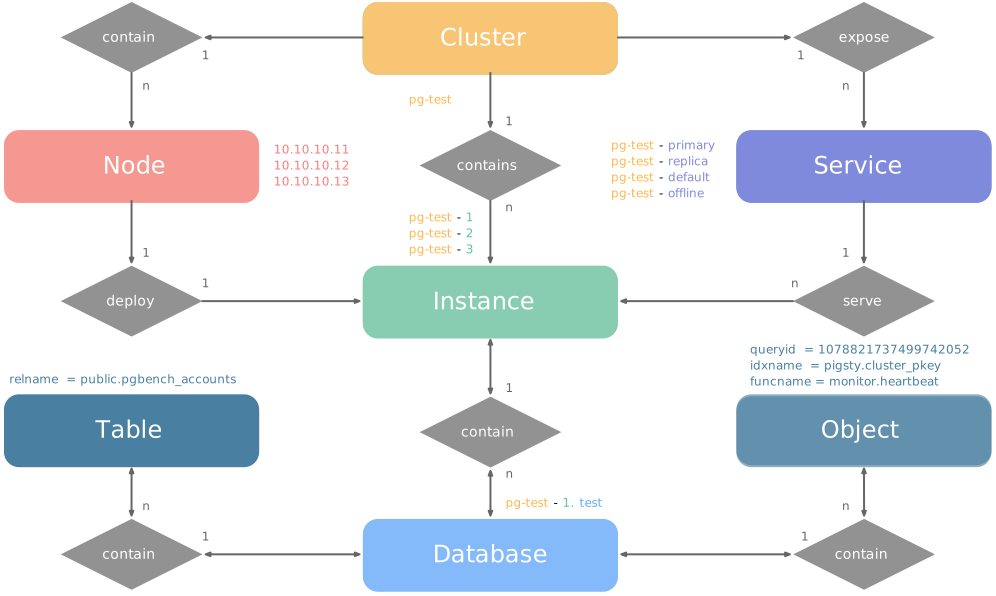
PGSQL organizes PostgreSQL as clusters. Each cluster is a logical group of database instances connected through primary-replica relationships.
Each cluster is an autonomous business unit with at least one primary instance. It exposes database capabilities through services.
There are four core entities in Pigsty’s PGSQL module:
- Cluster: An autonomous PostgreSQL business unit and the top-level namespace for other entities.
- Service: A named abstraction that exposes capabilities and routes traffic through node ports.
- Instance: One PostgreSQL server, including its running processes and database files, on one node.
- Node: A hardware resource that runs Linux and Systemd. It can be a physical server, VM, container, or Pod.
Two business entities, Database and Role, complete this logical model:
Examples
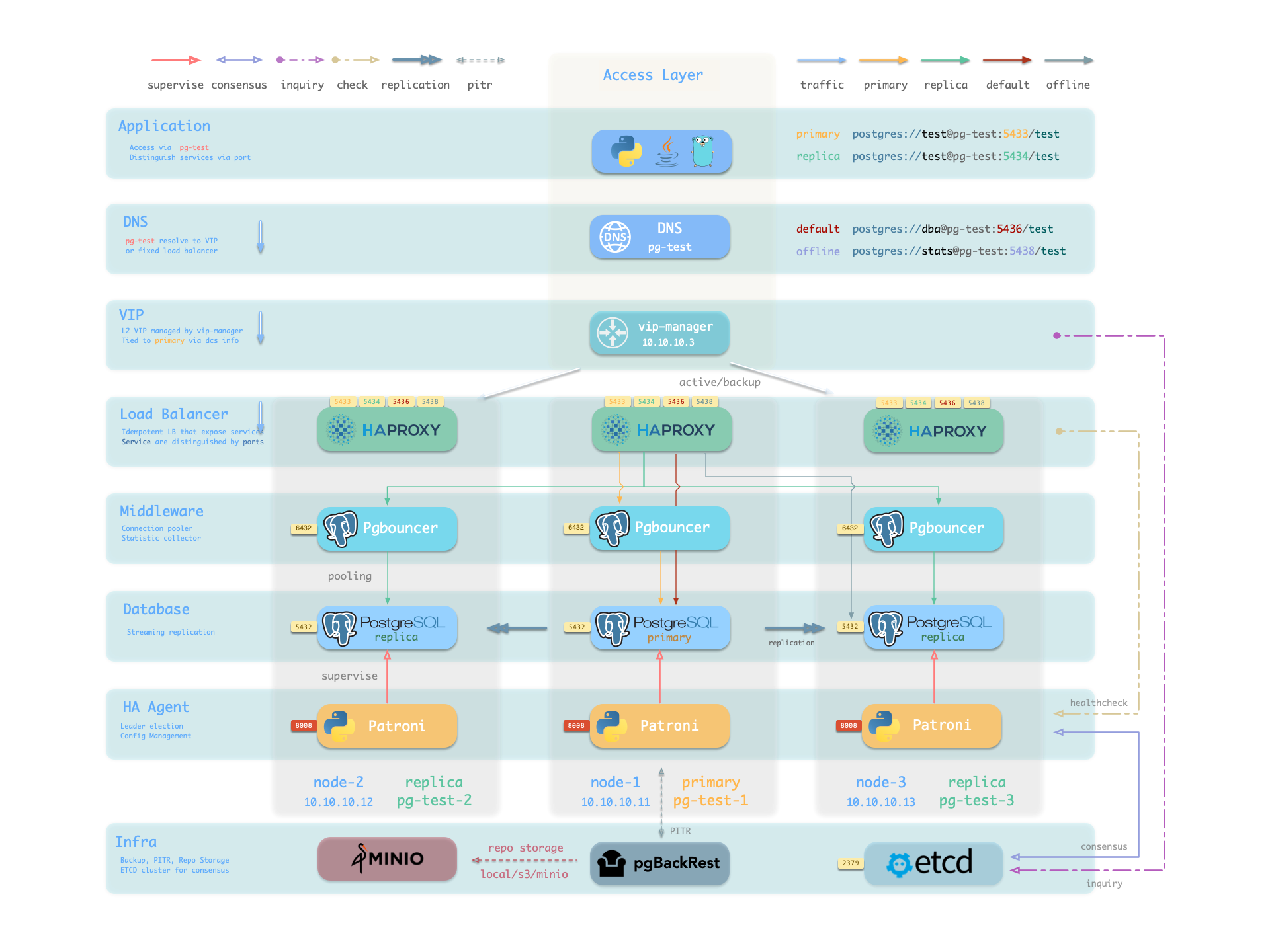
The following two examples show the model. The four-node Pigsty sandbox contains a three-node pg-test cluster:
This configuration defines a high-availability PostgreSQL cluster with these entities:
| Cluster | Description |
|---|---|
pg-test | PostgreSQL 3-node HA cluster |
| Instance | Description |
pg-test-1 | PostgreSQL instance #1, default primary |
pg-test-2 | PostgreSQL instance #2, initial replica |
pg-test-3 | PostgreSQL instance #3, initial replica |
| Service | Description |
pg-test-primary | Read-write service (routes to primary pgbouncer) |
pg-test-replica | Read-only service (routes to replica pgbouncer) |
pg-test-default | Direct read-write service (routes to primary postgres) |
pg-test-offline | Offline read service (routes to dedicated postgres) |
| Node | Description |
node-1 | 10.10.10.11 Node #1, hosts pg-test-1 PG instance |
node-2 | 10.10.10.12 Node #2, hosts pg-test-2 PG instance |
node-3 | 10.10.10.13 Node #3, hosts pg-test-3 PG instance |
Identity Parameters
The PG_ID parameter group assigns deterministic identities to PGSQL entities. Three parameters are required:
| Parameter | Type | Level | Description | Format |
|---|---|---|---|---|
pg_cluster | string | Cluster | PG cluster name, required | Valid DNS name, regex [a-zA-Z0-9-]+ |
pg_seq | int | Instance | PG instance number, required | Natural number, starting from 0 or 1, unique within cluster |
pg_role | enum | Instance | PG instance role, required | Enum: primary, replica, offline |
Set the cluster name at cluster level. Set each instance number and role at instance level. Pigsty generates unique identifiers with these rules:
| Entity | Generation Rule | Example |
|---|---|---|
| Instance | {{ pg_cluster }}-{{ pg_seq }} | pg-test-1, pg-test-2, pg-test-3 |
| Service | {{ pg_cluster }}-{{ pg_role }} | pg-test-primary, pg-test-replica, pg-test-offline |
| Node | Explicitly specified or borrowed from PG | pg-test-1, pg-test-2, pg-test-3 |
Pigsty uses an exclusive 1:1 mapping between nodes and PostgreSQL instances. By default, the node inherits its PostgreSQL instance identifier through node_id_from_pg. Set nodename to override this name. Alternatively, disable nodename_overwrite to retain the current default.
Sharding Identity Parameters
To serve one business with multiple PostgreSQL clusters (sharding), use two additional identity parameters: pg_shard and pg_group.
These clusters share one pg_shard name. Each has its own pg_group number, as in this Citus cluster:
A pg_cluster name usually combines {{ pg_shard }}{{ pg_group }}, for example pg-citus0 or pg-citus1.
Pigsty has dedicated dashboards for horizontally sharded clusters. Use this naming convention to compare shard performance and load in those dashboards.
Other identity parameters support specific uses:
pg_upstream: Set the upstream for a backup cluster or cascading replication.gp_role: Identify a Greenplum cluster role.pg_exporters: Define external monitoring instances.pg_offline_query: Define offline query instances.
See the PG_ID parameter documentation.
Monitoring Label System
The built-in monitoring system uses these identity parameters to identify PostgreSQL entities.
The labels cls, ins, and ip identify the cluster name, instance name, and node IP. They accompany job in all native VictoriaMetrics metrics and VictoriaLogs log streams.
These job values are fixed:
pgsql: PostgreSQL metrics.pgrds: Remote PostgreSQL instance metrics.postgres: PostgreSQL CSV logs.pgbackrest: pgBackRest logs.
Other PostgreSQL components collect logs through job: syslog.
Specific entity metrics also have these identity labels:
datname: Database name, if a metric belongs to a specific database.relname: Table name, if a metric belongs to a specific table.idxname: Index name, if a metric belongs to a specific index.funcname: Function name, if a metric belongs to a specific function.seqname: Sequence name, if a metric belongs to a specific sequence.query: Query fingerprint, if a metric belongs to a specific query.
Was this page helpful?
Thanks—your feedback helps us improve this page.
What got in the way? (optional)