Sandbox
Pigsty supplies a standard 4-node sandbox for learning, testing, and feature demonstrations. It uses fixed IP addresses and predefined identity values to make the demonstrations repeatable.
Description
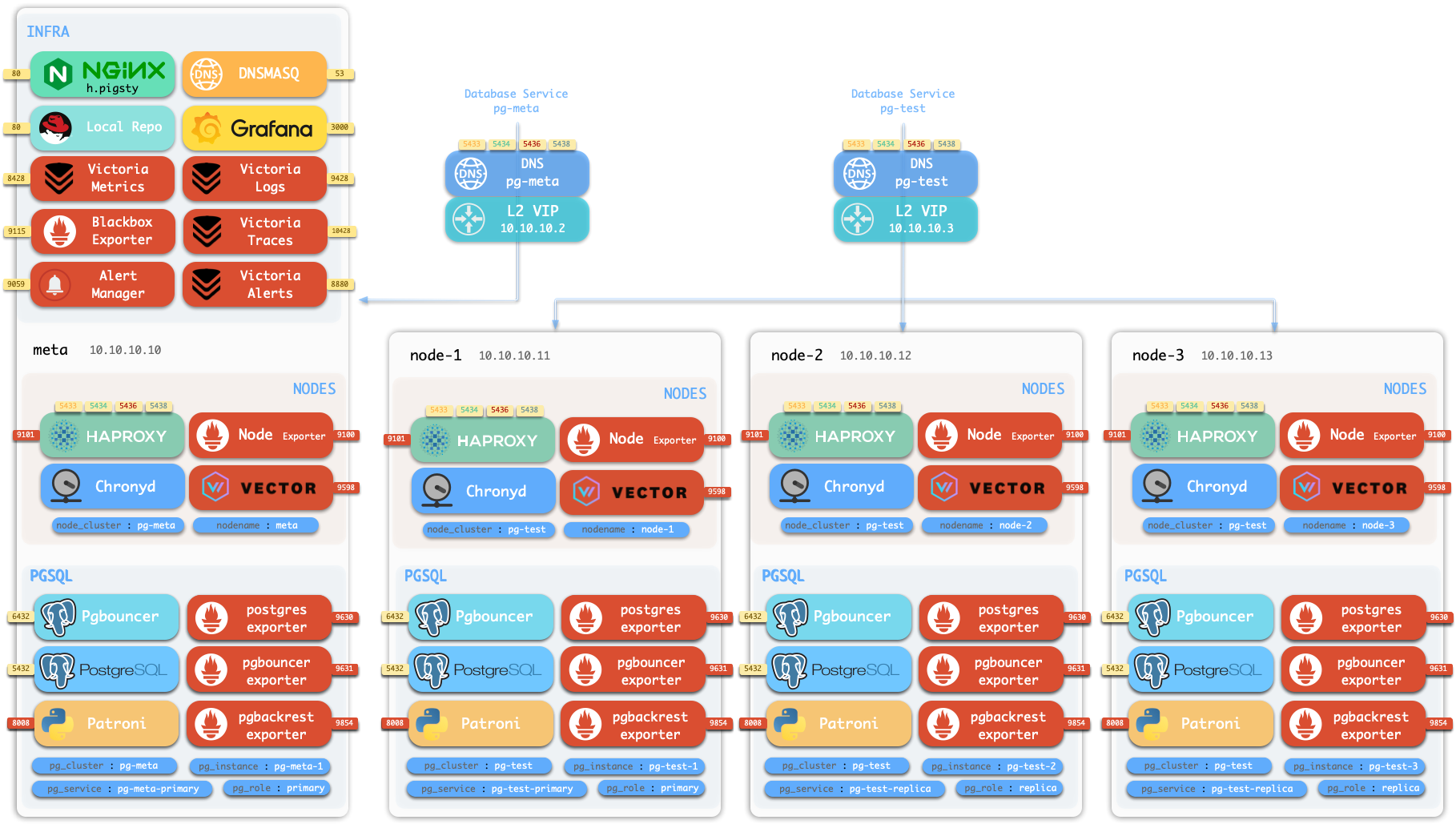
The default sandbox has 4 nodes and uses the ha/full.yml template.
| ID | IP Address | Node | PostgreSQL | INFRA | ETCD | MINIO |
|---|---|---|---|---|---|---|
| 1 | 10.10.10.10 | meta | pg-meta-1 | infra-1 | etcd-1 | minio-1 |
| 2 | 10.10.10.11 | node-1 | pg-test-1 | |||
| 3 | 10.10.10.12 | node-2 | pg-test-2 | |||
| 4 | 10.10.10.13 | node-3 | pg-test-3 |
This example shows the sandbox configuration:
PostgreSQL Clusters
The meta node has a PostgreSQL cluster named pg-meta with one instance:
The other three nodes host the pg-test HA cluster with 3 instances:
The sandbox has two optional L2 VIPs.
Each VIP binds to the primary instance of its cluster, pg-meta or pg-test.
Infrastructure
The meta node also hosts these services:
- A single-node
etcdcluster that supplies the distributed configuration store (DCS) for PostgreSQL HA. - A single-node Silo
miniocluster that supplies S3-compatible object storage through the MINIO module.
The ha/full.yml template also defines three Redis example topologies and enables Docker on the INFRA node.
The standard deploy.yml playbook does not deploy Redis or Docker.
When required, run ./redis.yml and ./docker.yml separately.
Creating Sandbox
Use Vagrant to create a local sandbox from the supplied templates. Use OpenTofu to create a cloud sandbox.
Local Sandbox (Vagrant)
The local sandbox uses VirtualBox or libvirt to create virtual machines on your Mac or PC. It has no cloud resource charges. For the complete 4-node sandbox, provide at least 4 CPU cores and 8GB memory.
The current Vagrant configuration uses cloud-image/* boxes from Vagrant Cloud.
See Supported Images for available images, pinned versions, and architectures.
If the source does not pin a box version, Vagrant selects its currently available version.
Cloud Sandbox (Terraform)
The cloud sandbox uses public cloud APIs to create virtual machines. You can create and remove these resources for short tests and pay for their use.
Use spec/aliyun-full.tf to create a 4-node sandbox on Alibaba Cloud:
See the OpenTofu guide for details.
Other Specs
Pigsty also supplies other environment specifications.
Run these Makefile shortcuts from ~/pigsty/vagrant:
Single Node Devbox (meta)
Use the 1-node environment for the quick start, development, and testing:
Two Node Environment (dual)
Use the 2-node environment to test replication between a primary and a replica:
Three Node Environment (trio)
Use the 3-node environment to test basic high availability:
Production Simulation (simu)
Use the 20-node simulation to test a complete production environment:
This environment includes these nodes:
- 3 infrastructure nodes:
meta1,meta2, andmeta3. - 2 HAProxy proxy nodes.
- 4 MINIO (Silo) nodes.
- 5 ETCD nodes.
- 6 PostgreSQL nodes in 2 clusters with 3 nodes each.
Was this page helpful?
Thanks—your feedback helps us improve this page.
What got in the way? (optional)