This is the multi-page printable view of this section. Click here to print.

Return to the regular view of this page.

Module: FERRET

Add MongoDB-compatible protocol support to PostgreSQL using FerretDB

FERRET is an optional module in Pigsty for deploying FerretDB — a protocol translation middleware built on the PostgreSQL kernel and the DocumentDB extension. It enables applications using MongoDB drivers to connect and translates those requests into PostgreSQL operations.

Pigsty is a community partner of FerretDB. We have built binary packages for FerretDB and DocumentDB (FerretDB-specific fork), and provide a ready-to-use configuration template mongo.yml to help you easily deploy enterprise-grade FerretDB clusters.

1 - Usage

Install client tools, connect to and use FerretDB

This document describes how to install MongoDB client tools and connect to FerretDB.


Installing Client Tools

You can use MongoDB’s command-line tool MongoSH to access FerretDB.

Use the pig command to add the MongoDB repository, then install mongosh using yum or apt:

pig repo add mongo -u   # Add the official MongoDB repository
yum install mongodb-mongosh   # RHEL/CentOS/Rocky/Alma
apt install mongodb-mongosh   # Debian/Ubuntu

After installation, you can use the mongosh command to connect to FerretDB.


Connecting to FerretDB

You can access FerretDB using any language’s MongoDB driver via a MongoDB connection string. Here’s an example using the mongosh CLI tool:

$ mongosh
Current Mongosh Log ID:	67ba8c1fe551f042bf51e943
Connecting to:		mongodb://127.0.0.1:27017/?directConnection=true&serverSelectionTimeoutMS=2000&appName=mongosh+2.4.0
Using MongoDB:		7.0.77
Using Mongosh:		2.4.0

For mongosh info see: https://www.mongodb.com/docs/mongodb-shell/

test>

Using Connection Strings

FerretDB authentication is entirely based on PostgreSQL. Since Pigsty-managed PostgreSQL clusters use scram-sha-256 authentication by default, you must specify the PLAIN authentication mechanism in the connection string:

mongosh 'mongodb://dbuser_meta:[email protected]:27017?authMechanism=PLAIN'

Connection string format:

mongodb://<username>:<password>@<host>:<port>/<database>?authMechanism=PLAIN

Using Different Users

You can connect to FerretDB using any user that has been created in PostgreSQL:

# Using dbuser_dba user
mongosh 'mongodb://dbuser_dba:[email protected]:27017?authMechanism=PLAIN'

# Using mongod superuser
mongosh 'mongodb://mongod:[email protected]:27017?authMechanism=PLAIN'

# Connecting to a specific database
mongosh 'mongodb://test:[email protected]:27017/test?authMechanism=PLAIN'

Basic Operations

After connecting to FerretDB, you can operate it just like MongoDB. Here are some basic operation examples:

Database Operations

// Switch to / create database
use mydb

// Show all databases
show dbs

// Drop current database
db.dropDatabase()

Collection Operations

// Create collection
db.createCollection('users')

// Show all collections
show collections

// Drop collection
db.users.drop()

Document Operations

// Insert a single document
db.users.insertOne({
    name: 'Alice',
    age: 30,
    email: '[email protected]'
})

// Insert multiple documents
db.users.insertMany([
    { name: 'Bob', age: 25 },
    { name: 'Charlie', age: 35 }
])

// Query documents
db.users.find()
db.users.find({ age: { $gt: 25 } })
db.users.findOne({ name: 'Alice' })

// Update documents
db.users.updateOne(
    { name: 'Alice' },
    { $set: { age: 31 } }
)

// Delete documents
db.users.deleteOne({ name: 'Bob' })
db.users.deleteMany({ age: { $lt: 30 } })

Index Operations

// Create indexes
db.users.createIndex({ name: 1 })
db.users.createIndex({ age: -1 })

// View indexes
db.users.getIndexes()

// Drop index
db.users.dropIndex('name_1')

Differences from MongoDB

FerretDB implements MongoDB’s wire protocol but uses PostgreSQL for underlying storage. This means:

  • MongoDB commands are translated to SQL statements for execution
  • Most basic operations are compatible with MongoDB
  • Some advanced features may differ or not be supported

You can consult the following resources for detailed information:


Programming Language Drivers

In addition to the mongosh command-line tool, you can also connect to FerretDB using MongoDB drivers for various programming languages:

Python

from pymongo import MongoClient

client = MongoClient('mongodb://dbuser_meta:[email protected]:27017/?authMechanism=PLAIN')
db = client.test
collection = db.users
collection.insert_one({'name': 'Alice', 'age': 30})

Node.js

const { MongoClient } = require('mongodb');

const uri = 'mongodb://dbuser_meta:[email protected]:27017/?authMechanism=PLAIN';
const client = new MongoClient(uri);

async function run() {
    await client.connect();
    const db = client.db('test');
    const collection = db.collection('users');
    await collection.insertOne({ name: 'Alice', age: 30 });
}

Go

import (
    "go.mongodb.org/mongo-driver/mongo"
    "go.mongodb.org/mongo-driver/mongo/options"
)

uri := "mongodb://dbuser_meta:[email protected]:27017/?authMechanism=PLAIN"
client, err := mongo.Connect(context.TODO(), options.Client().ApplyURI(uri))

Key point: All drivers require the authMechanism=PLAIN parameter in the connection string.

2 - Configuration

Configure the FerretDB module and define cluster topology

Before deploying a FerretDB cluster, you need to define it in the configuration inventory using the relevant parameters.


FerretDB Cluster

The following example uses the default single-node pg-meta cluster’s meta database as FerretDB’s underlying storage:

all:
  children:

    #----------------------------------#
    # ferretdb for mongodb on postgresql
    #----------------------------------#
    # ./mongo.yml -l ferret
    ferret:
      hosts:
        10.10.10.10: { mongo_seq: 1 }
      vars:
        mongo_cluster: ferret
        mongo_pgurl: 'postgres://mongod:[email protected]:5432/meta'

Here, mongo_cluster and mongo_seq are essential identity parameters. For FerretDB, mongo_pgurl is also required to specify the underlying PostgreSQL location.

Note that the mongo_pgurl parameter requires a PostgreSQL superuser. In this example, a dedicated mongod superuser is defined for FerretDB.

Note that FerretDB’s authentication is entirely based on PostgreSQL. You can create other regular users using either FerretDB or PostgreSQL.


PostgreSQL Cluster

FerretDB 2.0+ requires an extension: DocumentDB, which depends on several other extensions. Here’s a template for creating a PostgreSQL cluster for FerretDB:

all:
  children:

    #----------------------------------#
    # pgsql (singleton on current node)
    #----------------------------------#
    # postgres cluster: pg-meta
    pg-meta:
      hosts: { 10.10.10.10: { pg_seq: 1, pg_role: primary } }
      vars:
        pg_cluster: pg-meta
        pg_users:
          - { name: mongod      ,password: DBUser.Mongo  ,pgbouncer: true ,roles: [dbrole_admin ] ,superuser: true ,comment: ferretdb super user }
          - { name: dbuser_meta ,password: DBUser.Meta   ,pgbouncer: true ,roles: [dbrole_admin]    ,comment: pigsty admin user }
          - { name: dbuser_view ,password: DBUser.Viewer ,pgbouncer: true ,roles: [dbrole_readonly] ,comment: read-only viewer for meta database }
        pg_databases:
          - {name: meta, owner: mongod ,baseline: cmdb.sql ,comment: pigsty meta database ,schemas: [pigsty] ,extensions: [ documentdb, postgis, vector, pg_cron, rum ]}
        pg_hba_rules:
          - { user: dbuser_view , db: all ,addr: infra ,auth: pwd ,title: 'allow grafana dashboard access cmdb from infra nodes' }
          - { user: mongod      , db: all ,addr: world ,auth: pwd ,title: 'mongodb password access from everywhere' }
        pg_extensions:
          - documentdb, citus, postgis, pgvector, pg_cron, rum
        pg_parameters:
          cron.database_name: meta
        pg_libs: 'pg_documentdb, pg_documentdb_core, pg_cron, pg_stat_statements, auto_explain'

Key configuration points:

  • User configuration: You need to create a mongod user with superuser privileges for FerretDB to use
  • Database configuration: The database needs to have the documentdb extension and its dependencies installed
  • HBA rules: Allow the mongod user to connect from any address with password authentication
  • Shared libraries: pg_documentdb and pg_documentdb_core need to be preloaded in pg_libs

High Availability

You can use Services to connect to a highly available PostgreSQL cluster, deploy multiple FerretDB instance replicas, and bind an L2 VIP for the FerretDB layer to achieve high availability.

ferret:
  hosts:
    10.10.10.45: { mongo_seq: 1 }
    10.10.10.46: { mongo_seq: 2 }
    10.10.10.47: { mongo_seq: 3 }
  vars:
    mongo_cluster: ferret
    mongo_pgurl: 'postgres://mongod:[email protected]:5436/test'
    vip_enabled: true
    vip_vrid: 128
    vip_address: 10.10.10.99
    vip_interface: eth1

In this high-availability configuration:

  • Multi-instance deployment: Deploy FerretDB instances on three nodes, with all instances connecting to the same PostgreSQL backend
  • VIP configuration: Use Keepalived to bind the virtual IP 10.10.10.99, enabling failover at the FerretDB layer
  • Service address: Use PostgreSQL’s service address (port 5436 is typically the primary service), ensuring connections go to the correct primary

With this configuration, clients can connect to FerretDB through the VIP address. Even if one FerretDB instance fails, the VIP will automatically float to another available instance.

3 - Parameters

Customize FerretDB with 9 parameters

Parameter Overview

The FERRET parameter group is used for FerretDB deployment and configuration, including identity, underlying PostgreSQL connection, listen ports, and SSL settings.

ParameterTypeLevelDescription
mongo_seqintImongo instance number, required identity param
mongo_clusterstringCmongo cluster name, required identity param
mongo_pgurlpgurlC/IPostgreSQL URL for FerretDB backend
mongo_ssl_enabledboolCEnable SSL? default is false
mongo_listenipCListen address, empty listens on all addresses
mongo_portportCService port, default 27017
mongo_ssl_portportCTLS listen port, default 27018
mongo_exporter_portportCExporter port, default 9216
mongo_extra_varsstringCExtra environment variables, empty by default

Defaults

Default parameters are defined in roles/ferret/defaults/main.yml:

# mongo_cluster:        #CLUSTER  # mongo cluster name, required identity param
# mongo_seq: 0          #INSTANCE # mongo instance sequence, required identity param
# mongo_pgurl: 'postgres:///'     # mongo/ferretdb underlying postgresql url, required
mongo_ssl_enabled: false          # mongo/ferretdb ssl enabled, default false
mongo_listen: ''                  # mongo/ferretdb listen address, '' for all
mongo_port: 27017                 # mongo/ferretdb listen port, default 27017
mongo_ssl_port: 27018             # mongo/ferretdb tls listen port, default 27018
mongo_exporter_port: 9216         # mongo/ferretdb exporter port, default 9216
mongo_extra_vars: ''              # mongo/ferretdb extra environment variables

mongo_cluster

Parameter: mongo_cluster, Type: string, Level: C

mongo cluster name, a required identity parameter.

No default value—you must explicitly define it for production environments.

The cluster name must comply with the regex [a-z][a-z0-9-]*. Using descriptive names is recommended.


mongo_seq

Parameter: mongo_seq, Type: int, Level: I

mongo instance sequence number, a unique integer identifier within the cluster.

You must explicitly define the sequence number for each mongo instance. Integers start from 0 or 1.


mongo_pgurl

Parameter: mongo_pgurl, Type: pgurl, Level: C/I

PostgreSQL URL for FerretDB backend connection, a required parameter.

No default value—you must explicitly define it. This is the PostgreSQL database connection string that FerretDB will use as its backend storage.

Format: postgres://username:password@host:port/database

Notes:

  • The user needs to be a PostgreSQL superuser
  • The target database needs the documentdb extension installed
  • Using a dedicated mongod user is recommended

mongo_ssl_enabled

Parameter: mongo_ssl_enabled, Type: bool, Level: C

Enable SSL/TLS encryption for FerretDB.

Default is false. Set to true to enable SSL/TLS encryption for mongo connections.

When enabled, FerretDB will:

  • Generate and issue SSL certificates
  • Listen for encrypted connections on mongo_ssl_port

mongo_listen

Parameter: mongo_listen, Type: ip, Level: C

Listen address for mongo binding.

Default is empty string '', meaning listen on all available addresses (0.0.0.0). You can specify a specific IP address to bind to.


mongo_port

Parameter: mongo_port, Type: port, Level: C

Service port for mongo client connections.

Default is 27017, which is the standard MongoDB port. Change this port if you need to avoid port conflicts or have security considerations.


mongo_ssl_port

Parameter: mongo_ssl_port, Type: port, Level: C

TLS listen port for mongo encrypted connections.

Default is 27018. When SSL/TLS is enabled via mongo_ssl_enabled, FerretDB will accept encrypted connections on this port.


mongo_exporter_port

Parameter: mongo_exporter_port, Type: port, Level: C

Exporter port for mongo metrics collection.

Default is 9216. This port is used by FerretDB’s built-in metrics exporter to expose monitoring metrics to Prometheus.


mongo_extra_vars

Parameter: mongo_extra_vars, Type: string, Level: C

Extra environment variables for FerretDB server.

Default is empty string ''. You can specify additional environment variables to pass to the FerretDB process in KEY=VALUE format, with multiple variables separated by spaces.

Example:

mongo_extra_vars: 'FERRETDB_LOG_LEVEL=debug FERRETDB_TELEMETRY=disable'

4 - Administration

Create, remove, expand, shrink, and upgrade FerretDB clusters

This document describes daily administration operations for FerretDB clusters.


Create FerretDB Cluster

After defining a FerretDB cluster in the configuration inventory, you can install it with the following command:

./mongo.yml -l ferret   # Install FerretDB on the ferret group

Since FerretDB uses PostgreSQL as its underlying storage, running this playbook multiple times is generally safe (idempotent).

The FerretDB service is configured to automatically restart on failure (Restart=on-failure), providing basic resilience for this stateless proxy layer.


Remove FerretDB Cluster

To remove a FerretDB cluster, run the mongo_purge subtask of the mongo.yml playbook with the mongo_purge parameter:

./mongo.yml -l ferret -e mongo_purge=true -t mongo_purge

Important: Always use the -l <cluster> parameter to limit the execution scope and avoid accidentally removing other clusters.

This command will:

  • Stop the FerretDB service
  • Remove the systemd service file
  • Clean up configuration files and certificates
  • Deregister from Prometheus monitoring

Connect to FerretDB

You can access FerretDB using a MongoDB connection string with any language’s MongoDB driver. Here’s an example using the mongosh command-line tool:

mongosh 'mongodb://dbuser_meta:[email protected]:27017?authMechanism=PLAIN'
mongosh 'mongodb://test:[email protected]:27017/test?authMechanism=PLAIN'

Pigsty-managed PostgreSQL clusters use scram-sha-256 as the default authentication method, so you must use PLAIN authentication when connecting to FerretDB. See FerretDB: Authentication for details.

You can also use other PostgreSQL users to access FerretDB by specifying them in the connection string:

mongosh 'mongodb://dbuser_dba:[email protected]:27017?authMechanism=PLAIN'

Quick Start

After connecting to FerretDB, you can operate it just like MongoDB:

$ mongosh 'mongodb://dbuser_meta:[email protected]:27017?authMechanism=PLAIN'

MongoDB commands are translated to SQL commands and executed in the underlying PostgreSQL:

use test                            // CREATE SCHEMA test;
db.dropDatabase()                   // DROP SCHEMA test;
db.createCollection('posts')        // CREATE TABLE posts(_data JSONB,...)
db.posts.insert({                   // INSERT INTO posts VALUES(...);
    title: 'Post One',
    body: 'Body of post one',
    category: 'News',
    tags: ['news', 'events'],
    user: {name: 'John Doe', status: 'author'},
    date: Date()
})
db.posts.find().limit(2).pretty()   // SELECT * FROM posts LIMIT 2;
db.posts.createIndex({ title: 1 })  // CREATE INDEX ON posts(_data->>'title');

If you’re not familiar with MongoDB, here’s a quick start tutorial that also applies to FerretDB: Perform CRUD Operations with MongoDB Shell


Benchmark

If you want to generate some sample load, you can use mongosh to execute the following simple test script:

cat > benchmark.js <<'EOF'
const coll = "testColl";
const numDocs = 10000;

for (let i = 0; i < numDocs; i++) {  // insert
  db.getCollection(coll).insert({ num: i, name: "MongoDB Benchmark Test" });
}

for (let i = 0; i < numDocs; i++) {  // select
  db.getCollection(coll).find({ num: i });
}

for (let i = 0; i < numDocs; i++) {  // update
  db.getCollection(coll).update({ num: i }, { $set: { name: "Updated" } });
}

for (let i = 0; i < numDocs; i++) {  // delete
  db.getCollection(coll).deleteOne({ num: i });
}
EOF

mongosh 'mongodb://dbuser_meta:[email protected]:27017?authMechanism=PLAIN' benchmark.js

You can check the MongoDB commands supported by FerretDB, as well as some known differences. For basic usage, these differences usually aren’t a significant problem.

5 - Playbook

Ansible playbooks available for the FERRET module

Pigsty provides a built-in playbook mongo.yml for installing FerretDB on nodes.

Important: This playbook only executes on hosts where mongo_seq is defined. Running the playbook against hosts without mongo_seq will skip all tasks safely, making it safe to run against mixed host groups.


mongo.yml

Playbook location: mongo.yml

Function: Install MongoDB/FerretDB on target hosts where mongo_seq is defined.

This playbook contains the following subtasks:

SubtaskDescription
mongo_checkCheck mongo identity parameters
mongo_dbsuCreate OS user mongod
mongo_installInstall ferretdb RPM/DEB packages
mongo_purgePurge existing FerretDB (not by default)
mongo_configConfigure FerretDB service
mongo_certIssue FerretDB SSL certificates
mongo_launchLaunch FerretDB service
mongo_registerRegister FerretDB to Prometheus

Task Details

mongo_check

Check that required identity parameters are defined:

  • mongo_cluster: Cluster name
  • mongo_seq: Instance sequence number
  • mongo_pgurl: PostgreSQL connection string

If any parameter is missing, the playbook will exit with an error.

mongo_dbsu

Create OS user and group required for FerretDB:

  • Create mongod user group
  • Create mongod user with home directory /var/lib/mongod

mongo_install

Install FerretDB packages:

  • Install ferretdb2 package on RPM-based distributions
  • Install corresponding deb package on DEB-based distributions

mongo_purge

Purge existing FerretDB cluster. This task does not run by default and requires explicit specification:

./mongo.yml -l <cluster> -e mongo_purge=true -t mongo_purge

Important: Always use the -l <cluster> parameter to limit the execution scope.

Purge operations include:

  • Stop and disable ferretdb service
  • Remove systemd service file
  • Remove configuration files and SSL certificates
  • Deregister from Prometheus monitoring targets

mongo_config

Configure FerretDB service:

  • Render environment variable config file /etc/default/ferretdb
  • Create systemd service file

mongo_cert

When mongo_ssl_enabled is set to true, this task will:

  • Generate FerretDB SSL private key
  • Create Certificate Signing Request (CSR)
  • Issue SSL certificate using CA
  • Deploy certificate files to /var/lib/mongod/

mongo_launch

Launch FerretDB service:

  • Reload systemd configuration
  • Start and enable ferretdb service
  • Wait for service to be available on specified port (default 27017)

The FerretDB service is configured with Restart=on-failure, so it will automatically restart if the process crashes unexpectedly. This provides basic resilience for this stateless proxy service.

mongo_register

Register FerretDB instance to Prometheus monitoring system:

  • Create monitoring target file on all infra nodes
  • Target file path: /infra/targets/mongo/<cluster>-<seq>.yml
  • Contains instance IP, labels, and metrics port information

Usage Examples

# Deploy FerretDB on ferret group
./mongo.yml -l ferret

# Run config task only
./mongo.yml -l ferret -t mongo_config

# Reissue SSL certificates
./mongo.yml -l ferret -t mongo_cert

# Restart FerretDB service
./mongo.yml -l ferret -t mongo_launch

# Purge FerretDB cluster
./mongo.yml -l ferret -e mongo_purge=true -t mongo_purge

6 - Monitoring

Monitoring dashboards and alerting rules for the FerretDB module

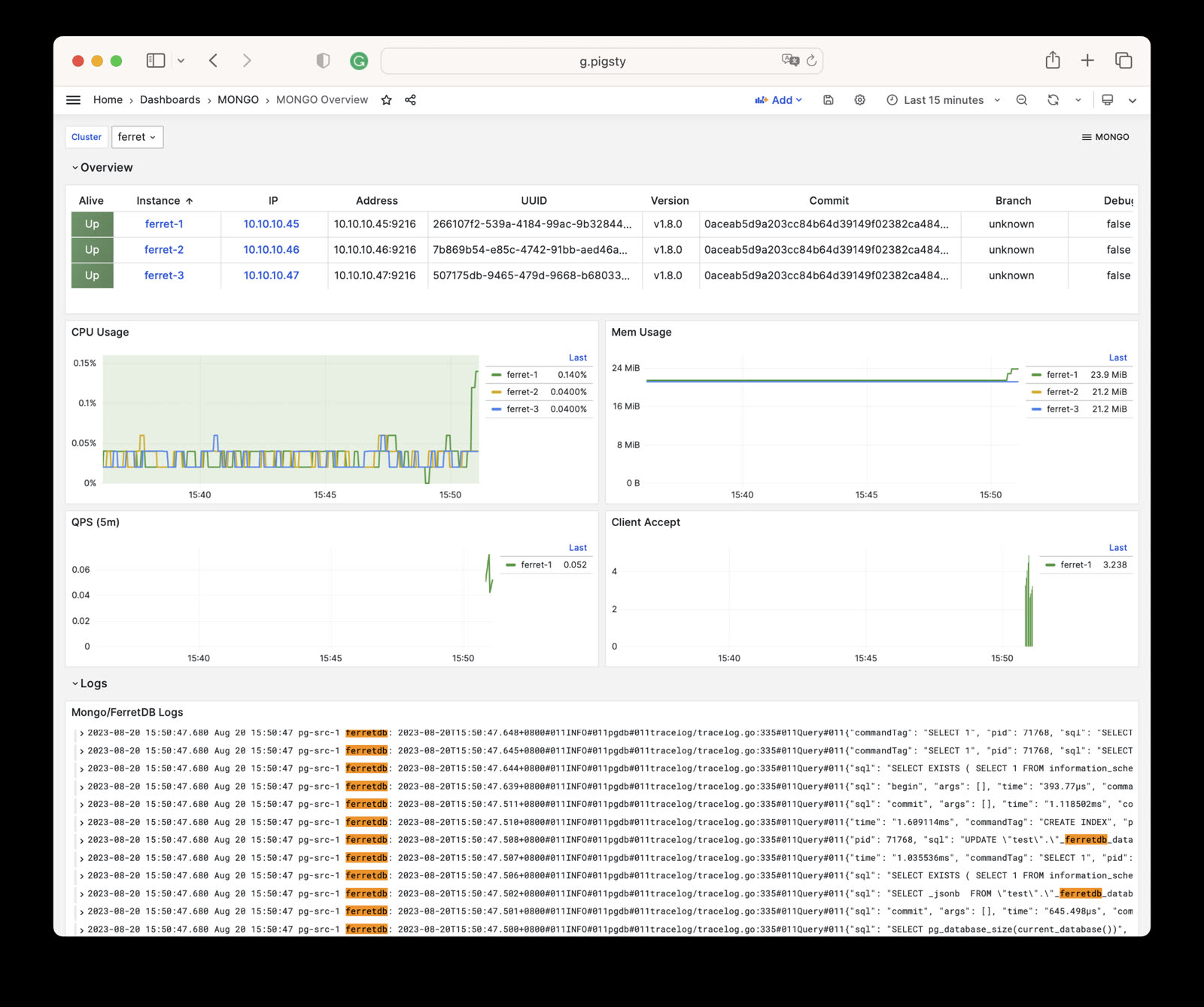
The FERRET module currently provides one monitoring dashboard.


Mongo Overview

Mongo Overview: Mongo/FerretDB cluster overview

This dashboard provides basic monitoring metrics for FerretDB, including:

  • Instance status: Running state of FerretDB instances
  • Client connections: Client connection count and request statistics
  • Resource usage: CPU, memory, goroutine count, etc.
  • PostgreSQL connection pool: Backend PostgreSQL connection pool status

mongo-overview.jpg

Since FerretDB uses PostgreSQL as its underlying storage engine, for more monitoring metrics please refer to PostgreSQL Monitoring.


Metrics

FerretDB exposes Prometheus-format metrics through its built-in exporter on the mongo_exporter_port (default 9216) port.

Key metric categories include:

Metric PrefixDescription
ferretdb_*FerretDB core metrics
ferretdb_client_*Client connection and request stats
ferretdb_postgresql_*PostgreSQL backend status
go_*Go runtime metrics
process_*Process-level metrics

For the complete list of metrics, see Metrics.


Alerting Rules

The FerretDB module currently uses basic instance liveness alerts:

- alert: FerretDBDown
  expr: ferretdb_up == 0
  for: 1m
  labels:
    severity: critical
  annotations:
    summary: "FerretDB instance {{ $labels.ins }} is down"
    description: "FerretDB instance {{ $labels.ins }} on {{ $labels.ip }} has been down for more than 1 minute."

Since FerretDB is a stateless proxy layer, the primary monitoring and alerting should focus on the underlying PostgreSQL cluster.

7 - Metrics

Complete list of monitoring metrics provided by the FerretDB module

The MONGO module contains 54 available monitoring metrics.

Metric NameTypeLabelsDescription
ferretdb_client_accepts_totalUnknownerror, cls, ip, ins, instance, jobN/A
ferretdb_client_duration_seconds_bucketUnknownerror, le, cls, ip, ins, instance, jobN/A
ferretdb_client_duration_seconds_countUnknownerror, cls, ip, ins, instance, jobN/A
ferretdb_client_duration_seconds_sumUnknownerror, cls, ip, ins, instance, jobN/A
ferretdb_client_requests_totalUnknowncls, ip, ins, opcode, instance, command, jobN/A
ferretdb_client_responses_totalUnknownresult, argument, cls, ip, ins, opcode, instance, command, jobN/A
ferretdb_postgresql_metadata_databasesgaugecls, ip, ins, instance, jobThe current number of database in the registry.
ferretdb_postgresql_pool_sizegaugecls, ip, ins, instance, jobThe current number of pools.
ferretdb_upgaugecls, version, commit, ip, ins, dirty, telemetry, package, update_available, uuid, instance, job, branch, debugFerretDB instance state.
go_gc_duration_secondssummarycls, ip, ins, instance, quantile, jobA summary of the pause duration of garbage collection cycles.
go_gc_duration_seconds_countUnknowncls, ip, ins, instance, jobN/A
go_gc_duration_seconds_sumUnknowncls, ip, ins, instance, jobN/A
go_goroutinesgaugecls, ip, ins, instance, jobNumber of goroutines that currently exist.
go_infogaugecls, version, ip, ins, instance, jobInformation about the Go environment.
go_memstats_alloc_bytesgaugecls, ip, ins, instance, jobNumber of bytes allocated and still in use.
go_memstats_alloc_bytes_totalcountercls, ip, ins, instance, jobTotal number of bytes allocated, even if freed.
go_memstats_buck_hash_sys_bytesgaugecls, ip, ins, instance, jobNumber of bytes used by the profiling bucket hash table.
go_memstats_frees_totalcountercls, ip, ins, instance, jobTotal number of frees.
go_memstats_gc_sys_bytesgaugecls, ip, ins, instance, jobNumber of bytes used for garbage collection system metadata.
go_memstats_heap_alloc_bytesgaugecls, ip, ins, instance, jobNumber of heap bytes allocated and still in use.
go_memstats_heap_idle_bytesgaugecls, ip, ins, instance, jobNumber of heap bytes waiting to be used.
go_memstats_heap_inuse_bytesgaugecls, ip, ins, instance, jobNumber of heap bytes that are in use.
go_memstats_heap_objectsgaugecls, ip, ins, instance, jobNumber of allocated objects.
go_memstats_heap_released_bytesgaugecls, ip, ins, instance, jobNumber of heap bytes released to OS.
go_memstats_heap_sys_bytesgaugecls, ip, ins, instance, jobNumber of heap bytes obtained from system.
go_memstats_last_gc_time_secondsgaugecls, ip, ins, instance, jobNumber of seconds since 1970 of last garbage collection.
go_memstats_lookups_totalcountercls, ip, ins, instance, jobTotal number of pointer lookups.
go_memstats_mallocs_totalcountercls, ip, ins, instance, jobTotal number of mallocs.
go_memstats_mcache_inuse_bytesgaugecls, ip, ins, instance, jobNumber of bytes in use by mcache structures.
go_memstats_mcache_sys_bytesgaugecls, ip, ins, instance, jobNumber of bytes used for mcache structures obtained from system.
go_memstats_mspan_inuse_bytesgaugecls, ip, ins, instance, jobNumber of bytes in use by mspan structures.
go_memstats_mspan_sys_bytesgaugecls, ip, ins, instance, jobNumber of bytes used for mspan structures obtained from system.
go_memstats_next_gc_bytesgaugecls, ip, ins, instance, jobNumber of heap bytes when next garbage collection will take place.
go_memstats_other_sys_bytesgaugecls, ip, ins, instance, jobNumber of bytes used for other system allocations.
go_memstats_stack_inuse_bytesgaugecls, ip, ins, instance, jobNumber of bytes in use by the stack allocator.
go_memstats_stack_sys_bytesgaugecls, ip, ins, instance, jobNumber of bytes obtained from system for stack allocator.
go_memstats_sys_bytesgaugecls, ip, ins, instance, jobNumber of bytes obtained from system.
go_threadsgaugecls, ip, ins, instance, jobNumber of OS threads created.
mongo_upUnknowncls, ip, ins, instance, jobN/A
process_cpu_seconds_totalcountercls, ip, ins, instance, jobTotal user and system CPU time spent in seconds.
process_max_fdsgaugecls, ip, ins, instance, jobMaximum number of open file descriptors.
process_open_fdsgaugecls, ip, ins, instance, jobNumber of open file descriptors.
process_resident_memory_bytesgaugecls, ip, ins, instance, jobResident memory size in bytes.
process_start_time_secondsgaugecls, ip, ins, instance, jobStart time of the process since unix epoch in seconds.
process_virtual_memory_bytesgaugecls, ip, ins, instance, jobVirtual memory size in bytes.
process_virtual_memory_max_bytesgaugecls, ip, ins, instance, jobMaximum amount of virtual memory available in bytes.
promhttp_metric_handler_errors_totalcounterjob, cls, ip, ins, instance, causeTotal number of internal errors encountered by the promhttp metric handler.
promhttp_metric_handler_requests_in_flightgaugecls, ip, ins, instance, jobCurrent number of scrapes being served.
promhttp_metric_handler_requests_totalcounterjob, cls, ip, ins, instance, codeTotal number of scrapes by HTTP status code.
scrape_duration_secondsUnknowncls, ip, ins, instance, jobN/A
scrape_samples_post_metric_relabelingUnknowncls, ip, ins, instance, jobN/A
scrape_samples_scrapedUnknowncls, ip, ins, instance, jobN/A
scrape_series_addedUnknowncls, ip, ins, instance, jobN/A
upUnknowncls, ip, ins, instance, jobN/A

8 - FAQ

Frequently asked questions about FerretDB and DocumentDB modules

Why Use FerretDB?

MongoDB was an amazing technology that allowed developers to escape the “schema constraints” of relational databases and rapidly build applications. However, over time, MongoDB abandoned its open-source roots and changed its license to SSPL, making it unusable for many open-source projects and early-stage commercial ventures. Most MongoDB users don’t actually need the advanced features MongoDB offers, but they do need an easy-to-use open-source document database solution. To fill this gap, FerretDB was born.

PostgreSQL’s JSON support is already quite comprehensive: binary JSONB storage, GIN indexes for arbitrary fields, various JSON processing functions, JSON PATH and JSON Schema—it has long been a fully-featured, high-performance document database. But providing alternative functionality is not the same as direct emulation. FerretDB can provide a smooth migration path to PostgreSQL for applications using MongoDB drivers.


Pigsty’s FerretDB Support History

Pigsty has provided Docker-based FerretDB templates since 1.x and added native deployment support in v2.3. As an optional component, it greatly enriches the PostgreSQL ecosystem. The Pigsty community has become a partner of the FerretDB community, and deeper collaboration and integration support will follow.

FERRET is an optional module in Pigsty. Since v2.0, it requires the documentdb extension to work. Pigsty has packaged this extension and provides a mongo.yml template to help you easily deploy FerretDB clusters.


Installing MongoSH

You can use MongoSH as a client tool to access FerretDB clusters.

The recommended approach is to use the pig command to add the MongoDB repository and install:

pig repo add mongo -u   # Add the official MongoDB repository
yum install mongodb-mongosh   # RHEL/CentOS/Rocky/Alma
apt install mongodb-mongosh   # Debian/Ubuntu

You can also manually add the MongoDB repository:

# RHEL/CentOS family
cat > /etc/yum.repos.d/mongo.repo <<EOF
[mongodb-org-7.0]
name=MongoDB Repository
baseurl=https://repo.mongodb.org/yum/redhat/\$releasever/mongodb-org/7.0/\$basearch/
gpgcheck=1
enabled=1
gpgkey=https://www.mongodb.org/static/pgp/server-7.0.asc
EOF
yum install -y mongodb-mongosh

Authentication Method

FerretDB authentication is entirely based on the underlying PostgreSQL. Since Pigsty-managed PostgreSQL clusters use scram-sha-256 authentication by default, you must specify the PLAIN authentication mechanism in the connection string:

mongosh 'mongodb://user:password@host:27017?authMechanism=PLAIN'

If you forget to add the authMechanism=PLAIN parameter, the connection will fail with an authentication error.


Compatibility with MongoDB

FerretDB implements MongoDB’s wire protocol but uses PostgreSQL for underlying storage. This means:

  • Most basic CRUD operations are compatible with MongoDB
  • Some advanced features may not be supported or may differ
  • Aggregation pipeline support is limited

For detailed compatibility information, see:


Why Is a Superuser Required?

FerretDB 2.0+ uses the documentdb extension, which requires superuser privileges to create and manage internal structures. Therefore, the user specified in mongo_pgurl must be a PostgreSQL superuser.

It’s recommended to create a dedicated mongod superuser for FerretDB to use, rather than using the default postgres user.


How to Achieve High Availability

FerretDB itself is stateless—all data is stored in the underlying PostgreSQL. To achieve high availability:

  1. PostgreSQL layer: Use Pigsty’s PGSQL module to deploy a highly available PostgreSQL cluster
  2. FerretDB layer: Deploy multiple FerretDB instances with a VIP or load balancer

For detailed configuration, see High Availability Configuration.


Performance Considerations

FerretDB’s performance depends on the underlying PostgreSQL cluster. Since MongoDB commands need to be translated to SQL, there is some performance overhead. For most OLTP scenarios, the performance is acceptable.

If you need higher performance, you can:

  • Use faster storage (NVMe SSD)
  • Increase PostgreSQL resource allocation
  • Optimize PostgreSQL parameters
  • Use connection pooling to reduce connection overhead