This is the multi-page printable view of this section. Click here to print.

Return to the regular view of this page.

Module: MINIO

Pigsty has built-in MinIO support, an open-source S3-compatible object storage that can be used for PGSQL cold backup storage.

MinIO is an S3-compatible multi-cloud object storage software, open-sourced under the AGPLv3 license.

MinIO can be used to store documents, images, videos, and backups. Pigsty natively supports deploying various MinIO clusters with native multi-node multi-disk high availability support, easy to scale, secure, and ready to use out of the box. It has been used in production environments at 10PB+ scale.

MinIO is an optional module in Pigsty. You can use MinIO as an optional storage repository for PostgreSQL backups, supplementing the default local POSIX filesystem repository. If using the MinIO backup repository, the MINIO module should be installed before any PGSQL modules. MinIO requires a trusted CA certificate to work, so it depends on the NODE module.


Quick Start

Here’s a simple example of MinIO single-node single-disk deployment:

# Define MinIO cluster in the config inventory
minio: { hosts: { 10.10.10.10: { minio_seq: 1 } }, vars: { minio_cluster: minio } }
./minio.yml -l minio    # Deploy MinIO module on the minio group

After deployment, you can access MinIO via:

  • S3 API: https://sss.pigsty:9000 (requires DNS resolution for the domain)
  • Web Console: https://<minio-ip>:9001 (default username/password: minioadmin / S3User.MinIO)
  • Command Line: mcli ls sss/ (alias pre-configured on the admin node)

Deployment Modes

MinIO supports three major deployment modes:

ModeDescriptionUse Cases
Single-Node Single-Disk (SNSD)Single node, single data directoryDevelopment, testing, demo
Single-Node Multi-Disk (SNMD)Single node, multiple disksResource-constrained small-scale deployments
Multi-Node Multi-Disk (MNMD)Multiple nodes, multiple disks per nodeRecommended for production

Additionally, you can use multi-pool deployment to scale existing clusters, or deploy multiple clusters.


Key Features

  • S3 Compatible: Fully compatible with AWS S3 API, seamlessly integrates with various S3 clients and tools
  • High Availability: Native support for multi-node multi-disk deployment, tolerates node and disk failures
  • Secure: HTTPS encrypted transmission enabled by default, supports server-side encryption
  • Monitoring: Out-of-the-box Grafana dashboards and Prometheus alerting rules
  • Easy to Use: Pre-configured mcli client alias, one-click deployment and management

1 - Usage

Getting started: how to use MinIO? How to reliably access MinIO? How to use mc / rclone client tools?

After you configure and deploy the MinIO cluster with the playbook, you can start using and accessing the MinIO cluster by following the instructions here.


Deploy Cluster

Deploying an out-of-the-box single-node single-disk MinIO instance in Pigsty is straightforward. First, define a MinIO cluster in the config inventory:

minio: { hosts: { 10.10.10.10: { minio_seq: 1 } }, vars: { minio_cluster: minio } }

Then, run the minio.yml playbook provided by Pigsty against the defined group (here minio):

./minio.yml -l minio

Note that in install.yml, pre-defined MinIO clusters will be automatically created, so you don’t need to manually run the minio.yml playbook again.

If you plan to deploy a production-grade large-scale multi-node MinIO cluster, we strongly recommend reading the Pigsty MinIO configuration documentation and the MinIO official documentation before proceeding.


Access Cluster

Note: MinIO services must be accessed via domain name and HTTPS, so make sure the MinIO service domain (default sss.pigsty) correctly points to the MinIO server node.

  1. You can add static resolution records in node_etc_hosts, or manually modify the /etc/hosts file
  2. You can add a record on the internal DNS server if you already have an existing DNS service
  3. If you have enabled the DNS server on Infra nodes, you can add records in dns_records

For production environment access to MinIO, we recommend using the first method: static DNS resolution records, to avoid MinIO’s additional dependency on DNS.

You should point the MinIO service domain to the IP address and service port of the MinIO server node, or the IP address and service port of the load balancer. Pigsty uses the default MinIO service domain sss.pigsty, which defaults to localhost for single-node deployment, serving on port 9000.

In some examples, HAProxy instances are also deployed on the MinIO cluster to expose services. In this case, 9002 is the service port used in the templates.


Adding Alias

To access the MinIO server cluster using the mcli client, you need to first configure the server alias:

mcli alias ls  # list minio alias (default is sss)
mcli alias set sss https://sss.pigsty:9000 minioadmin S3User.MinIO            # root user
mcli alias set sss https://sss.pigsty:9002 minioadmin S3User.MinIO            # root user, using load balancer port 9002

mcli alias set pgbackrest https://sss.pigsty:9000 pgbackrest S3User.Backup    # use backup user

On the admin user of the admin node, a MinIO alias named sss is pre-configured and can be used directly.

For the full functionality reference of the MinIO client tool mcli, please refer to the documentation: MinIO Client.


User Management

You can manage business users in MinIO using mcli. For example, here we can create two business users using the command line:

mcli admin user list sss     # list all users on sss
set +o history # hide password in history and create minio users
mcli admin user add sss dba S3User.DBA
mcli admin user add sss pgbackrest S3User.Backup
set -o history

Bucket Management

You can perform CRUD operations on buckets in MinIO:

mcli ls sss/                         # list all buckets on alias 'sss'
mcli mb --ignore-existing sss/hello  # create a bucket named 'hello'
mcli rb --force sss/hello            # force delete the 'hello' bucket

Object Management

You can also perform CRUD operations on objects within buckets. For details, please refer to the official documentation: Object Management

mcli cp /www/pigsty/* sss/infra/     # upload local repo content to MinIO infra bucket
mcli cp sss/infra/plugins.tgz /tmp/  # download file from minio to local
mcli ls sss/infra                    # list all files in the infra bucket
mcli rm sss/infra/plugins.tgz        # delete specific file in infra bucket
mcli cat sss/infra/repo_complete     # view file content in infra bucket

Using rclone

Pigsty repository provides rclone, a convenient multi-cloud object storage client that you can use to access MinIO services.

yum install rclone;  # EL-compatible systems
apt install rclone;  # Debian/Ubuntu systems

mkdir -p ~/.config/rclone/;
tee ~/.config/rclone/rclone.conf > /dev/null <<EOF
[sss]
type = s3
access_key_id = minioadmin
secret_access_key = S3User.MinIO
endpoint = https://sss.pigsty:9000
EOF

rclone ls sss:/

Configure Backup Repository

In Pigsty, the default use case for MinIO is as a backup storage repository for pgBackRest. When you modify pgbackrest_method to minio, the PGSQL module will automatically switch the backup repository to MinIO.

pgbackrest_method: local          # pgbackrest repo method: local,minio,[user-defined...]
pgbackrest_repo:                  # pgbackrest repo: https://pgbackrest.org/configuration.html#section-repository
  local:                          # default pgbackrest repo with local posix fs
    path: /pg/backup              # local backup directory, `/pg/backup` by default
    retention_full_type: count    # retention full backups by count
    retention_full: 2             # keep 2, at most 3 full backup when using local fs repo
  minio:                          # optional minio repo for pgbackrest
    type: s3                      # minio is s3-compatible, so s3 is used
    s3_endpoint: sss.pigsty       # minio endpoint domain name, `sss.pigsty` by default
    s3_region: us-east-1          # minio region, us-east-1 by default, useless for minio
    s3_bucket: pgsql              # minio bucket name, `pgsql` by default
    s3_key: pgbackrest            # minio user access key for pgbackrest
    s3_key_secret: S3User.Backup  # minio user secret key for pgbackrest
    s3_uri_style: path            # use path style uri for minio rather than host style
    path: /pgbackrest             # minio backup path, default is `/pgbackrest`
    storage_port: 9000            # minio port, 9000 by default
    storage_ca_file: /pg/cert/ca.crt  # minio ca file path, `/pg/cert/ca.crt` by default
    bundle: y                     # bundle small files into a single file
    cipher_type: aes-256-cbc      # enable AES encryption for remote backup repo
    cipher_pass: pgBackRest       # AES encryption password, default is 'pgBackRest'
    retention_full_type: time     # retention full backup by time on minio repo
    retention_full: 14            # keep full backup for last 14 days

Note that if you are using a multi-node MinIO cluster and exposing services through a load balancer, you need to modify the s3_endpoint and storage_port parameters accordingly.


2 - Configuration

Choose the appropriate MinIO deployment type based on your requirements and provide reliable access.

Before deploying MinIO, you need to define a MinIO cluster in the config inventory. MinIO has three classic deployment modes:

  • Single-Node Single-Disk: SNSD: Single-node single-disk mode, can use any directory as a data disk, for development, testing, and demo only.
  • Single-Node Multi-Disk: SNMD: Compromise mode, using multiple disks (>=2) on a single server, only when resources are extremely limited.
  • Multi-Node Multi-Disk: MNMD: Multi-node multi-disk mode, standard production deployment with the best reliability, but requires multiple servers.

We recommend using SNSD and MNMD modes - the former for development and testing, the latter for production deployment. SNMD should only be used when resources are limited (only one server).

Additionally, you can use multi-pool deployment to scale existing MinIO clusters, or directly deploy multiple clusters.

When using a multi-node MinIO cluster, you can access the service from any node, so the best practice is to use load balancing with high availability service access in front of the MinIO cluster.


Core Parameters

In MinIO deployment, MINIO_VOLUMES is a core configuration parameter that specifies the MinIO deployment mode. Pigsty provides convenient parameters to automatically generate MINIO_VOLUMES and other configuration values based on the config inventory, but you can also specify them directly.

  • Single-Node Single-Disk: MINIO_VOLUMES points to a regular directory on the local machine, specified by minio_data, defaulting to /data/minio.
  • Single-Node Multi-Disk: MINIO_VOLUMES points to a series of mount points on the local machine, also specified by minio_data, but requires special syntax to explicitly specify real mount points, e.g., /data{1...4}.
  • Multi-Node Multi-Disk: MINIO_VOLUMES points to mount points across multiple servers, automatically generated from two parts:
    • First, use minio_data to specify the disk mount point sequence for each cluster member /data{1...4}
    • Also use minio_node to specify the node naming pattern ${minio_cluster}-${minio_seq}.pigsty
  • Multi-Pool: You need to explicitly specify the minio_volumes parameter to allocate nodes for each storage pool

Single-Node Single-Disk

SNSD mode, deployment reference: MinIO Single-Node Single-Drive

In Pigsty, defining a singleton MinIO instance is straightforward:

# 1 Node 1 Driver (DEFAULT)
minio: { hosts: { 10.10.10.10: { minio_seq: 1 } }, vars: { minio_cluster: minio } }

In single-node mode, the only required parameters are minio_seq and minio_cluster, which uniquely identify each MinIO instance.

Single-node single-disk mode is for development purposes only, so you can use a regular directory as the data directory, specified by minio_data, defaulting to /data/minio.

When using MinIO, we strongly recommend accessing it via a statically resolved domain name. For example, if minio_domain uses the default sss.pigsty, you can add a static resolution on all nodes to facilitate access to this service.

node_etc_hosts: ["10.10.10.10 sss.pigsty"] # domain name to access minio from all nodes (required)

Single-Node Multi-Disk

SNMD mode, deployment reference: MinIO Single-Node Multi-Drive

To use multiple disks on a single node, the operation is similar to Single-Node Single-Disk, but you need to specify minio_data in the format {{ prefix }}{x...y}, which defines a series of disk mount points.

minio:
  hosts: { 10.10.10.10: { minio_seq: 1 } }
  vars:
    minio_cluster: minio         # minio cluster name, minio by default
    minio_data: '/data{1...4}'   # minio data dir(s), use {x...y} to specify multi drivers

For example, the Vagrant MinIO sandbox defines a single-node MinIO cluster with 4 disks: /data1, /data2, /data3, and /data4. Before starting MinIO, you need to mount them properly (be sure to format disks with xfs):

mkfs.xfs /dev/vdb; mkdir /data1; mount -t xfs /dev/sdb /data1;   # mount disk 1...
mkfs.xfs /dev/vdc; mkdir /data2; mount -t xfs /dev/sdb /data2;   # mount disk 2...
mkfs.xfs /dev/vdd; mkdir /data3; mount -t xfs /dev/sdb /data3;   # mount disk 3...
mkfs.xfs /dev/vde; mkdir /data4; mount -t xfs /dev/sdb /data4;   # mount disk 4...

Disk mounting is part of server provisioning and beyond Pigsty’s scope. Mounted disks should be written to /etc/fstab for auto-mounting after server restart.

/dev/vdb /data1 xfs defaults,noatime,nodiratime 0 0
/dev/vdc /data2 xfs defaults,noatime,nodiratime 0 0
/dev/vdd /data3 xfs defaults,noatime,nodiratime 0 0
/dev/vde /data4 xfs defaults,noatime,nodiratime 0 0

SNMD mode can utilize multiple disks on a single machine to provide higher performance and capacity, and tolerate partial disk failures. However, single-node mode cannot tolerate entire node failure, and you cannot add new nodes at runtime, so we do not recommend using SNMD mode in production unless you have special reasons.


Multi-Node Multi-Disk

MNMD mode, deployment reference: MinIO Multi-Node Multi-Drive

In addition to minio_data for specifying disk drives as in Single-Node Multi-Disk mode, multi-node MinIO deployment requires an additional minio_node parameter.

For example, the following configuration defines a MinIO cluster with four nodes, each with four disks:

minio:
  hosts:
    10.10.10.10: { minio_seq: 1 }  # actual nodename: minio-1.pigsty
    10.10.10.11: { minio_seq: 2 }  # actual nodename: minio-2.pigsty
    10.10.10.12: { minio_seq: 3 }  # actual nodename: minio-3.pigsty
    10.10.10.13: { minio_seq: 4 }  # actual nodename: minio-4.pigsty
  vars:
    minio_cluster: minio
    minio_data: '/data{1...4}'                         # 4-disk per node
    minio_node: '${minio_cluster}-${minio_seq}.pigsty' # minio node name pattern

The minio_node parameter specifies the MinIO node name pattern, used to generate a unique name for each node. By default, the node name is ${minio_cluster}-${minio_seq}.pigsty, where ${minio_cluster} is the cluster name and ${minio_seq} is the node sequence number. The MinIO instance name is crucial and will be automatically written to /etc/hosts on MinIO nodes for static resolution. MinIO relies on these names to identify and access other nodes in the cluster.

In this case, MINIO_VOLUMES will be set to https://minio-{1...4}.pigsty/data{1...4} to identify the four disks on four nodes. You can directly specify the minio_volumes parameter in the MinIO cluster to override the automatically generated value. However, this is usually not necessary as Pigsty will automatically generate it based on the config inventory.


Multi-Pool

MinIO’s architecture allows scaling by adding new storage pools. In Pigsty, you can achieve cluster scaling by explicitly specifying the minio_volumes parameter to allocate nodes for each storage pool.

For example, suppose you have already created the MinIO cluster defined in the Multi-Node Multi-Disk example, and now you want to add a new storage pool with four more nodes.

You need to directly override the minio_volumes parameter:

minio:
  hosts:
    10.10.10.10: { minio_seq: 1 }
    10.10.10.11: { minio_seq: 2 }
    10.10.10.12: { minio_seq: 3 }
    10.10.10.13: { minio_seq: 4 }

    10.10.10.14: { minio_seq: 5 }
    10.10.10.15: { minio_seq: 6 }
    10.10.10.16: { minio_seq: 7 }
    10.10.10.17: { minio_seq: 8 }
  vars:
    minio_cluster: minio
    minio_data: "/data{1...4}"
    minio_node: '${minio_cluster}-${minio_seq}.pigsty' # minio node name pattern
    minio_volumes: 'https://minio-{1...4}.pigsty:9000/data{1...4} https://minio-{5...8}.pigsty:9000/data{1...4}'

Here, the two space-separated parameters represent two storage pools, each with four nodes and four disks per node. For more information on storage pools, refer to Administration: MinIO Cluster Expansion


Multiple Clusters

You can deploy new MinIO nodes as a completely new MinIO cluster by defining a new group with a different cluster name. The following configuration declares two independent MinIO clusters:

minio1:
  hosts:
    10.10.10.10: { minio_seq: 1 }
    10.10.10.11: { minio_seq: 2 }
    10.10.10.12: { minio_seq: 3 }
    10.10.10.13: { minio_seq: 4 }
  vars:
    minio_cluster: minio2
    minio_data: "/data{1...4}"

minio2:
  hosts:
    10.10.10.14: { minio_seq: 5 }
    10.10.10.15: { minio_seq: 6 }
    10.10.10.16: { minio_seq: 7 }
    10.10.10.17: { minio_seq: 8 }
  vars:
    minio_cluster: minio2
    minio_data: "/data{1...4}"
    minio_alias: sss2
    minio_domain: sss2.pigsty
    minio_endpoint: sss2.pigsty:9000

Note that Pigsty defaults to having only one MinIO cluster per deployment. If you need to deploy multiple MinIO clusters, some parameters with default values must be explicitly set and cannot be omitted, otherwise naming conflicts will occur, as shown above.


Expose Service

MinIO serves on port 9000 by default. A multi-node MinIO cluster can be accessed by connecting to any one of its nodes.

Service access falls under the scope of the NODE module, and we’ll provide only a basic introduction here.

High-availability access to a multi-node MinIO cluster can be achieved using L2 VIP or HAProxy. For example, you can use keepalived to bind an L2 VIP to the MinIO cluster, or use the haproxy component provided by the NODE module to expose MinIO services through a load balancer.

# minio cluster with 4 nodes and 4 drivers per node
minio:
  hosts:
    10.10.10.10: { minio_seq: 1 , nodename: minio-1 }
    10.10.10.11: { minio_seq: 2 , nodename: minio-2 }
    10.10.10.12: { minio_seq: 3 , nodename: minio-3 }
    10.10.10.13: { minio_seq: 4 , nodename: minio-4 }
  vars:
    minio_cluster: minio
    minio_data: '/data{1...4}'
    minio_buckets: [ { name: pgsql }, { name: infra }, { name: redis } ]
    minio_users:
      - { access_key: dba , secret_key: S3User.DBA, policy: consoleAdmin }
      - { access_key: pgbackrest , secret_key: S3User.SomeNewPassWord , policy: readwrite }

    # bind a node l2 vip (10.10.10.9) to minio cluster (optional)
    node_cluster: minio
    vip_enabled: true
    vip_vrid: 128
    vip_address: 10.10.10.9
    vip_interface: eth1

    # expose minio service with haproxy on all nodes
    haproxy_services:
      - name: minio                    # [REQUIRED] service name, unique
        port: 9002                     # [REQUIRED] service port, unique
        balance: leastconn             # [OPTIONAL] load balancer algorithm
        options:                       # [OPTIONAL] minio health check
          - option httpchk
          - option http-keep-alive
          - http-check send meth OPTIONS uri /minio/health/live
          - http-check expect status 200
        servers:
          - { name: minio-1 ,ip: 10.10.10.10 ,port: 9000 ,options: 'check-ssl ca-file /etc/pki/ca.crt check port 9000' }
          - { name: minio-2 ,ip: 10.10.10.11 ,port: 9000 ,options: 'check-ssl ca-file /etc/pki/ca.crt check port 9000' }
          - { name: minio-3 ,ip: 10.10.10.12 ,port: 9000 ,options: 'check-ssl ca-file /etc/pki/ca.crt check port 9000' }
          - { name: minio-4 ,ip: 10.10.10.13 ,port: 9000 ,options: 'check-ssl ca-file /etc/pki/ca.crt check port 9000' }

For example, the configuration above enables HAProxy on all nodes of the MinIO cluster, exposing MinIO services on port 9002, and binds a Layer 2 VIP to the cluster. When in use, users should point the sss.pigsty domain name to the VIP address 10.10.10.9 and access MinIO services using port 9002. This ensures high availability, as the VIP will automatically switch to another node if any node fails.

In this scenario, you may also need to globally modify the domain name resolution destination and the minio_endpoint parameter to change the endpoint address for the MinIO alias on the admin node:

minio_endpoint: https://sss.pigsty:9002   # Override the default: https://sss.pigsty:9000
node_etc_hosts: ["10.10.10.9 sss.pigsty"] # Other nodes will use sss.pigsty domain to access MinIO

Dedicated Load Balancer

Pigsty allows using a dedicated load balancer server group instead of the cluster itself to run VIP and HAProxy. For example, the prod template uses this approach.

proxy:
  hosts:
    10.10.10.18 : { nodename: proxy1 ,node_cluster: proxy ,vip_interface: eth1 ,vip_role: master }
    10.10.10.19 : { nodename: proxy2 ,node_cluster: proxy ,vip_interface: eth1 ,vip_role: backup }
  vars:
    vip_enabled: true
    vip_address: 10.10.10.20
    vip_vrid: 20

    haproxy_services:      # expose minio service : sss.pigsty:9000
      - name: minio        # [REQUIRED] service name, unique
        port: 9000         # [REQUIRED] service port, unique
        balance: leastconn # Use leastconn algorithm and minio health check
        options: [ "option httpchk", "option http-keep-alive", "http-check send meth OPTIONS uri /minio/health/live", "http-check expect status 200" ]
        servers:           # reload service with ./node.yml -t haproxy_config,haproxy_reload
          - { name: minio-1 ,ip: 10.10.10.21 ,port: 9000 ,options: 'check-ssl ca-file /etc/pki/ca.crt check port 9000' }
          - { name: minio-2 ,ip: 10.10.10.22 ,port: 9000 ,options: 'check-ssl ca-file /etc/pki/ca.crt check port 9000' }
          - { name: minio-3 ,ip: 10.10.10.23 ,port: 9000 ,options: 'check-ssl ca-file /etc/pki/ca.crt check port 9000' }
          - { name: minio-4 ,ip: 10.10.10.24 ,port: 9000 ,options: 'check-ssl ca-file /etc/pki/ca.crt check port 9000' }
          - { name: minio-5 ,ip: 10.10.10.25 ,port: 9000 ,options: 'check-ssl ca-file /etc/pki/ca.crt check port 9000' }

In this case, you typically need to globally modify the MinIO domain resolution to point sss.pigsty to the load balancer address, and modify the minio_endpoint parameter to change the endpoint address for the MinIO alias on the admin node:

minio_endpoint: https://sss.pigsty:9002    # overwrite the defaults: https://sss.pigsty:9000
node_etc_hosts: ["10.10.10.20 sss.pigsty"] # domain name to access minio from all nodes (required)

Access Service

To access MinIO exposed via HAProxy, taking PGSQL backup configuration as an example, you can modify the configuration in pgbackrest_repo to add a new backup repository definition:

# This is the newly added HA MinIO Repo definition, USE THIS INSTEAD!
minio_ha:
  type: s3
  s3_endpoint: minio-1.pigsty   # s3_endpoint can be any load balancer: 10.10.10.1{0,1,2}, or domain names pointing to any of the nodes
  s3_region: us-east-1          # you can use external domain name: sss.pigsty, which resolves to any member (`minio_domain`)
  s3_bucket: pgsql              # instance & nodename can be used: minio-1.pigsty minio-1.pigsty minio-1.pigsty minio-1 minio-2 minio-3
  s3_key: pgbackrest            # Better using a dedicated password for MinIO pgbackrest user
  s3_key_secret: S3User.SomeNewPassWord
  s3_uri_style: path
  path: /pgbackrest
  storage_port: 9002            # Use load balancer port 9002 instead of default 9000 (direct access)
  storage_ca_file: /etc/pki/ca.crt
  bundle: y
  cipher_type: aes-256-cbc      # Better using a new cipher password for your production environment
  cipher_pass: pgBackRest.With.Some.Extra.PassWord.And.Salt.${pg_cluster}
  retention_full_type: time
  retention_full: 14

Expose Console

MinIO provides a Web console interface on port 9001 by default (specified by the minio_admin_port parameter).

Exposing the admin interface to external networks may pose security risks. If you want to do this, add MinIO to infra_portal and refresh the Nginx configuration.

# ./infra.yml -t nginx
infra_portal:
  home         : { domain: h.pigsty }
  grafana      : { domain: g.pigsty ,endpoint: "${admin_ip}:3000" , websocket: true }
  prometheus   : { domain: p.pigsty ,endpoint: "${admin_ip}:9090" }
  alertmanager : { domain: a.pigsty ,endpoint: "${admin_ip}:9093" }
  blackbox     : { endpoint: "${admin_ip}:9115" }
  loki         : { endpoint: "${admin_ip}:3100" }

  # MinIO console requires HTTPS / Websocket to work
  minio        : { domain: m.pigsty     ,endpoint: "10.10.10.10:9001" ,scheme: https ,websocket: true }
  minio10      : { domain: m10.pigsty   ,endpoint: "10.10.10.10:9001" ,scheme: https ,websocket: true }
  minio11      : { domain: m11.pigsty   ,endpoint: "10.10.10.11:9001" ,scheme: https ,websocket: true }
  minio12      : { domain: m12.pigsty   ,endpoint: "10.10.10.12:9001" ,scheme: https ,websocket: true }
  minio13      : { domain: m13.pigsty   ,endpoint: "10.10.10.13:9001" ,scheme: https ,websocket: true }

Note that the MinIO console requires HTTPS. Please DO NOT expose an unencrypted MinIO console in production.

This means you typically need to add a resolution record for m.pigsty in your DNS server or local /etc/hosts file to access the MinIO console.

Meanwhile, if you are using Pigsty’s self-signed CA rather than a proper public CA, you usually need to manually trust the CA or certificate to skip the “insecure” warning in the browser.


3 - Parameters

MinIO module provides 21 configuration parameters for customizing your MinIO cluster.

The MinIO module parameter list contains 21 parameters in two groups:

  • MINIO: 18 parameters for MinIO cluster deployment and configuration
  • MINIO_REMOVE: 3 parameters for MinIO cluster removal

Parameter Overview

The MINIO parameter group is used for MinIO cluster deployment and configuration, including identity, storage paths, ports, authentication credentials, and provisioning of buckets and users.

ParameterTypeLevelDescription
minio_seqintIminio instance identifier, REQUIRED
minio_clusterstringCminio cluster name, minio by default
minio_userusernameCminio os user, minio by default
minio_httpsboolG/Cenable HTTPS for MinIO? true by default
minio_nodestringCminio node name pattern
minio_datapathCminio data dir, use {x...y} for multiple disks
minio_volumesstringCminio core parameter for nodes and disks, auto-gen
minio_domainstringGminio external domain, sss.pigsty by default
minio_portportCminio service port, 9000 by default
minio_admin_portportCminio console port, 9001 by default
minio_access_keyusernameCroot access key, minioadmin by default
minio_secret_keypasswordCroot secret key, S3User.MinIO by default
minio_extra_varsstringCextra environment variables for minio server
minio_provisionboolG/Crun minio provisioning tasks? true by default
minio_aliasstringGminio client alias for the deployment
minio_endpointstringCendpoint for the minio client alias
minio_bucketsbucket[]Clist of minio buckets to be created
minio_usersuser[]Clist of minio users to be created

The MINIO_REMOVE parameter group controls MinIO cluster removal behavior, including safeguard protection, data cleanup, and package uninstallation.

ParameterTypeLevelDescription
minio_safeguardboolG/C/Aprevent accidental removal? false by default
minio_rm_databoolG/C/Aremove minio data during removal? true by default
minio_rm_pkgboolG/C/Auninstall minio packages during removal? false by default

The minio_volumes and minio_endpoint are auto-generated parameters, but you can explicitly override them.


Defaults

MINIO: 18 parameters, defined in roles/minio/defaults/main.yml

#-----------------------------------------------------------------
# MINIO
#-----------------------------------------------------------------
#minio_seq: 1                     # minio instance identifier, REQUIRED
minio_cluster: minio              # minio cluster name, minio by default
minio_user: minio                 # minio os user, `minio` by default
minio_https: true                 # enable HTTPS for MinIO? true by default
minio_node: '${minio_cluster}-${minio_seq}.pigsty' # minio node name pattern
minio_data: '/data/minio'         # minio data dir, use `{x...y}` for multiple disks
#minio_volumes:                   # minio core parameter, auto-generated if not specified
minio_domain: sss.pigsty          # minio external domain, `sss.pigsty` by default
minio_port: 9000                  # minio service port, 9000 by default
minio_admin_port: 9001            # minio console port, 9001 by default
minio_access_key: minioadmin      # root access key, `minioadmin` by default
minio_secret_key: S3User.MinIO    # root secret key, `S3User.MinIO` by default
minio_extra_vars: ''              # extra environment variables for minio server
minio_provision: true             # run minio provisioning tasks?
minio_alias: sss                  # minio client alias for the deployment
#minio_endpoint: https://sss.pigsty:9000 # endpoint for alias, auto-generated if not specified
minio_buckets:                    # list of minio buckets to be created
  - { name: pgsql }
  - { name: meta ,versioning: true }
  - { name: data }
minio_users:                      # list of minio users to be created
  - { access_key: pgbackrest  ,secret_key: S3User.Backup ,policy: pgsql }
  - { access_key: s3user_meta ,secret_key: S3User.Meta   ,policy: meta  }
  - { access_key: s3user_data ,secret_key: S3User.Data   ,policy: data  }

MINIO_REMOVE: 3 parameters, defined in roles/minio_remove/defaults/main.yml

#-----------------------------------------------------------------
# MINIO_REMOVE
#-----------------------------------------------------------------
minio_safeguard: false            # prevent accidental removal? false by default
minio_rm_data: true               # remove minio data during removal? true by default
minio_rm_pkg: false               # uninstall minio packages during removal? false by default

MINIO

This section contains parameters for the minio role, used by the minio.yml playbook.

minio_seq

Parameter: minio_seq, Type: int, Level: I

MinIO instance identifier, a required identity parameter. No default value—you must assign it manually.

Best practice is to start from 1, increment by 1, and never reuse previously assigned sequence numbers. The sequence number, together with the cluster name minio_cluster, uniquely identifies each MinIO instance (e.g., minio-1).

In multi-node deployments, sequence numbers are also used to generate node names, which are written to the /etc/hosts file for static resolution.


minio_cluster

Parameter: minio_cluster, Type: string, Level: C

MinIO cluster name, default is minio. This is useful when deploying multiple MinIO clusters.

The cluster name, together with the sequence number minio_seq, uniquely identifies each MinIO instance. For example, with cluster name minio and sequence 1, the instance name is minio-1.

Note that Pigsty defaults to a single MinIO cluster per deployment. If you need multiple MinIO clusters, you must explicitly set minio_alias, minio_domain, minio_endpoint, and other parameters to avoid naming conflicts.


minio_user

Parameter: minio_user, Type: username, Level: C

MinIO operating system user, default is minio.

The MinIO service runs under this user. SSL certificates used by MinIO are stored in this user’s home directory (default /home/minio), under the ~/.minio/certs/ directory.


minio_https

Parameter: minio_https, Type: bool, Level: G/C

Enable HTTPS for MinIO service? Default is true.

Note that pgBackREST requires MinIO to use HTTPS to work properly. If you don’t use MinIO for PostgreSQL backups and don’t need HTTPS, you can set this to false.

When HTTPS is enabled, Pigsty automatically issues SSL certificates for the MinIO server, containing the domain specified in minio_domain and the IP addresses of each node.


minio_node

Parameter: minio_node, Type: string, Level: C

MinIO node name pattern, used for multi-node deployments.

Default value: ${minio_cluster}-${minio_seq}.pigsty, which uses the instance name plus .pigsty suffix as the default node name.

The domain pattern specified here is used to generate node names, which are written to the /etc/hosts file on all MinIO nodes.


minio_data

Parameter: minio_data, Type: path, Level: C

MinIO data directory(s), default value: /data/minio, a common directory for single-node deployments.

For multi-node-multi-drive and single-node-multi-drive deployments, use the {x...y} notation to specify multiple disks.


minio_volumes

Parameter: minio_volumes, Type: string, Level: C

MinIO core parameter. By default, this is not specified and is auto-generated using the following rule:

minio_volumes: "{% if minio_cluster_size|int > 1 %}https://{{ minio_node|replace('${minio_cluster}', minio_cluster)|replace('${minio_seq}',minio_seq_range) }}:{{ minio_port|default(9000) }}{% endif %}{{ minio_data }}"
  • In single-node deployment (single or multi-drive), minio_volumes directly uses the minio_data value.
  • In multi-node deployment, minio_volumes uses minio_node, minio_port, and minio_data to generate multi-node addresses.
  • In multi-pool deployment, you typically need to explicitly specify and override minio_volumes to define multiple node pool addresses.

When specifying this parameter, ensure the values are consistent with minio_node, minio_port, and minio_data.


minio_domain

Parameter: minio_domain, Type: string, Level: G

MinIO service domain name, default is sss.pigsty.

Clients can access the MinIO S3 service via this domain name. This name is registered in local DNSMASQ and included in SSL certificates’ SAN (Subject Alternative Name) field.

It’s recommended to add a static DNS record in node_etc_hosts pointing this domain to the MinIO server node’s IP (single-node deployment) or load balancer VIP (multi-node deployment).


minio_port

Parameter: minio_port, Type: port, Level: C

MinIO service port, default is 9000.

This is the MinIO S3 API listening port. Clients access the object storage service through this port. In multi-node deployments, this port is also used for inter-node communication.


minio_admin_port

Parameter: minio_admin_port, Type: port, Level: C

MinIO console port, default is 9001.

This is the listening port for MinIO’s built-in web management console. You can access MinIO’s graphical management interface at https://<minio-ip>:9001.

To expose the MinIO console through Nginx, add it to infra_portal. Note that the MinIO console requires HTTPS and WebSocket support.


minio_access_key

Parameter: minio_access_key, Type: username, Level: C

Root access key (username), default is minioadmin.

This is the MinIO super administrator username with full access to all buckets and objects. It’s recommended to change this default value in production environments.


minio_secret_key

Parameter: minio_secret_key, Type: password, Level: C

Root secret key (password), default is S3User.MinIO.

This is the MinIO super administrator’s password, used together with minio_access_key.


minio_extra_vars

Parameter: minio_extra_vars, Type: string, Level: C

Extra environment variables for MinIO server. See the MinIO Server documentation for the complete list.

Default is an empty string. You can use multiline strings to pass multiple environment variables:

minio_extra_vars: |
  MINIO_BROWSER_REDIRECT_URL=https://minio.example.com
  MINIO_SERVER_URL=https://s3.example.com

minio_provision

Parameter: minio_provision, Type: bool, Level: G/C

Run MinIO provisioning tasks? Default is true.

When enabled, Pigsty automatically creates the buckets and users defined in minio_buckets and minio_users. Set this to false if you don’t need automatic provisioning of these resources.


minio_alias

Parameter: minio_alias, Type: string, Level: G

MinIO client alias for the local MinIO cluster, default value: sss.

This alias is written to the MinIO client configuration file (~/.mcli/config.json) for the admin user on the admin node, allowing you to directly use mcli <alias> commands to access the MinIO cluster, e.g., mcli ls sss/.

If deploying multiple MinIO clusters, specify different aliases for each cluster to avoid conflicts.


minio_endpoint

Parameter: minio_endpoint, Type: string, Level: C

Endpoint for the client alias. If specified, this minio_endpoint (e.g., https://sss.pigsty:9002) will replace the default value as the target endpoint for the MinIO alias written on the admin node.

mcli alias set {{ minio_alias }} {% if minio_endpoint is defined and minio_endpoint != '' %}{{ minio_endpoint }}{% else %}https://{{ minio_domain }}:{{ minio_port }}{% endif %} {{ minio_access_key }} {{ minio_secret_key }}

This MinIO alias is configured on the admin node as the default admin user.


minio_buckets

Parameter: minio_buckets, Type: bucket[], Level: C

List of MinIO buckets to create by default:

minio_buckets:
  - { name: pgsql }
  - { name: meta ,versioning: true }
  - { name: data }

Three default buckets are created with different purposes and policies:

  • pgsql bucket: Used by default for PostgreSQL pgBackREST backup storage.
  • meta bucket: Open bucket with versioning enabled, suitable for storing important metadata requiring version management.
  • data bucket: Open bucket for other purposes, e.g., Supabase templates may use this bucket for business data.

Each bucket has a corresponding access policy with the same name. For example, the pgsql policy has full access to the pgsql bucket, and so on.

You can also add a lock flag to bucket definitions to enable object locking, preventing accidental deletion of objects in the bucket.


minio_users

Parameter: minio_users, Type: user[], Level: C

List of MinIO users to create, default value:

minio_users:
  - { access_key: pgbackrest  ,secret_key: S3User.Backup ,policy: pgsql }
  - { access_key: s3user_meta ,secret_key: S3User.Meta   ,policy: meta  }
  - { access_key: s3user_data ,secret_key: S3User.Data   ,policy: data  }

The default configuration creates three users corresponding to three default buckets:

  • pgbackrest: For PostgreSQL pgBackREST backups, with access to the pgsql bucket.
  • s3user_meta: For accessing the meta bucket.
  • s3user_data: For accessing the data bucket.

MINIO_REMOVE

This section contains parameters for the minio_remove role, used by the minio-rm.yml playbook.

minio_safeguard

Parameter: minio_safeguard, Type: bool, Level: G/C/A

Safeguard switch to prevent accidental deletion, default value is false.

When enabled, the minio-rm.yml playbook will abort and refuse to remove the MinIO cluster, providing protection against accidental deletions.

It’s recommended to enable this safeguard in production environments to prevent data loss from accidental operations:

minio_safeguard: true   # When enabled, minio-rm.yml will refuse to execute

minio_rm_data

Parameter: minio_rm_data, Type: bool, Level: G/C/A

Remove MinIO data during removal? Default value is true.

When enabled, the minio-rm.yml playbook will delete MinIO data directories and configuration files during cluster removal.


minio_rm_pkg

Parameter: minio_rm_pkg, Type: bool, Level: G/C/A

Uninstall MinIO packages during removal? Default value is false.

When enabled, the minio-rm.yml playbook will uninstall MinIO packages during cluster removal. This is disabled by default to preserve the MinIO installation for potential future use.

4 - Playbook

Manage MinIO clusters with Ansible playbooks and quick command reference.

The MinIO module provides two built-in playbooks for cluster management:


minio.yml

Playbook minio.yml installs the MinIO module on nodes.

  • minio-id : Generate/validate minio identity parameters
  • minio_install : Install minio
    • minio_os_user : Create OS user minio
    • minio_pkg : Install minio/mcli packages
    • minio_dir : Create minio directories
  • minio_config : Generate minio configuration
    • minio_conf : Minio main config file
    • minio_cert : Minio SSL certificate issuance
    • minio_dns : Minio DNS record insertion
  • minio_launch : Launch minio service
  • minio_register : Register minio to monitoring
  • minio_provision : Create minio aliases/buckets/users
    • minio_alias : Create minio client alias (on admin node)
    • minio_bucket : Create minio buckets
    • minio_user : Create minio business users

Before running the playbook, complete the MinIO cluster configuration in the config inventory.


minio-rm.yml

Playbook minio-rm.yml removes the MinIO cluster.

  • minio-id : Generate minio identity parameters for removal (with any_errors_fatal - stops immediately on identity validation failure)
  • minio_safeguard : Safety check, prevent accidental deletion (default: false)
  • minio_pause : Pause 3 seconds, allow user to abort (Ctrl+C to cancel)
  • minio_deregister : Remove targets from Victoria/Prometheus monitoring, clean up DNS records
  • minio_svc : Stop and disable minio systemd service
  • minio_data : Remove minio data directory (disable with minio_rm_data=false)
  • minio_pkg : Uninstall minio packages (enable with minio_rm_pkg=true)

The removal playbook uses the minio_remove role with the following configurable parameters:

  • minio_safeguard: Prevents accidental deletion when set to true
  • minio_rm_data: Controls whether MinIO data is deleted (default: true)
  • minio_rm_pkg: Controls whether MinIO packages are uninstalled (default: false)

Cheatsheet

Common MINIO playbook commands:

./minio.yml -l <cls>                      # Install MINIO module on group <cls>
./minio.yml -l minio -t minio_install     # Install MinIO service, prepare data dirs, without configure & launch
./minio.yml -l minio -t minio_config      # Reconfigure MinIO cluster
./minio.yml -l minio -t minio_launch      # Restart MinIO cluster
./minio.yml -l minio -t minio_provision   # Re-run provisioning (create buckets and users)

./minio-rm.yml -l minio                   # Remove MinIO cluster (using dedicated removal playbook)
./minio-rm.yml -l minio -e minio_rm_data=false  # Remove cluster but preserve data
./minio-rm.yml -l minio -e minio_rm_pkg=true    # Remove cluster and uninstall packages

Safeguard

To prevent accidental deletion, Pigsty’s MINIO module provides a safeguard mechanism controlled by the minio_safeguard parameter.

By default, minio_safeguard is false, allowing removal operations. If you want to protect the MinIO cluster from accidental deletion, enable this safeguard in the config inventory:

minio_safeguard: true   # When enabled, minio-rm.yml will refuse to execute

If you need to remove a protected cluster, override with command-line parameters:

./minio-rm.yml -l minio -e minio_safeguard=false

Demo

asciicast

5 - Administration

MinIO cluster management SOP: create, destroy, expand, shrink, and handle node and disk failures.

Create Cluster

To create a cluster, define it in the config inventory and run the minio.yml playbook.

minio: { hosts: { 10.10.10.10: { minio_seq: 1 } }, vars: { minio_cluster: minio } }

For example, the above configuration defines an SNSD Single-Node Single-Disk MinIO cluster. Use the following command to create this MinIO cluster:

./minio.yml -l minio  # Install MinIO module on the minio group

Remove Cluster

To destroy a cluster, run the dedicated minio-rm.yml playbook:

./minio-rm.yml -l minio                   # Remove MinIO cluster
./minio-rm.yml -l minio -e minio_rm_data=false  # Remove cluster but keep data
./minio-rm.yml -l minio -e minio_rm_pkg=true    # Remove cluster and uninstall packages

The removal playbook automatically performs the following:

  • Deregisters MinIO targets from Victoria/Prometheus monitoring
  • Removes records from the DNS service on INFRA nodes
  • Stops and disables MinIO systemd service
  • Deletes MinIO data directory and configuration files (optional)
  • Uninstalls MinIO packages (optional)

Expand Cluster

MinIO cannot scale at the node/disk level, but can scale at the storage pool (multiple nodes) level.

Assume you have a four-node MinIO cluster and want to double the capacity by adding a new four-node storage pool.

minio:
  hosts:
    10.10.10.10: { minio_seq: 1 , nodename: minio-1 }
    10.10.10.11: { minio_seq: 2 , nodename: minio-2 }
    10.10.10.12: { minio_seq: 3 , nodename: minio-3 }
    10.10.10.13: { minio_seq: 4 , nodename: minio-4 }
  vars:
    minio_cluster: minio
    minio_data: '/data{1...4}'
    minio_buckets: [ { name: pgsql }, { name: infra }, { name: redis } ]
    minio_users:
      - { access_key: dba , secret_key: S3User.DBA, policy: consoleAdmin }
      - { access_key: pgbackrest , secret_key: S3User.SomeNewPassWord , policy: readwrite }

    # bind a node l2 vip (10.10.10.9) to minio cluster (optional)
    node_cluster: minio
    vip_enabled: true
    vip_vrid: 128
    vip_address: 10.10.10.9
    vip_interface: eth1

    # expose minio service with haproxy on all nodes
    haproxy_services:
      - name: minio                    # [REQUIRED] service name, unique
        port: 9002                     # [REQUIRED] service port, unique
        balance: leastconn             # [OPTIONAL] load balancer algorithm
        options:                       # [OPTIONAL] minio health check
          - option httpchk
          - option http-keep-alive
          - http-check send meth OPTIONS uri /minio/health/live
          - http-check expect status 200
        servers:
          - { name: minio-1 ,ip: 10.10.10.10 ,port: 9000 ,options: 'check-ssl ca-file /etc/pki/ca.crt check port 9000' }
          - { name: minio-2 ,ip: 10.10.10.11 ,port: 9000 ,options: 'check-ssl ca-file /etc/pki/ca.crt check port 9000' }
          - { name: minio-3 ,ip: 10.10.10.12 ,port: 9000 ,options: 'check-ssl ca-file /etc/pki/ca.crt check port 9000' }
          - { name: minio-4 ,ip: 10.10.10.13 ,port: 9000 ,options: 'check-ssl ca-file /etc/pki/ca.crt check port 9000' }

First, modify the MinIO cluster definition to add four new nodes, assigning sequence numbers 5 to 8. The key step is to modify the minio_volumes parameter to designate the new four nodes as a new storage pool.

minio:
  hosts:
    10.10.10.10: { minio_seq: 1 , nodename: minio-1 }
    10.10.10.11: { minio_seq: 2 , nodename: minio-2 }
    10.10.10.12: { minio_seq: 3 , nodename: minio-3 }
    10.10.10.13: { minio_seq: 4 , nodename: minio-4 }
    # new nodes
    10.10.10.14: { minio_seq: 5 , nodename: minio-5 }
    10.10.10.15: { minio_seq: 6 , nodename: minio-6 }
    10.10.10.16: { minio_seq: 7 , nodename: minio-7 }
    10.10.10.17: { minio_seq: 8 , nodename: minio-8 }

  vars:
    minio_cluster: minio
    minio_data: '/data{1...4}'
    minio_volumes: 'https://minio-{1...4}.pigsty:9000/data{1...4} https://minio-{5...8}.pigsty:9000/data{1...4}'  # new cluster config
    # ... other configs omitted

Step 2: Add these nodes to Pigsty:

./node.yml -l 10.10.10.14,10.10.10.15,10.10.10.16,10.10.10.17

Step 3: On the new nodes, use the Ansible playbook to install and prepare MinIO software:

./minio.yml -l 10.10.10.14,10.10.10.15,10.10.10.16,10.10.10.17 -t minio_install

Step 4: On the entire cluster, use the Ansible playbook to reconfigure the MinIO cluster:

./minio.yml -l minio -t minio_config

This step updates the MINIO_VOLUMES configuration on the existing four nodes

Step 5: Restart the entire MinIO cluster at once (be careful, do not rolling restart!):

./minio.yml -l minio -t minio_launch -f 10   # 8 parallel, ensure simultaneous restart

Step 6 (optional): If you are using a load balancer, make sure the load balancer configuration is updated. For example, add the new four nodes to the load balancer configuration:

# expose minio service with haproxy on all nodes
haproxy_services:
  - name: minio                    # [REQUIRED] service name, unique
    port: 9002                     # [REQUIRED] service port, unique
    balance: leastconn             # [OPTIONAL] load balancer algorithm
    options:                       # [OPTIONAL] minio health check
      - option httpchk
      - option http-keep-alive
      - http-check send meth OPTIONS uri /minio/health/live
      - http-check expect status 200
    servers:
      - { name: minio-1 ,ip: 10.10.10.10 ,port: 9000 ,options: 'check-ssl ca-file /etc/pki/ca.crt check port 9000' }
      - { name: minio-2 ,ip: 10.10.10.11 ,port: 9000 ,options: 'check-ssl ca-file /etc/pki/ca.crt check port 9000' }
      - { name: minio-3 ,ip: 10.10.10.12 ,port: 9000 ,options: 'check-ssl ca-file /etc/pki/ca.crt check port 9000' }
      - { name: minio-4 ,ip: 10.10.10.13 ,port: 9000 ,options: 'check-ssl ca-file /etc/pki/ca.crt check port 9000' }

      - { name: minio-5 ,ip: 10.10.10.14 ,port: 9000 ,options: 'check-ssl ca-file /etc/pki/ca.crt check port 9000' }
      - { name: minio-6 ,ip: 10.10.10.15 ,port: 9000 ,options: 'check-ssl ca-file /etc/pki/ca.crt check port 9000' }
      - { name: minio-7 ,ip: 10.10.10.16 ,port: 9000 ,options: 'check-ssl ca-file /etc/pki/ca.crt check port 9000' }
      - { name: minio-8 ,ip: 10.10.10.17 ,port: 9000 ,options: 'check-ssl ca-file /etc/pki/ca.crt check port 9000' }

Then, run the haproxy subtask of the node.yml playbook to update the load balancer configuration:

./node.yml -l minio -t haproxy_config,haproxy_reload   # Update and reload load balancer config

If you use L2 VIP for reliable load balancer access, you also need to add new nodes (if any) to the existing NODE VIP group:

./node.yml -l minio -t node_vip  # Refresh cluster L2 VIP configuration

Shrink Cluster

MinIO cannot shrink at the node/disk level, but can retire at the storage pool (multiple nodes) level — add a new storage pool, drain the old storage pool to the new one, then retire the old storage pool.


Upgrade Cluster

First, download the new version of MinIO packages to the local software repository on the INFRA node, then rebuild the repository index:

./infra.yml -t repo_create

Next, use Ansible to batch upgrade MinIO packages:

ansible minio -m package -b -a 'name=minio state=latest'  # Upgrade MinIO server
ansible minio -m package -b -a 'name=mcli state=latest'   # Upgrade MinIO client

Finally, use the mc command line tool to instruct the MinIO cluster to restart:

mc admin service restart sss

Node Failure Recovery

# 1. Remove the failed node from the cluster
bin/node-rm <your_old_node_ip>

# 2. Replace the failed node with the same node name (if IP changes, modify the MinIO cluster definition)
bin/node-add <your_new_node_ip>

# 3. Install and configure MinIO on the new node
./minio.yml -l <your_new_node_ip>

# 4. Instruct MinIO to perform heal action
mc admin heal

Disk Failure Recovery

# 1. Unmount the failed disk from the cluster
umount /dev/<your_disk_device>

# 2. Replace the failed disk, format with xfs
mkfs.xfs /dev/sdb -L DRIVE1

# 3. Don't forget to setup fstab for auto-mount
vi /etc/fstab
# LABEL=DRIVE1     /mnt/drive1    xfs     defaults,noatime  0       2

# 4. Remount
mount -a

# 5. Instruct MinIO to perform heal action
mc admin heal

6 - Monitoring

How to monitor MinIO in Pigsty? How to use MinIO’s built-in console? What alerting rules are worth noting?

Built-in Console

MinIO has a built-in management console. By default, you can access this interface via HTTPS through the admin port (minio_admin_port, default 9001) of any MinIO instance.

In most configuration templates that provide MinIO services, MinIO is exposed as a custom service at m.pigsty. After configuring domain name resolution, you can access the MinIO console at https://m.pigsty.

Log in with the admin credentials configured by minio_access_key and minio_secret_key (default minioadmin / S3User.MinIO).


Pigsty Monitoring

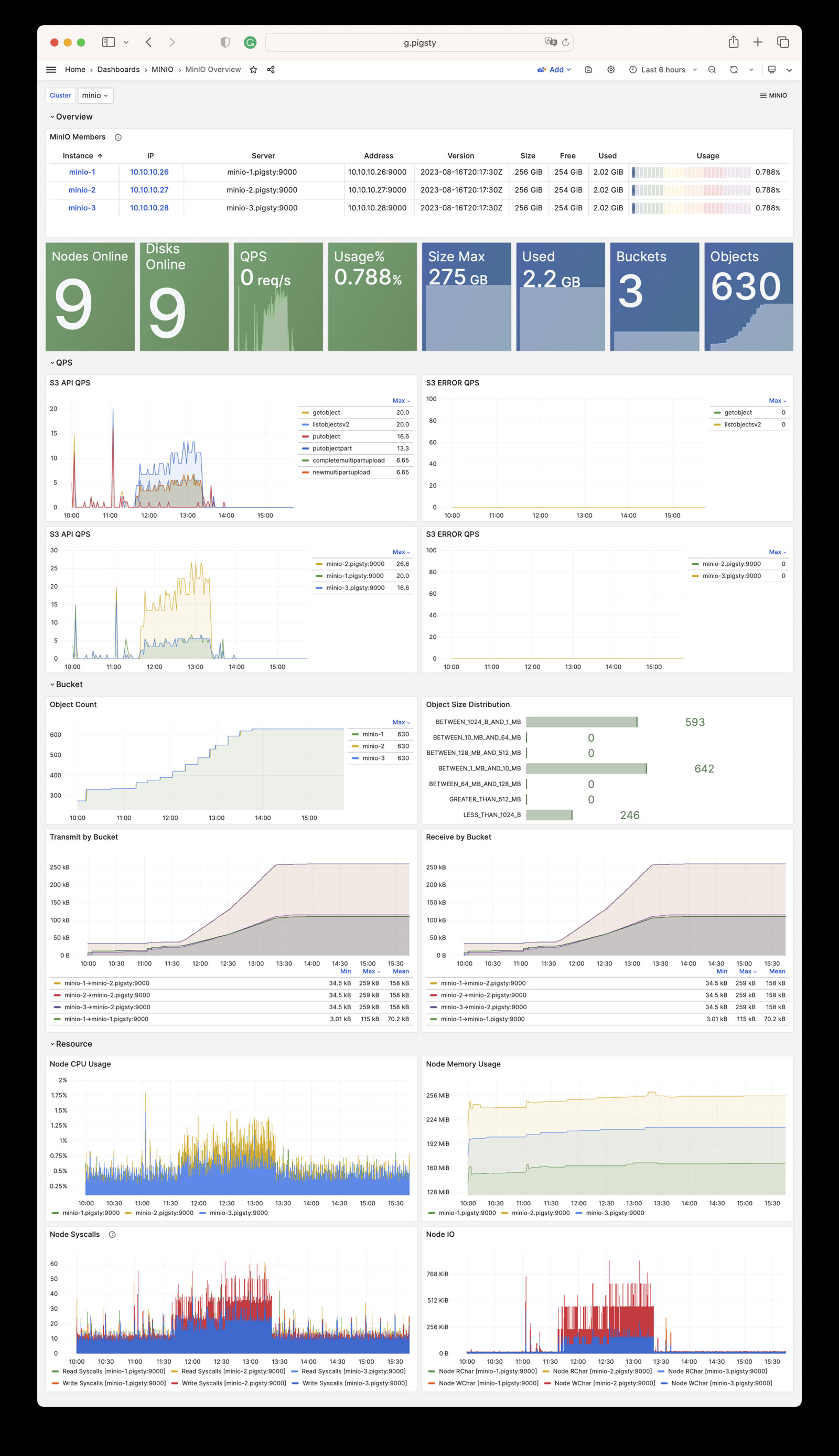
Pigsty provides two monitoring dashboards related to the MINIO module:

  • MinIO Overview: Displays overall monitoring metrics for the MinIO cluster, including cluster status, storage usage, request rates, etc.
  • MinIO Instance: Displays monitoring metrics details for a single MinIO instance, including CPU, memory, network, disk, etc.

minio-overview.jpg

MinIO monitoring metrics are collected through MinIO’s native Prometheus endpoint (/minio/v2/metrics/cluster), and by default are scraped and stored by Victoria Metrics.


Pigsty Alerting

Pigsty provides the following three alerting rules for MinIO:

  • MinIO Server Down
  • MinIO Node Offline
  • MinIO Disk Offline
#==============================================================#
#                         Aliveness                            #
#==============================================================#
# MinIO server instance down
- alert: MinioServerDown
  expr: minio_up < 1
  for: 1m
  labels: { level: 0, severity: CRIT, category: minio }
  annotations:
    summary: "CRIT MinioServerDown {{ $labels.ins }}@{{ $labels.instance }}"
    description: |
      minio_up[ins={{ $labels.ins }}, instance={{ $labels.instance }}] = {{ $value }} < 1
      http://g.pigsty/d/minio-overview

#==============================================================#
#                         Error                                #
#==============================================================#
# MinIO node offline triggers a p1 alert
- alert: MinioNodeOffline
  expr: avg_over_time(minio_cluster_nodes_offline_total{job="minio"}[5m]) > 0
  for: 3m
  labels: { level: 1, severity: WARN, category: minio }
  annotations:
    summary: "WARN MinioNodeOffline: {{ $labels.cls }} {{ $value }}"
    description: |
      minio_cluster_nodes_offline_total[cls={{ $labels.cls }}] = {{ $value }} > 0
      http://g.pigsty/d/minio-overview?from=now-5m&to=now&var-cls={{$labels.cls}}

# MinIO disk offline triggers a p1 alert
- alert: MinioDiskOffline
  expr: avg_over_time(minio_cluster_disk_offline_total{job="minio"}[5m]) > 0
  for: 3m
  labels: { level: 1, severity: WARN, category: minio }
  annotations:
    summary: "WARN MinioDiskOffline: {{ $labels.cls }} {{ $value }}"
    description: |
      minio_cluster_disk_offline_total[cls={{ $labels.cls }}] = {{ $value }} > 0
      http://g.pigsty/d/minio-overview?from=now-5m&to=now&var-cls={{$labels.cls}}

7 - Metrics

Complete list of monitoring metrics provided by the Pigsty MINIO module with explanations

The MINIO module contains 79 available monitoring metrics.

Metric NameTypeLabelsDescription
minio_audit_failed_messagescounterip, job, target_id, cls, instance, server, insTotal number of messages that failed to send since start
minio_audit_target_queue_lengthgaugeip, job, target_id, cls, instance, server, insNumber of unsent messages in queue for target
minio_audit_total_messagescounterip, job, target_id, cls, instance, server, insTotal number of messages sent since start
minio_cluster_bucket_totalgaugeip, job, cls, instance, server, insTotal number of buckets in the cluster
minio_cluster_capacity_raw_free_bytesgaugeip, job, cls, instance, server, insTotal free capacity online in the cluster
minio_cluster_capacity_raw_total_bytesgaugeip, job, cls, instance, server, insTotal capacity online in the cluster
minio_cluster_capacity_usable_free_bytesgaugeip, job, cls, instance, server, insTotal free usable capacity online in the cluster
minio_cluster_capacity_usable_total_bytesgaugeip, job, cls, instance, server, insTotal usable capacity online in the cluster
minio_cluster_drive_offline_totalgaugeip, job, cls, instance, server, insTotal drives offline in this cluster
minio_cluster_drive_online_totalgaugeip, job, cls, instance, server, insTotal drives online in this cluster
minio_cluster_drive_totalgaugeip, job, cls, instance, server, insTotal drives in this cluster
minio_cluster_health_erasure_set_healing_drivesgaugepool, ip, job, cls, set, instance, server, insGet the count of healing drives of this erasure set
minio_cluster_health_erasure_set_online_drivesgaugepool, ip, job, cls, set, instance, server, insGet the count of the online drives in this erasure set
minio_cluster_health_erasure_set_read_quorumgaugepool, ip, job, cls, set, instance, server, insGet the read quorum for this erasure set
minio_cluster_health_erasure_set_statusgaugepool, ip, job, cls, set, instance, server, insGet current health status for this erasure set
minio_cluster_health_erasure_set_write_quorumgaugepool, ip, job, cls, set, instance, server, insGet the write quorum for this erasure set
minio_cluster_health_statusgaugeip, job, cls, instance, server, insGet current cluster health status
minio_cluster_nodes_offline_totalgaugeip, job, cls, instance, server, insTotal number of MinIO nodes offline
minio_cluster_nodes_online_totalgaugeip, job, cls, instance, server, insTotal number of MinIO nodes online
minio_cluster_objects_size_distributiongaugeip, range, job, cls, instance, server, insDistribution of object sizes across a cluster
minio_cluster_objects_version_distributiongaugeip, range, job, cls, instance, server, insDistribution of object versions across a cluster
minio_cluster_usage_deletemarker_totalgaugeip, job, cls, instance, server, insTotal number of delete markers in a cluster
minio_cluster_usage_object_totalgaugeip, job, cls, instance, server, insTotal number of objects in a cluster
minio_cluster_usage_total_bytesgaugeip, job, cls, instance, server, insTotal cluster usage in bytes
minio_cluster_usage_version_totalgaugeip, job, cls, instance, server, insTotal number of versions (includes delete marker) in a cluster
minio_cluster_webhook_failed_messagescounterip, job, cls, instance, server, insNumber of messages that failed to send
minio_cluster_webhook_onlinegaugeip, job, cls, instance, server, insIs the webhook online?
minio_cluster_webhook_queue_lengthcounterip, job, cls, instance, server, insWebhook queue length
minio_cluster_webhook_total_messagescounterip, job, cls, instance, server, insTotal number of messages sent to this target
minio_cluster_write_quorumgaugeip, job, cls, instance, server, insMaximum write quorum across all pools and sets
minio_node_file_descriptor_limit_totalgaugeip, job, cls, instance, server, insLimit on total number of open file descriptors for the MinIO Server process
minio_node_file_descriptor_open_totalgaugeip, job, cls, instance, server, insTotal number of open file descriptors by the MinIO Server process
minio_node_go_routine_totalgaugeip, job, cls, instance, server, insTotal number of go routines running
minio_node_ilm_expiry_pending_tasksgaugeip, job, cls, instance, server, insNumber of pending ILM expiry tasks in the queue
minio_node_ilm_transition_active_tasksgaugeip, job, cls, instance, server, insNumber of active ILM transition tasks
minio_node_ilm_transition_missed_immediate_tasksgaugeip, job, cls, instance, server, insNumber of missed immediate ILM transition tasks
minio_node_ilm_transition_pending_tasksgaugeip, job, cls, instance, server, insNumber of pending ILM transition tasks in the queue
minio_node_ilm_versions_scannedcounterip, job, cls, instance, server, insTotal number of object versions checked for ilm actions since server start
minio_node_io_rchar_bytescounterip, job, cls, instance, server, insTotal bytes read by the process from the underlying storage system including cache, /proc/[pid]/io rchar
minio_node_io_read_bytescounterip, job, cls, instance, server, insTotal bytes read by the process from the underlying storage system, /proc/[pid]/io read_bytes
minio_node_io_wchar_bytescounterip, job, cls, instance, server, insTotal bytes written by the process to the underlying storage system including page cache, /proc/[pid]/io wchar
minio_node_io_write_bytescounterip, job, cls, instance, server, insTotal bytes written by the process to the underlying storage system, /proc/[pid]/io write_bytes
minio_node_process_cpu_total_secondscounterip, job, cls, instance, server, insTotal user and system CPU time spent in seconds
minio_node_process_resident_memory_bytesgaugeip, job, cls, instance, server, insResident memory size in bytes
minio_node_process_starttime_secondsgaugeip, job, cls, instance, server, insStart time for MinIO process per node, time in seconds since Unix epoc
minio_node_process_uptime_secondsgaugeip, job, cls, instance, server, insUptime for MinIO process per node in seconds
minio_node_scanner_bucket_scans_finishedcounterip, job, cls, instance, server, insTotal number of bucket scans finished since server start
minio_node_scanner_bucket_scans_startedcounterip, job, cls, instance, server, insTotal number of bucket scans started since server start
minio_node_scanner_directories_scannedcounterip, job, cls, instance, server, insTotal number of directories scanned since server start
minio_node_scanner_objects_scannedcounterip, job, cls, instance, server, insTotal number of unique objects scanned since server start
minio_node_scanner_versions_scannedcounterip, job, cls, instance, server, insTotal number of object versions scanned since server start
minio_node_syscall_read_totalcounterip, job, cls, instance, server, insTotal read SysCalls to the kernel. /proc/[pid]/io syscr
minio_node_syscall_write_totalcounterip, job, cls, instance, server, insTotal write SysCalls to the kernel. /proc/[pid]/io syscw
minio_notify_current_send_in_progressgaugeip, job, cls, instance, server, insNumber of concurrent async Send calls active to all targets (deprecated, please use ‘minio_notify_target_current_send_in_progress’ instead)
minio_notify_events_errors_totalcounterip, job, cls, instance, server, insEvents that were failed to be sent to the targets (deprecated, please use ‘minio_notify_target_failed_events’ instead)
minio_notify_events_sent_totalcounterip, job, cls, instance, server, insTotal number of events sent to the targets (deprecated, please use ‘minio_notify_target_total_events’ instead)
minio_notify_events_skipped_totalcounterip, job, cls, instance, server, insEvents that were skipped to be sent to the targets due to the in-memory queue being full
minio_s3_requests_4xx_errors_totalcounterip, job, cls, instance, server, ins, apiTotal number of S3 requests with (4xx) errors
minio_s3_requests_errors_totalcounterip, job, cls, instance, server, ins, apiTotal number of S3 requests with (4xx and 5xx) errors
minio_s3_requests_incoming_totalgaugeip, job, cls, instance, server, insTotal number of incoming S3 requests
minio_s3_requests_inflight_totalgaugeip, job, cls, instance, server, ins, apiTotal number of S3 requests currently in flight
minio_s3_requests_rejected_auth_totalcounterip, job, cls, instance, server, insTotal number of S3 requests rejected for auth failure
minio_s3_requests_rejected_header_totalcounterip, job, cls, instance, server, insTotal number of S3 requests rejected for invalid header
minio_s3_requests_rejected_invalid_totalcounterip, job, cls, instance, server, insTotal number of invalid S3 requests
minio_s3_requests_rejected_timestamp_totalcounterip, job, cls, instance, server, insTotal number of S3 requests rejected for invalid timestamp
minio_s3_requests_totalcounterip, job, cls, instance, server, ins, apiTotal number of S3 requests
minio_s3_requests_ttfb_seconds_distributiongaugeip, job, cls, le, instance, server, ins, apiDistribution of time to first byte across API calls
minio_s3_requests_waiting_totalgaugeip, job, cls, instance, server, insTotal number of S3 requests in the waiting queue
minio_s3_traffic_received_bytescounterip, job, cls, instance, server, insTotal number of s3 bytes received
minio_s3_traffic_sent_bytescounterip, job, cls, instance, server, insTotal number of s3 bytes sent
minio_software_commit_infogaugeip, job, cls, instance, commit, server, insGit commit hash for the MinIO release
minio_software_version_infogaugeip, job, cls, instance, version, server, insMinIO Release tag for the server
minio_upUnknownip, job, cls, instance, insN/A
minio_usage_last_activity_nano_secondsgaugeip, job, cls, instance, server, insTime elapsed (in nano seconds) since last scan activity.
scrape_duration_secondsUnknownip, job, cls, instance, insN/A
scrape_samples_post_metric_relabelingUnknownip, job, cls, instance, insN/A
scrape_samples_scrapedUnknownip, job, cls, instance, insN/A
scrape_series_addedUnknownip, job, cls, instance, insN/A
upUnknownip, job, cls, instance, insN/A

8 - FAQ

Frequently asked questions about the Pigsty MINIO object storage module

What version of MinIO does Pigsty use?

MinIO announced entering maintenance mode on 2025-12-03, no longer releasing new feature versions, only security patches and maintenance versions, and stopped releasing binary RPM/DEB on 2025-10-15. So Pigsty forked its own MinIO and used minio/pkger to create the latest 2025-12-03 version.

This version fixes the MinIO CVE-2025-62506 security vulnerability, ensuring Pigsty users’ MinIO deployments are safe and reliable. You can find the RPM/DEB packages and build scripts in the Pigsty Infra repository.


Why does MinIO require HTTPS?

When pgBackRest uses object storage as a backup repository, HTTPS is mandatory to ensure data transmission security. If your MinIO is not used for pgBackRest backup, you can still choose to use HTTP protocol. You can disable HTTPS by modifying the parameter minio_https.


Getting invalid certificate error when accessing MinIO from containers?

Unless you use certificates issued by a real enterprise CA, MinIO uses self-signed certificates by default, which causes client tools inside containers (such as mc / rclone / awscli, etc.) to be unable to verify the identity of the MinIO server, resulting in invalid certificate errors.

For example, for Node.js applications, you can mount the MinIO server’s CA certificate into the container and specify the CA certificate path via the environment variable NODE_EXTRA_CA_CERTS:

    environment:
      NODE_EXTRA_CA_CERTS: /etc/pki/ca.crt
    volumes:
      - /etc/pki/ca.crt:/etc/pki/ca.crt:ro

Of course, if your MinIO is not used as a pgBackRest backup repository, you can also choose to disable MinIO’s HTTPS support and use HTTP protocol instead.


What if multi-node/multi-disk MinIO cluster fails to start?

In Single-Node Multi-Disk or Multi-Node Multi-Disk mode, if the data directory is not a valid disk mount point, MinIO will refuse to start. Please use mounted disks as MinIO’s data directory instead of regular directories. You can only use regular directories as MinIO’s data directory in Single-Node Single-Disk mode, which is only suitable for development testing or non-critical scenarios.


How to add new members to an existing MinIO cluster?

Before deployment, you should plan MinIO cluster capacity, as adding new members requires a global restart.

You can scale MinIO by adding new server nodes to the existing cluster to create a new storage pool.

Note that once MinIO is deployed, you cannot modify the number of nodes and disks in the existing cluster! You can only scale by adding new storage pools.

For detailed steps, please refer to the Pigsty documentation: Expand Cluster, and the MinIO official documentation: Expand MinIO Deployment


How to remove a MinIO cluster?

Starting from Pigsty v3.6, removing a MinIO cluster requires using the dedicated minio-rm.yml playbook:

./minio-rm.yml -l minio                   # Remove MinIO cluster
./minio-rm.yml -l minio -e minio_rm_data=false  # Remove cluster but keep data

If you have enabled minio_safeguard protection, you need to explicitly override it to perform removal:

./minio-rm.yml -l minio -e minio_safeguard=false

What’s the difference between mcli and mc commands?

mcli is a renamed version of the official MinIO client mc. In Pigsty, we use mcli instead of mc to avoid conflicts with Midnight Commander (a common file manager that also uses the mc command).

Both have identical functionality, just with different command names. You can find the complete command reference in the MinIO Client documentation.


How to monitor MinIO cluster status?

Pigsty provides out-of-the-box monitoring capabilities for MinIO:

  • Grafana Dashboards: MinIO Overview and MinIO Instance
  • Alerting Rules: Including MinIO down, node offline, disk offline alerts
  • MinIO Built-in Console: Access via https://<minio-ip>:9001

For details, please refer to the Monitoring documentation