Tune nodes into the desired state and monitor it, manage node, VIP, HAProxy, and exporters.
This is the multi-page printable view of this section. Click here to print.
Module: NODE
Tune nodes into the desired state and monitor it, manage node, VIP, HAProxy, and exporters.
- 1: Configuration
- 2: Parameters
- 3: Playbook
- 4: Administration
- 5: Monitoring
- 6: Metrics
- 7: FAQ
1 - Configuration
Configure node identity, cluster, and identity borrowing from PostgreSQL
Pigsty uses IP address as the unique identifier for nodes. This IP should be the internal IP address on which the database instance listens and provides external services.
node-test:
  hosts:
    10.10.10.11: { nodename: node-test-1 }
    10.10.10.12: { nodename: node-test-2 }
    10.10.10.13: { nodename: node-test-3 }
  vars:
    node_cluster: node-test
This IP address must be the address on which the database instance listens and provides external services, but should not be a public IP address. That said, you don’t necessarily have to connect to the database via this IP. For example, managing target nodes indirectly through SSH tunnels or jump hosts is also feasible. However, when identifying database nodes, the primary IPv4 address remains the node’s core identifier. This is critical, and you should ensure this during configuration.
The IP address is the inventory_hostname in the inventory, represented as the key in the <cluster>.hosts object. In addition, each node has two optional identity parameters:
| Name | Type | Level | Necessity | Comment |
|---|---|---|---|---|
inventory_hostname | ip | - | Required | Node IP |
nodename | string | I | Optional | Node Name |
node_cluster | string | C | Optional | Node cluster name |
The parameters nodename and node_cluster are optional. If not provided, the node’s existing hostname and the fixed value nodes will be used as defaults. In Pigsty’s monitoring system, these two will be used as the node’s cluster identifier (cls) and instance identifier (ins).
For PGSQL nodes, because Pigsty defaults to a 1:1 exclusive deployment of PG to node, you can use the node_id_from_pg parameter to borrow the PostgreSQL instance’s identity parameters (pg_cluster and pg_seq) for the node’s ins and cls labels. This allows database and node monitoring metrics to share the same labels for cross-analysis.
#nodename:                # [instance] # node instance identity, uses existing hostname if missing, optional
node_cluster: nodes       # [cluster] # node cluster identity, uses 'nodes' if missing, optional
nodename_overwrite: true          # overwrite node's hostname with nodename?
nodename_exchange: false          # exchange nodename among play hosts?
node_id_from_pg: true             # borrow postgres identity as node identity if applicable?
You can also configure rich functionality for host clusters. For example, use HAProxy on the node cluster for load balancing and service exposure, or bind an L2 VIP to the cluster.
2 - Parameters
NODE module provides 11 sections with 83 parameters
The NODE module tunes target nodes into the desired state and integrates them into the Pigsty monitoring system.
| Parameter Section | Description |
|---|---|
NODE_ID | Node identity parameters |
NODE_DNS | Node DNS resolution |
NODE_PACKAGE | Upstream repo & package install |
NODE_TUNE | Node tuning & kernel features |
NODE_SEC | Node security configurations |
NODE_ADMIN | Admin user & SSH keys |
NODE_TIME | Timezone, NTP, crontab |
NODE_VIP | Optional L2 VIP for cluster |
HAPROXY | HAProxy load balancer |
NODE_EXPORTER | Node monitoring exporter |
VECTOR | Vector log collector |
Parameters Overview
NODE_ID section defines node identity parameters, including node name, cluster name, and whether to borrow identity from PostgreSQL.
| Parameter | Type | Level | Description |
|---|---|---|---|
nodename | string | I | node instance identity, use hostname if missing |
node_cluster | string | C | node cluster identity, use ’nodes’ if missing |
nodename_overwrite | bool | C | overwrite node’s hostname with nodename? |
nodename_exchange | bool | C | exchange nodename among play hosts? |
node_id_from_pg | bool | C | use postgres identity as node identity if applicable? |
NODE_DNS section configures node DNS resolution, including static hosts records and dynamic DNS servers.
| Parameter | Type | Level | Description |
|---|---|---|---|
node_write_etc_hosts | bool | G/C/I | modify /etc/hosts on target node? |
node_default_etc_hosts | string[] | G | static dns records in /etc/hosts |
node_etc_hosts | string[] | C | extra static dns records in /etc/hosts |
node_dns_method | enum | C | how to handle dns servers: add,none,overwrite |
node_dns_servers | string[] | C | dynamic nameserver in /etc/resolv.conf |
node_dns_options | string[] | C | dns resolv options in /etc/resolv.conf |
NODE_PACKAGE section configures node software repositories and package installation.
| Parameter | Type | Level | Description |
|---|---|---|---|
node_repo_modules | enum | C | which repo modules to enable on node? local default |
node_repo_remove | bool | C | remove existing repo on node when configuring? |
node_packages | string[] | C | packages to be installed on current nodes |
node_default_packages | string[] | G | default packages to be installed on all nodes |
NODE_TUNE section configures node kernel parameters, feature toggles, and tuning templates.
| Parameter | Type | Level | Description |
|---|---|---|---|
node_disable_numa | bool | C | disable node numa, reboot required |
node_disable_swap | bool | C | disable node swap, use with caution |
node_static_network | bool | C | preserve dns resolver settings after reboot |
node_disk_prefetch | bool | C | setup disk prefetch on HDD to increase performance |
node_kernel_modules | string[] | C | kernel modules to be enabled on this node |
node_hugepage_count | int | C | number of 2MB hugepage, take precedence over ratio |
node_hugepage_ratio | float | C | node mem hugepage ratio, 0 disable it by default |
node_overcommit_ratio | float | C | node mem overcommit ratio (50-100), 0 disable it |
node_tune | enum | C | node tuned profile: none,oltp,olap,crit,tiny |
node_sysctl_params | dict | C | extra sysctl parameters in k:v format |
NODE_SEC section configures node security options, including SELinux and firewall.
| Parameter | Type | Level | Description |
|---|---|---|---|
node_selinux_mode | enum | C | SELinux mode: disabled, permissive, enforcing |
node_firewall_mode | enum | C | firewall mode: off, none, zone |
node_firewall_intranet | cidr[] | C | intranet CIDR list for firewall rules |
node_firewall_public_port | port[] | C | public exposed port list, default [22, 80, 443, 5432] |
NODE_ADMIN section configures admin user, data directory, and shell aliases.
| Parameter | Type | Level | Description |
|---|---|---|---|
node_data | path | C | node main data directory, /data by default |
node_admin_enabled | bool | C | create a admin user on target node? |
node_admin_uid | int | C | uid and gid for node admin user |
node_admin_username | username | C | name of node admin user, dba by default |
node_admin_sudo | enum | C | admin sudo privilege: limited, nopass, all, none |
node_admin_ssh_exchange | bool | C | exchange admin ssh key among node cluster |
node_admin_pk_current | bool | C | add current user’s ssh pk to admin authorized_keys |
node_admin_pk_list | string[] | C | ssh public keys to be added to admin user |
node_aliases | dict | C | shell aliases in K:V dict format |
NODE_TIME section configures timezone, NTP time sync, and crontab.
| Parameter | Type | Level | Description |
|---|---|---|---|
node_timezone | string | C | setup node timezone, empty string to skip |
node_ntp_enabled | bool | C | enable chronyd time sync service? |
node_ntp_servers | string[] | C | ntp servers in /etc/chrony.conf |
node_crontab_overwrite | bool | C | overwrite or append to /etc/crontab? |
node_crontab | string[] | C | crontab entries in /etc/crontab |
NODE_VIP section configures L2 VIP for node cluster, implemented by keepalived.
| Parameter | Type | Level | Description |
|---|---|---|---|
vip_enabled | bool | C | enable L2 vip on this node cluster? |
vip_address | ip | C | node vip address in ipv4 format, required if enabled |
vip_vrid | int | C | integer 1-254, should be unique in same VLAN |
vip_role | enum | I | optional, master/backup, backup by default |
vip_preempt | bool | C/I | optional, true/false, enable vip preemption |
vip_interface | string | C/I | node vip network interface, eth0 by default |
vip_dns_suffix | string | C | node vip dns name suffix, empty string by default |
vip_auth_pass | password | C | vrrp authentication password, auto-generated if empty |
vip_exporter_port | port | C | keepalived exporter listen port, 9650 by default |
HAPROXY section configures HAProxy load balancer and service exposure.
| Parameter | Type | Level | Description |
|---|---|---|---|
haproxy_enabled | bool | C | enable haproxy on this node? |
haproxy_clean | bool | G/C/A | cleanup all existing haproxy config? |
haproxy_reload | bool | A | reload haproxy after config? |
haproxy_auth_enabled | bool | G | enable authentication for admin page |
haproxy_admin_username | username | G | haproxy admin username, admin default |
haproxy_admin_password | password | G | haproxy admin password, pigsty default |
haproxy_exporter_port | port | C | haproxy exporter port, 9101 by default |
haproxy_client_timeout | interval | C | client connection timeout, 24h default |
haproxy_server_timeout | interval | C | server connection timeout, 24h default |
haproxy_services | service[] | C | list of haproxy services to expose |
NODE_EXPORTER section configures node monitoring exporter.
| Parameter | Type | Level | Description |
|---|---|---|---|
node_exporter_enabled | bool | C | setup node_exporter on this node? |
node_exporter_port | port | C | node exporter listen port, 9100 default |
node_exporter_options | arg | C | extra server options for node_exporter |
VECTOR section configures Vector log collector.
| Parameter | Type | Level | Description |
|---|---|---|---|
vector_enabled | bool | C | enable vector log collector? |
vector_clean | bool | G/A | purge vector data dir during init? |
vector_data | path | C | vector data directory, /data/vector default |
vector_port | port | C | vector metrics listen port, 9598 default |
vector_read_from | enum | C | read log from beginning or end |
vector_log_endpoint | string[] | C | log endpoint, default send to infra group |
NODE_ID
Each node has identity parameters that are configured through the parameters in <cluster>.hosts and <cluster>.vars.
Pigsty uses IP address as the unique identifier for database nodes. This IP address must be the one that the database instance listens on and provides services, but should not be a public IP address.
However, users don’t have to connect to the database via this IP address. For example, managing target nodes indirectly through SSH tunnels or jump servers is feasible.
When identifying database nodes, the primary IPv4 address remains the core identifier. This is very important, and users should ensure this when configuring.
The IP address is the inventory_hostname in the inventory, which is the key of the <cluster>.hosts object.
node-test:
  hosts:
    10.10.10.11: { nodename: node-test-1 }
    10.10.10.12: { nodename: node-test-2 }
    10.10.10.13: { nodename: node-test-3 }
  vars:
    node_cluster: node-test
In addition, nodes have two important identity parameters in the Pigsty monitoring system: nodename and node_cluster, which are used as the instance identity (ins) and cluster identity (cls) in the monitoring system.
node_load1{cls="pg-meta", ins="pg-meta-1", ip="10.10.10.10", job="nodes"}
node_load1{cls="pg-test", ins="pg-test-1", ip="10.10.10.11", job="nodes"}
node_load1{cls="pg-test", ins="pg-test-2", ip="10.10.10.12", job="nodes"}
node_load1{cls="pg-test", ins="pg-test-3", ip="10.10.10.13", job="nodes"}
When executing the default PostgreSQL deployment, since Pigsty uses exclusive 1:1 deployment by default, you can borrow the database instance’s identity parameters (pg_cluster) to the node’s ins and cls labels through the node_id_from_pg parameter.
| Name | Type | Level | Required | Description |
|---|---|---|---|---|
inventory_hostname | ip | - | Required | Node IP Address |
nodename | string | I | Optional | Node Name |
node_cluster | string | C | Optional | Node Cluster Name |
#nodename:                # [instance] # node instance identity, use hostname if missing, optional
node_cluster: nodes       # [cluster] # node cluster identity, use 'nodes' if missing, optional
nodename_overwrite: true          # overwrite node's hostname with nodename?
nodename_exchange: false          # exchange nodename among play hosts?
node_id_from_pg: true             # use postgres identity as node identity if applicable?
nodename
name: nodename, type: string, level: I
Node instance identity parameter. If not explicitly set, the existing hostname will be used as the node name. This parameter is optional since it has a reasonable default value.
If node_id_from_pg is enabled (default), and nodename is not explicitly specified, nodename will try to use ${pg_cluster}-${pg_seq} as the instance identity. If the PGSQL module is not defined on this cluster, it will fall back to the default, which is the node’s HOSTNAME.
node_cluster
name: node_cluster, type: string, level: C
This option allows explicitly specifying a cluster name for the node, which is only meaningful when defined at the node cluster level. Using the default empty value will use the fixed value nodes as the node cluster identity.
If node_id_from_pg is enabled (default), and node_cluster is not explicitly specified, node_cluster will try to use ${pg_cluster} as the cluster identity. If the PGSQL module is not defined on this cluster, it will fall back to the default nodes.
nodename_overwrite
name: nodename_overwrite, type: bool, level: C
Overwrite node’s hostname with nodename? Default is true. In this case, if you set a non-empty nodename, it will be used as the current host’s HOSTNAME.
When nodename is empty, if node_id_from_pg is true (default), Pigsty will try to borrow the identity parameters of the PostgreSQL instance defined 1:1 on the node as the node name, i.e., {{ pg_cluster }}-{{ pg_seq }}. If the PGSQL module is not installed on this node, it will fall back to not doing anything.
Therefore, if you leave nodename empty and don’t enable node_id_from_pg, Pigsty will not make any changes to the existing hostname.
nodename_exchange
name: nodename_exchange, type: bool, level: C
Exchange nodename among play hosts? Default is false.
When enabled, nodes executing the node.yml playbook in the same batch will exchange node names with each other, writing them to /etc/hosts.
node_id_from_pg
name: node_id_from_pg, type: bool, level: C
Borrow identity parameters from the PostgreSQL instance/cluster deployed 1:1 on the node? Default is true.
PostgreSQL instances and nodes in Pigsty use 1:1 deployment by default, so you can “borrow” identity parameters from the database instance. This parameter is enabled by default, meaning that if a PostgreSQL cluster has no special configuration, the host node cluster and instance identity parameters will default to matching the database identity parameters. This provides extra convenience for problem analysis and monitoring data processing.
NODE_DNS
Pigsty configures static DNS records and dynamic DNS servers for nodes.
If your node provider has already configured DNS servers for you, you can set node_dns_method to none to skip DNS setup.
node_write_etc_hosts: true        # modify `/etc/hosts` on target node?
node_default_etc_hosts:           # static dns records in `/etc/hosts`
  - "${admin_ip} i.pigsty"
node_etc_hosts: []                # extra static dns records in `/etc/hosts`
node_dns_method: add              # how to handle dns servers: add,none,overwrite
node_dns_servers: ['${admin_ip}'] # dynamic nameserver in `/etc/resolv.conf`
node_dns_options:                 # dns resolv options in `/etc/resolv.conf`
  - options single-request-reopen timeout:1
node_write_etc_hosts
name: node_write_etc_hosts, type: bool, level: G|C|I
Modify /etc/hosts on target node? For example, in container environments, this file usually cannot be modified.
node_default_etc_hosts
name: node_default_etc_hosts, type: string[], level: G
Static DNS records to be written to all nodes’ /etc/hosts. Default value:
["${admin_ip} i.pigsty"]
node_default_etc_hosts is an array. Each element is a DNS record with format <ip> <name>. You can specify multiple domain names separated by spaces.
This parameter is used to configure global static DNS records. If you want to configure specific static DNS records for individual clusters and instances, use the node_etc_hosts parameter.
node_etc_hosts
name: node_etc_hosts, type: string[], level: C
Extra static DNS records to write to node’s /etc/hosts. Default is [] (empty array).
Same format as node_default_etc_hosts, but suitable for configuration at the cluster/instance level.
node_dns_method
name: node_dns_method, type: enum, level: C
How to configure DNS servers? Three options: add, none, overwrite. Default is add.
add: Append the records innode_dns_serversto/etc/resolv.confand keep existing DNS servers. (default)overwrite: Overwrite/etc/resolv.confwith the records innode_dns_serversnone: Skip DNS server configuration. If your environment already has DNS servers configured, you can skip DNS configuration directly.
node_dns_servers
name: node_dns_servers, type: string[], level: C
Configure the dynamic DNS server list in /etc/resolv.conf. Default is ["${admin_ip}"], using the admin node as the primary DNS server.
node_dns_options
name: node_dns_options, type: string[], level: C
DNS resolution options in /etc/resolv.conf. Default value:
- "options single-request-reopen timeout:1"
If node_dns_method is configured as add or overwrite, the records in this configuration will be written to /etc/resolv.conf first. Refer to Linux documentation for /etc/resolv.conf format details.
NODE_PACKAGE
Pigsty configures software repositories and installs packages on managed nodes.
node_repo_modules: local          # upstream repo to be added on node, local by default.
node_repo_remove: true            # remove existing repo on node?
node_packages: [openssh-server]   # packages to be installed current nodes with latest version
#node_default_packages:           # default packages to be installed on all nodes
node_repo_modules
name: node_repo_modules, type: string, level: C/A
List of software repository modules to be added on the node, same format as repo_modules. Default is local, using the local software repository specified in repo_upstream.
When Pigsty manages nodes, it filters entries in repo_upstream based on this parameter value. Only entries whose module field matches this parameter value will be added to the node’s software sources.
node_repo_remove
name: node_repo_remove, type: bool, level: C/A
Remove existing software repository definitions on the node? Default is true.
When enabled, Pigsty will remove existing configuration files in /etc/yum.repos.d on the node and back them up to /etc/yum.repos.d/backup.
On Debian/Ubuntu systems, it backs up /etc/apt/sources.list(.d) to /etc/apt/backup.
node_packages
name: node_packages, type: string[], level: C
List of software packages to install and upgrade on the current node. Default is [openssh-server], which upgrades sshd to the latest version during installation (to avoid security vulnerabilities).
Each array element is a string of comma-separated package names. Same format as node_default_packages. This parameter is usually used to specify additional packages to install at the node/cluster level.
Packages specified in this parameter will be upgraded to the latest available version. If you need to keep existing node software versions unchanged (just ensure they exist), use the node_default_packages parameter.
node_default_packages
name: node_default_packages, type: string[], level: G
Default packages to be installed on all nodes. Default value is a common RPM package list for EL 7/8/9. Array where each element is a space-separated package list string.
Packages specified in this variable only require existence, not latest. If you need to install the latest version, use the node_packages parameter.
This parameter has no default value (undefined state). If users don’t explicitly specify this parameter in the configuration file, Pigsty will load default values from the node_packages_default variable defined in roles/node_id/vars based on the current node’s OS family.
Default value (EL-based systems):
- lz4,unzip,bzip2,pv,jq,git,ncdu,make,patch,bash,lsof,wget,uuid,tuned,nvme-cli,numactl,sysstat,iotop,htop,rsync,tcpdump
- python3,python3-pip,socat,lrzsz,net-tools,ipvsadm,telnet,ca-certificates,openssl,keepalived,etcd,haproxy,chrony,pig
- zlib,yum,audit,bind-utils,readline,vim-minimal,node_exporter,grubby,openssh-server,openssh-clients,chkconfig,vector
Default value (Debian/Ubuntu):
- lz4,unzip,bzip2,pv,jq,git,ncdu,make,patch,bash,lsof,wget,uuid,tuned,nvme-cli,numactl,sysstat,iotop,htop,rsync
- python3,python3-pip,socat,lrzsz,net-tools,ipvsadm,telnet,ca-certificates,openssl,keepalived,etcd,haproxy,chrony,pig
- zlib1g,acl,dnsutils,libreadline-dev,vim-tiny,node-exporter,openssh-server,openssh-client,vector
Same format as node_packages, but this parameter is usually used to specify default packages that must be installed on all nodes at the global level.
NODE_TUNE
Host node features, kernel modules, and tuning templates.
node_disable_numa: false          # disable node numa, reboot required
node_disable_swap: false          # disable node swap, use with caution
node_static_network: true         # preserve dns resolver settings after reboot
node_disk_prefetch: false         # setup disk prefetch on HDD to increase performance
node_kernel_modules: [ softdog, ip_vs, ip_vs_rr, ip_vs_wrr, ip_vs_sh ]
node_hugepage_count: 0            # number of 2MB hugepage, take precedence over ratio
node_hugepage_ratio: 0            # node mem hugepage ratio, 0 disable it by default
node_overcommit_ratio: 0          # node mem overcommit ratio, 0 disable it by default
node_tune: oltp                   # node tuned profile: none,oltp,olap,crit,tiny
node_sysctl_params: { }           # sysctl parameters in k:v format in addition to tuned
node_disable_numa
name: node_disable_numa, type: bool, level: C
Disable NUMA? Default is false (NUMA not disabled).
Note that disabling NUMA requires a machine reboot to take effect! If you don’t know how to set CPU affinity, it’s recommended to disable NUMA when using databases in production environments.
node_disable_swap
name: node_disable_swap, type: bool, level: C
Disable SWAP? Default is false (SWAP not disabled).
Disabling SWAP is generally not recommended. The exception is if you have enough memory for exclusive PostgreSQL deployment, you can disable SWAP to improve performance.
Exception: SWAP should be disabled when your node is used for Kubernetes deployments.
node_static_network
name: node_static_network, type: bool, level: C
Use static DNS servers? Default is true (enabled).
Enabling static networking means your DNS Resolv configuration won’t be overwritten by machine reboots or NIC changes. Recommended to enable, or have network engineers handle the configuration.
node_disk_prefetch
name: node_disk_prefetch, type: bool, level: C
Enable disk prefetch? Default is false (not enabled).
Can optimize performance for HDD-deployed instances. Recommended to enable when using mechanical hard drives.
node_kernel_modules
name: node_kernel_modules, type: string[], level: C
Which kernel modules to enable? Default enables the following kernel modules:
node_kernel_modules: [ softdog, ip_vs, ip_vs_rr, ip_vs_wrr, ip_vs_sh ]
An array of kernel module names declaring the kernel modules that need to be installed on the node.
node_hugepage_count
name: node_hugepage_count, type: int, level: C
Number of 2MB hugepages to allocate on the node. Default is 0. Related parameter is node_hugepage_ratio.
If both node_hugepage_count and node_hugepage_ratio are 0 (default), hugepages will be completely disabled. This parameter has higher priority than node_hugepage_ratio because it’s more precise.
If a non-zero value is set, it will be written to /etc/sysctl.d/hugepage.conf to take effect. Negative values won’t work, and numbers higher than 90% of node memory will be capped at 90% of node memory.
If not zero, it should be slightly larger than the corresponding pg_shared_buffer_ratio value so PostgreSQL can use hugepages.
node_hugepage_ratio
name: node_hugepage_ratio, type: float, level: C
Ratio of node memory for hugepages. Default is 0. Valid range: 0 ~ 0.40.
This memory ratio will be allocated as hugepages and reserved for PostgreSQL. node_hugepage_count is the higher priority and more precise version of this parameter.
Default: 0, which sets vm.nr_hugepages=0 and completely disables hugepages.
This parameter should equal or be slightly larger than pg_shared_buffer_ratio if not zero.
For example, if you allocate 25% of memory for Postgres shared buffers by default, you can set this value to 0.27 ~ 0.30, and use /pg/bin/pg-tune-hugepage after initialization to precisely reclaim wasted hugepages.
node_overcommit_ratio
name: node_overcommit_ratio, type: int, level: C
Node memory overcommit ratio. Default is 0. This is an integer from 0 to 100+.
Default: 0, which sets vm.overcommit_memory=0. Otherwise, vm.overcommit_memory=2 will be used with this value as vm.overcommit_ratio.
Recommended to set vm.overcommit_ratio on dedicated pgsql nodes to avoid memory overcommit.
node_tune
name: node_tune, type: enum, level: C
Preset tuning profiles for machines, provided through tuned. Four preset modes:
tiny: Micro virtual machineoltp: Regular OLTP template, optimizes latency (default)olap: Regular OLAP template, optimizes throughputcrit: Core financial business template, optimizes dirty page count
Typically, the database tuning template pg_conf should match the machine tuning template.
node_sysctl_params
name: node_sysctl_params, type: dict, level: C
Sysctl kernel parameters in K:V format, added to the tuned profile. Default is {} (empty object).
This is a KV dictionary parameter where Key is the kernel sysctl parameter name and Value is the parameter value. You can also consider defining extra sysctl parameters directly in the tuned templates in roles/node/templates.
NODE_SEC
Node security related parameters, including SELinux and firewall configuration.
node_selinux_mode: permissive             # selinux mode: disabled, permissive, enforcing
node_firewall_mode: zone                  # firewall mode: disabled, zone, rules
node_firewall_intranet:           # which intranet cidr considered as internal network
  - 10.0.0.0/8
  - 192.168.0.0/16
  - 172.16.0.0/12
node_firewall_public_port:        # expose these ports to public network in (zone, strict) mode
  - 22                            # enable ssh access
  - 80                            # enable http access
  - 443                           # enable https access
  - 5432                          # enable postgresql access (think twice before exposing it!)
node_selinux_mode
name: node_selinux_mode, type: enum, level: C
SELinux running mode. Default is permissive.
Options:
disabled: Completely disable SELinux (equivalent to old version’snode_disable_selinux: true)permissive: Permissive mode, logs violations but doesn’t block (recommended, default)enforcing: Enforcing mode, strictly enforces SELinux policies
If you don’t have professional OS/security experts, it’s recommended to use permissive or disabled mode.
Note that SELinux is only enabled by default on EL-based systems. If you want to enable SELinux on Debian/Ubuntu systems, you need to install and enable SELinux configuration yourself. Also, SELinux mode changes may require a system reboot to fully take effect.
node_firewall_mode
name: node_firewall_mode, type: enum, level: C
Firewall running mode. Default is zone.
Options:
off: Turn off and disable firewall (equivalent to old version’snode_disable_firewall: true)none: Do nothing, maintain existing firewall rules unchangedzone: Use firewalld / ufw to configure firewall rules: trust intranet, only open specified ports to public
Uses firewalld service on EL systems, ufw service on Debian/Ubuntu systems.
If you’re deploying in a completely trusted intranet environment, or using cloud provider security groups for access control, you can choose none mode to keep existing firewall configuration, or set to off to completely disable the firewall.
Production environments recommend using zone mode with node_firewall_intranet and node_firewall_public_port for fine-grained access control.
Note that zone mode won’t automatically enable the firewall for you.
node_firewall_intranet
name: node_firewall_intranet, type: cidr[], level: C
Intranet CIDR address list. Introduced in v4.0. Default value:
node_firewall_intranet:
  - 10.0.0.0/8
  - 172.16.0.0/12
  - 192.168.0.0/16
This parameter defines IP address ranges considered as “internal network”. Traffic from these networks will be allowed to access all service ports without separate open rules.
Hosts within these CIDR ranges will be treated as trusted intranet hosts with more relaxed firewall rules. Also, in PG/PGB HBA rules, the intranet ranges defined here will be treated as “intranet”.
node_firewall_public_port
name: node_firewall_public_port, type: port[], level: C
Public exposed port list. Default is [22, 80, 443, 5432].
This parameter defines ports exposed to public network (non-intranet CIDR). Default exposed ports include:
22: SSH service port80: HTTP service port443: HTTPS service port5432: PostgreSQL database port
You can adjust this list according to actual needs. For example, if you don’t need to expose the database port externally, remove 5432:
node_firewall_public_port: [22, 80, 443]
PostgreSQL default security policy in Pigsty only allows administrators to access the database port from public networks. If you want other users to access the database from public networks, make sure to correctly configure corresponding access permissions in PG/PGB HBA rules.
If you want to expose other service ports to public networks, you can also add them to this list. If you want to tighten firewall rules, you can remove the 5432 database port to ensure only truly needed service ports are exposed.
Note that this parameter only takes effect when node_firewall_mode is set to zone.
NODE_ADMIN
This section is about administrators on host nodes - who can log in and how.
node_data: /data                  # node main data directory, `/data` by default
node_admin_enabled: true          # create a admin user on target node?
node_admin_uid: 88                # uid and gid for node admin user
node_admin_username: dba          # name of node admin user, `dba` by default
node_admin_sudo: nopass           # admin user's sudo privilege: limited, nopass, all, none
node_admin_ssh_exchange: true     # exchange admin ssh key among node cluster
node_admin_pk_current: true       # add current user's ssh pk to admin authorized_keys
node_admin_pk_list: []            # ssh public keys to be added to admin user
node_aliases: {}                  # alias name -> IP address dict for `/etc/hosts`
node_data
name: node_data, type: path, level: C
Node’s main data directory. Default is /data.
If this directory doesn’t exist, it will be created. This directory should be owned by root with 777 permissions.
node_admin_enabled
name: node_admin_enabled, type: bool, level: C
Create a dedicated admin user on this node? Default is true.
Pigsty creates an admin user on each node by default (with password-free sudo and ssh). The default admin is named dba (uid=88), which can access other nodes in the environment from the admin node via password-free SSH and execute password-free sudo.
node_admin_uid
name: node_admin_uid, type: int, level: C
Admin user UID. Default is 88.
Please ensure the UID is the same across all nodes whenever possible to avoid unnecessary permission issues.
If the default UID 88 is already taken, you can choose another UID. Be careful about UID namespace conflicts when manually assigning.
node_admin_username
name: node_admin_username, type: username, level: C
Admin username. Default is dba.
node_admin_sudo
name: node_admin_sudo, type: enum, level: C
Admin user’s sudo privilege level. Default is nopass (password-free sudo).
Options:
none: No sudo privilegeslimited: Limited sudo privileges (only allowed to execute specific commands)nopass: Password-free sudo privileges (default, allows all commands without password)all: Full sudo privileges (requires password)
Pigsty uses nopass mode by default, allowing admin users to execute any sudo command without password, which is very convenient for automated operations.
In production environments with high security requirements, you may need to adjust this parameter to limited or all to restrict admin privileges.
node_admin_ssh_exchange
name: node_admin_ssh_exchange, type: bool, level: C
Exchange node admin SSH keys between node clusters. Default is true.
When enabled, Pigsty will exchange SSH public keys between members during playbook execution, allowing admin node_admin_username to access each other from different nodes.
node_admin_pk_current
name: node_admin_pk_current, type: bool, level: C
Add current node & user’s public key to admin account? Default is true.
When enabled, the SSH public key (~/.ssh/id_rsa.pub) of the admin user executing this playbook on the current node will be copied to the target node admin user’s authorized_keys.
When deploying in production environments, please pay attention to this parameter, as it will install the default public key of the user currently executing the command to the admin user on all machines.
node_admin_pk_list
name: node_admin_pk_list, type: string[], level: C
List of public keys for admins who can log in. Default is [] (empty array).
Each array element is a string containing the public key to be written to the admin user’s ~/.ssh/authorized_keys. Users with the corresponding private key can log in as admin.
When deploying in production environments, please pay attention to this parameter and only add trusted keys to this list.
node_aliases
name: node_aliases, type: dict, level: C
Shell aliases to be written to host’s /etc/profile.d/node.alias.sh. Default is {} (empty dict).
This parameter allows you to configure convenient shell aliases for the host’s shell environment. The K:V dict defined here will be written to the target node’s profile.d file in the format alias k=v.
For example, the following declares an alias named dp for quickly executing docker compose pull:
node_alias:
  dp: 'docker compose pull'
NODE_TIME
Configuration related to host time/timezone/NTP/scheduled tasks.
Time synchronization is very important for database services. Please ensure the system chronyd time service is running properly.
node_timezone: ''                 # setup node timezone, empty string to skip
node_ntp_enabled: true            # enable chronyd time sync service?
node_ntp_servers:                 # ntp servers in `/etc/chrony.conf`
  - pool pool.ntp.org iburst
node_crontab_overwrite: true      # overwrite or append to `/etc/crontab`?
node_crontab: [ ]                 # crontab entries in `/etc/crontab`
node_timezone
name: node_timezone, type: string, level: C
Set node timezone. Empty string means skip. Default is empty string, which won’t modify the default timezone (usually UTC).
When using in China region, it’s recommended to set to Asia/Hong_Kong / Asia/Shanghai.
node_ntp_enabled
name: node_ntp_enabled, type: bool, level: C
Enable chronyd time sync service? Default is true.
Pigsty will override the node’s /etc/chrony.conf with the NTP server list specified in node_ntp_servers.
If your node already has NTP servers configured, you can set this parameter to false to skip time sync configuration.
node_ntp_servers
name: node_ntp_servers, type: string[], level: C
NTP server list used in /etc/chrony.conf. Default: ["pool pool.ntp.org iburst"]
This parameter is an array where each element is a string representing one line of NTP server configuration. Only takes effect when node_ntp_enabled is enabled.
Pigsty uses the global NTP server pool.ntp.org by default. You can modify this parameter according to your network environment, e.g., cn.pool.ntp.org iburst, or internal time services.
You can also use the ${admin_ip} placeholder in the configuration to use the time server on the admin node.
node_ntp_servers: [ 'pool ${admin_ip} iburst' ]
node_crontab_overwrite
name: node_crontab_overwrite, type: bool, level: C
When handling scheduled tasks in node_crontab, append or overwrite? Default is true (overwrite).
If you want to append scheduled tasks on the node, set this parameter to false, and Pigsty will append rather than overwrite all scheduled tasks on the node’s crontab.
node_crontab
name: node_crontab, type: string[], level: C
Scheduled tasks defined in node’s /etc/crontab. Default is [] (empty array).
Each array element is a string representing one scheduled task line. Use standard cron format for definition.
For example, the following configuration will execute a full backup task as the postgres user at 1am every day:
node_crontab:
  - '00 01 * * * postgres /pg/bin/pg-backup full' ] # make a full backup every 1am
NODE_VIP
You can bind an optional L2 VIP to a node cluster. This feature is disabled by default. L2 VIP only makes sense for a group of node clusters. The VIP will switch between nodes in the cluster according to configured priorities, ensuring high availability of node services.
Note that L2 VIP can only be used within the same L2 network segment, which may impose additional restrictions on your network topology. If you don’t want this restriction, you can consider using DNS LB or HAProxy for similar functionality.
When enabling this feature, you need to explicitly assign available vip_address and vip_vrid for this L2 VIP. Users should ensure both are unique within the same network segment.
Note that NODE VIP is different from PG VIP. PG VIP is a VIP serving PostgreSQL instances, managed by vip-manager and bound to the PG cluster primary. NODE VIP is managed by Keepalived and bound to node clusters. It can be in master-backup mode or load-balanced mode, and both can coexist.
vip_enabled: false                # enable vip on this node cluster?
# vip_address:         [IDENTITY] # node vip address in ipv4 format, required if vip is enabled
# vip_vrid:            [IDENTITY] # required, integer, 1-254, should be unique among same VLAN
vip_role: backup                  # optional, `master/backup`, backup by default, use as init role
vip_preempt: false                # optional, `true/false`, false by default, enable vip preemption
vip_interface: eth0               # node vip network interface to listen, `eth0` by default
vip_dns_suffix: ''                # node vip dns name suffix, empty string by default
vip_auth_pass: ''                 # vrrp auth password, empty to use `<cls>-<vrid>` as default
vip_exporter_port: 9650           # keepalived exporter listen port, 9650 by default
vip_enabled
name: vip_enabled, type: bool, level: C
Enable an L2 VIP managed by Keepalived on this node cluster? Default is false.
vip_address
name: vip_address, type: ip, level: C
Node VIP address in IPv4 format (without CIDR suffix). This is a required parameter when vip_enabled is enabled.
This parameter has no default value, meaning you must explicitly assign a unique VIP address for the node cluster.
vip_vrid
name: vip_vrid, type: int, level: C
VRID is a positive integer from 1 to 254 used to identify a VIP in the network. This is a required parameter when vip_enabled is enabled.
This parameter has no default value, meaning you must explicitly assign a unique ID within the network segment for the node cluster.
vip_role
name: vip_role, type: enum, level: I
Node VIP role. Options are master or backup. Default is backup.
This parameter value will be set as keepalived’s initial state.
vip_preempt
name: vip_preempt, type: bool, level: C/I
Enable VIP preemption? Optional parameter. Default is false (no preemption).
Preemption means when a backup node has higher priority than the currently alive and working master node, should it preempt the VIP?
vip_interface
name: vip_interface, type: string, level: C/I
Network interface for node VIP to listen on. Default is eth0.
You should use the same interface name as the node’s primary IP address (the IP address you put in the inventory).
If your nodes have different interface names, you can override it at the instance/node level.
vip_dns_suffix
name: vip_dns_suffix, type: string, level: C/I
DNS name for node cluster L2 VIP. Default is empty string, meaning the cluster name itself is used as the DNS name.
vip_auth_pass
name: vip_auth_pass, type: password, level: C
VRRP authentication password for keepalived. Default is empty string.
When empty, Pigsty will auto-generate a password using the pattern <cluster_name>-<vrid>.
For production environments with security requirements, set an explicit strong password.
vip_exporter_port
name: vip_exporter_port, type: port, level: C/I
Keepalived exporter listen port. Default is 9650.
HAPROXY
HAProxy is installed and enabled on all nodes by default, exposing services in a manner similar to Kubernetes NodePort.
The PGSQL module uses HAProxy for services.
haproxy_enabled: true             # enable haproxy on this node?
haproxy_clean: false              # cleanup all existing haproxy config?
haproxy_reload: true              # reload haproxy after config?
haproxy_auth_enabled: true        # enable authentication for haproxy admin page
haproxy_admin_username: admin     # haproxy admin username, `admin` by default
haproxy_admin_password: pigsty    # haproxy admin password, `pigsty` by default
haproxy_exporter_port: 9101       # haproxy admin/exporter port, 9101 by default
haproxy_client_timeout: 24h       # client connection timeout, 24h by default
haproxy_server_timeout: 24h       # server connection timeout, 24h by default
haproxy_services: []              # list of haproxy services to be exposed on node
haproxy_enabled
name: haproxy_enabled, type: bool, level: C
Enable haproxy on this node? Default is true.
haproxy_clean
name: haproxy_clean, type: bool, level: G/C/A
Cleanup all existing haproxy config? Default is false.
haproxy_reload
name: haproxy_reload, type: bool, level: A
Reload haproxy after config? Default is true, will reload haproxy after config changes.
If you want to check before applying, you can disable this option with command arguments, check, then apply.
haproxy_auth_enabled
name: haproxy_auth_enabled, type: bool, level: G
Enable authentication for haproxy admin page. Default is true, which requires HTTP basic auth for the admin page.
Not recommended to disable authentication, as your traffic control page will be exposed, which is risky.
haproxy_admin_username
name: haproxy_admin_username, type: username, level: G
HAProxy admin username. Default is admin.
haproxy_admin_password
name: haproxy_admin_password, type: password, level: G
HAProxy admin password. Default is pigsty.
PLEASE CHANGE THIS PASSWORD IN YOUR PRODUCTION ENVIRONMENT!
haproxy_exporter_port
name: haproxy_exporter_port, type: port, level: C
HAProxy traffic management/metrics exposed port. Default is 9101.
haproxy_client_timeout
name: haproxy_client_timeout, type: interval, level: C
Client connection timeout. Default is 24h.
Setting a timeout can avoid long-lived connections that are difficult to clean up. If you really need long connections, you can set it to a longer time.
haproxy_server_timeout
name: haproxy_server_timeout, type: interval, level: C
Server connection timeout. Default is 24h.
Setting a timeout can avoid long-lived connections that are difficult to clean up. If you really need long connections, you can set it to a longer time.
haproxy_services
name: haproxy_services, type: service[], level: C
List of services to expose via HAProxy on this node. Default is [] (empty array).
Each array element is a service definition. Here’s an example service definition:
haproxy_services:                   # list of haproxy service

  # expose pg-test read only replicas
  - name: pg-test-ro                # [REQUIRED] service name, unique
    port: 5440                      # [REQUIRED] service port, unique
    ip: "*"                         # [OPTIONAL] service listen addr, "*" by default
    protocol: tcp                   # [OPTIONAL] service protocol, 'tcp' by default
    balance: leastconn              # [OPTIONAL] load balance algorithm, roundrobin by default (or leastconn)
    maxconn: 20000                  # [OPTIONAL] max allowed front-end connection, 20000 by default
    default: 'inter 3s fastinter 1s downinter 5s rise 3 fall 3 on-marked-down shutdown-sessions slowstart 30s maxconn 3000 maxqueue 128 weight 100'
    options:
      - option httpchk
      - option http-keep-alive
      - http-check send meth OPTIONS uri /read-only
      - http-check expect status 200
    servers:
      - { name: pg-test-1 ,ip: 10.10.10.11 , port: 5432 , options: check port 8008 , backup: true }
      - { name: pg-test-2 ,ip: 10.10.10.12 , port: 5432 , options: check port 8008 }
      - { name: pg-test-3 ,ip: 10.10.10.13 , port: 5432 , options: check port 8008 }
Each service definition will be rendered to /etc/haproxy/<service.name>.cfg configuration file and take effect after HAProxy reload.
NODE_EXPORTER
node_exporter_enabled: true       # setup node_exporter on this node?
node_exporter_port: 9100          # node exporter listen port, 9100 by default
node_exporter_options: '--no-collector.softnet --no-collector.nvme --collector.tcpstat --collector.processes'
node_exporter_enabled
name: node_exporter_enabled, type: bool, level: C
Enable node metrics collector on current node? Default is true.
node_exporter_port
name: node_exporter_port, type: port, level: C
Port used to expose node metrics. Default is 9100.
node_exporter_options
name: node_exporter_options, type: arg, level: C
Command line arguments for node metrics collector. Default value:
--no-collector.softnet --no-collector.nvme --collector.tcpstat --collector.processes
This option enables/disables some metrics collectors. Please adjust according to your needs.
VECTOR
Vector is the log collection component used in Pigsty v4.0. It collects logs from various modules and sends them to VictoriaLogs service on infrastructure nodes.
INFRA: Infrastructure component logs, collected only on Infra nodes.nginx-access:/var/log/nginx/access.lognginx-error:/var/log/nginx/error.loggrafana:/var/log/grafana/grafana.log
NODES: Host-related logs, collection enabled on all nodes.syslog:/var/log/messages(/var/log/syslogon Debian)dmesg:/var/log/dmesgcron:/var/log/cron
PGSQL: PostgreSQL-related logs, collection enabled only when node has PGSQL module configured.postgres:/pg/log/postgres/*patroni:/pg/log/patroni.logpgbouncer:/pg/log/pgbouncer/pgbouncer.logpgbackrest:/pg/log/pgbackrest/*.log
REDIS: Redis-related logs, collection enabled only when node has REDIS module configured.redis:/var/log/redis/*.log
Log directories are automatically adjusted according to these parameter configurations:
pg_log_dir,patroni_log_dir,pgbouncer_log_dir,pgbackrest_log_dir
vector_enabled: true              # enable vector log collector?
vector_clean: false               # purge vector data dir during init?
vector_data: /data/vector         # vector data directory, /data/vector by default
vector_port: 9598                 # vector metrics port, 9598 by default
vector_read_from: beginning       # read log from beginning or end
vector_log_endpoint: [ infra ]    # log endpoint, default send to infra group
vector_enabled
name: vector_enabled, type: bool, level: C
Enable Vector log collection service? Default is true.
Vector is the log collection agent used in Pigsty v4.0, replacing Promtail from previous versions. It collects node and service logs and sends them to VictoriaLogs.
vector_clean
name: vector_clean, type: bool, level: G/A
Clean existing data directory when installing Vector? Default is false.
By default, it won’t clean. When you choose to clean, Pigsty will remove the existing data directory vector_data when deploying Vector. This means Vector will re-collect all logs on the current node and send them to VictoriaLogs.
vector_data
name: vector_data, type: path, level: C
Vector data directory path. Default is /data/vector.
Vector stores log read offsets and buffered data in this directory.
vector_port
name: vector_port, type: port, level: C
Vector metrics listen port. Default is 9598.
This port is used to expose Vector’s own monitoring metrics, which can be scraped by VictoriaMetrics.
vector_read_from
name: vector_read_from, type: enum, level: C
Vector log reading start position. Default is beginning.
Options are beginning (start from beginning) or end (start from end). beginning reads the entire content of existing log files, end only reads newly generated logs.
vector_log_endpoint
name: vector_log_endpoint, type: string[], level: C
Log destination endpoint list. Default is [ infra ].
Specifies which node group’s VictoriaLogs service to send logs to. Default sends to nodes in the infra group.
3 - Playbook
How to use built-in Ansible playbooks to manage NODE clusters, with a quick reference for common commands.
Pigsty provides two playbooks related to the NODE module:
node.yml: Add nodes to Pigsty and configure them to the desired statenode-rm.yml: Remove managed nodes from Pigsty
Two wrapper scripts are also provided: bin/node-add and bin/node-rm, for quickly invoking these playbooks.
node.yml
The node.yml playbook for adding nodes to Pigsty contains the following subtasks:
node-id       : generate node identity
node_name     : setup hostname
node_hosts    : setup /etc/hosts records
node_resolv   : setup DNS resolver /etc/resolv.conf
node_firewall : setup firewall & selinux
node_ca       : add & trust CA certificate
node_repo     : add upstream software repository
node_pkg      : install rpm/deb packages
node_feature  : setup numa, grub, static network
node_kernel   : enable kernel modules
node_tune     : setup tuned profile
node_sysctl   : setup additional sysctl parameters
node_profile  : write /etc/profile.d/node.sh
node_ulimit   : setup resource limits
node_data     : setup data directory
node_admin    : setup admin user and ssh key
node_timezone : setup timezone
node_ntp      : setup NTP server/client
node_crontab  : add/overwrite crontab tasks
node_vip      : setup optional L2 VIP for node cluster
haproxy       : setup haproxy on node to expose services
monitor       : setup node monitoring: node_exporter & vector
node-rm.yml
The node-rm.yml playbook for removing nodes from Pigsty contains the following subtasks:
register       : remove registration from prometheus & nginx
  - prometheus : remove registered prometheus monitoring target
  - nginx      : remove nginx proxy record for haproxy admin
vip            : remove keepalived & L2 VIP (if VIP enabled)
haproxy        : remove haproxy load balancer
node_exporter  : remove node monitoring: Node Exporter
vip_exporter   : remove keepalived_exporter (if VIP enabled)
vector         : remove log collection agent vector
profile        : remove /etc/profile.d/node.sh
Quick Reference
# Basic node management
./node.yml -l <cls|ip|group>          # Add node to Pigsty
./node-rm.yml -l <cls|ip|group>       # Remove node from Pigsty

# Node management shortcuts
bin/node-add node-test                 # Initialize node cluster 'node-test'
bin/node-add 10.10.10.10               # Initialize node '10.10.10.10'
bin/node-rm node-test                  # Remove node cluster 'node-test'
bin/node-rm 10.10.10.10                # Remove node '10.10.10.10'

# Node main initialization
./node.yml -t node                     # Complete node main init (excludes haproxy, monitor)
./node.yml -t haproxy                  # Setup haproxy on node
./node.yml -t monitor                  # Setup node monitoring: node_exporter & vector

# VIP management
./node.yml -t node_vip                 # Setup optional L2 VIP for node cluster
./node.yml -t vip_config,vip_reload    # Refresh node L2 VIP configuration

# HAProxy management
./node.yml -t haproxy_config,haproxy_reload   # Refresh service definitions on node

# Registration management
./node.yml -t register_prometheus      # Re-register node to Prometheus
./node.yml -t register_nginx           # Re-register node haproxy admin to Nginx

# Specific tasks
./node.yml -t node-id                  # Generate node identity
./node.yml -t node_name                # Setup hostname
./node.yml -t node_hosts               # Setup node /etc/hosts records
./node.yml -t node_resolv              # Setup node DNS resolver /etc/resolv.conf
./node.yml -t node_firewall            # Setup firewall & selinux
./node.yml -t node_ca                  # Setup node CA certificate
./node.yml -t node_repo                # Setup node upstream software repository
./node.yml -t node_pkg                 # Install yum packages on node
./node.yml -t node_feature             # Setup numa, grub, static network
./node.yml -t node_kernel              # Enable kernel modules
./node.yml -t node_tune                # Setup tuned profile
./node.yml -t node_sysctl              # Setup additional sysctl parameters
./node.yml -t node_profile             # Setup node environment: /etc/profile.d/node.sh
./node.yml -t node_ulimit              # Setup node resource limits
./node.yml -t node_data                # Setup node primary data directory
./node.yml -t node_admin               # Setup admin user and ssh key
./node.yml -t node_timezone            # Setup node timezone
./node.yml -t node_ntp                 # Setup node NTP server/client
./node.yml -t node_crontab             # Add/overwrite crontab tasks
4 - Administration
Node cluster management SOP - create, destroy, expand, shrink, and handle node/disk failures
Here are common administration operations for the NODE module:
For more questions, see FAQ: NODE
Add Node
To add a node to Pigsty, you need passwordless ssh/sudo access to that node.
You can also add an entire cluster at once, or use wildcards to match nodes in the inventory to add to Pigsty.
# ./node.yml -l <cls|ip|group>        # actual playbook to add nodes to Pigsty
# bin/node-add <selector|ip...>       # add node to Pigsty
bin/node-add node-test                # init node cluster 'node-test'
bin/node-add 10.10.10.10              # init node '10.10.10.10'
Remove Node
To remove a node from Pigsty, you can use the following commands:
# ./node-rm.yml -l <cls|ip|group>    # actual playbook to remove node from Pigsty
# bin/node-rm <cls|ip|selector> ...  # remove node from Pigsty
bin/node-rm node-test                # remove node cluster 'node-test'
bin/node-rm 10.10.10.10              # remove node '10.10.10.10'
You can also remove an entire cluster at once, or use wildcards to match nodes in the inventory to remove from Pigsty.
Create Admin
If the current user doesn’t have passwordless ssh/sudo access to the node, you can use another admin user to bootstrap it:
node.yml -t node_admin -k -K -e ansible_user=<another admin> # enter ssh/sudo password for another admin to complete this task
Bind VIP
You can bind an optional L2 VIP on a node cluster using the vip_enabled parameter.
proxy:
  hosts:
    10.10.10.29: { nodename: proxy-1 }   # you can explicitly specify initial VIP role: MASTER / BACKUP
    10.10.10.30: { nodename: proxy-2 }   # , vip_role: master }
  vars:
    node_cluster: proxy
    vip_enabled: true
    vip_vrid: 128
    vip_address: 10.10.10.99
    vip_interface: eth1
./node.yml -l proxy -t node_vip     # enable VIP for the first time
./node.yml -l proxy -t vip_refresh  # refresh VIP config (e.g., designate master)
Add Node Monitoring
If you want to add or reconfigure monitoring on existing nodes, use the following commands:
./node.yml -t node_exporter,node_register  # configure monitoring and register
./node.yml -t vector                        # configure log collection
Other Tasks
# Play
./node.yml -t node                            # complete node initialization (excludes haproxy, monitoring)
./node.yml -t haproxy                         # setup haproxy on node
./node.yml -t monitor                         # configure node monitoring: node_exporter & vector
./node.yml -t node_vip                        # install, configure, enable L2 VIP for clusters without VIP
./node.yml -t vip_config,vip_reload           # refresh node L2 VIP configuration
./node.yml -t haproxy_config,haproxy_reload   # refresh service definitions on node
./node.yml -t register_prometheus             # re-register node with Prometheus
./node.yml -t register_nginx                  # re-register node haproxy admin page with Nginx

# Task
./node.yml -t node-id        # generate node identity
./node.yml -t node_name      # setup hostname
./node.yml -t node_hosts     # configure node /etc/hosts records
./node.yml -t node_resolv    # configure node DNS resolver /etc/resolv.conf
./node.yml -t node_firewall  # configure firewall & selinux
./node.yml -t node_ca        # configure node CA certificate
./node.yml -t node_repo      # configure node upstream software repository
./node.yml -t node_pkg       # install yum packages on node
./node.yml -t node_feature   # configure numa, grub, static network, etc.
./node.yml -t node_kernel    # configure OS kernel modules
./node.yml -t node_tune      # configure tuned profile
./node.yml -t node_sysctl    # set additional sysctl parameters
./node.yml -t node_profile   # configure node environment variables: /etc/profile.d/node.sh
./node.yml -t node_ulimit    # configure node resource limits
./node.yml -t node_data      # configure node primary data directory
./node.yml -t node_admin     # configure admin user and ssh keys
./node.yml -t node_timezone  # configure node timezone
./node.yml -t node_ntp       # configure node NTP server/client
./node.yml -t node_crontab   # add/overwrite crontab entries
./node.yml -t node_vip       # setup optional L2 VIP for node cluster
5 - Monitoring
Monitor NODE in Pigsty with dashboards and alerting rules
The NODE module in Pigsty provides 6 monitoring dashboards and comprehensive alerting rules.
Dashboards
The NODE module provides 6 monitoring dashboards:
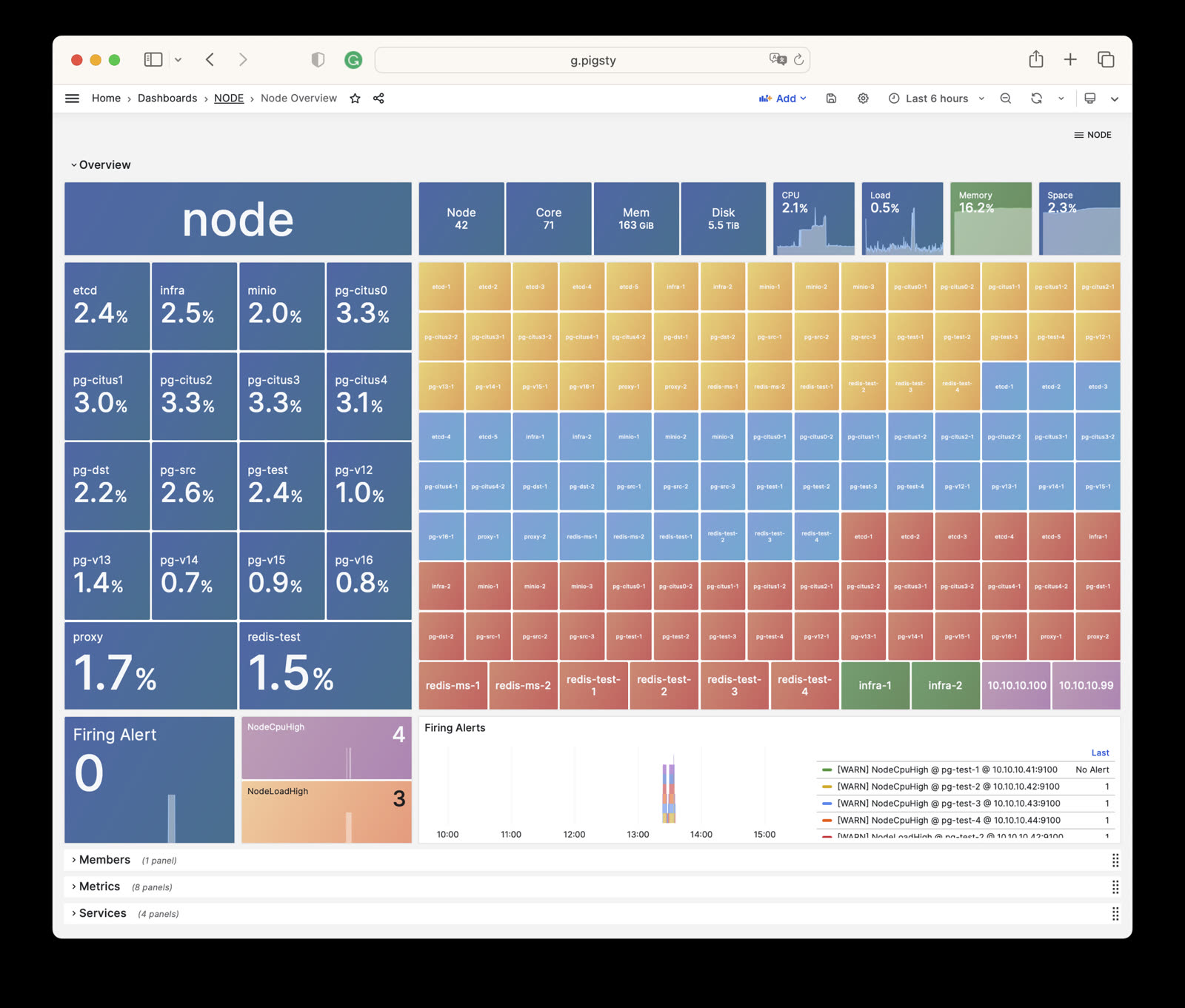
NODE Overview
Displays an overall overview of all host nodes in the current environment.
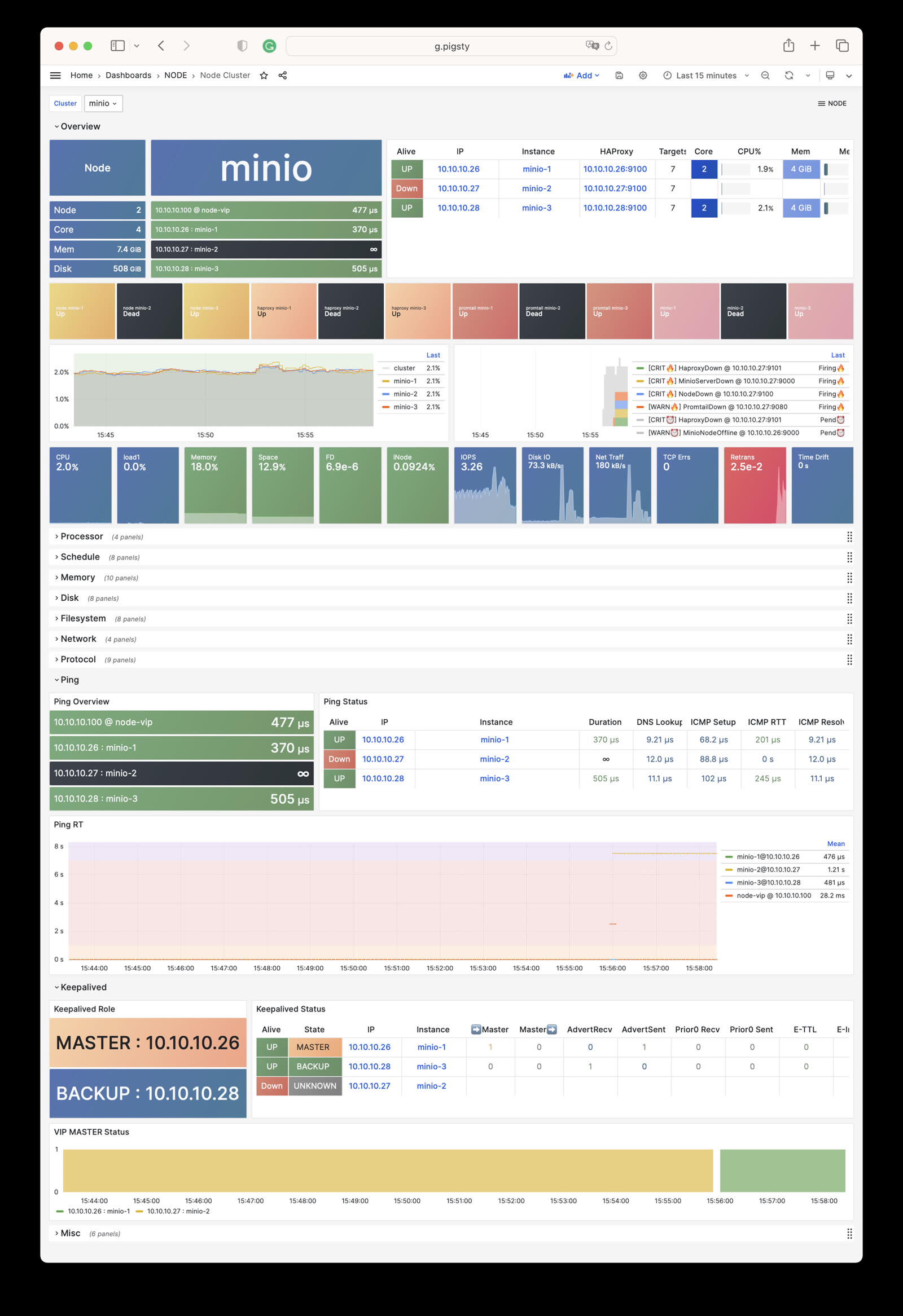
NODE Cluster
Shows detailed monitoring data for a specific host cluster.
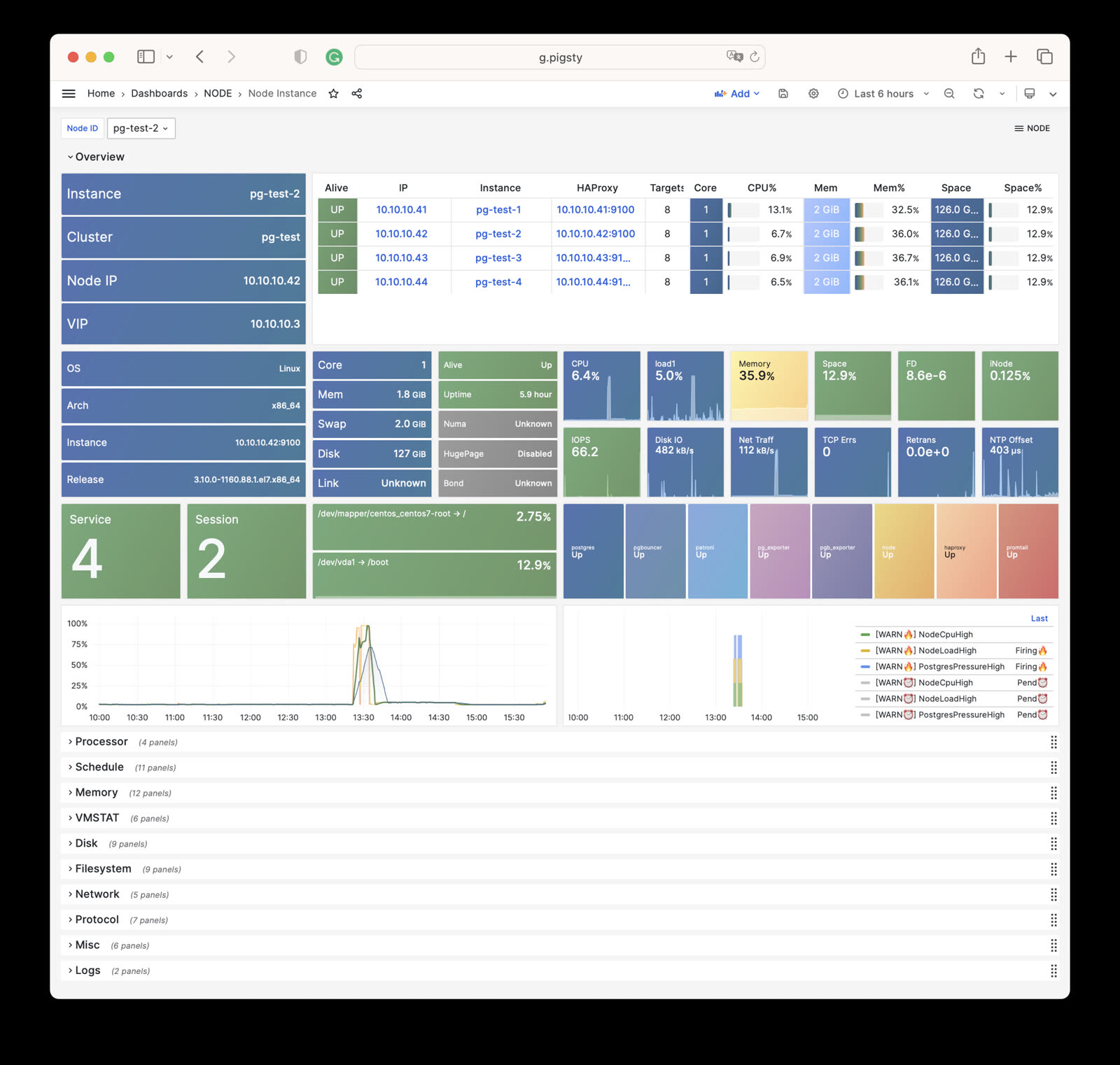
Node Instance
Presents detailed monitoring information for a single host node.
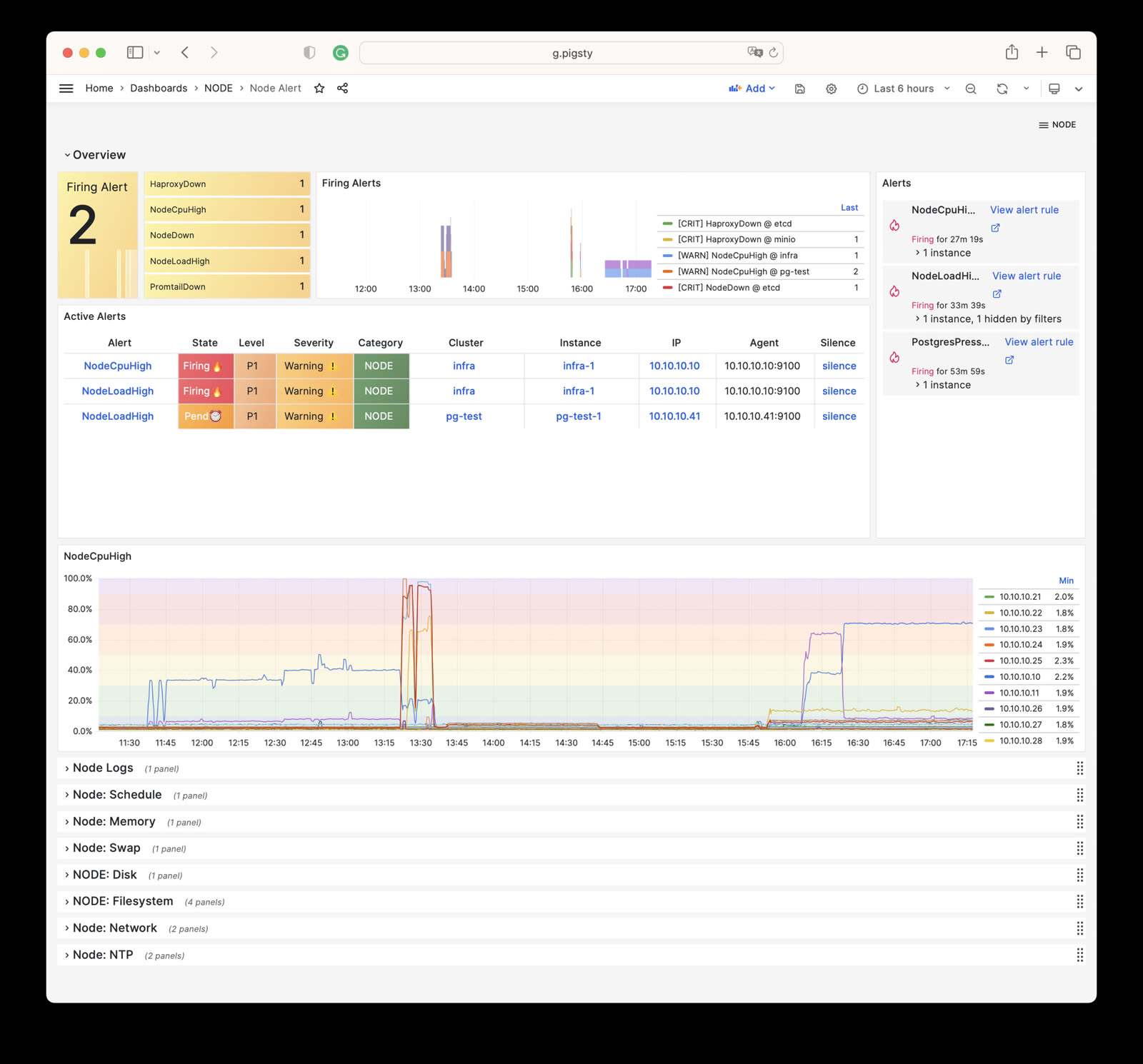
NODE Alert
Centrally displays alert information for all hosts in the environment.
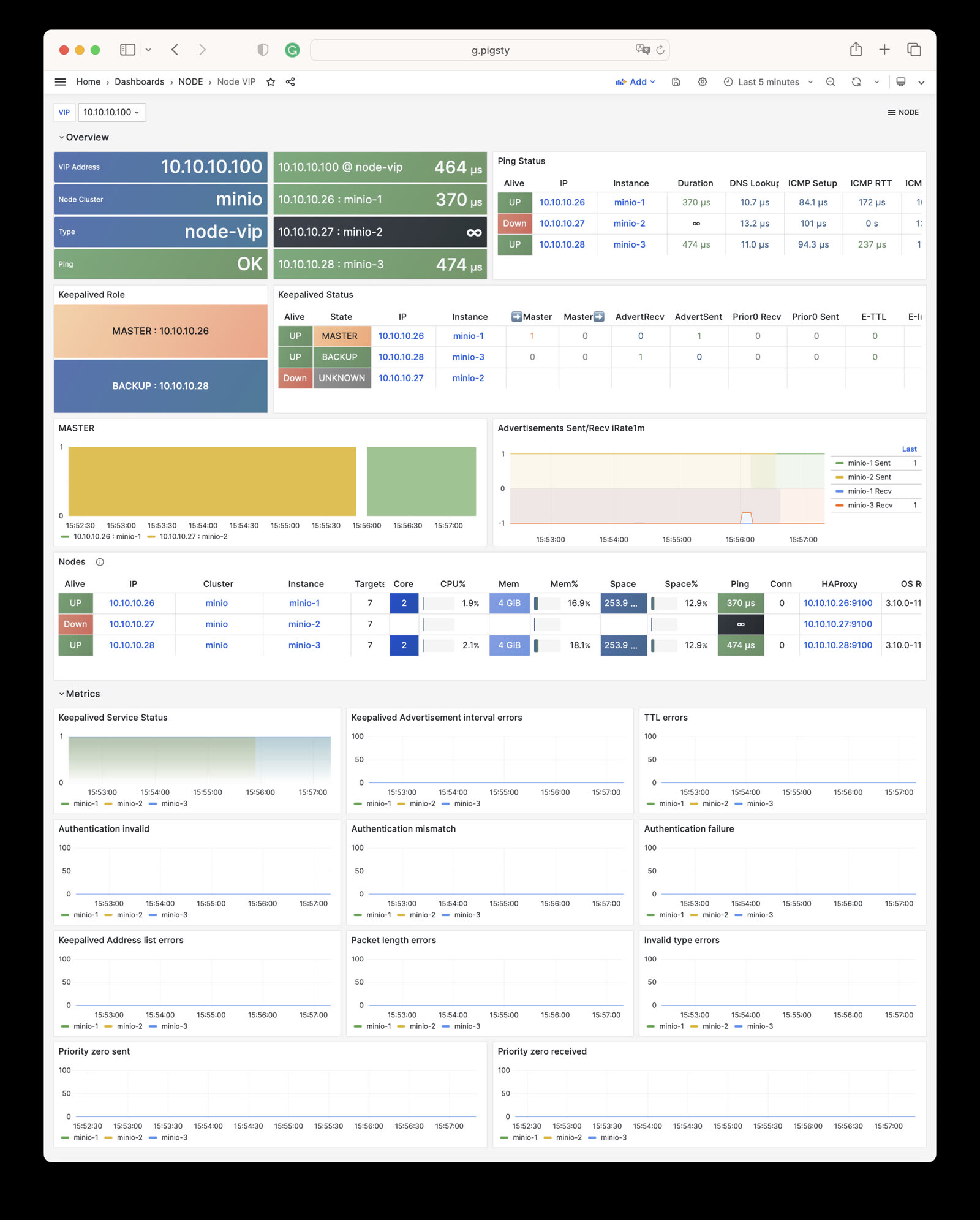
NODE VIP
Monitors detailed status of L2 virtual IPs.
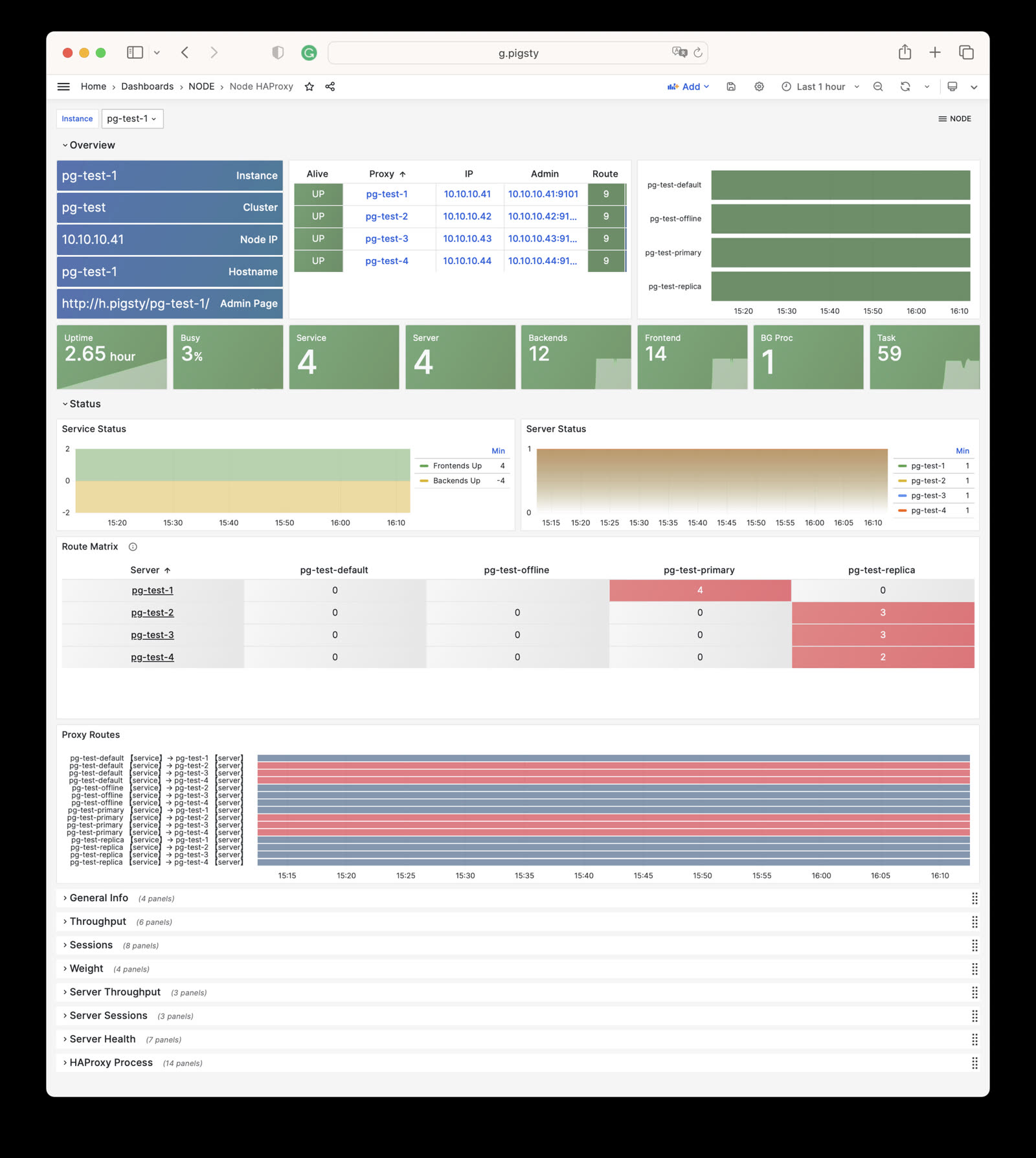
Node Haproxy
Tracks the operational status of HAProxy load balancers.
Alert Rules
Pigsty implements the following alerting rules for NODE:
Availability Alerts
| Rule | Level | Description |
|---|---|---|
NodeDown | CRIT | Node is offline |
HaproxyDown | CRIT | HAProxy service is offline |
VectorDown | WARN | Log collecting agent offline (Vector) |
DockerDown | WARN | Container engine offline |
KeepalivedDown | WARN | Keepalived daemon offline |
CPU Alerts
| Rule | Level | Description |
|---|---|---|
NodeCpuHigh | WARN | CPU usage exceeds 70% |
Scheduling Alerts
| Rule | Level | Description |
|---|---|---|
NodeLoadHigh | WARN | Normalized load exceeds 100% |
Memory Alerts
| Rule | Level | Description |
|---|---|---|
NodeOutOfMem | WARN | Available memory less than 10% |
NodeMemSwapped | WARN | Swap usage exceeds 1% |
Filesystem Alerts
| Rule | Level | Description |
|---|---|---|
NodeFsSpaceFull | WARN | Disk usage exceeds 90% |
NodeFsFilesFull | WARN | Inode usage exceeds 90% |
NodeFdFull | WARN | File descriptor usage exceeds 90% |
Disk Alerts
| Rule | Level | Description |
|---|---|---|
NodeDiskSlow | WARN | Read/write latency exceeds 32ms |
Network Protocol Alerts
| Rule | Level | Description |
|---|---|---|
NodeTcpErrHigh | WARN | TCP error rate exceeds 1/min |
NodeTcpRetransHigh | WARN | TCP retransmission rate exceeds 1% |
Time Synchronization Alerts
| Rule | Level | Description |
|---|---|---|
NodeTimeDrift | WARN | System time not synchronized |
6 - Metrics
Complete list of monitoring metrics provided by Pigsty NODE module
The NODE module has 747 available metrics.
| Metric Name | Type | Labels | Description |
|---|---|---|---|
| ALERTS | Unknown | alertname, ip, level, severity, ins, job, alertstate, category, instance, cls | N/A |
| ALERTS_FOR_STATE | Unknown | alertname, ip, level, severity, ins, job, category, instance, cls | N/A |
| deprecated_flags_inuse_total | Unknown | instance, ins, job, ip, cls | N/A |
| go_gc_duration_seconds | summary | quantile, instance, ins, job, ip, cls | A summary of the pause duration of garbage collection cycles. |
| go_gc_duration_seconds_count | Unknown | instance, ins, job, ip, cls | N/A |
| go_gc_duration_seconds_sum | Unknown | instance, ins, job, ip, cls | N/A |
| go_goroutines | gauge | instance, ins, job, ip, cls | Number of goroutines that currently exist. |
| go_info | gauge | version, instance, ins, job, ip, cls | Information about the Go environment. |
| go_memstats_alloc_bytes | gauge | instance, ins, job, ip, cls | Number of bytes allocated and still in use. |
| go_memstats_alloc_bytes_total | counter | instance, ins, job, ip, cls | Total number of bytes allocated, even if freed. |
| go_memstats_buck_hash_sys_bytes | gauge | instance, ins, job, ip, cls | Number of bytes used by the profiling bucket hash table. |
| go_memstats_frees_total | counter | instance, ins, job, ip, cls | Total number of frees. |
| go_memstats_gc_sys_bytes | gauge | instance, ins, job, ip, cls | Number of bytes used for garbage collection system metadata. |
| go_memstats_heap_alloc_bytes | gauge | instance, ins, job, ip, cls | Number of heap bytes allocated and still in use. |
| go_memstats_heap_idle_bytes | gauge | instance, ins, job, ip, cls | Number of heap bytes waiting to be used. |
| go_memstats_heap_inuse_bytes | gauge | instance, ins, job, ip, cls | Number of heap bytes that are in use. |
| go_memstats_heap_objects | gauge | instance, ins, job, ip, cls | Number of allocated objects. |
| go_memstats_heap_released_bytes | gauge | instance, ins, job, ip, cls | Number of heap bytes released to OS. |
| go_memstats_heap_sys_bytes | gauge | instance, ins, job, ip, cls | Number of heap bytes obtained from system. |
| go_memstats_last_gc_time_seconds | gauge | instance, ins, job, ip, cls | Number of seconds since 1970 of last garbage collection. |
| go_memstats_lookups_total | counter | instance, ins, job, ip, cls | Total number of pointer lookups. |
| go_memstats_mallocs_total | counter | instance, ins, job, ip, cls | Total number of mallocs. |
| go_memstats_mcache_inuse_bytes | gauge | instance, ins, job, ip, cls | Number of bytes in use by mcache structures. |
| go_memstats_mcache_sys_bytes | gauge | instance, ins, job, ip, cls | Number of bytes used for mcache structures obtained from system. |
| go_memstats_mspan_inuse_bytes | gauge | instance, ins, job, ip, cls | Number of bytes in use by mspan structures. |
| go_memstats_mspan_sys_bytes | gauge | instance, ins, job, ip, cls | Number of bytes used for mspan structures obtained from system. |
| go_memstats_next_gc_bytes | gauge | instance, ins, job, ip, cls | Number of heap bytes when next garbage collection will take place. |
| go_memstats_other_sys_bytes | gauge | instance, ins, job, ip, cls | Number of bytes used for other system allocations. |
| go_memstats_stack_inuse_bytes | gauge | instance, ins, job, ip, cls | Number of bytes in use by the stack allocator. |
| go_memstats_stack_sys_bytes | gauge | instance, ins, job, ip, cls | Number of bytes obtained from system for stack allocator. |
| go_memstats_sys_bytes | gauge | instance, ins, job, ip, cls | Number of bytes obtained from system. |
| go_threads | gauge | instance, ins, job, ip, cls | Number of OS threads created. |
| haproxy:cls:usage | Unknown | job, cls | N/A |
| haproxy:ins:uptime | Unknown | instance, ins, job, ip, cls | N/A |
| haproxy:ins:usage | Unknown | instance, ins, job, ip, cls | N/A |
| haproxy_backend_active_servers | gauge | proxy, instance, ins, job, ip, cls | Total number of active UP servers with a non-zero weight |
| haproxy_backend_agg_check_status | gauge | state, proxy, instance, ins, job, ip, cls | Backend’s aggregated gauge of servers’ state check status |
| haproxy_backend_agg_server_check_status | gauge | state, proxy, instance, ins, job, ip, cls | [DEPRECATED] Backend’s aggregated gauge of servers’ status |
| haproxy_backend_agg_server_status | gauge | state, proxy, instance, ins, job, ip, cls | Backend’s aggregated gauge of servers’ status |
| haproxy_backend_backup_servers | gauge | proxy, instance, ins, job, ip, cls | Total number of backup UP servers with a non-zero weight |
| haproxy_backend_bytes_in_total | counter | proxy, instance, ins, job, ip, cls | Total number of request bytes since process started |
| haproxy_backend_bytes_out_total | counter | proxy, instance, ins, job, ip, cls | Total number of response bytes since process started |
| haproxy_backend_check_last_change_seconds | gauge | proxy, instance, ins, job, ip, cls | How long ago the last server state changed, in seconds |
| haproxy_backend_check_up_down_total | counter | proxy, instance, ins, job, ip, cls | Total number of failed checks causing UP to DOWN server transitions, per server/backend, since the worker process started |
| haproxy_backend_client_aborts_total | counter | proxy, instance, ins, job, ip, cls | Total number of requests or connections aborted by the client since the worker process started |
| haproxy_backend_connect_time_average_seconds | gauge | proxy, instance, ins, job, ip, cls | Avg. connect time for last 1024 successful connections. |
| haproxy_backend_connection_attempts_total | counter | proxy, instance, ins, job, ip, cls | Total number of outgoing connection attempts on this backend/server since the worker process started |
| haproxy_backend_connection_errors_total | counter | proxy, instance, ins, job, ip, cls | Total number of failed connections to server since the worker process started |
| haproxy_backend_connection_reuses_total | counter | proxy, instance, ins, job, ip, cls | Total number of reused connection on this backend/server since the worker process started |
| haproxy_backend_current_queue | gauge | proxy, instance, ins, job, ip, cls | Number of current queued connections |
| haproxy_backend_current_sessions | gauge | proxy, instance, ins, job, ip, cls | Number of current sessions on the frontend, backend or server |
| haproxy_backend_downtime_seconds_total | counter | proxy, instance, ins, job, ip, cls | Total time spent in DOWN state, for server or backend |
| haproxy_backend_failed_header_rewriting_total | counter | proxy, instance, ins, job, ip, cls | Total number of failed HTTP header rewrites since the worker process started |
| haproxy_backend_http_cache_hits_total | counter | proxy, instance, ins, job, ip, cls | Total number of HTTP requests not found in the cache on this frontend/backend since the worker process started |
| haproxy_backend_http_cache_lookups_total | counter | proxy, instance, ins, job, ip, cls | Total number of HTTP requests looked up in the cache on this frontend/backend since the worker process started |
| haproxy_backend_http_comp_bytes_bypassed_total | counter | proxy, instance, ins, job, ip, cls | Total number of bytes that bypassed HTTP compression for this object since the worker process started (CPU/memory/bandwidth limitation) |
| haproxy_backend_http_comp_bytes_in_total | counter | proxy, instance, ins, job, ip, cls | Total number of bytes submitted to the HTTP compressor for this object since the worker process started |
| haproxy_backend_http_comp_bytes_out_total | counter | proxy, instance, ins, job, ip, cls | Total number of bytes emitted by the HTTP compressor for this object since the worker process started |
| haproxy_backend_http_comp_responses_total | counter | proxy, instance, ins, job, ip, cls | Total number of HTTP responses that were compressed for this object since the worker process started |
| haproxy_backend_http_requests_total | counter | proxy, instance, ins, job, ip, cls | Total number of HTTP requests processed by this object since the worker process started |
| haproxy_backend_http_responses_total | counter | ip, proxy, ins, code, job, instance, cls | Total number of HTTP responses with status 100-199 returned by this object since the worker process started |
| haproxy_backend_internal_errors_total | counter | proxy, instance, ins, job, ip, cls | Total number of internal errors since process started |
| haproxy_backend_last_session_seconds | gauge | proxy, instance, ins, job, ip, cls | How long ago some traffic was seen on this object on this worker process, in seconds |
| haproxy_backend_limit_sessions | gauge | proxy, instance, ins, job, ip, cls | Frontend/listener/server’s maxconn, backend’s fullconn |
| haproxy_backend_loadbalanced_total | counter | proxy, instance, ins, job, ip, cls | Total number of requests routed by load balancing since the worker process started (ignores queue pop and stickiness) |
| haproxy_backend_max_connect_time_seconds | gauge | proxy, instance, ins, job, ip, cls | Maximum observed time spent waiting for a connection to complete |
| haproxy_backend_max_queue | gauge | proxy, instance, ins, job, ip, cls | Highest value of queued connections encountered since process started |
| haproxy_backend_max_queue_time_seconds | gauge | proxy, instance, ins, job, ip, cls | Maximum observed time spent in the queue |
| haproxy_backend_max_response_time_seconds | gauge | proxy, instance, ins, job, ip, cls | Maximum observed time spent waiting for a server response |
| haproxy_backend_max_session_rate | gauge | proxy, instance, ins, job, ip, cls | Highest value of sessions per second observed since the worker process started |
| haproxy_backend_max_sessions | gauge | proxy, instance, ins, job, ip, cls | Highest value of current sessions encountered since process started |
| haproxy_backend_max_total_time_seconds | gauge | proxy, instance, ins, job, ip, cls | Maximum observed total request+response time (request+queue+connect+response+processing) |
| haproxy_backend_queue_time_average_seconds | gauge | proxy, instance, ins, job, ip, cls | Avg. queue time for last 1024 successful connections. |
| haproxy_backend_redispatch_warnings_total | counter | proxy, instance, ins, job, ip, cls | Total number of server redispatches due to connection failures since the worker process started |
| haproxy_backend_requests_denied_total | counter | proxy, instance, ins, job, ip, cls | Total number of denied requests since process started |
| haproxy_backend_response_errors_total | counter | proxy, instance, ins, job, ip, cls | Total number of invalid responses since the worker process started |
| haproxy_backend_response_time_average_seconds | gauge | proxy, instance, ins, job, ip, cls | Avg. response time for last 1024 successful connections. |
| haproxy_backend_responses_denied_total | counter | proxy, instance, ins, job, ip, cls | Total number of denied responses since process started |
| haproxy_backend_retry_warnings_total | counter | proxy, instance, ins, job, ip, cls | Total number of server connection retries since the worker process started |
| haproxy_backend_server_aborts_total | counter | proxy, instance, ins, job, ip, cls | Total number of requests or connections aborted by the server since the worker process started |
| haproxy_backend_sessions_total | counter | proxy, instance, ins, job, ip, cls | Total number of sessions since process started |
| haproxy_backend_status | gauge | state, proxy, instance, ins, job, ip, cls | Current status of the service, per state label value. |
| haproxy_backend_total_time_average_seconds | gauge | proxy, instance, ins, job, ip, cls | Avg. total time for last 1024 successful connections. |
| haproxy_backend_uweight | gauge | proxy, instance, ins, job, ip, cls | Server’s user weight, or sum of active servers’ user weights for a backend |
| haproxy_backend_weight | gauge | proxy, instance, ins, job, ip, cls | Server’s effective weight, or sum of active servers’ effective weights for a backend |
| haproxy_frontend_bytes_in_total | counter | proxy, instance, ins, job, ip, cls | Total number of request bytes since process started |
| haproxy_frontend_bytes_out_total | counter | proxy, instance, ins, job, ip, cls | Total number of response bytes since process started |
| haproxy_frontend_connections_rate_max | gauge | proxy, instance, ins, job, ip, cls | Highest value of connections per second observed since the worker process started |
| haproxy_frontend_connections_total | counter | proxy, instance, ins, job, ip, cls | Total number of new connections accepted on this frontend since the worker process started |
| haproxy_frontend_current_sessions | gauge | proxy, instance, ins, job, ip, cls | Number of current sessions on the frontend, backend or server |
| haproxy_frontend_denied_connections_total | counter | proxy, instance, ins, job, ip, cls | Total number of incoming connections blocked on a listener/frontend by a tcp-request connection rule since the worker process started |
| haproxy_frontend_denied_sessions_total | counter | proxy, instance, ins, job, ip, cls | Total number of incoming sessions blocked on a listener/frontend by a tcp-request connection rule since the worker process started |
| haproxy_frontend_failed_header_rewriting_total | counter | proxy, instance, ins, job, ip, cls | Total number of failed HTTP header rewrites since the worker process started |
| haproxy_frontend_http_cache_hits_total | counter | proxy, instance, ins, job, ip, cls | Total number of HTTP requests not found in the cache on this frontend/backend since the worker process started |
| haproxy_frontend_http_cache_lookups_total | counter | proxy, instance, ins, job, ip, cls | Total number of HTTP requests looked up in the cache on this frontend/backend since the worker process started |
| haproxy_frontend_http_comp_bytes_bypassed_total | counter | proxy, instance, ins, job, ip, cls | Total number of bytes that bypassed HTTP compression for this object since the worker process started (CPU/memory/bandwidth limitation) |
| haproxy_frontend_http_comp_bytes_in_total | counter | proxy, instance, ins, job, ip, cls | Total number of bytes submitted to the HTTP compressor for this object since the worker process started |
| haproxy_frontend_http_comp_bytes_out_total | counter | proxy, instance, ins, job, ip, cls | Total number of bytes emitted by the HTTP compressor for this object since the worker process started |
| haproxy_frontend_http_comp_responses_total | counter | proxy, instance, ins, job, ip, cls | Total number of HTTP responses that were compressed for this object since the worker process started |
| haproxy_frontend_http_requests_rate_max | gauge | proxy, instance, ins, job, ip, cls | Highest value of http requests observed since the worker process started |
| haproxy_frontend_http_requests_total | counter | proxy, instance, ins, job, ip, cls | Total number of HTTP requests processed by this object since the worker process started |
| haproxy_frontend_http_responses_total | counter | ip, proxy, ins, code, job, instance, cls | Total number of HTTP responses with status 100-199 returned by this object since the worker process started |
| haproxy_frontend_intercepted_requests_total | counter | proxy, instance, ins, job, ip, cls | Total number of HTTP requests intercepted on the frontend (redirects/stats/services) since the worker process started |
| haproxy_frontend_internal_errors_total | counter | proxy, instance, ins, job, ip, cls | Total number of internal errors since process started |
| haproxy_frontend_limit_session_rate | gauge | proxy, instance, ins, job, ip, cls | Limit on the number of sessions accepted in a second (frontend only, ‘rate-limit sessions’ setting) |
| haproxy_frontend_limit_sessions | gauge | proxy, instance, ins, job, ip, cls | Frontend/listener/server’s maxconn, backend’s fullconn |
| haproxy_frontend_max_session_rate | gauge | proxy, instance, ins, job, ip, cls | Highest value of sessions per second observed since the worker process started |
| haproxy_frontend_max_sessions | gauge | proxy, instance, ins, job, ip, cls | Highest value of current sessions encountered since process started |
| haproxy_frontend_request_errors_total | counter | proxy, instance, ins, job, ip, cls | Total number of invalid requests since process started |
| haproxy_frontend_requests_denied_total | counter | proxy, instance, ins, job, ip, cls | Total number of denied requests since process started |
| haproxy_frontend_responses_denied_total | counter | proxy, instance, ins, job, ip, cls | Total number of denied responses since process started |
| haproxy_frontend_sessions_total | counter | proxy, instance, ins, job, ip, cls | Total number of sessions since process started |
| haproxy_frontend_status | gauge | state, proxy, instance, ins, job, ip, cls | Current status of the service, per state label value. |
| haproxy_process_active_peers | gauge | instance, ins, job, ip, cls | Current number of verified active peers connections on the current worker process |
| haproxy_process_build_info | gauge | version, instance, ins, job, ip, cls | Build info |
| haproxy_process_busy_polling_enabled | gauge | instance, ins, job, ip, cls | 1 if busy-polling is currently in use on the worker process, otherwise zero (config.busy-polling) |
| haproxy_process_bytes_out_rate | gauge | instance, ins, job, ip, cls | Number of bytes emitted by current worker process over the last second |
| haproxy_process_bytes_out_total | counter | instance, ins, job, ip, cls | Total number of bytes emitted by current worker process since started |
| haproxy_process_connected_peers | gauge | instance, ins, job, ip, cls | Current number of peers having passed the connection step on the current worker process |
| haproxy_process_connections_total | counter | instance, ins, job, ip, cls | Total number of connections on this worker process since started |
| haproxy_process_current_backend_ssl_key_rate | gauge | instance, ins, job, ip, cls | Number of SSL keys created on backends in this worker process over the last second |
| haproxy_process_current_connection_rate | gauge | instance, ins, job, ip, cls | Number of front connections created on this worker process over the last second |
| haproxy_process_current_connections | gauge | instance, ins, job, ip, cls | Current number of connections on this worker process |
| haproxy_process_current_frontend_ssl_key_rate | gauge | instance, ins, job, ip, cls | Number of SSL keys created on frontends in this worker process over the last second |
| haproxy_process_current_run_queue | gauge | instance, ins, job, ip, cls | Total number of active tasks+tasklets in the current worker process |
| haproxy_process_current_session_rate | gauge | instance, ins, job, ip, cls | Number of sessions created on this worker process over the last second |
| haproxy_process_current_ssl_connections | gauge | instance, ins, job, ip, cls | Current number of SSL endpoints on this worker process (front+back) |
| haproxy_process_current_ssl_rate | gauge | instance, ins, job, ip, cls | Number of SSL connections created on this worker process over the last second |
| haproxy_process_current_tasks | gauge | instance, ins, job, ip, cls | Total number of tasks in the current worker process (active + sleeping) |
| haproxy_process_current_zlib_memory | gauge | instance, ins, job, ip, cls | Amount of memory currently used by HTTP compression on the current worker process (in bytes) |
| haproxy_process_dropped_logs_total | counter | instance, ins, job, ip, cls | Total number of dropped logs for current worker process since started |
| haproxy_process_failed_resolutions | counter | instance, ins, job, ip, cls | Total number of failed DNS resolutions in current worker process since started |
| haproxy_process_frontend_ssl_reuse | gauge | instance, ins, job, ip, cls | Percent of frontend SSL connections which did not require a new key |
| haproxy_process_hard_max_connections | gauge | instance, ins, job, ip, cls | Hard limit on the number of per-process connections (imposed by Memmax_MB or Ulimit-n) |
| haproxy_process_http_comp_bytes_in_total | counter | instance, ins, job, ip, cls | Number of bytes submitted to the HTTP compressor in this worker process over the last second |
| haproxy_process_http_comp_bytes_out_total | counter | instance, ins, job, ip, cls | Number of bytes emitted by the HTTP compressor in this worker process over the last second |
| haproxy_process_idle_time_percent | gauge | instance, ins, job, ip, cls | Percentage of last second spent waiting in the current worker thread |
| haproxy_process_jobs | gauge | instance, ins, job, ip, cls | Current number of active jobs on the current worker process (frontend connections, master connections, listeners) |
| haproxy_process_limit_connection_rate | gauge | instance, ins, job, ip, cls | Hard limit for ConnRate (global.maxconnrate) |
| haproxy_process_limit_http_comp | gauge | instance, ins, job, ip, cls | Limit of CompressBpsOut beyond which HTTP compression is automatically disabled |
| haproxy_process_limit_session_rate | gauge | instance, ins, job, ip, cls | Hard limit for SessRate (global.maxsessrate) |
| haproxy_process_limit_ssl_rate | gauge | instance, ins, job, ip, cls | Hard limit for SslRate (global.maxsslrate) |
| haproxy_process_listeners | gauge | instance, ins, job, ip, cls | Current number of active listeners on the current worker process |
| haproxy_process_max_backend_ssl_key_rate | gauge | instance, ins, job, ip, cls | Highest SslBackendKeyRate reached on this worker process since started (in SSL keys per second) |
| haproxy_process_max_connection_rate | gauge | instance, ins, job, ip, cls | Highest ConnRate reached on this worker process since started (in connections per second) |
| haproxy_process_max_connections | gauge | instance, ins, job, ip, cls | Hard limit on the number of per-process connections (configured or imposed by Ulimit-n) |
| haproxy_process_max_fds | gauge | instance, ins, job, ip, cls | Hard limit on the number of per-process file descriptors |
| haproxy_process_max_frontend_ssl_key_rate | gauge | instance, ins, job, ip, cls | Highest SslFrontendKeyRate reached on this worker process since started (in SSL keys per second) |
| haproxy_process_max_memory_bytes | gauge | instance, ins, job, ip, cls | Worker process’s hard limit on memory usage in byes (-m on command line) |
| haproxy_process_max_pipes | gauge | instance, ins, job, ip, cls | Hard limit on the number of pipes for splicing, 0=unlimited |
| haproxy_process_max_session_rate | gauge | instance, ins, job, ip, cls | Highest SessRate reached on this worker process since started (in sessions per second) |
| haproxy_process_max_sockets | gauge | instance, ins, job, ip, cls | Hard limit on the number of per-process sockets |
| haproxy_process_max_ssl_connections | gauge | instance, ins, job, ip, cls | Hard limit on the number of per-process SSL endpoints (front+back), 0=unlimited |
| haproxy_process_max_ssl_rate | gauge | instance, ins, job, ip, cls | Highest SslRate reached on this worker process since started (in connections per second) |
| haproxy_process_max_zlib_memory | gauge | instance, ins, job, ip, cls | Limit on the amount of memory used by HTTP compression above which it is automatically disabled (in bytes, see global.maxzlibmem) |
| haproxy_process_nbproc | gauge | instance, ins, job, ip, cls | Number of started worker processes (historical, always 1) |
| haproxy_process_nbthread | gauge | instance, ins, job, ip, cls | Number of started threads (global.nbthread) |
| haproxy_process_pipes_free_total | counter | instance, ins, job, ip, cls | Current number of allocated and available pipes in this worker process |
| haproxy_process_pipes_used_total | counter | instance, ins, job, ip, cls | Current number of pipes in use in this worker process |
| haproxy_process_pool_allocated_bytes | gauge | instance, ins, job, ip, cls | Amount of memory allocated in pools (in bytes) |
| haproxy_process_pool_failures_total | counter | instance, ins, job, ip, cls | Number of failed pool allocations since this worker was started |
| haproxy_process_pool_used_bytes | gauge | instance, ins, job, ip, cls | Amount of pool memory currently used (in bytes) |
| haproxy_process_recv_logs_total | counter | instance, ins, job, ip, cls | Total number of log messages received by log-forwarding listeners on this worker process since started |
| haproxy_process_relative_process_id | gauge | instance, ins, job, ip, cls | Relative worker process number (1) |
| haproxy_process_requests_total | counter | instance, ins, job, ip, cls | Total number of requests on this worker process since started |
| haproxy_process_spliced_bytes_out_total | counter | instance, ins, job, ip, cls | Total number of bytes emitted by current worker process through a kernel pipe since started |
| haproxy_process_ssl_cache_lookups_total | counter | instance, ins, job, ip, cls | Total number of SSL session ID lookups in the SSL session cache on this worker since started |
| haproxy_process_ssl_cache_misses_total | counter | instance, ins, job, ip, cls | Total number of SSL session ID lookups that didn’t find a session in the SSL session cache on this worker since started |
| haproxy_process_ssl_connections_total | counter | instance, ins, job, ip, cls | Total number of SSL endpoints on this worker process since started (front+back) |
| haproxy_process_start_time_seconds | gauge | instance, ins, job, ip, cls | Start time in seconds |
| haproxy_process_stopping | gauge | instance, ins, job, ip, cls | 1 if the worker process is currently stopping, otherwise zero |
| haproxy_process_unstoppable_jobs | gauge | instance, ins, job, ip, cls | Current number of unstoppable jobs on the current worker process (master connections) |
| haproxy_process_uptime_seconds | gauge | instance, ins, job, ip, cls | How long ago this worker process was started (seconds) |
| haproxy_server_bytes_in_total | counter | proxy, instance, ins, job, server, ip, cls | Total number of request bytes since process started |
| haproxy_server_bytes_out_total | counter | proxy, instance, ins, job, server, ip, cls | Total number of response bytes since process started |
| haproxy_server_check_code | gauge | proxy, instance, ins, job, server, ip, cls | layer5-7 code, if available of the last health check. |
| haproxy_server_check_duration_seconds | gauge | proxy, instance, ins, job, server, ip, cls | Total duration of the latest server health check, in seconds. |
| haproxy_server_check_failures_total | counter | proxy, instance, ins, job, server, ip, cls | Total number of failed individual health checks per server/backend, since the worker process started |
| haproxy_server_check_last_change_seconds | gauge | proxy, instance, ins, job, server, ip, cls | How long ago the last server state changed, in seconds |
| haproxy_server_check_status | gauge | state, proxy, instance, ins, job, server, ip, cls | Status of last health check, per state label value. |
| haproxy_server_check_up_down_total | counter | proxy, instance, ins, job, server, ip, cls | Total number of failed checks causing UP to DOWN server transitions, per server/backend, since the worker process started |
| haproxy_server_client_aborts_total | counter | proxy, instance, ins, job, server, ip, cls | Total number of requests or connections aborted by the client since the worker process started |
| haproxy_server_connect_time_average_seconds | gauge | proxy, instance, ins, job, server, ip, cls | Avg. connect time for last 1024 successful connections. |
| haproxy_server_connection_attempts_total | counter | proxy, instance, ins, job, server, ip, cls | Total number of outgoing connection attempts on this backend/server since the worker process started |
| haproxy_server_connection_errors_total | counter | proxy, instance, ins, job, server, ip, cls | Total number of failed connections to server since the worker process started |
| haproxy_server_connection_reuses_total | counter | proxy, instance, ins, job, server, ip, cls | Total number of reused connection on this backend/server since the worker process started |
| haproxy_server_current_queue | gauge | proxy, instance, ins, job, server, ip, cls | Number of current queued connections |
| haproxy_server_current_sessions | gauge | proxy, instance, ins, job, server, ip, cls | Number of current sessions on the frontend, backend or server |
| haproxy_server_current_throttle | gauge | proxy, instance, ins, job, server, ip, cls | Throttling ratio applied to a server’s maxconn and weight during the slowstart period (0 to 100%) |
| haproxy_server_downtime_seconds_total | counter | proxy, instance, ins, job, server, ip, cls | Total time spent in DOWN state, for server or backend |
| haproxy_server_failed_header_rewriting_total | counter | proxy, instance, ins, job, server, ip, cls | Total number of failed HTTP header rewrites since the worker process started |
| haproxy_server_idle_connections_current | gauge | proxy, instance, ins, job, server, ip, cls | Current number of idle connections available for reuse on this server |
| haproxy_server_idle_connections_limit | gauge | proxy, instance, ins, job, server, ip, cls | Limit on the number of available idle connections on this server (server ‘pool_max_conn’ directive) |
| haproxy_server_internal_errors_total | counter | proxy, instance, ins, job, server, ip, cls | Total number of internal errors since process started |
| haproxy_server_last_session_seconds | gauge | proxy, instance, ins, job, server, ip, cls | How long ago some traffic was seen on this object on this worker process, in seconds |
| haproxy_server_limit_sessions | gauge | proxy, instance, ins, job, server, ip, cls | Frontend/listener/server’s maxconn, backend’s fullconn |
| haproxy_server_loadbalanced_total | counter | proxy, instance, ins, job, server, ip, cls | Total number of requests routed by load balancing since the worker process started (ignores queue pop and stickiness) |
| haproxy_server_max_connect_time_seconds | gauge | proxy, instance, ins, job, server, ip, cls | Maximum observed time spent waiting for a connection to complete |
| haproxy_server_max_queue | gauge | proxy, instance, ins, job, server, ip, cls | Highest value of queued connections encountered since process started |
| haproxy_server_max_queue_time_seconds | gauge | proxy, instance, ins, job, server, ip, cls | Maximum observed time spent in the queue |
| haproxy_server_max_response_time_seconds | gauge | proxy, instance, ins, job, server, ip, cls | Maximum observed time spent waiting for a server response |
| haproxy_server_max_session_rate | gauge | proxy, instance, ins, job, server, ip, cls | Highest value of sessions per second observed since the worker process started |
| haproxy_server_max_sessions | gauge | proxy, instance, ins, job, server, ip, cls | Highest value of current sessions encountered since process started |
| haproxy_server_max_total_time_seconds | gauge | proxy, instance, ins, job, server, ip, cls | Maximum observed total request+response time (request+queue+connect+response+processing) |
| haproxy_server_need_connections_current | gauge | proxy, instance, ins, job, server, ip, cls | Estimated needed number of connections |
| haproxy_server_queue_limit | gauge | proxy, instance, ins, job, server, ip, cls | Limit on the number of connections in queue, for servers only (maxqueue argument) |
| haproxy_server_queue_time_average_seconds | gauge | proxy, instance, ins, job, server, ip, cls | Avg. queue time for last 1024 successful connections. |
| haproxy_server_redispatch_warnings_total | counter | proxy, instance, ins, job, server, ip, cls | Total number of server redispatches due to connection failures since the worker process started |
| haproxy_server_response_errors_total | counter | proxy, instance, ins, job, server, ip, cls | Total number of invalid responses since the worker process started |
| haproxy_server_response_time_average_seconds | gauge | proxy, instance, ins, job, server, ip, cls | Avg. response time for last 1024 successful connections. |
| haproxy_server_responses_denied_total | counter | proxy, instance, ins, job, server, ip, cls | Total number of denied responses since process started |
| haproxy_server_retry_warnings_total | counter | proxy, instance, ins, job, server, ip, cls | Total number of server connection retries since the worker process started |
| haproxy_server_safe_idle_connections_current | gauge | proxy, instance, ins, job, server, ip, cls | Current number of safe idle connections |
| haproxy_server_server_aborts_total | counter | proxy, instance, ins, job, server, ip, cls | Total number of requests or connections aborted by the server since the worker process started |
| haproxy_server_sessions_total | counter | proxy, instance, ins, job, server, ip, cls | Total number of sessions since process started |
| haproxy_server_status | gauge | state, proxy, instance, ins, job, server, ip, cls | Current status of the service, per state label value. |
| haproxy_server_total_time_average_seconds | gauge | proxy, instance, ins, job, server, ip, cls | Avg. total time for last 1024 successful connections. |
| haproxy_server_unsafe_idle_connections_current | gauge | proxy, instance, ins, job, server, ip, cls | Current number of unsafe idle connections |
| haproxy_server_used_connections_current | gauge | proxy, instance, ins, job, server, ip, cls | Current number of connections in use |
| haproxy_server_uweight | gauge | proxy, instance, ins, job, server, ip, cls | Server’s user weight, or sum of active servers’ user weights for a backend |
| haproxy_server_weight | gauge | proxy, instance, ins, job, server, ip, cls | Server’s effective weight, or sum of active servers’ effective weights for a backend |
| haproxy_up | Unknown | instance, ins, job, ip, cls | N/A |
| inflight_requests | gauge | instance, ins, job, route, ip, cls, method | Current number of inflight requests. |
| jaeger_tracer_baggage_restrictions_updates_total | Unknown | instance, ins, job, result, ip, cls | N/A |
| jaeger_tracer_baggage_truncations_total | Unknown | instance, ins, job, ip, cls | N/A |
| jaeger_tracer_baggage_updates_total | Unknown | instance, ins, job, result, ip, cls | N/A |
| jaeger_tracer_finished_spans_total | Unknown | instance, ins, job, sampled, ip, cls | N/A |
| jaeger_tracer_reporter_queue_length | gauge | instance, ins, job, ip, cls | Current number of spans in the reporter queue |
| jaeger_tracer_reporter_spans_total | Unknown | instance, ins, job, result, ip, cls | N/A |
| jaeger_tracer_sampler_queries_total | Unknown | instance, ins, job, result, ip, cls | N/A |
| jaeger_tracer_sampler_updates_total | Unknown | instance, ins, job, result, ip, cls | N/A |
| jaeger_tracer_span_context_decoding_errors_total | Unknown | instance, ins, job, ip, cls | N/A |
| jaeger_tracer_started_spans_total | Unknown | instance, ins, job, sampled, ip, cls | N/A |
| jaeger_tracer_throttled_debug_spans_total | Unknown | instance, ins, job, ip, cls | N/A |
| jaeger_tracer_throttler_updates_total | Unknown | instance, ins, job, result, ip, cls | N/A |
| jaeger_tracer_traces_total | Unknown | state, instance, ins, job, sampled, ip, cls | N/A |
| loki_experimental_features_in_use_total | Unknown | instance, ins, job, ip, cls | N/A |
| loki_internal_log_messages_total | Unknown | level, instance, ins, job, ip, cls | N/A |
| loki_log_flushes_bucket | Unknown | instance, ins, job, le, ip, cls | N/A |
| loki_log_flushes_count | Unknown | instance, ins, job, ip, cls | N/A |
| loki_log_flushes_sum | Unknown | instance, ins, job, ip, cls | N/A |
| loki_log_messages_total | Unknown | level, instance, ins, job, ip, cls | N/A |
| loki_logql_querystats_duplicates_total | Unknown | instance, ins, job, ip, cls | N/A |
| loki_logql_querystats_ingester_sent_lines_total | Unknown | instance, ins, job, ip, cls | N/A |
| loki_querier_index_cache_corruptions_total | Unknown | instance, ins, job, ip, cls | N/A |
| loki_querier_index_cache_encode_errors_total | Unknown | instance, ins, job, ip, cls | N/A |
| loki_querier_index_cache_gets_total | Unknown | instance, ins, job, ip, cls | N/A |
| loki_querier_index_cache_hits_total | Unknown | instance, ins, job, ip, cls | N/A |
| loki_querier_index_cache_puts_total | Unknown | instance, ins, job, ip, cls | N/A |
| net_conntrack_dialer_conn_attempted_total | counter | ip, ins, job, instance, cls, dialer_name | Total number of connections attempted by the given dialer a given name. |
| net_conntrack_dialer_conn_closed_total | counter | ip, ins, job, instance, cls, dialer_name | Total number of connections closed which originated from the dialer of a given name. |
| net_conntrack_dialer_conn_established_total | counter | ip, ins, job, instance, cls, dialer_name | Total number of connections successfully established by the given dialer a given name. |
| net_conntrack_dialer_conn_failed_total | counter | ip, ins, job, reason, instance, cls, dialer_name | Total number of connections failed to dial by the dialer a given name. |
| node:cls:avail_bytes | Unknown | job, cls | N/A |
| node:cls:cpu_count | Unknown | job, cls | N/A |
| node:cls:cpu_usage | Unknown | job, cls | N/A |
| node:cls:cpu_usage_15m | Unknown | job, cls | N/A |
| node:cls:cpu_usage_1m | Unknown | job, cls | N/A |
| node:cls:cpu_usage_5m | Unknown | job, cls | N/A |
| node:cls:disk_io_bytes_rate1m | Unknown | job, cls | N/A |
| node:cls:disk_iops_1m | Unknown | job, cls | N/A |
| node:cls:disk_mreads_rate1m | Unknown | job, cls | N/A |
| node:cls:disk_mreads_ratio1m | Unknown | job, cls | N/A |
| node:cls:disk_mwrites_rate1m | Unknown | job, cls | N/A |
| node:cls:disk_mwrites_ratio1m | Unknown | job, cls | N/A |
| node:cls:disk_read_bytes_rate1m | Unknown | job, cls | N/A |
| node:cls:disk_reads_rate1m | Unknown | job, cls | N/A |
| node:cls:disk_write_bytes_rate1m | Unknown | job, cls | N/A |
| node:cls:disk_writes_rate1m | Unknown | job, cls | N/A |
| node:cls:free_bytes | Unknown | job, cls | N/A |
| node:cls:mem_usage | Unknown | job, cls | N/A |
| node:cls:network_io_bytes_rate1m | Unknown | job, cls | N/A |
| node:cls:network_rx_bytes_rate1m | Unknown | job, cls | N/A |
| node:cls:network_rx_pps1m | Unknown | job, cls | N/A |
| node:cls:network_tx_bytes_rate1m | Unknown | job, cls | N/A |
| node:cls:network_tx_pps1m | Unknown | job, cls | N/A |
| node:cls:size_bytes | Unknown | job, cls | N/A |
| node:cls:space_usage | Unknown | job, cls | N/A |
| node:cls:space_usage_max | Unknown | job, cls | N/A |
| node:cls:stdload1 | Unknown | job, cls | N/A |
| node:cls:stdload15 | Unknown | job, cls | N/A |
| node:cls:stdload5 | Unknown | job, cls | N/A |
| node:cls:time_drift_max | Unknown | job, cls | N/A |
| node:cpu:idle_time_irate1m | Unknown | ip, ins, job, cpu, instance, cls | N/A |
| node:cpu:sched_timeslices_rate1m | Unknown | ip, ins, job, cpu, instance, cls | N/A |
| node:cpu:sched_wait_rate1m | Unknown | ip, ins, job, cpu, instance, cls | N/A |
| node:cpu:time_irate1m | Unknown | ip, mode, ins, job, cpu, instance, cls | N/A |
| node:cpu:total_time_irate1m | Unknown | ip, ins, job, cpu, instance, cls | N/A |
| node:cpu:usage | Unknown | ip, ins, job, cpu, instance, cls | N/A |
| node:cpu:usage_avg15m | Unknown | ip, ins, job, cpu, instance, cls | N/A |
| node:cpu:usage_avg1m | Unknown | ip, ins, job, cpu, instance, cls | N/A |
| node:cpu:usage_avg5m | Unknown | ip, ins, job, cpu, instance, cls | N/A |
| node:dev:disk_avg_queue_size | Unknown | ip, device, ins, job, instance, cls | N/A |
| node:dev:disk_io_batch_1m | Unknown | ip, device, ins, job, instance, cls | N/A |
| node:dev:disk_io_bytes_rate1m | Unknown | ip, device, ins, job, instance, cls | N/A |
| node:dev:disk_io_rt_1m | Unknown | ip, device, ins, job, instance, cls | N/A |
| node:dev:disk_io_time_rate1m | Unknown | ip, device, ins, job, instance, cls | N/A |
| node:dev:disk_iops_1m | Unknown | ip, device, ins, job, instance, cls | N/A |
| node:dev:disk_mreads_rate1m | Unknown | ip, device, ins, job, instance, cls | N/A |
| node:dev:disk_mreads_ratio1m | Unknown | ip, device, ins, job, instance, cls | N/A |
| node:dev:disk_mwrites_rate1m | Unknown | ip, device, ins, job, instance, cls | N/A |
| node:dev:disk_mwrites_ratio1m | Unknown | ip, device, ins, job, instance, cls | N/A |
| node:dev:disk_read_batch_1m | Unknown | ip, device, ins, job, instance, cls | N/A |
| node:dev:disk_read_bytes_rate1m | Unknown | ip, device, ins, job, instance, cls | N/A |
| node:dev:disk_read_rt_1m | Unknown | ip, device, ins, job, instance, cls | N/A |
| node:dev:disk_read_time_rate1m | Unknown | ip, device, ins, job, instance, cls | N/A |
| node:dev:disk_reads_rate1m | Unknown | ip, device, ins, job, instance, cls | N/A |
| node:dev:disk_util_1m | Unknown | ip, device, ins, job, instance, cls | N/A |
| node:dev:disk_write_batch_1m | Unknown | ip, device, ins, job, instance, cls | N/A |
| node:dev:disk_write_bytes_rate1m | Unknown | ip, device, ins, job, instance, cls | N/A |
| node:dev:disk_write_rt_1m | Unknown | ip, device, ins, job, instance, cls | N/A |
| node:dev:disk_write_time_rate1m | Unknown | ip, device, ins, job, instance, cls | N/A |
| node:dev:disk_writes_rate1m | Unknown | ip, device, ins, job, instance, cls | N/A |
| node:dev:network_io_bytes_rate1m | Unknown | ip, device, ins, job, instance, cls | N/A |
| node:dev:network_rx_bytes_rate1m | Unknown | ip, device, ins, job, instance, cls | N/A |
| node:dev:network_rx_pps1m | Unknown | ip, device, ins, job, instance, cls | N/A |
| node:dev:network_tx_bytes_rate1m | Unknown | ip, device, ins, job, instance, cls | N/A |
| node:dev:network_tx_pps1m | Unknown | ip, device, ins, job, instance, cls | N/A |
| node:env:avail_bytes | Unknown | job | N/A |
| node:env:cpu_count | Unknown | job | N/A |
| node:env:cpu_usage | Unknown | job | N/A |
| node:env:cpu_usage_15m | Unknown | job | N/A |
| node:env:cpu_usage_1m | Unknown | job | N/A |
| node:env:cpu_usage_5m | Unknown | job | N/A |
| node:env:device_space_usage_max | Unknown | device, mountpoint, job, fstype | N/A |
| node:env:free_bytes | Unknown | job | N/A |
| node:env:mem_avail | Unknown | job | N/A |
| node:env:mem_total | Unknown | job | N/A |
| node:env:mem_usage | Unknown | job | N/A |
| node:env:size_bytes | Unknown | job | N/A |
| node:env:space_usage | Unknown | job | N/A |
| node:env:stdload1 | Unknown | job | N/A |
| node:env:stdload15 | Unknown | job | N/A |
| node:env:stdload5 | Unknown | job | N/A |
| node:fs:avail_bytes | Unknown | ip, device, mountpoint, ins, cls, job, instance, fstype | N/A |
| node:fs:free_bytes | Unknown | ip, device, mountpoint, ins, cls, job, instance, fstype | N/A |
| node:fs:inode_free | Unknown | ip, device, mountpoint, ins, cls, job, instance, fstype | N/A |
| node:fs:inode_total | Unknown | ip, device, mountpoint, ins, cls, job, instance, fstype | N/A |
| node:fs:inode_usage | Unknown | ip, device, mountpoint, ins, cls, job, instance, fstype | N/A |
| node:fs:inode_used | Unknown | ip, device, mountpoint, ins, cls, job, instance, fstype | N/A |
| node:fs:size_bytes | Unknown | ip, device, mountpoint, ins, cls, job, instance, fstype | N/A |
| node:fs:space_deriv1h | Unknown | ip, device, mountpoint, ins, cls, job, instance, fstype | N/A |
| node:fs:space_exhaust | Unknown | ip, device, mountpoint, ins, cls, job, instance, fstype | N/A |
| node:fs:space_predict_1d | Unknown | ip, device, mountpoint, ins, cls, job, instance, fstype | N/A |
| node:fs:space_usage | Unknown | ip, device, mountpoint, ins, cls, job, instance, fstype | N/A |
| node:ins | Unknown | id, ip, ins, job, nodename, instance, cls | N/A |
| node:ins:avail_bytes | Unknown | instance, ins, job, ip, cls | N/A |
| node:ins:cpu_count | Unknown | instance, ins, job, ip, cls | N/A |
| node:ins:cpu_usage | Unknown | instance, ins, job, ip, cls | N/A |
| node:ins:cpu_usage_15m | Unknown | instance, ins, job, ip, cls | N/A |
| node:ins:cpu_usage_1m | Unknown | instance, ins, job, ip, cls | N/A |
| node:ins:cpu_usage_5m | Unknown | instance, ins, job, ip, cls | N/A |
| node:ins:ctx_switch_rate1m | Unknown | instance, ins, job, ip, cls | N/A |
| node:ins:disk_io_bytes_rate1m | Unknown | instance, ins, job, ip, cls | N/A |
| node:ins:disk_iops_1m | Unknown | instance, ins, job, ip, cls | N/A |
| node:ins:disk_mreads_rate1m | Unknown | instance, ins, job, ip, cls | N/A |
| node:ins:disk_mreads_ratio1m | Unknown | instance, ins, job, ip, cls | N/A |
| node:ins:disk_mwrites_rate1m | Unknown | instance, ins, job, ip, cls | N/A |
| node:ins:disk_mwrites_ratio1m | Unknown | instance, ins, job, ip, cls | N/A |
| node:ins:disk_read_bytes_rate1m | Unknown | instance, ins, job, ip, cls | N/A |
| node:ins:disk_reads_rate1m | Unknown | instance, ins, job, ip, cls | N/A |
| node:ins:disk_write_bytes_rate1m | Unknown | instance, ins, job, ip, cls | N/A |
| node:ins:disk_writes_rate1m | Unknown | instance, ins, job, ip, cls | N/A |
| node:ins:fd_alloc_rate1m | Unknown | instance, ins, job, ip, cls | N/A |
| node:ins:fd_usage | Unknown | instance, ins, job, ip, cls | N/A |
| node:ins:forks_rate1m | Unknown | instance, ins, job, ip, cls | N/A |
| node:ins:free_bytes | Unknown | instance, ins, job, ip, cls | N/A |
| node:ins:inode_usage | Unknown | instance, ins, job, ip, cls | N/A |
| node:ins:interrupt_rate1m | Unknown | instance, ins, job, ip, cls | N/A |
| node:ins:mem_avail | Unknown | instance, ins, job, ip, cls | N/A |
| node:ins:mem_commit_ratio | Unknown | instance, ins, job, ip, cls | N/A |
| node:ins:mem_kernel | Unknown | instance, ins, job, ip, cls | N/A |
| node:ins:mem_rss | Unknown | instance, ins, job, ip, cls | N/A |
| node:ins:mem_usage | Unknown | instance, ins, job, ip, cls | N/A |
| node:ins:network_io_bytes_rate1m | Unknown | instance, ins, job, ip, cls | N/A |
| node:ins:network_rx_bytes_rate1m | Unknown | instance, ins, job, ip, cls | N/A |
| node:ins:network_rx_pps1m | Unknown | instance, ins, job, ip, cls | N/A |
| node:ins:network_tx_bytes_rate1m | Unknown | instance, ins, job, ip, cls | N/A |
| node:ins:network_tx_pps1m | Unknown | instance, ins, job, ip, cls | N/A |
| node:ins:pagefault_rate1m | Unknown | instance, ins, job, ip, cls | N/A |
| node:ins:pagein_rate1m | Unknown | instance, ins, job, ip, cls | N/A |
| node:ins:pageout_rate1m | Unknown | instance, ins, job, ip, cls | N/A |
| node:ins:pgmajfault_rate1m | Unknown | instance, ins, job, ip, cls | N/A |
| node:ins:sched_wait_rate1m | Unknown | instance, ins, job, ip, cls | N/A |
| node:ins:size_bytes | Unknown | instance, ins, job, ip, cls | N/A |
| node:ins:space_usage_max | Unknown | instance, ins, job, ip, cls | N/A |
| node:ins:stdload1 | Unknown | instance, ins, job, ip, cls | N/A |
| node:ins:stdload15 | Unknown | instance, ins, job, ip, cls | N/A |
| node:ins:stdload5 | Unknown | instance, ins, job, ip, cls | N/A |
| node:ins:swap_usage | Unknown | instance, ins, job, ip, cls | N/A |
| node:ins:swapin_rate1m | Unknown | instance, ins, job, ip, cls | N/A |
| node:ins:swapout_rate1m | Unknown | instance, ins, job, ip, cls | N/A |
| node:ins:tcp_active_opens_rate1m | Unknown | instance, ins, job, ip, cls | N/A |
| node:ins:tcp_dropped_rate1m | Unknown | instance, ins, job, ip, cls | N/A |
| node:ins:tcp_error | Unknown | instance, ins, job, ip, cls | N/A |
| node:ins:tcp_error_rate1m | Unknown | instance, ins, job, ip, cls | N/A |
| node:ins:tcp_insegs_rate1m | Unknown | instance, ins, job, ip, cls | N/A |
| node:ins:tcp_outsegs_rate1m | Unknown | instance, ins, job, ip, cls | N/A |
| node:ins:tcp_overflow_rate1m | Unknown | instance, ins, job, ip, cls | N/A |
| node:ins:tcp_passive_opens_rate1m | Unknown | instance, ins, job, ip, cls | N/A |
| node:ins:tcp_retrans_ratio1m | Unknown | instance, ins, job, ip, cls | N/A |
| node:ins:tcp_retranssegs_rate1m | Unknown | instance, ins, job, ip, cls | N/A |
| node:ins:tcp_segs_rate1m | Unknown | instance, ins, job, ip, cls | N/A |
| node:ins:time_drift | Unknown | instance, ins, job, ip, cls | N/A |
| node:ins:udp_in_rate1m | Unknown | instance, ins, job, ip, cls | N/A |
| node:ins:udp_out_rate1m | Unknown | instance, ins, job, ip, cls | N/A |
| node:ins:uptime | Unknown | instance, ins, job, ip, cls | N/A |
| node_arp_entries | gauge | ip, device, ins, job, instance, cls | ARP entries by device |
| node_boot_time_seconds | gauge | instance, ins, job, ip, cls | Node boot time, in unixtime. |
| node_context_switches_total | counter | instance, ins, job, ip, cls | Total number of context switches. |
| node_cooling_device_cur_state | gauge | instance, ins, job, type, ip, cls | Current throttle state of the cooling device |
| node_cooling_device_max_state | gauge | instance, ins, job, type, ip, cls | Maximum throttle state of the cooling device |
| node_cpu_guest_seconds_total | counter | ip, mode, ins, job, cpu, instance, cls | Seconds the CPUs spent in guests (VMs) for each mode. |
| node_cpu_seconds_total | counter | ip, mode, ins, job, cpu, instance, cls | Seconds the CPUs spent in each mode. |
| node_disk_discard_time_seconds_total | counter | ip, device, ins, job, instance, cls | This is the total number of seconds spent by all discards. |
| node_disk_discarded_sectors_total | counter | ip, device, ins, job, instance, cls | The total number of sectors discarded successfully. |
| node_disk_discards_completed_total | counter | ip, device, ins, job, instance, cls | The total number of discards completed successfully. |
| node_disk_discards_merged_total | counter | ip, device, ins, job, instance, cls | The total number of discards merged. |
| node_disk_filesystem_info | gauge | ip, usage, version, device, uuid, ins, type, job, instance, cls | Info about disk filesystem. |
| node_disk_info | gauge | minor, ip, major, revision, device, model, serial, path, ins, job, instance, cls | Info of /sys/block/<block_device>. |
| node_disk_io_now | gauge | ip, device, ins, job, instance, cls | The number of I/Os currently in progress. |
| node_disk_io_time_seconds_total | counter | ip, device, ins, job, instance, cls | Total seconds spent doing I/Os. |
| node_disk_io_time_weighted_seconds_total | counter | ip, device, ins, job, instance, cls | The weighted # of seconds spent doing I/Os. |
| node_disk_read_bytes_total | counter | ip, device, ins, job, instance, cls | The total number of bytes read successfully. |
| node_disk_read_time_seconds_total | counter | ip, device, ins, job, instance, cls | The total number of seconds spent by all reads. |
| node_disk_reads_completed_total | counter | ip, device, ins, job, instance, cls | The total number of reads completed successfully. |
| node_disk_reads_merged_total | counter | ip, device, ins, job, instance, cls | The total number of reads merged. |
| node_disk_write_time_seconds_total | counter | ip, device, ins, job, instance, cls | This is the total number of seconds spent by all writes. |
| node_disk_writes_completed_total | counter | ip, device, ins, job, instance, cls | The total number of writes completed successfully. |
| node_disk_writes_merged_total | counter | ip, device, ins, job, instance, cls | The number of writes merged. |
| node_disk_written_bytes_total | counter | ip, device, ins, job, instance, cls | The total number of bytes written successfully. |
| node_dmi_info | gauge | bios_vendor, ip, product_family, product_version, product_uuid, system_vendor, bios_version, ins, bios_date, cls, job, product_name, instance, chassis_version, chassis_vendor, product_serial | A metric with a constant ‘1’ value labeled by bios_date, bios_release, bios_vendor, bios_version, board_asset_tag, board_name, board_serial, board_vendor, board_version, chassis_asset_tag, chassis_serial, chassis_vendor, chassis_version, product_family, product_name, product_serial, product_sku, product_uuid, product_version, system_vendor if provided by DMI. |
| node_entropy_available_bits | gauge | instance, ins, job, ip, cls | Bits of available entropy. |
| node_entropy_pool_size_bits | gauge | instance, ins, job, ip, cls | Bits of entropy pool. |
| node_exporter_build_info | gauge | ip, version, revision, goversion, branch, ins, goarch, job, tags, instance, cls, goos | A metric with a constant ‘1’ value labeled by version, revision, branch, goversion from which node_exporter was built, and the goos and goarch for the build. |
| node_filefd_allocated | gauge | instance, ins, job, ip, cls | File descriptor statistics: allocated. |
| node_filefd_maximum | gauge | instance, ins, job, ip, cls | File descriptor statistics: maximum. |
| node_filesystem_avail_bytes | gauge | ip, device, mountpoint, ins, cls, job, instance, fstype | Filesystem space available to non-root users in bytes. |
| node_filesystem_device_error | gauge | ip, device, mountpoint, ins, cls, job, instance, fstype | Whether an error occurred while getting statistics for the given device. |
| node_filesystem_files | gauge | ip, device, mountpoint, ins, cls, job, instance, fstype | Filesystem total file nodes. |
| node_filesystem_files_free | gauge | ip, device, mountpoint, ins, cls, job, instance, fstype | Filesystem total free file nodes. |
| node_filesystem_free_bytes | gauge | ip, device, mountpoint, ins, cls, job, instance, fstype | Filesystem free space in bytes. |
| node_filesystem_readonly | gauge | ip, device, mountpoint, ins, cls, job, instance, fstype | Filesystem read-only status. |
| node_filesystem_size_bytes | gauge | ip, device, mountpoint, ins, cls, job, instance, fstype | Filesystem size in bytes. |
| node_forks_total | counter | instance, ins, job, ip, cls | Total number of forks. |
| node_hwmon_chip_names | gauge | chip_name, ip, ins, chip, job, instance, cls | Annotation metric for human-readable chip names |
| node_hwmon_energy_joule_total | counter | sensor, ip, ins, chip, job, instance, cls | Hardware monitor for joules used so far (input) |
| node_hwmon_sensor_label | gauge | sensor, ip, ins, chip, job, label, instance, cls | Label for given chip and sensor |
| node_intr_total | counter | instance, ins, job, ip, cls | Total number of interrupts serviced. |
| node_ipvs_connections_total | counter | instance, ins, job, ip, cls | The total number of connections made. |
| node_ipvs_incoming_bytes_total | counter | instance, ins, job, ip, cls | The total amount of incoming data. |
| node_ipvs_incoming_packets_total | counter | instance, ins, job, ip, cls | The total number of incoming packets. |
| node_ipvs_outgoing_bytes_total | counter | instance, ins, job, ip, cls | The total amount of outgoing data. |
| node_ipvs_outgoing_packets_total | counter | instance, ins, job, ip, cls | The total number of outgoing packets. |
| node_load1 | gauge | instance, ins, job, ip, cls | 1m load average. |
| node_load15 | gauge | instance, ins, job, ip, cls | 15m load average. |
| node_load5 | gauge | instance, ins, job, ip, cls | 5m load average. |
| node_memory_Active_anon_bytes | gauge | instance, ins, job, ip, cls | Memory information field Active_anon_bytes. |
| node_memory_Active_bytes | gauge | instance, ins, job, ip, cls | Memory information field Active_bytes. |
| node_memory_Active_file_bytes | gauge | instance, ins, job, ip, cls | Memory information field Active_file_bytes. |
| node_memory_AnonHugePages_bytes | gauge | instance, ins, job, ip, cls | Memory information field AnonHugePages_bytes. |
| node_memory_AnonPages_bytes | gauge | instance, ins, job, ip, cls | Memory information field AnonPages_bytes. |
| node_memory_Bounce_bytes | gauge | instance, ins, job, ip, cls | Memory information field Bounce_bytes. |
| node_memory_Buffers_bytes | gauge | instance, ins, job, ip, cls | Memory information field Buffers_bytes. |
| node_memory_Cached_bytes | gauge | instance, ins, job, ip, cls | Memory information field Cached_bytes. |
| node_memory_CommitLimit_bytes | gauge | instance, ins, job, ip, cls | Memory information field CommitLimit_bytes. |
| node_memory_Committed_AS_bytes | gauge | instance, ins, job, ip, cls | Memory information field Committed_AS_bytes. |
| node_memory_DirectMap1G_bytes | gauge | instance, ins, job, ip, cls | Memory information field DirectMap1G_bytes. |
| node_memory_DirectMap2M_bytes | gauge | instance, ins, job, ip, cls | Memory information field DirectMap2M_bytes. |
| node_memory_DirectMap4k_bytes | gauge | instance, ins, job, ip, cls | Memory information field DirectMap4k_bytes. |
| node_memory_Dirty_bytes | gauge | instance, ins, job, ip, cls | Memory information field Dirty_bytes. |
| node_memory_FileHugePages_bytes | gauge | instance, ins, job, ip, cls | Memory information field FileHugePages_bytes. |
| node_memory_FilePmdMapped_bytes | gauge | instance, ins, job, ip, cls | Memory information field FilePmdMapped_bytes. |
| node_memory_HardwareCorrupted_bytes | gauge | instance, ins, job, ip, cls | Memory information field HardwareCorrupted_bytes. |
| node_memory_HugePages_Free | gauge | instance, ins, job, ip, cls | Memory information field HugePages_Free. |
| node_memory_HugePages_Rsvd | gauge | instance, ins, job, ip, cls | Memory information field HugePages_Rsvd. |
| node_memory_HugePages_Surp | gauge | instance, ins, job, ip, cls | Memory information field HugePages_Surp. |
| node_memory_HugePages_Total | gauge | instance, ins, job, ip, cls | Memory information field HugePages_Total. |
| node_memory_Hugepagesize_bytes | gauge | instance, ins, job, ip, cls | Memory information field Hugepagesize_bytes. |
| node_memory_Hugetlb_bytes | gauge | instance, ins, job, ip, cls | Memory information field Hugetlb_bytes. |
| node_memory_Inactive_anon_bytes | gauge | instance, ins, job, ip, cls | Memory information field Inactive_anon_bytes. |
| node_memory_Inactive_bytes | gauge | instance, ins, job, ip, cls | Memory information field Inactive_bytes. |
| node_memory_Inactive_file_bytes | gauge | instance, ins, job, ip, cls | Memory information field Inactive_file_bytes. |
| node_memory_KReclaimable_bytes | gauge | instance, ins, job, ip, cls | Memory information field KReclaimable_bytes. |
| node_memory_KernelStack_bytes | gauge | instance, ins, job, ip, cls | Memory information field KernelStack_bytes. |
| node_memory_Mapped_bytes | gauge | instance, ins, job, ip, cls | Memory information field Mapped_bytes. |
| node_memory_MemAvailable_bytes | gauge | instance, ins, job, ip, cls | Memory information field MemAvailable_bytes. |
| node_memory_MemFree_bytes | gauge | instance, ins, job, ip, cls | Memory information field MemFree_bytes. |
| node_memory_MemTotal_bytes | gauge | instance, ins, job, ip, cls | Memory information field MemTotal_bytes. |
| node_memory_Mlocked_bytes | gauge | instance, ins, job, ip, cls | Memory information field Mlocked_bytes. |
| node_memory_NFS_Unstable_bytes | gauge | instance, ins, job, ip, cls | Memory information field NFS_Unstable_bytes. |
| node_memory_PageTables_bytes | gauge | instance, ins, job, ip, cls | Memory information field PageTables_bytes. |
| node_memory_Percpu_bytes | gauge | instance, ins, job, ip, cls | Memory information field Percpu_bytes. |
| node_memory_SReclaimable_bytes | gauge | instance, ins, job, ip, cls | Memory information field SReclaimable_bytes. |
| node_memory_SUnreclaim_bytes | gauge | instance, ins, job, ip, cls | Memory information field SUnreclaim_bytes. |
| node_memory_ShmemHugePages_bytes | gauge | instance, ins, job, ip, cls | Memory information field ShmemHugePages_bytes. |
| node_memory_ShmemPmdMapped_bytes | gauge | instance, ins, job, ip, cls | Memory information field ShmemPmdMapped_bytes. |
| node_memory_Shmem_bytes | gauge | instance, ins, job, ip, cls | Memory information field Shmem_bytes. |
| node_memory_Slab_bytes | gauge | instance, ins, job, ip, cls | Memory information field Slab_bytes. |
| node_memory_SwapCached_bytes | gauge | instance, ins, job, ip, cls | Memory information field SwapCached_bytes. |
| node_memory_SwapFree_bytes | gauge | instance, ins, job, ip, cls | Memory information field SwapFree_bytes. |
| node_memory_SwapTotal_bytes | gauge | instance, ins, job, ip, cls | Memory information field SwapTotal_bytes. |
| node_memory_Unevictable_bytes | gauge | instance, ins, job, ip, cls | Memory information field Unevictable_bytes. |
| node_memory_VmallocChunk_bytes | gauge | instance, ins, job, ip, cls | Memory information field VmallocChunk_bytes. |
| node_memory_VmallocTotal_bytes | gauge | instance, ins, job, ip, cls | Memory information field VmallocTotal_bytes. |
| node_memory_VmallocUsed_bytes | gauge | instance, ins, job, ip, cls | Memory information field VmallocUsed_bytes. |
| node_memory_WritebackTmp_bytes | gauge | instance, ins, job, ip, cls | Memory information field WritebackTmp_bytes. |
| node_memory_Writeback_bytes | gauge | instance, ins, job, ip, cls | Memory information field Writeback_bytes. |
| node_netstat_Icmp6_InErrors | unknown | instance, ins, job, ip, cls | Statistic Icmp6InErrors. |
| node_netstat_Icmp6_InMsgs | unknown | instance, ins, job, ip, cls | Statistic Icmp6InMsgs. |
| node_netstat_Icmp6_OutMsgs | unknown | instance, ins, job, ip, cls | Statistic Icmp6OutMsgs. |
| node_netstat_Icmp_InErrors | unknown | instance, ins, job, ip, cls | Statistic IcmpInErrors. |
| node_netstat_Icmp_InMsgs | unknown | instance, ins, job, ip, cls | Statistic IcmpInMsgs. |
| node_netstat_Icmp_OutMsgs | unknown | instance, ins, job, ip, cls | Statistic IcmpOutMsgs. |
| node_netstat_Ip6_InOctets | unknown | instance, ins, job, ip, cls | Statistic Ip6InOctets. |
| node_netstat_Ip6_OutOctets | unknown | instance, ins, job, ip, cls | Statistic Ip6OutOctets. |
| node_netstat_IpExt_InOctets | unknown | instance, ins, job, ip, cls | Statistic IpExtInOctets. |
| node_netstat_IpExt_OutOctets | unknown | instance, ins, job, ip, cls | Statistic IpExtOutOctets. |
| node_netstat_Ip_Forwarding | unknown | instance, ins, job, ip, cls | Statistic IpForwarding. |
| node_netstat_TcpExt_ListenDrops | unknown | instance, ins, job, ip, cls | Statistic TcpExtListenDrops. |
| node_netstat_TcpExt_ListenOverflows | unknown | instance, ins, job, ip, cls | Statistic TcpExtListenOverflows. |
| node_netstat_TcpExt_SyncookiesFailed | unknown | instance, ins, job, ip, cls | Statistic TcpExtSyncookiesFailed. |
| node_netstat_TcpExt_SyncookiesRecv | unknown | instance, ins, job, ip, cls | Statistic TcpExtSyncookiesRecv. |
| node_netstat_TcpExt_SyncookiesSent | unknown | instance, ins, job, ip, cls | Statistic TcpExtSyncookiesSent. |
| node_netstat_TcpExt_TCPSynRetrans | unknown | instance, ins, job, ip, cls | Statistic TcpExtTCPSynRetrans. |
| node_netstat_TcpExt_TCPTimeouts | unknown | instance, ins, job, ip, cls | Statistic TcpExtTCPTimeouts. |
| node_netstat_Tcp_ActiveOpens | unknown | instance, ins, job, ip, cls | Statistic TcpActiveOpens. |
| node_netstat_Tcp_CurrEstab | unknown | instance, ins, job, ip, cls | Statistic TcpCurrEstab. |
| node_netstat_Tcp_InErrs | unknown | instance, ins, job, ip, cls | Statistic TcpInErrs. |
| node_netstat_Tcp_InSegs | unknown | instance, ins, job, ip, cls | Statistic TcpInSegs. |
| node_netstat_Tcp_OutRsts | unknown | instance, ins, job, ip, cls | Statistic TcpOutRsts. |
| node_netstat_Tcp_OutSegs | unknown | instance, ins, job, ip, cls | Statistic TcpOutSegs. |
| node_netstat_Tcp_PassiveOpens | unknown | instance, ins, job, ip, cls | Statistic TcpPassiveOpens. |
| node_netstat_Tcp_RetransSegs | unknown | instance, ins, job, ip, cls | Statistic TcpRetransSegs. |
| node_netstat_Udp6_InDatagrams | unknown | instance, ins, job, ip, cls | Statistic Udp6InDatagrams. |
| node_netstat_Udp6_InErrors | unknown | instance, ins, job, ip, cls | Statistic Udp6InErrors. |
| node_netstat_Udp6_NoPorts | unknown | instance, ins, job, ip, cls | Statistic Udp6NoPorts. |
| node_netstat_Udp6_OutDatagrams | unknown | instance, ins, job, ip, cls | Statistic Udp6OutDatagrams. |
| node_netstat_Udp6_RcvbufErrors | unknown | instance, ins, job, ip, cls | Statistic Udp6RcvbufErrors. |
| node_netstat_Udp6_SndbufErrors | unknown | instance, ins, job, ip, cls | Statistic Udp6SndbufErrors. |
| node_netstat_UdpLite6_InErrors | unknown | instance, ins, job, ip, cls | Statistic UdpLite6InErrors. |
| node_netstat_UdpLite_InErrors | unknown | instance, ins, job, ip, cls | Statistic UdpLiteInErrors. |
| node_netstat_Udp_InDatagrams | unknown | instance, ins, job, ip, cls | Statistic UdpInDatagrams. |
| node_netstat_Udp_InErrors | unknown | instance, ins, job, ip, cls | Statistic UdpInErrors. |
| node_netstat_Udp_NoPorts | unknown | instance, ins, job, ip, cls | Statistic UdpNoPorts. |
| node_netstat_Udp_OutDatagrams | unknown | instance, ins, job, ip, cls | Statistic UdpOutDatagrams. |
| node_netstat_Udp_RcvbufErrors | unknown | instance, ins, job, ip, cls | Statistic UdpRcvbufErrors. |
| node_netstat_Udp_SndbufErrors | unknown | instance, ins, job, ip, cls | Statistic UdpSndbufErrors. |
| node_network_address_assign_type | gauge | ip, device, ins, job, instance, cls | Network device property: address_assign_type |
| node_network_carrier | gauge | ip, device, ins, job, instance, cls | Network device property: carrier |
| node_network_carrier_changes_total | counter | ip, device, ins, job, instance, cls | Network device property: carrier_changes_total |
| node_network_carrier_down_changes_total | counter | ip, device, ins, job, instance, cls | Network device property: carrier_down_changes_total |
| node_network_carrier_up_changes_total | counter | ip, device, ins, job, instance, cls | Network device property: carrier_up_changes_total |
| node_network_device_id | gauge | ip, device, ins, job, instance, cls | Network device property: device_id |
| node_network_dormant | gauge | ip, device, ins, job, instance, cls | Network device property: dormant |
| node_network_flags | gauge | ip, device, ins, job, instance, cls | Network device property: flags |
| node_network_iface_id | gauge | ip, device, ins, job, instance, cls | Network device property: iface_id |
| node_network_iface_link | gauge | ip, device, ins, job, instance, cls | Network device property: iface_link |
| node_network_iface_link_mode | gauge | ip, device, ins, job, instance, cls | Network device property: iface_link_mode |
| node_network_info | gauge | broadcast, ip, device, operstate, ins, job, adminstate, duplex, address, instance, cls | Non-numeric data from /sys/class/net/ |
| node_network_mtu_bytes | gauge | ip, device, ins, job, instance, cls | Network device property: mtu_bytes |
| node_network_name_assign_type | gauge | ip, device, ins, job, instance, cls | Network device property: name_assign_type |
| node_network_net_dev_group | gauge | ip, device, ins, job, instance, cls | Network device property: net_dev_group |
| node_network_protocol_type | gauge | ip, device, ins, job, instance, cls | Network device property: protocol_type |
| node_network_receive_bytes_total | counter | ip, device, ins, job, instance, cls | Network device statistic receive_bytes. |
| node_network_receive_compressed_total | counter | ip, device, ins, job, instance, cls | Network device statistic receive_compressed. |
| node_network_receive_drop_total | counter | ip, device, ins, job, instance, cls | Network device statistic receive_drop. |
| node_network_receive_errs_total | counter | ip, device, ins, job, instance, cls | Network device statistic receive_errs. |
| node_network_receive_fifo_total | counter | ip, device, ins, job, instance, cls | Network device statistic receive_fifo. |
| node_network_receive_frame_total | counter | ip, device, ins, job, instance, cls | Network device statistic receive_frame. |
| node_network_receive_multicast_total | counter | ip, device, ins, job, instance, cls | Network device statistic receive_multicast. |
| node_network_receive_nohandler_total | counter | ip, device, ins, job, instance, cls | Network device statistic receive_nohandler. |
| node_network_receive_packets_total | counter | ip, device, ins, job, instance, cls | Network device statistic receive_packets. |
| node_network_speed_bytes | gauge | ip, device, ins, job, instance, cls | Network device property: speed_bytes |
| node_network_transmit_bytes_total | counter | ip, device, ins, job, instance, cls | Network device statistic transmit_bytes. |
| node_network_transmit_carrier_total | counter | ip, device, ins, job, instance, cls | Network device statistic transmit_carrier. |
| node_network_transmit_colls_total | counter | ip, device, ins, job, instance, cls | Network device statistic transmit_colls. |
| node_network_transmit_compressed_total | counter | ip, device, ins, job, instance, cls | Network device statistic transmit_compressed. |
| node_network_transmit_drop_total | counter | ip, device, ins, job, instance, cls | Network device statistic transmit_drop. |
| node_network_transmit_errs_total | counter | ip, device, ins, job, instance, cls | Network device statistic transmit_errs. |
| node_network_transmit_fifo_total | counter | ip, device, ins, job, instance, cls | Network device statistic transmit_fifo. |
| node_network_transmit_packets_total | counter | ip, device, ins, job, instance, cls | Network device statistic transmit_packets. |
| node_network_transmit_queue_length | gauge | ip, device, ins, job, instance, cls | Network device property: transmit_queue_length |
| node_network_up | gauge | ip, device, ins, job, instance, cls | Value is 1 if operstate is ‘up’, 0 otherwise. |
| node_nf_conntrack_entries | gauge | instance, ins, job, ip, cls | Number of currently allocated flow entries for connection tracking. |
| node_nf_conntrack_entries_limit | gauge | instance, ins, job, ip, cls | Maximum size of connection tracking table. |
| node_nf_conntrack_stat_drop | gauge | instance, ins, job, ip, cls | Number of packets dropped due to conntrack failure. |
| node_nf_conntrack_stat_early_drop | gauge | instance, ins, job, ip, cls | Number of dropped conntrack entries to make room for new ones, if maximum table size was reached. |
| node_nf_conntrack_stat_found | gauge | instance, ins, job, ip, cls | Number of searched entries which were successful. |
| node_nf_conntrack_stat_ignore | gauge | instance, ins, job, ip, cls | Number of packets seen which are already connected to a conntrack entry. |
| node_nf_conntrack_stat_insert | gauge | instance, ins, job, ip, cls | Number of entries inserted into the list. |
| node_nf_conntrack_stat_insert_failed | gauge | instance, ins, job, ip, cls | Number of entries for which list insertion was attempted but failed. |
| node_nf_conntrack_stat_invalid | gauge | instance, ins, job, ip, cls | Number of packets seen which can not be tracked. |
| node_nf_conntrack_stat_search_restart | gauge | instance, ins, job, ip, cls | Number of conntrack table lookups which had to be restarted due to hashtable resizes. |
| node_os_info | gauge | id, ip, version, version_id, ins, instance, job, pretty_name, id_like, cls | A metric with a constant ‘1’ value labeled by build_id, id, id_like, image_id, image_version, name, pretty_name, variant, variant_id, version, version_codename, version_id. |
| node_os_version | gauge | id, ip, ins, instance, job, id_like, cls | Metric containing the major.minor part of the OS version. |
| node_processes_max_processes | gauge | instance, ins, job, ip, cls | Number of max PIDs limit |
| node_processes_max_threads | gauge | instance, ins, job, ip, cls | Limit of threads in the system |
| node_processes_pids | gauge | instance, ins, job, ip, cls | Number of PIDs |
| node_processes_state | gauge | state, instance, ins, job, ip, cls | Number of processes in each state. |
| node_processes_threads | gauge | instance, ins, job, ip, cls | Allocated threads in system |
| node_processes_threads_state | gauge | instance, ins, job, thread_state, ip, cls | Number of threads in each state. |
| node_procs_blocked | gauge | instance, ins, job, ip, cls | Number of processes blocked waiting for I/O to complete. |
| node_procs_running | gauge | instance, ins, job, ip, cls | Number of processes in runnable state. |
| node_schedstat_running_seconds_total | counter | ip, ins, job, cpu, instance, cls | Number of seconds CPU spent running a process. |
| node_schedstat_timeslices_total | counter | ip, ins, job, cpu, instance, cls | Number of timeslices executed by CPU. |
| node_schedstat_waiting_seconds_total | counter | ip, ins, job, cpu, instance, cls | Number of seconds spent by processing waiting for this CPU. |
| node_scrape_collector_duration_seconds | gauge | ip, collector, ins, job, instance, cls | node_exporter: Duration of a collector scrape. |
| node_scrape_collector_success | gauge | ip, collector, ins, job, instance, cls | node_exporter: Whether a collector succeeded. |
| node_selinux_enabled | gauge | instance, ins, job, ip, cls | SELinux is enabled, 1 is true, 0 is false |
| node_sockstat_FRAG6_inuse | gauge | instance, ins, job, ip, cls | Number of FRAG6 sockets in state inuse. |
| node_sockstat_FRAG6_memory | gauge | instance, ins, job, ip, cls | Number of FRAG6 sockets in state memory. |
| node_sockstat_FRAG_inuse | gauge | instance, ins, job, ip, cls | Number of FRAG sockets in state inuse. |
| node_sockstat_FRAG_memory | gauge | instance, ins, job, ip, cls | Number of FRAG sockets in state memory. |
| node_sockstat_RAW6_inuse | gauge | instance, ins, job, ip, cls | Number of RAW6 sockets in state inuse. |
| node_sockstat_RAW_inuse | gauge | instance, ins, job, ip, cls | Number of RAW sockets in state inuse. |
| node_sockstat_TCP6_inuse | gauge | instance, ins, job, ip, cls | Number of TCP6 sockets in state inuse. |
| node_sockstat_TCP_alloc | gauge | instance, ins, job, ip, cls | Number of TCP sockets in state alloc. |
| node_sockstat_TCP_inuse | gauge | instance, ins, job, ip, cls | Number of TCP sockets in state inuse. |
| node_sockstat_TCP_mem | gauge | instance, ins, job, ip, cls | Number of TCP sockets in state mem. |
| node_sockstat_TCP_mem_bytes | gauge | instance, ins, job, ip, cls | Number of TCP sockets in state mem_bytes. |
| node_sockstat_TCP_orphan | gauge | instance, ins, job, ip, cls | Number of TCP sockets in state orphan. |
| node_sockstat_TCP_tw | gauge | instance, ins, job, ip, cls | Number of TCP sockets in state tw. |
| node_sockstat_UDP6_inuse | gauge | instance, ins, job, ip, cls | Number of UDP6 sockets in state inuse. |
| node_sockstat_UDPLITE6_inuse | gauge | instance, ins, job, ip, cls | Number of UDPLITE6 sockets in state inuse. |
| node_sockstat_UDPLITE_inuse | gauge | instance, ins, job, ip, cls | Number of UDPLITE sockets in state inuse. |
| node_sockstat_UDP_inuse | gauge | instance, ins, job, ip, cls | Number of UDP sockets in state inuse. |
| node_sockstat_UDP_mem | gauge | instance, ins, job, ip, cls | Number of UDP sockets in state mem. |
| node_sockstat_UDP_mem_bytes | gauge | instance, ins, job, ip, cls | Number of UDP sockets in state mem_bytes. |
| node_sockstat_sockets_used | gauge | instance, ins, job, ip, cls | Number of IPv4 sockets in use. |
| node_tcp_connection_states | gauge | state, instance, ins, job, ip, cls | Number of connection states. |
| node_textfile_scrape_error | gauge | instance, ins, job, ip, cls | 1 if there was an error opening or reading a file, 0 otherwise |
| node_time_clocksource_available_info | gauge | ip, device, ins, clocksource, job, instance, cls | Available clocksources read from ‘/sys/devices/system/clocksource’. |
| node_time_clocksource_current_info | gauge | ip, device, ins, clocksource, job, instance, cls | Current clocksource read from ‘/sys/devices/system/clocksource’. |
| node_time_seconds | gauge | instance, ins, job, ip, cls | System time in seconds since epoch (1970). |
| node_time_zone_offset_seconds | gauge | instance, ins, job, time_zone, ip, cls | System time zone offset in seconds. |
| node_timex_estimated_error_seconds | gauge | instance, ins, job, ip, cls | Estimated error in seconds. |
| node_timex_frequency_adjustment_ratio | gauge | instance, ins, job, ip, cls | Local clock frequency adjustment. |
| node_timex_loop_time_constant | gauge | instance, ins, job, ip, cls | Phase-locked loop time constant. |
| node_timex_maxerror_seconds | gauge | instance, ins, job, ip, cls | Maximum error in seconds. |
| node_timex_offset_seconds | gauge | instance, ins, job, ip, cls | Time offset in between local system and reference clock. |
| node_timex_pps_calibration_total | counter | instance, ins, job, ip, cls | Pulse per second count of calibration intervals. |
| node_timex_pps_error_total | counter | instance, ins, job, ip, cls | Pulse per second count of calibration errors. |
| node_timex_pps_frequency_hertz | gauge | instance, ins, job, ip, cls | Pulse per second frequency. |
| node_timex_pps_jitter_seconds | gauge | instance, ins, job, ip, cls | Pulse per second jitter. |
| node_timex_pps_jitter_total | counter | instance, ins, job, ip, cls | Pulse per second count of jitter limit exceeded events. |
| node_timex_pps_shift_seconds | gauge | instance, ins, job, ip, cls | Pulse per second interval duration. |
| node_timex_pps_stability_exceeded_total | counter | instance, ins, job, ip, cls | Pulse per second count of stability limit exceeded events. |
| node_timex_pps_stability_hertz | gauge | instance, ins, job, ip, cls | Pulse per second stability, average of recent frequency changes. |
| node_timex_status | gauge | instance, ins, job, ip, cls | Value of the status array bits. |
| node_timex_sync_status | gauge | instance, ins, job, ip, cls | Is clock synchronized to a reliable server (1 = yes, 0 = no). |
| node_timex_tai_offset_seconds | gauge | instance, ins, job, ip, cls | International Atomic Time (TAI) offset. |
| node_timex_tick_seconds | gauge | instance, ins, job, ip, cls | Seconds between clock ticks. |
| node_udp_queues | gauge | ip, queue, ins, job, exported_ip, instance, cls | Number of allocated memory in the kernel for UDP datagrams in bytes. |
| node_uname_info | gauge | ip, sysname, version, domainname, release, ins, job, nodename, instance, cls, machine | Labeled system information as provided by the uname system call. |
| node_up | Unknown | instance, ins, job, ip, cls | N/A |
| node_vmstat_oom_kill | unknown | instance, ins, job, ip, cls | /proc/vmstat information field oom_kill. |
| node_vmstat_pgfault | unknown | instance, ins, job, ip, cls | /proc/vmstat information field pgfault. |
| node_vmstat_pgmajfault | unknown | instance, ins, job, ip, cls | /proc/vmstat information field pgmajfault. |
| node_vmstat_pgpgin | unknown | instance, ins, job, ip, cls | /proc/vmstat information field pgpgin. |
| node_vmstat_pgpgout | unknown | instance, ins, job, ip, cls | /proc/vmstat information field pgpgout. |
| node_vmstat_pswpin | unknown | instance, ins, job, ip, cls | /proc/vmstat information field pswpin. |
| node_vmstat_pswpout | unknown | instance, ins, job, ip, cls | /proc/vmstat information field pswpout. |
| process_cpu_seconds_total | counter | instance, ins, job, ip, cls | Total user and system CPU time spent in seconds. |
| process_max_fds | gauge | instance, ins, job, ip, cls | Maximum number of open file descriptors. |
| process_open_fds | gauge | instance, ins, job, ip, cls | Number of open file descriptors. |
| process_resident_memory_bytes | gauge | instance, ins, job, ip, cls | Resident memory size in bytes. |
| process_start_time_seconds | gauge | instance, ins, job, ip, cls | Start time of the process since unix epoch in seconds. |
| process_virtual_memory_bytes | gauge | instance, ins, job, ip, cls | Virtual memory size in bytes. |
| process_virtual_memory_max_bytes | gauge | instance, ins, job, ip, cls | Maximum amount of virtual memory available in bytes. |
| prometheus_remote_storage_exemplars_in_total | counter | instance, ins, job, ip, cls | Exemplars in to remote storage, compare to exemplars out for queue managers. |
| prometheus_remote_storage_histograms_in_total | counter | instance, ins, job, ip, cls | HistogramSamples in to remote storage, compare to histograms out for queue managers. |
| prometheus_remote_storage_samples_in_total | counter | instance, ins, job, ip, cls | Samples in to remote storage, compare to samples out for queue managers. |
| prometheus_remote_storage_string_interner_zero_reference_releases_total | counter | instance, ins, job, ip, cls | The number of times release has been called for strings that are not interned. |
| prometheus_sd_azure_failures_total | counter | instance, ins, job, ip, cls | Number of Azure service discovery refresh failures. |
| prometheus_sd_consul_rpc_duration_seconds | summary | ip, call, quantile, ins, job, instance, cls, endpoint | The duration of a Consul RPC call in seconds. |
| prometheus_sd_consul_rpc_duration_seconds_count | Unknown | ip, call, ins, job, instance, cls, endpoint | N/A |
| prometheus_sd_consul_rpc_duration_seconds_sum | Unknown | ip, call, ins, job, instance, cls, endpoint | N/A |
| prometheus_sd_consul_rpc_failures_total | counter | instance, ins, job, ip, cls | The number of Consul RPC call failures. |
| prometheus_sd_consulagent_rpc_duration_seconds | summary | ip, call, quantile, ins, job, instance, cls, endpoint | The duration of a Consul Agent RPC call in seconds. |
| prometheus_sd_consulagent_rpc_duration_seconds_count | Unknown | ip, call, ins, job, instance, cls, endpoint | N/A |
| prometheus_sd_consulagent_rpc_duration_seconds_sum | Unknown | ip, call, ins, job, instance, cls, endpoint | N/A |
| prometheus_sd_consulagent_rpc_failures_total | Unknown | instance, ins, job, ip, cls | N/A |
| prometheus_sd_dns_lookup_failures_total | counter | instance, ins, job, ip, cls | The number of DNS-SD lookup failures. |
| prometheus_sd_dns_lookups_total | counter | instance, ins, job, ip, cls | The number of DNS-SD lookups. |
| prometheus_sd_file_read_errors_total | counter | instance, ins, job, ip, cls | The number of File-SD read errors. |
| prometheus_sd_file_scan_duration_seconds | summary | quantile, instance, ins, job, ip, cls | The duration of the File-SD scan in seconds. |
| prometheus_sd_file_scan_duration_seconds_count | Unknown | instance, ins, job, ip, cls | N/A |
| prometheus_sd_file_scan_duration_seconds_sum | Unknown | instance, ins, job, ip, cls | N/A |
| prometheus_sd_file_watcher_errors_total | counter | instance, ins, job, ip, cls | The number of File-SD errors caused by filesystem watch failures. |
| prometheus_sd_kubernetes_events_total | counter | ip, event, ins, job, role, instance, cls | The number of Kubernetes events handled. |
| prometheus_target_scrape_pool_exceeded_label_limits_total | counter | instance, ins, job, ip, cls | Total number of times scrape pools hit the label limits, during sync or config reload. |
| prometheus_target_scrape_pool_exceeded_target_limit_total | counter | instance, ins, job, ip, cls | Total number of times scrape pools hit the target limit, during sync or config reload. |
| prometheus_target_scrape_pool_reloads_failed_total | counter | instance, ins, job, ip, cls | Total number of failed scrape pool reloads. |
| prometheus_target_scrape_pool_reloads_total | counter | instance, ins, job, ip, cls | Total number of scrape pool reloads. |
| prometheus_target_scrape_pools_failed_total | counter | instance, ins, job, ip, cls | Total number of scrape pool creations that failed. |
| prometheus_target_scrape_pools_total | counter | instance, ins, job, ip, cls | Total number of scrape pool creation attempts. |
| prometheus_target_scrapes_cache_flush_forced_total | counter | instance, ins, job, ip, cls | How many times a scrape cache was flushed due to getting big while scrapes are failing. |
| prometheus_target_scrapes_exceeded_body_size_limit_total | counter | instance, ins, job, ip, cls | Total number of scrapes that hit the body size limit |
| prometheus_target_scrapes_exceeded_sample_limit_total | counter | instance, ins, job, ip, cls | Total number of scrapes that hit the sample limit and were rejected. |
| prometheus_target_scrapes_exemplar_out_of_order_total | counter | instance, ins, job, ip, cls | Total number of exemplar rejected due to not being out of the expected order. |
| prometheus_target_scrapes_sample_duplicate_timestamp_total | counter | instance, ins, job, ip, cls | Total number of samples rejected due to duplicate timestamps but different values. |
| prometheus_target_scrapes_sample_out_of_bounds_total | counter | instance, ins, job, ip, cls | Total number of samples rejected due to timestamp falling outside of the time bounds. |
| prometheus_target_scrapes_sample_out_of_order_total | counter | instance, ins, job, ip, cls | Total number of samples rejected due to not being out of the expected order. |
| prometheus_template_text_expansion_failures_total | counter | instance, ins, job, ip, cls | The total number of template text expansion failures. |
| prometheus_template_text_expansions_total | counter | instance, ins, job, ip, cls | The total number of template text expansions. |
| prometheus_treecache_watcher_goroutines | gauge | instance, ins, job, ip, cls | The current number of watcher goroutines. |
| prometheus_treecache_zookeeper_failures_total | counter | instance, ins, job, ip, cls | The total number of ZooKeeper failures. |
| promhttp_metric_handler_errors_total | counter | ip, cause, ins, job, instance, cls | Total number of internal errors encountered by the promhttp metric handler. |
| promhttp_metric_handler_requests_in_flight | gauge | instance, ins, job, ip, cls | Current number of scrapes being served. |
| promhttp_metric_handler_requests_total | counter | ip, ins, code, job, instance, cls | Total number of scrapes by HTTP status code. |
| promtail_batch_retries_total | Unknown | host, ip, ins, job, instance, cls | N/A |
| promtail_build_info | gauge | ip, version, revision, goversion, branch, ins, goarch, job, tags, instance, cls, goos | A metric with a constant ‘1’ value labeled by version, revision, branch, goversion from which promtail was built, and the goos and goarch for the build. |
| promtail_config_reload_fail_total | Unknown | instance, ins, job, ip, cls | N/A |
| promtail_config_reload_success_total | Unknown | instance, ins, job, ip, cls | N/A |
| promtail_dropped_bytes_total | Unknown | host, ip, ins, job, reason, instance, cls | N/A |
| promtail_dropped_entries_total | Unknown | host, ip, ins, job, reason, instance, cls | N/A |
| promtail_encoded_bytes_total | Unknown | host, ip, ins, job, instance, cls | N/A |
| promtail_file_bytes_total | gauge | path, instance, ins, job, ip, cls | Number of bytes total. |
| promtail_files_active_total | gauge | instance, ins, job, ip, cls | Number of active files. |
| promtail_mutated_bytes_total | Unknown | host, ip, ins, job, reason, instance, cls | N/A |
| promtail_mutated_entries_total | Unknown | host, ip, ins, job, reason, instance, cls | N/A |
| promtail_read_bytes_total | gauge | path, instance, ins, job, ip, cls | Number of bytes read. |
| promtail_read_lines_total | Unknown | path, instance, ins, job, ip, cls | N/A |
| promtail_request_duration_seconds_bucket | Unknown | host, ip, ins, job, status_code, le, instance, cls | N/A |
| promtail_request_duration_seconds_count | Unknown | host, ip, ins, job, status_code, instance, cls | N/A |
| promtail_request_duration_seconds_sum | Unknown | host, ip, ins, job, status_code, instance, cls | N/A |
| promtail_sent_bytes_total | Unknown | host, ip, ins, job, instance, cls | N/A |
| promtail_sent_entries_total | Unknown | host, ip, ins, job, instance, cls | N/A |
| promtail_targets_active_total | gauge | instance, ins, job, ip, cls | Number of active total. |
| promtail_up | Unknown | instance, ins, job, ip, cls | N/A |
| request_duration_seconds_bucket | Unknown | instance, ins, job, status_code, route, ws, le, ip, cls, method | N/A |
| request_duration_seconds_count | Unknown | instance, ins, job, status_code, route, ws, ip, cls, method | N/A |
| request_duration_seconds_sum | Unknown | instance, ins, job, status_code, route, ws, ip, cls, method | N/A |
| request_message_bytes_bucket | Unknown | instance, ins, job, route, le, ip, cls, method | N/A |
| request_message_bytes_count | Unknown | instance, ins, job, route, ip, cls, method | N/A |
| request_message_bytes_sum | Unknown | instance, ins, job, route, ip, cls, method | N/A |
| response_message_bytes_bucket | Unknown | instance, ins, job, route, le, ip, cls, method | N/A |
| response_message_bytes_count | Unknown | instance, ins, job, route, ip, cls, method | N/A |
| response_message_bytes_sum | Unknown | instance, ins, job, route, ip, cls, method | N/A |
| scrape_duration_seconds | Unknown | instance, ins, job, ip, cls | N/A |
| scrape_samples_post_metric_relabeling | Unknown | instance, ins, job, ip, cls | N/A |
| scrape_samples_scraped | Unknown | instance, ins, job, ip, cls | N/A |
| scrape_series_added | Unknown | instance, ins, job, ip, cls | N/A |
| tcp_connections | gauge | instance, ins, job, protocol, ip, cls | Current number of accepted TCP connections. |
| tcp_connections_limit | gauge | instance, ins, job, protocol, ip, cls | The max number of TCP connections that can be accepted (0 means no limit). |
| up | Unknown | instance, ins, job, ip, cls | N/A |
7 - FAQ
Frequently asked questions about Pigsty NODE module
How to configure NTP service?
NTP is critical for various production services. If NTP is not configured, you can use public NTP services or the Chronyd on the admin node as the time standard.
If your nodes already have NTP configured, you can preserve the existing configuration without making any changes by setting node_ntp_enabled to false.
Otherwise, if you have Internet access, you can use public NTP services such as pool.ntp.org.
If you don’t have Internet access, you can use the following approach to ensure all nodes in the environment are synchronized with the admin node, or use another internal NTP time service.
node_ntp_servers:                 # NTP servers in /etc/chrony.conf
  - pool cn.pool.ntp.org iburst
  - pool ${admin_ip} iburst       # assume non-admin nodes do not have internet access, at least sync with admin node
How to force sync time on nodes?
Use chronyc to sync time. You must configure the NTP service first.
ansible all -b -a 'chronyc -a makestep' # sync time
You can replace all with any group or host IP address to limit the execution scope.
Remote nodes are not accessible via SSH?
If the target machine is hidden behind an SSH jump host, or some customizations prevent direct access using ssh ip, you can use Ansible connection parameters to specify various SSH connection options, such as:
pg-test:
  vars: { pg_cluster: pg-test }
  hosts:
    10.10.10.11: {pg_seq: 1, pg_role: primary, ansible_host: node-1 }
    10.10.10.12: {pg_seq: 2, pg_role: replica, ansible_port: 22223, ansible_user: admin }
    10.10.10.13: {pg_seq: 3, pg_role: offline, ansible_port: 22224 }
Password required for remote node SSH and SUDO?
When performing deployments and changes, the admin user used must have ssh and sudo privileges for all nodes. Passwordless login is not required.
You can pass ssh and sudo passwords via the -k|-K parameters when executing playbooks, or even use another user to run playbooks via -eansible_host=<another_user>.
However, Pigsty strongly recommends configuring SSH passwordless login with passwordless sudo for the admin user.
How to create a dedicated admin user with an existing admin user?
Use the following command to create a new standard admin user defined by node_admin_username using an existing admin user on that node.
./node.yml -k -K -e ansible_user=<another_admin> -t node_admin
How to expose services using HAProxy on nodes?
You can use haproxy_services in the configuration to expose services, and use node.yml -t haproxy_config,haproxy_reload to update the configuration.
Here’s an example of exposing a MinIO service: Expose MinIO Service
Why are all my /etc/yum.repos.d/* files gone?
Pigsty builds a local software repository on infra nodes that includes all dependencies. All regular nodes will reference and use the local software repository on Infra nodes according to the default configuration of node_repo_modules as local.
This design avoids Internet access and enhances installation stability and reliability. All original repo definition files are moved to the /etc/yum.repos.d/backup directory; you can copy them back as needed.
If you want to preserve the original repo definition files during regular node installation, set node_repo_remove to false.
If you want to preserve the original repo definition files during Infra node local repo construction, set repo_remove to false.
Why did my command line prompt change? How to restore it?
The shell command line prompt used by Pigsty is specified by the environment variable PS1, defined in the /etc/profile.d/node.sh file.
If you don’t like it and want to modify or restore it, you can remove this file and log in again.
Why did my hostname change?
Pigsty will modify your node hostname in two situations:
nodenamevalue is explicitly defined (default is empty)- The
PGSQLmodule is declared on the node and thenode_id_from_pgparameter is enabled (default istrue)
If you don’t want the hostname to be modified, you can set nodename_overwrite to false at the global/cluster/instance level (default is true).
For details, see the NODE_ID section.
What compatibility issues exist with Tencent OpenCloudOS?
The softdog kernel module is not available on OpenCloudOS and needs to be removed from node_kernel_modules. Add the following configuration item to the global variables in the config file to override:
node_kernel_modules: [ ip_vs, ip_vs_rr, ip_vs_wrr, ip_vs_sh ]
What common issues exist on Debian systems?
When using Pigsty on Debian/Ubuntu systems, you may encounter the following issues:
Missing locale
If the system reports locale-related errors, you can fix them with the following command:
localedef -i en_US -f UTF-8 en_US.UTF-8
Missing rsync tool
Pigsty relies on rsync for file synchronization. If the system doesn’t have it installed, you can install it with:
apt-get install rsync