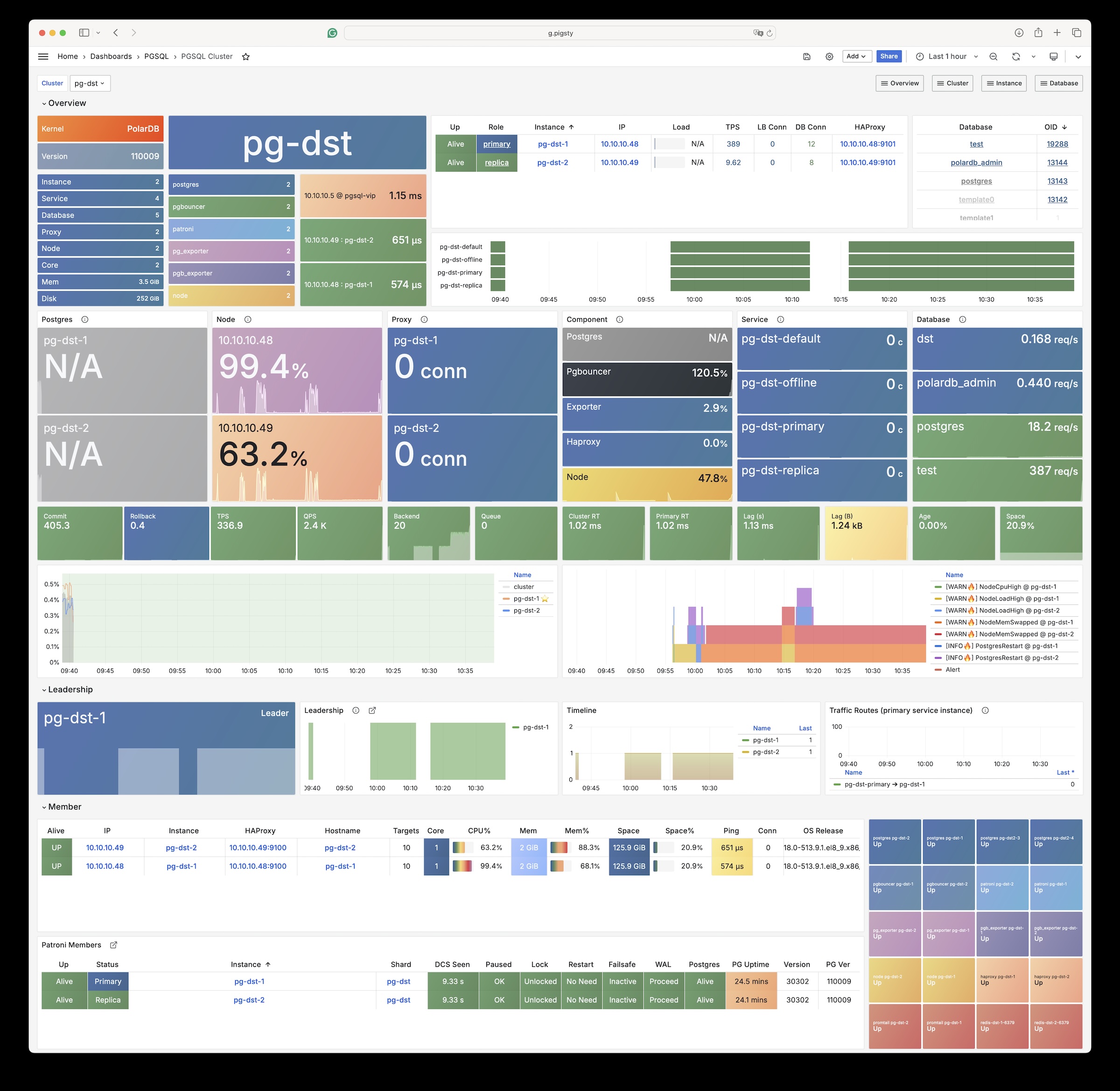
uninstall postgres pkgs during remove? true by default
Tutorials
Tutorials for using/managing PostgreSQL in Pigsty.
Clone an existing PostgreSQL cluster
Create an online standby cluster of existing PostgreSQL cluster
Create a delayed standby cluster of existing PostgreSQL cluster
Monitor an existing postgres instance
Migrate from external PostgreSQL to Pigsty-managed PostgreSQL using logical replication
Use MinIO as centralized pgBackRest backup repo
Use dedicated etcd cluster as PostgreSQL / Patroni DCS
Use dedicated haproxy load balancer cluster to expose PostgreSQL services
Use pg-meta CMDB instead of pigsty.yml as inventory source
Use PostgreSQL as Grafana backend storage
Use PostgreSQL as Prometheus backend storage
1 - Core Concepts
Core concepts and architecture design
2 - Configuration
Choose the appropriate instance and cluster types based on your requirements to configure PostgreSQL database clusters that meet your needs.
Pigsty is a “configuration-driven” PostgreSQL platform: all behaviors come from the combination of inventory files in ~/pigsty/conf/*.yml and PGSQL parameters.
Once you’ve written the configuration, you can replicate a customized cluster with instances, users, databases, access control, extensions, and tuning policies in just a few minutes.
Configuration Entry
Prepare Inventory: Copy a pigsty/conf/*.yml template or write an Ansible Inventory from scratch, placing cluster groups (all.children.<cls>.hosts) and global variables (all.vars) in the same file.
Define Parameters: Override the required PGSQL parameters in the vars block. The override order from global → cluster → host determines the final value.
Apply Configuration: Run ./configure -c <conf> or bin/pgsql-add <cls> and other playbooks to apply the configuration. Pigsty will generate the configuration files needed for Patroni/pgbouncer/pgbackrest based on the parameters.
Pigsty’s default demo inventory conf/pgsql.yml is a minimal example: one pg-meta cluster, global pg_version: 18, and a few business user and database definitions. You can expand with more clusters from this base.
Focus Areas & Documentation Index
Pigsty’s PostgreSQL configuration can be organized from the following dimensions. Subsequent documentation will explain “how to configure” each:
Kernel Version: Select the core version, flavor, and tuning templates using pg_version, pg_mode, pg_packages, pg_extensions, pg_conf, and other parameters.
Users/Roles: Declare system roles, business accounts, password policies, and connection pool attributes in pg_default_roles and pg_users.
Database Objects: Create databases as needed using pg_databases, baseline, schemas, extensions, pool_* fields and automatically integrate with pgbouncer/Grafana.
Access Control (HBA): Maintain host-based authentication policies using pg_default_hba_rules and pg_hba_rules to ensure access boundaries for different roles/networks.
Privilege Model (ACL): Converge object privileges through pg_default_privileges, pg_default_roles, pg_revoke_public parameters, providing an out-of-the-box layered role system.
After understanding these parameters, you can write declarative inventory manifests as “configuration as infrastructure” for any business requirement. Pigsty will handle execution and ensure idempotency.
A Typical Example
The following snippet shows how to control instance topology, kernel version, extensions, users, and databases in the same configuration file:
This configuration is concise and self-describing, consisting only of identity parameters. Note that the Ansible Group name should match pg_cluster.
Use the following command to create this cluster:
bin/pgsql-add pg-test
For demos, development testing, hosting temporary requirements, or performing non-critical analytical tasks, a single database instance may not be a big problem. However, such a single-node cluster has no high availability. When hardware failures occur, you’ll need to use PITR or other recovery methods to ensure the cluster’s RTO/RPO. For this reason, you may consider adding several read-only replicas to the cluster.
Replica
To add a read-only replica instance, you can add a new node to pg-test and set its pg_role to replica.
If the entire cluster doesn’t exist, you can directly create the complete cluster. If the cluster primary has already been initialized, you can add a replica to the existing cluster:
bin/pgsql-add pg-test # initialize the entire cluster at oncebin/pgsql-add pg-test 10.10.10.12 # add replica to existing cluster
When the cluster primary fails, the read-only instance (Replica) can take over the primary’s work with the help of the high availability system. Additionally, read-only instances can be used to execute read-only queries: many businesses have far more read requests than write requests, and most read-only query loads can be handled by replica instances.
Offline
Offline instances are dedicated read-only replicas specifically for serving slow queries, ETL, OLAP traffic, and interactive queries. Slow queries/long transactions have adverse effects on the performance and stability of online business, so it’s best to isolate them from online business.
To add an offline instance, assign it a new instance and set pg_role to offline.
Dedicated offline instances work similarly to common replica instances, but they serve as backup servers in the pg-test-replica service. That is, only when all replica instances are down will the offline and primary instances provide this read-only service.
In many cases, database resources are limited, and using a separate server as an offline instance is not economical. As a compromise, you can select an existing replica instance and mark it with the pg_offline_query flag to indicate it can handle “offline queries”. In this case, this read-only replica will handle both online read-only requests and offline queries. You can use pg_default_hba_rules and pg_hba_rules for additional access control on offline instances.
Sync Standby
When Sync Standby is enabled, PostgreSQL will select one replica as the sync standby, with all other replicas as candidates. The primary database will wait for the standby instance to flush to disk before confirming commits. The standby instance always has the latest data with no replication lag, and primary-standby switchover to the sync standby will have no data loss.
PostgreSQL uses asynchronous streaming replication by default, which may have small replication lag (on the order of 10KB/10ms). When the primary fails, there may be a small data loss window (which can be controlled using pg_rpo), but this is acceptable for most scenarios.
However, in some critical scenarios (e.g., financial transactions), data loss is completely unacceptable, or read replication lag is unacceptable. In such cases, you can use synchronous commit to solve this problem. To enable sync standby mode, you can simply use the crit.yml template in pg_conf.
To enable sync standby on an existing cluster, configure the cluster and enable synchronous_mode:
$ pg edit-config pg-test # run as admin user on admin node+++
-synchronous_mode: false# <--- old value+synchronous_mode: true# <--- new value synchronous_mode_strict: falseApply these changes? [y/N]: y
In this case, the PostgreSQL configuration parameter synchronous_standby_names is automatically managed by Patroni.
One replica will be elected as the sync standby, and its application_name will be written to the PostgreSQL primary configuration file and applied.
Quorum Commit
Quorum Commit provides more powerful control than sync standby: especially when you have multiple replicas, you can set criteria for successful commits, achieving higher/lower consistency levels (and trade-offs with availability).
synchronous_mode:true# ensure synchronous commit is enabledsynchronous_node_count:2# specify "at least" how many replicas must successfully commit
If you want to use more sync replicas, modify the synchronous_node_count value. When the cluster size changes, you should ensure this configuration is still valid to avoid service unavailability.
In this case, the PostgreSQL configuration parameter synchronous_standby_names is automatically managed by Patroni.
Another scenario is using any n replicas to confirm commits. In this case, the configuration is slightly different. For example, if we only need any one replica to confirm commits:
synchronous_mode:quorum # use quorum commitpostgresql:parameters:# modify PostgreSQL's configuration parameter synchronous_standby_names, using `ANY n ()` syntaxsynchronous_standby_names:'ANY 1 (*)'# you can specify a specific replica list or use * to wildcard all replicas.
Example: Enable ANY quorum commit
$ pg edit-config pg-test
+ synchronous_standby_names: 'ANY 1 (*)'# in ANY mode, this parameter is needed- synchronous_node_count: 2# in ANY mode, this parameter is not neededApply these changes? [y/N]: y
After applying, the configuration takes effect, and all standbys become regular replicas in Patroni. However, in pg_stat_replication, you can see sync_state becomes quorum.
Standby Cluster
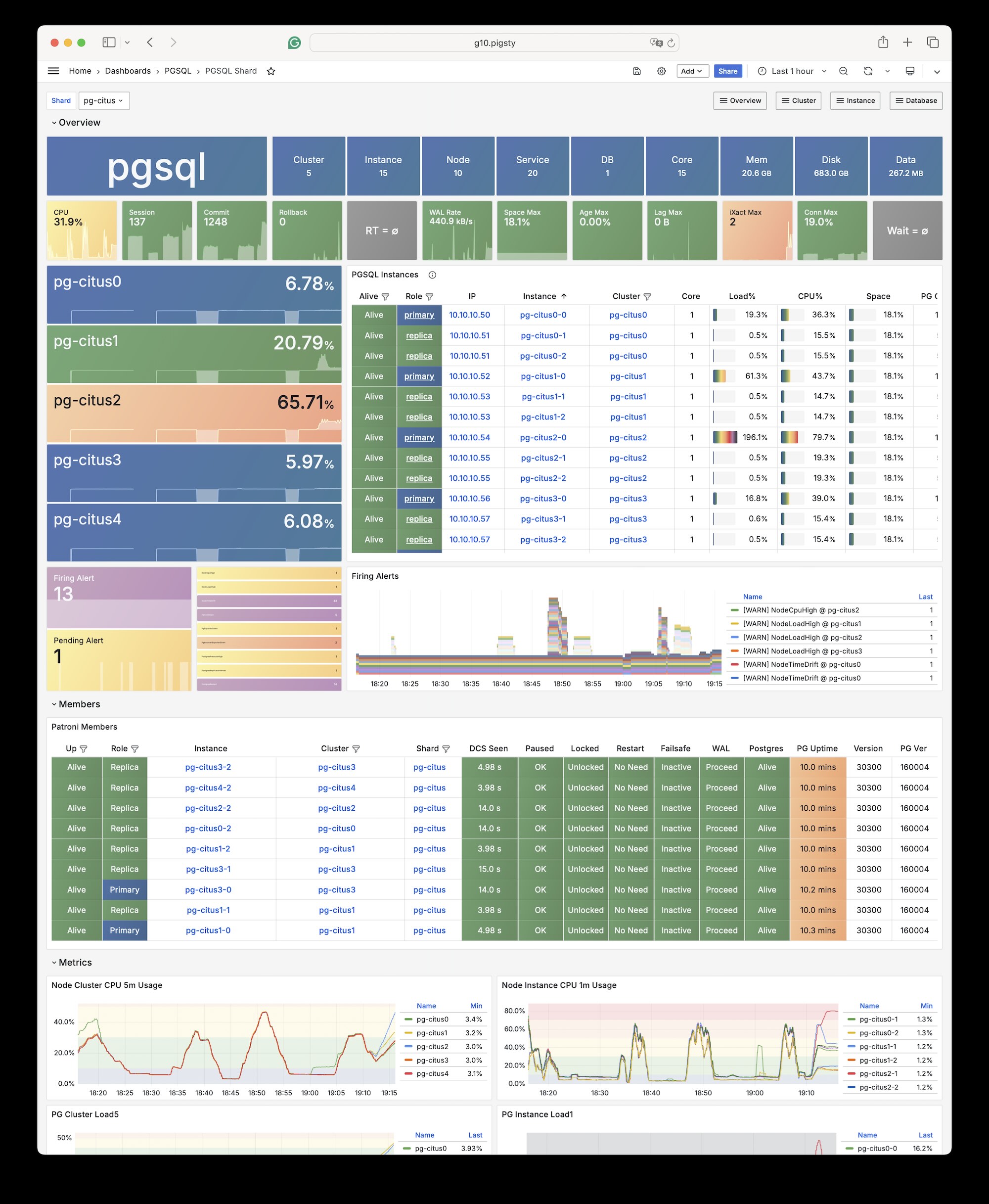
You can clone an existing cluster and create a standby cluster for data migration, horizontal splitting, multi-region deployment, or disaster recovery.
Under normal circumstances, the standby cluster will follow the upstream cluster and keep content synchronized. You can promote the standby cluster to become a truly independent cluster.
The standby cluster definition is basically the same as a normal cluster definition, except that the pg_upstream parameter is additionally defined on the primary. The primary of the standby cluster is called the Standby Leader.
For example, below defines a pg-test cluster and its standby cluster pg-test2. The configuration inventory might look like this:
# pg-test is the original clusterpg-test:hosts:10.10.10.11:{pg_seq: 1, pg_role:primary }vars:{pg_cluster:pg-test }# pg-test2 is the standby cluster of pg-testpg-test2:hosts:10.10.10.12:{pg_seq: 1, pg_role: primary , pg_upstream:10.10.10.11}# <--- pg_upstream defined here10.10.10.13:{pg_seq: 2, pg_role:replica }vars:{pg_cluster:pg-test2 }
The primary node pg-test2-1 of the pg-test2 cluster will be a downstream replica of pg-test and serve as the Standby Leader in the pg-test2 cluster.
Just ensure the pg_upstream parameter is configured on the standby cluster’s primary node to automatically pull backups from the original upstream.
If necessary (e.g., upstream primary-standby switchover/failover), you can change the standby cluster’s replication upstream through cluster configuration.
To do this, simply change standby_cluster.host to the new upstream IP address and apply.
$ pg edit-config pg-test2
standby_cluster:
create_replica_methods:
- basebackup
- host: 10.10.10.13 # <--- old upstream+ host: 10.10.10.12 # <--- new upstream port: 5432 Apply these changes? [y/N]: y
Example: Promote standby cluster
You can promote the standby cluster to an independent cluster at any time, so the cluster can independently handle write requests and diverge from the original cluster.
To do this, you must configure the cluster and completely erase the standby_cluster section, then apply.
$ pg edit-config pg-test2
-standby_cluster:
- create_replica_methods:
- - basebackup
- host: 10.10.10.11
- port: 5432Apply these changes? [y/N]: y
Example: Cascade replication
If you specify pg_upstream on a replica instead of the primary, you can configure cascade replication for the cluster.
When configuring cascade replication, you must use the IP address of an instance in the cluster as the parameter value, otherwise initialization will fail. The replica performs streaming replication from a specific instance rather than the primary.
The instance acting as a WAL relay is called a Bridge Instance. Using a bridge instance can share the burden of sending WAL from the primary. When you have dozens of replicas, using bridge instance cascade replication is a good idea.
A Delayed Cluster is a special type of standby cluster used to quickly recover “accidentally deleted” data.
For example, if you want a cluster named pg-testdelay whose data content is the same as the pg-test cluster from one hour ago:
# pg-test is the original clusterpg-test:hosts:10.10.10.11:{pg_seq: 1, pg_role:primary }vars:{pg_cluster:pg-test }# pg-testdelay is the delayed cluster of pg-testpg-testdelay:hosts:10.10.10.12:{pg_seq: 1, pg_role: primary , pg_upstream: 10.10.10.11, pg_delay:1d }10.10.10.13:{pg_seq: 2, pg_role:replica }vars:{pg_cluster:pg-testdelay }
$ pg edit-config pg-testdelay
standby_cluster:
create_replica_methods:
- basebackup
host: 10.10.10.11
port: 5432+ recovery_min_apply_delay: 1h # <--- add delay duration here, e.g. 1 hourApply these changes? [y/N]: y
When some tuples and tables are accidentally deleted, you can modify this parameter to advance this delayed cluster to an appropriate point in time, read data from it, and quickly fix the original cluster.
Delayed clusters require additional resources, but are much faster than PITR and have much less impact on the system. For very critical clusters, consider setting up delayed clusters.
To define a Citus cluster, you need to specify the following parameters:
pg_mode must be set to citus, not the default pgsql
The shard name pg_shard and shard number pg_group must be defined on each shard cluster
pg_primary_db must be defined to specify the database managed by Patroni.
If you want to use pg_dbsupostgres instead of the default pg_admin_username to execute admin commands, then pg_dbsu_password must be set to a non-empty plaintext password
Additionally, extra hba rules are needed to allow SSL access from localhost and other data nodes. As shown below:
all:children:pg-citus0:# citus shard 0hosts:{10.10.10.10:{pg_seq: 1, pg_role:primary } }vars:{pg_cluster: pg-citus0 , pg_group:0}pg-citus1:# citus shard 1hosts:{10.10.10.11:{pg_seq: 1, pg_role:primary } }vars:{pg_cluster: pg-citus1 , pg_group:1}pg-citus2:# citus shard 2hosts:{10.10.10.12:{pg_seq: 1, pg_role:primary } }vars:{pg_cluster: pg-citus2 , pg_group:2}pg-citus3:# citus shard 3hosts:10.10.10.13:{pg_seq: 1, pg_role:primary }10.10.10.14:{pg_seq: 2, pg_role:replica }vars:{pg_cluster: pg-citus3 , pg_group:3}vars:# global parameters for all Citus clusterspg_mode: citus # pgsql cluster mode must be set to:cituspg_shard: pg-citus # citus horizontal shard name:pg-cituspg_primary_db: meta # citus database name:metapg_dbsu_password:DBUser.Postgres# if using dbsu, need to configure a password for itpg_users:[{name: dbuser_meta ,password: DBUser.Meta ,pgbouncer: true ,roles:[dbrole_admin ] } ]pg_databases:[{name: meta ,extensions:[{name:citus }, { name: postgis }, { name: timescaledb } ] } ]pg_hba_rules:- {user: 'all' ,db: all ,addr: 127.0.0.1/32 ,auth: ssl ,title:'all user ssl access from localhost'}- {user: 'all' ,db: all ,addr: intra ,auth: ssl ,title:'all user ssl access from intranet'}
On the coordinator node, you can create distributed tables and reference tables and query them from any data node. Starting from 11.2, any Citus database node can act as a coordinator.
How to choose the appropriate PostgreSQL kernel and major version.
Choosing a “kernel” in Pigsty means determining the PostgreSQL major version, mode/distribution, packages to install, and tuning templates to load.
Pigsty supports PostgreSQL from version 10 onwards. The current version packages core software for versions 13-18 by default and provides a complete extension set for 17/18. The following content shows how to make these choices through configuration files.
Major Version and Packages
pg_version: Specify the PostgreSQL major version (default 18). Pigsty will automatically map to the correct package name prefix based on the version.
pg_packages: Define the core package set to install, supports using package aliases (default pgsql-main pgsql-common, includes kernel + patroni/pgbouncer/pgbackrest and other common tools).
pg_extensions: List of additional extension packages to install, also supports aliases; defaults to empty meaning only core dependencies are installed.
Effect: Ansible will pull packages corresponding to pg_version=17 during installation, pre-install extensions to the system, and database initialization scripts can then directly CREATE EXTENSION.
Extension support varies across versions in Pigsty’s offline repository: 12/13 only provide core and tier-1 extensions, while 15/17/18 cover all extensions. If an extension is not pre-packaged, it can be added via repo_packages_extra.
Kernel Mode (pg_mode)
pg_mode controls the kernel “flavor” to deploy. Default pgsql indicates standard PostgreSQL. Pigsty currently supports the following modes:
Mode
Scenario
pgsql
Standard PostgreSQL, HA + replication
citus
Citus distributed cluster, requires additional pg_shard / pg_group
gpsql
Greenplum / MatrixDB
mssql
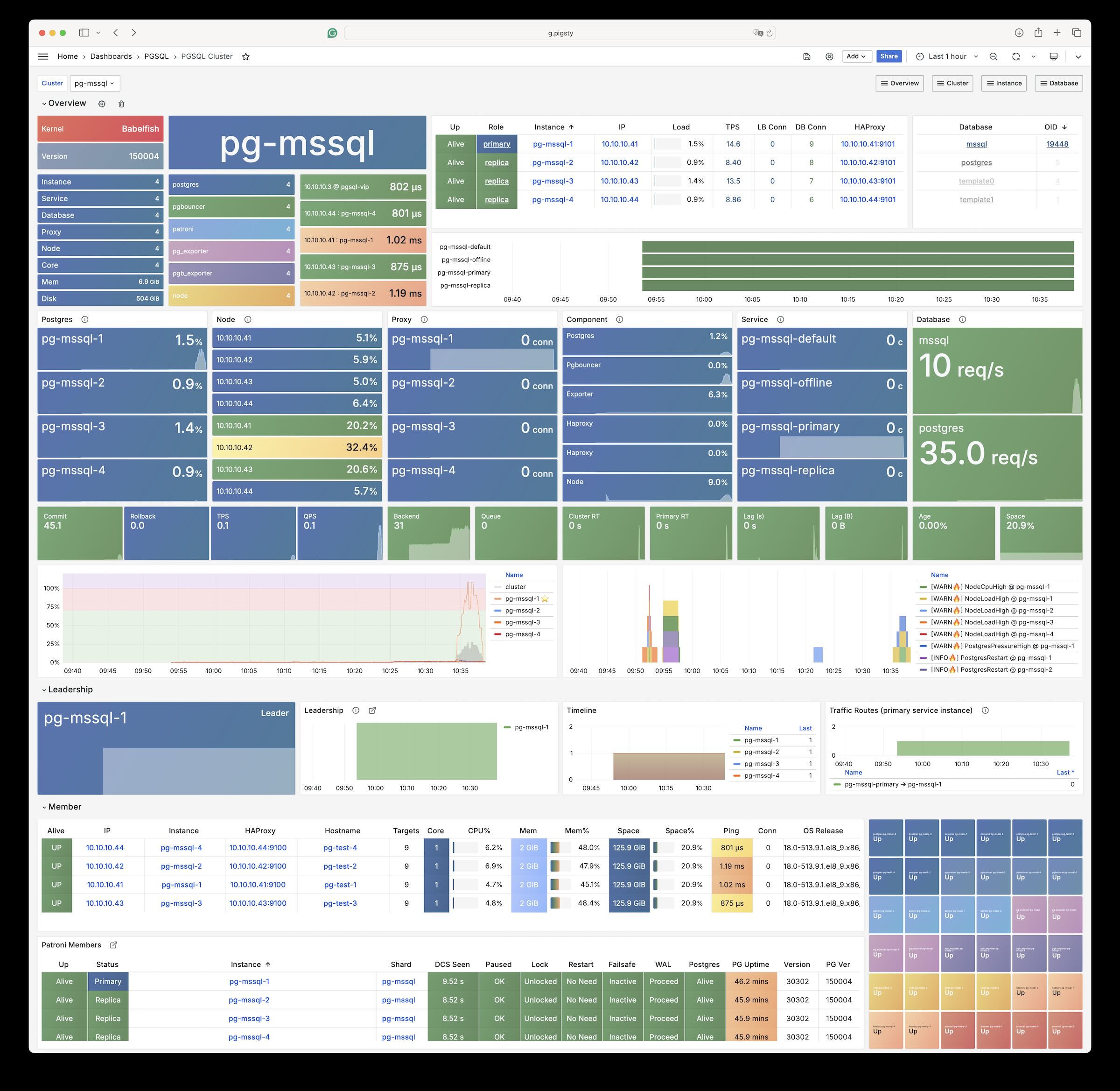
Babelfish for PostgreSQL
mysql
OpenGauss/HaloDB compatible with MySQL protocol
polar
Alibaba PolarDB (based on pg polar distribution)
ivory
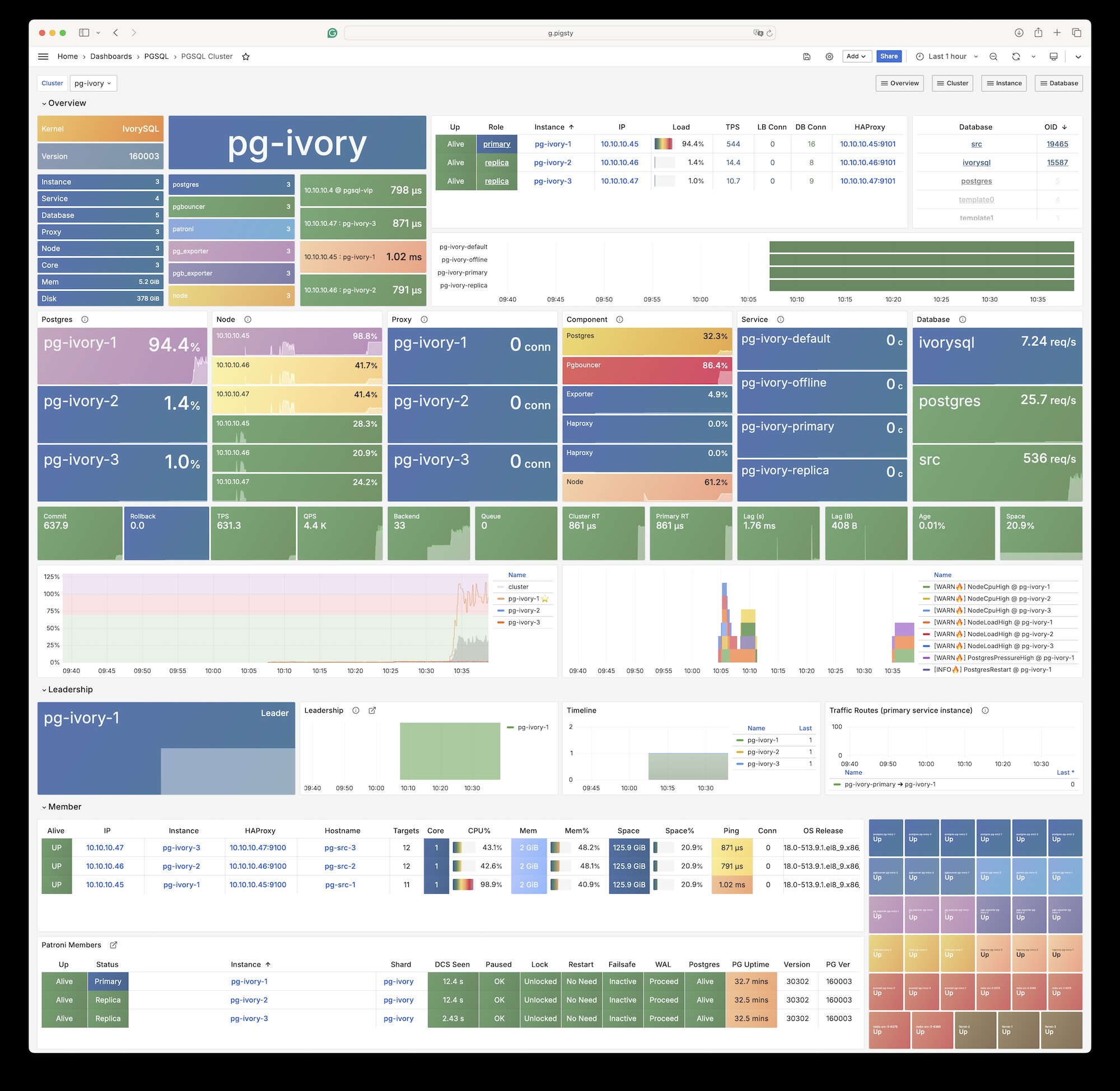
IvorySQL (Oracle-compatible syntax)
oriole
OrioleDB storage engine
oracle
PostgreSQL + ora compatibility (pg_mode: oracle)
After selecting a mode, Pigsty will automatically load corresponding templates, dependency packages, and Patroni configurations. For example, deploying Citus:
Effect: All members will install Citus-related packages, Patroni writes to etcd in shard mode, and automatically CREATE EXTENSION citus in the meta database.
Extensions and Pre-installed Objects
Besides system packages, you can control components automatically loaded after database startup through the following parameters:
pg_libs: List to write to shared_preload_libraries. For example: pg_libs: 'timescaledb, pg_stat_statements, auto_explain'.
pg_default_extensions / pg_default_schemas: Control schemas and extensions pre-created in template1 and postgres by initialization scripts.
pg_parameters: Append ALTER SYSTEM SET for all instances (written to postgresql.auto.conf).
Example: Enable TimescaleDB, pgvector and customize some system parameters.
Effect: During initialization, template1 creates extensions, Patroni’s postgresql.conf injects corresponding parameters, and all business databases inherit these settings.
Tuning Template (pg_conf)
pg_conf points to Patroni templates in roles/pgsql/templates/*.yml. Pigsty includes four built-in general templates:
Template
Applicable Scenario
oltp.yml
Default template, for 4–128 core TP workload
olap.yml
Optimized for analytical scenarios
crit.yml
Emphasizes sync commit/minimal latency, suitable for zero-loss scenarios like finance
Effect: Copy crit.yml as Patroni configuration, overlay pg_parameters written to postgresql.auto.conf, making instances run immediately in synchronous commit mode.
First primary + one replica, using olap.yml tuning.
Install PG18 + RAG common extensions, automatically load pgvector/pgml at system level.
Patroni/pgbouncer/pgbackrest generated by Pigsty, no manual intervention needed.
Replace the above parameters according to business needs to complete all kernel-level customization.
2.3 - Package Alias
Pigsty provides a package alias translation mechanism that shields the differences in binary package details across operating systems, making installation easier.
PostgreSQL package naming conventions vary significantly across different operating systems:
EL systems (RHEL/Rocky/Alma/…) use formats like pgvector_17, postgis36_17*
Debian/Ubuntu systems use formats like postgresql-17-pgvector, postgresql-17-postgis-3
This difference adds cognitive burden to users: you need to remember different package name rules for different systems, and handle the embedding of PostgreSQL version numbers.
Package Alias
Pigsty solves this problem through the Package Alias mechanism: you only need to use unified aliases, and Pigsty will handle all the details:
# Using aliases - simple, unified, cross-platformpg_extensions:[postgis, pgvector, timescaledb ]# Equivalent to actual package names on EL9 + PG17pg_extensions:[postgis36_17*, pgvector_17*, timescaledb-tsl_17* ]# Equivalent to actual package names on Ubuntu 24 + PG17pg_extensions:[postgresql-17-postgis-3, postgresql-17-pgvector, postgresql-17-timescaledb-tsl ]
Alias Translation
Aliases can also group a set of packages as a whole. For example, Pigsty’s default installed packages - the default value of pg_packages is:
pg_packages:# pg packages to be installed, alias can be used- pgsql-main pgsql-common
Pigsty will query the current operating system alias list (assuming el10.x86_64) and translate it to PGSQL kernel, extensions, and toolkits:
Through this approach, Pigsty shields the complexity of packages, allowing users to simply specify the functional components they want.
Which Variables Can Use Aliases?
You can use package aliases in the following four parameters, and the aliases will be automatically converted to actual package names according to the translation process:
repo_packages - Package download parameter: packages to download to local repository
repo_packages_extra - Extension installation parameter: additional packages to download to local repository
Alias List
You can find the alias mapping files for each operating system and architecture in the roles/node_id/vars/ directory of the Pigsty project source code:
User config alias --> Detect OS -->  Find alias mapping table ---> Replace $v placeholder ---> Install actual packages
     ↓                 ↓                   ↓                                   ↓
  postgis          el9.x86_64         postgis36_$v*                   postgis36_17*
  postgis          u24.x86_64         postgresql-$v-postgis-3         postgresql-17-postgis-3
Version Placeholder
Pigsty’s alias system uses $v as a placeholder for the PostgreSQL version number. When you specify a PostgreSQL version using pg_version, all $v in aliases will be replaced with the actual version number.
For example, when pg_version: 17:
Alias Definition (EL)
Expanded Result
postgresql$v*
postgresql17*
pgvector_$v*
pgvector_17*
timescaledb-tsl_$v*
timescaledb-tsl_17*
Alias Definition (Debian/Ubuntu)
Expanded Result
postgresql-$v
postgresql-17
postgresql-$v-pgvector
postgresql-17-pgvector
postgresql-$v-timescaledb-tsl
postgresql-17-timescaledb-tsl
Wildcard Matching
On EL systems, many aliases use the * wildcard to match related subpackages. For example:
postgis36_17* will match postgis36_17, postgis36_17-client, postgis36_17-utils, etc.
postgresql17* will match postgresql17, postgresql17-server, postgresql17-libs, postgresql17-contrib, etc.
This design ensures you don’t need to list each subpackage individually - one alias can install the complete extension.
2.4 - User/Role
User/Role refers to logical objects created by the SQL command CREATE USER/ROLE within a database cluster.
In this context, user refers to logical objects created by the SQL command CREATE USER/ROLE within a database cluster.
In PostgreSQL, users belong directly to the database cluster rather than a specific database. Therefore, when creating business databases and business users, the principle of “users first, databases later” should be followed.
Define Users
Pigsty defines roles and users in database clusters through two config parameters:
pg_users: Define business users and roles at the database cluster level
The former defines roles and users shared across the entire env, while the latter defines business roles and users specific to a single cluster. Both have the same format as arrays of user definition objects.
You can define multiple users/roles. They will be created sequentially: first global, then cluster, and finally by array order. So later users can belong to roles defined earlier.
Here is the business user definition in the default pg-meta cluster in the Pigsty demo env:
pg-meta:hosts:{10.10.10.10:{pg_seq: 1, pg_role:primary } }vars:pg_cluster:pg-metapg_users:- {name: dbuser_meta ,password: DBUser.Meta ,pgbouncer: true ,roles: [dbrole_admin] ,comment:pigsty admin user }- {name: dbuser_view ,password: DBUser.Viewer ,pgbouncer: true ,roles: [dbrole_readonly] ,comment:read-only viewer for meta database }- {name: dbuser_grafana ,password: DBUser.Grafana ,pgbouncer: true ,roles: [dbrole_admin] ,comment:admin user for grafana database }- {name: dbuser_bytebase ,password: DBUser.Bytebase ,pgbouncer: true ,roles: [dbrole_admin] ,comment:admin user for bytebase database }- {name: dbuser_kong ,password: DBUser.Kong ,pgbouncer: true ,roles: [dbrole_admin] ,comment:admin user for kong api gateway }- {name: dbuser_gitea ,password: DBUser.Gitea ,pgbouncer: true ,roles: [dbrole_admin] ,comment:admin user for gitea service }- {name: dbuser_wiki ,password: DBUser.Wiki ,pgbouncer: true ,roles: [dbrole_admin] ,comment:admin user for wiki.js service }- {name: dbuser_noco ,password: DBUser.Noco ,pgbouncer: true ,roles: [dbrole_admin] ,comment:admin user for nocodb service }- {name: dbuser_remove ,state: absent } # use state:absent to delete user
Each user/role definition is an object that may include the following fields, using dbuser_meta user as an example:
- name:dbuser_meta # Required, `name` is the only mandatory fieldstate: create # Optional, user state:create (default), absent (delete)password:DBUser.Meta # Optional, password, can be scram-sha-256 hash or plaintextlogin:true# Optional, can login by defaultsuperuser:false# Optional, default false, is it a superuser?createdb:false# Optional, default false, can create databases?createrole:false# Optional, default false, can create roles?inherit:true# Optional, can this role use inherited privileges by default?replication:false# Optional, default false, can this role perform replication?bypassrls:false# Optional, default false, can bypass row-level security?pgbouncer:true# Optional, default false, add to pgbouncer user list? (prod users should set to true)connlimit:-1# Optional, user connection limit, default -1 disables limitexpire_in:3650# Optional, expire after n days from creation (higher priority than expire_at)expire_at:'2030-12-31'# Optional, expiration date in YYYY-MM-DD format (lower priority than expire_in)comment:pigsty admin user # Optional, description and comment stringroles: [dbrole_admin] # Optional, default roles:dbrole_{admin,readonly,readwrite,offline}parameters:# Optional, role-level params via `ALTER ROLE SET`search_path:public # e.g., set default search_pathpool_mode:transaction # Optional, pgbouncer pool mode, default transactionpool_connlimit:-1# Optional, user-level max pool connections, -1 disables limit
The only required field is name, which should be a valid and unique username in the PostgreSQL cluster.
Username must match regex ^[a-z_][a-z0-9_]{0,62}$ (lowercase letters, digits, underscores, starts with letter or underscore, max 63 chars).
Roles don’t need password, but for login-able business users, a password is usually needed.
password can be plaintext or scram-sha-256 / md5 hash string. Please avoid using plaintext passwords.
Users/roles are created sequentially in array order, so ensure role/group definitions come before their members.
login, superuser, createdb, createrole, inherit, replication, bypassrls are boolean flags.
pgbouncer is disabled by default: to add business users to the pgbouncer user list, you should explicitly set it to true.
Parameter Overview
Field
Category
Type
Mutability
Description
name
Basic
string
Required
Username, must be valid and unique identifier
state
Basic
enum
Optional
User state: create (default), absent
password
Basic
string
Mutable
User password, plaintext or hash
comment
Basic
string
Mutable
User comment/description
login
Privilege
bool
Mutable
Can login, default true
superuser
Privilege
bool
Mutable
Is superuser, default false
createdb
Privilege
bool
Mutable
Can create database, default false
createrole
Privilege
bool
Mutable
Can create role, default false
inherit
Privilege
bool
Mutable
Inherit role privileges, default true
replication
Privilege
bool
Mutable
Can replicate, default false
bypassrls
Privilege
bool
Mutable
Can bypass RLS, default false
connlimit
Privilege
int
Mutable
Connection limit, -1 means no limit
expire_in
Validity
int
Mutable
Expire N days from now (higher priority than expire_at)
expire_at
Validity
string
Mutable
Expiration date, YYYY-MM-DD format
roles
Role
array
Incremental
Roles array, supports string or object format
parameters
Params
object
Mutable
Role-level parameters
pgbouncer
Pool
bool
Mutable
Add to connection pool, default false
pool_mode
Pool
enum
Mutable
Pool mode: transaction (default)
pool_connlimit
Pool
int
Mutable
Pool user max connections
Mutability Notes
Mutability
Meaning
Required
Must be specified
Optional
Optional field with default value
Mutable
Can be modified by re-running playbook
Incremental
Only adds new content, doesn’t remove existing
Basic Parameters
name
Type: string
Mutability: Required
Description: Username, unique identifier within cluster
Username must be a valid PostgreSQL identifier matching regex ^[a-z_][a-z0-9_]{0,62}$:
Starts with lowercase letter or underscore
Contains only lowercase letters, digits, underscores
Object format supports finer-grained role membership control:
- name:dbuser_approles:- dbrole_readwrite # simple string:GRANT role- {name: dbrole_admin, admin:true}# GRANT WITH ADMIN OPTION- {name: pg_monitor, set: false } # PG16+:REVOKE SET OPTION- {name: pg_signal_backend, inherit: false } # PG16+:REVOKE INHERIT OPTION- {name: old_role, state:absent } # REVOKE role membership
Object Format Parameters
Param
Type
Description
name
string
Role name (required)
state
enum
grant (default) or absent/revoke: control membership
admin
bool
true: WITH ADMIN OPTION / false: REVOKE ADMIN
set
bool
PG16+: true: WITH SET TRUE / false: REVOKE SET
inherit
bool
PG16+: true: WITH INHERIT TRUE / false: REVOKE INHERIT
PostgreSQL 16+ New Features
PostgreSQL 16 introduced finer-grained role membership control:
ADMIN OPTION: Allow granting role to other users
SET OPTION: Allow using SET ROLE to switch to this role
INHERIT OPTION: Auto-inherit this role’s privileges
# PostgreSQL 16+ complete example- name:dbuser_approles:# Normal membership- dbrole_readwrite# Can grant dbrole_admin to other users- {name: dbrole_admin, admin:true}# Cannot SET ROLE to pg_monitor (can only inherit privileges)- {name: pg_monitor, set:false}# Don't auto-inherit pg_execute_server_program privileges (need explicit SET ROLE)- {name: pg_execute_server_program, inherit:false}# Revoke old_role membership- {name: old_role, state:absent }
Note: set and inherit options only work in PostgreSQL 16+. On earlier versions they’re ignored with warning comments.
Role-Level Parameters
parameters
Type: object
Mutability: Mutable
Description: Role-level config parameters
Set via ALTER ROLE ... SET, params apply to all sessions for this user.
Use special value DEFAULT (case-insensitive) to reset param to PostgreSQL default:
- name:dbuser_appparameters:work_mem:DEFAULT # reset to PostgreSQL defaultstatement_timeout:'30s'# set new value
Common Role-Level Parameters
Parameter
Description
Example
work_mem
Query work memory
'64MB'
statement_timeout
Statement timeout
'30s'
lock_timeout
Lock wait timeout
'10s'
idle_in_transaction_session_timeout
Idle transaction timeout
'10min'
search_path
Schema search path
'app,public'
log_statement
Log level
'ddl'
temp_file_limit
Temp file size limit
'10GB'
Connection Pool Parameters
These params control user behavior in Pgbouncer connection pool.
pgbouncer
Type: bool
Mutability: Mutable
Default: false
Description: Add user to Pgbouncer user list
Important
For prod users needing connection pool access, you must explicitly set pgbouncer: true.
Default false prevents accidentally exposing internal users to the connection pool.
# Prod user: needs connection pool- name:dbuser_apppassword:DBUser.Apppgbouncer:true# Internal user: no connection pool needed- name:dbuser_internalpassword:DBUser.Internalpgbouncer:false# default, can be omitted
pool_mode
Type: enum
Mutability: Mutable
Values: transaction, session, statement
Default: transaction
Description: User-level pool mode
Mode
Description
Use Case
transaction
Return connection after txn (default)
Most OLTP apps
session
Return connection after session
Apps needing session state
statement
Return connection after statement
Simple stateless queries
# DBA user: session mode (may need SET commands etc.)- name:dbuser_dbapgbouncer:truepool_mode:session# Normal business user: transaction mode- name:dbuser_apppgbouncer:truepool_mode:transaction
pool_connlimit
Type: int
Mutability: Mutable
Default: -1 (no limit)
Description: User-level max pool connections
- name:dbuser_apppgbouncer:truepool_connlimit:50# max 50 pool connections for this user
ACL System
Pigsty has a built-in, out-of-the-box access control / ACL system. You only need to assign these four default roles to business users:
dbrole_readwrite: Global read-write access role (primary business prod accounts should have this)
dbrole_readonly: Global read-only access role (for other businesses needing read-only access)
dbrole_admin: DDL privileges role (business admins, scenarios requiring table creation in apps)
dbrole_offline: Restricted read-only role (can only access offline instances, typically for individual users)
If you want to redesign your own ACL system, consider customizing:
When you create users, Pgbouncer’s user list definition file will be refreshed and take effect via online config reload, without affecting existing connections.
Pgbouncer runs with the same dbsu as PostgreSQL, defaulting to the postgres OS user. You can use the pgb alias to access pgbouncer admin functions using dbsu.
Note that the pgbouncer_auth_query param allows dynamic query for connection pool user auth—a compromise when you’re lazy about managing pool users.
Database refers to logical objects created by the SQL command CREATE DATABASE within a database cluster.
In this context, database refers to logical objects created by the SQL command CREATE DATABASE within a database cluster.
A PostgreSQL server can serve multiple databases simultaneously. In Pigsty, you can define the required databases in the cluster config.
Pigsty modifies and customizes the default template database template1, creating default schemas, installing default extensions, and configuring default privileges. Newly created databases will inherit these settings from template1 by default.
By default, all business databases are added 1:1 to the Pgbouncer connection pool; pg_exporter will automatically discover all business databases through an auto-discovery mechanism and monitor objects within them.
Define Database
Business databases are defined in the cluster parameter pg_databases, which is an array of database definition objects.
Databases in the array are created sequentially in definition order, so databases defined later can use previously defined databases as templates.
Here is the database definition in the default pg-meta cluster in the Pigsty demo env:
Grants admin, owner connection privilege (WITH GRANT OPTION)
When set to false:
Restores PUBLIC CONNECT privilege
- name:secure_dbowner:dbuser_securerevokeconn:true# only specified users can connect
connlimit
Type: int
Mutability: Mutable
Default: -1 (no limit)
Description: Database max connection limit
- name:limited_dbconnlimit:50# max 50 concurrent connections
Initialization Parameters
baseline
Type: string
Mutability: One-time
Description: SQL baseline file path
Specifies SQL file to execute after database creation for initializing table structure, data, etc.
Path is relative to Ansible search path (usually files/ directory)
Only executes on first database creation
Re-executes when using state: recreate
- name:myappbaseline:myapp_init.sql # will search files/myapp_init.sql
schemas
Type: (string | object)[]
Mutability: Incremental
Description: Schema definitions to create
Supports two formats:
schemas:# Simple format: schema name only- app- api# Full format: object definition- name:core # schema name (required)owner:dbuser_app # schema owner (optional)- name:old_schemastate:absent # delete schema
Schema owner: Use owner to specify schema owner, generates AUTHORIZATION clause:
- name:myappowner:dbuser_myappschemas:- name:appowner:dbuser_myapp # schema owner same as database owner- name:auditowner:dbuser_audit # schema owner is different user
Create operations are incremental, uses IF NOT EXISTS
Delete operations use CASCADE, deletes all objects in schema
extensions
Type: object[]
Mutability: Incremental
Description: Extension definitions to install
Supports two formats:
extensions:# Simple format: extension name only- postgis- pg_trgm# Full format: object definition- name:vector # extension name (required)schema:public # install to specified schema (optional)version:'0.5.1'# specify version (optional)state:absent # set absent to uninstall extension (optional)
Uninstall extension: Use state: absent to uninstall:
These params control database behavior in Pgbouncer connection pool.
pgbouncer
Type: bool
Mutability: Mutable
Default: true
Description: Add database to Pgbouncer connection pool
- name:internal_dbpgbouncer:false# not accessed via connection pool
pool_mode
Type: enum
Mutability: Mutable
Values: transaction, session, statement
Default: transaction
Description: Database-level pool mode
Mode
Description
Use Case
transaction
Return connection after txn
Most OLTP apps
session
Return connection after session
Apps needing session state
statement
Return connection after statement
Simple stateless queries
pool_size
Type: int
Mutability: Mutable
Default: 64
Description: Database default pool size
pool_size_min
Type: int
Mutability: Mutable
Default: 0
Description: Minimum pool size, pre-warmed connections
pool_reserve
Type: int
Mutability: Mutable
Default: 32
Description: Reserve connections, extra burst connections available when default pool exhausted
pool_connlimit
Type: int
Mutability: Mutable
Default: 100
Description: Max connections accessing this database via pool
pool_auth_user
Type: string
Mutability: Mutable
Description: Auth query user
Requires pgbouncer_auth_query enabled.
When specified, all connections to this database use this user to query passwords.
Monitoring Parameter
register_datasource
Type: bool
Mutability: Mutable
Default: true
Description: Register to Grafana datasource
Set to false to skip Grafana datasource registration, suitable for temporary databases not needing monitoring.
Template Inheritance
Many params inherit from template database if not explicitly specified. Default template is template1, whose encoding settings are determined by cluster init params:
Newly created databases are forked from template1 by default. This template database is customized during PG_PROVISION phase:
configured with extensions, schemas, and default privileges, so newly created databases also inherit these configs, unless you explicitly use another database as template.
Detailed explanation of PostgreSQL and Pgbouncer Host-Based Authentication (HBA) rules configuration in Pigsty.
HBA (Host-Based Authentication) controls “who can connect to the database from where and how”.
Pigsty manages HBA rules declaratively through pg_default_hba_rules and pg_hba_rules.
Overview
Pigsty renders the following config files during cluster init or HBA refresh:
Role filtering: Rules support role field, auto-filter based on instance’s pg_role
Order sorting: Rules support order field, controls position in final config file
Two syntaxes: Supports alias form (simplified) and raw form (direct HBA text)
Parameter Reference
pg_default_hba_rules
PostgreSQL global default HBA rule list, usually defined in all.vars, provides base access control for all PostgreSQL clusters.
Type: rule[]
Level: Global (G)
Default: See below
pg_default_hba_rules:- {user:'${dbsu}',db: all ,addr: local ,auth: ident ,title: 'dbsu access via local os user ident' ,order:100}- {user:'${dbsu}',db: replication ,addr: local ,auth: ident ,title: 'dbsu replication from local os ident' ,order:150}- {user:'${repl}',db: replication ,addr: localhost ,auth: pwd ,title: 'replicator replication from localhost',order:200}- {user:'${repl}',db: replication ,addr: intra ,auth: pwd ,title: 'replicator replication from intranet' ,order:250}- {user:'${repl}',db: postgres ,addr: intra ,auth: pwd ,title: 'replicator postgres db from intranet' ,order:300}- {user:'${monitor}',db: all ,addr: localhost ,auth: pwd ,title: 'monitor from localhost with password' ,order:350}- {user:'${monitor}',db: all ,addr: infra ,auth: pwd ,title: 'monitor from infra host with password',order:400}- {user:'${admin}',db: all ,addr: infra ,auth: ssl ,title: 'admin @ infra nodes with pwd & ssl' ,order:450}- {user:'${admin}',db: all ,addr: world ,auth: ssl ,title: 'admin @ everywhere with ssl & pwd' ,order:500}- {user: '+dbrole_readonly',db: all ,addr: localhost ,auth: pwd ,title: 'pgbouncer read/write via local socket',order:550}- {user: '+dbrole_readonly',db: all ,addr: intra ,auth: pwd ,title: 'read/write biz user via password' ,order:600}- {user: '+dbrole_offline' ,db: all ,addr: intra ,auth: pwd ,title: 'allow etl offline tasks from intranet',order:650}
pg_hba_rules
PostgreSQL cluster/instance-level additional HBA rules, can be overridden at cluster or instance level, merged with default rules and sorted by order.
Pgbouncer global default HBA rule list, usually defined in all.vars.
Type: rule[]
Level: Global (G)
Default: See below
pgb_default_hba_rules:- {user:'${dbsu}',db: pgbouncer ,addr: local ,auth: peer ,title: 'dbsu local admin access with os ident',order:100}- {user: 'all' ,db: all ,addr: localhost ,auth: pwd ,title: 'allow all user local access with pwd' ,order:150}- {user:'${monitor}',db: pgbouncer ,addr: intra ,auth: pwd ,title: 'monitor access via intranet with pwd' ,order:200}- {user:'${monitor}',db: all ,addr: world ,auth: deny ,title: 'reject all other monitor access addr' ,order:250}- {user:'${admin}',db: all ,addr: intra ,auth: pwd ,title: 'admin access via intranet with pwd' ,order:300}- {user:'${admin}',db: all ,addr: world ,auth: deny ,title: 'reject all other admin access addr' ,order:350}- {user: 'all' ,db: all ,addr: intra ,auth: pwd ,title: 'allow all user intra access with pwd' ,order:400}
The role field in HBA rules controls which instances the rule applies to:
Role
Description
common
Default, applies to all instances
primary
Primary instance only
replica
Replica instance only
offline
Offline instance only (pg_role: offline or pg_offline_query: true)
standby
Standby instance
delayed
Delayed replica instance
Role filtering matches based on instance’s pg_role variable. Non-matching rules are commented out (prefixed with #).
pg_hba_rules:# Only applies on primary- {user: writer, db: all, addr: intra, auth: pwd, role: primary, title:'writer only on primary'}# Only applies on offline instances- {user: '+dbrole_offline', db: all, addr: '172.20.0.0/16', auth: ssl, role: offline, title:'offline dedicated'}
Order Sorting
PostgreSQL HBA is first-match-wins, rule order is critical. Pigsty controls rule rendering order via the order field.
Order Interval Convention
Interval
Usage
0 - 99
User high-priority rules (before all default rules)
100 - 650
Default rule zone (spaced by 50 for easy insertion)
1000+
User rule default (rules without order append to end)
Default Rule Order Assignment
PostgreSQL Default Rules:
Order
Rule Description
100
dbsu local ident
150
dbsu replication local
200
replicator localhost
250
replicator intra replication
300
replicator intra postgres
350
monitor localhost
400
monitor infra
450
admin infra ssl
500
admin world ssl
550
dbrole_readonly localhost
600
dbrole_readonly intra
650
dbrole_offline intra
Pgbouncer Default Rules:
Order
Rule Description
100
dbsu local peer
150
all localhost pwd
200
monitor pgbouncer intra
250
monitor world deny
300
admin intra pwd
350
admin world deny
400
all intra pwd
Sorting Example
pg_hba_rules:# order: 0, before all default rules (blacklist)- {user: all, db: all, addr: '10.1.1.100/32', auth: deny, order: 0, title:'blacklist bad ip'}# order: 120, between dbsu(100) and replicator(200)- {user: auditor, db: all, addr: local, auth: ident, order: 120, title:'auditor access'}# order: 420, between monitor(400) and admin(450)- {user: exporter, db: all, addr: infra, auth: pwd, order: 420, title:'prometheus exporter'}# no order, defaults to 1000, appends after all default rules- {user: app_user, db: app_db, addr: intra, auth: pwd, title:'app user access'}
pg_hba_rules:- title:allow intranet password accessrole:commonrules:- host all all 10.0.0.0/8 scram-sha-256- host all all 172.16.0.0/12 scram-sha-256- host all all 192.168.0.0/16 scram-sha-256
Rendered result:
# allow intranet password access [common]
host all all 10.0.0.0/8 scram-sha-256
host all all 172.16.0.0/12 scram-sha-256
host all all 192.168.0.0/16 scram-sha-256
Default role system and privilege model provided by Pigsty
Access control is determined by the combination of “role system + privilege templates + HBA”. This section focuses on how to declare roles and object privileges through configuration parameters.
Pigsty provides a streamlined ACL model, fully described by the following parameters:
pg_default_roles: System roles and system users.
pg_users: Business users and roles.
pg_default_privileges: Default privileges for objects created by administrators/owners.
pg_revoke_public, pg_default_schemas, pg_default_extensions: Control the default behavior of template1.
After understanding these parameters, you can write fully reproducible privilege configurations.
Default Role System (pg_default_roles)
By default, it includes 4 business roles + 4 system users:
Name
Type
Description
dbrole_readonly
NOLOGIN
Shared by all business, has SELECT/USAGE
dbrole_readwrite
NOLOGIN
Inherits read-only role, with INSERT/UPDATE/DELETE
dbrole_admin
NOLOGIN
Inherits pg_monitor + read-write role, can create objects and triggers
dbrole_offline
NOLOGIN
Restricted read-only role, only allowed to access offline instances
postgres
User
System superuser, same as pg_dbsu
replicator
User
Used for streaming replication and backup, inherits monitoring and read-only privileges
dbuser_dba
User
Primary admin account, also synced to pgbouncer
dbuser_monitor
User
Monitoring account, has pg_monitor privilege, records slow SQL by default
These definitions are in pg_default_roles. They can theoretically be customized, but if you replace names, you must synchronize updates in HBA/ACL/script references.
Example: Add an additional dbrole_etl for offline tasks:
Effect: All users inheriting dbrole_admin automatically have dbrole_etl privileges, can access offline instances and execute ETL.
Default Users and Credential Parameters
System user usernames/passwords are controlled by the following parameters:
Parameter
Default Value
Purpose
pg_dbsu
postgres
Database/system superuser
pg_dbsu_password
Empty string
dbsu password (disabled by default)
pg_replication_username
replicator
Replication username
pg_replication_password
DBUser.Replicator
Replication user password
pg_admin_username
dbuser_dba
Admin username
pg_admin_password
DBUser.DBA
Admin password
pg_monitor_username
dbuser_monitor
Monitoring user
pg_monitor_password
DBUser.Monitor
Monitoring user password
If you modify these parameters, please synchronize updates to the corresponding user definitions in pg_default_roles to avoid role attribute inconsistencies.
Business Roles and Authorization (pg_users)
Business users are declared through pg_users (see User Configuration for detailed fields), where the roles field controls the granted business roles.
Example: Create one read-only and one read-write user:
By inheriting dbrole_* to control access privileges, no need to GRANT for each database separately. Combined with pg_hba_rules, you can distinguish access sources.
For finer-grained ACL, you can use standard GRANT/REVOKE in baseline SQL or subsequent playbooks. Pigsty won’t prevent you from granting additional privileges.
pg_default_privileges will set DEFAULT PRIVILEGE on postgres, dbuser_dba, dbrole_admin (after business admin SET ROLE). The default template is as follows:
pg_default_privileges:- GRANT USAGE ON SCHEMAS TO dbrole_readonly- GRANT SELECT ON TABLES TO dbrole_readonly- GRANT SELECT ON SEQUENCES TO dbrole_readonly- GRANT EXECUTE ON FUNCTIONS TO dbrole_readonly- GRANT USAGE ON SCHEMAS TO dbrole_offline- GRANT SELECT ON TABLES TO dbrole_offline- GRANT SELECT ON SEQUENCES TO dbrole_offline- GRANT EXECUTE ON FUNCTIONS TO dbrole_offline- GRANT INSERT ON TABLES TO dbrole_readwrite- GRANT UPDATE ON TABLES TO dbrole_readwrite- GRANT DELETE ON TABLES TO dbrole_readwrite- GRANT USAGE ON SEQUENCES TO dbrole_readwrite- GRANT UPDATE ON SEQUENCES TO dbrole_readwrite- GRANT TRUNCATE ON TABLES TO dbrole_admin- GRANT REFERENCES ON TABLES TO dbrole_admin- GRANT TRIGGER ON TABLES TO dbrole_admin- GRANT CREATE ON SCHEMAS TO dbrole_admin
As long as objects are created by the above administrators, they will automatically carry the corresponding privileges without manual GRANT. If business needs a custom template, simply replace this array.
Additional notes:
pg_revoke_public defaults to true, meaning automatic revocation of PUBLIC’s CREATE privilege on databases and the public schema.
pg_default_schemas and pg_default_extensions control pre-created schemas/extensions in template1/postgres, typically used for monitoring objects (monitor schema, pg_stat_statements, etc.).
Effect: Partner account only has default read-only privileges after login, and can only access the analytics database via TLS from the specified network segment.
Business administrators can inherit the default DDL privilege template by SET ROLE dbrole_admin or logging in directly as app_admin.
Customize Default Privileges
pg_default_privileges:- GRANT INSERT,UPDATE,DELETE ON TABLES TO dbrole_admin- GRANT SELECT,UPDATE ON SEQUENCES TO dbrole_admin- GRANT SELECT ON TABLES TO reporting_group
After replacing the default template, all objects created by administrators will carry the new privilege definitions, avoiding per-object authorization.
Coordination with Other Components
HBA Rules: Use pg_hba_rules to bind roles with sources (e.g., only allow dbrole_offline to access offline instances).
Pgbouncer: Users with pgbouncer: true will be written to userlist.txt, and pool_mode/pool_connlimit can control connection pool-level quotas.
Grafana/Monitoring: dbuser_monitor’s privileges come from pg_default_roles. If you add a new monitoring user, remember to grant pg_monitor + access to the monitor schema.
Through these parameters, you can version the privilege system along with code, truly achieving “configuration as policy”.
3 - Service/Access
Split read and write operations, route traffic correctly, and reliably deliver PostgreSQL cluster capabilities.
Split read and write operations, route traffic correctly, and reliably deliver PostgreSQL cluster capabilities.
Service is an abstraction: it is the form in which database clusters provide capabilities externally, encapsulating the details of the underlying cluster.
Service is critical for stable access in production environments, showing its value during high availability cluster automatic failovers. Personal users typically don’t need to worry about this concept.
Personal User
The concept of “service” is for production environments. Personal users/single-machine clusters can skip the complexity and directly access the database using instance names/IP addresses.
For example, Pigsty’s default single-node pg-meta.meta database can be directly connected using three different users:
psql postgres://dbuser_dba:[email protected]/meta # Direct connection with DBA superuserpsql postgres://dbuser_meta:[email protected]/meta # Connect with default business admin userpsql postgres://dbuser_view:DBUser.View@pg-meta/meta # Connect with default read-only user via instance domain name
Service Overview
In real-world production environments, we use primary-replica database clusters based on replication. Within the cluster, there is one and only one instance as the leader (primary) that can accept writes.
Other instances (replicas) continuously fetch change logs from the cluster leader to stay synchronized. Additionally, replicas can handle read-only requests, significantly offloading the primary in read-heavy, write-light scenarios.
Therefore, distinguishing between write requests and read-only requests to the cluster is a very common practice.
Moreover, for production environments with high-frequency short connections, we pool requests through connection pooling middleware (Pgbouncer) to reduce the overhead of connection and backend process creation. But for scenarios like ETL and change execution, we need to bypass the connection pool and directly access the database.
At the same time, high-availability clusters may experience failover during failures, which causes a change in the cluster leader. Therefore, high-availability database solutions require write traffic to automatically adapt to cluster leader changes.
These different access requirements (read-write separation, pooling vs. direct connection, automatic adaptation to failovers) ultimately abstract the concept of Service.
Typically, database clusters must provide this most basic service:
Read-write service (primary): Can read and write to the database
For production database clusters, at least these two services should be provided:
Read-write service (primary): Write data: Only carried by the primary.
Read-only service (replica): Read data: Can be carried by replicas, but can also be carried by the primary if no replicas are available
Additionally, depending on specific business scenarios, there might be other services, such as:
Default direct access service (default): Service that allows (admin) users to bypass the connection pool and directly access the database
Offline replica service (offline): Dedicated replica that doesn’t handle online read-only traffic, used for ETL and analytical queries
Synchronous replica service (standby): Read-only service with no replication delay, handled by synchronous standby/primary for read-only queries
Delayed replica service (delayed): Access older data from the same cluster from a certain time ago, handled by delayed replicas
Default Service
Pigsty provides four different services by default for each PostgreSQL database cluster. Here are the default services and their definitions:
Taking the default pg-meta cluster as an example, it provides four default services:
psql postgres://dbuser_meta:DBUser.Meta@pg-meta:5433/meta # pg-meta-primary : production read-write via primary pgbouncer(6432)psql postgres://dbuser_meta:DBUser.Meta@pg-meta:5434/meta # pg-meta-replica : production read-only via replica pgbouncer(6432)psql postgres://dbuser_dba:DBUser.DBA@pg-meta:5436/meta # pg-meta-default : direct connection via primary postgres(5432)psql postgres://dbuser_stats:DBUser.Stats@pg-meta:5438/meta # pg-meta-offline : direct connection via offline postgres(5432)
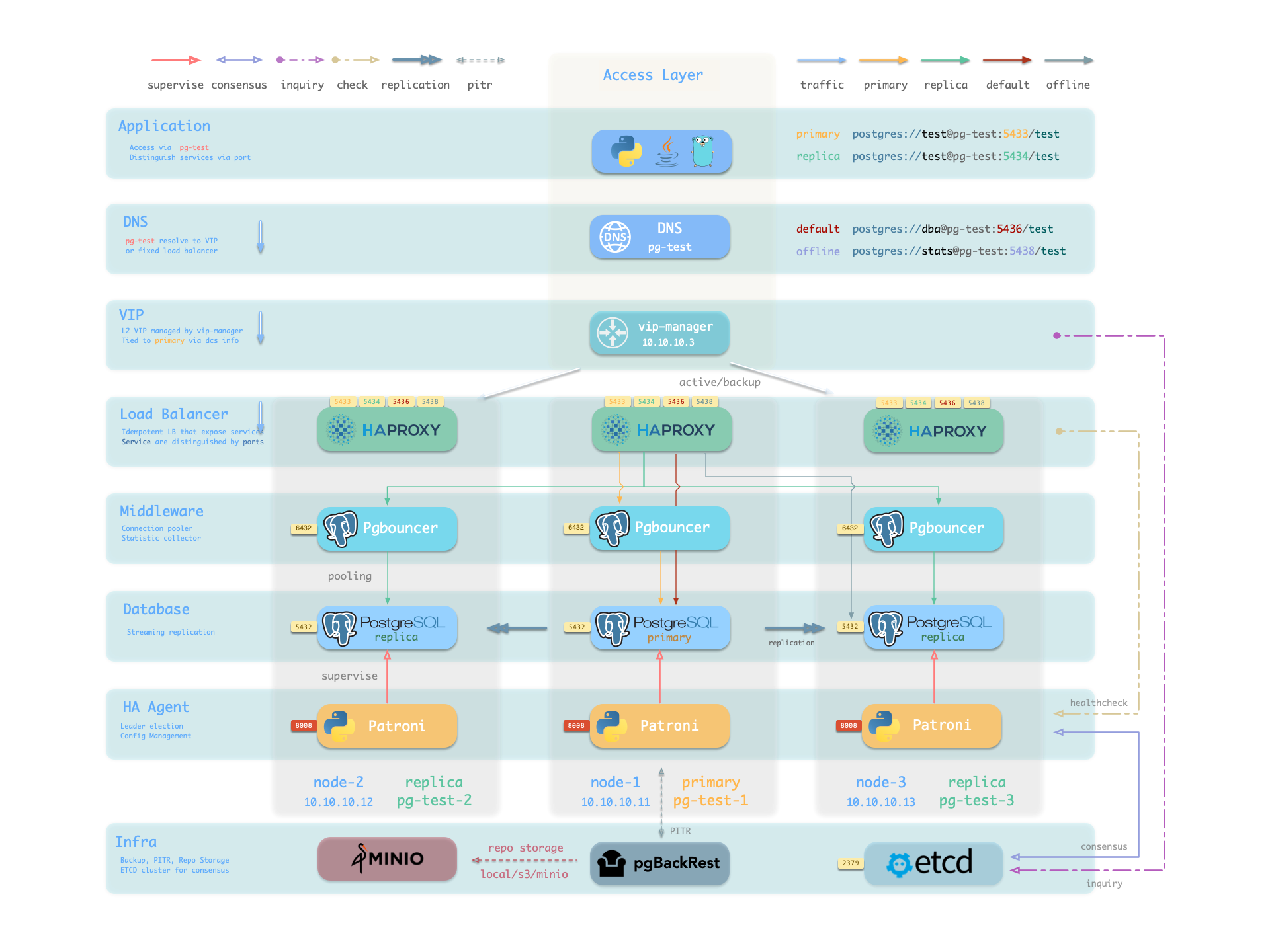
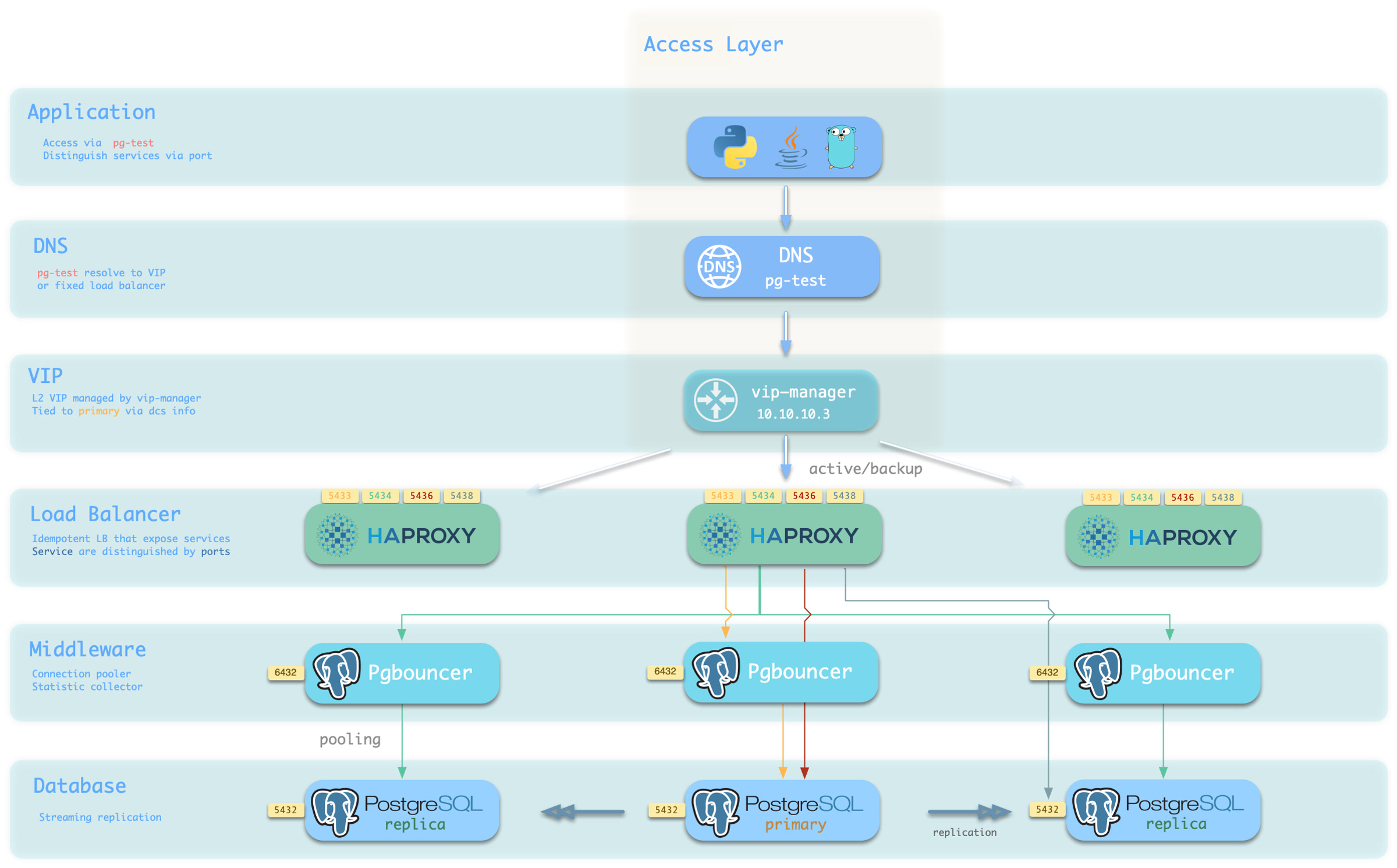
From the sample cluster architecture diagram, you can see how these four services work:
Note that the pg-meta domain name points to the cluster’s L2 VIP, which in turn points to the haproxy load balancer on the cluster primary, responsible for routing traffic to different instances. See Access Service for details.
Service Implementation
In Pigsty, services are implemented using haproxy on nodes, differentiated by different ports on the host node.
Haproxy is enabled by default on every node managed by Pigsty to expose services, and database nodes are no exception.
Although nodes in the cluster have primary-replica distinctions from the database perspective, from the service perspective, all nodes are the same:
This means even if you access a replica node, as long as you use the correct service port, you can still use the primary’s read-write service.
This design seals the complexity: as long as you can access any instance on the PostgreSQL cluster, you can fully access all services.
This design is similar to the NodePort service in Kubernetes. Similarly, in Pigsty, every service includes these two core elements:
Access endpoints exposed via NodePort (port number, from where to access?)
Target instances chosen through Selectors (list of instances, who will handle it?)
The boundary of Pigsty’s service delivery stops at the cluster’s HAProxy. Users can access these load balancers in various ways. Please refer to Access Service.
All services are declared through configuration files. For instance, the default PostgreSQL service is defined by the pg_default_services parameter:
You can also define additional services in pg_services. Both pg_default_services and pg_services are arrays of Service Definition objects.
Define Service
Pigsty allows you to define your own services:
pg_default_services: Services uniformly exposed by all PostgreSQL clusters, with four by default.
pg_services: Additional PostgreSQL services, can be defined at global or cluster level as needed.
haproxy_services: Directly customize HAProxy service content, can be used for other component access
For PostgreSQL clusters, you typically only need to focus on the first two.
Each service definition will generate a new configuration file in the configuration directory of all related HAProxy instances: /etc/haproxy/<svcname>.cfg
Here’s a custom service example standby: When you want to provide a read-only service with no replication delay, you can add this record in pg_services:
- name: standby # required, service name, the actual svc name will be prefixed with `pg_cluster`, e.g:pg-meta-standbyport:5435# required, service exposed port (work as kubernetes service node port mode)ip:"*"# optional, service bind ip address, `*` for all ip by defaultselector:"[]"# required, service member selector, use JMESPath to filter inventorybackup:"[? pg_role == `primary`]"# optional, backup server selector, these instances will only be used when default selector instances are all downdest:default # optional, destination port, default|postgres|pgbouncer|<port_number>, 'default' by default, which means use pg_default_service_dest valuecheck: /sync # optional, health check url path, / by default, here using Patroni API:/sync, only sync standby and primary will return 200 healthy statusmaxconn:5000# optional, max allowed front-end connection, default 5000balance: roundrobin # optional, haproxy load balance algorithm (roundrobin by default, other options:leastconn)options:'inter 3s fastinter 1s downinter 5s rise 3 fall 3 on-marked-down shutdown-sessions slowstart 30s maxconn 3000 maxqueue 128 weight 100'
The service definition above will be translated to a haproxy config file /etc/haproxy/pg-test-standby.conf on the sample three-node pg-test:
#---------------------------------------------------------------------# service: pg-test-standby @ 10.10.10.11:5435#---------------------------------------------------------------------# service instances 10.10.10.11, 10.10.10.13, 10.10.10.12# service backups 10.10.10.11listen pg-test-standbybind *:5435 # <--- Binds to port 5435 on all IP addressesmode tcp # <--- Load balancer works on TCP protocolmaxconn 5000 # <--- Max connections 5000, can be increased as neededbalance roundrobin # <--- Load balance algorithm is rr round-robin, can also use leastconnoption httpchk # <--- Enable HTTP health checkoption http-keep-alive# <--- Keep HTTP connectionshttp-check send meth OPTIONS uri /sync # <---- Using /sync here, Patroni health check API, only sync standby and primary will return 200 healthy statushttp-check expect status 200 # <---- Health check return code 200 means healthydefault-server inter 3s fastinter 1s downinter 5s rise 3 fall 3 on-marked-down shutdown-sessions slowstart 30s maxconn 3000 maxqueue 128 weight 100# servers: All three instances of pg-test cluster are selected by selector: "[]", as there are no filtering conditions, they will all be backend servers for pg-test-replica service. But due to /sync health check, only primary and sync standby can actually serve requests.server pg-test-1 10.10.10.11:6432 check port 8008 weight 100 backup # <----- Only primary satisfies condition pg_role == `primary`, selected by backup selector.server pg-test-3 10.10.10.13:6432 check port 8008 weight 100 # Therefore acts as fallback instance:normally doesn't serve requests, only serves read-only requests after all other replicas are down, maximizing avoidance of read-write service being affected by read-only serviceserver pg-test-2 10.10.10.12:6432 check port 8008 weight 100 #
Here, all three instances of the pg-test cluster are selected by selector: "[]" and rendered into the backend server list of the pg-test-replica service. But due to the /sync health check, the Patroni Rest API only returns HTTP 200 status code representing healthy on the primary and synchronous standby, so only the primary and sync standby can actually serve requests.
Additionally, the primary satisfies the condition pg_role == primary and is selected by the backup selector, marked as a backup server, and will only be used when no other instances (i.e., sync standby) can satisfy the requirement.
Primary Service
The Primary service is probably the most critical service in production environments. It provides read-write capability to the database cluster on port 5433, with the service definition as follows:
The selector parameter selector: "[]" means all cluster members will be included in the Primary service
But only the primary can pass the health check (check: /primary), actually serving Primary service traffic.
The destination parameter dest: default means the Primary service destination is affected by the pg_default_service_dest parameter
The default value of dest is default which will be replaced with the value of pg_default_service_dest, defaulting to pgbouncer.
By default, the Primary service destination is the connection pool on the primary, i.e., the port specified by pgbouncer_port, defaulting to 6432
If the value of pg_default_service_dest is postgres, then the primary service destination will bypass the connection pool and directly use the PostgreSQL database port (pg_port, default value 5432), which is very useful for scenarios where you don’t want to use a connection pool.
Example: pg-test-primary haproxy configuration
listen pg-test-primarybind *:5433 # <--- primary service defaults to port 5433mode tcpmaxconn 5000balance roundrobinoption httpchkoption http-keep-alivehttp-check send meth OPTIONS uri /primary# <--- primary service defaults to using Patroni RestAPI /primary health checkhttp-check expect status 200default-server inter 3s fastinter 1s downinter 5s rise 3 fall 3 on-marked-down shutdown-sessions slowstart 30s maxconn 3000 maxqueue 128 weight 100# serversserver pg-test-1 10.10.10.11:6432 check port 8008 weight 100server pg-test-3 10.10.10.13:6432 check port 8008 weight 100server pg-test-2 10.10.10.12:6432 check port 8008 weight 100
Patroni’s high availability mechanism ensures that at most one instance’s /primary health check is true at any time, so the Primary service will always route traffic to the primary instance.
One benefit of using the Primary service instead of directly connecting to the database is that if the cluster experiences a split-brain situation (for example, killing the primary Patroni with kill -9 without watchdog), Haproxy can still avoid split-brain in this situation, because it only distributes traffic when Patroni is alive and returns primary status.
Replica Service
The Replica service is second only to the Primary service in importance in production environments. It provides read-only capability to the database cluster on port 5434, with the service definition as follows:
The selector parameter selector: "[]" means all cluster members will be included in the Replica service
All instances can pass the health check (check: /read-only), serving Replica service traffic.
Backup selector: [? pg_role == 'primary' || pg_role == 'offline' ] marks the primary and offline replicas as backup servers.
Only when all regular replicas are down will the Replica service be served by the primary or offline replicas.
The destination parameter dest: default means the Replica service destination is also affected by the pg_default_service_dest parameter
The default value of dest is default which will be replaced with the value of pg_default_service_dest, defaulting to pgbouncer, same as the Primary service
By default, the Replica service destination is the connection pool on replicas, i.e., the port specified by pgbouncer_port, defaulting to 6432
Example: pg-test-replica haproxy configuration
listen pg-test-replicabind *:5434mode tcpmaxconn 5000balance roundrobinoption httpchkoption http-keep-alivehttp-check send meth OPTIONS uri /read-onlyhttp-check expect status 200default-server inter 3s fastinter 1s downinter 5s rise 3 fall 3 on-marked-down shutdown-sessions slowstart 30s maxconn 3000 maxqueue 128 weight 100# serversserver pg-test-1 10.10.10.11:6432 check port 8008 weight 100 backupserver pg-test-3 10.10.10.13:6432 check port 8008 weight 100server pg-test-2 10.10.10.12:6432 check port 8008 weight 100
The Replica service is very flexible: If there are living dedicated Replica instances, it will prioritize using these instances to serve read-only requests. Only when all replica instances are down will the primary serve as a fallback for read-only requests. For the common one-primary-one-replica two-node cluster: use the replica as long as it’s alive, use the primary only when the replica is down.
Additionally, unless all dedicated read-only instances are down, the Replica service will not use dedicated Offline instances, thus avoiding mixing online fast queries with offline slow queries and their mutual interference.
Default Service
The Default service provides service on port 5436, and it’s a variant of the Primary service.
The Default service always bypasses the connection pool and directly connects to PostgreSQL on the primary, which is useful for admin connections, ETL writes, CDC change data capture, etc.
If pg_default_service_dest is changed to postgres, then the Default service is completely equivalent to the Primary service except for port and name. In this case, you can consider removing Default from default services.
Example: pg-test-default haproxy configuration
listen pg-test-defaultbind *:5436 # <--- Except for listening port/target port and service name, other configurations are the same as primary servicemode tcpmaxconn 5000balance roundrobinoption httpchkoption http-keep-alivehttp-check send meth OPTIONS uri /primaryhttp-check expect status 200default-server inter 3s fastinter 1s downinter 5s rise 3 fall 3 on-marked-down shutdown-sessions slowstart 30s maxconn 3000 maxqueue 128 weight 100# serversserver pg-test-1 10.10.10.11:5432 check port 8008 weight 100server pg-test-3 10.10.10.13:5432 check port 8008 weight 100server pg-test-2 10.10.10.12:5432 check port 8008 weight 100
Offline Service
The Offline service provides service on port 5438, and it also bypasses the connection pool to directly access PostgreSQL database, typically used for slow queries/analytical queries/ETL reads/personal user interactive queries, with service definition as follows:
The selector parameter filters two types of instances from the cluster: offline replicas with pg_role = offline, or regular read-only instances marked with pg_offline_query = true
The main difference between dedicated offline replicas and marked regular replicas is: the former doesn’t serve Replica service requests by default, avoiding mixing fast and slow queries, while the latter does serve by default.
The backup selector parameter filters one type of instance from the cluster: regular replicas without the offline mark, which means if offline instances or marked regular replicas are down, other regular replicas can be used to serve Offline service.
Health check /replica only returns 200 for replicas, primary returns error, so Offline service will never distribute traffic to the primary instance, even if only the primary remains in the cluster.
At the same time, the primary instance is neither selected by the selector nor by the backup selector, so it will never serve Offline service. Therefore, Offline service can always avoid users accessing the primary, thus avoiding impact on the primary.
Example: pg-test-offline haproxy configuration
listen pg-test-offlinebind *:5438mode tcpmaxconn 5000balance roundrobinoption httpchkoption http-keep-alivehttp-check send meth OPTIONS uri /replicahttp-check expect status 200default-server inter 3s fastinter 1s downinter 5s rise 3 fall 3 on-marked-down shutdown-sessions slowstart 30s maxconn 3000 maxqueue 128 weight 100# serversserver pg-test-3 10.10.10.13:5432 check port 8008 weight 100server pg-test-2 10.10.10.12:5432 check port 8008 weight 100 backup
The Offline service provides restricted read-only service, typically used for two types of queries: interactive queries (personal users), slow queries and long transactions (analytics/ETL).
The Offline service requires extra maintenance care: When the cluster undergoes primary-replica switchover or automatic failover, the instance roles will change, but Haproxy configuration won’t automatically change. For clusters with multiple replicas, this is usually not a problem.
However, for streamlined small clusters with one-primary-one-replica where the replica runs Offline queries, primary-replica switchover means the replica becomes primary (health check fails), and the original primary becomes replica (not in Offline backend list), so no instance can serve Offline service, requiring manual reload service to make changes effective.
If your business model is relatively simple, you can consider removing Default service and Offline service, using Primary service and Replica service to directly connect to the database.
Reload Service
When cluster membership changes, such as adding/removing replicas, switchover/failover, or adjusting relative weights, you need to reload service to make the changes take effect.
bin/pgsql-svc <cls> [ip...]# reload service for lb cluster or lb instance# ./pgsql.yml -t pg_service # the actual ansible task to reload service
Access Service
The boundary of Pigsty’s service delivery stops at the cluster’s HAProxy. Users can access these load balancers in various ways.
The typical approach is to use DNS or VIP access, binding to all or any number of load balancers in the cluster.
You can use different host & port combinations, which provide PostgreSQL services in different ways.
Host
Type
Example
Description
Cluster Domain Name
pg-test
Access via cluster domain name (resolved by dnsmasq @ infra nodes)
Cluster VIP Address
10.10.10.3
Access via L2 VIP address managed by vip-manager, bound to primary
Instance Hostname
pg-test-1
Access via any instance hostname (resolved by dnsmasq @ infra nodes)
Instance IP Address
10.10.10.11
Access any instance IP address
Port
Pigsty uses different ports to distinguish pg services
Port
Service
Type
Description
5432
postgres
database
Direct access to postgres server
6432
pgbouncer
middleware
Go through connection pool middleware before postgres
5433
primary
service
Access primary pgbouncer (or postgres)
5434
replica
service
Access replica pgbouncer (or postgres)
5436
default
service
Access primary postgres
5438
offline
service
Access offline postgres
Combinations
# Access via cluster domainpostgres://test@pg-test:5432/test # DNS -> L2 VIP -> primary direct connectionpostgres://test@pg-test:6432/test # DNS -> L2 VIP -> primary connection pool -> primarypostgres://test@pg-test:5433/test # DNS -> L2 VIP -> HAProxy -> Primary Connection Pool -> Primarypostgres://test@pg-test:5434/test # DNS -> L2 VIP -> HAProxy -> Replica Connection Pool -> Replicapostgres://dbuser_dba@pg-test:5436/test # DNS -> L2 VIP -> HAProxy -> Primary direct connection (for Admin)postgres://dbuser_stats@pg-test:5438/test # DNS -> L2 VIP -> HAProxy -> offline direct connection (for ETL/personal queries)# Direct access via cluster VIPpostgres://[email protected]:5432/test # L2 VIP -> Primary direct accesspostgres://[email protected]:6432/test # L2 VIP -> Primary Connection Pool -> Primarypostgres://[email protected]:5433/test # L2 VIP -> HAProxy -> Primary Connection Pool -> Primarypostgres://[email protected]:5434/test # L2 VIP -> HAProxy -> Replica Connection Pool -> Replicapostgres://[email protected]:5436/test # L2 VIP -> HAProxy -> Primary direct connection (for Admin)postgres://[email protected]::5438/test # L2 VIP -> HAProxy -> offline direct connect (for ETL/personal queries)# Specify any cluster instance name directlypostgres://test@pg-test-1:5432/test # DNS -> Database Instance Direct Connect (singleton access)postgres://test@pg-test-1:6432/test # DNS -> connection pool -> databasepostgres://test@pg-test-1:5433/test # DNS -> HAProxy -> connection pool -> database read/writepostgres://test@pg-test-1:5434/test # DNS -> HAProxy -> connection pool -> database read-onlypostgres://dbuser_dba@pg-test-1:5436/test # DNS -> HAProxy -> database direct connectpostgres://dbuser_stats@pg-test-1:5438/test # DNS -> HAProxy -> database offline read/write# Directly specify any cluster instance IP accesspostgres://[email protected]:5432/test # Database instance direct connection (directly specify instance, no automatic traffic distribution)postgres://[email protected]:6432/test # Connection Pool -> Databasepostgres://[email protected]:5433/test # HAProxy -> connection pool -> database read/writepostgres://[email protected]:5434/test # HAProxy -> connection pool -> database read-onlypostgres://[email protected]:5436/test # HAProxy -> Database Direct Connectionspostgres://[email protected]:5438/test # HAProxy -> database offline read-write# Smart client automatic read/write separationpostgres://[email protected]:6432,10.10.10.12:6432,10.10.10.13:6432/test?target_session_attrs=primary
postgres://[email protected]:6432,10.10.10.12:6432,10.10.10.13:6432/test?target_session_attrs=prefer-standby
Override Service
You can override the default service configuration in several ways. A common requirement is to have Primary service and Replica service bypass Pgbouncer connection pool and directly access PostgreSQL database.
To achieve this, you can change pg_default_service_dest to postgres, so all services with svc.dest='default' in the service definition will use postgres instead of the default pgbouncer as the target.
If you don’t need to distinguish between personal interactive queries and analytics/ETL slow queries, you can consider removing the Offline service from the default service list pg_default_services.
If you don’t need read-only replicas to share online read-only traffic, you can also remove Replica service from the default service list.
Delegate Service
Pigsty exposes PostgreSQL services with haproxy on nodes. All haproxy instances in the cluster are configured with the same service definition.
However, you can delegate pg service to a specific node group (e.g., dedicated haproxy lb cluster) rather than haproxy on PostgreSQL cluster members.
For example, this configuration will expose pg cluster primary service on haproxy node group proxy with port 10013.
pg_service_provider:proxy # use load balancer on group `proxy` with port 10013pg_default_services:[{name: primary ,port: 10013 ,dest: postgres ,check: /primary ,selector:"[]"}]
It’s user’s responsibility to make sure each delegate service port is unique among the proxy cluster.
A dedicated load balancer cluster example is provided in the 43-node production environment simulation sandbox: prod.yml
4 - Access Control
Default role system and privilege model provided by Pigsty
Access control is crucial, yet many users struggle to implement it properly. Therefore, Pigsty provides a streamlined, battery-included access control model to provide a safety net for your cluster security.
Read-Only (dbrole_readonly): Role for global read-only access. If other business applications need read-only access to this database, they can use this role.
Read-Write (dbrole_readwrite): Role for global read-write access, the primary business production account should have database read-write privileges.
Admin (dbrole_admin): Role with DDL privileges, typically used for business administrators or scenarios requiring table creation in applications (such as various business software).
Offline (dbrole_offline): Restricted read-only access role (can only access offline instances, typically for personal users and ETL tool accounts).
Default roles are defined in pg_default_roles. Unless you really know what you’re doing, it’s recommended not to change the default role names.
- {name: dbrole_readonly , login: false , comment:role for global read-only access } # production read-only role- {name: dbrole_offline , login: false , comment:role for restricted read-only access (offline instance) } # restricted read-only role- {name: dbrole_readwrite , login: false , roles: [dbrole_readonly], comment:role for global read-write access } # production read-write role- {name: dbrole_admin , login: false , roles: [pg_monitor, dbrole_readwrite] , comment:role for object creation }# production DDL change role
Default Users
Pigsty also has four default users (system users):
Superuser (postgres), the owner and creator of the cluster, same name as the OS dbsu.
Replication user (replicator), the system user used for primary-replica replication.
Monitor user (dbuser_monitor), a user used to monitor database and connection pool metrics.
Admin user (dbuser_dba), the admin user who performs daily operations and database changes.
The usernames/passwords for these 4 default users are defined through 4 pairs of dedicated parameters, referenced in many places:
pg_dbsu: OS dbsu name, defaults to postgres, better not to change it
pg_dbsu_password: dbsu password, empty string by default means no password is set for dbsu, best not to set it.
Remember to change these passwords in production deployment! Do not use the default values!
pg_dbsu:postgres # database superuser name, better not to change this username.pg_dbsu_password:''# database superuser password, it's recommended to leave this empty! Disable dbsu password login.pg_replication_username:replicator # system replication usernamepg_replication_password:DBUser.Replicator # system replication password, must change this password!pg_monitor_username:dbuser_monitor # system monitor usernamepg_monitor_password:DBUser.Monitor # system monitor password, must change this password!pg_admin_username:dbuser_dba # system admin usernamepg_admin_password:DBUser.DBA # system admin password, must change this password!
Pigsty has a battery-included privilege model that works with default roles.
All users have access to all schemas.
Read-Only users (dbrole_readonly) can read from all tables. (SELECT, EXECUTE)
Read-Write users (dbrole_readwrite) can write to all tables and run DML. (INSERT, UPDATE, DELETE).
Admin users (dbrole_admin) can create objects and run DDL (CREATE, USAGE, TRUNCATE, REFERENCES, TRIGGER).
Offline users (dbrole_offline) are similar to read-only users but with restricted access, only allowed to access offline instances (pg_role = 'offline' or pg_offline_query = true)
Objects created by admin users will have correct privileges.
Default privileges are configured on all databases, including template databases.
Database connect privileges are managed by database definitions.
The CREATE privilege on database and public schema is revoked from PUBLIC by default.
Object Privileges
Default privileges for newly created objects in the database are controlled by the parameter pg_default_privileges:
- GRANT USAGE ON SCHEMAS TO dbrole_readonly- GRANT SELECT ON TABLES TO dbrole_readonly- GRANT SELECT ON SEQUENCES TO dbrole_readonly- GRANT EXECUTE ON FUNCTIONS TO dbrole_readonly- GRANT USAGE ON SCHEMAS TO dbrole_offline- GRANT SELECT ON TABLES TO dbrole_offline- GRANT SELECT ON SEQUENCES TO dbrole_offline- GRANT EXECUTE ON FUNCTIONS TO dbrole_offline- GRANT INSERT ON TABLES TO dbrole_readwrite- GRANT UPDATE ON TABLES TO dbrole_readwrite- GRANT DELETE ON TABLES TO dbrole_readwrite- GRANT USAGE ON SEQUENCES TO dbrole_readwrite- GRANT UPDATE ON SEQUENCES TO dbrole_readwrite- GRANT TRUNCATE ON TABLES TO dbrole_admin- GRANT REFERENCES ON TABLES TO dbrole_admin- GRANT TRIGGER ON TABLES TO dbrole_admin- GRANT CREATE ON SCHEMAS TO dbrole_admin
Objects newly created by admin users will have the above privileges by default. Use \ddp+ to view these default privileges:
Type
Access privileges
function
=X
dbrole_readonly=X
dbrole_offline=X
dbrole_admin=X
schema
dbrole_readonly=U
dbrole_offline=U
dbrole_admin=UC
sequence
dbrole_readonly=r
dbrole_offline=r
dbrole_readwrite=wU
dbrole_admin=rwU
table
dbrole_readonly=r
dbrole_offline=r
dbrole_readwrite=awd
dbrole_admin=arwdDxt
Default Privileges
ALTER DEFAULT PRIVILEGES allows you to set the privileges that will be applied to objects created in the future. It does not affect privileges assigned to already-existing objects, nor objects created by non-admin users.
In Pigsty, default privileges are defined for three roles:
{%forprivinpg_default_privileges%}ALTERDEFAULTPRIVILEGESFORROLE{{pg_dbsu}}{{priv}};{%endfor%}{%forprivinpg_default_privileges%}ALTERDEFAULTPRIVILEGESFORROLE{{pg_admin_username}}{{priv}};{%endfor%}-- For other business administrators, they should execute SET ROLE dbrole_admin before running DDL to use the corresponding default privilege configuration.
{%forprivinpg_default_privileges%}ALTERDEFAULTPRIVILEGESFORROLE"dbrole_admin"{{priv}};{%endfor%}
These contents will be used by the PG cluster initialization template pg-init-template.sql, rendered and output to /pg/tmp/pg-init-template.sql during cluster initialization.
This command will be executed on template1 and postgres databases, and newly created databases will inherit these default privilege configurations through template template1.
That is to say, to maintain correct object privileges, you must run DDL with admin users, which could be:
Business admin users granted with dbrole_admin role (switch to dbrole_admin identity via SET ROLE)
It’s wise to use postgres as the global object owner. If you wish to create objects with business admin user, you must use SET ROLE dbrole_admin before running DDL to maintain correct privileges.
Of course, you can also explicitly grant default privileges to business admins in the database with ALTER DEFAULT PRIVILEGE FOR ROLE <some_biz_admin> XXX.
There are 3 database-level privileges: CONNECT, CREATE, TEMP, and a special ‘privilege’: OWNERSHIP.
- name:meta # required, `name` is the only mandatory field in database definitionowner:postgres # optional, database owner, defaults to postgresallowconn:true# optional, allow connection, true by default. false will completely disable connection to this databaserevokeconn:false# optional, revoke public connection privilege. false by default, when set to true, CONNECT privilege will be revoked from users other than owner and admin
If owner parameter exists, it will be used as the database owner instead of the default {{ pg_dbsu }} (usually postgres)
If revokeconn is false, all users have the database’s CONNECT privilege, this is the default behavior.
If revokeconn is explicitly set to true:
The database’s CONNECT privilege will be revoked from PUBLIC: ordinary users cannot connect to this database
CONNECT privilege will be explicitly granted to {{ pg_replication_username }}, {{ pg_monitor_username }} and {{ pg_admin_username }}
CONNECT privilege will be granted to the database owner with GRANT OPTION, the database owner can then grant connection privileges to other users.
The revokeconn option can be used to isolate cross-database access within the same cluster. You can create different business users as owners for each database and set the revokeconn option for them.
For security considerations, Pigsty revokes the CREATE privilege on database from PUBLIC by default, and this has been the default behavior since PostgreSQL 15.
The database owner can always adjust CREATE privileges as needed based on actual requirements.
5 - Administration
Database administration and operation tasks
6 - Administration
Standard Operating Procedures (SOP) for database administration tasks
How to maintain existing PostgreSQL clusters with Pigsty?
This section provides standard operating procedures (SOP) for common PostgreSQL administration tasks:
SOP: Standard operating procedures for creating/removing clusters and instances, backup & restore, rolling upgrades, etc.
Failure: Common failure troubleshooting strategies and handling methods, such as disk exhaustion, connection exhaustion, XID wraparound, etc.
Drop: Emergency procedures for handling accidental data deletion, table drops, and database drops
Maintain: Maintenance tasks including regular inspections, post-failover cleanup, bloat management, VACUUM FREEZE, etc.
Tuning: Automatic optimization strategies and adjustment methods for memory, CPU, storage parameters, etc.
6.1 - Troubleshooting
Common failures and analysis troubleshooting approaches
This document lists potential failures in PostgreSQL and Pigsty, as well as SOPs for locating, handling, and analyzing issues.
Disk Space Exhausted
Disk space exhaustion is the most common type of failure.
Symptoms
When the disk space where the database resides is exhausted, PostgreSQL will not work normally and may exhibit the following symptoms: database logs repeatedly report “no space left on device” errors, new data cannot be written, and PostgreSQL may even trigger a PANIC and force shutdown.
Pigsty includes a NodeFsSpaceFull alert rule that triggers when filesystem available space is less than 10%.
Use the monitoring system’s NODE Instance panel to review the FS metrics panel to locate the issue.
Diagnosis
You can also log into the database node and use df -h to view the usage of each mounted partition to determine which partition is full.
For database nodes, focus on checking the following directories and their sizes to determine which category of files has filled up the space:
Data directory (/pg/data/base): Stores data files for tables and indexes; pay attention to heavy writes and temporary files
WAL directory (e.g., pg/data/pg_wal): Stores PG WAL; WAL accumulation/replication slot retention is a common cause of disk exhaustion.
Database log directory (e.g., pg/log): If PG logs are not rotated in time and large amounts of errors are written, they may also consume significant space.
Local backup directory (e.g., data/backups): When using pgBackRest or similar tools to save backups locally, this may also fill up the disk.
If the issue occurs on the Pigsty admin node or monitoring node, also consider:
Monitoring data: VictoriaMetrics time-series metrics and VictoriaLogs log storage both consume disk space; check retention policies.
Object storage data: Pigsty’s integrated MinIO object storage may be used for PG backup storage.
After identifying the directory consuming the most space, you can further use du -sh <directory> to drill down and find specific large files or subdirectories.
Resolution
Disk exhaustion is an emergency issue requiring immediate action to free up space and ensure the database continues to operate.
When the data disk is not separated from the system disk, a full disk may prevent shell commands from executing. In this case, you can delete the /pg/dummy placeholder file to free up a small amount of emergency space so shell commands can work again.
If the database has crashed due to pg_wal filling up, you need to restart the database service after clearing space and carefully check data integrity.
Transaction ID Wraparound
PostgreSQL cyclically uses 32-bit transaction IDs (XIDs), and when exhausted, a “transaction ID wraparound” failure occurs (XID Wraparound).
Symptoms
The typical sign in the first phase is when the age saturation in the PGSQL Persist - Age Usage panel enters the warning zone.
Database logs begin to show messages like: WARNING: database "postgres" must be vacuumed within xxxxxxxx transactions.
If the problem continues to worsen, PostgreSQL enters protection mode: when remaining transaction IDs drop to about 1 million, the database switches to read-only mode; when reaching the limit of about 2.1 billion (2^31), it refuses any new transactions and forces the server to shut down to avoid data corruption.
Diagnosis
PostgreSQL and Pigsty enable automatic garbage collection (AutoVacuum) by default, so the occurrence of this type of failure usually has deeper root causes.
Common causes include: very long transactions (SAGE), misconfigured Autovacuum, replication slot blockage, insufficient resources, storage engine/extension bugs, disk bad blocks.
First identify the database with the highest age, then use the Pigsty PGCAT Database - Tables panel to confirm the age distribution of tables.
Also review the database error logs, which usually contain clues to locate the root cause.
Resolution
Immediately freeze old transactions: If the database has not yet entered read-only protection mode, immediately execute a manual VACUUM FREEZE on the affected database. You can start by freezing the most severely aged tables one by one rather than doing the entire database at once to accelerate the effect. Connect to the database as a superuser and run VACUUM FREEZE table_name; on tables identified with the largest relfrozenxid, prioritizing tables with the highest XID age. This can quickly reclaim large amounts of transaction ID space.
Single-user mode rescue: If the database is already refusing writes or has crashed for protection, you need to start the database in single-user mode to perform freeze operations. In single-user mode, run VACUUM FREEZE database_name; to freeze and clean the entire database. After completion, restart the database in multi-user mode. This can lift the wraparound lock and make the database writable again. Be very careful when operating in single-user mode and ensure sufficient transaction ID margin to complete the freeze.
Standby node takeover: In some complex scenarios (e.g., when hardware issues prevent vacuum from completing), consider promoting a read-only standby node in the cluster to primary to obtain a relatively clean environment for handling the freeze. For example, if the primary cannot vacuum due to bad blocks, you can manually failover to promote the standby to the new primary, then perform emergency vacuum freeze on it. After ensuring the new primary has frozen old transactions, switch the load back.
Connection Exhaustion
PostgreSQL has a maximum connections configuration (max_connections). When client connections exceed this limit, new connection requests will be rejected. The typical symptom is that applications cannot connect to the database and report errors like
FATAL: remaining connection slots are reserved for non-replication superuser connections or too many clients already.
This indicates that regular connections are exhausted, leaving only slots reserved for superusers or replication.
Diagnosis
Connection exhaustion is usually caused by a large number of concurrent client requests. You can directly review the database’s current active sessions through PGCAT Instance / PGCAT Database / PGCAT Locks.
Determine what types of queries are filling the system and proceed with further handling. Pay special attention to whether there are many connections in the “Idle in Transaction” state and long-running transactions (as well as slow queries).
Resolution
Kill queries: For situations where exhaustion has already blocked business operations, typically use pg_terminate_backend(pid) immediately for emergency pressure relief.
For cases using connection pooling, you can adjust the connection pool size parameters and execute a reload to reduce the number of connections at the database level.
You can also modify the max_connections parameter to a larger value, but this parameter requires a database restart to take effect.
etcd Quota Exhausted
An exhausted etcd quota will cause the PG high availability control plane to fail and prevent configuration changes.
Diagnosis
Pigsty uses etcd as the distributed configuration store (DCS) when implementing high availability. etcd itself has a storage quota (default is about 2GB).
When etcd storage usage reaches the quota limit, etcd will refuse write operations and report “etcdserver: mvcc: database space exceeded”. In this case, Patroni cannot write heartbeats or update configuration to etcd, causing cluster management functions to fail.
Resolution
Versions between Pigsty v2.0.0 and v2.5.1 are affected by this issue by default. Pigsty v2.6.0 added auto-compaction configuration for deployed etcd. If you only use it for PG high availability leases, this issue will no longer occur in regular use cases.
Defective Storage Engine
Currently, TimescaleDB’s experimental storage engine Hypercore has been proven to have defects, with cases of VACUUM being unable to reclaim leading to XID wraparound failures.
Users using this feature should migrate to PostgreSQL native tables or TimescaleDB’s default engine promptly.
Database management: create, modify, delete, rebuild databases, and clone databases using templates
In Pigsty, database management follows an IaC (Infrastructure as Code) approach—define in the configuration inventory, then execute playbooks.
When no baseline SQL is defined, executing the pgsql-db.yml playbook is idempotent. It adjusts the specified database in the specified cluster to match the target state in the configuration inventory.
Note that some parameters can only be specified at creation time. Modifying these parameters requires deleting and recreating the database (using state: recreate to rebuild).
Define Database
Business databases are defined in the cluster parameter pg_databases, which is an array of database definition objects. Databases in the array are created in definition order, so later-defined databases can use previously-defined databases as templates.
Here’s the database definition from the default cluster pg-meta in Pigsty’s demo environment:
The only required field is name, which should be a valid and unique database name within the current PostgreSQL cluster—all other parameters have sensible defaults. For complete database definition parameter reference, see Database Configuration Reference.
Create Database
To create a new business database on an existing PostgreSQL cluster, add the database definition to all.children.<cls>.pg_databases, then execute:
We don’t recommend creating business databases manually with SQL, especially when using Pgbouncer connection pooling.
Using bin/pgsql-db automatically handles connection pool configuration and monitoring registration.
Modify Database
Modify database properties by updating the configuration and re-executing the playbook:
bin/pgsql-db <cls> <dbname> # Idempotent operation, can be executed repeatedly
Schema deletion uses the CASCADE option, which also deletes all objects within the schema (tables, views, functions, etc.).
Ensure you understand the impact before executing delete operations.
Manage Extensions
Extensions are configured via the extensions array, supporting install and uninstall operations.
Install Extensions
- name:myappextensions:# Simple form: extension name only- postgis- pg_trgm# Full form: specify schema and version- {name: vector, schema:public }- {name: pg_stat_statements, schema: monitor, version:'1.10'}
Extension uninstall uses the CASCADE option, which also drops all objects depending on that extension (views, functions, etc.).
Ensure you understand the impact before executing uninstall operations.
Delete Database
To delete a database, set its state to absent and execute the playbook:
pg_databases:- name:olddbstate:absent
bin/pgsql-db <cls> olddb
Delete operation will:
If database is marked is_template: true, first execute ALTER DATABASE ... IS_TEMPLATE false
Force drop database with DROP DATABASE ... WITH (FORCE) (PG13+)
Terminate all active connections to the database
Remove database from Pgbouncer connection pool
Unregister from Grafana data sources
Protection mechanisms:
System databases postgres, template0, template1 cannot be deleted
Delete operations only execute on the primary—streaming replication syncs to replicas automatically
Dangerous Operation Warning
Deleting a database is an irreversible operation that permanently removes all data in that database.
Before executing, ensure:
You have the latest database backup
No applications are using the database
Relevant stakeholders have been notified
Rebuild Database
The recreate state rebuilds a database, equivalent to delete then create:
pg_databases:- name:testdbstate:recreateowner:dbuser_testbaseline:test_init.sql # Execute initialization after rebuild
Automatically preserves Pgbouncer and Grafana configuration
Automatically loads baseline initialization script after execution
Clone Database
You can use an existing database as a template to create a new database, enabling quick replication of database structures.
Basic Clone
pg_databases:# 1. First define the template database- name:app_templateowner:dbuser_appschemas:[core, api]extensions:[postgis, pg_trgm]baseline:app_schema.sql# 2. Create business database using template- name:app_prodtemplate:app_templateowner:dbuser_app
Specify Clone Strategy (PG15+)
- name:app_stagingtemplate:app_templatestrategy:FILE_COPY # Or WAL_LOGowner:dbuser_app
Strategy
Description
Use Case
FILE_COPY
Direct data file copy
Large templates, general scenarios
WAL_LOG
Copy via WAL logs
Small templates, doesn’t block template connections
Use Custom Template Database
When using non-system templates (not template0/template1), Pigsty automatically terminates connections to the template database to allow cloning.
- name:new_dbtemplate:existing_db # Use existing business database as templateowner:dbuser_app
Mark as Template Database
By default, only superusers or database owners can use regular databases as templates.
Using is_template: true allows any user with CREATEDB privilege to clone:
- name:shared_templateis_template:true# Allow any user with CREATEDB privilege to cloneowner:dbuser_app
Use ICU Locale Provider
When using the icu locale provider, you must specify template: template0:
- name:myapp_icutemplate:template0 # Must use template0locale_provider:icuicu_locale:en-USencoding:UTF8
Connection Pool Config
By default, all business databases are added to the Pgbouncer connection pool.
Database-Level Connection Pool Parameters
- name:myapppgbouncer:true# Include in connection pool (default true)pool_mode: transaction # Pool mode:transaction/session/statementpool_size:64# Default pool sizepool_size_min:0# Minimum pool sizepool_reserve:32# Reserved connectionspool_connlimit:100# Maximum database connectionspool_auth_user:dbuser_meta # Auth query user
Generated Configuration
Configuration file located at /etc/pgbouncer/database.txt:
Warning: Don’t edit these files directly—they will be overwritten the next time a playbook runs. All changes should be made in pigsty.yml.
Verify HBA Rules
View Currently Active HBA Rules
# Use psql to view PostgreSQL HBA rulespsql -c "TABLE pg_hba_file_rules"# Or view the config file directlycat /pg/data/pg_hba.conf
# View Pgbouncer HBA rulescat /etc/pgbouncer/pgb_hba.conf
Check HBA Configuration Syntax
# PostgreSQL config reload (validates syntax)psql -c "SELECT pg_reload_conf()"# If there are syntax errors, check the logstail -f /pg/log/postgresql-*.log
Test Connection Authentication
# Test connection for specific user from specific addresspsql -h <host> -p 5432 -U <user> -d <database> -c "SELECT 1"# See which HBA rule matches the connectionpsql -c "SELECT * FROM pg_hba_file_rules WHERE database @> ARRAY['<dbname>']::text[]"
Common Management Scenarios
Add New HBA Rule
Edit pigsty.yml, add rule to the cluster’s pg_hba_rules:
Problem: Manual changes will be overwritten the next time an Ansible playbook runs.
Correct approach: Always modify in pigsty.yml, then run bin/pgsql-hba to refresh.
Pgbouncer HBA Management
Pgbouncer HBA management is similar to PostgreSQL, with some differences:
Configuration Differences
Config file: /etc/pgbouncer/pgb_hba.conf
Doesn’t support db: replication
Authentication method: local connections use peer instead of ident
Refresh Commands
# Refresh Pgbouncer HBA only./pgsql.yml -l pg-meta -t pgbouncer_hba,pgbouncer_reload
# Or use unified script (refreshes both PostgreSQL and Pgbouncer)bin/pgsql-hba pg-meta
View Pgbouncer HBA
cat /etc/pgbouncer/pgb_hba.conf
Best Practices
Always manage in config files: Don’t directly edit pg_hba.conf—all changes through pigsty.yml
Verify in test environment first: HBA changes can cause connection issues—verify in test environment first
Use order to control priority: Blocklist rules use order: 0 to ensure priority matching
Refresh promptly: Refresh HBA after adding/removing instances or failover
Principle of least privilege: Only open necessary access—avoid addr: world + auth: trust
Monitor authentication failures: Watch for authentication failures in pg_stat_activity
Backup configuration: Backup pigsty.yml before important changes
pb info # print pgbackrest repo infopg-backup # make a backup, incr, or full backup if necessarypg-backup full # make a full backuppg-backup diff # make a differential backuppg-backup incr # make a incremental backuppg-pitr -i # restore to most recent backup completion time (not common)pg-pitr --time="2022-12-30 14:44:44+08"# restore to specific time point (e.g., in case of table/database drop)pg-pitr --name="my-restore-point"# restore to named restore point created by pg_create_restore_pointpg-pitr --lsn="0/7C82CB8" -X # restore immediately before LSNpg-pitr --xid="1234567" -X -P # restore immediately before specific transaction ID, then promote to primarypg-pitr --backup=latest # restore to latest backup setpg-pitr --backup=20221108-105325 # restore to specific backup set, can be checked with pgbackrest info
Use the pg-drop-role script to safely delete the user
Automatically disable user login and terminate active connections
Automatically transfer database/tablespace ownership to postgres
Automatically handle object ownership and permissions in all databases
Revoke all role memberships
Create an audit log for traceability
Remove the user from the Pgbouncer user list (if previously added)
Reload Pgbouncer configuration
Protected System Users:
The following system users cannot be deleted via state: absent and will be automatically skipped:
postgres (superuser)
replicator (or the user configured in pg_replication_username)
dbuser_dba (or the user configured in pg_admin_username)
dbuser_monitor (or the user configured in pg_monitor_username)
Example: pg-drop-role Script Usage
# Check user dependencies (read-only operation)pg-drop-role dbuser_old --check
# Preview deletion operation (don't actually execute)pg-drop-role dbuser_old --dry-run -v
# Delete user, transfer objects to postgrespg-drop-role dbuser_old
# Delete user, transfer objects to specified userpg-drop-role dbuser_old dbuser_new
# Force delete (terminate active connections)pg-drop-role dbuser_old --force
Create Database
To create a new database on an existing Postgres cluster, add the database definition to all.children.<cls>.pg_databases, then create the database as follows:
Note: If the database specifies a non-default owner, the owner user must already exist, otherwise you must Create User first.
Example: Create Business Database
Reload Service
Services are access points exposed by PostgreSQL (reachable via PGURL), served by HAProxy on host nodes.
Use this task when cluster membership changes, for example: append/remove replicas, switchover/failover / exposing new services, or updating existing service configurations (e.g., LB weights)
To create new services or reload existing services on entire proxy cluster or specific instances:
When your Postgres/Pgbouncer HBA rules change, you may need to reload HBA to apply the changes.
If you have any role-specific HBA rules, or IP address ranges referencing cluster member aliases, you may also need to reload HBA after switchover/cluster scaling.
To reload postgres and pgbouncer HBA rules on entire cluster or specific instances:
To change configuration of an existing Postgres cluster, you need to issue control commands on the admin node using the admin user (the user who installed Pigsty, with nopass ssh/sudo):
Alternatively, on any node in the database cluster, using dbsu (default postgres), you can execute admin commands, but only for this cluster.
pg edit-config <cls> # interactive config a cluster with patronictl
Change patroni parameters and postgresql.parameters, save and apply changes according to prompts.
Example: Non-Interactive Cluster Configuration
You can skip interactive mode and override postgres parameters using the -p option, for example:
Note: Patroni sensitive API access (e.g., restart) is restricted to requests from infra/admin nodes, with HTTP basic authentication (username/password) and optional HTTPS protection.
Example: Configure Cluster with patronictl
Append Replica
To add a new replica to an existing PostgreSQL cluster, add its definition to the inventory all.children.<cls>.hosts, then:
bin/node-add <ip> # add node <ip> to Pigsty managementbin/pgsql-add <cls> <ip> # init <ip> as new replica of cluster <cls>
This will add node <ip> to pigsty and initialize it as a replica of cluster <cls>.
Cluster services will be reloaded to accept the new member.
Example: Add Replica to pg-test
For example, if you want to add pg-test-3 / 10.10.10.13 to existing cluster pg-test, first update the inventory:
pg-test:
hosts:
10.10.10.11: { pg_seq: 1, pg_role: primary }# existing member 10.10.10.12: { pg_seq: 2, pg_role: replica }# existing member 10.10.10.13: { pg_seq: 3, pg_role: replica }# <--- new member vars: { pg_cluster: pg-test }
Then apply the changes as follows:
bin/node-add 10.10.10.13 # add node to pigstybin/pgsql-add pg-test 10.10.10.13 # init new replica for cluster pg-test on 10.10.10.13
This is similar to cluster initialization but works on a single instance:
[ OK ] Initialize instance 10.10.10.11 in pgsql cluster 'pg-test':
[WARN] Reminder: add nodes to pigsty first, then install module 'pgsql'[HINT] $ bin/node-add 10.10.10.11 # run this first except for infra nodes[WARN] Init instance from cluster:
[ OK ] $ ./pgsql.yml -l '10.10.10.11,&pg-test'[WARN] Reload pg_service on existing instances:
[ OK ] $ ./pgsql.yml -l 'pg-test,!10.10.10.11' -t pg_service
Remove Replica
To remove a replica from an existing PostgreSQL cluster:
This will remove instance <ip> from cluster <cls>. Cluster services will be reloaded to remove the instance from load balancers.
Example: Remove Replica from pg-test
For example, if you want to remove pg-test-3 / 10.10.10.13 from existing cluster pg-test:
bin/pgsql-rm pg-test 10.10.10.13 # remove pgsql instance 10.10.10.13 from pg-testbin/node-rm 10.10.10.13 # remove node from pigsty (optional)vi pigsty.yml # remove instance definition from inventorybin/pgsql-svc pg-test # refresh pg_service on existing instances to remove from load balancer
[ OK ] Remove pgsql instance 10.10.10.13 from 'pg-test':
[WARN]   Remove instance from cluster:
[ OK ]     $ ./pgsql-rm.yml -l '10.10.10.13,&pg-test'
And remove the instance definition from inventory:
pg-test:hosts:10.10.10.11:{pg_seq: 1, pg_role:primary }10.10.10.12:{pg_seq: 2, pg_role:replica }10.10.10.13:{pg_seq: 3, pg_role:replica }# <--- remove this line after executionvars:{pg_cluster:pg-test }
Finally, you can reload PG service to remove the instance from load balancers:
bin/pgsql-svc pg-test # reload service on pg-test
Remove Cluster
To remove an entire Postgres cluster, simply run:
bin/pgsql-rm <cls> # ./pgsql-rm.yml -l <cls>
Example: Remove Cluster
Example: Force Remove Cluster
Note: If pg_safeguard is configured for this cluster (or globally set to true), pgsql-rm.yml will abort to avoid accidental cluster removal.
You can explicitly override it with playbook command line parameters to force removal:
./pgsql-rm.yml -l pg-meta -e pg_safeguard=false# force remove pg cluster pg-meta
Switchover
You can use the patroni command line tool to perform PostgreSQL cluster switchover.
pg switchover <cls> # interactive mode, you can skip the wizard with the following parameter combinationpg switchover --leader pg-test-1 --candidate=pg-test-2 --scheduled=now --force pg-test
Example: pg-test Switchover
$ pg switchover pg-test
Master [pg-test-1]:
Candidate ['pg-test-2', 'pg-test-3'][]: pg-test-2
When should the switchover take place (e.g. 2022-12-26T07:39 )[now]: now
Current cluster topology
+ Cluster: pg-test (7181325041648035869) -----+----+-----------+-----------------+
| Member | Host | Role | State | TL | Lag in MB | Tags |+-----------+-------------+---------+---------+----+-----------+-----------------+
| pg-test-1 | 10.10.10.11 | Leader | running |1|| clonefrom: true|||||||| conf: tiny.yml |||||||| spec: 1C.2G.50G |||||||| version: '15'|+-----------+-------------+---------+---------+----+-----------+-----------------+
| pg-test-2 | 10.10.10.12 | Replica | running |1|0| clonefrom: true|||||||| conf: tiny.yml |||||||| spec: 1C.2G.50G |||||||| version: '15'|+-----------+-------------+---------+---------+----+-----------+-----------------+
| pg-test-3 | 10.10.10.13 | Replica | running |1|0| clonefrom: true|||||||| conf: tiny.yml |||||||| spec: 1C.2G.50G |||||||| version: '15'|+-----------+-------------+---------+---------+----+-----------+-----------------+
Are you sure you want to switchover cluster pg-test, demoting current master pg-test-1? [y/N]: y
2022-12-26 06:39:58.02468 Successfully switched over to "pg-test-2"+ Cluster: pg-test (7181325041648035869) -----+----+-----------+-----------------+
| Member | Host | Role | State | TL | Lag in MB | Tags |+-----------+-------------+---------+---------+----+-----------+-----------------+
| pg-test-1 | 10.10.10.11 | Replica | stopped || unknown | clonefrom: true|||||||| conf: tiny.yml |||||||| spec: 1C.2G.50G |||||||| version: '15'|+-----------+-------------+---------+---------+----+-----------+-----------------+
| pg-test-2 | 10.10.10.12 | Leader | running |1|| clonefrom: true|||||||| conf: tiny.yml |||||||| spec: 1C.2G.50G |||||||| version: '15'|+-----------+-------------+---------+---------+----+-----------+-----------------+
| pg-test-3 | 10.10.10.13 | Replica | running |1|0| clonefrom: true|||||||| conf: tiny.yml |||||||| spec: 1C.2G.50G |||||||| version: '15'|+-----------+-------------+---------+---------+----+-----------+-----------------+
To perform this via Patroni API (e.g., switch primary from instance 2 to instance 1 at a specified time):
After either switchover or failover, you need to refresh services and HBA rules after cluster membership changes. You should complete this promptly (e.g., within a few hours or a day) after the change:
bin/pgsql-svc <cls>
bin/pgsql-hba <cls>
Backup Cluster
To create backups using pgBackRest, run the following commands as local dbsu (default postgres):
pg-backup # make a backup, incremental or full if necessarypg-backup full # make a full backuppg-backup diff # make a differential backuppg-backup incr # make an incremental backuppb info # print backup info (pgbackrest info)
You can add crontab to node_crontab to specify your backup strategy.
# Full backup daily at 1 AM- '00 01 * * * postgres /pg/bin/pg-backup full'# Full backup on Monday at 1 AM, incremental backups on other weekdays- '00 01 * * 1 postgres /pg/bin/pg-backup full'- '00 01 * * 2,3,4,5,6,7 postgres /pg/bin/pg-backup'
Restore Cluster
To restore a cluster to a previous point in time (PITR), run the Pigsty helper script pg-pitr as local dbsu user (default postgres):
pg-pitr -i # restore to most recent backup completion time (not common)pg-pitr --time="2022-12-30 14:44:44+08"# restore to specific time point (e.g., in case of table/database drop)pg-pitr --name="my-restore-point"# restore to named restore point created by pg_create_restore_pointpg-pitr --lsn="0/7C82CB8" -X # restore immediately before LSNpg-pitr --xid="1234567" -X -P # restore immediately before specific transaction ID, then promote cluster to primarypg-pitr --backup=latest # restore to latest backup setpg-pitr --backup=20221108-105325 # restore to specific backup set, can be listed with pgbackrest info
The command will output an operations manual, follow the instructions. See Backup & Restore - PITR for details.
Example: PITR Using Raw pgBackRest Commands
# Restore to latest available point (e.g., hardware failure)pgbackrest --stanza=pg-meta restore
# PITR to specific time point (e.g., accidental table drop)pgbackrest --stanza=pg-meta --type=time --target="2022-11-08 10:58:48"\
--target-action=promote restore
# Restore specific backup point, then promote (or pause|shutdown)pgbackrest --stanza=pg-meta --type=immediate --target-action=promote \
--set=20221108-105325F_20221108-105938I restore
Use ./infra.yml -t repo_build subtask to rebuild local repo on Infra node. Then you can install these packages using ansible’s package module:
ansible pg-test -b -m package -a "name=pg_cron_15,topn_15,pg_stat_monitor_15*"# install some packages with ansible
Example: Manually Update Packages in Local Repo
# Add upstream repo on infra/admin node, then manually download required packagescd ~/pigsty; ./infra.yml -t repo_upstream,repo_cache # add upstream repo (internet)cd /www/pigsty; repotrack "some_new_package_name"# download latest RPM packages# Update local repo metadatacd ~/pigsty; ./infra.yml -t repo_create # recreate local repo./node.yml -t node_repo # refresh YUM/APT cache on all nodes# You can also manually refresh YUM/APT cache on nodes using Ansibleansible all -b -a 'yum clean all'# clean node repo cacheansible all -b -a 'yum makecache'# rebuild yum/apt cache from new repoansible all -b -a 'apt clean'# clean APT cache (Ubuntu/Debian)ansible all -b -a 'apt update'# rebuild APT cache (Ubuntu/Debian)
For example, you can install or upgrade packages as follows:
ansible pg-test -b -m package -a "name=postgresql15* state=latest"
Install Extension
If you want to install extensions on a PostgreSQL cluster, add them to pg_extensions, then execute:
./pgsql.yml -t pg_extension # install extensions
Some extensions need to be loaded in shared_preload_libraries to take effect. You can add them to pg_libs, or configure an existing cluster.
Finally, execute CREATE EXTENSION <extname>; on the cluster’s primary to complete extension installation.
Example: Install pg_cron Extension on pg-test Cluster
ansible pg-test -b -m package -a "name=pg_cron_15"# install pg_cron package on all nodes# Add pg_cron to shared_preload_librariespg edit-config --force -p shared_preload_libraries='timescaledb, pg_cron, pg_stat_statements, auto_explain'pg restart --force pg-test # restart clusterpsql -h pg-test -d postgres -c 'CREATE EXTENSION pg_cron;'# install pg_cron on primary
The easiest way to perform a major upgrade is to create a new cluster using the new version, then perform online migration through logical replication and blue-green deployment.
You can also perform in-place major upgrades. When using only the database kernel itself, this is not complicated - use PostgreSQL’s built-in pg_upgrade:
Suppose you want to upgrade PostgreSQL major version from 14 to 15. First add packages to the repo and ensure core extension plugins are installed with the same version numbers on both major versions.
To create a new database on an existing Postgres cluster, add the database definition to all.children.<cls>.pg_databases, then create the database as follows:
Note: If the database specifies a non-default owner, the owner user must already exist, otherwise you must Create User first.
Example: Create Business Database
Reload Service
Services are access points exposed by PostgreSQL (reachable via PGURL), served by HAProxy on host nodes.
Use this task when cluster membership changes, for example: append/remove replicas, switchover/failover / exposing new services, or updating existing service configurations (e.g., LB weights)
To create new services or reload existing services on entire proxy cluster or specific instances:
When your Postgres/Pgbouncer HBA rules change, you may need to reload HBA to apply the changes.
If you have any role-specific HBA rules, or IP address ranges referencing cluster member aliases, you may also need to reload HBA after switchover/cluster scaling.
To reload postgres and pgbouncer HBA rules on entire cluster or specific instances:
To change configuration of an existing Postgres cluster, you need to issue control commands on the admin node using the admin user (the user who installed Pigsty, with nopass ssh/sudo):
Alternatively, on any node in the database cluster, using dbsu (default postgres), you can execute admin commands, but only for this cluster.
pg edit-config <cls> # interactive config a cluster with patronictl
Change patroni parameters and postgresql.parameters, save and apply changes according to prompts.
Example: Non-Interactive Cluster Configuration
You can skip interactive mode and override postgres parameters using the -p option, for example:
Note: Patroni sensitive API access (e.g., restart) is restricted to requests from infra/admin nodes, with HTTP basic authentication (username/password) and optional HTTPS protection.
Example: Configure Cluster with patronictl
Append Replica
To add a new replica to an existing PostgreSQL cluster, add its definition to the inventory all.children.<cls>.hosts, then:
bin/node-add <ip> # add node <ip> to Pigsty managementbin/pgsql-add <cls> <ip> # init <ip> as new replica of cluster <cls>
This will add node <ip> to pigsty and initialize it as a replica of cluster <cls>.
Cluster services will be reloaded to accept the new member.
Example: Add Replica to pg-test
For example, if you want to add pg-test-3 / 10.10.10.13 to existing cluster pg-test, first update the inventory:
pg-test:
hosts:
10.10.10.11: { pg_seq: 1, pg_role: primary }# existing member 10.10.10.12: { pg_seq: 2, pg_role: replica }# existing member 10.10.10.13: { pg_seq: 3, pg_role: replica }# <--- new member vars: { pg_cluster: pg-test }
Then apply the changes as follows:
bin/node-add 10.10.10.13 # add node to pigstybin/pgsql-add pg-test 10.10.10.13 # init new replica for cluster pg-test on 10.10.10.13
This is similar to cluster initialization but works on a single instance:
[ OK ] Initialize instance 10.10.10.11 in pgsql cluster 'pg-test':
[WARN] Reminder: add nodes to pigsty first, then install module 'pgsql'[HINT] $ bin/node-add 10.10.10.11 # run this first except for infra nodes[WARN] Init instance from cluster:
[ OK ] $ ./pgsql.yml -l '10.10.10.11,&pg-test'[WARN] Reload pg_service on existing instances:
[ OK ] $ ./pgsql.yml -l 'pg-test,!10.10.10.11' -t pg_service
Remove Replica
To remove a replica from an existing PostgreSQL cluster:
This will remove instance <ip> from cluster <cls>. Cluster services will be reloaded to remove the instance from load balancers.
Example: Remove Replica from pg-test
For example, if you want to remove pg-test-3 / 10.10.10.13 from existing cluster pg-test:
bin/pgsql-rm pg-test 10.10.10.13 # remove pgsql instance 10.10.10.13 from pg-testbin/node-rm 10.10.10.13 # remove node from pigsty (optional)vi pigsty.yml # remove instance definition from inventorybin/pgsql-svc pg-test # refresh pg_service on existing instances to remove from load balancer
[ OK ] Remove pgsql instance 10.10.10.13 from 'pg-test':
[WARN] Remove instance from cluster:
[ OK ] $ ./pgsql-rm.yml -l '10.10.10.13,&pg-test'
And remove the instance definition from inventory:
pg-test:hosts:10.10.10.11:{pg_seq: 1, pg_role:primary }10.10.10.12:{pg_seq: 2, pg_role:replica }10.10.10.13:{pg_seq: 3, pg_role:replica }# <--- remove this line after executionvars:{pg_cluster:pg-test }
Finally, you can reload PG service to remove the instance from load balancers:
bin/pgsql-svc pg-test # reload service on pg-test
Remove Cluster
To remove an entire Postgres cluster, simply run:
bin/pgsql-rm <cls> # ./pgsql-rm.yml -l <cls>
Example: Remove Cluster
Example: Force Remove Cluster
Note: If pg_safeguard is configured for this cluster (or globally set to true), pgsql-rm.yml will abort to avoid accidental cluster removal.
You can explicitly override it with playbook command line parameters to force removal:
./pgsql-rm.yml -l pg-meta -e pg_safeguard=false# force remove pg cluster pg-meta
6.6 - User Management
Creating PostgreSQL users/roles, managing connection pool roles, refreshing expiration times, user password rotation
Creating Users
To create a new business user on an existing Postgres cluster, add the user definition to all.children.<cls>.pg_users, then create it using the following command:
pg_users: Defines business users and roles at the database cluster level
The former is used to define roles and users shared across the entire environment, while the latter defines business roles and users specific to individual clusters. Both have the same format, being arrays of user definition objects.
You can define multiple users/roles. They will be created sequentially first globally, then by cluster, and finally in array order, so later users can belong to previously defined roles.
Below is the business user definition in the default cluster pg-meta in the Pigsty demo environment:
pg-meta:hosts:{10.10.10.10:{pg_seq: 1, pg_role:primary } }vars:pg_cluster:pg-metapg_users:- {name: dbuser_meta ,password: DBUser.Meta ,pgbouncer: true ,roles: [dbrole_admin] ,comment:pigsty admin user }- {name: dbuser_view ,password: DBUser.Viewer ,pgbouncer: true ,roles: [dbrole_readonly] ,comment:read-only viewer for meta database }- {name: dbuser_grafana ,password: DBUser.Grafana ,pgbouncer: true ,roles: [dbrole_admin] ,comment:admin user for grafana database }- {name: dbuser_bytebase ,password: DBUser.Bytebase ,pgbouncer: true ,roles: [dbrole_admin] ,comment:admin user for bytebase database }- {name: dbuser_kong ,password: DBUser.Kong ,pgbouncer: true ,roles: [dbrole_admin] ,comment:admin user for kong api gateway }- {name: dbuser_gitea ,password: DBUser.Gitea ,pgbouncer: true ,roles: [dbrole_admin] ,comment:admin user for gitea service }- {name: dbuser_wiki ,password: DBUser.Wiki ,pgbouncer: true ,roles: [dbrole_admin] ,comment:admin user for wiki.js service }- {name: dbuser_noco ,password: DBUser.Noco ,pgbouncer: true ,roles: [dbrole_admin] ,comment:admin user for nocodb service }
Each user/role definition is an object that may include the following fields, using the dbuser_meta user as an example:
- name:dbuser_meta # Required, `name` is the only mandatory field in a user definitionpassword:DBUser.Meta # Optional, password, can be a scram-sha-256 hash string or plaintextlogin:true# Optional, can log in by defaultsuperuser:false# Optional, default is false, is this a superuser?createdb:false# Optional, default is false, can create databases?createrole:false# Optional, default is false, can create roles?inherit:true# Optional, by default, can this role use inherited permissions?replication:false# Optional, default is false, can this role perform replication?bypassrls:false# Optional, default is false, can this role bypass row-level security?pgbouncer:true# Optional, default is false, add this user to the pgbouncer user list? (production users using connection pooling should explicitly set to true)connlimit:-1# Optional, user connection limit, default -1 disables limitexpire_in: 3650 # Optional, expiration time for this role:calculated as created time + n days (higher priority than expire_at)expire_at:'2030-12-31'# Optional, time point when this role expires, specify a specific date using YYYY-MM-DD format string (lower priority than expire_in)comment:pigsty admin user # Optional, description and comment string for this user/roleroles: [dbrole_admin] # Optional, default roles are:dbrole_{admin,readonly,readwrite,offline}parameters:{}# Optional, configure role-level database parameters for this role using `ALTER ROLE SET`pool_mode:transaction # Optional, pgbouncer pool mode defaulting to transaction, at user levelpool_connlimit:-1# Optional, maximum database connections at user level, default -1 disables limitsearch_path:public # Optional, key-value configuration parameters according to postgresql documentation (e.g., use pigsty as default search_path)
The only required field is name, which should be a valid and unique username in the PostgreSQL cluster.
Roles don’t need a password, but for login-enabled business users, it’s usually necessary to specify a password.
password can be plaintext or a scram-sha-256 / md5 hash string; please avoid using plaintext passwords.
Users/roles are created sequentially in array order, so ensure role/group definitions come before members.
login, superuser, createdb, createrole, inherit, replication, bypassrls are boolean flags.
pgbouncer is disabled by default: to add business users to the pgbouncer user list, you should explicitly set it to true.
ACL System
Pigsty has a built-in, out-of-the-box access control / ACL system. You can easily use it by assigning the following four default roles to business users:
dbrole_readwrite: Role with global read-write access (production accounts primarily used by business should have database read-write permissions)
dbrole_readonly: Role with global read-only access (if other businesses want read-only access, they can use this role)
dbrole_admin: Role with DDL permissions (business administrators, scenarios requiring table creation in applications)
dbrole_offline: Role with restricted read-only access (can only access offline instances, typically for personal users)
If you want to redesign your own ACL system, consider customizing the following parameters and templates:
Users and roles defined in pg_default_roles and pg_users will be automatically created sequentially during the PROVISION phase of cluster initialization.
If you want to create users on an existing cluster, you can use the bin/pgsql-user tool.
Add the new user/role definition to all.children.<cls>.pg_users and create the database using the following method:
Unlike databases, the user creation playbook is always idempotent. When the target user already exists, Pigsty will modify the target user’s attributes to conform to the configuration. So running it repeatedly on existing clusters typically won’t cause issues.
Please Use Playbook to Create Users
We do not recommend manually creating new business users, especially when you want to create users that use the default pgbouncer connection pool: unless you’re willing to manually maintain the user list in Pgbouncer and keep it consistent with PostgreSQL.
When creating a new database using the bin/pgsql-user tool or the pgsql-user.yml playbook, this database will also be added to the Pgbouncer Users list.
Modifying Users
The method for modifying PostgreSQL user attributes is the same as Creating Users.
First, adjust your user definition, modify the attributes that need adjustment, then execute the following command to apply:
Note that modifying users does not delete users but modifies user attributes using the ALTER USER command; it also doesn’t revoke user permissions and groups, and uses the GRANT command to grant new roles.
Deleting Users
To delete a user, set its state to absent and execute the playbook:
pg_users:- name:dbuser_oldstate:absent
bin/pgsql-user <cls> dbuser_old
The deletion process will:
Use the pg-drop-role script to safely delete the user
Automatically disable user login and terminate active connections
Automatically transfer database/tablespace ownership to postgres
Automatically handle object ownership and permissions in all databases
Revoke all role memberships
Create an audit log for traceability
Remove the user from the Pgbouncer user list (if previously added)
Reload Pgbouncer configuration
Protected System Users:
The following system users cannot be deleted via state: absent and will be automatically skipped:
postgres (superuser)
replicator (or the user configured in pg_replication_username)
dbuser_dba (or the user configured in pg_admin_username)
dbuser_monitor (or the user configured in pg_monitor_username)
Safe Deletion
Pigsty uses the pg-drop-role script to safely delete users. This script will:
Automatically handle objects owned by the user (databases, tablespaces, schemas, tables, etc.)
Automatically terminate active connections (using --force)
Transfer object ownership to the postgres user
Create an audit log at /tmp/pg_drop_role_<user>_<timestamp>.log
No need to manually handle dependent objects - the script handles everything automatically.
pg-drop-role Script
pg-drop-role is a safe user deletion script provided by Pigsty, located at /pg/bin/pg-drop-role.
When you create a database, Pgbouncer’s database list definition file will be refreshed and take effect through online configuration reload, without affecting existing connections.
Pgbouncer runs with the same dbsu as PostgreSQL, defaulting to the postgres OS user. You can use the pgb alias to access pgbouncer management functions using dbsu.
Pigsty also provides a utility function pgb-route that can quickly switch pgbouncer database traffic to other nodes in the cluster for zero-downtime migration:
Connection pool user configuration files userlist.txt and useropts.txt will be automatically refreshed when you create users and take effect through online configuration reload, normally without affecting existing connections.
Note that the pgbouncer_auth_query parameter allows you to use dynamic queries to complete connection pool user authentication, which is a compromise solution when you don’t want to manage users in the connection pool.
6.7 - Parameter Tuning
Tuning Postgres Parameters
Pigsty provides four scenario-based parameter templates by default, which can be specified and used through the pg_conf parameter.
tiny.yml: Optimized for small nodes, VMs, and small demos (1-8 cores, 1-16GB)
oltp.yml: Optimized for OLTP workloads and latency-sensitive applications (4C8GB+) (default template)
olap.yml: Optimized for OLAP workloads and throughput (4C8G+)
crit.yml: Optimized for data consistency and critical applications (4C8G+)
Pigsty adopts different parameter optimization strategies for these four default scenarios, as shown below:
Memory Parameter Tuning
Pigsty automatically detects the system’s memory size and uses it as the basis for setting the maximum number of connections and memory-related parameters.
pg_max_conn: PostgreSQL maximum connections, auto will use recommended values for different scenarios
By default, Pigsty uses 25% of memory as PostgreSQL shared buffers, with the remaining 75% as the operating system cache.
By default, if the user has not set a pg_max_conn maximum connections value, Pigsty will use defaults according to the following rules:
oltp: 500 (pgbouncer) / 1000 (postgres)
crit: 500 (pgbouncer) / 1000 (postgres)
tiny: 300
olap: 300
For OLTP and CRIT templates, if the service is not pointing to the pgbouncer connection pool but directly connects to the postgres database, the maximum connections will be doubled to 1000.
After determining the maximum connections, work_mem is calculated from shared memory size / maximum connections and limited to the range of 64MB ~ 1GB.
{% raw %}{% if pg_max_conn != 'auto' and pg_max_conn|int >= 20 %}{% set pg_max_connections = pg_max_conn|int %}{% else %}{% if pg_default_service_dest|default('postgres') == 'pgbouncer' %}{% set pg_max_connections = 500 %}{% else %}{% set pg_max_connections = 1000 %}{% endif %}{% endif %}{% set pg_max_prepared_transactions = pg_max_connections if 'citus' in pg_libs else 0 %}{% set pg_max_locks_per_transaction = (2 * pg_max_connections)|int if 'citus' in pg_libs or 'timescaledb' in pg_libs else pg_max_connections %}{% set pg_shared_buffers = (node_mem_mb|int * pg_shared_buffer_ratio|float) | round(0, 'ceil') | int %}{% set pg_maintenance_mem = (pg_shared_buffers|int * 0.25)|round(0, 'ceil')|int %}{% set pg_effective_cache_size = node_mem_mb|int - pg_shared_buffers|int %}{% set pg_workmem = ([ ([ (pg_shared_buffers / pg_max_connections)|round(0,'floor')|int , 64 ])|max|int , 1024])|min|int %}{% endraw %}
CPU Parameter Tuning
In PostgreSQL, there are 4 important parameters related to parallel queries. Pigsty automatically optimizes parameters based on the current system’s CPU cores.
In all strategies, the total number of parallel processes (total budget) is usually set to CPU cores + 8, with a minimum of 16, to reserve enough background workers for logical replication and extensions. The OLAP and TINY templates vary slightly based on scenarios.
OLTP
Setting Logic
Range Limits
max_worker_processes
max(100% CPU + 8, 16)
CPU cores + 4, minimum 12
max_parallel_workers
max(ceil(50% CPU), 2)
1/2 CPU rounded up, minimum 2
max_parallel_maintenance_workers
max(ceil(33% CPU), 2)
1/3 CPU rounded up, minimum 2
max_parallel_workers_per_gather
min(max(ceil(20% CPU), 2),8)
1/5 CPU rounded down, minimum 2, max 8
OLAP
Setting Logic
Range Limits
max_worker_processes
max(100% CPU + 12, 20)
CPU cores + 12, minimum 20
max_parallel_workers
max(ceil(80% CPU, 2))
4/5 CPU rounded up, minimum 2
max_parallel_maintenance_workers
max(ceil(33% CPU), 2)
1/3 CPU rounded up, minimum 2
max_parallel_workers_per_gather
max(floor(50% CPU), 2)
1/2 CPU rounded up, minimum 2
CRIT
Setting Logic
Range Limits
max_worker_processes
max(100% CPU + 8, 16)
CPU cores + 8, minimum 16
max_parallel_workers
max(ceil(50% CPU), 2)
1/2 CPU rounded up, minimum 2
max_parallel_maintenance_workers
max(ceil(33% CPU), 2)
1/3 CPU rounded up, minimum 2
max_parallel_workers_per_gather
0, enable as needed
TINY
Setting Logic
Range Limits
max_worker_processes
max(100% CPU + 4, 12)
CPU cores + 4, minimum 12
max_parallel_workers
max(ceil(50% CPU) 1)
50% CPU rounded down, minimum 1
max_parallel_maintenance_workers
max(ceil(33% CPU), 1)
33% CPU rounded down, minimum 1
max_parallel_workers_per_gather
0, enable as needed
Note that the CRIT and TINY templates disable parallel queries by setting max_parallel_workers_per_gather = 0.
Users can enable parallel queries as needed by setting this parameter.
Both OLTP and CRIT templates additionally set the following parameters, doubling the parallel query cost to reduce the tendency to use parallel queries.
parallel_setup_cost:2000# double from 100 to increase parallel costparallel_tuple_cost:0.2# double from 0.1 to increase parallel costmin_parallel_table_scan_size:16MB # double from 8MB to increase parallel costmin_parallel_index_scan_size:1024# double from 512 to increase parallel cost
Note that adjustments to the max_worker_processes parameter only take effect after a restart. Additionally, when a replica’s configuration value for this parameter is higher than the primary’s, the replica will fail to start.
This parameter must be adjusted through Patroni configuration management, which ensures consistent primary-replica configuration and prevents new replicas from failing to start during failover.
Storage Space Parameters
Pigsty automatically detects the total space of the disk where the /data/postgres main data directory is located and uses it as the basis for specifying the following parameters:
{% raw %}min_wal_size:{{([pg_size_twentieth, 200])|min }}GB # 1/20 disk size, max 200GBmax_wal_size:{{([pg_size_twentieth * 4, 2000])|min }}GB # 2/10 disk size, max 2000GBmax_slot_wal_keep_size:{{([pg_size_twentieth * 6, 3000])|min }}GB # 3/10 disk size, max 3000GBtemp_file_limit:{{([pg_size_twentieth, 200])|min }}GB # 1/20 of disk size, max 200GB{% endraw %}
temp_file_limit defaults to 5% of disk space, capped at 200GB.
min_wal_size defaults to 5% of disk space, capped at 200GB.
max_wal_size defaults to 20% of disk space, capped at 2TB.
max_slot_wal_keep_size defaults to 30% of disk space, capped at 3TB.
As a special case, the OLAP template allows 20% for temp_file_limit, capped at 2TB.
Manual Parameter Tuning
In addition to using Pigsty’s automatically configured parameters, you can also manually tune PostgreSQL parameters.
Use the pg edit-config <cluster> command to interactively edit cluster configuration:
pg edit-config pg-meta
Or use the -p parameter to directly set parameters:
Handling accidental data deletion, table deletion, and database deletion
Accidental Data Deletion
If it’s a small-scale DELETE misoperation, you can consider using the pg_surgery or pg_dirtyread extension for in-place surgical recovery.
-- Immediately disable Auto Vacuum on this table and abort Auto Vacuum worker processes for this table
ALTERTABLEpublic.some_tableSET(autovacuum_enabled=off,toast.autovacuum_enabled=off);CREATEEXTENSIONpg_dirtyread;SELECT*FROMpg_dirtyread('tablename')ASt(col1type1,col2type2,...);
If the deleted data has already been reclaimed by VACUUM, then use the general accidental deletion recovery process.
Accidental Object Deletion
When DROP/DELETE type misoperations occur, typically decide on a recovery plan according to the following process:
Confirm whether this data can be recovered from the business system or other data systems. If yes, recover directly from the business side.
Confirm whether there is a delayed replica. If yes, advance the delayed replica to the time point before deletion and query the data for recovery.
If the data has been confirmed deleted, confirm backup information and whether the backup range covers the deletion time point. If it does, start PITR.
Confirm whether to perform in-place cluster PITR rollback, or start a new server for replay, or use a replica for replay, and execute the recovery strategy.
Accidental Cluster Deletion
If an entire database cluster is accidentally deleted through Pigsty management commands, for example, incorrectly executing the pgsql-rm.yml playbook or the bin/pgsql-rm command.
Unless you have set the pg_rm_backup parameter to false, the backup will be deleted along with the database cluster.
Warning: In this situation, your data will be unrecoverable! Please think three times before proceeding!
Recommendation: For production environments, you can globally configure this parameter to false in the configuration manifest to preserve backups when removing clusters.
6.9 - Clone Replicas
How to clone databases, database instances, and database clusters?
PostgreSQL can already replicate data through physical replicas and logical replicas, but sometimes you may need to quickly clone a database, database instance, or entire database cluster. The cloned database can be written to, evolve independently, and not affect the original database. In Pigsty, there are several cloning methods:
Clone Database: Clone a new database within the same cluster
Clone Instance: Clone a new instance on the same PG node
Clone Cluster: Create a new database cluster using PITR mechanism and restore to any point in time of the specified cluster
Clone Database
You can copy a PostgreSQL database through the template mechanism, but no active connections to the template database are allowed during this period.
If you want to clone the postgres database, you must execute the following two statements at the same time. Ensure all connections to the postgres database are cleaned up before executing Clone:
If you are using PostgreSQL 18 or higher, Pigsty sets file_copy_method by default. This parameter allows you to clone a database in O(1) (~200ms) time complexity without copying data files.
However, you must explicitly use the FILE_COPY strategy to create the database. Since the STRATEGY parameter of CREATE DATABASE was introduced in PostgreSQL 15, the default value has been WAL_LOG. You need to explicitly specify FILE_COPY for instant cloning.
For example, cloning a 30 GB database: normal clone (WAL_LOG) takes 18 seconds, while instant clone (FILE_COPY) only needs constant time of 200 milliseconds.
Since Pigsty v4.0, you can use strategy: FILE_COPY in the pg_databases parameter to achieve instant database cloning.
pg-meta:hosts:10.10.10.10:{pg_seq: 1, pg_role:primary }vars:pg_cluster:pg-metapg_version:18pg_databases:- name:meta- name:meta_devtemplate:metastrategy:FILE_COPY # <---- Introduced in PG 15, instant in PG18
After configuration, use the standard database creation SOP to create the database:
bin/pgsql-db pg-meta meta_dev
Limitations and Notes
This feature is only available on supported file systems (xfs, btrfs, zfs, apfs). If the file system doesn’t support it, PostgreSQL will fail with an error.
By default, mainstream OS distributions’ xfs have reflink=1 enabled by default, so you don’t need to worry about this in most cases.
If your PostgreSQL version is below 15, specifying strategy will have no effect.
Please don’t use the postgres database as a template database for cloning, as management connections typically connect to the postgres database, which prevents the cloning operation.
Use instant cloning with caution in extremely high concurrency/throughput production environments, as it requires clearing all connections to the template database within the cloning window (200ms), otherwise the clone will fail.
6.10 - Maintenance
Common system maintenance tasks
To ensure Pigsty and PostgreSQL clusters run healthily and stably, some routine maintenance work is required.
Regular Monitoring Review
Pigsty provides an out-of-the-box monitoring platform. We recommend you browse the monitoring dashboards once a day to keep track of system status.
At a minimum, we recommend you review the monitoring at least once a week, paying attention to alert events that occur, which can help you avoid most failures and issues in advance.
Here is a list of pre-defined alert rules in Pigsty.
Failover Follow-up
Pigsty’s high availability architecture allows PostgreSQL clusters to automatically perform primary-replica switchovers, meaning operations and DBAs don’t need to intervene or respond immediately.
However, users still need to perform the following follow-up work at an appropriate time (e.g., the next business day), including:
Investigate and confirm the cause of the failure to prevent recurrence
Restore the cluster’s original primary-replica topology as appropriate, or modify the configuration manifest to match the new primary-replica status.
Refresh load balancer configuration through bin/pgsql-svc to update service routing status
Refresh the cluster’s HBA rules through bin/pgsql-hba to avoid primary-replica-specific rule drift
If necessary, use bin/pgsql-rm to remove the failed server and expand with a new replica through bin/pgsql-add
Table Bloat Management
Long-running PostgreSQL will experience “table bloat” / “index bloat” phenomena, leading to system performance degradation.
Regularly using pg_repack to perform online rebuilding of tables and indexes helps maintain PostgreSQL’s good performance.
Pigsty has already installed and enabled this extension by default in all databases, so you can use it directly.
You can use Pigsty’s PGCAT Database - Table Bloat panel to
confirm table bloat and index bloat in the database. Select tables and indexes with high bloat rates (larger tables with bloat rates above 50%) and use pg_repack for online reorganization:
pg_repack dbname -t schema.table
Reorganization does not affect normal read and write operations, but the switching moment after reorganization completes requires an AccessExclusive lock on the table, blocking all access.
Therefore, for high-throughput businesses, it’s recommended to perform this during off-peak periods or maintenance windows. For more details, please refer to: Managing Relation Bloat
VACUUM FREEZE
Freezing expired transaction IDs (VACUUM FREEZE) is an important PostgreSQL maintenance task used to prevent transaction ID (XID) exhaustion leading to downtime.
Although PostgreSQL already provides an automatic vacuum (AutoVacuum) mechanism, for high-standard production environments,
we still recommend combining both automatic and manual approaches, regularly executing database-wide VACUUM FREEZE to ensure XID safety.
You can manually execute VACUUM FREEZE on a database using the following commands:
-- Execute VACUUM FREEZE on the entire database
VACUUMFREEZE;-- Execute VACUUM FREEZE on a specific table
VACUUMFREEZEschema.table_name;
Or set up a scheduled task through crontab, for example, execute every Sunday morning:
# Execute VACUUM FREEZE on all databases every Sunday at 3 AM03 * * 0 postgres psql -c 'VACUUM FREEZE;' dbname
6.11 - Version Upgrade
How to upgrade (or downgrade) PostgreSQL minor version kernel, and how to perform major version upgrades
Minor Version Upgrade
To perform a minor version server upgrade/downgrade, you first need to add software to your local software repository: the latest PG minor version RPM/DEB.
First perform a rolling upgrade/downgrade on all replicas, then execute a cluster switchover to upgrade/downgrade the primary.
Add 15.1 packages to the software repository and refresh the node’s yum/apt cache:
cd ~/pigsty; ./infra.yml -t repo_upstream # Add upstream repositorycd /www/pigsty; repotrack postgresql15-*-15.1 # Add 15.1 packages to yum repositorycd ~/pigsty; ./infra.yml -t repo_create # Rebuild repository metadataansible pg-test -b -a 'yum clean all'# Clean node repository cacheansible pg-test -b -a 'yum makecache'# Regenerate yum cache from new repository# For Ubuntu/Debian users, use apt instead of yumansible pg-test -b -a 'apt clean'# Clean node repository cacheansible pg-test -b -a 'apt update'# Regenerate apt cache from new repository
Execute downgrade and restart cluster:
ansible pg-test -b -a "yum downgrade -y postgresql15*"# Downgrade packagespg restart --force pg-test # Restart entire cluster to complete upgrade
Major Version Upgrade
The simplest way to perform a major version upgrade is to create a new cluster using the new version, then perform online migration through logical replication and blue-green deployment.
You can also perform an in-place major version upgrade. When you only use the database kernel itself, this is not complicated; use PostgreSQL’s built-in pg_upgrade:
Suppose you want to upgrade PostgreSQL major version from 14 to 15. You first need to add software to the repository and ensure that core extension plugins installed on both sides of the two major versions also have the same version numbers.
Pigsty uses pgBackRest to manage PostgreSQL backups, arguably the most powerful open-source backup tool in the ecosystem.
It supports incremental/parallel backup and restore, encryption, MinIO/S3, and many other features. Pigsty configures backup functionality by default for each PGSQL cluster.
Pigsty makes every effort to provide a reliable PITR solution, but we accept no responsibility for data loss resulting from PITR operations. Use at your own risk. If you need professional support, please consider our professional services.
The first question is when to backup your database - this is a tradeoff between backup frequency and recovery time.
Since you need to replay WAL logs from the last backup to the recovery target point, the more frequent the backups, the less WAL logs need to be replayed, and the faster the recovery.
Daily Full Backup
For production databases, it’s recommended to start with the simplest daily full backup strategy.
This is also Pigsty’s default backup strategy, implemented via crontab.
node_crontab:['00 01 * * * postgres /pg/bin/pg-backup full']pgbackrest_method: local # Choose backup repository method:`local`, `minio`, or other custom repositorypgbackrest_repo: # pgbackrest repository configuration:https://pgbackrest.org/configuration.html#section-repositorylocal:# Default pgbackrest repository using local POSIX filesystempath:/pg/backup # Local backup directory, defaults to `/pg/backup`retention_full_type:count # Retain full backups by countretention_full:2# Keep 2, up to 3 full backups when using local filesystem repository
When used with the default local local filesystem backup repository, this provides a 24~48 hour recovery window.
Assuming your database size is 100GB and writes 10GB of data per day, the backup size is as follows:
This will consume 2~3 times the database size in space, plus 2 days of WAL logs.
Therefore, in practice, you may need to prepare at least 3~5 times the database size for backup disk to use the default backup strategy.
Full + Incremental Backup
You can optimize backup space usage by adjusting these parameters.
If using MinIO / S3 as a centralized backup repository, you can use storage space beyond local disk limitations.
In this case, consider using full + incremental backup with a 2-week retention policy:
node_crontab:# Full backup at 1 AM on Monday, incremental backups on weekdays- '00 01 * * 1 postgres /pg/bin/pg-backup full'- '00 01 * * 2,3,4,5,6,7 postgres /pg/bin/pg-backup'pgbackrest_method:miniopgbackrest_repo: # pgbackrest repository configuration:https://pgbackrest.org/configuration.html#section-repositoryminio:# Optional minio repositorytype:s3 # minio is S3 compatibles3_endpoint:sss.pigsty # minio endpoint domain, defaults to `sss.pigsty`s3_region:us-east-1 # minio region, defaults to us-east-1, meaningless for minios3_bucket:pgsql # minio bucket name, defaults to `pgsql`s3_key:pgbackrest # minio user access key for pgbackrests3_key_secret:S3User.Backup # minio user secret for pgbackrests3_uri_style:path # minio uses path-style URIs instead of host-stylepath:/pgbackrest # minio backup path, defaults to `/pgbackrest`storage_port:9000# minio port, defaults to 9000storage_ca_file:/etc/pki/ca.crt # minio CA certificate path, defaults to `/etc/pki/ca.crt`block:y# Enable block-level incremental backupbundle:y# Bundle small files into a single filebundle_limit:20MiB # Bundle size limit, recommended 20MiB for object storagebundle_size:128MiB # Bundle target size, recommended 128MiB for object storagecipher_type:aes-256-cbc # Enable AES encryption for remote backup repositorycipher_pass:pgBackRest # AES encryption password, defaults to 'pgBackRest'retention_full_type:time # Retain full backups by timeretention_full:14# Keep full backups from the last 14 days
When used with the built-in minio backup repository, this provides a guaranteed 1-week PITR recovery window.
Assuming your database size is 100GB and writes 10GB of data per day, the backup size is as follows:
Backup Location
By default, Pigsty provides two default backup repository definitions: local and minio backup repositories.
local: Default option, uses local /pg/backup directory (symlink to pg_fs_backup: /data/backups)
minio: Uses SNSD single-node MinIO cluster (supported by Pigsty, but not enabled by default)
pgbackrest_method: local # Choose backup repository method:`local`, `minio`, or other custom repositorypgbackrest_repo: # pgbackrest repository configuration:https://pgbackrest.org/configuration.html#section-repositorylocal:# Default pgbackrest repository using local POSIX filesystempath:/pg/backup # Local backup directory, defaults to `/pg/backup`retention_full_type:count # Retain full backups by countretention_full:2# Keep 2, up to 3 full backups when using local filesystem repositoryminio:# Optional minio repositorytype:s3 # minio is S3 compatibles3_endpoint:sss.pigsty # minio endpoint domain, defaults to `sss.pigsty`s3_region:us-east-1 # minio region, defaults to us-east-1, meaningless for minios3_bucket:pgsql # minio bucket name, defaults to `pgsql`s3_key:pgbackrest # minio user access key for pgbackrests3_key_secret:S3User.Backup # minio user secret for pgbackrests3_uri_style:path # minio uses path-style URIs instead of host-stylepath:/pgbackrest # minio backup path, defaults to `/pgbackrest`storage_port:9000# minio port, defaults to 9000storage_ca_file:/etc/pki/ca.crt # minio CA certificate path, defaults to `/etc/pki/ca.crt`block:y# Enable block-level incremental backupbundle:y# Bundle small files into a single filebundle_limit:20MiB # Bundle size limit, recommended 20MiB for object storagebundle_size:128MiB # Bundle target size, recommended 128MiB for object storagecipher_type:aes-256-cbc # Enable AES encryption for remote backup repositorycipher_pass:pgBackRest # AES encryption password, defaults to 'pgBackRest'retention_full_type:time # Retain full backups by timeretention_full:14# Keep full backups from the last 14 days
7.2 - Backup Mechanism
Backup scripts, cron jobs, backup repository and infrastructure
Backups can be invoked via built-in scripts, scheduled using node crontab,
managed by pgbackrest, and stored in backup repositories,
which can be local disk filesystems or MinIO / S3, supporting different retention policies.
Scripts
You can create backups using the pg_dbsu user (defaults to postgres) to execute pgbackrest commands:
pgbackrest --stanza=pg-meta --type=full backup # Create full backup for cluster pg-meta
tmp: /pg/spool used as temporary spool directory for pgbackrest
data: /pg/backup used to store data (when using the default local filesystem backup repository)
Additionally, during PITR recovery, Pigsty creates a temporary /pg/conf/pitr.conf pgbackrest configuration file,
and writes postgres recovery logs to the /pg/tmp/recovery.log file.
When creating a postgres cluster, Pigsty automatically creates an initial backup.
Since the new cluster is almost empty, this is a very small backup.
It leaves a /etc/pgbackrest/initial.done marker file to avoid recreating the initial backup.
If you don’t want an initial backup, set pgbackrest_init_backup to false.
Management
Enable Backup
If pgbackrest_enabled is set to true when the database cluster is created, backups will be automatically enabled.
If this value was false at creation time, you can enable the pgbackrest component with the following command:
./pgsql.yml -t pg_backup # Run pgbackrest subtask
Remove Backup
When removing the primary instance (pg_role = primary), Pigsty will delete the pgbackrest backup stanza.
Use the pg_backup subtask to remove backups only, and the pg_rm_backup parameter (set to false) to preserve backups.
If your backup repository is locked (e.g., S3 / MinIO has locking options), this operation will fail.
Backup Deletion
Deleting backups may result in permanent data loss. This is a dangerous operation, please proceed with caution.
List Backups
This command will list all backups in the pgbackrest repository (shared across all clusters)
pgbackrest info
Manual Backup
Pigsty provides a built-in script /pg/bin/pg-backup that wraps the pgbackrest backup command.
pg-backup # Perform incremental backuppg-backup full # Perform full backuppg-backup incr # Perform incremental backuppg-backup diff # Perform differential backup
Base Backup
Pigsty provides an alternative backup script /pg/bin/pg-basebackup that does not depend on pgbackrest and directly provides a physical copy of the database cluster.
The default backup directory is /pg/backup.
NAME
pg-basebackup -- make base backup from PostgreSQL instance
SYNOPSIS
pg-basebackup -sdfeukr
pg-basebackup --src postgres:/// --dst . --file backup.tar.lz4
DESCRIPTION
-s, --src, --url Backup source URL, optional, defaults to "postgres:///", password should be provided in url, ENV, or .pgpass if required
-d, --dst, --dir Location to store backup file, defaults to "/pg/backup"-f, --file Override default backup filename, "backup_${tag}_${date}.tar.lz4"-r, --remove Remove .lz4 files older than n minutes, defaults to 1200(20 hours)-t, --tag Backup file tag, uses target cluster name or local IP address if not set, also used for default filename
-k, --key Encryption key when --encrypt is specified, defaults to ${tag}-u, --upload Upload backup file to cloud storage (needs to be implemented by yourself)-e, --encryption Use OpenSSL RC4 encryption, uses tag as key if not specified
-h, --help Print this help information
postgres@pg-meta-1:~$ pg-basebackup
[2025-07-13 06:16:05][INFO]================================================================[2025-07-13 06:16:05][INFO][INIT] pg-basebackup begin, checking parameters
[2025-07-13 06:16:05][DEBUG][INIT] filename (-f) : backup_pg-meta_20250713.tar.lz4
[2025-07-13 06:16:05][DEBUG][INIT] src (-s) : postgres:///
[2025-07-13 06:16:05][DEBUG][INIT] dst (-d) : /pg/backup
[2025-07-13 06:16:05][INFO][LOCK] lock acquired success on /tmp/backup.lock, pid=107417[2025-07-13 06:16:05][INFO][BKUP] backup begin, from postgres:/// to /pg/backup/backup_pg-meta_20250713.tar.lz4
pg_basebackup: initiating base backup, waiting for checkpoint to completepg_basebackup: checkpoint completed
pg_basebackup: write-ahead log start point: 0/7000028 on timeline 1pg_basebackup: write-ahead log end point: 0/7000FD8
pg_basebackup: syncing data to disk ...
pg_basebackup: base backup completed
[2025-07-13 06:16:06][INFO][BKUP] backup complete!
[2025-07-13 06:16:06][INFO][DONE] backup procedure complete!
[2025-07-13 06:16:06][INFO]================================================================
The backup uses lz4 compression. You can decompress and extract the tarball with the following command:
mkdir -p /tmp/data # Extract backup to this directorycat /pg/backup/backup_pg-meta_20250713.tar.lz4 | unlz4 -d -c | tar -xC /tmp/data
Logical Backup
You can also perform logical backups using the pg_dump command.
Logical backups cannot be used for PITR (Point-in-Time Recovery), but are very useful for migrating data between different major versions or implementing flexible data export logic.
Bootstrap from Repository
Suppose you have an existing cluster pg-meta and want to clone it as pg-meta2:
You need to create a new pg-meta2 cluster branch and then run pitr on it.
You can configure the backup storage location by specifying the pgbackrest_repo parameter.
You can define multiple repositories here, and Pigsty will choose which one to use based on the value of pgbackrest_method.
Default Repositories
By default, Pigsty provides two default backup repository definitions: local and minio backup repositories.
local: Default option, uses local /pg/backup directory (symlink to pg_fs_backup: /data/backups)
minio: Uses SNSD single-node MinIO cluster (supported by Pigsty, but not enabled by default)
pgbackrest_method: local # Choose backup repository method:`local`, `minio`, or other custom repositorypgbackrest_repo: # pgbackrest repository configuration:https://pgbackrest.org/configuration.html#section-repositorylocal:# Default pgbackrest repository using local POSIX filesystempath:/pg/backup # Local backup directory, defaults to `/pg/backup`retention_full_type:count # Retain full backups by countretention_full:2# Keep 2, up to 3 full backups when using local filesystem repositoryminio:# Optional minio repositorytype:s3 # minio is S3 compatibles3_endpoint:sss.pigsty # minio endpoint domain, defaults to `sss.pigsty`s3_region:us-east-1 # minio region, defaults to us-east-1, meaningless for minios3_bucket:pgsql # minio bucket name, defaults to `pgsql`s3_key:pgbackrest # minio user access key for pgbackrests3_key_secret:S3User.Backup # minio user secret for pgbackrests3_uri_style:path # minio uses path-style URIs instead of host-stylepath:/pgbackrest # minio backup path, defaults to `/pgbackrest`storage_port:9000# minio port, defaults to 9000storage_ca_file:/etc/pki/ca.crt # minio CA certificate path, defaults to `/etc/pki/ca.crt`block:y# Enable block-level incremental backupbundle:y# Bundle small files into a single filebundle_limit:20MiB # Bundle size limit, recommended 20MiB for object storagebundle_size:128MiB # Bundle target size, recommended 128MiB for object storagecipher_type:aes-256-cbc # Enable AES encryption for remote backup repositorycipher_pass:pgBackRest # AES encryption password, defaults to 'pgBackRest'retention_full_type:time # Retain full backups by timeretention_full:14# Keep full backups from the last 14 days
Repository Retention Policy
If you backup daily but don’t delete old backups, the backup repository will grow indefinitely and exhaust disk space.
You need to define a retention policy to keep only a limited number of backups.
The default backup policy is defined in the pgbackrest_repo parameter and can be adjusted as needed.
local: Keep the latest 2 full backups, allowing up to 3 during backup
minio: Keep all full backups from the last 14 days
Space Planning
Object storage provides almost unlimited storage capacity, so there’s no need to worry about disk space.
You can use a hybrid full + differential backup strategy to optimize space usage.
For local disk backup repositories, Pigsty recommends using a policy that keeps the latest 2 full backups,
meaning the disk will retain the two most recent full backups (there may be a third copy while running a new backup).
This guarantees at least a 24-hour recovery window. See Backup Policy for details.
Other Repository Options
You can also use other services as backup repositories, refer to the pgbackrest documentation for details:
You can enable MinIO locking by adding the lock flag in minio_buckets:
minio_buckets:- {name: pgsql , lock:true}- {name: meta ,versioning:true}- {name:data }
Using Object Storage
Object storage services provide almost unlimited storage capacity and provide remote disaster recovery capability for your system.
If you don’t have an object storage service, Pigsty has built-in MinIO support.
MinIO
You can enable the MinIO backup repository by uncommenting the following settings.
Note that pgbackrest only supports HTTPS / domain names, so you must run MinIO with domain names and HTTPS endpoints.
all:vars:pgbackrest_method:minio # Use minio as default backup repositorychildren:# Define a single-node minio SNSD clusterminio:{hosts:{10.10.10.10:{minio_seq: 1 }} ,vars:{minio_cluster:minio }}
S3
If you only have one node, a meaningful backup strategy would be to use cloud provider object storage services like AWS S3, Alibaba Cloud OSS, or Google Cloud, etc.
To do this, you can define a new repository:
pgbackrest_method:s3 # Use 'pgbackrest_repo.s3' as backup repositorypgbackrest_repo: # pgbackrest repository configuration:https://pgbackrest.org/configuration.html#section-repositorys3:# Alibaba Cloud OSS (S3 compatible) object storage servicetype:s3 # oss is S3 compatibles3_endpoint:oss-cn-beijing-internal.aliyuncs.coms3_region:oss-cn-beijings3_bucket:<your_bucket_name>s3_key:<your_access_key>s3_key_secret:<your_secret_key>s3_uri_style:hostpath:/pgbackrestbundle:y# Bundle small files into a single filebundle_limit:20MiB # Bundle size limit, recommended 20MiB for object storagebundle_size:128MiB # Bundle target size, recommended 128MiB for object storagecipher_type:aes-256-cbc # Enable AES encryption for remote backup repositorycipher_pass:pgBackRest # AES encryption password, defaults to 'pgBackRest'retention_full_type:time # Retain full backups by timeretention_full:14# Keep full backups from the last 14 dayslocal:# Default pgbackrest repository using local POSIX filesystempath:/pg/backup # Local backup directory, defaults to `/pg/backup`retention_full_type:count # Retain full backups by countretention_full:2# Keep 2, up to 3 full backups when using local filesystem repository
Managing Backups
Enable Backup
If pgbackrest_enabled is set to true when the database cluster is created, backups will be automatically enabled.
If this value was false at creation time, you can enable the pgbackrest component with the following command:
./pgsql.yml -t pg_backup # Run pgbackrest subtask
Remove Backup
When removing the primary instance (pg_role = primary), Pigsty will delete the pgbackrest backup stanza.
Use the pg_backup subtask to remove backups only, and the pg_rm_backup parameter (set to false) to preserve backups.
If your backup repository is locked (e.g., S3 / MinIO has locking options), this operation will fail.
Backup Deletion
Deleting backups may result in permanent data loss. This is a dangerous operation, please proceed with caution.
List Backups
This command will list all backups in the pgbackrest repository (shared across all clusters)
pgbackrest info
Manual Backup
Pigsty provides a built-in script /pg/bin/pg-backup that wraps the pgbackrest backup command.
pg-backup # Perform incremental backuppg-backup full # Perform full backuppg-backup incr # Perform incremental backuppg-backup diff # Perform differential backup
Base Backup
Pigsty provides an alternative backup script /pg/bin/pg-basebackup that does not depend on pgbackrest and directly provides a physical copy of the database cluster.
The default backup directory is /pg/backup.
NAME
pg-basebackup -- make base backup from PostgreSQL instance
SYNOPSIS
pg-basebackup -sdfeukr
pg-basebackup --src postgres:/// --dst . --file backup.tar.lz4
DESCRIPTION
-s, --src, --url Backup source URL, optional, defaults to "postgres:///", password should be provided in url, ENV, or .pgpass if required
-d, --dst, --dir Location to store backup file, defaults to "/pg/backup"-f, --file Override default backup filename, "backup_${tag}_${date}.tar.lz4"-r, --remove Remove .lz4 files older than n minutes, defaults to 1200(20 hours)-t, --tag Backup file tag, uses target cluster name or local IP address if not set, also used for default filename
-k, --key Encryption key when --encrypt is specified, defaults to ${tag}-u, --upload Upload backup file to cloud storage (needs to be implemented by yourself)-e, --encryption Use OpenSSL RC4 encryption, uses tag as key if not specified
-h, --help Print this help information
postgres@pg-meta-1:~$ pg-basebackup
[2025-07-13 06:16:05][INFO]================================================================[2025-07-13 06:16:05][INFO][INIT] pg-basebackup begin, checking parameters
[2025-07-13 06:16:05][DEBUG][INIT] filename (-f) : backup_pg-meta_20250713.tar.lz4
[2025-07-13 06:16:05][DEBUG][INIT] src (-s) : postgres:///
[2025-07-13 06:16:05][DEBUG][INIT] dst (-d) : /pg/backup
[2025-07-13 06:16:05][INFO][LOCK] lock acquired success on /tmp/backup.lock, pid=107417[2025-07-13 06:16:05][INFO][BKUP] backup begin, from postgres:/// to /pg/backup/backup_pg-meta_20250713.tar.lz4
pg_basebackup: initiating base backup, waiting for checkpoint to completepg_basebackup: checkpoint completed
pg_basebackup: write-ahead log start point: 0/7000028 on timeline 1pg_basebackup: write-ahead log end point: 0/7000FD8
pg_basebackup: syncing data to disk ...
pg_basebackup: base backup completed
[2025-07-13 06:16:06][INFO][BKUP] backup complete!
[2025-07-13 06:16:06][INFO][DONE] backup procedure complete!
[2025-07-13 06:16:06][INFO]================================================================
The backup uses lz4 compression. You can decompress and extract the tarball with the following command:
mkdir -p /tmp/data # Extract backup to this directorycat /pg/backup/backup_pg-meta_20250713.tar.lz4 | unlz4 -d -c | tar -xC /tmp/data
Logical Backup
You can also perform logical backups using the pg_dump command.
Logical backups cannot be used for PITR (Point-in-Time Recovery), but are very useful for migrating data between different major versions or implementing flexible data export logic.
Bootstrap from Repository
Suppose you have an existing cluster pg-meta and want to clone it as pg-meta2:
You need to create a new pg-meta2 cluster branch and then run pitr on it.
7.4 - Admin Commands
Managing backup repositories and backups
Enable Backup
If pgbackrest_enabled is set to true when the database cluster is created, backups will be automatically enabled.
If this value was false at creation time, you can enable the pgbackrest component with the following command:
./pgsql.yml -t pg_backup # Run pgbackrest subtask
Remove Backup
When removing the primary instance (pg_role = primary), Pigsty will delete the pgbackrest backup stanza.
Use the pg_backup subtask to remove backups only, and the pg_rm_backup parameter (set to false) to preserve backups.
If your backup repository is locked (e.g., S3 / MinIO has locking options), this operation will fail.
Backup Deletion
Deleting backups may result in permanent data loss. This is a dangerous operation, please proceed with caution.
List Backups
This command will list all backups in the pgbackrest repository (shared across all clusters)
pgbackrest info
Manual Backup
Pigsty provides a built-in script /pg/bin/pg-backup that wraps the pgbackrest backup command.
pg-backup # Perform incremental backuppg-backup full # Perform full backuppg-backup incr # Perform incremental backuppg-backup diff # Perform differential backup
Base Backup
Pigsty provides an alternative backup script /pg/bin/pg-basebackup that does not depend on pgbackrest and directly provides a physical copy of the database cluster.
The default backup directory is /pg/backup.
NAME
pg-basebackup -- make base backup from PostgreSQL instance
SYNOPSIS
pg-basebackup -sdfeukr
pg-basebackup --src postgres:/// --dst . --file backup.tar.lz4
DESCRIPTION
-s, --src, --url Backup source URL, optional, defaults to "postgres:///", password should be provided in url, ENV, or .pgpass if required
-d, --dst, --dir Location to store backup file, defaults to "/pg/backup"-f, --file Override default backup filename, "backup_${tag}_${date}.tar.lz4"-r, --remove Remove .lz4 files older than n minutes, defaults to 1200(20 hours)-t, --tag Backup file tag, uses target cluster name or local IP address if not set, also used for default filename
-k, --key Encryption key when --encrypt is specified, defaults to ${tag}-u, --upload Upload backup file to cloud storage (needs to be implemented by yourself)-e, --encryption Use OpenSSL RC4 encryption, uses tag as key if not specified
-h, --help Print this help information
postgres@pg-meta-1:~$ pg-basebackup
[2025-07-13 06:16:05][INFO]================================================================[2025-07-13 06:16:05][INFO][INIT] pg-basebackup begin, checking parameters
[2025-07-13 06:16:05][DEBUG][INIT] filename (-f) : backup_pg-meta_20250713.tar.lz4
[2025-07-13 06:16:05][DEBUG][INIT] src (-s) : postgres:///
[2025-07-13 06:16:05][DEBUG][INIT] dst (-d) : /pg/backup
[2025-07-13 06:16:05][INFO][LOCK] lock acquired success on /tmp/backup.lock, pid=107417[2025-07-13 06:16:05][INFO][BKUP] backup begin, from postgres:/// to /pg/backup/backup_pg-meta_20250713.tar.lz4
pg_basebackup: initiating base backup, waiting for checkpoint to completepg_basebackup: checkpoint completed
pg_basebackup: write-ahead log start point: 0/7000028 on timeline 1pg_basebackup: write-ahead log end point: 0/7000FD8
pg_basebackup: syncing data to disk ...
pg_basebackup: base backup completed
[2025-07-13 06:16:06][INFO][BKUP] backup complete!
[2025-07-13 06:16:06][INFO][DONE] backup procedure complete!
[2025-07-13 06:16:06][INFO]================================================================
The backup uses lz4 compression. You can decompress and extract the tarball with the following command:
mkdir -p /tmp/data # Extract backup to this directorycat /pg/backup/backup_pg-meta_20250713.tar.lz4 | unlz4 -d -c | tar -xC /tmp/data
Logical Backup
You can also perform logical backups using the pg_dump command.
Logical backups cannot be used for PITR (Point-in-Time Recovery), but are very useful for migrating data between different major versions or implementing flexible data export logic.
Bootstrap from Repository
Suppose you have an existing cluster pg-meta and want to clone it as pg-meta2:
You need to create a new pg-meta2 cluster branch and then run pitr on it.
7.5 - Restore Operations
Restore PostgreSQL from backups
You can perform Point-in-Time Recovery (PITR) in Pigsty using pre-configured pgbackrest.
Manual Approach: Manually execute PITR using pg-pitr prompt scripts, more flexible but more complex.
Playbook Approach: Automatically execute PITR using pgsql-pitr.yml playbook, highly automated but less flexible and error-prone.
If you are very familiar with the configuration, you can use the fully automated playbook, otherwise manual step-by-step operation is recommended.
Quick Start
If you want to roll back the pg-meta cluster to a previous point in time, add the pg_pitr parameter:
pg-meta:hosts:{10.10.10.10:{pg_seq: 1, pg_role:primary } }vars:pg_cluster:pg-meta2pg_pitr:{time:'2025-07-13 10:00:00+00'}# Recover from latest backup
Then run the pgsql-pitr.yml playbook, which will roll back the pg-meta cluster to the specified point in time.
./pgsql-pitr.yml -l pg-meta
Post-Recovery
The recovered cluster will have archive_modedisabled to prevent accidental WAL writes.
If the recovered database state is normal, you can enable archive_mode and perform a full backup.
psql -c 'ALTER SYSTEM RESET archive_mode; SELECT pg_reload_conf();'pg-backup full # Perform new full backup
Recovery Target
You can specify different types of recovery targets in pg_pitr, but they are mutually exclusive:
name: Recover to a named restore point (created by pg_create_restore_point)
xid: Recover to a specific transaction ID (TXID/XID)
lsn: Recover to a specific LSN (Log Sequence Number) point
If any of the above parameters are specified, the recovery type will be set accordingly,
otherwise it will be set to latest (end of WAL archive stream).
The special immediate type can be used to instruct pgbackrest to minimize recovery time by stopping at the first consistent point.
Target Types
pg_pitr:{}# Recover to latest state (end of WAL archive stream)
pg_pitr:{time:"2025-07-13 10:00:00+00"}
pg_pitr:{lsn:"0/4001C80"}
pg_pitr:{xid:"250000"}
pg_pitr:{name:"some_restore_point"}
pg_pitr:{type:"immediate"}
Recover by Time
The most commonly used target is a point in time; you can specify the time point to recover to:
If you have a transaction that accidentally deleted some data, the best way to recover is to restore the database to the state before that transaction.
You can find the exact transaction ID from monitoring dashboards or from the TXID field in CSVLOG.
Inclusive vs Exclusive
Target parameters are “inclusive” by default, meaning recovery will include the target point.
The exclusive flag will exclude that exact target, e.g., xid 24999 will be the last transaction replayed.
PostgreSQL uses LSN (Log Sequence Number) to identify the location of WAL records.
You can find it in many places, such as the PG LSN panel in Pigsty dashboards.
To recover to an exact position in the WAL stream, you can also specify the timeline parameter (defaults to latest)
Recovery Source
cluster: From which cluster to recover? Defaults to current pg_cluster, you can use any other cluster in the same pgbackrest repository
repo: Override backup repository, uses same format as pgbackrest_repo
set: Defaults to latest backup set, but you can specify a specific pgbackrest backup by label
Pigsty will recover from the pgbackrest backup repository. If you use a centralized backup repository (like MinIO/S3),
you can specify another “stanza” (another cluster’s backup directory) as the recovery source.
pg_pitr:# Define PITR taskcluster:"some_pg_cls_name"# Source cluster nametype: latest # Recovery target type:time, xid, name, lsn, immediate, latesttime:"2025-01-01 10:00:00+00"# Recovery target: time, mutually exclusive with xid, name, lsnname:"some_restore_point"# Recovery target: named restore point, mutually exclusive with time, xid, lsnxid:"100000"# Recovery target: transaction ID, mutually exclusive with time, name, lsnlsn:"0/3000000"# Recovery target: log sequence number, mutually exclusive with time, name, xidtimeline:latest # Target timeline, can be integer, defaults to latestexclusive:false# Whether to exclude target point, defaults to falseaction: pause # Post-recovery action:pause, promote, shutdownarchive:false# Whether to keep archive settings? Defaults to falsedb_exclude:[template0, template1 ]db_include:[]link_map:pg_wal:'/data/wal'pg_xact:'/data/pg_xact'process:4# Number of parallel recovery processesrepo:{}# Recovery source repositorydata:/pg/data # Data recovery locationport:5432# Listening port for recovered instance
7.6 - Clone Database Cluster
How to use PITR to create a new PostgreSQL cluster and restore to a specified point in time?
Quick Start
Create an online replica of an existing cluster using Standby Cluster
Create a point-in-time snapshot of an existing cluster using PITR
Perform post-PITR cleanup to ensure the new cluster’s backup process works properly
You can use the PG PITR mechanism to clone an entire database cluster.
Reset a Cluster’s State
You can also consider creating a brand new empty cluster, then use PITR to reset it to a specific state of the pg-meta cluster.
Using this technique, you can clone any point-in-time (within backup retention period) state of the existing cluster pg-meta to a new cluster.
Using the Pigsty 4-node sandbox environment as an example, use the following command to reset the pg-test cluster to the latest state of the pg-meta cluster:
When you restore a cluster using PITR, the new cluster’s PITR functionality is disabled. This is because if it also tries to generate backups and archive WAL, it could dirty the backup repository of the previous cluster.
Therefore, after confirming that the state of this PITR-restored new cluster meets expectations, you need to perform the following cleanup:
Upgrade the backup repository Stanza to accept new backups from different clusters (only when restoring from another cluster)
Enable archive_mode to allow the new cluster to archive WAL logs (requires cluster restart)
Perform a new full backup to ensure the new cluster’s data is included (optional, can also wait for crontab scheduled execution)
pb stanza-upgrade
psql -c 'ALTER SYSTEM RESET archive_mode;'pg-backup full
Through these operations, your new cluster will have its own backup history starting from the first full backup. If you skip these steps, the new cluster’s backups will not work, and WAL archiving will not take effect, meaning you cannot perform any backup or PITR operations on the new cluster.
Consequences of Not Cleaning Up
Suppose you performed PITR recovery on the pg-test cluster using data from another cluster pg-meta, but did not perform cleanup.
Then at the next routine backup, you will see the following error:
postgres@pg-test-1:~$ pb backup
2025-12-27 10:20:29.336 P00 INFO: backup command begin...
2025-12-27 10:20:29.357 P00 ERROR: [051]: PostgreSQL version 18, system-id 7588470953413201282do not match stanza version 18, system-id 7588470974940466058 HINT: is this the correct stanza?
Clone a New Cluster
For example, suppose you have a cluster pg-meta, and now you want to clone a new cluster pg-meta2 from pg-meta.
You can consider using the Standby Cluster method to create a new cluster pg-meta2.
pgBackrest supports incremental backup/restore, so if you have already pulled pg-meta’s data through physical replication, the incremental PITR restore is usually very fast.
Using this technique, you can not only clone the latest state of the pg-meta cluster, but also clone to any point in time.
7.7 - Instance Recovery
Clone instances and perform point-in-time recovery on the same machine
Pigsty provides two utility scripts for quickly cloning instances and performing point-in-time recovery on the same machine:
pg-fork: Quickly clone a new PostgreSQL instance on the same machine
pg-pitr: Manually perform point-in-time recovery using pgbackrest
These two scripts can be used together: first use pg-fork to clone the instance, then use pg-pitr to restore the cloned instance to a specified point in time.
pg-fork
pg-fork can quickly clone a new PostgreSQL instance on the same machine.
Quick Start
Execute the following command as the postgres user (dbsu) to create a new instance:
pg-fork 1# Clone from /pg/data to /pg/data1, port 15432pg-fork 2 -d /pg/data1 # Clone from /pg/data1 to /pg/data2, port 25432pg-fork 3 -D /tmp/test -P 5555# Clone to custom directory and port
Clone instance number (1-9), determines default port and data directory
Optional Parameters:
Parameter
Description
Default
-d, --data <datadir>
Source instance data directory
/pg/data or $PG_DATA
-D, --dst <dst_dir>
Target data directory
/pg/data<FORK_ID>
-p, --port <port>
Source instance port
5432 or $PG_PORT
-P, --dst-port <port>
Target instance port
<FORK_ID>5432
-s, --skip
Skip backup API, use cold copy mode
-
-y, --yes
Skip confirmation prompts
-
-h, --help
Show help information
-
How It Works
pg-fork supports two working modes:
Hot Backup Mode (default, source instance running):
Call pg_backup_start() to start backup
Use cp --reflink=auto to copy data directory
Call pg_backup_stop() to end backup
Modify configuration files to avoid conflicts with source instance
Cold Copy Mode (using -s parameter or source instance not running):
Directly use cp --reflink=auto to copy data directory
Modify configuration files
If you use XFS (with reflink enabled), Btrfs, or ZFS file systems, pg-fork will leverage Copy-on-Write features. The data directory copy completes in a few hundred milliseconds and takes almost no additional storage space.
pg-pitr
pg-pitr is a script for manually performing point-in-time recovery, based on pgbackrest.
Quick Start
pg-pitr -d # Restore to latest statepg-pitr -i # Restore to backup completion timepg-pitr -t "2025-01-01 12:00:00+08"# Restore to specified time pointpg-pitr -n my-savepoint # Restore to named restore pointpg-pitr -l "0/7C82CB8"# Restore to specified LSNpg-pitr -x 12345678 -X # Restore to before transactionpg-pitr -b 20251225-120000F # Restore to specified backup set
Command Syntax
pg-pitr [options][recovery_target]
Recovery Target (choose one):
Parameter
Description
-d, --default
Restore to end of WAL archive stream (latest state)
-i, --immediate
Restore to database consistency point (fastest recovery)
-t, --time <timestamp>
Restore to specified time point
-n, --name <restore_point>
Restore to named restore point
-l, --lsn <lsn>
Restore to specified LSN
-x, --xid <xid>
Restore to specified transaction ID
-b, --backup <label>
Restore to specified backup set
Optional Parameters:
Parameter
Description
Default
-D, --data <path>
Recovery target data directory
/pg/data
-s, --stanza <name>
pgbackrest stanza name
Auto-detect
-X, --exclusive
Exclude target point (restore to before target)
-
-P, --promote
Auto-promote after recovery (default pauses)
-
-c, --check
Dry run mode, only print commands
-
-y, --yes
Skip confirmation and countdown
-
Post-Recovery Processing
After recovery completes, the instance will be in recovery paused state (unless -P parameter is used). You need to:
Start instance: pg_ctl -D /pg/data start
Verify data: Check if data meets expectations
Promote instance: pg_ctl -D /pg/data promote
Enable archiving: psql -c "ALTER SYSTEM SET archive_mode = on;"
Restart instance: pg_ctl -D /pg/data restart
Execute backup: pg-backup full
Combined Usage
pg-fork and pg-pitr can be combined for a safe PITR verification workflow:
# 1. Clone current instancepg-fork 1 -y
# 2. Execute PITR on cloned instance (doesn't affect production)pg-pitr -D /pg/data1 -t "2025-12-27 10:00:00+08"# 3. Start cloned instancepg_ctl -D /pg/data1 start
# 4. Verify recovery resultspsql -p 15432 -c "SELECT count(*) FROM orders WHERE created_at < '2025-12-27 10:00:00';"# 5. After confirmation, you can choose:# - Option A: Execute the same PITR on production instance# - Option B: Promote cloned instance as new production instance# 6. Clean up test instancepg_ctl -D /pg/data1 stop
rm -rf /pg/data1
Notes
Runtime Requirements
Must be executed as postgres user (or postgres group member)
pg-pitr requires stopping target instance’s PostgreSQL before execution
pg-fork hot backup mode requires source instance to be running
File System
XFS (with reflink enabled) or Btrfs file system recommended
Cloning on CoW file systems is almost instant and takes no extra space
Non-CoW file systems will perform full copy, taking longer
Port Planning
FORK_ID
Default Port
Default Data Directory
1
15432
/pg/data1
2
25432
/pg/data2
3
35432
/pg/data3
…
…
…
9
95432
/pg/data9
7.8 - Clone Database
How to clone an existing database within a PostgreSQL cluster using instant XFS cloning
Clone Database
You can copy a PostgreSQL database through the template mechanism, but no active connections to the template database are allowed during this period.
If you want to clone the postgres database, you must execute the following two statements at the same time. Ensure all connections to the postgres database are cleaned up before executing Clone:
If you are using PostgreSQL 18 or higher, Pigsty sets file_copy_method by default. This parameter allows you to clone a database in O(1) (~200ms) time complexity without copying data files.
However, you must explicitly use the FILE_COPY strategy to create the database. Since the STRATEGY parameter of CREATE DATABASE was introduced in PostgreSQL 15, the default value has been WAL_LOG. You need to explicitly specify FILE_COPY for instant cloning.
For example, cloning a 30 GB database: normal clone (WAL_LOG) takes 18 seconds, while instant clone (FILE_COPY) only needs constant time of 200 milliseconds.
However, you still need to ensure no active connections to the template database during cloning, but this time can be very short, making it practical for production environments.
If you need a new database copy for testing or development, instant cloning is an excellent choice. It doesn’t introduce additional storage overhead because it uses the file system’s CoW (Copy on Write) mechanism.
Since Pigsty v4.0, you can use strategy: FILE_COPY in the pg_databases parameter to achieve instant database cloning.
pg-meta:hosts:10.10.10.10:{pg_seq: 1, pg_role:primary }vars:pg_cluster:pg-metapg_version:18pg_databases:- name:meta- name:meta_devtemplate:metastrategy:FILE_COPY # <---- Introduced in PG 15, instant in PG18#comment: "meta clone" # <---- Database comment#pgbouncer: false # <---- Not added to connection pool?#register_datasource: false # <---- Not added to Grafana datasource?
After configuration, use the standard database creation SOP to create the database:
bin/pgsql-db pg-meta meta_dev
Limitations and Notes
This feature is only available on supported file systems (xfs, btrfs, zfs, apfs). If the file system doesn’t support it, PostgreSQL will fail with an error.
By default, mainstream OS distributions’ xfs have reflink=1 enabled by default, so you don’t need to worry about this in most cases.
OpenZFS requires explicit configuration to support CoW, but due to prior data corruption incidents, it’s not recommended for production use.
If your PostgreSQL version is below 15, specifying strategy will have no effect.
Please don’t use the postgres database as a template database for cloning, as management connections typically connect to the postgres database, which prevents the cloning operation.
Use instant cloning with caution in extremely high concurrency/throughput production environments, as it requires clearing all connections to the template database within the cloning window (200ms), otherwise the clone will fail.
7.9 - Manual Recovery
Manually perform PITR following prompt scripts in sandbox environment
You can use the pgsql-pitr.yml playbook to perform PITR, but in some cases, you may want to manually execute PITR using pgbackrest primitives directly for fine-grained control.
We will use a four-node sandbox cluster with MinIO backup repository to demonstrate the process.
Initialize Sandbox
Use vagrant or terraform to prepare a four-node sandbox environment, then:
curl https://repo.pigsty.io/get | bash;cd ~/pigsty/
./configure -c full
./install
Now operate as the admin user (or dbsu) on the admin node.
Check Backup
To check backup status, you need to switch to the postgres user and use the pb command:
sudo su - postgres # Switch to dbsu: postgres userpb info # Print pgbackrest backup info
pb is an alias for pgbackrest that automatically retrieves the stanza name from pgbackrest configuration.
function pb(){localstanza=$(grep -o '\[[^][]*]' /etc/pgbackrest/pgbackrest.conf | head -n1 | sed 's/.*\[\([^]]*\)].*/\1/') pgbackrest --stanza=$stanza$@}
You can see the initial backup information, which is a full backup:
The backup completed at 2025-07-13 02:27:33+00, which is the earliest time you can restore to.
Since WAL archiving is active, you can restore to any point in time after the backup, up to the end of WAL (i.e., now).
Generate Heartbeats
You can generate some heartbeats to simulate workload. /pg-bin/pg-heartbeat is for this purpose,
it writes a heartbeat timestamp to the monitor.heartbeat table every second.
make rh # Run heartbeat: ssh 10.10.10.10 'sudo -iu postgres /pg/bin/pg-heartbeat'
while true;do pgbench -nv -P1 -c4 --rate=64 -T10 postgres://dbuser_meta:[email protected]:5433/meta;donepgbench (17.5 (Homebrew), server 17.4 (Ubuntu 17.4-1.pgdg24.04+2))progress: 1.0 s, 60.9 tps, lat 7.295 ms stddev 4.219, 0 failed, lag 1.818 ms
progress: 2.0 s, 69.1 tps, lat 6.296 ms stddev 1.983, 0 failed, lag 1.397 ms
...
PITR Manual
Now let’s choose a recovery point in time, such as 2025-07-13 03:03:03+00, which is a point after the initial backup (and heartbeat).
To perform manual PITR, use the pg-pitr tool:
$ pg-pitr -t "2025-07-13 03:03:00+00"
It will generate instructions for performing the recovery, typically requiring four steps:
Perform time PITR on pg-meta
[1. Stop PostgreSQL]=========================================== 1.1 Pause Patroni (if there are any replicas) $ pg pause <cls> # Pause patroni auto-failover 1.2 Shutdown Patroni
$ pt-stop # sudo systemctl stop patroni 1.3 Shutdown Postgres
$ pg-stop # pg_ctl -D /pg/data stop -m fast[2. Perform PITR]=========================================== 2.1 Restore Backup
$ pgbackrest --stanza=pg-meta --type=time --target='2025-07-13 03:03:00+00' restore
2.2 Start PG to Replay WAL
$ pg-start # pg_ctl -D /pg/data start 2.3 Validate and Promote
- If database content is ok, promote it to finish recovery, otherwise goto 2.1
$ pg-promote # pg_ctl -D /pg/data promote
[3. Restore Primary]=========================================== 3.1 Enable Archive Mode (Restart Required) $ psql -c 'ALTER SYSTEM SET archive_mode = on;' 3.1 Restart Postgres to Apply Changes
$ pg-restart # pg_ctl -D /pg/data restart 3.3 Restart Patroni
$ pt-restart # sudo systemctl restart patroni[4. Restore Cluster]=========================================== 4.1 Re-Init All [**REPLICAS**](if any) - 4.1.1 option 1: restore replicas with same pgbackrest cmd (require central backup repo) $ pgbackrest --stanza=pg-meta --type=time --target='2025-07-13 03:03:00+00' restore
- 4.1.2 option 2: nuke the replica data dir and restart patroni (may take long time to restore) $ rm -rf /pg/data/*; pt-restart
- 4.1.3 option 3: reinit with patroni, which may fail if primary lsn < replica lsn
$ pg reinit pg-meta
4.2 Resume Patroni
$ pg resume pg-meta
4.3 Full Backup (optional) $ pg-backup full # Recommended to perform new full backup after PITR
Single Node Example
Let’s start with the simple single-node pg-meta cluster as a simpler example.
# Optional, because postgres will be shutdown by patroni if patroni is not paused$ pg_stop # pg_ctl -D /pg/data stop -m fast, shutdown postgrespg_ctl: PID file "/pg/data/postmaster.pid" does not exist
Is server running?
$ pg-ps # Print postgres related processes UID PID PPID C STIME TTY STAT TIME CMD
postgres 3104810 02:27 ? Ssl 0:19 /usr/sbin/pgbouncer /etc/pgbouncer/pgbouncer.ini
postgres 3202610 02:28 ? Ssl 0:03 /usr/bin/pg_exporter ...
postgres 35510354800 03:01 pts/2 S+ 0:00 /bin/bash /pg/bin/pg-heartbeat
Make sure local postgres is not running, then execute the recovery commands given in the manual:
We don’t want patroni HA to take over until we’re sure the data is correct, so start postgres manually:
pg-start
waiting for server to start....2025-07-13 03:19:33.133 UTC [39294] LOG: redirecting log output to logging collector process
2025-07-13 03:19:33.133 UTC [39294] HINT: Future log output will appear in directory "/pg/log/postgres".
doneserver started
Now you can check the data to see if it’s at the point in time you want.
You can verify by checking the latest timestamp in business tables, or in this case, check via the heartbeat table.
The timestamp is just before our specified point in time! (2025-07-13 03:03:00+00).
If this is not the point in time you want, you can repeat the recovery with a different time point.
Since recovery is performed incrementally and in parallel, it’s very fast.
You can retry until you find the correct point in time.
Promote Primary
The recovered postgres cluster is in recovery mode, so it will reject any write operations until promoted to primary.
These recovery parameters are generated by pgBackRest in the configuration file.
postgres@pg-meta-1:~$ cat /pg/data/postgresql.auto.conf# Do not edit this file or use ALTER SYSTEM manually!# It is managed by Pigsty & Ansible automatically!# Recovery settings generated by pgBackRest restore on 2025-07-13 03:17:08archive_mode='off'restore_command='pgbackrest --stanza=pg-meta archive-get %f "%p"'recovery_target_time='2025-07-13 03:03:00+00'
If the data is correct, you can promote it to primary, marking it as the new leader and ready to accept writes.
pg-promote
waiting for server to promote.... doneserver promoted
psql -c 'SELECT pg_is_in_recovery()'# 'f' means promoted to primary pg_is_in_recovery
-------------------
f
(1 row)
New Timeline and Split Brain
Once promoted, the database cluster will enter a new timeline (leader epoch).
If there is any write traffic, it will be written to the new timeline.
Restore Cluster
Finally, not only do you need to restore data, but also restore cluster state, such as:
patroni takeover
archive mode
backup set
replicas
Patroni Takeover
Your postgres was started directly. To restore HA takeover, you need to start the patroni service:
archive_mode is disabled during recovery by pgbackrest.
If you want new leader writes to be archived to the backup repository, you also need to enable the archive_mode configuration.
psql -c 'show archive_mode' archive_mode
--------------
off
# You can also directly edit postgresql.auto.conf and reload with pg_ctlsed -i '/archive_mode/d' /pg/data/postgresql.auto.conf
pg_ctl -D /pg/data reload
Backup Set
It’s generally recommended to perform a new full backup after PITR, but this is optional.
Replicas
If your postgres cluster has replicas, you also need to perform PITR on each replica.
Alternatively, a simpler approach is to remove the replica data directory and restart patroni, which will reinitialize the replica from the primary.
We’ll cover this scenario in the next multi-node cluster example.
Multi-Node Example
Now let’s use the three-node pg-test cluster as a PITR example.
8 - Data Migration
How to migrate an existing PostgreSQL cluster to a new Pigsty-managed PostgreSQL cluster with minimal downtime?
Pigsty includes a built-in playbook pgsql-migration.yml that implements online database migration based on logical replication.
With pre-generated automation scripts, application downtime can be reduced to just a few seconds. However, note that logical replication requires PostgreSQL 10 or later to work.
Of course, if you have sufficient downtime budget, you can always use the pg_dump | psql approach for offline migration.
Defining Migration Tasks
To use Pigsty’s online migration playbook, you need to create a definition file that describes the migration task details.
This migration task will online migrate pg-meta.meta to pg-test.test, where the former is called the Source Cluster (SRC) and the latter is called the Destination Cluster (DST).
Logical replication-based migration works on a per-database basis. You need to specify the database name to migrate, as well as the IP addresses of the source and destination cluster primary nodes and superuser connection information.
---#-----------------------------------------------------------------# PG_MIGRATION#-----------------------------------------------------------------context_dir:~/migration # Directory for migration manual & scripts#-----------------------------------------------------------------# SRC Cluster (Old Cluster)#-----------------------------------------------------------------src_cls:pg-meta # Source cluster name <Required>src_db:meta # Source database name <Required>src_ip:10.10.10.10# Source cluster primary IP <Required>#src_pg: '' # If defined, use this as source dbsu pgurl instead of:# # postgres://{{ pg_admin_username }}@{{ src_ip }}/{{ src_db }}# # e.g.: 'postgres://dbuser_dba:[email protected]:5432/meta'#sub_conn: '' # If defined, use this as subscription connection string instead of:# # host={{ src_ip }} dbname={{ src_db }} user={{ pg_replication_username }}'# # e.g.: 'host=10.10.10.10 dbname=meta user=replicator password=DBUser.Replicator'#-----------------------------------------------------------------# DST Cluster (New Cluster)#-----------------------------------------------------------------dst_cls:pg-test # Destination cluster name <Required>dst_db:test # Destination database name <Required>dst_ip:10.10.10.11# Destination cluster primary IP <Required>#dst_pg: '' # If defined, use this as destination dbsu pgurl instead of:# # postgres://{{ pg_admin_username }}@{{ dst_ip }}/{{ dst_db }}# # e.g.: 'postgres://dbuser_dba:[email protected]:5432/test'#-----------------------------------------------------------------# PGSQL#-----------------------------------------------------------------pg_dbsu:postgrespg_replication_username:replicatorpg_replication_password:DBUser.Replicatorpg_admin_username:dbuser_dbapg_admin_password:DBUser.DBApg_monitor_username:dbuser_monitorpg_monitor_password:DBUser.Monitor#-----------------------------------------------------------------...
By default, the superuser connection strings on both source and destination sides are constructed using the global admin user and the respective primary IP addresses, but you can always override these defaults through the src_pg and dst_pg parameters.
Similarly, you can override the subscription connection string default through the sub_conn parameter.
Generating Migration Plan
This playbook does not actively perform cluster migration, but it generates the operation manual and automation scripts needed for migration.
By default, you will find the migration context directory at ~/migration/pg-meta.meta.
Follow the instructions in README.md and execute these scripts in sequence to complete the database migration!
# Activate migration context: enable related environment variables. ~/migration/pg-meta.meta/activate
# These scripts check src cluster status and help generate new cluster definitions in pigsty./check-user # Check src users./check-db # Check src databases./check-hba # Check src hba rules./check-repl # Check src replication identity./check-misc # Check src special objects# These scripts establish logical replication between existing src cluster and pigsty-managed dst cluster, data except sequences will sync in real-time./copy-schema # Copy schema to destination./create-pub # Create publication on src./create-sub # Create subscription on dst./copy-progress # Print logical replication progress./copy-diff # Quick compare src and dst differences by counting tables# These scripts run during online migration, which stops src cluster and copies sequence numbers (logical replication doesn't replicate sequences!)./copy-seq [n]# Sync sequence numbers, if n is given, apply additional offset# You must switch application traffic to the new cluster based on your access method (dns,vip,haproxy,pgbouncer,etc.)!#./disable-src # Restrict src cluster access to admin nodes and new cluster (your implementation)#./re-routing # Re-route application traffic from SRC to DST! (your implementation)# Then cleanup to remove subscription and publication./drop-sub # Drop subscription on dst after migration./drop-pub # Drop publication on src after migration
Notes
If you’re worried about primary key conflicts when copying sequence numbers, you can advance all sequences forward by some distance when copying, for example +1000. You can use ./copy-seq with a parameter 1000 to achieve this.
You must implement your own ./re-routing script to route your application traffic from src to dst. Because we don’t know how your traffic is routed (e.g., dns, VIP, haproxy, or pgbouncer). Of course, you can also do this manually…
You can implement a ./disable-src script to restrict application access to the src cluster—this is optional: if you can ensure all application traffic is cleanly switched in ./re-routing, you don’t really need this step.
But if you have various access from unknown sources that can’t be cleanly sorted out, it’s better to use more thorough methods: change HBA rules and reload to implement (recommended), or simply stop the postgres, pgbouncer, or haproxy processes on the source primary.
9 - Tutorials
Step-by-step guides for common PostgreSQL tasks and scenarios.
This section provides step-by-step tutorials for common PostgreSQL tasks and scenarios.
Citus Cluster: Deploy and manage Citus distributed clusters
Disaster Drill: Emergency recovery when 2 of 3 nodes fail
HA scenario response plan: When two of three nodes fail and auto-failover doesn’t work, how to recover from the emergency state?
If a classic 3-node HA deployment experiences simultaneous failure of two nodes (majority), the system typically cannot complete automatic failover and requires manual intervention.
First, assess the status of the other two servers. If they can be brought up quickly, prioritize recovering those two servers. Otherwise, enter the Emergency Recovery Procedure.
The Emergency Recovery Procedure assumes your admin node has failed and only a single regular database node survives. In this case, the fastest recovery process is:
Adjust HAProxy configuration to direct traffic to the primary.
Stop Patroni and manually promote the PostgreSQL replica to primary.
Adjust HAProxy Configuration
If you access the cluster bypassing HAProxy, you can skip this step. If you access the database cluster through HAProxy, you need to adjust the load balancer configuration to manually direct read/write traffic to the primary.
Edit the /etc/haproxy/<pg_cluster>-primary.cfg configuration file, where <pg_cluster> is your PostgreSQL cluster name, e.g., pg-meta.
Comment out the health check configuration options to stop health checks.
Comment out the other two failed machines in the server list, keeping only the current primary server.
listen pg-meta-primarybind *:5433mode tcpmaxconn 5000balance roundrobin# Comment out the following four health check lines#option httpchk # <---- remove this#option http-keep-alive # <---- remove this#http-check send meth OPTIONS uri /primary # <---- remove this#http-check expect status 200 # <---- remove thisdefault-server inter 3s fastinter 1s downinter 5s rise 3 fall 3 on-marked-down shutdown-sessions slowstart 30s maxconn 3000 maxqueue 128 weight 100server pg-meta-1 10.10.10.10:6432 check port 8008 weight 100# Comment out the other two failed machines#server pg-meta-2 10.10.10.11:6432 check port 8008 weight 100 <---- comment this#server pg-meta-3 10.10.10.12:6432 check port 8008 weight 100 <---- comment this
After adjusting the configuration, don’t rush to execute systemctl reload haproxy to reload. Wait until after promoting the primary, then execute together. The effect of this configuration is that HAProxy will no longer perform primary health checks (which by default use Patroni), but will directly direct write traffic to the current primary.
Manually Promote Replica
Log in to the target server, switch to the dbsu user, execute CHECKPOINT to flush to disk, stop Patroni, restart PostgreSQL, and execute Promote.
sudo su - postgres # Switch to database dbsu userpsql -c 'checkpoint; checkpoint;'# Two Checkpoints to flush dirty pages, avoid long PG restartsudo systemctl stop patroni # Stop Patronipg-restart # Restart PostgreSQLpg-promote # Promote PostgreSQL replica to primarypsql -c 'SELECT pg_is_in_recovery();'# If result is f, it has been promoted to primary
If you adjusted the HAProxy configuration above, you can now execute systemctl reload haproxy to reload the HAProxy configuration and direct traffic to the new primary.
systemctl reload haproxy # Reload HAProxy configuration to direct write traffic to current instance
Avoid Split Brain
After emergency recovery, the second priority is: Avoid Split Brain. Users should prevent the other two servers from coming back online and forming a split brain with the current primary, causing data inconsistency.
Simple approaches:
Power off/disconnect network the other two servers to ensure they don’t come online uncontrollably.
Adjust the database connection string used by applications to point directly to the surviving server’s primary.
Then decide the next steps based on the specific situation:
A: The two servers have temporary failures (e.g., network/power outage) and can be repaired in place to continue service.
B: The two failed servers have permanent failures (e.g., hardware damage) and will be removed and decommissioned.
Recovery After Temporary Failure
If the other two servers have temporary failures and can be repaired to continue service, follow these steps for repair and rebuild:
Handle one failed server at a time, prioritize the admin node / INFRA node.
Start the failed server and stop Patroni after startup.
After the ETCD cluster quorum is restored, it will resume work. Then start Patroni on the surviving server (current primary) to take over the existing PostgreSQL and regain cluster leadership. After Patroni starts, enter maintenance mode.
systemctl restart patroni
pg pause <pg_cluster>
On the other two instances, create the touch /pg/data/standby.signal marker file as the postgres user to mark them as replicas, then start Patroni:
systemctl restart patroni
After confirming Patroni cluster identity/roles are correct, exit maintenance mode:
pg resume <pg_cluster>
Recovery After Permanent Failure
After permanent failure, first recover the ~/pigsty directory on the admin node. The key files needed are pigsty.yml and files/pki/ca/ca.key.
If you cannot retrieve or don’t have backups of these two files, you can deploy a new Pigsty and migrate the existing cluster to the new deployment via Backup Cluster.
Please regularly backup the pigsty directory (e.g., using Git for version control). Learn from this and avoid such mistakes in the future.
Configuration Repair
You can use the surviving node as the new admin node, copy the ~/pigsty directory to the new admin node, then start adjusting the configuration. For example, replace the original default admin node 10.10.10.10 with the surviving node 10.10.10.12:
all:vars:admin_ip:10.10.10.12# Use new admin node addressnode_etc_hosts:[10.10.10.12h.pigsty a.pigsty p.pigsty g.pigsty sss.pigsty]infra_portal:{}# Also modify other configs referencing old admin IP (10.10.10.10)children:infra:# Adjust Infra clusterhosts:# 10.10.10.10: { infra_seq: 1 } # Old Infra node10.10.10.12:{infra_seq:3}# New Infra nodeetcd:# Adjust ETCD clusterhosts:#10.10.10.10: { etcd_seq: 1 } # Comment out this failed node#10.10.10.11: { etcd_seq: 2 } # Comment out this failed node10.10.10.12:{etcd_seq:3}# Keep surviving nodevars:etcd_cluster:etcdpg-meta:# Adjust PGSQL cluster configurationhosts:#10.10.10.10: { pg_seq: 1, pg_role: primary }#10.10.10.11: { pg_seq: 2, pg_role: replica }#10.10.10.12: { pg_seq: 3, pg_role: replica , pg_offline_query: true }10.10.10.12:{pg_seq: 3, pg_role: primary , pg_offline_query:true}vars:pg_cluster:pg-meta
ETCD Repair
Then execute the following command to reset ETCD to a single-node cluster:
If the surviving node doesn’t have the INFRA module, configure and install a new INFRA module on the current node. Execute the following command to deploy the INFRA module to the surviving node:
After repairing each module, you can follow the standard expansion process to add new nodes to the cluster and restore cluster high availability.
9.2 - Bind a L2 VIP to PostgreSQL Primary with VIP-Manager
You can define an OPTIONAL L2 VIP on a PostgreSQL cluster, provided that all nodes in the cluster are in the same L2 network.
This VIP works on Master-Backup mode and always points to the node where the primary instance of the database cluster is located.
This VIP is managed by the VIP-Manager, which reads the Leader Key written by Patroni from DCS (etcd) to determine whether it is the master.
Enable VIP
Define pg_vip_enabled parameter as true in the cluster level to enable the VIP component on the cluster. You can also enable this configuration in the global configuration.
Beware that pg_vip_address must be a valid IP address with subnet and available in the current L2 network.
Beware that pg_vip_interface must be a valid network interface name and should be the same as the one using IPv4 address in the inventory.
If the network interface name is different among cluster members, users should explicitly specify the pg_vip_interface parameter for each instance, for example:
To refresh the VIP configuration and restart the VIP-Manager, use the following command:
./pgsql.yml -t pg_vip
9.3 - Citus: Deploy HA Citus Cluster
How to deploy a Citus high-availability distributed cluster?
Citus is a PostgreSQL extension that transforms PostgreSQL into a distributed database, enabling horizontal scaling across multiple nodes to handle large amounts of data and queries.
Patroni v3.0+ provides native high-availability support for Citus, simplifying the setup of Citus clusters. Pigsty also provides native support for this.
Note: The current Citus version (12.1.6) supports PostgreSQL 16, 15, and 14, but not PostgreSQL 17 yet. There is no official ARM64 support. Pigsty extension repo provides Citus ARM64 packages, but use with caution on ARM architecture.
Citus Cluster
Pigsty natively supports Citus. See conf/citus.yml for reference.
Here we use the Pigsty 4-node sandbox to define a Citus cluster pg-citus, which includes a 2-node coordinator cluster pg-citus0 and two Worker clusters pg-citus1 and pg-citus2.
pg-citus:hosts:10.10.10.10:{pg_group: 0, pg_cluster: pg-citus0 ,pg_vip_address: 10.10.10.2/24 ,pg_seq: 1, pg_role:primary }10.10.10.11:{pg_group: 0, pg_cluster: pg-citus0 ,pg_vip_address: 10.10.10.2/24 ,pg_seq: 2, pg_role:replica }10.10.10.12:{pg_group: 1, pg_cluster: pg-citus1 ,pg_vip_address: 10.10.10.3/24 ,pg_seq: 1, pg_role:primary }10.10.10.13:{pg_group: 2, pg_cluster: pg-citus2 ,pg_vip_address: 10.10.10.4/24 ,pg_seq: 1, pg_role:primary }vars:pg_mode: citus # pgsql cluster mode:cituspg_version:16# citus does not have pg16 availablepg_shard: pg-citus # citus shard name:pg-cituspg_primary_db:citus # primary database used by cituspg_vip_enabled:true# enable vip for citus clusterpg_vip_interface:eth1 # vip interface for all memberspg_dbsu_password:DBUser.Postgres # all dbsu password access for citus clusterpg_extensions:[citus, postgis, pgvector, topn, pg_cron, hll ] # install these extensionspg_libs:'citus, pg_cron, pg_stat_statements'# citus will be added by patroni automaticallypg_users:[{name: dbuser_citus ,password: DBUser.Citus ,pgbouncer: true ,roles:[dbrole_admin ] }]pg_databases:[{name: citus ,owner: dbuser_citus ,extensions:[citus, vector, topn, pg_cron, hll ] }]pg_parameters:cron.database_name:cituscitus.node_conninfo:'sslmode=require sslrootcert=/pg/cert/ca.crt sslmode=verify-full'pg_hba_rules:- {user: 'all' ,db: all ,addr: 127.0.0.1/32 ,auth: ssl ,title:'all user ssl access from localhost'}- {user: 'all' ,db: all ,addr: intra ,auth: ssl ,title:'all user ssl access from intranet'}
Compared to standard PostgreSQL clusters, Citus cluster configuration has some special requirements. First, you need to ensure the Citus extension is downloaded, installed, loaded, and enabled, which involves the following four parameters:
repo_packages: Must include the citus extension, or you need to use a PostgreSQL offline package that includes Citus.
pg_extensions: Must include the citus extension, i.e., you must install the citus extension on each node.
pg_libs: Must include the citus extension at the first position, though Patroni now handles this automatically.
pg_databases: Define a primary database that must have the citus extension installed.
Second, you need to ensure the Citus cluster is configured correctly:
pg_mode: Must be set to citus to tell Patroni to use Citus mode.
pg_primary_db: Must specify the name of the primary database with citus extension, named citus here.
pg_shard: Must specify a unified name as the cluster name prefix for all horizontal shard PG clusters, pg-citus here.
pg_group: Must specify a shard number, integers starting from zero. 0 represents the coordinator cluster, others are Worker clusters.
You can treat each horizontal shard cluster as an independent PGSQL cluster and manage them with the pg (patronictl) command. Note that when using the pg command to manage Citus clusters, you need to use the --group parameter to specify the cluster shard number:
pg list pg-citus --group 0# Use --group 0 to specify cluster shard number
Citus has a system table called pg_dist_node that records Citus cluster node information. Patroni automatically maintains this table.
PGURL=postgres://postgres:[email protected]/citus
psql $PGURL -c 'SELECT * FROM pg_dist_node;'# View node information nodeid | groupid | nodename | nodeport | noderack | hasmetadata | isactive | noderole | nodecluster | metadatasynced | shouldhaveshards
--------+---------+-------------+----------+----------+-------------+----------+-----------+-------------+----------------+------------------
1|0| 10.10.10.10 |5432| default | t | t | primary | default | t | f
4|1| 10.10.10.12 |5432| default | t | t | primary | default | t | t
5|2| 10.10.10.13 |5432| default | t | t | primary | default | t | t
6|0| 10.10.10.11 |5432| default | t | t | secondary | default | t | f
You can also view user authentication information (superuser access only):
$ psql $PGURL -c 'SELECT * FROM pg_dist_authinfo;'# View node auth info (superuser only)
Then you can use a regular business user (e.g., dbuser_citus with DDL privileges) to access the Citus cluster:
psql postgres://dbuser_citus:[email protected]/citus -c 'SELECT * FROM pg_dist_node;'
Using Citus Cluster
When using Citus clusters, we strongly recommend reading the Citus official documentation to understand its architecture and core concepts.
The key is understanding the five types of tables in Citus and their characteristics and use cases:
Distributed Table
Reference Table
Local Table
Local Management Table
Schema Table
On the coordinator node, you can create distributed tables and reference tables and query them from any data node. Since 11.2, any Citus database node can act as a coordinator.
We can use pgbench to create some tables and distribute the main table (pgbench_accounts) across nodes, then use other small tables as reference tables:
pgbench -nv -P1 -c10 -T500 postgres://dbuser_citus:[email protected]/citus # Direct connect to coordinator port 5432pgbench -nv -P1 -c10 -T500 postgres://dbuser_citus:[email protected]:6432/citus # Through connection pool, reduce client connection pressurepgbench -nv -P1 -c10 -T500 postgres://dbuser_citus:[email protected]/citus # Any primary node can act as coordinatorpgbench --select-only -nv -P1 -c10 -T500 postgres://dbuser_citus:[email protected]/citus # Read-only queries
Production Deployment
For production use of Citus, you typically need to set up streaming replication physical replicas for the Coordinator and each Worker cluster.
For example, simu.yml defines a 10-node Citus cluster:
pg-citus:# citus grouphosts:10.10.10.50:{pg_group: 0, pg_cluster: pg-citus0 ,pg_vip_address: 10.10.10.60/24 ,pg_seq: 0, pg_role:primary }10.10.10.51:{pg_group: 0, pg_cluster: pg-citus0 ,pg_vip_address: 10.10.10.60/24 ,pg_seq: 1, pg_role:replica }10.10.10.52:{pg_group: 1, pg_cluster: pg-citus1 ,pg_vip_address: 10.10.10.61/24 ,pg_seq: 0, pg_role:primary }10.10.10.53:{pg_group: 1, pg_cluster: pg-citus1 ,pg_vip_address: 10.10.10.61/24 ,pg_seq: 1, pg_role:replica }10.10.10.54:{pg_group: 2, pg_cluster: pg-citus2 ,pg_vip_address: 10.10.10.62/24 ,pg_seq: 0, pg_role:primary }10.10.10.55:{pg_group: 2, pg_cluster: pg-citus2 ,pg_vip_address: 10.10.10.62/24 ,pg_seq: 1, pg_role:replica }10.10.10.56:{pg_group: 3, pg_cluster: pg-citus3 ,pg_vip_address: 10.10.10.63/24 ,pg_seq: 0, pg_role:primary }10.10.10.57:{pg_group: 3, pg_cluster: pg-citus3 ,pg_vip_address: 10.10.10.63/24 ,pg_seq: 1, pg_role:replica }10.10.10.58:{pg_group: 4, pg_cluster: pg-citus4 ,pg_vip_address: 10.10.10.64/24 ,pg_seq: 0, pg_role:primary }10.10.10.59:{pg_group: 4, pg_cluster: pg-citus4 ,pg_vip_address: 10.10.10.64/24 ,pg_seq: 1, pg_role:replica }vars:pg_mode: citus # pgsql cluster mode:cituspg_version:16# citus does not have pg16 availablepg_shard: pg-citus # citus shard name:pg-cituspg_primary_db:citus # primary database used by cituspg_vip_enabled:true# enable vip for citus clusterpg_vip_interface:eth1 # vip interface for all memberspg_dbsu_password:DBUser.Postgres # enable dbsu password access for cituspg_extensions:[citus, postgis, pgvector, topn, pg_cron, hll ] # install these extensionspg_libs:'citus, pg_cron, pg_stat_statements'# citus will be added by patroni automaticallypg_users:[{name: dbuser_citus ,password: DBUser.Citus ,pgbouncer: true ,roles:[dbrole_admin ] }]pg_databases:[{name: citus ,owner: dbuser_citus ,extensions:[citus, vector, topn, pg_cron, hll ] }]pg_parameters:cron.database_name:cituscitus.node_conninfo:'sslrootcert=/pg/cert/ca.crt sslmode=verify-full'pg_hba_rules:- {user: 'all' ,db: all ,addr: 127.0.0.1/32 ,auth: ssl ,title:'all user ssl access from localhost'}- {user: 'all' ,db: all ,addr: intra ,auth: ssl ,title:'all user ssl access from intranet'}
We will cover a series of advanced Citus topics in subsequent tutorials:
Read/write separation
Failure handling
Consistent backup and recovery
Advanced monitoring and diagnostics
Connection pooling
10 - Reference
Parameters and reference documentation
11 - Monitoring
Overview of Pigsty’s monitoring system architecture and how to monitor existing PostgreSQL instances
This document introduces Pigsty’s monitoring system architecture, including metrics, logs, and target management. It also covers how to monitor existing PG clusters and remote RDS services.
Monitoring Overview
Pigsty uses a modern observability stack for PostgreSQL monitoring:
Grafana for metrics visualization and PostgreSQL datasource
VictoriaMetrics for collecting metrics from PostgreSQL / Pgbouncer / Patroni / HAProxy / Node
VictoriaLogs for logging PostgreSQL / Pgbouncer / Patroni / pgBackRest and host component logs
Battery-included Grafana dashboards showcasing all aspects of PostgreSQL
Metrics
PostgreSQL monitoring metrics are fully defined by the pg_exporter configuration file: pg_exporter.yml
They are further processed by Prometheus recording rules and alert rules: files/prometheus/rules/pgsql.yml.
Pigsty uses three identity labels: cls, ins, ip, which are attached to all metrics and logs. Additionally, metrics from Pgbouncer, host nodes (NODE), and load balancers are also used by Pigsty, with the same labels used whenever possible for correlation analysis.
PostgreSQL-related logs are collected by Vector and sent to the VictoriaLogs log storage/query service on infra nodes.
pg_log_dir: postgres log directory, defaults to /pg/log/postgres
pgbouncer_log_dir: pgbouncer log directory, defaults to /pg/log/pgbouncer
patroni_log_dir: patroni log directory, defaults to /pg/log/patroni
pgbackrest_log_dir: pgbackrest log directory, defaults to /pg/log/pgbackrest
Target Management
Prometheus monitoring targets are defined in static files under /etc/prometheus/targets/pgsql/, with each instance having a corresponding file. Taking pg-meta-1 as an example:
# pg-meta-1 [primary] @ 10.10.10.10- labels:{cls: pg-meta, ins: pg-meta-1, ip:10.10.10.10}targets:- 10.10.10.10:9630# <--- pg_exporter for PostgreSQL metrics- 10.10.10.10:9631# <--- pg_exporter for pgbouncer metrics- 10.10.10.10:8008# <--- patroni metrics (when API SSL is not enabled)
When the global flag patroni_ssl_enabled is set, patroni targets will be moved to a separate file /etc/prometheus/targets/patroni/<ins>.yml, as it uses the https scrape endpoint. When monitoring RDS instances, monitoring targets are placed separately in the /etc/prometheus/targets/pgrds/ directory and managed by cluster.
When removing a cluster using bin/pgsql-rm or pgsql-rm.yml, the Prometheus monitoring targets will be removed. You can also remove them manually or use subtasks from the playbook:
bin/pgmon-rm <cls|ins> # Remove prometheus monitoring targets from all infra nodes
Remote RDS monitoring targets are placed in /etc/prometheus/targets/pgrds/<cls>.yml, created by the pgsql-monitor.yml playbook or bin/pgmon-add script.
Monitoring Modes
Pigsty provides three monitoring modes to suit different monitoring needs.
Databases fully managed by Pigsty are automatically monitored with the best support and typically require no configuration. For existing PostgreSQL clusters or RDS services, if the target DB nodes can be managed by Pigsty (ssh accessible, sudo available), you can consider managed deployment for a monitoring experience similar to native Pigsty. If you can only access the target database via PGURL (database connection string), such as remote RDS services, you can use basic mode to monitor the target database.
Monitor Existing Cluster
If the target DB nodes can be managed by Pigsty (ssh accessible and sudo available), you can use the pg_exporter task in the pgsql.yml playbook to deploy monitoring components (PG Exporter) on target nodes in the same way as standard deployments. You can also use the pgbouncer and pgbouncer_exporter tasks from that playbook to deploy connection pools and their monitoring on existing instance nodes. Additionally, you can use node_exporter, haproxy, and vector from node.yml to deploy host monitoring, load balancing, and log collection components, achieving an experience identical to native Pigsty database instances.
The definition method for existing clusters is exactly the same as for clusters managed by Pigsty. You selectively execute partial tasks from the pgsql.yml playbook instead of running the entire playbook.
./node.yml -l <cls> -t node_repo,node_pkg # Add YUM repos from INFRA nodes and install packages on host nodes./node.yml -l <cls> -t node_exporter,node_register # Configure host monitoring and add to VictoriaMetrics./node.yml -l <cls> -t vector # Configure host log collection and send to VictoriaLogs./pgsql.yml -l <cls> -t pg_exporter,pg_register # Configure PostgreSQL monitoring and register with VictoriaMetrics/Grafana
If you can only access the target database via PGURL (database connection string), you can configure according to the instructions here. In this mode, Pigsty deploys corresponding PG Exporters on INFRA nodes to scrape remote database metrics, as shown below:
In this mode, the monitoring system will not have metrics from hosts, connection pools, load balancers, or high availability components, but the database itself and real-time status information from the data catalog are still available. Pigsty provides two dedicated monitoring dashboards focused on PostgreSQL metrics: PGRDS Cluster and PGRDS Instance, while overview and database-level monitoring reuses existing dashboards. Since Pigsty cannot manage your RDS, users need to configure monitoring objects on the target database in advance.
Limitations when monitoring external Postgres instances
pgBouncer connection pool metrics are not available
Patroni high availability component metrics are not available
Host node monitoring metrics are not available, including node HAProxy and Keepalived metrics
Log collection and log-derived metrics are not available
Here we use the sandbox environment as an example: suppose the pg-meta cluster is an RDS instance pg-foo-1 to be monitored, and the pg-test cluster is an RDS cluster pg-bar to be monitored:
Create monitoring schemas, users, and permissions on the target. Refer to Monitor Setup for details
Declare the cluster in the configuration inventory. For example, if we want to monitor “remote” pg-meta & pg-test clusters:
infra:# Infra cluster for proxies, monitoring, alerts, etc.hosts:{10.10.10.10:{infra_seq:1}}vars:# Install pg_exporter on group 'infra' for remote postgres RDSpg_exporters:# List all remote instances here, assign a unique unused local port for k20001:{pg_cluster: pg-foo, pg_seq: 1, pg_host: 10.10.10.10 , pg_databases:[{name:meta }] }# Register meta database as Grafana datasource20002:{pg_cluster: pg-bar, pg_seq: 1, pg_host: 10.10.10.11 , pg_port:5432}# Different connection string methods20003:{pg_cluster: pg-bar, pg_seq: 2, pg_host: 10.10.10.12 , pg_exporter_url:'postgres://dbuser_monitor:[email protected]:5432/postgres?sslmode=disable'}20004:{pg_cluster: pg-bar, pg_seq: 3, pg_host: 10.10.10.13 , pg_monitor_username: dbuser_monitor, pg_monitor_password:DBUser.Monitor }
Databases listed in the pg_databases field will be registered in Grafana as PostgreSQL datasources, providing data support for PGCAT monitoring dashboards. If you don’t want to use PGCAT and register databases in Grafana, simply set pg_databases to an empty array or leave it blank.
Execute the add monitoring command: bin/pgmon-add <clsname>
bin/pgmon-add pg-foo # Bring pg-foo cluster into monitoringbin/pgmon-add pg-bar # Bring pg-bar cluster into monitoring
To remove remote cluster monitoring targets, use bin/pgmon-rm <clsname>
bin/pgmon-rm pg-foo # Remove pg-foo from Pigsty monitoringbin/pgmon-rm pg-bar # Remove pg-bar from Pigsty monitoring
You can use more parameters to override default pg_exporter options. Here’s an example configuration for monitoring Aliyun RDS for PostgreSQL and PolarDB with Pigsty:
Example: Monitoring Aliyun RDS for PostgreSQL and PolarDB
infra:# Infra cluster for proxies, monitoring, alerts, etc.hosts:{10.10.10.10:{infra_seq:1}}vars:pg_exporters:# List all remote RDS PG instances to be monitored here20001:# Assign a unique unused local port for local monitoring agent, this is a PolarDB primarypg_cluster:pg-polar # RDS cluster name (identity parameter, manually assigned name in monitoring system)pg_seq:1# RDS instance number (identity parameter, manually assigned name in monitoring system)pg_host:pc-2ze379wb1d4irc18x.polardbpg.rds.aliyuncs.com# RDS host addresspg_port:1921# RDS port (from console connection info)pg_exporter_auto_discovery:true# Disable new database auto-discovery featurepg_exporter_include_database:'test'# Only monitor databases in this list (comma-separated)pg_monitor_username:dbuser_monitor # Monitoring username, overrides global configpg_monitor_password:DBUser_Monitor # Monitoring password, overrides global configpg_databases:[{name:test }] # List of databases to enable PGCAT for, only name field needed, set register_datasource to false to not register20002:# This is a PolarDB standbypg_cluster:pg-polar # RDS cluster name (identity parameter, manually assigned name in monitoring system)pg_seq:2# RDS instance number (identity parameter, manually assigned name in monitoring system)pg_host:pe-2ze7tg620e317ufj4.polarpgmxs.rds.aliyuncs.com# RDS host addresspg_port:1521# RDS port (from console connection info)pg_exporter_auto_discovery:true# Disable new database auto-discovery featurepg_exporter_include_database:'test,postgres'# Only monitor databases in this list (comma-separated)pg_monitor_username:dbuser_monitor # Monitoring usernamepg_monitor_password:DBUser_Monitor # Monitoring passwordpg_databases:[{name:test } ] # List of databases to enable PGCAT for, only name field needed, set register_datasource to false to not register20004:# This is a basic single-node RDS for PostgreSQL instancepg_cluster:pg-rds # RDS cluster name (identity parameter, manually assigned name in monitoring system)pg_seq:1# RDS instance number (identity parameter, manually assigned name in monitoring system)pg_host:pgm-2zern3d323fe9ewk.pg.rds.aliyuncs.com # RDS host addresspg_port:5432# RDS port (from console connection info)pg_exporter_auto_discovery:true# Disable new database auto-discovery featurepg_exporter_include_database:'rds'# Only monitor databases in this list (comma-separated)pg_monitor_username:dbuser_monitor # Monitoring usernamepg_monitor_password:DBUser_Monitor # Monitoring passwordpg_databases:[{name:rds } ] # List of databases to enable PGCAT for, only name field needed, set register_datasource to false to not register20005:# This is a high-availability RDS for PostgreSQL cluster primarypg_cluster:pg-rdsha # RDS cluster name (identity parameter, manually assigned name in monitoring system)pg_seq:1# RDS instance number (identity parameter, manually assigned name in monitoring system)pg_host:pgm-2ze3d35d27bq08wu.pg.rds.aliyuncs.com # RDS host addresspg_port:5432# RDS port (from console connection info)pg_exporter_include_database:'rds'# Only monitor databases in this list (comma-separated)pg_databases:[{name:rds }, {name : test} ] # Include these two databases in PGCAT management, register as Grafana datasources20006:# This is a high-availability RDS for PostgreSQL cluster read-only instance (standby)pg_cluster:pg-rdsha # RDS cluster name (identity parameter, manually assigned name in monitoring system)pg_seq:2# RDS instance number (identity parameter, manually assigned name in monitoring system)pg_host:pgr-2zexqxalk7d37edt.pg.rds.aliyuncs.com # RDS host addresspg_port:5432# RDS port (from console connection info)pg_exporter_include_database:'rds'# Only monitor databases in this list (comma-separated)pg_databases:[{name:rds }, {name : test} ] # Include these two databases in PGCAT management, register as Grafana datasources
Monitor Setup
When you want to monitor existing instances, whether RDS or self-built PostgreSQL instances, you need to configure the target database so that Pigsty can access them.
To monitor an external existing PostgreSQL instance, you need a connection string that can access that instance/cluster. Any accessible connection string (business user, superuser) can be used, but we recommend using a dedicated monitoring user to avoid permission leaks.
Monitor User: The default username is dbuser_monitor, which should belong to the pg_monitor role group or have access to relevant views
Monitor Authentication: Default password authentication is used; ensure HBA policies allow the monitoring user to access databases from the admin node or DB node locally
Monitor Schema: Fixed schema name monitor is used for installing additional monitoring views and extension plugins; optional but recommended
Monitor Extension: Strongly recommended to enable the built-in monitoring extension pg_stat_statements
Monitor Views: Monitoring views are optional but can provide additional metric support
Monitor User
Using the default monitoring user dbuser_monitor as an example, create the following user on the target database cluster.
CREATEUSERdbuser_monitor;-- Create monitoring user
COMMENTONROLEdbuser_monitorIS'system monitor user';-- Comment on monitoring user
GRANTpg_monitorTOdbuser_monitor;-- Grant pg_monitor privilege to monitoring user, otherwise some metrics cannot be collected
ALTERUSERdbuser_monitorPASSWORD'DBUser.Monitor';-- Modify monitoring user password as needed (strongly recommended! but keep consistent with Pigsty config)
ALTERUSERdbuser_monitorSETlog_min_duration_statement=1000;-- Recommended to avoid logs filling up with monitoring slow queries
ALTERUSERdbuser_monitorSETsearch_path=monitor,public;-- Recommended to ensure pg_stat_statements extension works properly
Configure the database pg_hba.conf file, adding the following rules to allow the monitoring user to access all databases from localhost and the admin machine using password authentication.
# allow local role monitor with passwordlocal all dbuser_monitor md5host all dbuser_monitor 127.0.0.1/32 md5host all dbuser_monitor <admin_machine_IP>/32 md5
If your RDS doesn’t support defining HBA, simply whitelist the internal IP address of the machine running Pigsty.
Monitor Schema
The monitoring schema is optional; even without it, the main functionality of Pigsty’s monitoring system can work properly, but we strongly recommend creating this schema.
CREATESCHEMAIFNOTEXISTSmonitor;-- Create dedicated monitoring schema
GRANTUSAGEONSCHEMAmonitorTOdbuser_monitor;-- Allow monitoring user to use it
Monitor Extension
The monitoring extension is optional, but we strongly recommend enabling the pg_stat_statements extension, which provides important data about query performance.
Note: This extension must be listed in the database parameter shared_preload_libraries to take effect, and modifying that parameter requires a database restart.
Please note that you should install this extension in the default admin database postgres. Sometimes RDS doesn’t allow you to create a monitoring schema in the postgres database. In such cases, you can install the pg_stat_statements plugin in the default public schema, as long as you ensure the monitoring user’s search_path is configured as above so it can find the pg_stat_statements view.
CREATEEXTENSIONIFNOTEXISTS"pg_stat_statements";ALTERUSERdbuser_monitorSETsearch_path=monitor,public;-- Recommended to ensure pg_stat_statements extension works properly
Monitor Views
Monitoring views provide several commonly used pre-processed results and encapsulate permissions for monitoring metrics that require high privileges (such as shared memory allocation), making them convenient for querying and use. Strongly recommended to create in all databases requiring monitoring.
Monitoring schema and monitoring view definitions
----------------------------------------------------------------------
-- Table bloat estimate : monitor.pg_table_bloat
----------------------------------------------------------------------
DROPVIEWIFEXISTSmonitor.pg_table_bloatCASCADE;CREATEORREPLACEVIEWmonitor.pg_table_bloatASSELECTCURRENT_CATALOGASdatname,nspname,relname,tblid,bs*tblpagesASsize,CASEWHENtblpages-est_tblpages_ff>0THEN(tblpages-est_tblpages_ff)/tblpages::FLOATELSE0ENDASratioFROM(SELECTceil(reltuples/((bs-page_hdr)*fillfactor/(tpl_size*100)))+ceil(toasttuples/4)ASest_tblpages_ff,tblpages,fillfactor,bs,tblid,nspname,relname,is_naFROM(SELECT(4+tpl_hdr_size+tpl_data_size+(2*ma)-CASEWHENtpl_hdr_size%ma=0THENmaELSEtpl_hdr_size%maEND-CASEWHENceil(tpl_data_size)::INT%ma=0THENmaELSEceil(tpl_data_size)::INT%maEND)AStpl_size,(heappages+toastpages)AStblpages,heappages,toastpages,reltuples,toasttuples,bs,page_hdr,tblid,nspname,relname,fillfactor,is_naFROM(SELECTtbl.oidAStblid,ns.nspname,tbl.relname,tbl.reltuples,tbl.relpagesASheappages,coalesce(toast.relpages,0)AStoastpages,coalesce(toast.reltuples,0)AStoasttuples,coalesce(substring(array_to_string(tbl.reloptions,' ')FROM'fillfactor=([0-9]+)')::smallint,100)ASfillfactor,current_setting('block_size')::numericASbs,CASEWHENversion()~'mingw32'ORversion()~'64-bit|x86_64|ppc64|ia64|amd64'THEN8ELSE4ENDASma,24ASpage_hdr,23+CASEWHENMAX(coalesce(s.null_frac,0))>0THEN(7+count(s.attname))/8ELSE0::intEND+CASEWHENbool_or(att.attname='oid'andatt.attnum<0)THEN4ELSE0ENDAStpl_hdr_size,sum((1-coalesce(s.null_frac,0))*coalesce(s.avg_width,0))AStpl_data_size,bool_or(att.atttypid='pg_catalog.name'::regtype)ORsum(CASEWHENatt.attnum>0THEN1ELSE0END)<>count(s.attname)ASis_naFROMpg_attributeASattJOINpg_classAStblONatt.attrelid=tbl.oidJOINpg_namespaceASnsONns.oid=tbl.relnamespaceLEFTJOINpg_statsASsONs.schemaname=ns.nspnameANDs.tablename=tbl.relnameANDs.inherited=falseANDs.attname=att.attnameLEFTJOINpg_classAStoastONtbl.reltoastrelid=toast.oidWHERENOTatt.attisdroppedANDtbl.relkind='r'ANDnspnameNOTIN('pg_catalog','information_schema')GROUPBY1,2,3,4,5,6,7,8,9,10)ASs)ASs2)ASs3WHERENOTis_na;COMMENTONVIEWmonitor.pg_table_bloatIS'postgres table bloat estimate';GRANTSELECTONmonitor.pg_table_bloatTOpg_monitor;----------------------------------------------------------------------
-- Index bloat estimate : monitor.pg_index_bloat
----------------------------------------------------------------------
DROPVIEWIFEXISTSmonitor.pg_index_bloatCASCADE;CREATEORREPLACEVIEWmonitor.pg_index_bloatASSELECTCURRENT_CATALOGASdatname,nspname,idxnameASrelname,tblid,idxid,relpages::BIGINT*bsASsize,COALESCE((relpages-(reltuples*(6+ma-(CASEWHENindex_tuple_hdr%ma=0THENmaELSEindex_tuple_hdr%maEND)+nulldatawidth+ma-(CASEWHENnulldatawidth%ma=0THENmaELSEnulldatawidth%maEND))/(bs-pagehdr)::FLOAT+1)),0)/relpages::FLOATASratioFROM(SELECTnspname,idxname,indrelidAStblid,indexrelidASidxid,reltuples,relpages,current_setting('block_size')::INTEGERASbs,(CASEWHENversion()~'mingw32'ORversion()~'64-bit|x86_64|ppc64|ia64|amd64'THEN8ELSE4END)ASma,24ASpagehdr,(CASEWHENmax(COALESCE(pg_stats.null_frac,0))=0THEN2ELSE6END)ASindex_tuple_hdr,sum((1.0-COALESCE(pg_stats.null_frac,0.0))*COALESCE(pg_stats.avg_width,1024))::INTEGERASnulldatawidthFROMpg_attributeJOIN(SELECTpg_namespace.nspname,ic.relnameASidxname,ic.reltuples,ic.relpages,pg_index.indrelid,pg_index.indexrelid,tc.relnameAStablename,regexp_split_to_table(pg_index.indkey::TEXT,' ')::INTEGERASattnum,pg_index.indexrelidASindex_oidFROMpg_indexJOINpg_classicONpg_index.indexrelid=ic.oidJOINpg_classtcONpg_index.indrelid=tc.oidJOINpg_namespaceONpg_namespace.oid=ic.relnamespaceJOINpg_amONic.relam=pg_am.oidWHEREpg_am.amname='btree'ANDic.relpages>0ANDnspnameNOTIN('pg_catalog','information_schema'))ind_attsONpg_attribute.attrelid=ind_atts.indexrelidANDpg_attribute.attnum=ind_atts.attnumJOINpg_statsONpg_stats.schemaname=ind_atts.nspnameAND((pg_stats.tablename=ind_atts.tablenameANDpg_stats.attname=pg_get_indexdef(pg_attribute.attrelid,pg_attribute.attnum,TRUE))OR(pg_stats.tablename=ind_atts.idxnameANDpg_stats.attname=pg_attribute.attname))WHEREpg_attribute.attnum>0GROUPBY1,2,3,4,5,6)est;COMMENTONVIEWmonitor.pg_index_bloatIS'postgres index bloat estimate (btree-only)';GRANTSELECTONmonitor.pg_index_bloatTOpg_monitor;----------------------------------------------------------------------
-- Relation Bloat : monitor.pg_bloat
----------------------------------------------------------------------
DROPVIEWIFEXISTSmonitor.pg_bloatCASCADE;CREATEORREPLACEVIEWmonitor.pg_bloatASSELECTcoalesce(ib.datname,tb.datname)ASdatname,coalesce(ib.nspname,tb.nspname)ASnspname,coalesce(ib.tblid,tb.tblid)AStblid,coalesce(tb.nspname||'.'||tb.relname,ib.nspname||'.'||ib.tblid::RegClass)AStblname,tb.sizeAStbl_size,CASEWHENtb.ratio<0THEN0ELSEround(tb.ratio::NUMERIC,6)ENDAStbl_ratio,(tb.size*(CASEWHENtb.ratio<0THEN0ELSEtb.ratio::NUMERICEND))::BIGINTAStbl_wasted,ib.idxid,ib.nspname||'.'||ib.relnameASidxname,ib.sizeASidx_size,CASEWHENib.ratio<0THEN0ELSEround(ib.ratio::NUMERIC,5)ENDASidx_ratio,(ib.size*(CASEWHENib.ratio<0THEN0ELSEib.ratio::NUMERICEND))::BIGINTASidx_wastedFROMmonitor.pg_index_bloatibFULLOUTERJOINmonitor.pg_table_bloattbONib.tblid=tb.tblid;COMMENTONVIEWmonitor.pg_bloatIS'postgres relation bloat detail';GRANTSELECTONmonitor.pg_bloatTOpg_monitor;----------------------------------------------------------------------
-- monitor.pg_index_bloat_human
----------------------------------------------------------------------
DROPVIEWIFEXISTSmonitor.pg_index_bloat_humanCASCADE;CREATEORREPLACEVIEWmonitor.pg_index_bloat_humanASSELECTidxnameASname,tblname,idx_wastedASwasted,pg_size_pretty(idx_size)ASidx_size,round(100*idx_ratio::NUMERIC,2)ASidx_ratio,pg_size_pretty(idx_wasted)ASidx_wasted,pg_size_pretty(tbl_size)AStbl_size,round(100*tbl_ratio::NUMERIC,2)AStbl_ratio,pg_size_pretty(tbl_wasted)AStbl_wastedFROMmonitor.pg_bloatWHEREidxnameISNOTNULL;COMMENTONVIEWmonitor.pg_index_bloat_humanIS'postgres index bloat info in human-readable format';GRANTSELECTONmonitor.pg_index_bloat_humanTOpg_monitor;----------------------------------------------------------------------
-- monitor.pg_table_bloat_human
----------------------------------------------------------------------
DROPVIEWIFEXISTSmonitor.pg_table_bloat_humanCASCADE;CREATEORREPLACEVIEWmonitor.pg_table_bloat_humanASSELECTtblnameASname,idx_wasted+tbl_wastedASwasted,pg_size_pretty(idx_wasted+tbl_wasted)ASall_wasted,pg_size_pretty(tbl_wasted)AStbl_wasted,pg_size_pretty(tbl_size)AStbl_size,tbl_ratio,pg_size_pretty(idx_wasted)ASidx_wasted,pg_size_pretty(idx_size)ASidx_size,round(idx_wasted::NUMERIC*100.0/idx_size,2)ASidx_ratioFROM(SELECTdatname,nspname,tblname,coalesce(max(tbl_wasted),0)AStbl_wasted,coalesce(max(tbl_size),1)AStbl_size,round(100*coalesce(max(tbl_ratio),0)::NUMERIC,2)AStbl_ratio,coalesce(sum(idx_wasted),0)ASidx_wasted,coalesce(sum(idx_size),1)ASidx_sizeFROMmonitor.pg_bloatWHEREtblnameISNOTNULLGROUPBY1,2,3)d;COMMENTONVIEWmonitor.pg_table_bloat_humanIS'postgres table bloat info in human-readable format';GRANTSELECTONmonitor.pg_table_bloat_humanTOpg_monitor;----------------------------------------------------------------------
-- Activity Overview: monitor.pg_session
----------------------------------------------------------------------
DROPVIEWIFEXISTSmonitor.pg_sessionCASCADE;CREATEORREPLACEVIEWmonitor.pg_sessionASSELECTcoalesce(datname,'all')ASdatname,numbackends,active,idle,ixact,max_duration,max_tx_duration,max_conn_durationFROM(SELECTdatname,count(*)ASnumbackends,count(*)FILTER(WHEREstate='active')ASactive,count(*)FILTER(WHEREstate='idle')ASidle,count(*)FILTER(WHEREstate='idle in transaction'ORstate='idle in transaction (aborted)')ASixact,max(extract(epochfromnow()-state_change))FILTER(WHEREstate='active')ASmax_duration,max(extract(epochfromnow()-xact_start))ASmax_tx_duration,max(extract(epochfromnow()-backend_start))ASmax_conn_durationFROMpg_stat_activityWHEREbackend_type='client backend'ANDpid<>pg_backend_pid()GROUPBYROLLUP(1)ORDERBY1NULLSFIRST)t;COMMENTONVIEWmonitor.pg_sessionIS'postgres activity group by session';GRANTSELECTONmonitor.pg_sessionTOpg_monitor;----------------------------------------------------------------------
-- Sequential Scan: monitor.pg_seq_scan
----------------------------------------------------------------------
DROPVIEWIFEXISTSmonitor.pg_seq_scanCASCADE;CREATEORREPLACEVIEWmonitor.pg_seq_scanASSELECTschemanameASnspname,relname,seq_scan,seq_tup_read,seq_tup_read/seq_scanASseq_tup_avg,idx_scan,n_live_tup+n_dead_tupAStuples,round(n_live_tup*100.0::NUMERIC/(n_live_tup+n_dead_tup),2)ASlive_ratioFROMpg_stat_user_tablesWHEREseq_scan>0and(n_live_tup+n_dead_tup)>0ORDERBYseq_scanDESC;COMMENTONVIEWmonitor.pg_seq_scanIS'table that have seq scan';GRANTSELECTONmonitor.pg_seq_scanTOpg_monitor;
Function for viewing shared memory allocation (PG13 and above)
DROPFUNCTIONIFEXISTSmonitor.pg_shmem()CASCADE;CREATEORREPLACEFUNCTIONmonitor.pg_shmem()RETURNSSETOFpg_shmem_allocationsAS$$SELECT*FROMpg_shmem_allocations;$$LANGUAGESQLSECURITYDEFINER;COMMENTONFUNCTIONmonitor.pg_shmem()IS'security wrapper for system view pg_shmem';REVOKEALLONFUNCTIONmonitor.pg_shmem()FROMPUBLIC;GRANTEXECUTEONFUNCTIONmonitor.pg_shmem()TOpg_monitor;
11.1 - Dashboards
Pigsty provides many out-of-the-box Grafana monitoring dashboards for PostgreSQL
Pigsty provides many out-of-the-box Grafana monitoring dashboards for PostgreSQL: Demo & Gallery.
There are 26 PostgreSQL-related monitoring dashboards in Pigsty, organized hierarchically into Overview, Cluster, Instance, and Database categories, and by data source into PGSQL, PGCAT, and PGLOG categories.
Client connections that have sent queries but have not yet got a server connection
pgbouncer_stat_avg_query_count
gauge
datname, job, ins, ip, instance, cls
Average queries per second in last stat period
pgbouncer_stat_avg_query_time
gauge
datname, job, ins, ip, instance, cls
Average query duration, in seconds
pgbouncer_stat_avg_recv
gauge
datname, job, ins, ip, instance, cls
Average received (from clients) bytes per second
pgbouncer_stat_avg_sent
gauge
datname, job, ins, ip, instance, cls
Average sent (to clients) bytes per second
pgbouncer_stat_avg_wait_time
gauge
datname, job, ins, ip, instance, cls
Time spent by clients waiting for a server, in seconds (average per second).
pgbouncer_stat_avg_xact_count
gauge
datname, job, ins, ip, instance, cls
Average transactions per second in last stat period
pgbouncer_stat_avg_xact_time
gauge
datname, job, ins, ip, instance, cls
Average transaction duration, in seconds
pgbouncer_stat_total_query_count
gauge
datname, job, ins, ip, instance, cls
Total number of SQL queries pooled by pgbouncer
pgbouncer_stat_total_query_time
counter
datname, job, ins, ip, instance, cls
Total number of seconds spent when executing queries
pgbouncer_stat_total_received
counter
datname, job, ins, ip, instance, cls
Total volume in bytes of network traffic received by pgbouncer
pgbouncer_stat_total_sent
counter
datname, job, ins, ip, instance, cls
Total volume in bytes of network traffic sent by pgbouncer
pgbouncer_stat_total_wait_time
counter
datname, job, ins, ip, instance, cls
Time spent by clients waiting for a server, in seconds
pgbouncer_stat_total_xact_count
gauge
datname, job, ins, ip, instance, cls
Total number of SQL transactions pooled by pgbouncer
pgbouncer_stat_total_xact_time
counter
datname, job, ins, ip, instance, cls
Total number of seconds spent when in a transaction
pgbouncer_up
gauge
job, ins, ip, instance, cls
last scrape was able to connect to the server: 1 for yes, 0 for no
pgbouncer_version
gauge
job, ins, ip, instance, cls
server version number
process_cpu_seconds_total
counter
job, ins, ip, instance, cls
Total user and system CPU time spent in seconds.
process_max_fds
gauge
job, ins, ip, instance, cls
Maximum number of open file descriptors.
process_open_fds
gauge
job, ins, ip, instance, cls
Number of open file descriptors.
process_resident_memory_bytes
gauge
job, ins, ip, instance, cls
Resident memory size in bytes.
process_start_time_seconds
gauge
job, ins, ip, instance, cls
Start time of the process since unix epoch in seconds.
process_virtual_memory_bytes
gauge
job, ins, ip, instance, cls
Virtual memory size in bytes.
process_virtual_memory_max_bytes
gauge
job, ins, ip, instance, cls
Maximum amount of virtual memory available in bytes.
promhttp_metric_handler_requests_in_flight
gauge
job, ins, ip, instance, cls
Current number of scrapes being served.
promhttp_metric_handler_requests_total
counter
code, job, ins, ip, instance, cls
Total number of scrapes by HTTP status code.
scrape_duration_seconds
Unknown
job, ins, ip, instance, cls
N/A
scrape_samples_post_metric_relabeling
Unknown
job, ins, ip, instance, cls
N/A
scrape_samples_scraped
Unknown
job, ins, ip, instance, cls
N/A
scrape_series_added
Unknown
job, ins, ip, instance, cls
N/A
up
Unknown
job, ins, ip, instance, cls
N/A
12 - Parameters
Customize PostgreSQL clusters with 120 parameters in the PGSQL module
The PGSQL module needs to be installed on nodes managed by Pigsty (i.e., nodes that have the NODE module configured), and also requires an available ETCD cluster in your deployment to store cluster metadata.
Installing the PGSQL module on a single node will create a standalone PGSQL server/instance, i.e., a primary instance.
Installing on additional nodes will create read replicas, which can serve as standby instances and handle read-only requests.
You can also create offline instances for ETL/OLAP/interactive queries, use sync standby and quorum commit to improve data consistency,
or even set up standby clusters and delayed clusters to quickly respond to data loss caused by human errors and software defects.
You can define multiple PGSQL clusters and further organize them into a horizontal sharding cluster: Pigsty natively supports Citus cluster groups, allowing you to upgrade your standard PGSQL cluster in-place to a distributed database cluster.
Pigsty v4.0 uses PostgreSQL 18 by default and introduces new parameters such as pg_io_method and pgbackrest_exporter.
PostgreSQL instance cleanup and uninstall configuration
Parameter Overview
PG_ID parameters are used to define PostgreSQL cluster and instance identity, including cluster name, instance sequence number, role, shard, and other core identity parameters.
pg extensions to be installed, ${pg_version} will be replaced
PG_BOOTSTRAP parameters are used to configure PostgreSQL cluster initialization, including Patroni high availability, data directory, storage, networking, encoding, and other core settings.
PG_PROVISION parameters are used to configure PostgreSQL cluster template provisioning, including default roles, privileges, schemas, extensions, and HBA rules.
extra command line options for pgbackrest_exporter
PG_REMOVE parameters are used to configure PostgreSQL instance cleanup and uninstall behavior, including data directory, backup, and package removal control.
pg_cluster: Identifies the cluster name, configured at cluster level.
pg_role: Configured at instance level, identifies the role of the instance. Only primary role is treated specially. If not specified, defaults to replica role, with special delayed and offline roles.
pg_seq: Used to identify instances within a cluster, typically an integer starting from 0 or 1, once assigned it doesn’t change.
All other parameters can be inherited from global or default configuration, but identity parameters must be explicitly specified and manually assigned.
pg_mode
Parameter Name: pg_mode, Type: enum, Level: C
PostgreSQL cluster mode, default value is pgsql, i.e., standard PostgreSQL cluster.
If pg_mode is set to citus or gpsql, two additional required identity parameters pg_shard and pg_group are needed to define the horizontal sharding cluster identity.
In both cases, each PostgreSQL cluster is part of a larger business unit.
pg_cluster
Parameter Name: pg_cluster, Type: string, Level: C
PostgreSQL cluster name, required identity parameter, no default value.
The cluster name is used as the namespace for resources.
Cluster naming must follow a specific pattern: [a-z][a-z0-9-]*, i.e., only numbers and lowercase letters, not starting with a number, to meet different identifier constraints.
pg_seq
Parameter Name: pg_seq, Type: int, Level: I
PostgreSQL instance sequence number, required identity parameter, no default value.
The sequence number of this instance, uniquely assigned within its cluster, typically using natural numbers starting from 0 or 1, usually not recycled or reused.
pg_role
Parameter Name: pg_role, Type: enum, Level: I
PostgreSQL instance role, required identity parameter, no default value. Values can be: primary, replica, offline
The role of a PGSQL instance can be: primary, replica, standby, or offline.
primary: Primary instance, there is one and only one in a cluster.
replica: Replica for serving online read-only traffic, may have slight replication delay under high load (10ms~100ms, 100KB).
offline: Offline replica for handling offline read-only traffic, such as analytics/ETL/personal queries.
pg_instances
Parameter Name: pg_instances, Type: dict, Level: I
Define multiple PostgreSQL instances on a single host using {port:ins_vars} format.
This parameter is reserved for multi-instance deployment on a single node. Pigsty has not yet implemented this feature and strongly recommends dedicated node deployment.
pg_upstream
Parameter Name: pg_upstream, Type: ip, Level: I
Upstream instance IP address for standby cluster or cascade replica.
Setting pg_upstream on the primary instance of a cluster indicates this cluster is a standby cluster, and this instance will act as a standby leader, receiving and applying changes from the upstream cluster.
Setting pg_upstream on a non-primary instance specifies a specific instance as the upstream for physical replication. If different from the primary instance IP address, this instance becomes a cascade replica. It is the user’s responsibility to ensure the upstream IP address is another instance in the same cluster.
pg_shard
Parameter Name: pg_shard, Type: string, Level: C
PostgreSQL horizontal shard name, required identity parameter for sharding clusters (e.g., citus clusters).
When multiple standard PostgreSQL clusters serve the same business together in a horizontal sharding manner, Pigsty marks this group of clusters as a horizontal sharding cluster.
pg_shard is the shard group name. It is typically a prefix of pg_cluster.
For example, if we have a shard group pg-citus with 4 clusters, their identity parameters would be:
If you want to monitor remote PostgreSQL instances, define them in the pg_exporters parameter on the cluster where the monitoring system resides (Infra node), and use the pgsql-monitor.yml playbook to complete the deployment.
pg_exporters:# list all remote instances here, alloc a unique unused local port as k20001:{pg_cluster: pg-foo, pg_seq: 1, pg_host:10.10.10.10}20004:{pg_cluster: pg-foo, pg_seq: 2, pg_host:10.10.10.11}20002:{pg_cluster: pg-bar, pg_seq: 1, pg_host:10.10.10.12}20003:{pg_cluster: pg-bar, pg_seq: 1, pg_host:10.10.10.13}
pg_offline_query
Parameter Name: pg_offline_query, Type: bool, Level: I
Set to true to enable offline queries on this instance, default is false.
When this parameter is enabled on a PostgreSQL instance, users belonging to the dbrole_offline group can directly connect to this PostgreSQL instance to execute offline queries (slow queries, interactive queries, ETL/analytics queries).
Instances with this flag have an effect similar to setting pg_role = offline for the instance, with the only difference being that offline instances by default do not serve replica service requests and exist as dedicated offline/analytics replica instances.
If you don’t have spare instances available for this purpose, you can select a regular replica and enable this parameter at the instance level to handle offline queries when needed.
PG_BUSINESS
Customize cluster templates: users, databases, services, and permission rules.
Users should pay close attention to this section of parameters, as this is where business declares its required database objects.
# postgres business object definition, overwrite in group varspg_users:[]# postgres business userspg_databases:[]# postgres business databasespg_services:[]# postgres business servicespg_hba_rules:[]# business hba rules for postgrespgb_hba_rules:[]# business hba rules for pgbouncer# global credentials, overwrite in global varspg_dbsu_password:''# dbsu password, empty string means no dbsu password by defaultpg_replication_username:replicatorpg_replication_password:DBUser.Replicatorpg_admin_username:dbuser_dbapg_admin_password:DBUser.DBApg_monitor_username:dbuser_monitorpg_monitor_password:DBUser.Monitor
pg_users
Parameter Name: pg_users, Type: user[], Level: C
PostgreSQL business user list, needs to be defined at the PG cluster level. Default value: [] empty list.
Each array element is a user/role definition, for example:
- name:dbuser_meta # required, `name` is the only required field for user definitionpassword:DBUser.Meta # optional, password, can be scram-sha-256 hash string or plaintextlogin:true# optional, can login by defaultsuperuser:false# optional, default false, is superuser?createdb:false# optional, default false, can create database?createrole:false# optional, default false, can create role?inherit:true# optional, by default, can this role use inherited privileges?replication:false# optional, default false, can this role do replication?bypassrls:false# optional, default false, can this role bypass row-level security?pgbouncer:true# optional, default false, add this user to pgbouncer user list? (production users using connection pool should explicitly set to true)connlimit:-1# optional, user connection limit, default -1 disables limitexpire_in: 3650 # optional, this role expires:calculated from creation + n days (higher priority than expire_at)expire_at:'2030-12-31'# optional, when this role expires, use YYYY-MM-DD format string to specify a specific date (lower priority than expire_in)comment:pigsty admin user # optional, description and comment string for this user/roleroles: [dbrole_admin] # optional, default roles are:dbrole_{admin,readonly,readwrite,offline}parameters:{}# optional, use `ALTER ROLE SET` for this role, configure role-level database parameterspool_mode:transaction # optional, pgbouncer pool mode at user level, default transactionpool_connlimit:-1# optional, user-level max database connections, default -1 disables limitsearch_path:public # optional, key-value config parameter per postgresql docs (e.g., use pigsty as default search_path)
pg_databases
Parameter Name: pg_databases, Type: database[], Level: C
PostgreSQL business database list, needs to be defined at the PG cluster level. Default value: [] empty list.
- name:meta # required, `name` is the only required field for database definitionbaseline:cmdb.sql # optional, database sql baseline file path (relative path in ansible search path, e.g., files/)pgbouncer:true# optional, add this database to pgbouncer database list? default trueschemas:[pigsty] # optional, additional schemas to create, array of schema name stringsextensions: # optional, additional extensions to install:array of extension objects- {name: postgis , schema:public } # can specify which schema to install extension into, or not (if not specified, installs to first schema in search_path)- {name:timescaledb } # some extensions create and use fixed schemas, so no need to specify schemacomment:pigsty meta database # optional, description and comment for the databaseowner:postgres # optional, database owner, default is postgrestemplate:template1 # optional, template to use, default is template1, target must be a template databaseencoding:UTF8 # optional, database encoding, default UTF8 (must match template database)locale:C # optional, database locale setting, default C (must match template database)lc_collate:C # optional, database collate rule, default C (must match template database), no reason to changelc_ctype:C # optional, database ctype character set, default C (must match template database)tablespace:pg_default # optional, default tablespace, default is 'pg_default'allowconn:true# optional, allow connections, default true. Explicitly set false to completely forbid connectionsrevokeconn:false# optional, revoke public connect privileges. default false, when true, CONNECT privilege revoked from users other than owner and adminregister_datasource:true# optional, register this database to grafana datasource? default true, explicitly false skips registrationconnlimit:-1# optional, database connection limit, default -1 means no limit, positive integer limits connectionspool_auth_user:dbuser_meta # optional, all connections to this pgbouncer database will authenticate using this user (useful when pgbouncer_auth_query enabled)pool_mode:transaction # optional, database-level pgbouncer pooling mode, default transactionpool_size:64# optional, database-level pgbouncer default pool size, default 64pool_size_reserve:32# optional, database-level pgbouncer pool reserve, default 32, max additional burst connections when default pool insufficientpool_size_min:0# optional, database-level pgbouncer pool minimum size, default 0pool_max_db_conn:100# optional, database-level max database connections, default 100
In each database definition object, only name is a required field, all other fields are optional.
pg_services
Parameter Name: pg_services, Type: service[], Level: C
PostgreSQL service list, needs to be defined at the PG cluster level. Default value: [], empty list.
Used to define additional services at the database cluster level. Each object in the array defines a service. A complete service definition example:
- name:standby # required, service name, final svc name will use `pg_cluster` as prefix, e.g., pg-meta-standbyport:5435# required, exposed service port (as kubernetes service node port mode)ip:"*"# optional, IP address to bind service, default is all IP addressesselector:"[]"# required, service member selector, use JMESPath to filter inventorybackup:"[? pg_role == `primary`]"# optional, service member selector (backup), service is handled by these instances when default selector instances are all downdest:default # optional, target port, default|postgres|pgbouncer|<port_number>, default is 'default', Default means use pg_default_service_dest value to decidecheck: /sync # optional, health check URL path, default is /, here uses Patroni API:/sync, only sync standby and primary return 200 health statusmaxconn:5000# optional, max frontend connections allowed, default 5000balance: roundrobin # optional, haproxy load balancing algorithm (default roundrobin, other option:leastconn)options:'inter 3s fastinter 1s downinter 5s rise 3 fall 3 on-marked-down shutdown-sessions slowstart 30s maxconn 3000 maxqueue 128 weight 100'
Note that this parameter is used to add additional services at the cluster level. If you want to globally define services that all PostgreSQL databases should provide, use the pg_default_services parameter.
pg_hba_rules
Parameter Name: pg_hba_rules, Type: hba[], Level: C
Client IP whitelist/blacklist rules for database cluster/instance. Default: [] empty list.
Array of objects, each object represents a rule. HBA rule object definition:
- title:allow intranet password accessrole:commonrules:- host all all 10.0.0.0/8 md5- host all all 172.16.0.0/12 md5- host all all 192.168.0.0/16 md5
title: Rule title name, rendered as comment in HBA file.
rules: Rule array, each element is a standard HBA rule string.
role: Rule application scope, which instance roles will enable this rule?
common: Applies to all instances
primary, replica, offline: Only applies to instances with specific pg_role.
Special case: role: 'offline' rules apply to instances with pg_role : offline, and also to instances with pg_offline_query flag.
In addition to the native HBA rule definition above, Pigsty also provides a more convenient alias form:
- addr:'intra'# world|intra|infra|admin|local|localhost|cluster|<cidr>auth:'pwd'# trust|pwd|ssl|cert|deny|<official auth method>user:'all'# all|${dbsu}|${repl}|${admin}|${monitor}|<user>|<group>db:'all'# all|replication|....rules:[]# raw hba string precedence over above alltitle:allow intranet password access
pg_default_hba_rules is similar to this parameter, but it’s used to define global HBA rules, while this parameter is typically used to customize HBA rules for specific clusters/instances.
pgb_hba_rules
Parameter Name: pgb_hba_rules, Type: hba[], Level: C
Pgbouncer business HBA rules, default value: [], empty array.
This parameter is similar to pg_hba_rules, both are arrays of hba rule objects, the difference is that this parameter is for Pgbouncer.
pgb_default_hba_rules is similar to this parameter, but it’s used to define global connection pool HBA rules, while this parameter is typically used to customize HBA rules for specific connection pool clusters/instances.
pg_replication_username
Parameter Name: pg_replication_username, Type: username, Level: G
PostgreSQL physical replication username, default is replicator, not recommended to change this parameter.
pg_replication_password
Parameter Name: pg_replication_password, Type: password, Level: G
PostgreSQL physical replication user password, default value: DBUser.Replicator.
Warning: Please change this password in production environments!
pg_admin_username
Parameter Name: pg_admin_username, Type: username, Level: G
This is the globally used database administrator with database Superuser privileges and connection pool traffic management permissions. Please control its usage scope.
pg_admin_password
Parameter Name: pg_admin_password, Type: password, Level: G
This is a database/connection pool user for monitoring, not recommended to change this username.
However, if your existing database uses a different monitor user, you can use this parameter to specify the monitor username when defining monitoring targets.
pg_monitor_password
Parameter Name: pg_monitor_password, Type: password, Level: G
Password used by PostgreSQL/Pgbouncer monitor user, default: DBUser.Monitor.
Try to avoid using characters like @:/ that can be confused with URL delimiters in passwords to reduce unnecessary trouble.
Warning: Please change this password in production environments!
PostgreSQL pg_dbsu superuser password, default is empty string, meaning no password is set.
We don’t recommend configuring password login for dbsu as it increases the attack surface. The exception is: pg_mode = citus, in which case you need to configure a password for each shard cluster’s dbsu to allow connections within the shard cluster.
PG_INSTALL
This section is responsible for installing PostgreSQL and its extensions. If you want to install different major versions and extension plugins, just modify pg_version and pg_extensions. Note that not all extensions are available for all major versions.
pg_dbsu:postgres # os dbsu name, default is postgres, better not change itpg_dbsu_uid:26# os dbsu uid and gid, default is 26, for default postgres user and grouppg_dbsu_sudo:limit # dbsu sudo privilege, none,limit,all,nopass. default is limitpg_dbsu_home:/var/lib/pgsql # postgresql home directory, default is `/var/lib/pgsql`pg_dbsu_ssh_exchange:true# exchange postgres dbsu ssh key among same pgsql clusterpg_version:18# postgres major version to be installed, default is 18pg_bin_dir:/usr/pgsql/bin # postgres binary dir, default is `/usr/pgsql/bin`pg_log_dir:/pg/log/postgres # postgres log dir, default is `/pg/log/postgres`pg_packages:# pg packages to be installed, alias can be used- pgsql-main pgsql-commonpg_extensions:[]# pg extensions to be installed, alias can be used
pg_dbsu
Parameter Name: pg_dbsu, Type: username, Level: C
OS dbsu username used by PostgreSQL, default is postgres, changing this username is not recommended.
However, in certain situations, you may need a username different from postgres, for example, when installing and configuring Greenplum / MatrixDB, you need to use gpadmin / mxadmin as the corresponding OS superuser.
pg_dbsu_uid
Parameter Name: pg_dbsu_uid, Type: int, Level: C
OS database superuser uid and gid, 26 is the default postgres user UID/GID from PGDG RPM.
For Debian/Ubuntu systems, there is no default value, and user 26 is often taken. Therefore, when Pigsty detects the installation environment is Debian-based and uid is 26, it will automatically use the replacement pg_dbsu_uid = 543.
pg_dbsu_sudo
Parameter Name: pg_dbsu_sudo, Type: enum, Level: C
Database superuser sudo privilege, can be none, limit, all, or nopass. Default is limit
none: No sudo privilege
limit: Limited sudo privilege for executing systemctl commands for database-related components (default option).
all: Full sudo privilege, requires password.
nopass: Full sudo privilege without password (not recommended).
Default value is limit, only allows executing sudo systemctl <start|stop|reload> <postgres|patroni|pgbouncer|...>.
pg_dbsu_home
Parameter Name: pg_dbsu_home, Type: path, Level: C
PostgreSQL home directory, default is /var/lib/pgsql, consistent with official pgdg RPM.
pg_dbsu_ssh_exchange
Parameter Name: pg_dbsu_ssh_exchange, Type: bool, Level: C
Whether to exchange OS dbsu ssh keys within the same PostgreSQL cluster?
Default is true, meaning database superusers in the same cluster can ssh to each other.
pg_version
Parameter Name: pg_version, Type: enum, Level: C
PostgreSQL major version to install, default is 18.
Note that PostgreSQL physical streaming replication cannot cross major versions, so it’s best not to configure this at the instance level.
You can use parameters in pg_packages and pg_extensions to install different packages and extensions for specific PG major versions.
pg_bin_dir
Parameter Name: pg_bin_dir, Type: path, Level: C
PostgreSQL binary directory, default is /usr/pgsql/bin.
The default value is a symlink manually created during installation, pointing to the specific installed Postgres version directory.
For example /usr/pgsql -> /usr/pgsql-15. On Ubuntu/Debian it points to /usr/lib/postgresql/15/bin.
PostgreSQL log directory, default: /pg/log/postgres. The Vector log agent uses this variable to collect PostgreSQL logs.
Note that if the log directory pg_log_dir is prefixed with the data directory pg_data, it won’t be explicitly created (created automatically during data directory initialization).
pg_packages
Parameter Name: pg_packages, Type: string[], Level: C
PostgreSQL packages to install (RPM/DEB), this is an array of package names where elements can be space or comma-separated package aliases.
Pigsty v4 converges the default value to two aliases:
pg_packages:- pgsql-main pgsql-common
pgsql-main: Maps to PostgreSQL kernel, client, PL languages, and core extensions like pg_repack, wal2json, pgvector on the current platform.
pgsql-common: Maps to companion components required for running the database, such as Patroni, Pgbouncer, pgBackRest, pg_exporter, vip-manager, and other daemons.
Alias definitions can be found in pg_package_map under roles/node_id/vars/. Pigsty first resolves aliases based on OS and architecture, then replaces $v/${pg_version} with the actual major version pg_version, and finally installs the real packages. This shields package name differences between distributions.
If additional packages are needed (e.g., specific FDW or extensions), you can append aliases or real package names directly to pg_packages. But remember to keep pgsql-main pgsql-common, otherwise core components will be missing.
PostgreSQL extension packages to install (RPM/DEB), this is an array of extension package names or aliases.
Starting from v4, the default value is an empty list []. Pigsty no longer forces installation of large extensions, users can choose as needed to avoid extra disk and dependency usage.
To install extensions, fill in like this:
pg_extensions:- postgis timescaledb pgvector- pgsql-fdw # use alias to install common FDWs at once
pg_package_map provides many aliases to shield package name differences between distributions. Here are available extension combinations for EL9 platform for reference (pick as needed):
Bootstrap PostgreSQL cluster with Patroni and set up 1:1 corresponding Pgbouncer connection pool.
It also initializes the database cluster with default roles, users, privileges, schemas, and extensions defined in PG_PROVISION.
pg_data:/pg/data # postgres data directory, `/pg/data` by defaultpg_fs_main:/data/postgres # postgres main data directory, `/data/postgres` by defaultpg_fs_backup:/data/backups # postgres backup data directory, `/data/backups` by defaultpg_storage_type:SSD # storage type for pg main data, SSD,HDD, SSD by defaultpg_dummy_filesize:64MiB # size of `/pg/dummy`, hold 64MB disk space for emergency usepg_listen:'0.0.0.0'# postgres/pgbouncer listen addresses, comma separated listpg_port:5432# postgres listen port, 5432 by defaultpg_localhost:/var/run/postgresql# postgres unix socket dir for localhost connectionpatroni_enabled:true# if disabled, no postgres cluster will be created during initpatroni_mode: default # patroni working mode:default,pause,removepg_namespace:/pg # top level key namespace in etcd, used by patroni & vippatroni_port:8008# patroni listen port, 8008 by defaultpatroni_log_dir:/pg/log/patroni # patroni log dir, `/pg/log/patroni` by defaultpatroni_ssl_enabled:false# secure patroni RestAPI communications with SSL?patroni_watchdog_mode: off # patroni watchdog mode:automatic,required,off. off by defaultpatroni_username:postgres # patroni restapi username, `postgres` by defaultpatroni_password:Patroni.API # patroni restapi password, `Patroni.API` by defaultpg_etcd_password:''# etcd password for this pg cluster, '' to use pg_clusterpg_primary_db:postgres # primary database name, used by citus,etc... ,postgres by defaultpg_parameters:{}# extra parameters in postgresql.auto.confpg_files:[]# extra files to be copied to postgres data directory (e.g. license)pg_conf: oltp.yml # config template:oltp,olap,crit,tiny. `oltp.yml` by defaultpg_max_conn:auto # postgres max connections, `auto` will use recommended valuepg_shared_buffer_ratio:0.25# postgres shared buffers ratio, 0.25 by default, 0.1~0.4pg_io_method:worker # io method for postgres, auto,fsync,worker,io_uring, worker by defaultpg_rto:30# recovery time objective in seconds, `30s` by defaultpg_rpo:1048576# recovery point objective in bytes, `1MiB` at most by defaultpg_libs:'pg_stat_statements, auto_explain'# preloaded libraries, `pg_stat_statements,auto_explain` by defaultpg_delay:0# replication apply delay for standby cluster leaderpg_checksum:true# enable data checksum for postgres cluster?pg_pwd_enc: scram-sha-256 # passwords encryption algorithm:fixed to scram-sha-256pg_encoding:UTF8 # database cluster encoding, `UTF8` by defaultpg_locale:C # database cluster local, `C` by defaultpg_lc_collate:C # database cluster collate, `C` by defaultpg_lc_ctype:C # database character type, `C` by default#pgsodium_key: "" # pgsodium key, 64 hex digit, default to sha256(pg_cluster)#pgsodium_getkey_script: "" # pgsodium getkey script path, pgsodium_getkey by default
pg_data
Parameter Name: pg_data, Type: path, Level: C
Postgres data directory, default is /pg/data.
This is a symlink to the underlying actual data directory, used in multiple places, please don’t modify it. See PGSQL File Structure for details.
pg_fs_main
Parameter Name: pg_fs_main, Type: path, Level: C
Mount point/file system path for PostgreSQL main data disk, default is /data/postgres.
Default value: /data/postgres, which will be used directly as the parent directory of PostgreSQL main data directory.
NVME SSD is recommended for PostgreSQL main data storage. Pigsty is optimized for SSD storage by default, but also supports HDD.
You can change pg_storage_type to HDD for HDD storage optimization.
pg_fs_backup
Parameter Name: pg_fs_backup, Type: path, Level: C
Mount point/file system path for PostgreSQL backup data disk, default is /data/backups.
If you’re using the default pgbackrest_method = local, it’s recommended to use a separate disk for backup storage.
The backup disk should be large enough to hold all backups, at least sufficient for 3 base backups + 2 days of WAL archives. Usually capacity isn’t a big issue since you can use cheap large HDDs as backup disks.
It’s recommended to use a separate disk for backup storage, otherwise Pigsty will fall back to the main data disk and consume main data disk capacity and IO.
pg_storage_type
Parameter Name: pg_storage_type, Type: enum, Level: C
Type of PostgreSQL data storage media: SSD or HDD, default is SSD.
Default value: SSD, which affects some tuning parameters like random_page_cost and effective_io_concurrency.
pg_dummy_filesize
Parameter Name: pg_dummy_filesize, Type: size, Level: C
Size of /pg/dummy, default is 64MiB, 64MB disk space for emergency use.
When disk is full, deleting the placeholder file can free some space for emergency use. Recommend at least 8GiB for production.
For production environments with high security requirements, it’s recommended to restrict listen IP addresses.
pg_port
Parameter Name: pg_port, Type: port, Level: C
Port that PostgreSQL server listens on, default is 5432.
pg_localhost
Parameter Name: pg_localhost, Type: path, Level: C
Unix socket directory for localhost PostgreSQL connection, default is /var/run/postgresql.
Unix socket directory for PostgreSQL and Pgbouncer local connections. pg_exporter and patroni will preferentially use Unix sockets to access PostgreSQL.
pg_namespace
Parameter Name: pg_namespace, Type: path, Level: C
Top-level namespace used in etcd, used by patroni and vip-manager, default is: /pg, not recommended to change.
patroni_enabled
Parameter Name: patroni_enabled, Type: bool, Level: C
Enable Patroni? Default is: true.
If disabled, no Postgres cluster will be created during initialization. Pigsty will skip the task of starting patroni, which can be used when trying to add some components to existing postgres instances.
patroni_mode
Parameter Name: patroni_mode, Type: enum, Level: C
Patroni working mode: default, pause, remove. Default: default.
default: Normal use of Patroni to bootstrap PostgreSQL cluster
pause: Similar to default, but enters maintenance mode after bootstrap
remove: Use Patroni to initialize cluster, then remove Patroni and use raw PostgreSQL.
patroni_port
Parameter Name: patroni_port, Type: port, Level: C
Patroni listen port, default is 8008, not recommended to change.
Patroni API server listens on this port for health checks and API requests.
patroni_log_dir
Parameter Name: patroni_log_dir, Type: path, Level: C
Patroni log directory, default is /pg/log/patroni, collected by Vector log agent.
patroni_ssl_enabled
Parameter Name: patroni_ssl_enabled, Type: bool, Level: G
Secure patroni RestAPI communications with SSL? Default is false.
This parameter is a global flag that can only be set before deployment. Because if SSL is enabled for patroni, you will have to use HTTPS instead of HTTP for health checks, fetching metrics, and calling APIs.
patroni_watchdog_mode
Parameter Name: patroni_watchdog_mode, Type: string, Level: C
Patroni watchdog mode: automatic, required, off, default is off.
In case of primary failure, Patroni can use watchdog to force shutdown old primary node to avoid split-brain.
off: Don’t use watchdog. No fencing at all (default behavior)
automatic: Enable watchdog if kernel has softdog module enabled and watchdog belongs to dbsu.
required: Force enable watchdog, refuse to start Patroni/PostgreSQL if softdog unavailable.
Default is off. You should not enable watchdog on Infra nodes. Critical systems where data consistency takes priority over availability, especially business clusters involving money, can consider enabling this option.
Note that if all your access traffic uses HAproxy health check service access, there is normally no split-brain risk.
patroni_username
Parameter Name: patroni_username, Type: username, Level: C
Patroni REST API username, default is postgres, used with patroni_password.
Patroni’s dangerous REST APIs (like restarting cluster) are protected by additional username/password. See Configure Cluster and Patroni RESTAPI for details.
patroni_password
Parameter Name: patroni_password, Type: password, Level: C
Patroni REST API password, default is Patroni.API.
Warning: Must change this parameter in production environments!
pg_primary_db
Parameter Name: pg_primary_db, Type: string, Level: C
Specify the primary database name in the cluster, used for citus and other business databases, default is postgres.
For example, when using Patroni to manage HA Citus clusters, you must choose a “primary database”.
Additionally, the database name specified here will be displayed in the printed connection string after PGSQL module installation is complete.
Used to specify and manage configuration parameters in postgresql.auto.conf.
After all cluster instances are initialized, the pg_param task will write the key/value pairs from this dictionary sequentially to /pg/data/postgresql.auto.conf.
Note: Do not manually modify this configuration file, or modify cluster configuration parameters via ALTER SYSTEM, changes will be overwritten on the next configuration sync.
This variable has higher priority than cluster configuration in Patroni / DCS (i.e., higher priority than cluster configuration edited by Patroni edit-config), so it can typically be used to override cluster default parameters at instance level.
When your cluster members have different specifications (not recommended!), you can use this parameter for fine-grained configuration management of each instance.
Note that some important cluster parameters (with requirements on primary/replica parameter values) are managed directly by Patroni via command line arguments, have highest priority, and cannot be overridden this way. For these parameters, you must use Patroni edit-config for management and configuration.
PostgreSQL parameters that must be consistent on primary and replicas (inconsistency will cause replica to fail to start!):
wal_level
max_connections
max_locks_per_transaction
max_worker_processes
max_prepared_transactions
track_commit_timestamp
Parameters that should preferably be consistent on primary and replicas (considering possibility of failover):
listen_addresses
port
cluster_name
hot_standby
wal_log_hints
max_wal_senders
max_replication_slots
wal_keep_segments
wal_keep_size
You can set non-existent parameters (e.g., GUCs from extensions, thus configuring “not yet existing” parameters that ALTER SYSTEM cannot modify), but modifying existing configuration to illegal values may cause PostgreSQL to fail to start, configure with caution!
pg_files
Parameter Name: pg_files, Type: path[], Level: C
Used to specify a list of files to be copied to the PGDATA directory, default is empty array: []
Files specified in this parameter will be copied to the {{ pg_data }} directory, mainly used to distribute license files required by special commercial PostgreSQL kernels.
Currently only PolarDB (Oracle compatible) kernel requires license files. For example, you can place the license.lic file in the files/ directory and specify in pg_files:
pg_files:[license.lic ]
pg_conf
Parameter Name: pg_conf, Type: enum, Level: C
Configuration template: {oltp,olap,crit,tiny}.yml, default is oltp.yml.
tiny.yml: Optimized for small nodes, VMs, small demos (1-8 cores, 1-16GB)
oltp.yml: Optimized for OLTP workloads and latency-sensitive applications (4C8GB+) (default template)
olap.yml: Optimized for OLAP workloads and throughput (4C8G+)
crit.yml: Optimized for data consistency and critical applications (4C8G+)
Default is oltp.yml, but the configure script will set this to tiny.yml when current node is a small node.
You can have your own templates, just place them under templates/<mode>.yml and set this value to the template name to use.
pg_max_conn
Parameter Name: pg_max_conn, Type: int, Level: C
PostgreSQL server max connections. You can choose a value between 50 and 5000, or use auto for recommended value.
Not recommended to set this value above 5000, otherwise you’ll need to manually increase haproxy service connection limits.
Pgbouncer’s transaction pool can mitigate excessive OLTP connection issues, so setting a large connection count is not recommended by default.
For OLAP scenarios, change pg_default_service_dest to postgres to bypass connection pooling.
pg_shared_buffer_ratio
Parameter Name: pg_shared_buffer_ratio, Type: float, Level: C
Postgres shared buffer memory ratio, default is 0.25, normal range is 0.1~0.4.
Default: 0.25, meaning 25% of node memory will be used as PostgreSQL’s shared buffer. If you want to enable huge pages for PostgreSQL, this value should be appropriately smaller than node_hugepage_ratio.
Setting this value above 0.4 (40%) is usually not a good idea, but may be useful in extreme cases.
Note that shared buffers are only part of PostgreSQL’s shared memory. To calculate total shared memory, use show shared_memory_size_in_huge_pages;.
pg_rto
Parameter Name: pg_rto, Type: int, Level: C
Recovery Time Objective (RTO) in seconds. This is used to calculate Patroni’s TTL value, default is 30 seconds.
If the primary instance is missing for this long, a new leader election will be triggered. This value is not the lower the better, it involves trade-offs:
Reducing this value can reduce unavailable time (unable to write) during cluster failover, but makes the cluster more sensitive to short-term network jitter, thus increasing the chance of false positives triggering failover.
You need to configure this value based on network conditions and business constraints, making a trade-off between failure probability and failure impact. Default is 30s, which affects the following Patroni parameters:
# TTL for acquiring leader lease (in seconds). Think of it as the time before starting automatic failover. Default: 30ttl:{{pg_rto }}# Seconds the loop will sleep. Default: 10, this is patroni check loop intervalloop_wait:{{(pg_rto / 3)|round(0, 'ceil')|int }}# Timeout for DCS and PostgreSQL operation retries (in seconds). DCS or network issues shorter than this won't cause Patroni to demote leader. Default: 10retry_timeout:{{(pg_rto / 3)|round(0, 'ceil')|int }}# Time (in seconds) allowed for primary to recover from failure before triggering failover, max RTO: 2x loop_wait + primary_start_timeoutprimary_start_timeout:{{(pg_rto / 3)|round(0, 'ceil')|int }}
pg_rpo
Parameter Name: pg_rpo, Type: int, Level: C
Recovery Point Objective (RPO) in bytes, default: 1048576.
Default is 1MiB, meaning up to 1MiB of data loss can be tolerated during failover.
When the primary goes down and all replicas are lagging, you must make a difficult choice, trade-off between availability and consistency:
Promote a replica to become new primary and restore service ASAP, but at the cost of acceptable data loss (e.g., less than 1MB).
Wait for primary to come back online (may never happen), or manual intervention to avoid any data loss.
You can use the crit.ymlconf template to ensure no data loss during failover, but this sacrifices some performance.
pg_libs
Parameter Name: pg_libs, Type: string, Level: C
Preloaded dynamic shared libraries, default is pg_stat_statements,auto_explain, two PostgreSQL built-in extensions that are strongly recommended to enable.
For existing clusters, you can directly configure clustershared_preload_libraries parameter and apply.
If you want to use TimescaleDB or Citus extensions, you need to add timescaledb or citus to this list. timescaledb and citus should be placed at the front of this list, for example:
citus,timescaledb,pg_stat_statements,auto_explain
Other extensions requiring dynamic loading can also be added to this list, such as pg_cron, pgml, etc. Typically citus and timescaledb have highest priority and should be added to the front of the list.
pg_delay
Parameter Name: pg_delay, Type: interval, Level: I
Delayed standby replication delay, default: 0.
If this value is set to a positive value, the standby cluster leader will be delayed by this time before applying WAL changes. Setting to 1h means data in this cluster will always lag the original cluster by one hour.
Enable data checksum for PostgreSQL cluster? Default is true, enabled.
This parameter can only be set before PGSQL deployment (but you can enable it manually later).
Data checksums help detect disk corruption and hardware failures. This feature is enabled by default since Pigsty v3.5 to ensure data integrity.
pg_pwd_enc
Parameter Name: pg_pwd_enc, Type: enum, Level: C
Password encryption algorithm, fixed to scram-sha-256 since Pigsty v4.
All new users will use SCRAM credentials. md5 has been deprecated. For compatibility with old clients, upgrade to SCRAM in business connection pools or client drivers.
pg_encoding
Parameter Name: pg_encoding, Type: enum, Level: C
Database cluster encoding, default is UTF8.
Using other non-UTF8 encodings is not recommended.
pg_locale
Parameter Name: pg_locale, Type: enum, Level: C
Database cluster locale, default is C.
This parameter controls the database’s default Locale setting, affecting collation, character classification, and other behaviors. Using C or POSIX provides best performance and predictable sorting behavior.
If you need specific language localization support, you can set it to the corresponding Locale, such as en_US.UTF-8 or zh_CN.UTF-8. Note that Locale settings affect index sort order, so they cannot be changed after cluster initialization.
pg_lc_collate
Parameter Name: pg_lc_collate, Type: enum, Level: C
Database cluster collation, default is C.
Unless you know what you’re doing, modifying cluster-level collation settings is not recommended.
pg_lc_ctype
Parameter Name: pg_lc_ctype, Type: enum, Level: C
Database character set CTYPE, default is C.
Starting from Pigsty v3.5, to be consistent with pg_lc_collate, the default value changed to C.
pg_io_method
Parameter Name: pg_io_method, Type: enum, Level: C
PostgreSQL IO method, default is worker. Available options include:
auto: Automatically select based on operating system, uses io_uring on Debian-based systems or EL 10+, otherwise uses worker
sync: Use traditional synchronous IO method
worker: Use background worker processes to handle IO (default option)
io_uring: Use Linux’s io_uring asynchronous IO interface
This parameter only applies to PostgreSQL 17 and above, controlling PostgreSQL’s data block layer IO strategy.
In PostgreSQL 17, io_uring can provide higher IO performance, but requires operating system kernel support (Linux 5.1+) and the liburing library installed.
In PostgreSQL 18, the default IO method changed from sync to worker, using background worker processes for asynchronous IO without additional dependencies.
If you’re using Debian 12/Ubuntu 22+ or EL 10+ systems and want optimal IO performance, consider setting this to io_uring.
Note that setting this value on systems that don’t support io_uring may cause PostgreSQL startup to fail, so auto or worker are safer choices.
pg_etcd_password
Parameter Name: pg_etcd_password, Type: password, Level: C
The password used by this PostgreSQL cluster in etcd, default is empty string ''.
If set to empty string, the pg_cluster parameter value will be used as the password (for Citus clusters, the pg_shard parameter value is used).
This password is used for authentication when Patroni connects to etcd and when vip-manager accesses etcd.
pgsodium_key
Parameter Name: pgsodium_key, Type: string, Level: C
The encryption master key for the pgsodium extension, consisting of 64 hexadecimal digits.
This parameter is not set by default. If not specified, Pigsty will automatically generate a deterministic key using the value of sha256(pg_cluster).
pgsodium is a PostgreSQL extension based on libsodium that provides encryption functions and transparent column encryption capabilities.
If you need to use pgsodium’s encryption features, it’s recommended to explicitly specify a secure random key and keep it safe.
Parameter Name: pgsodium_getkey_script, Type: path, Level: C
Path to the pgsodium key retrieval script, default uses the pgsodium_getkey script from Pigsty templates.
This script is used to retrieve pgsodium’s master key when PostgreSQL starts. The default script reads the key from environment variables or configuration files.
If you have custom key management requirements (such as using HashiCorp Vault, AWS KMS, etc.), you can provide a custom script path.
PG_PROVISION
If PG_BOOTSTRAP is about creating a new cluster, then PG_PROVISION is about creating default objects in the cluster, including:
pg_provision:true# provision postgres cluster after bootstrappg_init:pg-init # init script for cluster template, default is `pg-init`pg_default_roles:# default roles and users in postgres cluster- {name: dbrole_readonly ,login: false ,comment:role for global read-only access }- {name: dbrole_offline ,login: false ,comment:role for restricted read-only access }- {name: dbrole_readwrite ,login: false ,roles: [dbrole_readonly] ,comment:role for global read-write access }- {name: dbrole_admin ,login: false ,roles: [pg_monitor, dbrole_readwrite] ,comment:role for object creation }- {name: postgres ,superuser: true ,comment:system superuser }- {name: replicator ,replication: true ,roles: [pg_monitor, dbrole_readonly] ,comment:system replicator }- {name: dbuser_dba ,superuser: true ,roles: [dbrole_admin] ,pgbouncer: true ,pool_mode: session, pool_connlimit: 16 ,comment:pgsql admin user }- {name: dbuser_monitor ,roles: [pg_monitor, dbrole_readonly] ,pgbouncer: true ,parameters:{log_min_duration_statement: 1000 } ,pool_mode: session ,pool_connlimit: 8 ,comment:pgsql monitor user }pg_default_privileges:# default privileges when admin user creates objects- GRANT USAGE ON SCHEMAS TO dbrole_readonly- GRANT SELECT ON TABLES TO dbrole_readonly- GRANT SELECT ON SEQUENCES TO dbrole_readonly- GRANT EXECUTE ON FUNCTIONS TO dbrole_readonly- GRANT USAGE ON SCHEMAS TO dbrole_offline- GRANT SELECT ON TABLES TO dbrole_offline- GRANT SELECT ON SEQUENCES TO dbrole_offline- GRANT EXECUTE ON FUNCTIONS TO dbrole_offline- GRANT INSERT ON TABLES TO dbrole_readwrite- GRANT UPDATE ON TABLES TO dbrole_readwrite- GRANT DELETE ON TABLES TO dbrole_readwrite- GRANT USAGE ON SEQUENCES TO dbrole_readwrite- GRANT UPDATE ON SEQUENCES TO dbrole_readwrite- GRANT TRUNCATE ON TABLES TO dbrole_admin- GRANT REFERENCES ON TABLES TO dbrole_admin- GRANT TRIGGER ON TABLES TO dbrole_admin- GRANT CREATE ON SCHEMAS TO dbrole_adminpg_default_schemas:[monitor ] # default schemaspg_default_extensions:# default extensions- {name: pg_stat_statements ,schema:monitor }- {name: pgstattuple ,schema:monitor }- {name: pg_buffercache ,schema:monitor }- {name: pageinspect ,schema:monitor }- {name: pg_prewarm ,schema:monitor }- {name: pg_visibility ,schema:monitor }- {name: pg_freespacemap ,schema:monitor }- {name: postgres_fdw ,schema:public }- {name: file_fdw ,schema:public }- {name: btree_gist ,schema:public }- {name: btree_gin ,schema:public }- {name: pg_trgm ,schema:public }- {name: intagg ,schema:public }- {name: intarray ,schema:public }- {name:pg_repack }pg_reload:true# reload config after HBA changes?pg_default_hba_rules:# postgres default HBA rules, ordered by `order`- {user:'${dbsu}',db: all ,addr: local ,auth: ident ,title: 'dbsu access via local os user ident' ,order:100}- {user:'${dbsu}',db: replication ,addr: local ,auth: ident ,title: 'dbsu replication from local os ident' ,order:150}- {user:'${repl}',db: replication ,addr: localhost ,auth: pwd ,title: 'replicator replication from localhost',order:200}- {user:'${repl}',db: replication ,addr: intra ,auth: pwd ,title: 'replicator replication from intranet' ,order:250}- {user:'${repl}',db: postgres ,addr: intra ,auth: pwd ,title: 'replicator postgres db from intranet' ,order:300}- {user:'${monitor}',db: all ,addr: localhost ,auth: pwd ,title: 'monitor from localhost with password' ,order:350}- {user:'${monitor}',db: all ,addr: infra ,auth: pwd ,title: 'monitor from infra host with password',order:400}- {user:'${admin}',db: all ,addr: infra ,auth: ssl ,title: 'admin @ infra nodes with pwd & ssl' ,order:450}- {user:'${admin}',db: all ,addr: world ,auth: ssl ,title: 'admin @ everywhere with ssl & pwd' ,order:500}- {user: '+dbrole_readonly',db: all ,addr: localhost ,auth: pwd ,title: 'pgbouncer read/write via local socket',order:550}- {user: '+dbrole_readonly',db: all ,addr: intra ,auth: pwd ,title: 'read/write biz user via password' ,order:600}- {user: '+dbrole_offline' ,db: all ,addr: intra ,auth: pwd ,title: 'allow etl offline tasks from intranet',order:650}pgb_default_hba_rules:# pgbouncer default HBA rules, ordered by `order`- {user:'${dbsu}',db: pgbouncer ,addr: local ,auth: peer ,title: 'dbsu local admin access with os ident',order:100}- {user: 'all' ,db: all ,addr: localhost ,auth: pwd ,title: 'allow all user local access with pwd' ,order:150}- {user:'${monitor}',db: pgbouncer ,addr: intra ,auth: pwd ,title: 'monitor access via intranet with pwd' ,order:200}- {user:'${monitor}',db: all ,addr: world ,auth: deny ,title: 'reject all other monitor access addr' ,order:250}- {user:'${admin}',db: all ,addr: intra ,auth: pwd ,title: 'admin access via intranet with pwd' ,order:300}- {user:'${admin}',db: all ,addr: world ,auth: deny ,title: 'reject all other admin access addr' ,order:350}- {user: 'all' ,db: all ,addr: intra ,auth: pwd ,title: 'allow all user intra access with pwd' ,order:400}
pg_provision
Parameter Name: pg_provision, Type: bool, Level: C
Complete the PostgreSQL cluster provisioning work defined in this section after the cluster is bootstrapped. Default value is true.
If disabled, the PostgreSQL cluster will not be provisioned. For some special “PostgreSQL” clusters, such as Greenplum, you can disable this option to skip the provisioning phase.
pg_init
Parameter Name: pg_init, Type: string, Level: G/C
Location of the shell script for initializing database templates, default is pg-init. This script is copied to /pg/bin/pg-init and then executed.
You can add your own logic to this script, or provide a new script in the templates/ directory and set pg_init to the new script name. When using a custom script, please preserve the existing initialization logic.
Default privileges (DEFAULT PRIVILEGE) settings in each database:
pg_default_privileges:# default privileges when admin user creates objects- GRANT USAGE ON SCHEMAS TO dbrole_readonly- GRANT SELECT ON TABLES TO dbrole_readonly- GRANT SELECT ON SEQUENCES TO dbrole_readonly- GRANT EXECUTE ON FUNCTIONS TO dbrole_readonly- GRANT USAGE ON SCHEMAS TO dbrole_offline- GRANT SELECT ON TABLES TO dbrole_offline- GRANT SELECT ON SEQUENCES TO dbrole_offline- GRANT EXECUTE ON FUNCTIONS TO dbrole_offline- GRANT INSERT ON TABLES TO dbrole_readwrite- GRANT UPDATE ON TABLES TO dbrole_readwrite- GRANT DELETE ON TABLES TO dbrole_readwrite- GRANT USAGE ON SEQUENCES TO dbrole_readwrite- GRANT UPDATE ON SEQUENCES TO dbrole_readwrite- GRANT TRUNCATE ON TABLES TO dbrole_admin- GRANT REFERENCES ON TABLES TO dbrole_admin- GRANT TRIGGER ON TABLES TO dbrole_admin- GRANT CREATE ON SCHEMAS TO dbrole_admin
Pigsty provides corresponding default privilege settings based on the default role system. Please check PGSQL Access Control: Privileges for details.
Default schemas to create, default value is: [ monitor ]. This will create a monitor schema on all databases for placing various monitoring extensions, tables, views, and functions.
The only third-party extension is pg_repack, which is important for database maintenance. All other extensions are built-in PostgreSQL Contrib extensions.
Monitoring-related extensions are installed in the monitor schema by default, which is created by pg_default_schemas.
pg_reload
Parameter Name: pg_reload, Type: bool, Level: A
Reload PostgreSQL after HBA changes, default value is true.
Set it to false to disable automatic configuration reload when you want to check before applying HBA changes.
PostgreSQL host-based authentication rules, global default rules definition. Default value is:
pg_default_hba_rules:# postgres default host-based authentication rules, ordered by `order`- {user:'${dbsu}',db: all ,addr: local ,auth: ident ,title: 'dbsu access via local os user ident' ,order:100}- {user:'${dbsu}',db: replication ,addr: local ,auth: ident ,title: 'dbsu replication from local os ident' ,order:150}- {user:'${repl}',db: replication ,addr: localhost ,auth: pwd ,title: 'replicator replication from localhost',order:200}- {user:'${repl}',db: replication ,addr: intra ,auth: pwd ,title: 'replicator replication from intranet' ,order:250}- {user:'${repl}',db: postgres ,addr: intra ,auth: pwd ,title: 'replicator postgres db from intranet' ,order:300}- {user:'${monitor}',db: all ,addr: localhost ,auth: pwd ,title: 'monitor from localhost with password' ,order:350}- {user:'${monitor}',db: all ,addr: infra ,auth: pwd ,title: 'monitor from infra host with password',order:400}- {user:'${admin}',db: all ,addr: infra ,auth: ssl ,title: 'admin @ infra nodes with pwd & ssl' ,order:450}- {user:'${admin}',db: all ,addr: world ,auth: ssl ,title: 'admin @ everywhere with ssl & pwd' ,order:500}- {user: '+dbrole_readonly',db: all ,addr: localhost ,auth: pwd ,title: 'pgbouncer read/write via local socket',order:550}- {user: '+dbrole_readonly',db: all ,addr: intra ,auth: pwd ,title: 'read/write biz user via password' ,order:600}- {user: '+dbrole_offline' ,db: all ,addr: intra ,auth: pwd ,title: 'allow etl offline tasks from intranet',order:650}
The default value provides a fair security level for common scenarios. Please check PGSQL Authentication for details.
This parameter is an array of HBA rule objects, identical in format to pg_hba_rules.
It’s recommended to configure unified pg_default_hba_rules globally, and use pg_hba_rules for additional customization on specific clusters. Rules from both parameters are applied sequentially, with the latter having higher priority.
Pgbouncer default host-based authentication rules, array of HBA rule objects.
Default value provides a fair security level for common scenarios. Check PGSQL Authentication for details.
pgb_default_hba_rules:# pgbouncer default host-based authentication rules, ordered by `order`- {user:'${dbsu}',db: pgbouncer ,addr: local ,auth: peer ,title: 'dbsu local admin access with os ident',order:100}- {user: 'all' ,db: all ,addr: localhost ,auth: pwd ,title: 'allow all user local access with pwd' ,order:150}- {user:'${monitor}',db: pgbouncer ,addr: intra ,auth: pwd ,title: 'monitor access via intranet with pwd' ,order:200}- {user:'${monitor}',db: all ,addr: world ,auth: deny ,title: 'reject all other monitor access addr' ,order:250}- {user:'${admin}',db: all ,addr: intra ,auth: pwd ,title: 'admin access via intranet with pwd' ,order:300}- {user:'${admin}',db: all ,addr: world ,auth: deny ,title: 'reject all other admin access addr' ,order:350}- {user: 'all' ,db: all ,addr: intra ,auth: pwd ,title: 'allow all user intra access with pwd' ,order:400}
The default Pgbouncer HBA rules are simple:
Allow login from localhost with password
Allow login from intranet with password
Users can customize according to their own needs.
This parameter is identical in format to pgb_hba_rules. It’s recommended to configure unified pgb_default_hba_rules globally, and use pgb_hba_rules for additional customization on specific clusters. Rules from both parameters are applied sequentially, with the latter having higher priority.
PG_BACKUP
This section defines variables for pgBackRest, which is used for PGSQL Point-in-Time Recovery (PITR).
pgbackrest_enabled:true# enable pgBackRest on pgsql host?pgbackrest_clean:true# remove pg backup data during init?pgbackrest_log_dir:/pg/log/pgbackrest# pgbackrest log dir, default is `/pg/log/pgbackrest`pgbackrest_method: local # pgbackrest repo method:local, minio, [user defined...]pgbackrest_init_backup:true# perform a full backup immediately after pgbackrest init?pgbackrest_repo: # pgbackrest repo:https://pgbackrest.org/configuration.html#section-repositorylocal:# default pgbackrest repo with local posix filesystempath:/pg/backup # local backup directory, default is `/pg/backup`retention_full_type:count # retain full backup by countretention_full:2# keep at most 3 full backups when using local filesystem repo, at least 2minio:# optional minio repo for pgbackresttype:s3 # minio is s3-compatible, so use s3s3_endpoint:sss.pigsty # minio endpoint domain, default is `sss.pigsty`s3_region:us-east-1 # minio region, default is us-east-1, not effective for minios3_bucket:pgsql # minio bucket name, default is `pgsql`s3_key:pgbackrest # minio user access key for pgbackrests3_key_secret:S3User.Backup # minio user secret key for pgbackrests3_uri_style:path # use path style uri for minio, instead of host stylepath:/pgbackrest # minio backup path, default is `/pgbackrest`storage_port:9000# minio port, default is 9000storage_ca_file:/etc/pki/ca.crt # minio ca file path, default is `/etc/pki/ca.crt`block:y# enable block-level incremental backup (pgBackRest 2.46+)bundle:y# bundle small files into one filebundle_limit:20MiB # object storage file bundling threshold, default 20MiBbundle_size:128MiB # object storage file bundling target size, default 128MiBcipher_type:aes-256-cbc # enable AES encryption for remote backup repocipher_pass:pgBackRest # AES encryption password, default is 'pgBackRest'retention_full_type:time # retain full backup by time on minio reporetention_full:14# keep full backups from the past 14 days
pgbackrest_enabled
Parameter Name: pgbackrest_enabled, Type: bool, Level: C
Enable pgBackRest on PGSQL nodes? Default value is: true
When using local filesystem backup repository (local), only the cluster primary will actually enable pgbackrest. Other instances will only initialize an empty repository.
pgbackrest_clean
Parameter Name: pgbackrest_clean, Type: bool, Level: C
Remove PostgreSQL backup data during initialization? Default value is true.
pgbackrest_log_dir
Parameter Name: pgbackrest_log_dir, Type: path, Level: C
pgBackRest log directory, default is /pg/log/pgbackrest. The Vector log agent references this parameter for log collection.
pgbackrest_method
Parameter Name: pgbackrest_method, Type: enum, Level: C
pgBackRest repository method: default options are local, minio, or other user-defined methods, default is local.
This parameter determines which repository to use for pgBackRest. All available repository methods are defined in pgbackrest_repo.
Pigsty uses the local backup repository by default, which creates a backup repository in the /pg/backup directory on the primary instance. The underlying storage path is specified by pg_fs_backup.
pgbackrest_init_backup
Parameter Name: pgbackrest_init_backup, Type: bool, Level: C
Perform a full backup immediately after pgBackRest initialization completes? Default is true.
This operation is only executed on cluster primary and non-cascading replicas (no pg_upstream defined). Enabling this parameter ensures you have a base backup immediately after cluster initialization for recovery when needed.
Default value includes two repository methods: local and minio, defined as follows:
pgbackrest_repo: # pgbackrest repo:https://pgbackrest.org/configuration.html#section-repositorylocal:# default pgbackrest repo with local posix filesystempath:/pg/backup # local backup directory, default is `/pg/backup`retention_full_type:count # retain full backup by countretention_full:2# keep at most 3 full backups when using local filesystem repo, at least 2minio:# optional minio repo for pgbackresttype:s3 # minio is s3-compatible, so use s3s3_endpoint:sss.pigsty # minio endpoint domain, default is `sss.pigsty`s3_region:us-east-1 # minio region, default is us-east-1, not effective for minios3_bucket:pgsql # minio bucket name, default is `pgsql`s3_key:pgbackrest # minio user access key for pgbackrests3_key_secret:S3User.Backup # minio user secret key for pgbackrests3_uri_style:path # use path style uri for minio, instead of host stylepath:/pgbackrest # minio backup path, default is `/pgbackrest`storage_port:9000# minio port, default is 9000storage_ca_file:/etc/pki/ca.crt # minio ca file path, default is `/etc/pki/ca.crt`block:y# enable block-level incremental backup (pgBackRest 2.46+)bundle:y# bundle small files into one filebundle_limit:20MiB # object storage file bundling threshold, default 20MiBbundle_size:128MiB # object storage file bundling target size, default 128MiBcipher_type:aes-256-cbc # enable AES encryption for remote backup repocipher_pass:pgBackRest # AES encryption password, default is 'pgBackRest'retention_full_type:time # retain full backup by time on minio reporetention_full:14# keep full backups from the past 14 days
You can define new backup repositories, such as using AWS S3, GCP, or other cloud providers’ S3-compatible storage services.
Block Incremental Backup: Starting from pgBackRest 2.46, the block: y option enables block-level incremental backup.
This means during incremental backups, pgBackRest only backs up changed data blocks instead of entire changed files, significantly reducing backup data volume and backup time.
This feature is particularly useful for large databases, and it’s recommended to enable this option on object storage repositories.
PG_ACCESS
This section handles database access paths, including:
Deploy Pgbouncer connection pooler on each PGSQL node and set default behavior
Publish service ports through local or dedicated haproxy nodes
Bind optional L2 VIP and register DNS records
pgbouncer_enabled:true# if disabled, pgbouncer will not be launched on pgsql hostpgbouncer_port:6432# pgbouncer listen port, 6432 by defaultpgbouncer_log_dir:/pg/log/pgbouncer # pgbouncer log dir, `/pg/log/pgbouncer` by defaultpgbouncer_auth_query:false# query postgres to retrieve unlisted business users?pgbouncer_poolmode: transaction # pooling mode:transaction,session,statement, transaction by defaultpgbouncer_sslmode:disable # pgbouncer client ssl mode, disable by defaultpgbouncer_ignore_param:[extra_float_digits, application_name, TimeZone, DateStyle, IntervalStyle, search_path ]pg_weight:100#INSTANCE # relative load balance weight in service, 100 by default, 0-255pg_service_provider:''# dedicate haproxy node group name, or empty string for local nodes by defaultpg_default_service_dest:pgbouncer# default service destination if svc.dest='default'pg_default_services:# postgres default service definitions- {name: primary ,port: 5433 ,dest: default ,check: /primary ,selector:"[]"}- {name: replica ,port: 5434 ,dest: default ,check: /read-only ,selector:"[]", backup:"[? pg_role == `primary` || pg_role == `offline` ]"}- {name: default ,port: 5436 ,dest: postgres ,check: /primary ,selector:"[]"}- {name: offline ,port: 5438 ,dest: postgres ,check: /replica ,selector:"[? pg_role == `offline` || pg_offline_query ]", backup:"[? pg_role == `replica` && !pg_offline_query]"}pg_vip_enabled:false# enable a l2 vip for pgsql primary? false by defaultpg_vip_address:127.0.0.1/24 # vip address in `<ipv4>/<mask>` format, require if vip is enabledpg_vip_interface:eth0 # vip network interface to listen, eth0 by defaultpg_dns_suffix:''# pgsql dns suffix, '' by defaultpg_dns_target:auto # auto, primary, vip, none, or ad hoc ip
pgbouncer_enabled
Parameter Name: pgbouncer_enabled, Type: bool, Level: C
Default value is true. If disabled, the Pgbouncer connection pooler will not be configured on PGSQL nodes.
pgbouncer_port
Parameter Name: pgbouncer_port, Type: port, Level: C
Pgbouncer listen port, default is 6432.
pgbouncer_log_dir
Parameter Name: pgbouncer_log_dir, Type: path, Level: C
Pgbouncer log directory, default is /pg/log/pgbouncer. The Vector log agent collects Pgbouncer logs based on this parameter.
pgbouncer_auth_query
Parameter Name: pgbouncer_auth_query, Type: bool, Level: C
Allow Pgbouncer to query PostgreSQL to allow users not explicitly listed to access PostgreSQL through the connection pool? Default value is false.
If enabled, pgbouncer users will authenticate against the postgres database using SELECT username, password FROM monitor.pgbouncer_auth($1). Otherwise, only business users with pgbouncer: true are allowed to connect to the Pgbouncer connection pool.
pgbouncer_poolmode
Parameter Name: pgbouncer_poolmode, Type: enum, Level: C
Pgbouncer connection pool pooling mode: transaction, session, statement, default is transaction.
session: Session-level pooling with best feature compatibility.
transaction: Transaction-level pooling with better performance (many small connections), may break some session-level features like NOTIFY/LISTEN, etc.
statements: Statement-level pooling for simple read-only queries.
If your application has feature compatibility issues, consider changing this parameter to session.
pgbouncer_sslmode
Parameter Name: pgbouncer_sslmode, Type: enum, Level: C
Pgbouncer client SSL mode, default is disable.
Note that enabling SSL may have a significant performance impact on your pgbouncer.
disable: Ignore if client requests TLS (default)
allow: Use TLS if client requests it. Use plain TCP if not. Does not verify client certificate.
prefer: Same as allow.
require: Client must use TLS. Reject client connection if not. Does not verify client certificate.
verify-ca: Client must use TLS with a valid client certificate.
verify-full: Same as verify-ca.
pgbouncer_ignore_param
Parameter Name: pgbouncer_ignore_param, Type: string[], Level: C
List of startup parameters ignored by PgBouncer, default value is:
These parameters are configured in the ignore_startup_parameters option in the PgBouncer configuration file. When clients set these parameters during connection, PgBouncer will not create new connections due to parameter mismatch in the connection pool.
This allows different clients to use the same connection pool even if they set different values for these parameters. This parameter was added in Pigsty v3.5.
pg_weight
Parameter Name: pg_weight, Type: int, Level: I
Relative load balancing weight in service, default is 100, range 0-255.
Default value: 100. You must define it in instance variables and reload service for it to take effect.
It should be your node’s primary network interface name, i.e., the IP address used in your inventory.
If your nodes have multiple network interfaces with different names, you can override it in instance variables:
pg-test:hosts:10.10.10.11:{pg_seq: 1, pg_role: replica ,pg_vip_interface:eth0 }10.10.10.12:{pg_seq: 2, pg_role: primary ,pg_vip_interface:eth1 }10.10.10.13:{pg_seq: 3, pg_role: replica ,pg_vip_interface:eth2 }vars:pg_vip_enabled:true# enable L2 VIP for this cluster, binds to primary by defaultpg_vip_address: 10.10.10.3/24 # L2 network CIDR: 10.10.10.0/24, vip address:10.10.10.3# pg_vip_interface: eth1 # if your nodes have a unified interface, you can define it here
pg_dns_suffix
Parameter Name: pg_dns_suffix, Type: string, Level: C
PostgreSQL DNS name suffix, default is empty string.
By default, the PostgreSQL cluster name is registered as a DNS domain in dnsmasq on Infra nodes for external resolution.
You can specify a domain suffix with this parameter, which will use {{ pg_cluster }}{{ pg_dns_suffix }} as the cluster DNS name.
For example, if you set pg_dns_suffix to .db.vip.company.tld, the pg-test cluster DNS name will be pg-test.db.vip.company.tld.
pg_dns_target
Parameter Name: pg_dns_target, Type: enum, Level: C
Could be: auto, primary, vip, none, or an ad hoc IP address, which will be the target IP address of cluster DNS record.
Default value: auto, which will bind to pg_vip_address if pg_vip_enabled, or fallback to cluster primary instance IP address.
vip: bind to pg_vip_address
primary: resolve to cluster primary instance IP address
auto: resolve to pg_vip_address if pg_vip_enabled, or fallback to cluster primary instance IP address
none: do not bind to any IP address
<ipv4>: bind to the given IP address
PG_MONITOR
The PG_MONITOR group parameters are used to monitor the status of PostgreSQL databases, Pgbouncer connection pools, and pgBackRest backup systems.
This parameter group defines three Exporter configurations: pg_exporter for monitoring PostgreSQL, pgbouncer_exporter for monitoring connection pools, and pgbackrest_exporter for monitoring backup status.
pg_exporter_enabled:true# enable pg_exporter on pgsql host?pg_exporter_config:pg_exporter.yml # pg_exporter config file namepg_exporter_cache_ttls:'1,10,60,300'# pg_exporter collector ttl stages (seconds), default is '1,10,60,300'pg_exporter_port:9630# pg_exporter listen port, default is 9630pg_exporter_params:'sslmode=disable'# extra url parameters for pg_exporter dsnpg_exporter_url:''# if specified, will override auto-generated pg dsnpg_exporter_auto_discovery:true# enable auto database discovery? enabled by defaultpg_exporter_exclude_database:'template0,template1,postgres'# csv list of databases not monitored during auto-discoverypg_exporter_include_database:''# csv list of databases monitored during auto-discoverypg_exporter_connect_timeout:200# pg_exporter connection timeout (ms), default is 200pg_exporter_options:''# extra options to override pg_exporterpgbouncer_exporter_enabled:true# enable pgbouncer_exporter on pgsql host?pgbouncer_exporter_port:9631# pgbouncer_exporter listen port, default is 9631pgbouncer_exporter_url:''# if specified, will override auto-generated pgbouncer dsnpgbouncer_exporter_options:''# extra options to override pgbouncer_exporterpgbackrest_exporter_enabled:true# enable pgbackrest_exporter on pgsql host?pgbackrest_exporter_port:9854# pgbackrest_exporter listen port, default is 9854pgbackrest_exporter_options:''# extra options to override pgbackrest_exporter
pg_exporter_enabled
Parameter Name: pg_exporter_enabled, Type: bool, Level: C
Enable pg_exporter on PGSQL nodes? Default value is: true.
PG Exporter is used to monitor PostgreSQL database instances. Set to false if you don’t want to install pg_exporter.
pg_exporter_config
Parameter Name: pg_exporter_config, Type: string, Level: C
pg_exporter configuration file name, both PG Exporter and PGBouncer Exporter will use this configuration file. Default value: pg_exporter.yml.
If you want to use a custom configuration file, you can define it here. Your custom configuration file should be placed in files/<name>.yml.
For example, when you want to monitor a remote PolarDB database instance, you can use the sample configuration: files/polar_exporter.yml.
pg_exporter_cache_ttls
Parameter Name: pg_exporter_cache_ttls, Type: string, Level: C
pg_exporter collector TTL stages (seconds), default is ‘1,10,60,300’.
Default value: 1,10,60,300, which will use different TTL values for different metric collectors: 1s, 10s, 60s, 300s.
PG Exporter has a built-in caching mechanism to avoid the improper impact of multiple Prometheus scrapes on the database. All metric collectors are divided into four categories by TTL:
For example, with default configuration, liveness metrics are cached for at most 1s, most common metrics are cached for 10s (should match the monitoring scrape interval victoria_scrape_interval).
A few slow-changing queries have 60s TTL, and very few high-overhead monitoring queries have 300s TTL.
pg_exporter_port
Parameter Name: pg_exporter_port, Type: port, Level: C
pg_exporter listen port, default value is: 9630
pg_exporter_params
Parameter Name: pg_exporter_params, Type: string, Level: C
Extra URL path parameters in the DSN used by pg_exporter.
Default value: sslmode=disable, which disables SSL for monitoring connections (since local unix sockets are used by default).
pg_exporter_url
Parameter Name: pg_exporter_url, Type: pgurl, Level: C
If specified, will override the auto-generated PostgreSQL DSN and use the specified DSN to connect to PostgreSQL. Default value is empty string.
If not specified, PG Exporter will use the following connection string to access PostgreSQL by default:
Use this parameter when you want to monitor a remote PostgreSQL instance, or need to use different monitoring user/password or configuration options.
pg_exporter_auto_discovery
Parameter Name: pg_exporter_auto_discovery, Type: bool, Level: C
Enable auto database discovery? Enabled by default: true.
By default, PG Exporter connects to the database specified in the DSN (default is the admin database postgres) to collect global metrics. If you want to collect metrics from all business databases, enable this option.
PG Exporter will automatically discover all databases in the target PostgreSQL instance and collect database-level monitoring metrics from these databases.
pg_exporter_exclude_database
Parameter Name: pg_exporter_exclude_database, Type: string, Level: C
If database auto-discovery is enabled (enabled by default), databases in this parameter’s list will not be monitored.
Default value is: template0,template1,postgres, meaning the admin database postgres and template databases are excluded from auto-monitoring.
As an exception, the database specified in the DSN is not affected by this parameter. For example, if PG Exporter connects to the postgres database, it will be monitored even if postgres is in this list.
pg_exporter_include_database
Parameter Name: pg_exporter_include_database, Type: string, Level: C
If database auto-discovery is enabled (enabled by default), only databases in this parameter’s list will be monitored. Default value is empty string, meaning this feature is not enabled.
The parameter format is a comma-separated list of database names, e.g., db1,db2,db3.
This parameter has higher priority than pg_exporter_exclude_database, acting as a whitelist mode. Use this parameter if you only want to monitor specific databases.
pg_exporter_connect_timeout
Parameter Name: pg_exporter_connect_timeout, Type: int, Level: C
pg_exporter connection timeout (milliseconds), default is 200 (in milliseconds).
How long will PG Exporter wait when trying to connect to a PostgreSQL database? Beyond this time, PG Exporter will give up the connection and report an error.
The default value of 200ms is sufficient for most scenarios (e.g., same availability zone monitoring), but if your monitored remote PostgreSQL is on another continent, you may need to increase this value to avoid connection timeouts.
pg_exporter_options
Parameter Name: pg_exporter_options, Type: arg, Level: C
Command line arguments passed to PG Exporter, default value is: "" empty string.
When using empty string, the default command arguments will be used:
Parameter Name: pgbackrest_exporter_enabled, Type: bool, Level: C
Enable pgbackrest_exporter on PGSQL nodes? Default value is: true.
pgbackrest_exporter is used to monitor the status of the pgBackRest backup system, including key metrics such as backup size, time, type, and duration.
pgbackrest_exporter_port
Parameter Name: pgbackrest_exporter_port, Type: port, Level: C
pgbackrest_exporter listen port, default value is: 9854.
This port needs to be referenced in the Prometheus service discovery configuration to scrape backup-related monitoring metrics.
pgbackrest_exporter_options
Parameter Name: pgbackrest_exporter_options, Type: arg, Level: C
Command line arguments passed to pgbackrest_exporter, default value is: "" empty string.
When using empty string, the default command argument configuration will be used. You can specify additional parameter options here to adjust the exporter’s behavior.
PG_REMOVE
pgsql-rm.yml invokes the pg_remove role to safely remove PostgreSQL instances. This section’s parameters control cleanup behavior to avoid accidental deletion.
pg_rm_data:true# remove postgres data during remove? true by defaultpg_rm_backup:true# remove pgbackrest backup during primary remove? true by defaultpg_rm_pkg:true# uninstall postgres packages during remove? true by defaultpg_safeguard:false# stop pg_remove running if pg_safeguard is enabled, false by default
Whether to clean up pg_data and symlinks when removing PGSQL instances, default is true.
This switch affects both pgsql-rm.yml and other scenarios that trigger pg_remove. Set to false to preserve the data directory for manual inspection or remounting.
Whether to also clean up the pgBackRest repository and configuration when removing the primary, default is true.
This parameter only applies to primary instances with pg_role=primary: pg_remove will first stop pgBackRest, delete the current cluster’s stanza, and remove data in pg_fs_backup when pgbackrest_method == 'local'. Standby clusters or upstream backups are not affected.
Whether to uninstall all packages installed by pg_packages when cleaning up PGSQL instances, default is true.
If you only want to temporarily stop and preserve binaries, set it to false. Otherwise, pg_remove will call the system package manager to completely uninstall PostgreSQL-related components.
Accidental deletion protection, default is false. When explicitly set to true, pg_remove will immediately terminate with a prompt, and will only continue after using -e pg_safeguard=false or disabling it in variables.
It’s recommended to enable this switch before batch cleanup in production environments, verify the commands and target nodes are correct, then disable it to avoid accidental deletion of instances.
13 - Playbook
How to manage PostgreSQL clusters with Ansible playbooks
Pigsty provides a series of playbooks for cluster provisioning, scaling, user/database management, monitoring, backup & recovery, and migration.
Be extra cautious when using PGSQL playbooks. Misuse of pgsql.yml and pgsql-rm.yml can lead to accidental database deletion!
Always add the -l parameter to limit the execution scope, and ensure you’re executing the right tasks on the right targets.
Limiting scope to a single cluster is recommended. Running pgsql.yml without parameters in production is a high-risk operation—think twice before proceeding.
To prevent accidental deletion, Pigsty’s PGSQL module provides a safeguard mechanism controlled by the pg_safeguard parameter.
When pg_safeguard is set to true, the pgsql-rm.yml playbook will abort immediately, protecting your database cluster.
# Will abort execution, protecting data./pgsql-rm.yml -l pg-test
# Force override the safeguard via command line parameter./pgsql-rm.yml -l pg-test -e pg_safeguard=false
In addition to pg_safeguard, pgsql-rm.yml provides finer-grained control parameters:
Do not run this playbook on a primary that still has replicas—otherwise, remaining replicas will trigger automatic failover. Always remove all replicas first, then remove the primary. This is not a concern when removing the entire cluster at once.
Refresh cluster services after removing instances. When you remove a replica from a cluster, it remains in the load balancer configuration file. Since health checks will fail, the removed instance won’t affect cluster services. However, you should Reload Service at an appropriate time to ensure consistency between the production environment and configuration inventory.
pgsql-user.yml
The pgsql-user.yml playbook is used to add new business users to existing PostgreSQL clusters.
The pgsql-migration.yml playbook generates migration manuals and scripts for zero-downtime logical replication-based migration of existing PostgreSQL clusters.
The pgsql-pitr.yml playbook performs PostgreSQL Point-In-Time Recovery (PITR).
Basic Usage
# Recover to latest state (end of WAL archive stream)./pgsql-pitr.yml -l pg-meta -e '{"pg_pitr": {}}'# Recover to specific point in time./pgsql-pitr.yml -l pg-meta -e '{"pg_pitr": {"time": "2025-07-13 10:00:00+00"}}'# Recover to specific LSN./pgsql-pitr.yml -l pg-meta -e '{"pg_pitr": {"lsn": "0/4001C80"}}'# Recover to specific transaction ID./pgsql-pitr.yml -l pg-meta -e '{"pg_pitr": {"xid": "250000"}}'# Recover to named restore point./pgsql-pitr.yml -l pg-meta -e '{"pg_pitr": {"name": "some_restore_point"}}'# Recover from another cluster's backup./pgsql-pitr.yml -l pg-test -e '{"pg_pitr": {"cluster": "pg-meta"}}'
PITR Task Parameters
pg_pitr:# Define PITR taskcluster:"pg-meta"# Source cluster name (for restoring from another cluster's backup)type: latest # Recovery target type:time, xid, name, lsn, immediate, latesttime:"2025-01-01 10:00:00+00"# Recovery target: point in timename:"some_restore_point"# Recovery target: named restore pointxid:"100000"# Recovery target: transaction IDlsn:"0/3000000"# Recovery target: log sequence numberset: latest # Backup set to restore from, default:latesttimeline: latest # Target timeline, can be integer, default:latestexclusive: false # Exclude target point, default:falseaction: pause # Post-recovery action:pause, promote, shutdownarchive: false # Keep archive settings, default:falsebackup: false # Backup existing data to /pg/data-backup before restore? default:falsedb_include:[]# Include only these databasesdb_exclude:[]# Exclude these databaseslink_map:{}# Tablespace link mappingprocess:4# Parallel recovery processesrepo:{}# Recovery source repo configurationdata:/pg/data # Recovery data directoryport:5432# Recovery instance listen port
Subtasks
This playbook contains the following subtasks:
# down : stop HA and shutdown patroni and postgres# - pause : pause patroni auto failover# - stop : stop patroni and postgres services# - stop_patroni : stop patroni service# - stop_postgres : stop postgres service## pitr : execute PITR recovery process# - config : generate pgbackrest config and recovery script# - backup : perform optional backup to original data# - restore : run pgbackrest restore command# - recovery : start postgres and complete recovery# - verify : verify recovered cluster control data## up : start postgres/patroni and restore HA# - etcd : clean etcd metadata before startup# - start : start patroni and postgres services# - start_postgres : start postgres service# - start_patroni : start patroni service# - resume : resume patroni auto failover
Recovery Target Types
Type
Description
Example
latest
Recover to end of WAL archive stream (latest state)
Harness the synergistic power of PostgreSQL extensions
Pigsty provides 440+ extensions, covering 16 major categories including time-series, geospatial, vector, full-text search, analytics, and feature enhancements, ready to use out-of-the-box.
Core concepts of PostgreSQL extensions and the Pigsty extension ecosystem
Extensions are the soul of PostgreSQL. Pigsty includes 440+ pre-compiled, out-of-the-box extension plugins, fully unleashing PostgreSQL’s potential.
What are Extensions
PostgreSQL extensions are a modular mechanism that allows enhancing database functionality without modifying the core code.
An extension typically consists of three parts:
Control file (.control): Required, contains extension metadata
SQL scripts (.sql): Optional, defines functions, types, operators, and other database objects
Dynamic library (.so): Optional, provides high-performance functionality implemented in C
Extensions can add to PostgreSQL: new data types, index methods, functions and operators, foreign data access, procedural languages, performance monitoring, security auditing, and more.
Core Extensions
Among the extensions included in Pigsty, the following are most representative:
Extension package aliases and category naming conventions
Pigsty uses a package alias mechanism to simplify extension installation and management.
Package Alias Mechanism
Managing extensions involves multiple layers of name mapping:
Layer
Example pgvector
Example postgis
Extension Name
vector
postgis, postgis_topology, …
Package Alias
pgvector
postgis
RPM Package Name
pgvector_18
postgis36_18*
DEB Package Name
postgresql-18-pgvector
postgresql-18-postgis-3*
Pigsty provides a package alias abstraction layer, so users don’t need to worry about specific RPM/DEB package names:
pg_extensions:[pgvector, postgis, timescaledb ] # Use package aliases
Pigsty automatically translates to the correct package names based on the operating system and PostgreSQL version.
Note: When using CREATE EXTENSION, you use the extension name (e.g., vector), not the package alias (pgvector).
Category Aliases
All extensions are organized into 16 categories, which can be batch installed using category aliases:
# Use generic category aliases (auto-adapt to current PG version)pg_extensions:[pgsql-gis, pgsql-rag, pgsql-fts ]# Or use version-specific category aliasespg_extensions:[pg18-gis, pg18-rag, pg18-fts ]
Except for the olap category, all category extensions can be installed simultaneously. Within the olap category, there are conflicts: pg_duckdb and pg_mooncake are mutually exclusive.
Category List
Category
Description
Typical Extensions
time
Time-series
timescaledb, pg_cron, periods
gis
Geospatial
postgis, h3, pgrouting
rag
Vector/RAG
pgvector, pgml, vchord
fts
Full-text Search
pg_trgm, zhparser, pgroonga
olap
Analytics
citus, pg_duckdb, pg_analytics
feat
Feature
age, pg_graphql, rum
lang
Language
plpython3u, pljava, plv8
type
Data Type
hstore, ltree, citext
util
Utility
http, pg_net, pgjwt
func
Function
pgcrypto, uuid-ossp, pg_uuidv7
admin
Admin
pg_repack, pgagent, pg_squeeze
stat
Statistics
pg_stat_statements, pg_qualstats, auto_explain
sec
Security
pgaudit, pgcrypto, pgsodium
fdw
Foreign Data Wrapper
postgres_fdw, mysql_fdw, oracle_fdw
sim
Compatibility
orafce, babelfishpg_tds
etl
Data/ETL
pglogical, wal2json, decoderbufs
Browse Extension Catalog
You can browse detailed information about all available extensions on the Pigsty Extension Catalog website, including:
Extension name, description, version
Supported PostgreSQL versions
Supported OS distributions
Installation methods, preloading requirements
License, source repository
14.4 - Download
Download extension packages from software repositories to local
Before installing extensions, ensure that extension packages are downloaded to the local repository or available from upstream.
Default Behavior
Pigsty automatically downloads mainstream extensions available for the default PostgreSQL version to the local software repository during installation.
The Pigsty repository only includes extensions not present in the PGDG repository. Once an extension enters the PGDG repository, the Pigsty repository will remove it or keep it consistent.
pg_packages is typically used to specify base components needed by all clusters (PostgreSQL kernel, Patroni, pgBouncer, etc.) and essential extensions.
pg_extensions is used to specify extensions needed by specific clusters.
pg_packages:# Global base packages- pgsql-main pgsql-commonpg_extensions:# Cluster extensions- postgis timescaledb pgvector
Install During Cluster Initialization
Declare extensions in cluster configuration, and they will be automatically installed during initialization:
Preload extension libraries and configure extension parameters
Some extensions require preloading dynamic libraries or configuring parameters before use. This section describes how to configure extensions.
Preload Extensions
Most extensions can be enabled directly with CREATE EXTENSION after installation, but some extensions using PostgreSQL’s Hook mechanism require preloading.
Preloading is specified via the shared_preload_libraries parameter and requires a database restart to take effect.
Extensions Requiring Preload
Common extensions that require preloading:
Extension
Description
timescaledb
Time-series database extension, must be placed first
citus
Distributed database extension, must be placed first
pg_stat_statements
SQL statement statistics, enabled by default in Pigsty
auto_explain
Automatically log slow query execution plans, enabled by default in Pigsty
pg_cron
Scheduled task scheduling
pg_net
Asynchronous HTTP requests
pg_tle
Trusted language extensions
pgaudit
Audit logging
pg_stat_kcache
Kernel statistics
pg_squeeze
Online table space reclamation
pgml
PostgresML machine learning
For the complete list, see the Extension Catalog (marked with LOAD).
Preload Order
The loading order of extensions in shared_preload_libraries is important:
timescaledb and citus must be placed first
If using both, citus should come before timescaledb
Statistics extensions should come after pg_stat_statements to use the same query_id
pg-meta:vars:pg_cluster:pg-metapg_libs:'pg_cron, pg_stat_statements, auto_explain'pg_parameters:cron.database_name:postgres # Database used by pg_cronpg_stat_statements.track:all # Track all statementsauto_explain.log_min_duration:1000# Log queries exceeding 1 second
# Modify using patronictlpg edit-config pg-meta --force -p 'pg_stat_statements.track=all'
Important Notes
Preload errors prevent startup: If an extension in shared_preload_libraries doesn’t exist or fails to load, PostgreSQL will not start. Ensure extensions are properly installed before adding to preload.
Modification requires restart: Changes to shared_preload_libraries require restarting the PostgreSQL service to take effect.
Partial functionality available: Some extensions can be partially used without preloading, but full functionality requires preloading.
View current configuration: Use the following command to view current preload libraries:
SHOWshared_preload_libraries;
14.7 - Create
Create and enable extensions in databases
After installing extension packages, you need to execute CREATE EXTENSION in the database to use extension features.
View Available Extensions
After installing extension packages, you can view available extensions:
-- View all available extensions
SELECT*FROMpg_available_extensions;-- View specific extension
SELECT*FROMpg_available_extensionsWHEREname='vector';-- View enabled extensions
SELECT*FROMpg_extension;
Create Extensions
Use CREATE EXTENSION to enable extensions in the database:
-- Create extension
CREATEEXTENSIONvector;-- Create extension in specific schema
CREATEEXTENSIONpostgisSCHEMApublic;-- Automatically install dependent extensions
CREATEEXTENSIONpostgis_topologyCASCADE;-- Create if not exists
CREATEEXTENSIONIFNOTEXISTSvector;
Note: CREATE EXTENSION uses the extension name (e.g., vector), not the package alias (pgvector).
Create During Cluster Initialization
Declare extensions in pg_databases, and they will be automatically created during cluster initialization:
If you try to create without preloading, you will receive an error message.
Common extensions requiring preload: timescaledb, citus, pg_cron, pg_net, pgaudit, etc. See Configure Extensions.
Extension Dependencies
Some extensions depend on other extensions and need to be created in order:
-- postgis_topology depends on postgis
CREATEEXTENSIONpostgis;CREATEEXTENSIONpostgis_topology;-- Or use CASCADE to automatically install dependencies
CREATEEXTENSIONpostgis_topologyCASCADE;
Extensions Not Requiring Creation
A few extensions don’t provide SQL interfaces and don’t need CREATE EXTENSION:
Extension
Description
wal2json
Logical decoding plugin, used directly in replication slots
decoderbufs
Logical decoding plugin
decoder_raw
Logical decoding plugin
These extensions can be used immediately after installation, for example:
-- Create logical replication slot using wal2json
SELECT*FROMpg_create_logical_replication_slot('test_slot','wal2json');
View Extension Information
-- View extension details
\dx+vector-- View objects contained in extension
SELECT*FROMpg_extension_config_dump('vector');-- View extension version
SELECTextversionFROMpg_extensionWHEREextname='vector';
14.8 - Update
Upgrade PostgreSQL extension versions
Extension updates involve two levels: package updates (operating system level) and extension object updates (database level).
Update Packages
Use package managers to update extension packages:
PostgreSQL extensions typically don’t support direct rollback. To rollback:
Restore from backup
Or: Uninstall new version extension, install old version package, recreate extension
14.9 - Remove
Uninstall PostgreSQL extensions
Removing extensions involves two levels: dropping extension objects (database level) and uninstalling packages (operating system level).
Drop Extension Objects
Use DROP EXTENSION to remove extensions from the database:
-- Drop extension
DROPEXTENSIONpgvector;-- If there are dependent objects, cascade delete is required
DROPEXTENSIONpgvectorCASCADE;
Warning: CASCADE will drop all objects that depend on this extension (tables, functions, views, etc.). Use with caution.
Check Extension Dependencies
It’s recommended to check dependencies before dropping:
-- View objects that depend on an extension
SELECTclassid::regclass,objid,deptypeFROMpg_dependWHERErefobjid=(SELECToidFROMpg_extensionWHEREextname='pgvector');-- View tables using extension types
SELECTc.relnameAStable_name,a.attnameAScolumn_name,t.typnameAStype_nameFROMpg_attributeaJOINpg_classcONa.attrelid=c.oidJOINpg_typetONa.atttypid=t.oidWHEREt.typname='vector';
Remove Preload
If the extension is in shared_preload_libraries, it must be removed from the preload list after dropping:
Applicable to Debian 11/12/13 and Ubuntu 22.04/24.04 and compatible systems.
Add Repository
# Add GPG public keycurl -fsSL https://repo.pigsty.io/key | sudo gpg --dearmor -o /etc/apt/keyrings/pigsty.gpg
# Get distribution codename and add repositorydistro_codename=$(lsb_release -cs)sudo tee /etc/apt/sources.list.d/pigsty.list > /dev/null <<EOF
deb [signed-by=/etc/apt/keyrings/pigsty.gpg] https://repo.pigsty.io/apt/infra generic main
deb [signed-by=/etc/apt/keyrings/pigsty.gpg] https://repo.pigsty.io/apt/pgsql ${distro_codename} main
EOF# Refresh cachesudo apt update
China Mainland Mirror
curl -fsSL https://repo.pigsty.cc/key | sudo gpg --dearmor -o /etc/apt/keyrings/pigsty.gpg
distro_codename=$(lsb_release -cs)sudo tee /etc/apt/sources.list.d/pigsty.list > /dev/null <<EOF
deb [signed-by=/etc/apt/keyrings/pigsty.gpg] https://repo.pigsty.cc/apt/infra generic main
deb [signed-by=/etc/apt/keyrings/pigsty.gpg] https://repo.pigsty.cc/apt/pgsql/${distro_codename} ${distro_codename} main
EOF
How to use other PostgreSQL kernel forks in Pigsty? Such as Citus, Babelfish, IvorySQL, PolarDB, etc.
In Pigsty, you can replace the “native PG kernel” with different “flavors” of PostgreSQL forks to achieve special features and effects.
Pigsty supports various PostgreSQL kernels and compatible forks, enabling you to simulate different database systems while leveraging PostgreSQL’s ecosystem. Each kernel provides unique capabilities and compatibility layers.
Supabase is an open-source Firebase alternative that wraps PostgreSQL and provides authentication, out-of-the-box APIs, edge functions, real-time subscriptions, object storage, and vector embedding capabilities.
This is a low-code all-in-one backend platform that lets you skip most backend development work, requiring only database design and frontend knowledge to quickly ship products!
Supabase’s motto is: “Build in a weekend, Scale to millions”. Indeed, Supabase is extremely cost-effective at small to micro scales (4c8g), like a cyber bodhisattva.
— But when you really scale to millions of users — you should seriously consider self-hosting Supabase — whether for functionality, performance, or cost considerations.
Pigsty provides you with a complete one-click self-hosting solution for Supabase. Self-hosted Supabase enjoys full PostgreSQL monitoring, IaC, PITR, and high availability,
and compared to Supabase cloud services, it provides up to 440 out-of-the-box PostgreSQL extensions and can more fully utilize the performance and cost advantages of modern hardware.
Pigsty’s default supa.yml configuration template defines a single-node Supabase.
First, use Pigsty’s standard installation process to install the MinIO and PostgreSQL instances required for Supabase:
curl -fsSL https://repo.pigsty.io/get | bash
./bootstrap # Environment check, install dependencies./configure -c supa # Important: modify passwords and other key info in config!./deploy.yml # Install Pigsty, deploy PGSQL and MINIO!
Before deploying Supabase, please modify the Supabase parameters in the pigsty.yml config file according to your actual situation (mainly passwords!)
Then, run docker.yml and app.yml to complete the remaining work and deploy Supabase containers:
For users in China, please configure appropriate Docker mirror sites or proxy servers to bypass GFW to pull DockerHub images.
For professional subscriptions, we provide the ability to offline install Pigsty and Supabase without internet access.
Pigsty exposes web services through Nginx on the admin node/INFRA node by default. You can add DNS resolution for supa.pigsty pointing to this node locally,
then access https://supa.pigsty through a browser to enter the Supabase Studio management interface.
Default username and password: supabase / pigsty
15.3 - Percona
Percona Postgres distribution with TDE transparent encryption support
Percona Postgres is a patched Postgres kernel with pg_tde (Transparent Data Encryption) extension.
It’s compatible with PostgreSQL 18.1 and available on all Pigsty-supported platforms.
curl -fsSL https://repo.pigsty.io/get | bash;cd ~/pigsty;./configure -c pgtde # Use percona postgres kernel./deploy.yml # Set up everything with pigsty
Configuration
The following parameters need to be adjusted to deploy a Percona cluster:
pg-meta:hosts:10.10.10.10:{pg_seq: 1, pg_role:primary }vars:pg_cluster:pg-metapg_users:- {name: dbuser_meta ,password: DBUser.Meta ,pgbouncer: true ,roles: [dbrole_admin ] ,comment:pgsql admin user }- {name: dbuser_view ,password: DBUser.Viewer ,pgbouncer: true ,roles: [dbrole_readonly] ,comment:read-only viewer }pg_databases:- name:metabaseline:cmdb.sqlcomment:pigsty tde databaseschemas:[pigsty]extensions:[vector, postgis, pg_tde ,pgaudit, { name: pg_stat_monitor, schema: monitor } ]pg_hba_rules:- {user: dbuser_view , db: all ,addr: infra ,auth: pwd ,title:'allow grafana dashboard access cmdb from infra nodes'}node_crontab:['00 01 * * * postgres /pg/bin/pg-backup full']# Full backup at 1 AM daily# Percona PostgreSQL TDE specific settingspg_packages:[percona-main, pgsql-common ] # Install percona postgres packagespg_libs:'pg_tde, pgaudit, pg_stat_statements, pg_stat_monitor, auto_explain'
Extensions
Percona provides 80 available extensions, including pg_tde, pgvector, postgis, pgaudit, set_user, pg_stat_monitor, and other useful third-party extensions.
Extension
Version
Description
pg_tde
2.1
Percona transparent data encryption access method
vector
0.8.1
Vector data type and ivfflat and hnsw access methods
postgis
3.5.4
PostGIS geometry and geography types and functions
pgaudit
18.0
Provides auditing functionality
pg_stat_monitor
2.3
PostgreSQL query performance monitoring tool
set_user
4.2.0
Similar to SET ROLE but with additional logging
pg_repack
1.5.3
Reorganize tables in PostgreSQL databases with minimal locks
hstore
1.8
Data type for storing sets of (key, value) pairs
ltree
1.3
Data type for hierarchical tree-like structures
pg_trgm
1.6
Text similarity measurement and index searching based on trigrams
curl -fsSL https://repo.pigsty.io/get | bash;cd ~/pigsty;./configure -c mysql # Use MySQL (openHalo) configuration template./deploy.yml # Install, for production deployment please modify passwords in pigsty.yml first
For production deployment, ensure you modify the password parameters in the pigsty.yml configuration file before running the install playbook.
Configuration
pg-meta:hosts:10.10.10.10:{pg_seq: 1, pg_role:primary }vars:pg_cluster:pg-metapg_users:- {name: dbuser_meta ,password: DBUser.Meta ,pgbouncer: true ,roles: [dbrole_admin] ,comment:pigsty admin user }- {name: dbuser_view ,password: DBUser.Viewer ,pgbouncer: true ,roles: [dbrole_readonly] ,comment:read-only viewer for meta database }pg_databases:- {name: postgres, extensions:[aux_mysql]}# mysql compatible database- {name: meta ,baseline: cmdb.sql ,comment: pigsty meta database ,schemas:[pigsty]}pg_hba_rules:- {user: dbuser_view , db: all ,addr: infra ,auth: pwd ,title:'allow grafana dashboard access cmdb from infra nodes'}node_crontab:['00 01 * * * postgres /pg/bin/pg-backup full']# Full backup at 1 AM daily# OpenHalo specific settingspg_mode:mysql # HaloDB's MySQL compatibility modepg_version:14# Current HaloDB compatible PG major version 14pg_packages:[openhalodb, pgsql-common ] # Install openhalodb instead of postgresql kernel
Usage
When accessing MySQL, the actual connection uses the postgres database. Please note that the concept of “database” in MySQL actually corresponds to “Schema” in PostgreSQL. Therefore, use mysql actually uses the mysql Schema within the postgres database.
The username and password for MySQL are the same as in PostgreSQL. You can manage users and permissions using standard PostgreSQL methods.
Client Access
OpenHalo provides MySQL wire protocol compatibility, listening on port 3306 by default, allowing MySQL clients and drivers to connect directly.
Pigsty’s conf/mysql configuration installs the mysql client tool by default.
You can access MySQL using the following command:
mysql -h 127.0.0.1 -u dbuser_dba
Currently, OpenHalo officially ensures Navicat can properly access this MySQL port, but Intellij IDEA’s DataGrip access will cause errors.
Changed the default database name from halo0root back to postgres
Removed the 1.0. prefix from the default version number, restoring it to 14.10
Modified the default configuration file to enable MySQL compatibility and listen on port 3306 by default
Please note that Pigsty does not provide any warranty for using the OpenHalo kernel. Any issues or requirements encountered when using this kernel should be addressed with the original vendor.
Warning: Currently experimental - thoroughly evaluate before production use.
15.5 - OrioleDB
Next-generation OLTP engine for PostgreSQL
OrioleDB is a PostgreSQL storage engine extension that claims to provide 4x OLTP performance, no xid wraparound and table bloat issues, and “cloud-native” (data stored in S3) capabilities.
You can run OrioleDB as an RDS using Pigsty. It’s compatible with PG 17 and available on all supported Linux platforms.
The latest version is beta12, based on PG 17_11 patch.
curl -fsSL https://repo.pigsty.io/get | bash;cd ~/pigsty;./configure -c oriole # Use OrioleDB configuration template./deploy.yml # Install Pigsty with OrioleDB
For production deployment, ensure you modify the password parameters in the pigsty.yml configuration before running the install playbook.
Configuration
pg-meta:hosts:10.10.10.10:{pg_seq: 1, pg_role:primary }vars:pg_cluster:pg-metapg_users:- {name: dbuser_meta ,password: DBUser.Meta ,pgbouncer: true ,roles: [dbrole_admin] ,comment:pigsty admin user }- {name: dbuser_view ,password: DBUser.Viewer ,pgbouncer: true ,roles: [dbrole_readonly] ,comment:read-only viewer for meta database }pg_databases:- {name: meta ,baseline: cmdb.sql ,comment: pigsty meta database ,schemas: [pigsty], extensions:[orioledb]}pg_hba_rules:- {user: dbuser_view , db: all ,addr: infra ,auth: pwd ,title:'allow grafana dashboard access cmdb from infra nodes'}node_crontab:['00 01 * * * postgres /pg/bin/pg-backup full']# Full backup at 1 AM daily# OrioleDB specific settingspg_mode:oriole # oriole compatibility modepg_packages:[orioledb, pgsql-common ] # Install OrioleDB kernelpg_libs:'orioledb, pg_stat_statements, auto_explain'# Load OrioleDB extension
Usage
To use OrioleDB, you need to install the orioledb_17 and oriolepg_17 packages (currently only RPM versions are available).
Initialize TPC-B-like tables with pgbench using 100 warehouses:
pgbench -is 100 meta
pgbench -nv -P1 -c10 -S -T1000 meta
pgbench -nv -P1 -c50 -S -T1000 meta
pgbench -nv -P1 -c10 -T1000 meta
pgbench -nv -P1 -c50 -T1000 meta
Next, you can rebuild these tables using the orioledb storage engine and observe the performance difference:
-- Create OrioleDB tables
CREATETABLEpgbench_accounts_o(LIKEpgbench_accountsINCLUDINGALL)USINGorioledb;CREATETABLEpgbench_branches_o(LIKEpgbench_branchesINCLUDINGALL)USINGorioledb;CREATETABLEpgbench_history_o(LIKEpgbench_historyINCLUDINGALL)USINGorioledb;CREATETABLEpgbench_tellers_o(LIKEpgbench_tellersINCLUDINGALL)USINGorioledb;-- Copy data from regular tables to OrioleDB tables
INSERTINTOpgbench_accounts_oSELECT*FROMpgbench_accounts;INSERTINTOpgbench_branches_oSELECT*FROMpgbench_branches;INSERTINTOpgbench_history_oSELECT*FROMpgbench_history;INSERTINTOpgbench_tellers_oSELECT*FROMpgbench_tellers;-- Drop original tables and rename OrioleDB tables
DROPTABLEpgbench_accounts,pgbench_branches,pgbench_history,pgbench_tellers;ALTERTABLEpgbench_accounts_oRENAMETOpgbench_accounts;ALTERTABLEpgbench_branches_oRENAMETOpgbench_branches;ALTERTABLEpgbench_history_oRENAMETOpgbench_history;ALTERTABLEpgbench_tellers_oRENAMETOpgbench_tellers;
Key Features
No XID Wraparound: Eliminates transaction ID wraparound maintenance
No Table Bloat: Advanced storage management prevents table bloat
Cloud Storage: Native support for S3-compatible object storage
OLTP Optimized: Designed for transactional workloads
Improved Performance: Better space utilization and query performance
Note: Currently in Beta stage - thoroughly evaluate before production use.
15.6 - Citus
Deploy native high-availability Citus horizontally sharded clusters with Pigsty, seamlessly scaling PostgreSQL across multiple shards and accelerating OLTP/OLAP queries.
Pigsty natively supports Citus. This is a distributed horizontal scaling extension based on the native PostgreSQL kernel.
Installation
Citus is a PostgreSQL extension plugin that can be installed and enabled on a native PostgreSQL cluster following the standard plugin installation process.
To define a citus cluster, you need to specify the following parameters:
pg_mode must be set to citus instead of the default pgsql
You must define the shard name pg_shard and shard number pg_group on each shard cluster
You must define pg_primary_db to specify the database managed by Patroni
If you want to use postgres from pg_dbsu instead of the default pg_admin_username to execute admin commands, then pg_dbsu_password must be set to a non-empty plaintext password
Additionally, you need extra hba rules to allow SSL access from localhost and other data nodes.
You can define each Citus cluster as a separate group, like standard PostgreSQL clusters, as shown in conf/dbms/citus.yml:
all:children:pg-citus0:# citus shard 0hosts:{10.10.10.10:{pg_seq: 1, pg_role:primary } }vars:{pg_cluster: pg-citus0 , pg_group:0}pg-citus1:# citus shard 1hosts:{10.10.10.11:{pg_seq: 1, pg_role:primary } }vars:{pg_cluster: pg-citus1 , pg_group:1}pg-citus2:# citus shard 2hosts:{10.10.10.12:{pg_seq: 1, pg_role:primary } }vars:{pg_cluster: pg-citus2 , pg_group:2}pg-citus3:# citus shard 3hosts:10.10.10.13:{pg_seq: 1, pg_role:primary }10.10.10.14:{pg_seq: 2, pg_role:replica }vars:{pg_cluster: pg-citus3 , pg_group:3}vars:# Global parameters for all Citus clusterspg_mode: citus # pgsql cluster mode must be set to:cituspg_shard: pg-citus # citus horizontal shard name:pg-cituspg_primary_db: meta # citus database name:metapg_dbsu_password:DBUser.Postgres# If using dbsu, you need to configure a password for itpg_users:[{name: dbuser_meta ,password: DBUser.Meta ,pgbouncer: true ,roles:[dbrole_admin ] } ]pg_databases:[{name: meta ,extensions:[{name:citus }, { name: postgis }, { name: timescaledb } ] } ]pg_hba_rules:- {user: 'all' ,db: all ,addr: 127.0.0.1/32 ,auth: ssl ,title:'all user ssl access from localhost'}- {user: 'all' ,db: all ,addr: intra ,auth: ssl ,title:'all user ssl access from intranet'}
You can also specify identity parameters for all Citus cluster members within a single group, as shown in prod.yml:
#==========================================================## pg-citus: 10 node citus cluster (5 x primary-replica pair)#==========================================================#pg-citus:# citus grouphosts:10.10.10.50:{pg_group: 0, pg_cluster: pg-citus0 ,pg_vip_address: 10.10.10.60/24 ,pg_seq: 0, pg_role:primary }10.10.10.51:{pg_group: 0, pg_cluster: pg-citus0 ,pg_vip_address: 10.10.10.60/24 ,pg_seq: 1, pg_role:replica }10.10.10.52:{pg_group: 1, pg_cluster: pg-citus1 ,pg_vip_address: 10.10.10.61/24 ,pg_seq: 0, pg_role:primary }10.10.10.53:{pg_group: 1, pg_cluster: pg-citus1 ,pg_vip_address: 10.10.10.61/24 ,pg_seq: 1, pg_role:replica }10.10.10.54:{pg_group: 2, pg_cluster: pg-citus2 ,pg_vip_address: 10.10.10.62/24 ,pg_seq: 0, pg_role:primary }10.10.10.55:{pg_group: 2, pg_cluster: pg-citus2 ,pg_vip_address: 10.10.10.62/24 ,pg_seq: 1, pg_role:replica }10.10.10.56:{pg_group: 3, pg_cluster: pg-citus3 ,pg_vip_address: 10.10.10.63/24 ,pg_seq: 0, pg_role:primary }10.10.10.57:{pg_group: 3, pg_cluster: pg-citus3 ,pg_vip_address: 10.10.10.63/24 ,pg_seq: 1, pg_role:replica }10.10.10.58:{pg_group: 4, pg_cluster: pg-citus4 ,pg_vip_address: 10.10.10.64/24 ,pg_seq: 0, pg_role:primary }10.10.10.59:{pg_group: 4, pg_cluster: pg-citus4 ,pg_vip_address: 10.10.10.64/24 ,pg_seq: 1, pg_role:replica }vars:pg_mode: citus # pgsql cluster mode:cituspg_shard: pg-citus # citus shard name:pg-cituspg_primary_db:test # primary database used by cituspg_dbsu_password:DBUser.Postgres# all dbsu password access for citus clusterpg_vip_enabled:truepg_vip_interface:eth1pg_extensions:['citus postgis timescaledb pgvector']pg_libs:'citus, timescaledb, pg_stat_statements, auto_explain'# citus will be added by patroni automaticallypg_users:[{name: test ,password: test ,pgbouncer: true ,roles:[dbrole_admin ] } ]pg_databases:[{name: test ,owner: test ,extensions:[{name:citus }, { name: postgis } ] } ]pg_hba_rules:- {user: 'all' ,db: all ,addr: 10.10.10.0/24 ,auth: trust ,title:'trust citus cluster members'}- {user: 'all' ,db: all ,addr: 127.0.0.1/32 ,auth: ssl ,title:'all user ssl access from localhost'}- {user: 'all' ,db: all ,addr: intra ,auth: ssl ,title:'all user ssl access from intranet'}
Usage
You can access any node just like accessing a regular cluster:
When a node fails, the native high availability support provided by Patroni will promote the standby node and automatically take over.
test=# select * from pg_dist_node; nodeid | groupid | nodename | nodeport | noderack | hasmetadata | isactive | noderole | nodecluster | metadatasynced | shouldhaveshards
--------+---------+-------------+----------+----------+-------------+----------+----------+-------------+----------------+------------------
1|0| 10.10.10.51 |5432| default | t | t | primary | default | t | f
2|2| 10.10.10.54 |5432| default | t | t | primary | default | t | t
5|1| 10.10.10.52 |5432| default | t | t | primary | default | t | t
3|4| 10.10.10.58 |5432| default | t | t | primary | default | t | t
4|3| 10.10.10.56 |5432| default | t | t | primary | default | t | t
15.7 - Babelfish
Create Microsoft SQL Server compatible PostgreSQL clusters using WiltonDB and Babelfish! (Wire protocol level compatibility)
Babelfish is an MSSQL (Microsoft SQL Server) compatibility solution based on PostgreSQL, open-sourced by AWS.
Overview
Pigsty allows users to create Microsoft SQL Server compatible PostgreSQL clusters using Babelfish and WiltonDB!
Babelfish: An MSSQL (Microsoft SQL Server) compatibility extension plugin open-sourced by AWS
WiltonDB: A PostgreSQL kernel distribution focusing on integrating Babelfish
Babelfish is a PostgreSQL extension, but it only works on a slightly modified PostgreSQL kernel fork. WiltonDB provides compiled fork kernel binaries and extension binary packages on EL/Ubuntu systems.
Pigsty can replace the native PostgreSQL kernel with WiltonDB, providing an out-of-the-box MSSQL compatible cluster. Using and managing an MSSQL cluster is no different from a standard PostgreSQL 15 cluster. You can use all the features provided by Pigsty, such as high availability, backup, monitoring, etc.
WiltonDB comes with several extension plugins including Babelfish, but cannot use native PostgreSQL extension plugins.
After the MSSQL compatible cluster starts, in addition to listening on the PostgreSQL default port, it also listens on the MSSQL default port 1433, providing MSSQL services via the TDS Wire Protocol on this port.
You can connect to the MSSQL service provided by Pigsty using any MSSQL client, such as SQL Server Management Studio, or using the sqlcmd command-line tool.
Installation
WiltonDB conflicts with the native PostgreSQL kernel. Only one kernel can be installed on a node. Use the following command to install the WiltonDB kernel online.
Please note that WiltonDB is only available on EL and Ubuntu systems. Debian support is not currently provided.
The Pigsty Professional Edition provides offline installation packages for WiltonDB, which can be installed from local software sources.
Configuration
When installing and deploying the MSSQL module, please pay special attention to the following:
WiltonDB is available on EL (7/8/9) and Ubuntu (20.04/22.04), but not available on Debian systems.
WiltonDB is currently compiled based on PostgreSQL 15, so you need to specify pg_version: 15.
On EL systems, the wiltondb binary is installed by default in the /usr/bin/ directory, while on Ubuntu systems it is installed in the /usr/lib/postgresql/15/bin/ directory, which is different from the official PostgreSQL binary placement.
In WiltonDB compatibility mode, the HBA password authentication rule needs to use md5 instead of scram-sha-256. Therefore, you need to override Pigsty’s default HBA rule set and insert the md5 authentication rule required by SQL Server before the dbrole_readonly wildcard authentication rule.
WiltonDB can only be enabled for one primary database, and you should designate a user as the Babelfish superuser, allowing Babelfish to create databases and users. The default is mssql and dbuser_mssql. If you change this, please also modify the user in files/mssql.sql.
The WiltonDB TDS wire protocol compatibility plugin babelfishpg_tds needs to be enabled in shared_preload_libraries.
After enabling the WiltonDB extension, it listens on the MSSQL default port 1433. You can override Pigsty’s default service definitions to point the primary and replica services to port 1433 instead of 5432 / 6432.
The following parameters need to be configured for the MSSQL database cluster:
#----------------------------------## PGSQL & MSSQL (Babelfish & Wilton)#----------------------------------## PG Installationnode_repo_modules:local,node,mssql# add mssql and os upstream repospg_mode:mssql # Microsoft SQL Server Compatible Modepg_libs:'babelfishpg_tds, pg_stat_statements, auto_explain'# add timescaledb to shared_preload_librariespg_version:15# The current WiltonDB major version is 15pg_packages:- wiltondb # install forked version of postgresql with babelfishpg support- patroni pgbouncer pgbackrest pg_exporter pgbadger vip-managerpg_extensions:[]# do not install any vanilla postgresql extensions# PG Provisionpg_default_hba_rules:# overwrite default HBA rules for babelfish cluster- {user:'${dbsu}',db: all ,addr: local ,auth: ident ,title:'dbsu access via local os user ident'}- {user:'${dbsu}',db: replication ,addr: local ,auth: ident ,title:'dbsu replication from local os ident'}- {user:'${repl}',db: replication ,addr: localhost ,auth: pwd ,title:'replicator replication from localhost'}- {user:'${repl}',db: replication ,addr: intra ,auth: pwd ,title:'replicator replication from intranet'}- {user:'${repl}',db: postgres ,addr: intra ,auth: pwd ,title:'replicator postgres db from intranet'}- {user:'${monitor}',db: all ,addr: localhost ,auth: pwd ,title:'monitor from localhost with password'}- {user:'${monitor}',db: all ,addr: infra ,auth: pwd ,title:'monitor from infra host with password'}- {user:'${admin}',db: all ,addr: infra ,auth: ssl ,title:'admin @ infra nodes with pwd & ssl'}- {user:'${admin}',db: all ,addr: world ,auth: ssl ,title:'admin @ everywhere with ssl & pwd'}- {user: dbuser_mssql ,db: mssql ,addr: intra ,auth: md5 ,title:'allow mssql dbsu intranet access'}# <--- use md5 auth method for mssql user- {user: '+dbrole_readonly',db: all ,addr: localhost ,auth: pwd ,title:'pgbouncer read/write via local socket'}- {user: '+dbrole_readonly',db: all ,addr: intra ,auth: pwd ,title:'read/write biz user via password'}- {user: '+dbrole_offline' ,db: all ,addr: intra ,auth: pwd ,title:'allow etl offline tasks from intranet'}pg_default_services:# route primary & replica service to mssql port 1433- {name: primary ,port: 5433 ,dest: 1433 ,check: /primary ,selector:"[]"}- {name: replica ,port: 5434 ,dest: 1433 ,check: /read-only ,selector:"[]", backup:"[? pg_role == `primary` || pg_role == `offline` ]"}- {name: default ,port: 5436 ,dest: postgres ,check: /primary ,selector:"[]"}- {name: offline ,port: 5438 ,dest: postgres ,check: /replica ,selector:"[? pg_role == `offline` || pg_offline_query ]", backup:"[? pg_role == `replica` && !pg_offline_query]"}
You can define MSSQL business databases and business users:
#----------------------------------## pgsql (singleton on current node)#----------------------------------## this is an example single-node postgres cluster with postgis & timescaledb installed, with one biz database & two biz userspg-meta:hosts:10.10.10.10:{pg_seq: 1, pg_role:primary }# <---- primary instance with read-write capabilityvars:pg_cluster:pg-testpg_users:# create MSSQL superuser- {name: dbuser_mssql ,password: DBUser.MSSQL ,superuser: true, pgbouncer: true ,roles: [dbrole_admin], comment:superuser & owner for babelfish }pg_primary_db:mssql # use `mssql` as the primary sql server databasepg_databases:- name:mssqlbaseline:mssql.sql # init babelfish database & userextensions:- {name:uuid-ossp }- {name:babelfishpg_common }- {name:babelfishpg_tsql }- {name:babelfishpg_tds }- {name:babelfishpg_money }- {name:pg_hint_plan }- {name:system_stats }- {name:tds_fdw }owner:dbuser_mssqlparameters:{'babelfishpg_tsql.migration_mode' :'multi-db'}comment:babelfish cluster, a MSSQL compatible pg cluster
Access
You can use any SQL Server compatible client tool to access this database cluster.
Microsoft provides sqlcmd as the official command-line tool.
In addition, they also provide a Go version command-line tool go-sqlcmd.
Install go-sqlcmd:
curl -LO https://github.com/microsoft/go-sqlcmd/releases/download/v1.4.0/sqlcmd-v1.4.0-linux-amd64.tar.bz2
tar xjvf sqlcmd-v1.4.0-linux-amd64.tar.bz2
sudo mv sqlcmd* /usr/bin/
Quick start with go-sqlcmd:
$ sqlcmd -S 10.10.10.10,1433 -U dbuser_mssql -P DBUser.MSSQL
1> select @@version
2> go
version
----------------------------------------------------------------------------------------------------------------------------------------------------------------------------------------------------------------------------------------------------------------
Babelfish for PostgreSQL with SQL Server Compatibility - 12.0.2000.8
Oct 222023 17:48:32
Copyright (c) Amazon Web Services
PostgreSQL 15.4 (EL 1:15.4.wiltondb3.3_2-2.el8) on x86_64-redhat-linux-gnu (Babelfish 3.3.0)(1 row affected)
Using the service mechanism provided by Pigsty, you can use ports 5433 / 5434 to always connect to port 1433 on the primary/replica.
# Access port 5433 on any cluster member, pointing to port 1433 MSSQL port on the primarysqlcmd -S 10.10.10.11,5433 -U dbuser_mssql -P DBUser.MSSQL
# Access port 5434 on any cluster member, pointing to port 1433 MSSQL port on any readable replicasqlcmd -S 10.10.10.11,5434 -U dbuser_mssql -P DBUser.MSSQL
Extensions
Most of the PGSQL module’s extension plugins (non-pure SQL class) cannot be directly used on the WiltonDB kernel of the MSSQL module and need to be recompiled.
Currently, WiltonDB comes with the following extension plugins. In addition to PostgreSQL Contrib extensions and the four BabelfishPG core extensions, it also provides three third-party extensions: pg_hint_plan, tds_fdw, and system_stats.
Extension Name
Version
Description
dblink
1.2
connect to other PostgreSQL databases from within a database
adminpack
2.1
administrative functions for PostgreSQL
dict_int
1.0
text search dictionary template for integers
intagg
1.1
integer aggregator and enumerator (obsolete)
dict_xsyn
1.0
text search dictionary template for extended synonym processing
amcheck
1.3
functions for verifying relation integrity
autoinc
1.0
functions for autoincrementing fields
bloom
1.0
bloom access method - signature file based index
fuzzystrmatch
1.1
determine similarities and distance between strings
intarray
1.5
functions, operators, and index support for 1-D arrays of integers
btree_gin
1.3
support for indexing common datatypes in GIN
btree_gist
1.7
support for indexing common datatypes in GiST
hstore
1.8
data type for storing sets of (key, value) pairs
hstore_plperl
1.0
transform between hstore and plperl
isn
1.2
data types for international product numbering standards
hstore_plperlu
1.0
transform between hstore and plperlu
jsonb_plperl
1.0
transform between jsonb and plperl
citext
1.6
data type for case-insensitive character strings
jsonb_plperlu
1.0
transform between jsonb and plperlu
jsonb_plpython3u
1.0
transform between jsonb and plpython3u
cube
1.5
data type for multidimensional cubes
hstore_plpython3u
1.0
transform between hstore and plpython3u
earthdistance
1.1
calculate great-circle distances on the surface of the Earth
lo
1.1
Large Object maintenance
file_fdw
1.0
foreign-data wrapper for flat file access
insert_username
1.0
functions for tracking who changed a table
ltree
1.2
data type for hierarchical tree-like structures
ltree_plpython3u
1.0
transform between ltree and plpython3u
pg_walinspect
1.0
functions to inspect contents of PostgreSQL Write-Ahead Log
moddatetime
1.0
functions for tracking last modification time
old_snapshot
1.0
utilities in support of old_snapshot_threshold
pgcrypto
1.3
cryptographic functions
pgrowlocks
1.2
show row-level locking information
pageinspect
1.11
inspect the contents of database pages at a low level
pg_surgery
1.0
extension to perform surgery on a damaged relation
seg
1.4
data type for representing line segments or floating-point intervals
pgstattuple
1.5
show tuple-level statistics
pg_buffercache
1.3
examine the shared buffer cache
pg_freespacemap
1.2
examine the free space map (FSM)
postgres_fdw
1.1
foreign-data wrapper for remote PostgreSQL servers
pg_prewarm
1.2
prewarm relation data
tcn
1.0
Triggered change notifications
pg_trgm
1.6
text similarity measurement and index searching based on trigrams
xml2
1.1
XPath querying and XSLT
refint
1.0
functions for implementing referential integrity (obsolete)
pg_visibility
1.2
examine the visibility map (VM) and page-level visibility info
pg_stat_statements
1.10
track planning and execution statistics of all SQL statements executed
sslinfo
1.2
information about SSL certificates
tablefunc
1.0
functions that manipulate whole tables, including crosstab
tsm_system_rows
1.0
TABLESAMPLE method which accepts number of rows as a limit
tsm_system_time
1.0
TABLESAMPLE method which accepts time in milliseconds as a limit
unaccent
1.1
text search dictionary that removes accents
uuid-ossp
1.1
generate universally unique identifiers (UUIDs)
plpgsql
1.0
PL/pgSQL procedural language
babelfishpg_money
1.1.0
babelfishpg_money
system_stats
2.0
EnterpriseDB system statistics for PostgreSQL
tds_fdw
2.0.3
Foreign data wrapper for querying a TDS database (Sybase or Microsoft SQL Server)
babelfishpg_common
3.3.3
Transact SQL Datatype Support
babelfishpg_tds
1.0.0
TDS protocol extension
pg_hint_plan
1.5.1
babelfishpg_tsql
3.3.1
Transact SQL compatibility
The Pigsty Professional Edition provides offline installation capabilities for MSSQL compatible modules
Pigsty Professional Edition provides optional MSSQL compatible kernel extension porting and customization services, which can port extensions available in the PGSQL module to MSSQL clusters.
15.8 - IvorySQL
Use HighGo’s open-source IvorySQL kernel to achieve Oracle syntax/PLSQL compatibility based on PostgreSQL clusters.
IvorySQL is an open-source PostgreSQL kernel fork that aims to provide “Oracle compatibility” based on PG.
Overview
The IvorySQL kernel is supported in the Pigsty open-source version. Your server needs internet access to download relevant packages directly from IvorySQL’s official repository.
Please note that adding IvorySQL directly to Pigsty’s default software repository will affect the installation of the native PostgreSQL kernel. Pigsty Professional Edition provides offline installation solutions including the IvorySQL kernel.
The current latest version of IvorySQL is 5.0, corresponding to PostgreSQL version 18. Please note that IvorySQL is currently only available on EL8/EL9.
The last IvorySQL version supporting EL7 was 3.3, corresponding to PostgreSQL 16.3; the last version based on PostgreSQL 17 is IvorySQL 4.4
Installation
If your environment has internet access, you can add the IvorySQL repository directly to the node using the following method, then execute the PGSQL playbook for installation:
The following parameters need to be configured for IvorySQL database clusters:
#----------------------------------## Ivory SQL Configuration#----------------------------------#node_repo_modules:local,node,pgsql,ivory # add ivorysql upstream repopg_mode:ivory # IvorySQL Oracle Compatible Modepg_packages:['ivorysql patroni pgbouncer pgbackrest pg_exporter pgbadger vip-manager']pg_libs:'liboracle_parser, pg_stat_statements, auto_explain'pg_extensions:[]# do not install any vanilla postgresql extensions
When using Oracle compatibility mode, you need to dynamically load the liboracle_parser extension plugin.
Client Access
IvorySQL is equivalent to PostgreSQL 16, and any client tool compatible with the PostgreSQL wire protocol can access IvorySQL clusters.
Extension List
Most of the PGSQL module’s extensions (non-pure SQL types) cannot be used directly on the IvorySQL kernel. If you need to use them, please recompile and install from source for the new kernel.
Currently, the IvorySQL kernel comes with the following 101 extension plugins.
(The extension table remains unchanged as it’s already in English)
Please note that Pigsty does not assume any warranty responsibility for using the IvorySQL kernel. Any issues or requirements encountered when using this kernel should be addressed with the original vendor.
15.9 - PolarDB PG
Using Alibaba Cloud’s open-source PolarDB for PostgreSQL kernel to provide domestic innovation qualification support, with Oracle RAC-like user experience.
Overview
Pigsty allows you to create PostgreSQL clusters with “domestic innovation qualification” credentials using PolarDB!
PolarDB for PostgreSQL is essentially equivalent to PostgreSQL 15. Any client tool compatible with the PostgreSQL wire protocol can access PolarDB clusters.
Pigsty’s PGSQL repository provides PolarDB PG open-source installation packages for EL7 / EL8, but they are not downloaded to the local software repository during Pigsty installation.
If your environment has internet access, you can add the Pigsty PGSQL and dependency repositories to the node using the following method:
node_repo_modules:local,node,pgsql
Then in pg_packages, replace the native postgresql package with polardb.
Configuration
The following parameters need special configuration for PolarDB database clusters:
#----------------------------------## PGSQL & PolarDB#----------------------------------#pg_version:15pg_packages:['polardb patroni pgbouncer pgbackrest pg_exporter pgbadger vip-manager']pg_extensions:[]# do not install any vanilla postgresql extensionspg_mode:polar # PolarDB Compatible Modepg_default_roles:# default roles and users in postgres cluster- {name: dbrole_readonly ,login: false ,comment:role for global read-only access }- {name: dbrole_offline ,login: false ,comment:role for restricted read-only access }- {name: dbrole_readwrite ,login: false ,roles: [dbrole_readonly] ,comment:role for global read-write access }- {name: dbrole_admin ,login: false ,roles: [pg_monitor, dbrole_readwrite] ,comment:role for object creation }- {name: postgres ,superuser: true ,comment:system superuser }- {name: replicator ,superuser: true ,replication: true ,roles: [pg_monitor, dbrole_readonly] ,comment:system replicator }# <- superuser is required for replication- {name: dbuser_dba ,superuser: true ,roles: [dbrole_admin] ,pgbouncer: true ,pool_mode: session, pool_connlimit: 16 ,comment:pgsql admin user }- {name: dbuser_monitor ,roles: [pg_monitor] ,pgbouncer: true ,parameters:{log_min_duration_statement: 1000 } ,pool_mode: session ,pool_connlimit: 8 ,comment:pgsql monitor user }
Note particularly that PolarDB PG requires the replicator replication user to be a Superuser, unlike native PG.
Extension List
Most PGSQL module extension plugins (non-pure SQL types) cannot be used directly on the PolarDB kernel. If needed, please recompile and install from source for the new kernel.
Currently, the PolarDB kernel comes with the following 61 extension plugins. Apart from Contrib extensions, the additional extensions provided include:
polar_csn 1.0 : polar_csn
polar_monitor 1.2 : examine the polardb information
polar_monitor_preload 1.1 : examine the polardb information
polar_parameter_check 1.0 : kernel extension for parameter validation
polar_px 1.0 : Parallel Execution extension
polar_stat_env 1.0 : env stat functions for PolarDB
polar_stat_sql 1.3 : Kernel statistics gathering, and sql plan nodes information gathering
polar_tde_utils 1.0 : Internal extension for TDE
polar_vfs 1.0 : polar_vfs
polar_worker 1.0 : polar_worker
timetravel 1.0 : functions for implementing time travel
vector 0.5.1 : vector data type and ivfflat and hnsw access methods
smlar 1.0 : compute similary of any one-dimensional arrays
Complete list of available PolarDB plugins:
name
version
comment
hstore_plpython2u
1.0
transform between hstore and plpython2u
dict_int
1.0
text search dictionary template for integers
adminpack
2.0
administrative functions for PostgreSQL
hstore_plpython3u
1.0
transform between hstore and plpython3u
amcheck
1.1
functions for verifying relation integrity
hstore_plpythonu
1.0
transform between hstore and plpythonu
autoinc
1.0
functions for autoincrementing fields
insert_username
1.0
functions for tracking who changed a table
bloom
1.0
bloom access method - signature file based index
file_fdw
1.0
foreign-data wrapper for flat file access
dblink
1.2
connect to other PostgreSQL databases from within a database
btree_gin
1.3
support for indexing common datatypes in GIN
fuzzystrmatch
1.1
determine similarities and distance between strings
lo
1.1
Large Object maintenance
intagg
1.1
integer aggregator and enumerator (obsolete)
btree_gist
1.5
support for indexing common datatypes in GiST
hstore
1.5
data type for storing sets of (key, value) pairs
intarray
1.2
functions, operators, and index support for 1-D arrays of integers
citext
1.5
data type for case-insensitive character strings
cube
1.4
data type for multidimensional cubes
hstore_plperl
1.0
transform between hstore and plperl
isn
1.2
data types for international product numbering standards
jsonb_plperl
1.0
transform between jsonb and plperl
dict_xsyn
1.0
text search dictionary template for extended synonym processing
hstore_plperlu
1.0
transform between hstore and plperlu
earthdistance
1.1
calculate great-circle distances on the surface of the Earth
pg_prewarm
1.2
prewarm relation data
jsonb_plperlu
1.0
transform between jsonb and plperlu
pg_stat_statements
1.6
track execution statistics of all SQL statements executed
jsonb_plpython2u
1.0
transform between jsonb and plpython2u
jsonb_plpython3u
1.0
transform between jsonb and plpython3u
jsonb_plpythonu
1.0
transform between jsonb and plpythonu
pg_trgm
1.4
text similarity measurement and index searching based on trigrams
pgstattuple
1.5
show tuple-level statistics
ltree
1.1
data type for hierarchical tree-like structures
ltree_plpython2u
1.0
transform between ltree and plpython2u
pg_visibility
1.2
examine the visibility map (VM) and page-level visibility info
ltree_plpython3u
1.0
transform between ltree and plpython3u
ltree_plpythonu
1.0
transform between ltree and plpythonu
seg
1.3
data type for representing line segments or floating-point intervals
moddatetime
1.0
functions for tracking last modification time
pgcrypto
1.3
cryptographic functions
pgrowlocks
1.2
show row-level locking information
pageinspect
1.7
inspect the contents of database pages at a low level
pg_buffercache
1.3
examine the shared buffer cache
pg_freespacemap
1.2
examine the free space map (FSM)
tcn
1.0
Triggered change notifications
plperl
1.0
PL/Perl procedural language
uuid-ossp
1.1
generate universally unique identifiers (UUIDs)
plperlu
1.0
PL/PerlU untrusted procedural language
refint
1.0
functions for implementing referential integrity (obsolete)
xml2
1.1
XPath querying and XSLT
plpgsql
1.0
PL/pgSQL procedural language
plpython3u
1.0
PL/Python3U untrusted procedural language
pltcl
1.0
PL/Tcl procedural language
pltclu
1.0
PL/TclU untrusted procedural language
polar_csn
1.0
polar_csn
sslinfo
1.2
information about SSL certificates
polar_monitor
1.2
examine the polardb information
polar_monitor_preload
1.1
examine the polardb information
polar_parameter_check
1.0
kernel extension for parameter validation
polar_px
1.0
Parallel Execution extension
tablefunc
1.0
functions that manipulate whole tables, including crosstab
polar_stat_env
1.0
env stat functions for PolarDB
smlar
1.0
compute similary of any one-dimensional arrays
timetravel
1.0
functions for implementing time travel
tsm_system_rows
1.0
TABLESAMPLE method which accepts number of rows as a limit
polar_stat_sql
1.3
Kernel statistics gathering, and sql plan nodes information gathering
tsm_system_time
1.0
TABLESAMPLE method which accepts time in milliseconds as a limit
polar_tde_utils
1.0
Internal extension for TDE
polar_vfs
1.0
polar_vfs
polar_worker
1.0
polar_worker
unaccent
1.1
text search dictionary that removes accents
postgres_fdw
1.0
foreign-data wrapper for remote PostgreSQL servers
Pigsty Professional Edition provides PolarDB offline installation support, extension plugin compilation support, and monitoring and management support specifically adapted for PolarDB clusters.
Pigsty collaborates with the Alibaba Cloud kernel team and can provide paid kernel backup support services.
15.10 - PolarDB Oracle
Using Alibaba Cloud’s commercial PolarDB for Oracle kernel (closed source, PG14, only available in special enterprise edition customization)
Pigsty allows you to create PolarDB for Oracle clusters with “domestic innovation qualification” credentials using PolarDB!
PolarDB for Oracle is an Oracle-compatible version developed based on PolarDB for PostgreSQL. Both share the same kernel, distinguished by the --compatibility-mode parameter.
We collaborate with the Alibaba Cloud kernel team to provide a complete database solution based on PolarDB v2.0 kernel and Pigsty v3.0 RDS. Please contact sales for inquiries, or purchase on Alibaba Cloud Marketplace.
The PolarDB for Oracle kernel is currently only available on EL systems.
Extensions
Currently, the PolarDB 2.0 (Oracle compatible) kernel comes with the following 188 extension plugins:
name
default_version
comment
cube
1.5
data type for multidimensional cubes
ip4r
2.4
NULL
adminpack
2.1
administrative functions for PostgreSQL
dict_xsyn
1.0
text search dictionary template for extended synonym processing
amcheck
1.4
functions for verifying relation integrity
autoinc
1.0
functions for autoincrementing fields
hstore
1.8
data type for storing sets of (key, value) pairs
bloom
1.0
bloom access method - signature file based index
earthdistance
1.1
calculate great-circle distances on the surface of the Earth
hstore_plperl
1.0
transform between hstore and plperl
bool_plperl
1.0
transform between bool and plperl
file_fdw
1.0
foreign-data wrapper for flat file access
bool_plperlu
1.0
transform between bool and plperlu
fuzzystrmatch
1.1
determine similarities and distance between strings
hstore_plperlu
1.0
transform between hstore and plperlu
btree_gin
1.3
support for indexing common datatypes in GIN
hstore_plpython2u
1.0
transform between hstore and plpython2u
btree_gist
1.6
support for indexing common datatypes in GiST
hll
2.17
type for storing hyperloglog data
hstore_plpython3u
1.0
transform between hstore and plpython3u
citext
1.6
data type for case-insensitive character strings
hstore_plpythonu
1.0
transform between hstore and plpythonu
hypopg
1.3.1
Hypothetical indexes for PostgreSQL
insert_username
1.0
functions for tracking who changed a table
dblink
1.2
connect to other PostgreSQL databases from within a database
decoderbufs
0.1.0
Logical decoding plugin that delivers WAL stream changes using a Protocol Buffer format
intagg
1.1
integer aggregator and enumerator (obsolete)
dict_int
1.0
text search dictionary template for integers
intarray
1.5
functions, operators, and index support for 1-D arrays of integers
isn
1.2
data types for international product numbering standards
jsonb_plperl
1.0
transform between jsonb and plperl
jsonb_plperlu
1.0
transform between jsonb and plperlu
jsonb_plpython2u
1.0
transform between jsonb and plpython2u
jsonb_plpython3u
1.0
transform between jsonb and plpython3u
jsonb_plpythonu
1.0
transform between jsonb and plpythonu
lo
1.1
Large Object maintenance
log_fdw
1.0
foreign-data wrapper for csvlog
ltree
1.2
data type for hierarchical tree-like structures
ltree_plpython2u
1.0
transform between ltree and plpython2u
ltree_plpython3u
1.0
transform between ltree and plpython3u
ltree_plpythonu
1.0
transform between ltree and plpythonu
moddatetime
1.0
functions for tracking last modification time
old_snapshot
1.0
utilities in support of old_snapshot_threshold
oracle_fdw
1.2
foreign data wrapper for Oracle access
oss_fdw
1.1
foreign-data wrapper for OSS access
pageinspect
2.1
inspect the contents of database pages at a low level
pase
0.0.1
ant ai similarity search
pg_bigm
1.2
text similarity measurement and index searching based on bigrams
pg_freespacemap
1.2
examine the free space map (FSM)
pg_hint_plan
1.4
controls execution plan with hinting phrases in comment of special form
pg_buffercache
1.5
examine the shared buffer cache
pg_prewarm
1.2
prewarm relation data
pg_repack
1.4.8-1
Reorganize tables in PostgreSQL databases with minimal locks
pg_sphere
1.0
spherical objects with useful functions, operators and index support
pg_cron
1.5
Job scheduler for PostgreSQL
pg_jieba
1.1.0
a parser for full-text search of Chinese
pg_stat_kcache
2.2.1
Kernel statistics gathering
pg_stat_statements
1.9
track planning and execution statistics of all SQL statements executed
pg_surgery
1.0
extension to perform surgery on a damaged relation
pg_trgm
1.6
text similarity measurement and index searching based on trigrams
pg_visibility
1.2
examine the visibility map (VM) and page-level visibility info
pg_wait_sampling
1.1
sampling based statistics of wait events
pgaudit
1.6.2
provides auditing functionality
pgcrypto
1.3
cryptographic functions
pgrowlocks
1.2
show row-level locking information
pgstattuple
1.5
show tuple-level statistics
pgtap
1.2.0
Unit testing for PostgreSQL
pldbgapi
1.1
server-side support for debugging PL/pgSQL functions
plperl
1.0
PL/Perl procedural language
plperlu
1.0
PL/PerlU untrusted procedural language
plpgsql
1.0
PL/pgSQL procedural language
plpython2u
1.0
PL/Python2U untrusted procedural language
plpythonu
1.0
PL/PythonU untrusted procedural language
plsql
1.0
Oracle compatible PL/SQL procedural language
pltcl
1.0
PL/Tcl procedural language
pltclu
1.0
PL/TclU untrusted procedural language
polar_bfile
1.0
The BFILE data type enables access to binary file LOBs that are stored in file systems outside Database
polar_bpe
1.0
polar_bpe
polar_builtin_cast
1.1
Internal extension for builtin casts
polar_builtin_funcs
2.0
implement polar builtin functions
polar_builtin_type
1.5
polar_builtin_type for PolarDB
polar_builtin_view
1.5
polar_builtin_view
polar_catalog
1.2
polardb pg extend catalog
polar_channel
1.0
polar_channel
polar_constraint
1.0
polar_constraint
polar_csn
1.0
polar_csn
polar_dba_views
1.0
polar_dba_views
polar_dbms_alert
1.2
implement polar_dbms_alert - supports asynchronous notification of database events.
polar_dbms_application_info
1.0
implement polar_dbms_application_info - record names of executing modules or transactions in the database.
polar_dbms_pipe
1.1
implements polar_dbms_pipe - package lets two or more sessions in the same instance communicate.
polar_dbms_aq
1.2
implement dbms_aq - provides an interface to Advanced Queuing.
polar_dbms_lob
1.3
implement dbms_lob - provides subprograms to operate on BLOBs, CLOBs, and NCLOBs.
polar_dbms_output
1.2
implement polar_dbms_output - enables you to send messages from stored procedures.
polar_dbms_lock
1.0
implement polar_dbms_lock - provides an interface to Oracle Lock Management services.
polar_dbms_aqadm
1.3
polar_dbms_aqadm - procedures to manage Advanced Queuing configuration and administration information.
polar_dbms_assert
1.0
implement polar_dbms_assert - provide an interface to validate properties of the input value.
polar_dbms_metadata
1.0
implement polar_dbms_metadata - provides a way for you to retrieve metadata from the database dictionary.
polar_dbms_random
1.0
implement polar_dbms_random - a built-in random number generator, not intended for cryptography
polar_dbms_crypto
1.1
implement dbms_crypto - provides an interface to encrypt and decrypt stored data.
polar_dbms_redact
1.0
implement polar_dbms_redact - provides an interface to mask data from queries by an application.
polar_dbms_debug
1.1
server-side support for debugging PL/SQL functions
polar_dbms_job
1.0
polar_dbms_job
polar_dbms_mview
1.1
implement polar_dbms_mview - enables to refresh materialized views.
polar_dbms_job_preload
1.0
polar_dbms_job_preload
polar_dbms_obfuscation_toolkit
1.1
implement polar_dbms_obfuscation_toolkit - enables an application to get data md5.
polar_dbms_rls
1.1
implement polar_dbms_rls - a fine-grained access control administrative built-in package
polar_multi_toast_utils
1.0
polar_multi_toast_utils
polar_dbms_session
1.2
implement polar_dbms_session - support to set preferences and security levels.
polar_odciconst
1.0
implement ODCIConst - Provide some built-in constants in Oracle.
polar_dbms_sql
1.2
implement polar_dbms_sql - provides an interface to execute dynamic SQL.
polar_osfs_toolkit
1.0
osfs library tools and functions extension
polar_dbms_stats
14.0
stabilize plans by fixing statistics
polar_monitor
1.5
monitor functions for PolarDB
polar_osfs_utils
1.0
osfs library utils extension
polar_dbms_utility
1.3
implement polar_dbms_utility - provides various utility subprograms.
polar_parameter_check
1.0
kernel extension for parameter validation
polar_dbms_xmldom
1.0
implement dbms_xmldom and dbms_xmlparser - support standard DOM interface and xml parser object
polar_parameter_manager
1.1
Extension to select parameters for manger.
polar_faults
1.0.0
simulate some database faults for end user or testing system.
polar_monitor_preload
1.1
examine the polardb information
polar_proxy_utils
1.0
Extension to provide operations about proxy.
polar_feature_utils
1.2
PolarDB feature utilization
polar_global_awr
1.0
PolarDB Global AWR Report
polar_publication
1.0
support polardb pg logical replication
polar_global_cache
1.0
polar_global_cache
polar_px
1.0
Parallel Execution extension
polar_serverless
1.0
polar serverless extension
polar_resource_manager
1.0
a background process that forcibly frees user session process memory
polar_sys_context
1.1
implement polar_sys_context - returns the value of parameter associated with the context namespace at the current instant.
polar_gpc
1.3
polar_gpc
polar_tde_utils
1.0
Internal extension for TDE
polar_gtt
1.1
polar_gtt
polar_utl_encode
1.2
implement polar_utl_encode - provides functions that encode RAW data into a standard encoded format
polar_htap
1.1
extension for PolarDB HTAP
polar_htap_db
1.0
extension for PolarDB HTAP database level operation
polar_io_stat
1.0
polar io stat in multi dimension
polar_utl_file
1.0
implement utl_file - support PL/SQL programs can read and write operating system text files
polar_ivm
1.0
polar_ivm
polar_sql_mapping
1.2
Record error sqls and mapping them to correct one
polar_stat_sql
1.0
Kernel statistics gathering, and sql plan nodes information gathering
tds_fdw
2.0.2
Foreign data wrapper for querying a TDS database (Sybase or Microsoft SQL Server)
xml2
1.1
XPath querying and XSLT
polar_upgrade_catalogs
1.1
Upgrade catalogs for old version instance
polar_utl_i18n
1.1
polar_utl_i18n
polar_utl_raw
1.0
implement utl_raw - provides SQL functions for manipulating RAW datatypes.
timescaledb
2.9.2
Enables scalable inserts and complex queries for time-series data
polar_vfs
1.0
polar virtual file system for different storage
polar_worker
1.0
polar_worker
postgres_fdw
1.1
foreign-data wrapper for remote PostgreSQL servers
refint
1.0
functions for implementing referential integrity (obsolete)
roaringbitmap
0.5
support for Roaring Bitmaps
tsm_system_time
1.0
TABLESAMPLE method which accepts time in milliseconds as a limit
vector
0.5.0
vector data type and ivfflat and hnsw access methods
rum
1.3
RUM index access method
unaccent
1.1
text search dictionary that removes accents
seg
1.4
data type for representing line segments or floating-point intervals
sequential_uuids
1.0.2
generator of sequential UUIDs
uuid-ossp
1.1
generate universally unique identifiers (UUIDs)
smlar
1.0
compute similary of any one-dimensional arrays
varbitx
1.1
varbit functions pack
sslinfo
1.2
information about SSL certificates
tablefunc
1.0
functions that manipulate whole tables, including crosstab
tcn
1.0
Triggered change notifications
zhparser
1.0
a parser for full-text search of Chinese
address_standardizer
3.3.2
Ganos PostGIS address standardizer
address_standardizer_data_us
3.3.2
Ganos PostGIS address standardizer data us
ganos_fdw
6.0
Ganos Spatial FDW extension for POLARDB
ganos_geometry
6.0
Ganos geometry lite extension for POLARDB
ganos_geometry_pyramid
6.0
Ganos Geometry Pyramid extension for POLARDB
ganos_geometry_sfcgal
6.0
Ganos geometry lite sfcgal extension for POLARDB
ganos_geomgrid
6.0
Ganos geometry grid extension for POLARDB
ganos_importer
6.0
Ganos Spatial importer extension for POLARDB
ganos_networking
6.0
Ganos networking
ganos_pointcloud
6.0
Ganos pointcloud extension For POLARDB
ganos_pointcloud_geometry
6.0
Ganos_pointcloud LIDAR data and ganos_geometry data for POLARDB
ganos_raster
6.0
Ganos raster extension for POLARDB
ganos_scene
6.0
Ganos scene extension for POLARDB
ganos_sfmesh
6.0
Ganos surface mesh extension for POLARDB
ganos_spatialref
6.0
Ganos spatial reference extension for POLARDB
ganos_trajectory
6.0
Ganos trajectory extension for POLARDB
ganos_vomesh
6.0
Ganos volumn mesh extension for POLARDB
postgis_tiger_geocoder
3.3.2
Ganos PostGIS tiger geocoder
postgis_topology
3.3.2
Ganos PostGIS topology
15.11 - PostgresML
How to deploy PostgresML with Pigsty: ML, training, inference, Embedding, RAG inside DB.
PostgresML is a PostgreSQL extension that supports the latest large language models (LLM), vector operations, classical machine learning, and traditional Postgres application workloads.
PostgresML (pgml) is a PostgreSQL extension written in Rust. You can run standalone Docker images, but this documentation is not a docker-compose template introduction, for reference only.
PostgresML officially supports Ubuntu 22.04, but we also maintain RPM versions for EL 8/9, if you don’t need CUDA and NVIDIA-related features.
You need internet access on database nodes to download Python dependencies from PyPI and models from HuggingFace.
PostgresML is Deprecated
Because the company behind it has ceased operations.
Configuration
PostgresML is an extension written in Rust, officially supporting Ubuntu. Pigsty maintains RPM versions of PostgresML on EL8 and EL9.
Creating a New Cluster
PostgresML 2.7.9 is available for PostgreSQL 15, supporting Ubuntu 22.04 (official), Debian 12, and EL 8/9 (maintained by Pigsty). To enable pgml, you first need to install the extension:
pg-meta:hosts:{10.10.10.10:{pg_seq: 1, pg_role:primary } }vars:pg_cluster:pg-metapg_users:- {name: dbuser_meta ,password: DBUser.Meta ,pgbouncer: true ,roles: [dbrole_admin] ,comment:pigsty admin user }- {name: dbuser_view ,password: DBUser.Viewer ,pgbouncer: true ,roles: [dbrole_readonly] ,comment:read-only viewer for meta database }pg_databases:- {name: meta ,baseline: cmdb.sql ,comment: pigsty meta database ,schemas: [pigsty] ,extensions:[{name: postgis, schema:public}, {name: timescaledb}]}pg_hba_rules:- {user: dbuser_view , db: all ,addr: infra ,auth: pwd ,title:'allow grafana dashboard access cmdb from infra nodes'}pg_libs:'pgml, pg_stat_statements, auto_explain'pg_extensions:['pgml_15 pgvector_15 wal2json_15 repack_15']# ubuntu#pg_extensions: [ 'postgresql-pgml-15 postgresql-15-pgvector postgresql-15-wal2json postgresql-15-repack' ] # ubuntu
On EL 8/9, the extension name is pgml_15, corresponding to the Ubuntu/Debian name postgresql-pgml-15. You also need to add pgml to pg_libs.
Enabling on an Existing Cluster
To enable pgml on an existing cluster, you can install it using Ansible’s package module:
ansible pg-meta -m package -b -a 'name=pgml_15'# ansible el8,el9 -m package -b -a 'name=pgml_15' # EL 8/9# ansible u22 -m package -b -a 'name=postgresql-pgml-15' # Ubuntu 22.04 jammy
Python Dependencies
You also need to install PostgresML’s Python dependencies on cluster nodes. Official tutorial: Installation Guide
Install Python and PIP
Ensure python3, pip, and venv are installed:
# Ubuntu 22.04 (python3.10), need to install pip and venv using aptsudo apt install -y python3 python3-pip python3-venv
For EL 8 / EL9 and compatible distributions, you can use python3.11:
# EL 8/9, can upgrade the default pip and virtualenvsudo yum install -y python3.11 python3.11-pip # install latest python3.11python3.11 -m pip install --upgrade pip virtualenv # use python3.11 on EL8 / EL9
Using PyPI Mirrors
For users in mainland China, we recommend using Tsinghua University’s PyPI mirror.
pip config set global.index-url https://pypi.tuna.tsinghua.edu.cn/simple # set global mirror (recommended)pip install -i https://pypi.tuna.tsinghua.edu.cn/simple some-package # use for single installation
If you’re using EL 8/9, replace python3 with python3.11 in the following commands.
su - postgres;# create virtual environment as database superusermkdir -p /data/pgml;cd /data/pgml;# create virtual environment directorypython3 -m venv /data/pgml # create virtual environment directory (Ubuntu 22.04)source /data/pgml/bin/activate # activate virtual environment# write Python dependencies and install with pipcat > /data/pgml/requirments.txt <<EOF
accelerate==0.22.0
auto-gptq==0.4.2
bitsandbytes==0.41.1
catboost==1.2
ctransformers==0.2.27
datasets==2.14.5
deepspeed==0.10.3
huggingface-hub==0.17.1
InstructorEmbedding==1.0.1
lightgbm==4.1.0
orjson==3.9.7
pandas==2.1.0
rich==13.5.2
rouge==1.0.1
sacrebleu==2.3.1
sacremoses==0.0.53
scikit-learn==1.3.0
sentencepiece==0.1.99
sentence-transformers==2.2.2
tokenizers==0.13.3
torch==2.0.1
torchaudio==2.0.2
torchvision==0.15.2
tqdm==4.66.1
transformers==4.33.1
xgboost==2.0.0
langchain==0.0.287
einops==0.6.1
pynvml==11.5.0
EOF# install dependencies using pip in the virtual environmentpython3 -m pip install -r /data/pgml/requirments.txt
python3 -m pip install xformers==0.0.21 --no-dependencies
# additionally, 3 Python packages need to be installed globally using sudo!sudo python3 -m pip install xgboost lightgbm scikit-learn
Enable PostgresML
After installing the pgml extension and Python dependencies on all cluster nodes, you can enable pgml on the PostgreSQL cluster.
Use the patronictl command to configure the cluster, add pgml to shared_preload_libraries, and specify your virtual environment directory in pgml.venv:
Then restart the database cluster and create the extension using SQL commands:
CREATEEXTENSIONvector;-- also recommend installing pgvector!
CREATEEXTENSIONpgml;-- create PostgresML in the current database
SELECTpgml.version();-- print PostgresML version information
If everything is normal, you should see output similar to the following:
# create extension pgml;INFO: Python version: 3.11.2 (main, Oct 5 2023, 16:06:03)[GCC 8.5.0 20210514(Red Hat 8.5.0-18)]INFO: Scikit-learn 1.3.0, XGBoost 2.0.0, LightGBM 4.1.0, NumPy 1.26.1
CREATE EXTENSION
# SELECT pgml.version(); -- print PostgresML version information version
---------
2.7.8
Deploy/Monitor Greenplum clusters with Pigsty, build Massively Parallel Processing (MPP) PostgreSQL data warehouse clusters!
Pigsty supports deploying Greenplum clusters and its derivative distribution YMatrixDB, and provides the capability to integrate existing Greenplum deployments into Pigsty monitoring.
Overview
Greenplum / YMatrix cluster deployment capabilities are only available in the professional/enterprise editions and are not currently open source.
Installation
Pigsty provides installation packages for Greenplum 6 (@el7) and Greenplum 7 (@el8). Open source users can install and configure them manually.
# EL 7 Only (Greenplum6)./node.yml -t node_install -e '{"node_repo_modules":"pgsql","node_packages":["open-source-greenplum-db-6"]}'# EL 8 Only (Greenplum7)./node.yml -t node_install -e '{"node_repo_modules":"pgsql","node_packages":["open-source-greenplum-db-7"]}'
Configuration
To define a Greenplum cluster, you need to use pg_mode = gpsql and additional identity parameters pg_shard and gp_role.
#================================================================## GPSQL Clusters ##================================================================##----------------------------------## cluster: mx-mdw (gp master)#----------------------------------#mx-mdw:hosts:10.10.10.10:{pg_seq: 1, pg_role: primary , nodename:mx-mdw-1 }vars:gp_role:master # this cluster is used as greenplum masterpg_shard:mx # pgsql sharding name & gpsql deployment namepg_cluster:mx-mdw # this master cluster name is mx-mdwpg_databases:- {name: matrixmgr , extensions:[{name:matrixdbts } ] }- {name:meta }pg_users:- {name: meta , password: DBUser.Meta , pgbouncer:true}- {name: dbuser_monitor , password: DBUser.Monitor , roles: [ dbrole_readonly ], superuser:true}pgbouncer_enabled:true# enable pgbouncer for greenplum masterpgbouncer_exporter_enabled:false# enable pgbouncer_exporter for greenplum masterpg_exporter_params:'host=127.0.0.1&sslmode=disable'# use 127.0.0.1 as local monitor host#----------------------------------## cluster: mx-sdw (gp master)#----------------------------------#mx-sdw:hosts:10.10.10.11:nodename:mx-sdw-1 # greenplum segment nodepg_instances:# greenplum segment instances6000:{pg_cluster: mx-seg1, pg_seq: 1, pg_role: primary , pg_exporter_port:9633}6001:{pg_cluster: mx-seg2, pg_seq: 2, pg_role: replica , pg_exporter_port:9634}10.10.10.12:nodename:mx-sdw-2pg_instances:6000:{pg_cluster: mx-seg2, pg_seq: 1, pg_role: primary , pg_exporter_port:9633}6001:{pg_cluster: mx-seg3, pg_seq: 2, pg_role: replica , pg_exporter_port:9634}10.10.10.13:nodename:mx-sdw-3pg_instances:6000:{pg_cluster: mx-seg3, pg_seq: 1, pg_role: primary , pg_exporter_port:9633}6001:{pg_cluster: mx-seg1, pg_seq: 2, pg_role: replica , pg_exporter_port:9634}vars:gp_role:segment # these are nodes for gp segmentspg_shard:mx # pgsql sharding name & gpsql deployment namepg_cluster:mx-sdw # these segment clusters name is mx-sdwpg_preflight_skip:true# skip preflight check (since pg_seq & pg_role & pg_cluster not exists)pg_exporter_config:pg_exporter_basic.yml # use basic config to avoid segment server crashpg_exporter_params:'options=-c%20gp_role%3Dutility&sslmode=disable'# use gp_role = utility to connect to segments
Additionally, PG Exporter requires extra connection parameters to connect to Greenplum Segment instances for metric collection.
15.13 - Cloudberry
Deploy/Monitor Cloudberry clusters with Pigsty, an MPP data warehouse cluster forked from Greenplum!
Installation
Pigsty provides installation packages for Greenplum 6 (@el7) and Greenplum 7 (@el8). Open source users can install and configure them manually.
# EL 7 Only (Greenplum6)./node.yml -t node_install -e '{"node_repo_modules":"pgsql","node_packages":["cloudberrydb"]}'# EL 8 Only (Greenplum7)./node.yml -t node_install -e '{"node_repo_modules":"pgsql","node_packages":["cloudberrydb"]}'
15.14 - Neon
Use Neon’s open-source Serverless PostgreSQL kernel to build flexible, scale-to-zero, forkable PG services.
Neon adopts a storage and compute separation architecture, providing seamless autoscaling, scale to zero, and unique database branching capabilities.
The compiled binaries of Neon are excessively large and are currently not available to open-source users. It is currently in the pilot stage. If you have requirements, please contact Pigsty sales.
16 - FAQ
Frequently asked questions about PostgreSQL
Why can’t my current user use the pg admin alias?
Starting from Pigsty v4.0, permissions to manage global Patroni / PostgreSQL clusters using the pg admin alias have been tightened to the admin group (admin) on admin nodes.
The admin user (dba) created by the node.yml playbook has this permission by default. If your current user wants this permission, you need to explicitly add them to the admin group:
sudo usermod -aG admin <username>
PGSQL Init Fails: Fail to wait for postgres/patroni primary
There are multiple possible causes for this error. You need to check Ansible, Systemd / Patroni / PostgreSQL logs to find the real cause.
Possibility 1: Cluster config error - find and fix the incorrect config items.
Possibility 2: A cluster with the same name exists, or the previous same-named cluster primary was improperly removed.
Possibility 3: Residual garbage metadata from a same-named cluster in DCS - decommissioning wasn’t completed properly. Use etcdctl del --prefix /pg/<cls> to manually delete residual data (be careful).
Possibility 4: Your PostgreSQL or node-related RPM pkgs were not successfully installed.
Possibility 5: Your Watchdog kernel module was not properly enabled/loaded.
Possibility 6: The locale you specified during database init doesn’t exist (e.g., used en_US.UTF8 but English language pack or Locale support wasn’t installed).
If you encounter other causes, please submit an Issue or ask the community for help.
PGSQL Init Fails: Fail to wait for postgres/patroni replica
There are several possible causes:
Immediate failure: Usually due to config errors, network issues, corrupted DCS metadata, etc. You must check /pg/log to find the actual cause.
Failure after a while: This might be due to source instance data corruption. See PGSQL FAQ: How to create a replica when data is corrupted?
Timeout after a long time: If the wait for postgres replica task takes 30 minutes or longer and fails due to timeout, this is common for large clusters (e.g., 1TB+, may take hours to create a replica).
In this case, the underlying replica creation process is still ongoing. You can use pg list <cls> to check cluster status and wait for the replica to catch up with the primary. Then use the following command to continue with remaining tasks and complete the full replica init:
PGSQL Init Fails: ABORT due to pg_safeguard enabled
This means the PostgreSQL instance being cleaned has the deletion safeguard enabled. Disable pg_safeguard to remove the Postgres instance.
If the deletion safeguard pg_safeguard is enabled, you cannot remove running PGSQL instances using bin/pgsql-rm or the pgsql-rm.yml playbook.
To disable pg_safeguard, you can set pg_safeguard to false in the config inventory, or use the command param -e pg_safeguard=false when executing the playbook.
./pgsql-rm.yml -e pg_safeguard=false -l <cls_to_remove> # Force override pg_safeguard
How to Enable HugePages for PostgreSQL?
Use node_hugepage_count and node_hugepage_ratio or /pg/bin/pg-tune-hugepage
HugePages have pros and cons for databases. The advantage is that memory is managed exclusively, eliminating concerns about being reallocated and reducing database OOM risk. The disadvantage is that it may negatively impact performance in certain scenarios.
Before PostgreSQL starts, you need to allocate enough huge pages. The wasted portion can be reclaimed using the pg-tune-hugepage script, but this script is only available for PostgreSQL 15+.
If your PostgreSQL is already running, you can enable huge pages using the following method (PG15+ only):
sync;echo3 > /proc/sys/vm/drop_caches # Flush disk, release system cache (be prepared for database perf impact)sudo /pg/bin/pg-tune-hugepage # Write nr_hugepages to /etc/sysctl.d/hugepage.confpg restart <cls> # Restart postgres to use hugepage
How to Ensure No Data Loss During Failover?
Use the crit.yml param template, set pg_rpo to 0, or config the cluster for sync commit mode.
If the disk is full and even Shell commands cannot execute, rm -rf /pg/dummy can release some emergency space.
By default, pg_dummy_filesize is set to 64MB. In prod envs, it’s recommended to increase it to 8GB or larger.
It will be placed at /pg/dummy path on the PGSQL main data disk. You can delete this file to free up some emergency space: at least it will allow you to run some shell scripts on that node to further reclaim other space.
How to Create a Replica When Cluster Data is Corrupted?
Pigsty sets the clonefrom: true tag in the patroni config of all instances, marking the instance as available for creating replicas.
If an instance has corrupted data files causing errors when creating new replicas, you can set clonefrom: false to avoid pulling data from the corrupted instance. Here’s how:
What is the Perf Overhead of PostgreSQL Monitoring?
A regular PostgreSQL instance scrape takes about 200ms. The scrape interval defaults to 10 seconds, which is almost negligible for a prod multi-core database instance.
Note that Pigsty enables in-database object monitoring by default, so if your database has hundreds of thousands of table/index objects, scraping may increase to several seconds.
You can modify Prometheus’s scrape frequency. Please ensure: the scrape cycle should be significantly longer than the duration of a single scrape.
How to Monitor an Existing PostgreSQL Instance?
Detailed monitoring config instructions are provided in PGSQL Monitor.
How to Manually Remove PostgreSQL Monitoring Targets?
./pgsql-rm.yml -t rm_metrics -l <cls> # Remove all instances of cluster 'cls' from victoria
bin/pgmon-rm <ins> # Remove a single instance 'ins' monitoring object from Victoria, especially suitable for removing added external instances
17 - Misc
Miscellaneous Topics
17.1 - Service / Access
Separate read and write operations, route traffic correctly, and deliver PostgreSQL cluster capabilities reliably.
Separate read and write operations, route traffic correctly, and deliver PostgreSQL cluster capabilities reliably.
Service is an abstraction: it is the form in which database clusters provide capabilities to the outside world and encapsulates the details of the underlying cluster.
Services are critical for stable access in production environments and show their value when high availability clusters automatically fail over. Single-node users typically don’t need to worry about this concept.
Single-Node Users
The concept of “service” is for production environments. Personal users/single-node clusters can simply access the database directly using instance name/IP address.
For example, Pigsty’s default single-node pg-meta.meta database can be connected directly using three different users:
psql postgres://dbuser_dba:[email protected]/meta # Connect directly with DBA superuserpsql postgres://dbuser_meta:[email protected]/meta # Connect with default business admin userpsql postgres://dbuser_view:DBUser.View@pg-meta/meta # Connect with default read-only user via instance domain name
Service Overview
In real-world production environments, we use replication-based primary-replica database clusters. In a cluster, there is one and only one instance as the leader (primary) that can accept writes.
Other instances (replicas) continuously fetch change logs from the cluster leader and stay consistent with it. At the same time, replicas can also handle read-only requests, significantly reducing the load on the primary in read-heavy scenarios.
Therefore, separating write requests and read-only requests to the cluster is a very common practice.
In addition, for production environments with high-frequency short connections, we also pool requests through a connection pool middleware (Pgbouncer) to reduce the overhead of creating connections and backend processes. But for scenarios such as ETL and change execution, we need to bypass the connection pool and access the database directly.
At the same time, high-availability clusters will experience failover when failures occur, and failover will cause changes to the cluster’s leader. Therefore, high-availability database solutions require that write traffic can automatically adapt to changes in the cluster’s leader.
These different access requirements (read-write separation, pooling and direct connection, automatic failover adaptation) ultimately abstract the concept of Service.
Typically, database clusters must provide this most basic service:
Read-Write Service (primary): Can read and write to the database
For production database clusters, at least these two services should be provided:
Read-Write Service (primary): Write data: can only be carried by the primary.
Read-Only Service (replica): Read data: can be carried by replicas, or by the primary if there are no replicas
In addition, depending on specific business scenarios, there may be other services, such as:
Default Direct Service (default): Allows (admin) users to access the database directly, bypassing the connection pool
Offline Replica Service (offline): Dedicated replicas that do not handle online read-only traffic, used for ETL and analytical queries
Standby Replica Service (standby): Read-only service without replication lag, handled by sync standby/primary for read-only queries
Delayed Replica Service (delayed): Access old data from the same cluster at a previous point in time, handled by delayed replica
Default Services
Pigsty provides four different services by default for each PostgreSQL database cluster. Here are the default services and their definitions:
Taking the default pg-meta cluster as an example, it provides four default services:
psql postgres://dbuser_meta:DBUser.Meta@pg-meta:5433/meta # pg-meta-primary : production read-write via primary pgbouncer(6432)psql postgres://dbuser_meta:DBUser.Meta@pg-meta:5434/meta # pg-meta-replica : production read-only via replica pgbouncer(6432)psql postgres://dbuser_dba:DBUser.DBA@pg-meta:5436/meta # pg-meta-default : direct connection via primary postgres(5432)psql postgres://dbuser_stats:DBUser.Stats@pg-meta:5438/meta # pg-meta-offline : direct connection via offline postgres(5432)
You can see how these four services work from the sample cluster architecture diagram:
Note that the pg-meta domain name points to the cluster’s L2 VIP, which in turn points to the haproxy load balancer on the cluster primary, which routes traffic to different instances. See Accessing Services for details.
Service Implementation
In Pigsty, services are implemented using haproxy on nodes, differentiated by different ports on host nodes.
Haproxy is enabled by default on each node managed by Pigsty to expose services, and database nodes are no exception.
Although nodes in a cluster have primary-replica distinctions from the database perspective, from the service perspective, each node is the same:
This means that even if you access a replica node, as long as you use the correct service port, you can still use the primary’s read-write service.
This design can hide complexity: so as long as you can access any instance on a PostgreSQL cluster, you can completely access all services.
This design is similar to NodePort services in Kubernetes. Similarly, in Pigsty, each service includes the following two core elements:
Access endpoints exposed through NodePort (port number, where to access?)
Target instances selected through Selectors (instance list, who carries the load?)
Pigsty’s service delivery boundary stops at the cluster’s HAProxy, and users can access these load balancers in various ways. See Accessing Services.
All services are declared through configuration files. For example, the PostgreSQL default services are defined by the pg_default_services parameter:
You can also define additional services in pg_services. Both pg_default_services and pg_services are arrays of service definition objects.
Defining Services
Pigsty allows you to define your own services:
pg_default_services: Services uniformly exposed by all PostgreSQL clusters, four by default.
pg_services: Additional PostgreSQL services, can be defined at global or cluster level as needed.
haproxy_services: Directly customize HAProxy service content, can be used for accessing other components
For PostgreSQL clusters, you typically only need to focus on the first two.
Each service definition generates a new configuration file in the configuration directory of all related HAProxy instances: /etc/haproxy/<svcname>.cfg
Here’s a custom service example standby: when you want to provide a read-only service without replication lag, you can add this record to pg_services:
- name: standby # Required, service name, final svc name uses `pg_cluster` as prefix, e.g.:pg-meta-standbyport:5435# Required, exposed service port (as kubernetes service node port mode)ip:"*"# Optional, IP address the service binds to, all IP addresses by defaultselector:"[]"# Required, service member selector, uses JMESPath to filter configuration manifestbackup:"[? pg_role == `primary`]"# Optional, service member selector (backup), instances selected here only carry the service when all default selector instances are downdest:default # Optional, target port, default|postgres|pgbouncer|<port_number>, defaults to 'default', Default means using pg_default_service_dest value to ultimately decidecheck: /sync # Optional, health check URL path, defaults to /, here uses Patroni API:/sync, only sync standby and primary return 200 healthy status codemaxconn:5000# Optional, maximum number of allowed frontend connections, defaults to 5000balance: roundrobin # Optional, haproxy load balancing algorithm (defaults to roundrobin, other options:leastconn)options:'inter 3s fastinter 1s downinter 5s rise 3 fall 3 on-marked-down shutdown-sessions slowstart 30s maxconn 3000 maxqueue 128 weight 100'
The above service definition will be converted to haproxy configuration file /etc/haproxy/pg-test-standby.conf on the sample three-node pg-test:
#---------------------------------------------------------------------# service: pg-test-standby @ 10.10.10.11:5435#---------------------------------------------------------------------# service instances 10.10.10.11, 10.10.10.13, 10.10.10.12# service backups 10.10.10.11listen pg-test-standbybind *:5435 # <--- Binds port 5435 on all IP addressesmode tcp # <--- Load balancer works on TCP protocolmaxconn 5000 # <--- Maximum connections 5000, can be increased as neededbalance roundrobin # <--- Load balancing algorithm is rr round-robin, can also use leastconnoption httpchk # <--- Enable HTTP health checkoption http-keep-alive# <--- Keep HTTP connectionhttp-check send meth OPTIONS uri /sync # <---- Here uses /sync, Patroni health check API, only sync standby and primary return 200 healthy status codehttp-check expect status 200 # <---- Health check return code 200 means normaldefault-server inter 3s fastinter 1s downinter 5s rise 3 fall 3 on-marked-down shutdown-sessions slowstart 30s maxconn 3000 maxqueue 128 weight 100# servers: # All three instances of pg-test cluster are selected by selector: "[]", since there are no filter conditions, they all become backend servers for pg-test-replica service. But due to /sync health check, only primary and sync standby can actually handle requestsserver pg-test-1 10.10.10.11:6432 check port 8008 weight 100 backup # <----- Only primary satisfies condition pg_role == `primary`, selected by backup selectorserver pg-test-3 10.10.10.13:6432 check port 8008 weight 100 # Therefore serves as service fallback instance:normally doesn't handle requests, only handles read-only requests when all other replicas fail, thus maximally avoiding read-write service being affected by read-only serviceserver pg-test-2 10.10.10.12:6432 check port 8008 weight 100 #
Here, all three instances of the pg-test cluster are selected by selector: "[]", rendered into the backend server list of the pg-test-replica service. But due to the /sync health check, Patroni Rest API only returns healthy HTTP 200 status code on the primary and sync standby, so only the primary and sync standby can actually handle requests.
Additionally, the primary satisfies the condition pg_role == primary, is selected by the backup selector, and is marked as a backup server, only used when no other instances (i.e., sync standby) can meet the demand.
Primary Service
The Primary service is perhaps the most critical service in production environments. It provides read-write capability to the database cluster on port 5433. The service definition is as follows:
The selector parameter selector: "[]" means all cluster members will be included in the Primary service
But only the primary can pass the health check (check: /primary) and actually carry Primary service traffic.
The destination parameter dest: default means the Primary service destination is affected by the pg_default_service_dest parameter
The default value default of dest will be replaced by the value of pg_default_service_dest, which defaults to pgbouncer.
By default, the Primary service destination is the connection pool on the primary, which is the port specified by pgbouncer_port, defaulting to 6432
If the value of pg_default_service_dest is postgres, then the primary service destination will bypass the connection pool and use the PostgreSQL database port directly (pg_port, default 5432). This parameter is very useful for scenarios that don’t want to use a connection pool.
Example: haproxy configuration for pg-test-primary
listen pg-test-primarybind *:5433 # <--- primary service defaults to port 5433mode tcpmaxconn 5000balance roundrobinoption httpchkoption http-keep-alivehttp-check send meth OPTIONS uri /primary# <--- primary service defaults to Patroni RestAPI /primary health checkhttp-check expect status 200default-server inter 3s fastinter 1s downinter 5s rise 3 fall 3 on-marked-down shutdown-sessions slowstart 30s maxconn 3000 maxqueue 128 weight 100# serversserver pg-test-1 10.10.10.11:6432 check port 8008 weight 100server pg-test-3 10.10.10.13:6432 check port 8008 weight 100server pg-test-2 10.10.10.12:6432 check port 8008 weight 100
Patroni’s high availability mechanism ensures that at most one instance’s /primary health check is true at any time, so the Primary service will always route traffic to the primary instance.
One benefit of using the Primary service instead of direct database connection is that if the cluster has a split-brain situation for some reason (e.g., kill -9 killing the primary Patroni without watchdog), Haproxy can still avoid split-brain in this case, because it will only distribute traffic when Patroni is alive and returns primary status.
Replica Service
The Replica service is second only to the Primary service in importance in production environments. It provides read-only capability to the database cluster on port 5434. The service definition is as follows:
The selector parameter selector: "[]" means all cluster members will be included in the Replica service
All instances can pass the health check (check: /read-only) and carry Replica service traffic.
Backup selector: [? pg_role == 'primary' || pg_role == 'offline' ] marks the primary and offline replicas as backup servers.
Only when all normal replicas are down will the Replica service be carried by the primary or offline replicas.
The destination parameter dest: default means the Replica service destination is also affected by the pg_default_service_dest parameter
The default value default of dest will be replaced by the value of pg_default_service_dest, which defaults to pgbouncer, same as the Primary service
By default, the Replica service destination is the connection pool on the replicas, which is the port specified by pgbouncer_port, defaulting to 6432
Example: haproxy configuration for pg-test-replica
listen pg-test-replicabind *:5434mode tcpmaxconn 5000balance roundrobinoption httpchkoption http-keep-alivehttp-check send meth OPTIONS uri /read-onlyhttp-check expect status 200default-server inter 3s fastinter 1s downinter 5s rise 3 fall 3 on-marked-down shutdown-sessions slowstart 30s maxconn 3000 maxqueue 128 weight 100# serversserver pg-test-1 10.10.10.11:6432 check port 8008 weight 100 backupserver pg-test-3 10.10.10.13:6432 check port 8008 weight 100server pg-test-2 10.10.10.12:6432 check port 8008 weight 100
The Replica service is very flexible: if there are surviving dedicated Replica instances, it will prioritize using these instances to handle read-only requests. Only when all replica instances are down will the primary handle read-only requests. For the common one-primary-one-replica two-node cluster, this means: use the replica as long as it’s alive, use the primary when the replica is down.
Additionally, unless all dedicated read-only instances are down, the Replica service will not use dedicated Offline instances, thus avoiding mixing online fast queries and offline slow queries together, interfering with each other.
Default Service
The Default service provides services on port 5436. It is a variant of the Primary service.
The Default service always bypasses the connection pool and connects directly to PostgreSQL on the primary. This is useful for admin connections, ETL writes, CDC data change capture, etc.
If pg_default_service_dest is changed to postgres, then the Default service is completely equivalent to the Primary service except for port and name. In this case, you can consider removing Default from default services.
Example: haproxy configuration for pg-test-default
listen pg-test-defaultbind *:5436 # <--- Except for listening port/target port and service name, other configurations are exactly the same as primary servicemode tcpmaxconn 5000balance roundrobinoption httpchkoption http-keep-alivehttp-check send meth OPTIONS uri /primaryhttp-check expect status 200default-server inter 3s fastinter 1s downinter 5s rise 3 fall 3 on-marked-down shutdown-sessions slowstart 30s maxconn 3000 maxqueue 128 weight 100# serversserver pg-test-1 10.10.10.11:5432 check port 8008 weight 100server pg-test-3 10.10.10.13:5432 check port 8008 weight 100server pg-test-2 10.10.10.12:5432 check port 8008 weight 100
Offline Service
The Offline service provides services on port 5438. It also bypasses the connection pool to directly access the PostgreSQL database, typically used for slow queries/analytical queries/ETL reads/personal user interactive queries. Its service definition is as follows:
The selector parameter filters two types of instances from the cluster: offline replicas with pg_role = offline, or normal read-only instances with pg_offline_query = true
The main difference between dedicated offline replicas and flagged normal replicas is: the former does not handle Replica service requests by default, avoiding mixing fast and slow requests together, while the latter does by default.
The backup selector parameter filters one type of instance from the cluster: normal replicas without offline flag. This means if offline instances or flagged normal replicas fail, other normal replicas can be used to carry the Offline service.
The health check /replica only returns 200 for replicas, the primary returns an error, so the Offline service will never distribute traffic to the primary instance, even if only this primary is left in the cluster.
At the same time, the primary instance is neither selected by the selector nor by the backup selector, so it will never carry the Offline service. Therefore, the Offline service can always avoid user access to the primary, thus avoiding impact on the primary.
Example: haproxy configuration for pg-test-offline
listen pg-test-offlinebind *:5438mode tcpmaxconn 5000balance roundrobinoption httpchkoption http-keep-alivehttp-check send meth OPTIONS uri /replicahttp-check expect status 200default-server inter 3s fastinter 1s downinter 5s rise 3 fall 3 on-marked-down shutdown-sessions slowstart 30s maxconn 3000 maxqueue 128 weight 100# serversserver pg-test-3 10.10.10.13:5432 check port 8008 weight 100server pg-test-2 10.10.10.12:5432 check port 8008 weight 100 backup
The Offline service provides limited read-only service, typically used for two types of queries: interactive queries (personal users), slow queries and long transactions (analytics/ETL).
The Offline service requires extra maintenance care: when the cluster experiences primary-replica switchover or automatic failover, the cluster’s instance roles change, but Haproxy’s configuration does not automatically change. For clusters with multiple replicas, this is usually not a problem.
However, for simplified small clusters with one primary and one replica running Offline queries, primary-replica switchover means the replica becomes the primary (health check fails), and the original primary becomes a replica (not in the Offline backend list), so no instance can carry the Offline service. Therefore, you need to manually reload services to make the changes effective.
If your business model is relatively simple, you can consider removing the Default service and Offline service, and use the Primary service and Replica service to connect directly to the database.
Reload Services
When cluster members change, such as adding/removing replicas, primary-replica switchover, or adjusting relative weights, you need to reload services to make the changes effective.
bin/pgsql-svc <cls> [ip...]# Reload services for lb cluster or lb instance# ./pgsql.yml -t pg_service # Actual ansible task for reloading services
Accessing Services
Pigsty’s service delivery boundary stops at the cluster’s HAProxy. Users can access these load balancers in various ways.
The typical approach is to use DNS or VIP access, binding them to all or any number of load balancers in the cluster.
You can use different host & port combinations, which provide PostgreSQL services in different ways.
Host
Type
Example
Description
Cluster Domain
pg-test
Access via cluster domain name (resolved by dnsmasq @ infra node)
Cluster VIP Address
10.10.10.3
Access via L2 VIP address managed by vip-manager, bound to primary node
Instance Hostname
pg-test-1
Access via any instance hostname (resolved by dnsmasq @ infra node)
Instance IP Address
10.10.10.11
Access any instance’s IP address
Port
Pigsty uses different ports to distinguish pg services
Port
Service
Type
Description
5432
postgres
Database
Direct access to postgres server
6432
pgbouncer
Middleware
Access postgres via connection pool middleware
5433
primary
Service
Access primary pgbouncer (or postgres)
5434
replica
Service
Access replica pgbouncer (or postgres)
5436
default
Service
Access primary postgres
5438
offline
Service
Access offline postgres
Combinations
# Access via cluster domain namepostgres://test@pg-test:5432/test # DNS -> L2 VIP -> Primary direct connectionpostgres://test@pg-test:6432/test # DNS -> L2 VIP -> Primary connection pool -> Primarypostgres://test@pg-test:5433/test # DNS -> L2 VIP -> HAProxy -> Primary connection pool -> Primarypostgres://test@pg-test:5434/test # DNS -> L2 VIP -> HAProxy -> Replica connection pool -> Replicapostgres://dbuser_dba@pg-test:5436/test # DNS -> L2 VIP -> HAProxy -> Primary direct connection (for admin)postgres://dbuser_stats@pg-test:5438/test # DNS -> L2 VIP -> HAProxy -> Offline direct connection (for ETL/personal queries)# Direct access via cluster VIPpostgres://[email protected]:5432/test # L2 VIP -> Primary direct accesspostgres://[email protected]:6432/test # L2 VIP -> Primary connection pool -> Primarypostgres://[email protected]:5433/test # L2 VIP -> HAProxy -> Primary connection pool -> Primarypostgres://[email protected]:5434/test # L2 VIP -> HAProxy -> Replica connection pool -> Replicapostgres://[email protected]:5436/test # L2 VIP -> HAProxy -> Primary direct connection (for admin)postgres://[email protected]::5438/test # L2 VIP -> HAProxy -> Offline direct connection (for ETL/personal queries)# Specify any cluster instance name directlypostgres://test@pg-test-1:5432/test # DNS -> Database instance direct connection (single instance access)postgres://test@pg-test-1:6432/test # DNS -> Connection pool -> Databasepostgres://test@pg-test-1:5433/test # DNS -> HAProxy -> Connection pool -> Database read/writepostgres://test@pg-test-1:5434/test # DNS -> HAProxy -> Connection pool -> Database read-onlypostgres://dbuser_dba@pg-test-1:5436/test # DNS -> HAProxy -> Database direct connectionpostgres://dbuser_stats@pg-test-1:5438/test # DNS -> HAProxy -> Database offline read/write# Specify any cluster instance IP directlypostgres://[email protected]:5432/test # Database instance direct connection (direct instance specification, no automatic traffic distribution)postgres://[email protected]:6432/test # Connection pool -> Databasepostgres://[email protected]:5433/test # HAProxy -> Connection pool -> Database read/writepostgres://[email protected]:5434/test # HAProxy -> Connection pool -> Database read-onlypostgres://[email protected]:5436/test # HAProxy -> Database direct connectionpostgres://[email protected]:5438/test # HAProxy -> Database offline read-write# Smart client: automatic read-write separationpostgres://[email protected]:6432,10.10.10.12:6432,10.10.10.13:6432/test?target_session_attrs=primary
postgres://[email protected]:6432,10.10.10.12:6432,10.10.10.13:6432/test?target_session_attrs=prefer-standby
Overriding Services
You can override default service configuration in multiple ways. A common requirement is to have Primary service and Replica service bypass the Pgbouncer connection pool and access the PostgreSQL database directly.
To achieve this, you can change pg_default_service_dest to postgres, so all services with svc.dest='default' in their service definitions will use postgres instead of the default pgbouncer as the target.
If you have already pointed Primary service to PostgreSQL, then default service becomes redundant and can be considered for removal.
If you don’t need to distinguish between personal interactive queries and analytical/ETL slow queries, you can consider removing Offline service from the default service list pg_default_services.
If you don’t need read-only replicas to share online read-only traffic, you can also remove Replica service from the default service list.
Delegating Services
Pigsty exposes PostgreSQL services through haproxy on nodes. All haproxy instances in the entire cluster are configured with the same service definitions.
However, you can delegate pg services to specific node groups (e.g., dedicated haproxy load balancer cluster) instead of haproxy on PostgreSQL cluster members.
For example, this configuration will expose the pg cluster’s primary service on the proxy haproxy node group on port 10013.
pg_service_provider:proxy # Use load balancer from `proxy` group on port 10013pg_default_services:[{name: primary ,port: 10013 ,dest: postgres ,check: /primary ,selector:"[]"}]
Users need to ensure that the port for each delegated service is unique in the proxy cluster.
An example of using a dedicated load balancer cluster is provided in the 43-node production environment simulation sandbox: prod.yml
17.2 - User / Role
Users/roles refer to logical objects within a database cluster created using the SQL commands CREATE USER/ROLE.
In this context, users refer to logical objects within a database cluster created using the SQL commands CREATE USER/ROLE.
In PostgreSQL, users belong directly to the database cluster rather than to a specific database. Therefore, when creating business databases and business users, you should follow the principle of “users first, then databases.”
Defining Users
Pigsty defines roles and users in database clusters through two configuration parameters:
pg_users: Defines business users and roles at the database cluster level
The former defines roles and users shared across the entire environment, while the latter defines business roles and users specific to individual clusters. Both have the same format and are arrays of user definition objects.
You can define multiple users/roles, and they will be created sequentially—first global, then cluster-level, and finally in array order—so later users can belong to roles defined earlier.
Here is the business user definition for the default cluster pg-meta in the Pigsty demo environment:
pg-meta:hosts:{10.10.10.10:{pg_seq: 1, pg_role:primary } }vars:pg_cluster:pg-metapg_users:- {name: dbuser_meta ,password: DBUser.Meta ,pgbouncer: true ,roles: [dbrole_admin] ,comment:pigsty admin user }- {name: dbuser_view ,password: DBUser.Viewer ,pgbouncer: true ,roles: [dbrole_readonly] ,comment:read-only viewer for meta database }- {name: dbuser_grafana ,password: DBUser.Grafana ,pgbouncer: true ,roles: [dbrole_admin] ,comment:admin user for grafana database }- {name: dbuser_bytebase ,password: DBUser.Bytebase ,pgbouncer: true ,roles: [dbrole_admin] ,comment:admin user for bytebase database }- {name: dbuser_kong ,password: DBUser.Kong ,pgbouncer: true ,roles: [dbrole_admin] ,comment:admin user for kong api gateway }- {name: dbuser_gitea ,password: DBUser.Gitea ,pgbouncer: true ,roles: [dbrole_admin] ,comment:admin user for gitea service }- {name: dbuser_wiki ,password: DBUser.Wiki ,pgbouncer: true ,roles: [dbrole_admin] ,comment:admin user for wiki.js service }- {name: dbuser_noco ,password: DBUser.Noco ,pgbouncer: true ,roles: [dbrole_admin] ,comment:admin user for nocodb service }
Each user/role definition is an object that may include the following fields. Using dbuser_meta as an example:
- name:dbuser_meta # Required, `name` is the only mandatory field in user definitionpassword:DBUser.Meta # Optional, password can be scram-sha-256 hash string or plaintextlogin:true# Optional, can login by defaultsuperuser:false# Optional, default is false, is this a superuser?createdb:false# Optional, default is false, can create databases?createrole:false# Optional, default is false, can create roles?inherit:true# Optional, by default this role can use inherited privileges?replication:false# Optional, default is false, can this role perform replication?bypassrls:false# Optional, default is false, can this role bypass row-level security?pgbouncer:true# Optional, default is false, add this user to pgbouncer user list? (production users using connection pool should explicitly set to true)connlimit:-1# Optional, user connection limit, default -1 disables limitexpire_in: 3650 # Optional, this role expires:calculated from creation + n days (higher priority than expire_at)expire_at:'2030-12-31'# Optional, when this role expires, use YYYY-MM-DD format string to specify a date (lower priority than expire_in)comment:pigsty admin user # Optional, description and comment string for this user/roleroles: [dbrole_admin] # Optional, default roles are:dbrole_{admin,readonly,readwrite,offline}parameters:{}# Optional, use `ALTER ROLE SET` to configure role-level database parameters for this rolepool_mode:transaction # Optional, pgbouncer pool mode defaulting to transaction, user levelpool_connlimit:-1# Optional, user-level maximum database connections, default -1 disables limitsearch_path:public # Optional, key-value configuration parameters per postgresql documentation (e.g., use pigsty as default search_path)
The only required field is name, which should be a valid and unique username in the PostgreSQL cluster.
Roles don’t need a password, but for loginable business users, a password is usually required.
password can be plaintext or scram-sha-256 / md5 hash string; please avoid using plaintext passwords.
Users/roles are created one by one in array order, so ensure roles/groups are defined before their members.
login, superuser, createdb, createrole, inherit, replication, bypassrls are boolean flags.
pgbouncer is disabled by default: to add business users to the pgbouncer user list, you should explicitly set it to true.
ACL System
Pigsty has a built-in, out-of-the-box access control / ACL system. You can easily use it by simply assigning the following four default roles to business users:
dbrole_readwrite: Role with global read-write access (production accounts primarily used by business should have database read-write privileges)
dbrole_readonly: Role with global read-only access (if other businesses need read-only access, use this role)
dbrole_admin: Role with DDL privileges (business administrators, scenarios requiring table creation in applications)
dbrole_offline: Restricted read-only access role (can only access offline instances, typically for individual users)
If you want to redesign your own ACL system, consider customizing the following parameters and templates:
Users and roles defined in pg_default_roles and pg_users are automatically created one by one during the cluster initialization PROVISION phase.
If you want to create users on an existing cluster, you can use the bin/pgsql-user tool.
Add the new user/role definition to all.children.<cls>.pg_users and use the following method to create the user:
Unlike databases, the user creation playbook is always idempotent. When the target user already exists, Pigsty will modify the target user’s attributes to match the configuration. So running it repeatedly on existing clusters is usually not a problem.
Please Use Playbooks to Create Users
We don’t recommend manually creating new business users, especially when you want the user to use the default pgbouncer connection pool: unless you’re willing to manually maintain the user list in Pgbouncer and keep it consistent with PostgreSQL.
When creating new users with bin/pgsql-user tool or pgsql-user.yml playbook, the user will also be added to the Pgbouncer Users list.
Modifying Users
The method for modifying PostgreSQL user attributes is the same as Creating Users.
First, adjust your user definition, modify the attributes that need adjustment, then execute the following command to apply:
Note that modifying users will not delete users, but modify user attributes through the ALTER USER command; it also won’t revoke user privileges and groups, and will use the GRANT command to grant new roles.
Pgbouncer Users
Pgbouncer is enabled by default and serves as a connection pool middleware, with its users managed by default.
Pigsty adds all users in pg_users that explicitly have the pgbouncer: true flag to the pgbouncer user list.
Users in the Pgbouncer connection pool are listed in /etc/pgbouncer/userlist.txt:
When you create a database, the Pgbouncer database list definition file will be refreshed and take effect through online configuration reload, without affecting existing connections.
Pgbouncer runs with the same dbsu as PostgreSQL, which defaults to the postgres operating system user. You can use the pgb alias to access pgbouncer management functions using the dbsu.
Pigsty also provides a utility function pgb-route that can quickly switch pgbouncer database traffic to other nodes in the cluster, useful for zero-downtime migration:
The connection pool user configuration files userlist.txt and useropts.txt are automatically refreshed when you create users, and take effect through online configuration reload, normally without affecting existing connections.
Note that the pgbouncer_auth_query parameter allows you to use dynamic queries to complete connection pool user authentication—this is a compromise when you don’t want to manage users in the connection pool.
17.3 - Database
Database refers to the logical object created using the SQL command CREATE DATABASE within a database cluster.
In this context, Database refers to the logical object created using the SQL command CREATE DATABASE within a database cluster.
A PostgreSQL server can serve multiple databases simultaneously. In Pigsty, you can define the required databases in the cluster configuration.
Pigsty will modify and customize the default template database template1, creating default schemas, installing default extensions, and configuring default privileges. Newly created databases will inherit these settings from template1 by default.
By default, all business databases will be added to the Pgbouncer connection pool in a 1:1 manner; pg_exporter will use an auto-discovery mechanism to find all business databases and monitor objects within them.
Define Database
Business databases are defined in the database cluster parameter pg_databases, which is an array of database definition objects.
Databases in the array are created sequentially according to the definition order, so later defined databases can use previously defined databases as templates.
Below is the database definition for the default pg-meta cluster in the Pigsty demo environment:
Each database definition is an object that may include the following fields, using the meta database as an example:
- name:meta # REQUIRED, `name` is the only mandatory field of a database definitionbaseline:cmdb.sql # optional, database sql baseline path (relative path among ansible search path, e.g. files/)pgbouncer:true# optional, add this database to pgbouncer database list? true by defaultschemas:[pigsty] # optional, additional schemas to be created, array of schema namesextensions: # optional, additional extensions to be installed:array of extension objects- {name: postgis , schema:public } # can specify which schema to install the extension in, or leave it unspecified (will install in the first schema of search_path)- {name:timescaledb } # for example, some extensions create and use fixed schemas, so no schema specification is needed.comment:pigsty meta database # optional, comment string for this databaseowner:postgres # optional, database owner, postgres by defaulttemplate:template1 # optional, which template to use, template1 by default, target must be a template databaseencoding:UTF8 # optional, database encoding, UTF8 by default (MUST same as template database)locale:C # optional, database locale, C by default (MUST same as template database)lc_collate:C # optional, database collate, C by default (MUST same as template database), no reason not to recommend changing.lc_ctype:C # optional, database ctype, C by default (MUST same as template database)tablespace:pg_default # optional, default tablespace, 'pg_default' by defaultallowconn:true# optional, allow connection, true by default. false will disable connect at allrevokeconn:false# optional, revoke public connection privilege. false by default, when set to true, CONNECT privilege will be revoked from users other than owner and adminregister_datasource:true# optional, register this database to grafana datasources? true by default, explicitly set to false to skip registrationconnlimit:-1# optional, database connection limit, default -1 disable limit, set to positive integer will limit connectionspool_auth_user:dbuser_meta # optional, all connections to this pgbouncer database will be authenticated using this user (only useful when pgbouncer_auth_query is enabled)pool_mode:transaction # optional, pgbouncer pool mode at database level, default transactionpool_size:64# optional, pgbouncer pool size at database level, default 64pool_size_reserve:32# optional, pgbouncer pool size reserve at database level, default 32, when default pool is insufficient, can request at most this many burst connectionspool_size_min:0# optional, pgbouncer pool size min at database level, default 0pool_max_db_conn:100# optional, max database connections at database level, default 100
The only required field is name, which should be a valid and unique database name in the current PostgreSQL cluster, other parameters have reasonable defaults.
name: Database name, required.
baseline: SQL file path (Ansible search path, usually in files), used to initialize database content.
owner: Database owner, default is postgres
template: Template used when creating the database, default is template1
encoding: Database default character encoding, default is UTF8, default is consistent with the instance. It is recommended not to configure and modify.
locale: Database default locale, default is C, it is recommended not to configure, keep consistent with the instance.
lc_collate: Database default locale string collation, default is same as instance setting, it is recommended not to modify, must be consistent with template database. It is strongly recommended not to configure, or configure to C.
lc_ctype: Database default LOCALE, default is same as instance setting, it is recommended not to modify or set, must be consistent with template database. It is recommended to configure to C or en_US.UTF8.
allowconn: Whether to allow connection to the database, default is true, not recommended to modify.
revokeconn: Whether to revoke connection privilege to the database? Default is false. If true, PUBLIC CONNECT privilege on the database will be revoked. Only default users (dbsu|monitor|admin|replicator|owner) can connect. In addition, admin|owner will have GRANT OPTION, can grant connection privileges to other users.
tablespace: Tablespace associated with the database, default is pg_default.
connlimit: Database connection limit, default is -1, meaning no limit.
extensions: Object array, each object defines an extension in the database, and the schema in which it is installed.
parameters: KV object, each KV defines a parameter that needs to be modified for the database through ALTER DATABASE.
pgbouncer: Boolean option, whether to add this database to Pgbouncer. All databases will be added to Pgbouncer list unless explicitly specified as pgbouncer: false.
comment: Database comment information.
pool_auth_user: When pgbouncer_auth_query is enabled, all connections to this pgbouncer database will use the user specified here to execute authentication queries. You need to use a user with access to the pg_shadow table.
pool_mode: Database level pgbouncer pool mode, default is transaction, i.e., transaction pooling. If left empty, will use pgbouncer_poolmode parameter as default value.
pool_size: Database level pgbouncer default pool size, default is 64
pool_size_reserve: Database level pgbouncer pool size reserve, default is 32, when default pool is insufficient, can request at most this many burst connections.
pool_size_min: Database level pgbouncer pool size min, default is 0
pool_max_db_conn: Database level pgbouncer connection pool max database connections, default is 100
Newly created databases are forked from the template1 database by default. This template database will be customized during the PG_PROVISION phase:
configured with extensions, schemas, and default privileges, so newly created databases will also inherit these configurations unless you explicitly use another database as a template.
Databases defined in pg_databases will be automatically created during cluster initialization.
If you wish to create database on an existing cluster, you can use the bin/pgsql-db wrapper script.
Add new database definition to all.children.<cls>.pg_databases, and create that database with the following command:
Here are some considerations when creating a new database:
The create database playbook is idempotent by default, however when you use baseline scripts, it may not be: in this case, it’s usually not recommended to re-run this on existing databases unless you’re sure the provided baseline SQL is also idempotent.
We don’t recommend manually creating new databases, especially when you’re using the default pgbouncer connection pool: unless you’re willing to manually maintain the Pgbouncer database list and keep it consistent with PostgreSQL.
When creating new databases using the pgsql-db tool or pgsql-db.yml playbook, this database will also be added to the Pgbouncer Database list.
If your database definition has a non-trivial owner (default is dbsu postgres), make sure the owner user exists before creating the database.
Best practice is always to createusers before creating databases.
Pgbouncer Database
Pigsty will configure and enable a Pgbouncer connection pool for PostgreSQL instances in a 1:1 manner by default, communicating via /var/run/postgresql Unix Socket.
Connection pools can optimize short connection performance, reduce concurrency contention, avoid overwhelming the database with too many connections, and provide additional flexibility during database migration.
Pigsty adds all databases in pg_databases to pgbouncer’s database list by default.
You can disable pgbouncer connection pool support for a specific database by explicitly setting pgbouncer: false in the database definition.
The Pgbouncer database list is defined in /etc/pgbouncer/database.txt, and connection pool parameters from the database definition are reflected here:
When you create databases, the Pgbouncer database list definition file will be refreshed and take effect through online configuration reload, normally without affecting existing connections.
Pgbouncer runs with the same dbsu as PostgreSQL, defaulting to the postgres os user. You can use the pgb alias to access pgbouncer management functions using dbsu.
Pigsty also provides a utility function pgb-route, which can quickly switch pgbouncer database traffic to other nodes in the cluster for zero-downtime migration:
# route pgbouncer traffic to another cluster memberfunction pgb-route(){localip=${1-'\/var\/run\/postgresql'} sed -ie "s/host=[^[:space:]]\+/host=${ip}/g" /etc/pgbouncer/pgbouncer.ini
cat /etc/pgbouncer/pgbouncer.ini
}
17.4 - Authentication / HBA
Detailed explanation of Host-Based Authentication (HBA) in Pigsty.
Detailed explanation of Host-Based Authentication (HBA) in Pigsty.
Here we mainly introduce HBA: Host Based Authentication. HBA rules define which users can access which databases from which locations and in which ways.
Client Authentication
To connect to a PostgreSQL database, users must first be authenticated (password is used by default).
You can provide the password in the connection string (not secure), or pass it using the PGPASSWORD environment variable or .pgpass file. Refer to the psql documentation and PostgreSQL Connection Strings for more details.
By default, Pigsty enables server-side SSL encryption but does not verify client SSL certificates. To connect using client SSL certificates, you can provide client parameters using the PGSSLCERT and PGSSLKEY environment variables or sslkey and sslcert parameters.
These are all arrays of HBA rule objects. Each HBA rule is an object in one of the following two forms:
1. Raw Form
The raw form of HBA is almost identical to the PostgreSQL pg_hba.conf format:
- title:allow intranet password accessrole:commonrules:- host all all 10.0.0.0/8 md5- host all all 172.16.0.0/12 md5- host all all 192.168.0.0/16 md5
In this form, the rules field is an array of strings, where each line is a raw HBA rule. The title field is rendered as a comment explaining what the rules below do.
The role field specifies which instance roles the rule applies to. When an instance’s pg_role matches the role, the HBA rule will be added to that instance’s HBA.
HBA rules with role: common will be added to all instances.
HBA rules with role: primary will only be added to primary instances.
HBA rules with role: replica will only be added to replica instances.
HBA rules with role: offline will be added to offline instances (pg_role = offline or pg_offline_query = true)
2. Alias Form
The alias form allows you to maintain HBA rules in a simpler, clearer, and more convenient way: it replaces the rules field with addr, auth, user, and db fields. The title and role fields still apply.
- addr:'intra'# world|intra|infra|admin|local|localhost|cluster|<cidr>auth:'pwd'# trust|pwd|ssl|cert|deny|<official auth method>user:'all'# all|${dbsu}|${repl}|${admin}|${monitor}|<user>|<group>db:'all'# all|replication|....rules:[]# raw hba string precedence over above alltitle:allow intranet password access
addr: where - Which IP address ranges are affected by this rule?
world: All IP addresses
intra: All intranet IP address ranges: '10.0.0.0/8', '172.16.0.0/12', '192.168.0.0/16'
infra: IP addresses of Infra nodes
admin: IP addresses of admin_ip management nodes
local: Local Unix Socket
localhost: Local Unix Socket and TCP 127.0.0.1/32 loopback address
cluster: IP addresses of all members in the same PostgreSQL cluster
<cidr>: A specific CIDR address block or IP address
auth: how - What authentication method does this rule specify?
deny: Deny access
trust: Trust directly, no authentication required
pwd: Password authentication, uses md5 or scram-sha-256 authentication based on the pg_pwd_enc parameter
sha/scram-sha-256: Force use of scram-sha-256 password authentication.
md5: md5 password authentication, but can also be compatible with scram-sha-256 authentication, not recommended.
ssl: On top of password authentication pwd, require SSL to be enabled
ssl-md5: On top of password authentication md5, require SSL to be enabled
ssl-sha: On top of password authentication sha, require SSL to be enabled
os/ident: Use ident authentication with the operating system user identity
peer: Use peer authentication method, similar to os ident
cert: Use client SSL certificate-based authentication, certificate CN is the username
db: which: Which databases are affected by this rule?
all: All databases
replication: Allow replication connections (not specifying a specific database)
A specific database
3. Definition Location
Typically, global HBA is defined in all.vars. If you want to modify the global default HBA rules, you can copy one from the full.yml template to all.vars and modify it.
Here are some examples of cluster HBA rule definitions:
pg-meta:hosts:{10.10.10.10:{pg_seq: 1, pg_role:primary } }vars:pg_cluster:pg-metapg_hba_rules:- {user: dbuser_view ,db: all ,addr: infra ,auth: pwd ,title:'Allow dbuser_view password access to all databases from infrastructure nodes'}- {user: all ,db: all ,addr: 100.0.0.0/8 ,auth: pwd ,title:'Allow all users password access to all databases from K8S network'}- {user:'${admin}',db: world ,addr: 0.0.0.0/0 ,auth: cert ,title:'Allow admin user to login from anywhere with client certificate'}
Reloading HBA
HBA is a static rule configuration file that needs to be reloaded to take effect after modification. The default HBA rule set typically doesn’t need to be reloaded because it doesn’t involve Role or cluster members.
If your HBA design uses specific instance role restrictions or cluster member restrictions, then when cluster instance members change (add/remove/failover), some HBA rules’ effective conditions/scope change, and you typically also need to reload HBA to reflect the latest changes.
To reload postgres/pgbouncer hba rules:
bin/pgsql-hba <cls> # Reload hba rules for cluster `<cls>`bin/pgsql-hba <cls> ip1 ip2... # Reload hba rules for specific instances
The underlying Ansible playbook commands actually executed are:
Pigsty has a default set of HBA rules that are secure enough for most scenarios. These rules use the alias form, so they are basically self-explanatory.
pg_default_hba_rules:# postgres global default HBA rules - {user:'${dbsu}',db: all ,addr: local ,auth: ident ,title:'dbsu access via local os user ident'}- {user:'${dbsu}',db: replication ,addr: local ,auth: ident ,title:'dbsu replication from local os ident'}- {user:'${repl}',db: replication ,addr: localhost ,auth: pwd ,title:'replicator replication from localhost'}- {user:'${repl}',db: replication ,addr: intra ,auth: pwd ,title:'replicator replication from intranet'}- {user:'${repl}',db: postgres ,addr: intra ,auth: pwd ,title:'replicator postgres db from intranet'}- {user:'${monitor}',db: all ,addr: localhost ,auth: pwd ,title:'monitor from localhost with password'}- {user:'${monitor}',db: all ,addr: infra ,auth: pwd ,title:'monitor from infra host with password'}- {user:'${admin}',db: all ,addr: infra ,auth: ssl ,title:'admin @ infra nodes with pwd & ssl'}- {user:'${admin}',db: all ,addr: world ,auth: ssl ,title:'admin @ everywhere with ssl & pwd'}- {user: '+dbrole_readonly',db: all ,addr: localhost ,auth: pwd ,title:'pgbouncer read/write via local socket'}- {user: '+dbrole_readonly',db: all ,addr: intra ,auth: pwd ,title:'read/write biz user via password'}- {user: '+dbrole_offline' ,db: all ,addr: intra ,auth: pwd ,title:'allow etl offline tasks from intranet'}pgb_default_hba_rules:# pgbouncer global default HBA rules - {user:'${dbsu}',db: pgbouncer ,addr: local ,auth: peer ,title:'dbsu local admin access with os ident'}- {user: 'all' ,db: all ,addr: localhost ,auth: pwd ,title:'allow all user local access with pwd'}- {user:'${monitor}',db: pgbouncer ,addr: intra ,auth: pwd ,title:'monitor access via intranet with pwd'}- {user:'${monitor}',db: all ,addr: world ,auth: deny ,title:'reject all other monitor access addr'}- {user:'${admin}',db: all ,addr: intra ,auth: pwd ,title:'admin access via intranet with pwd'}- {user:'${admin}',db: all ,addr: world ,auth: deny ,title:'reject all other admin access addr'}- {user: 'all' ,db: all ,addr: intra ,auth: pwd ,title:'allow all user intra access with pwd'}
Example: Rendered pg_hba.conf
#==============================================================## File : pg_hba.conf# Desc : Postgres HBA Rules for pg-meta-1 [primary]# Time : 2023-01-11 15:19# Host : pg-meta-1 @ 10.10.10.10:5432# Path : /pg/data/pg_hba.conf# Note : ANSIBLE MANAGED, DO NOT CHANGE!# Author : Ruohang Feng ([email protected])# License : AGPLv3#==============================================================## addr alias# local : /var/run/postgresql# admin : 10.10.10.10# infra : 10.10.10.10# intra : 10.0.0.0/8, 172.16.0.0/12, 192.168.0.0/16# user alias# dbsu : postgres# repl : replicator# monitor : dbuser_monitor# admin : dbuser_dba# dbsu access via local os user ident [default]local all postgres ident# dbsu replication from local os ident [default]local replication postgres ident# replicator replication from localhost [default]local replication replicator scram-sha-256host replication replicator 127.0.0.1/32 scram-sha-256# replicator replication from intranet [default]host replication replicator 10.0.0.0/8 scram-sha-256host replication replicator 172.16.0.0/12 scram-sha-256host replication replicator 192.168.0.0/16 scram-sha-256# replicator postgres db from intranet [default]host postgres replicator 10.0.0.0/8 scram-sha-256host postgres replicator 172.16.0.0/12 scram-sha-256host postgres replicator 192.168.0.0/16 scram-sha-256# monitor from localhost with password [default]local all dbuser_monitor scram-sha-256host all dbuser_monitor 127.0.0.1/32 scram-sha-256# monitor from infra host with password [default]host all dbuser_monitor 10.10.10.10/32 scram-sha-256# admin @ infra nodes with pwd & ssl [default]hostssl all dbuser_dba 10.10.10.10/32 scram-sha-256# admin @ everywhere with ssl & pwd [default]hostssl all dbuser_dba 0.0.0.0/0 scram-sha-256# pgbouncer read/write via local socket [default]local all +dbrole_readonly scram-sha-256host all +dbrole_readonly 127.0.0.1/32 scram-sha-256# read/write biz user via password [default]host all +dbrole_readonly 10.0.0.0/8 scram-sha-256host all +dbrole_readonly 172.16.0.0/12 scram-sha-256host all +dbrole_readonly 192.168.0.0/16 scram-sha-256# allow etl offline tasks from intranet [default]host all +dbrole_offline 10.0.0.0/8 scram-sha-256host all +dbrole_offline 172.16.0.0/12 scram-sha-256host all +dbrole_offline 192.168.0.0/16 scram-sha-256# allow application database intranet access [common] [DISABLED]#host kong dbuser_kong 10.0.0.0/8 md5#host bytebase dbuser_bytebase 10.0.0.0/8 md5#host grafana dbuser_grafana 10.0.0.0/8 md5
Example: Rendered pgb_hba.conf
#==============================================================## File : pgb_hba.conf# Desc : Pgbouncer HBA Rules for pg-meta-1 [primary]# Time : 2023-01-11 15:28# Host : pg-meta-1 @ 10.10.10.10:5432# Path : /etc/pgbouncer/pgb_hba.conf# Note : ANSIBLE MANAGED, DO NOT CHANGE!# Author : Ruohang Feng ([email protected])# License : AGPLv3#==============================================================## PGBOUNCER HBA RULES FOR pg-meta-1 @ 10.10.10.10:6432# ansible managed: 2023-01-11 14:30:58# addr alias# local : /var/run/postgresql# admin : 10.10.10.10# infra : 10.10.10.10# intra : 10.0.0.0/8, 172.16.0.0/12, 192.168.0.0/16# user alias# dbsu : postgres# repl : replicator# monitor : dbuser_monitor# admin : dbuser_dba# dbsu local admin access with os ident [default]local pgbouncer postgres peer# allow all user local access with pwd [default]local all all scram-sha-256host all all 127.0.0.1/32 scram-sha-256# monitor access via intranet with pwd [default]host pgbouncer dbuser_monitor 10.0.0.0/8 scram-sha-256host pgbouncer dbuser_monitor 172.16.0.0/12 scram-sha-256host pgbouncer dbuser_monitor 192.168.0.0/16 scram-sha-256# reject all other monitor access addr [default]host all dbuser_monitor 0.0.0.0/0 reject# admin access via intranet with pwd [default]host all dbuser_dba 10.0.0.0/8 scram-sha-256host all dbuser_dba 172.16.0.0/12 scram-sha-256host all dbuser_dba 192.168.0.0/16 scram-sha-256# reject all other admin access addr [default]host all dbuser_dba 0.0.0.0/0 reject# allow all user intra access with pwd [default]host all all 10.0.0.0/8 scram-sha-256host all all 172.16.0.0/12 scram-sha-256host all all 192.168.0.0/16 scram-sha-256
Security Hardening
For scenarios requiring higher security, we provide a security hardening configuration template security.yml, which uses the following default HBA rule set:
pg_default_hba_rules:# postgres host-based auth rules by default- {user:'${dbsu}',db: all ,addr: local ,auth: ident ,title:'dbsu access via local os user ident'}- {user:'${dbsu}',db: replication ,addr: local ,auth: ident ,title:'dbsu replication from local os ident'}- {user:'${repl}',db: replication ,addr: localhost ,auth: ssl ,title:'replicator replication from localhost'}- {user:'${repl}',db: replication ,addr: intra ,auth: ssl ,title:'replicator replication from intranet'}- {user:'${repl}',db: postgres ,addr: intra ,auth: ssl ,title:'replicator postgres db from intranet'}- {user:'${monitor}',db: all ,addr: localhost ,auth: pwd ,title:'monitor from localhost with password'}- {user:'${monitor}',db: all ,addr: infra ,auth: ssl ,title:'monitor from infra host with password'}- {user:'${admin}',db: all ,addr: infra ,auth: ssl ,title:'admin @ infra nodes with pwd & ssl'}- {user:'${admin}',db: all ,addr: world ,auth: cert ,title:'admin @ everywhere with ssl & cert'}- {user: '+dbrole_readonly',db: all ,addr: localhost ,auth: ssl ,title:'pgbouncer read/write via local socket'}- {user: '+dbrole_readonly',db: all ,addr: intra ,auth: ssl ,title:'read/write biz user via password'}- {user: '+dbrole_offline' ,db: all ,addr: intra ,auth: ssl ,title:'allow etl offline tasks from intranet'}pgb_default_hba_rules:# pgbouncer host-based authentication rules- {user:'${dbsu}',db: pgbouncer ,addr: local ,auth: peer ,title:'dbsu local admin access with os ident'}- {user: 'all' ,db: all ,addr: localhost ,auth: pwd ,title:'allow all user local access with pwd'}- {user:'${monitor}',db: pgbouncer ,addr: intra ,auth: ssl ,title:'monitor access via intranet with pwd'}- {user:'${monitor}',db: all ,addr: world ,auth: deny ,title:'reject all other monitor access addr'}- {user:'${admin}',db: all ,addr: intra ,auth: ssl ,title:'admin access via intranet with pwd'}- {user:'${admin}',db: all ,addr: world ,auth: deny ,title:'reject all other admin access addr'}- {user: 'all' ,db: all ,addr: intra ,auth: ssl ,title:'allow all user intra access with pwd'}
Access control is important, but many users don’t do it well. Therefore, Pigsty provides a simplified, ready-to-use access control model to provide a security baseline for your cluster.
Business Read-Only (dbrole_readonly): Role for global read-only access. If other businesses need read-only access to this database, they can use this role.
Business Read-Write (dbrole_readwrite): Role for global read-write access. Production accounts used by primary business should have database read-write privileges.
Business Admin (dbrole_admin): Role with DDL permissions, typically used for business administrators or scenarios requiring table creation in applications (such as various business software).
Offline Read-Only (dbrole_offline): Restricted read-only access role (can only access offline instances, typically for personal users and ETL tool accounts).
Default roles are defined in pg_default_roles. Unless you really know what you’re doing, it’s recommended not to change the default role names.
- {name: dbrole_readonly , login: false , comment:role for global read-only access } # production read-only role- {name: dbrole_offline , login: false , comment:role for restricted read-only access (offline instance) } # restricted-read-only role- {name: dbrole_readwrite , login: false , roles: [dbrole_readonly], comment:role for global read-write access } # production read-write role- {name: dbrole_admin , login: false , roles: [pg_monitor, dbrole_readwrite] , comment:role for object creation }# production DDL change role
Default Users
Pigsty also has four default users (system users):
Superuser (postgres), the owner and creator of the cluster, same as the OS dbsu.
Replication user (replicator), the system user used for primary-replica replication.
Monitor user (dbuser_monitor), a user used to monitor database and connection pool metrics.
Admin user (dbuser_dba), the admin user who performs daily operations and database changes.
These four default users’ username/password are defined with four pairs of dedicated parameters, referenced in many places:
pg_dbsu: os dbsu name, postgres by default, better not change it
pg_dbsu_password: dbsu password, empty string by default means no password is set for dbsu, best not to set it.
Remember to change these passwords in production deployment! Don’t use default values!
pg_dbsu:postgres # database superuser name, it's recommended not to modify this username.pg_dbsu_password:''# database superuser password, it's recommended to leave this empty! Prohibit dbsu password login.pg_replication_username:replicator # system replication usernamepg_replication_password:DBUser.Replicator # system replication password, be sure to modify this password!pg_monitor_username:dbuser_monitor # system monitor usernamepg_monitor_password:DBUser.Monitor # system monitor password, be sure to modify this password!pg_admin_username:dbuser_dba # system admin usernamepg_admin_password:DBUser.DBA # system admin password, be sure to modify this password!
If you modify the default user parameters, update the corresponding role definition in pg_default_roles:
Pigsty has a battery-included privilege model that works with default roles.
All users have access to all schemas.
Read-Only users (dbrole_readonly) can read from all tables. (SELECT, EXECUTE)
Read-Write users (dbrole_readwrite) can write to all tables and run DML. (INSERT, UPDATE, DELETE).
Admin users (dbrole_admin) can create objects and run DDL (CREATE, USAGE, TRUNCATE, REFERENCES, TRIGGER).
Offline users (dbrole_offline) are like Read-Only users, but with limited access, only allowed to access offline instances (pg_role = 'offline' or pg_offline_query = true)
Objects created by admin users will have correct privileges.
Default privileges are installed on all databases, including template databases.
Database connect privilege is covered by database definition.
CREATE privileges of database & public schema are revoked from PUBLIC by default.
Object Privilege
Default object privileges for newly created objects in the database are controlled by the pg_default_privileges parameter:
- GRANT USAGE ON SCHEMAS TO dbrole_readonly- GRANT SELECT ON TABLES TO dbrole_readonly- GRANT SELECT ON SEQUENCES TO dbrole_readonly- GRANT EXECUTE ON FUNCTIONS TO dbrole_readonly- GRANT USAGE ON SCHEMAS TO dbrole_offline- GRANT SELECT ON TABLES TO dbrole_offline- GRANT SELECT ON SEQUENCES TO dbrole_offline- GRANT EXECUTE ON FUNCTIONS TO dbrole_offline- GRANT INSERT ON TABLES TO dbrole_readwrite- GRANT UPDATE ON TABLES TO dbrole_readwrite- GRANT DELETE ON TABLES TO dbrole_readwrite- GRANT USAGE ON SEQUENCES TO dbrole_readwrite- GRANT UPDATE ON SEQUENCES TO dbrole_readwrite- GRANT TRUNCATE ON TABLES TO dbrole_admin- GRANT REFERENCES ON TABLES TO dbrole_admin- GRANT TRIGGER ON TABLES TO dbrole_admin- GRANT CREATE ON SCHEMAS TO dbrole_admin
Newly created objects by admin users will have these privileges by default. Use \ddp+ to view these default privileges:
Type
Access privileges
function
=X
dbrole_readonly=X
dbrole_offline=X
dbrole_admin=X
schema
dbrole_readonly=U
dbrole_offline=U
dbrole_admin=UC
sequence
dbrole_readonly=r
dbrole_offline=r
dbrole_readwrite=wU
dbrole_admin=rwU
table
dbrole_readonly=r
dbrole_offline=r
dbrole_readwrite=awd
dbrole_admin=arwdDxt
Default Privilege
ALTER DEFAULT PRIVILEGES allows you to set the privileges that will be applied to objects created in the future. It does not affect privileges assigned to already-existing objects, nor does it affect objects created by non-admin users.
In Pigsty, default privileges are defined for three roles:
{%forprivinpg_default_privileges%}ALTERDEFAULTPRIVILEGESFORROLE{{pg_dbsu}}{{priv}};{%endfor%}{%forprivinpg_default_privileges%}ALTERDEFAULTPRIVILEGESFORROLE{{pg_admin_username}}{{priv}};{%endfor%}-- for additional business admin, they should SET ROLE dbrole_admin before executing DDL to use the corresponding default privilege configuration.
{%forprivinpg_default_privileges%}ALTERDEFAULTPRIVILEGESFORROLE"dbrole_admin"{{priv}};{%endfor%}
This content will be used by the PG cluster initialization template pg-init-template.sql, rendered during cluster initialization and output to /pg/tmp/pg-init-template.sql.
These commands will be executed on template1 and postgres databases, and newly created databases will inherit these default privilege configurations from template1.
That is to say, to maintain correct object privileges, you must execute DDL with admin users, which could be:
Business admin users granted with dbrole_admin role (by switching to dbrole_admin identity using SET ROLE)
It’s wise to use postgres as the global object owner. If you wish to create objects as business admin user, you MUST USE SET ROLE dbrole_admin before running that DDL to maintain the correct privileges.
You can also explicitly grant default privileges to business admin users in the database through ALTER DEFAULT PRIVILEGE FOR ROLE <some_biz_admin> XXX.
Database Privilege
In Pigsty, database-level privileges are covered in the database definition.
There are three database level privileges: CONNECT, CREATE, TEMP, and a special ‘privilege’: OWNERSHIP.
- name:meta # required, `name` is the only mandatory field of a database definitionowner:postgres # optional, specify a database owner, postgres by defaultallowconn:true# optional, allow connection, true by default. false will disable connect at allrevokeconn:false# optional, revoke public connection privilege. false by default. when set to true, CONNECT privilege will be revoked from users other than owner and admin
If owner exists, it will be used as the database owner instead of default {{ pg_dbsu }} (which is usually postgres)
If revokeconn is false, all users have the CONNECT privilege of the database, this is the default behavior.
If revokeconn is explicitly set to true:
CONNECT privilege of the database will be revoked from PUBLIC: regular users cannot connect to this database
CONNECT privilege will be explicitly granted to {{ pg_replication_username }}, {{ pg_monitor_username }} and {{ pg_admin_username }}
CONNECT privilege will be granted to the database owner with GRANT OPTION, the database owner can then grant connection privileges to other users.
revokeconn flag can be used for database access isolation. You can create different business users as owners for each database and set the revokeconn option for them.