Skip to content

Citus

Deploy high-availability Citus clusters with Pigsty. Scale PostgreSQL across shards and accelerate OLTP/OLAP queries.

Pigsty natively supports Citus. This is a distributed horizontal scaling extension based on the native PostgreSQL kernel.

Citus

Installation

Citus is a PostgreSQL extension plugin. Use the standard extension installation procedure to install and enable it on a native PostgreSQL cluster.

./pgsql.yml -t pg_extension -e '{"pg_extensions":["citus"]}'

Configuration

To define a Citus cluster, set these parameters:

  • pg_mode must be set to citus instead of the default pgsql
  • You must define the shard name pg_shard and shard number pg_group on each shard cluster
  • You must define pg_primary_db to specify the database managed by Patroni
  • You can run administration commands as postgres from pg_dbsu, instead of the default pg_admin_username. If you use this account, you must set pg_dbsu_password to a non-empty plaintext password.

You also need HBA rules that allow SSL access from localhost and other data nodes.

You can define each Citus cluster as a separate group, as with standard PostgreSQL clusters. The current complete template is conf/ha/citus.yml:

all:
  children:
    pg-citus0: # citus shard 0
      hosts: { 10.10.10.10: { pg_seq: 1, pg_role: primary } }
      vars: { pg_cluster: pg-citus0 , pg_group: 0 }
    pg-citus1: # citus shard 1
      hosts: { 10.10.10.11: { pg_seq: 1, pg_role: primary } }
      vars: { pg_cluster: pg-citus1 , pg_group: 1 }
    pg-citus2: # citus shard 2
      hosts: { 10.10.10.12: { pg_seq: 1, pg_role: primary } }
      vars: { pg_cluster: pg-citus2 , pg_group: 2 }
    pg-citus3: # citus shard 3
      hosts:
        10.10.10.13: { pg_seq: 1, pg_role: primary }
        10.10.10.14: { pg_seq: 2, pg_role: replica }
      vars: { pg_cluster: pg-citus3 , pg_group: 3 }
  vars:                               # Global parameters for all Citus clusters
    pg_mode: citus                    # pgsql cluster mode must be set to: citus
    pg_shard: pg-citus                # citus horizontal shard name: pg-citus
    pg_primary_db: meta               # citus database name: meta
    pg_dbsu_password: DBUser.Postgres # If using dbsu, you need to configure a password for it
    pg_users: [ { name: dbuser_meta ,password: DBUser.Meta ,pgbouncer: true ,roles: [ dbrole_admin ] } ]
    pg_databases: [ { name: meta ,extensions: [ { name: citus }, { name: postgis }, { name: timescaledb } ] } ]
    pg_hba_rules:
      - { user: 'all' ,db: all  ,addr: 127.0.0.1/32 ,auth: ssl ,title: 'all user ssl access from localhost' }
      - { user: 'all' ,db: all  ,addr: intra        ,auth: ssl ,title: 'all user ssl access from intranet'  }

You can also specify identity parameters for all Citus cluster members within a single group, as shown in conf/ha/citus.yml:

#==========================================================#
# pg-citus: 10 node citus cluster (5 x primary-replica pair)
#==========================================================#
pg-citus: # citus group
  hosts:
    10.10.10.50: { pg_group: 0, pg_cluster: pg-citus0 ,pg_vip_address: 10.10.10.60/24 ,pg_seq: 0, pg_role: primary }
    10.10.10.51: { pg_group: 0, pg_cluster: pg-citus0 ,pg_vip_address: 10.10.10.60/24 ,pg_seq: 1, pg_role: replica }
    10.10.10.52: { pg_group: 1, pg_cluster: pg-citus1 ,pg_vip_address: 10.10.10.61/24 ,pg_seq: 0, pg_role: primary }
    10.10.10.53: { pg_group: 1, pg_cluster: pg-citus1 ,pg_vip_address: 10.10.10.61/24 ,pg_seq: 1, pg_role: replica }
    10.10.10.54: { pg_group: 2, pg_cluster: pg-citus2 ,pg_vip_address: 10.10.10.62/24 ,pg_seq: 0, pg_role: primary }
    10.10.10.55: { pg_group: 2, pg_cluster: pg-citus2 ,pg_vip_address: 10.10.10.62/24 ,pg_seq: 1, pg_role: replica }
    10.10.10.56: { pg_group: 3, pg_cluster: pg-citus3 ,pg_vip_address: 10.10.10.63/24 ,pg_seq: 0, pg_role: primary }
    10.10.10.57: { pg_group: 3, pg_cluster: pg-citus3 ,pg_vip_address: 10.10.10.63/24 ,pg_seq: 1, pg_role: replica }
    10.10.10.58: { pg_group: 4, pg_cluster: pg-citus4 ,pg_vip_address: 10.10.10.64/24 ,pg_seq: 0, pg_role: primary }
    10.10.10.59: { pg_group: 4, pg_cluster: pg-citus4 ,pg_vip_address: 10.10.10.64/24 ,pg_seq: 1, pg_role: replica }
  vars:
    pg_mode: citus                    # pgsql cluster mode: citus
    pg_shard: pg-citus                # citus shard name: pg-citus
    pg_primary_db: test               # primary database used by citus
    pg_dbsu_password: DBUser.Postgres # all dbsu password access for citus cluster
    pg_vip_enabled: true
    pg_vip_interface: auto
    pg_extensions: [ 'citus postgis timescaledb pgvector' ]
    pg_libs: 'citus, timescaledb, pg_stat_statements, auto_explain' # citus will be added by patroni automatically
    pg_users: [ { name: test ,password: test ,pgbouncer: true ,roles: [ dbrole_admin ] } ]
    pg_databases: [ { name: test ,owner: test ,extensions: [ { name: citus }, { name: postgis } ] } ]
    pg_hba_rules:
      - { user: 'all' ,db: all  ,addr: 10.10.10.0/24 ,auth: trust ,title: 'trust citus cluster members'        }
      - { user: 'all' ,db: all  ,addr: 127.0.0.1/32  ,auth: ssl   ,title: 'all user ssl access from localhost' }
      - { user: 'all' ,db: all  ,addr: intra         ,auth: ssl   ,title: 'all user ssl access from intranet'  }

Usage

Connect to any node as you would connect to a regular cluster:
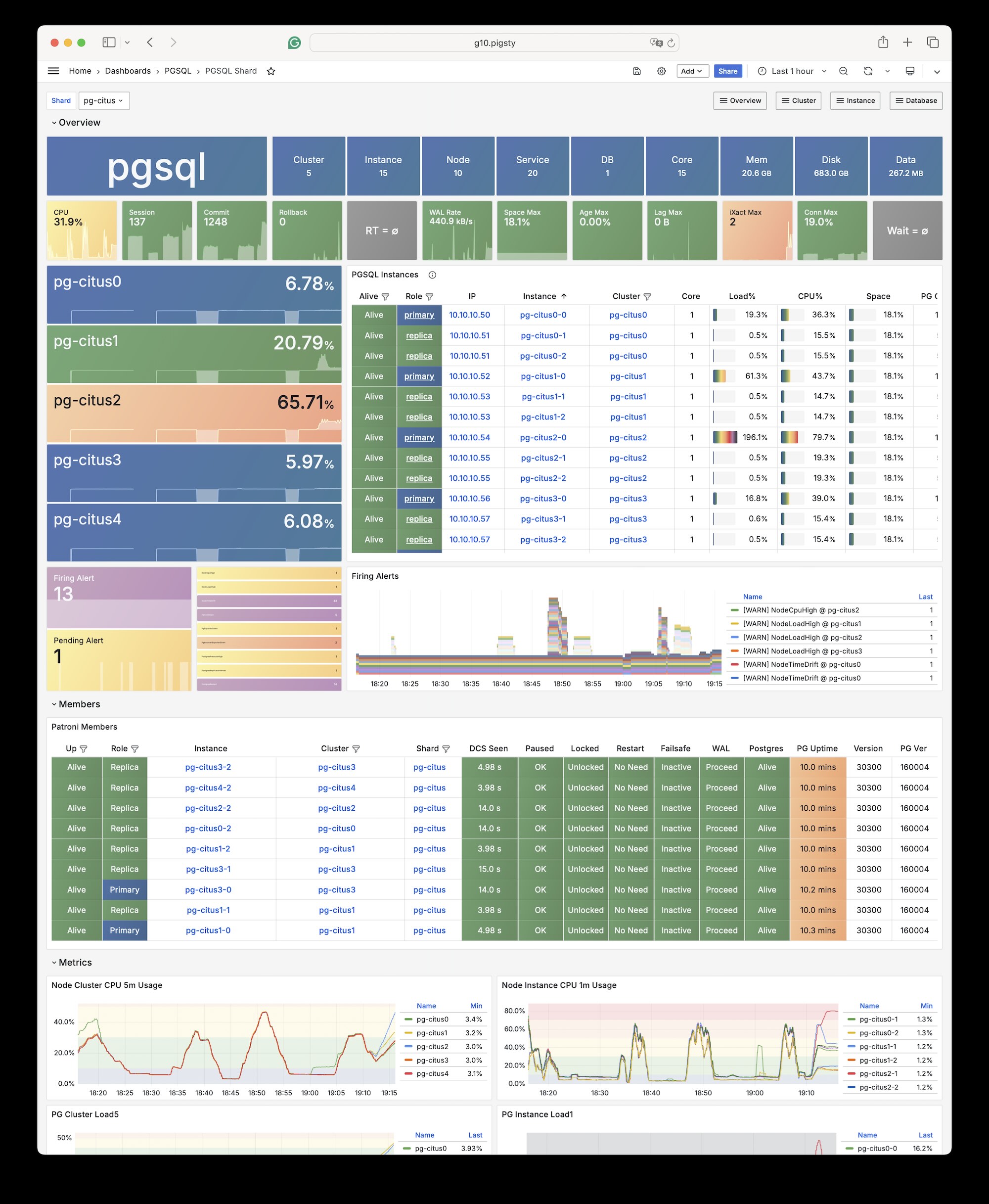
pgbench -i postgres://test:test@pg-citus0/test
pgbench -nv -P1 -T1000 -c 2 postgres://test:test@pg-citus0/test

By default, changes to one shard affect only that cluster. These changes do not synchronize to other shards.

To distribute writes across all shards, use Citus API functions to mark tables as one of these types:

  • Distributed tables (automatic partitioning, requires specifying partition key)
  • Reference tables (full replication: does not require specifying partition key)

From Citus 11.2, any Citus database node can act as coordinator. Thus, any primary node can write:

psql -h pg-citus0 -d test -c "SELECT create_distributed_table('pgbench_accounts', 'aid'); SELECT truncate_local_data_after_distributing_table('public.pgbench_accounts');"
psql -h pg-citus0 -d test -c "SELECT create_reference_table('pgbench_branches')         ; SELECT truncate_local_data_after_distributing_table('public.pgbench_branches');"
psql -h pg-citus0 -d test -c "SELECT create_reference_table('pgbench_history')          ; SELECT truncate_local_data_after_distributing_table('public.pgbench_history');"
psql -h pg-citus0 -d test -c "SELECT create_reference_table('pgbench_tellers')          ; SELECT truncate_local_data_after_distributing_table('public.pgbench_tellers');"

After distributing the tables, you can also access them on other nodes:

psql -h pg-citus1 -d test -c '\dt+'

For example, this full table scan shows a distributed execution plan:

vagrant@meta-1:~$ psql -h pg-citus3 -d test -c 'explain select * from pgbench_accounts'
                                               QUERY PLAN
---------------------------------------------------------------------------------------------------------
 Custom Scan (Citus Adaptive)  (cost=0.00..0.00 rows=100000 width=352)
   Task Count: 32
   Tasks Shown: One of 32
   ->  Task
         Node: host=10.10.10.52 port=5432 dbname=test
         ->  Seq Scan on pgbench_accounts_102008 pgbench_accounts  (cost=0.00..81.66 rows=3066 width=97)
(6 rows)

You can initiate writes from several different primary nodes:

pgbench -nv -P1 -T1000 -c 2 postgres://test:test@pg-citus1/test
pgbench -nv -P1 -T1000 -c 2 postgres://test:test@pg-citus2/test
pgbench -nv -P1 -T1000 -c 2 postgres://test:test@pg-citus3/test
pgbench -nv -P1 -T1000 -c 2 postgres://test:test@pg-citus4/test

When a node fails, Patroni promotes the standby node. The standby automatically takes over through native high availability support.

test=# select * from  pg_dist_node;
 nodeid | groupid |  nodename   | nodeport | noderack | hasmetadata | isactive | noderole | nodecluster | metadatasynced | shouldhaveshards
--------+---------+-------------+----------+----------+-------------+----------+----------+-------------+----------------+------------------
      1 |       0 | 10.10.10.51 |     5432 | default  | t           | t        | primary  | default     | t              | f
      2 |       2 | 10.10.10.54 |     5432 | default  | t           | t        | primary  | default     | t              | t
      5 |       1 | 10.10.10.52 |     5432 | default  | t           | t        | primary  | default     | t              | t
      3 |       4 | 10.10.10.58 |     5432 | default  | t           | t        | primary  | default     | t              | t
      4 |       3 | 10.10.10.56 |     5432 | default  | t           | t        | primary  | default     | t              | t

Was this page helpful?