Dashboards
Pigsty provides many out-of-the-box Grafana monitoring dashboards for PostgreSQL
This document introduces Pigsty’s monitoring system architecture, including metrics, logs, and target management. It also covers how to monitor existing PG clusters and remote RDS services.
Pigsty uses a modern observability stack for PostgreSQL monitoring:
Metrics
PostgreSQL monitoring metrics are fully defined by the pg_exporter configuration file: pg_exporter.yml
They are further processed by Prometheus recording rules and alert rules: files/prometheus/rules/pgsql.yml.
Pigsty uses three identity labels: cls, ins, ip, which are attached to all metrics and logs. Additionally, metrics from Pgbouncer, host nodes (NODE), and load balancers are also used by Pigsty, with the same labels used whenever possible for correlation analysis.
{ cls: pg-meta, ins: pg-meta-1, ip: 10.10.10.10 }
{ cls: pg-meta, ins: pg-test-1, ip: 10.10.10.11 }
{ cls: pg-meta, ins: pg-test-2, ip: 10.10.10.12 }
{ cls: pg-meta, ins: pg-test-3, ip: 10.10.10.13 }
Logs
PostgreSQL-related logs are collected by Vector and sent to the VictoriaLogs log storage/query service on infra nodes.
pg_log_dir: postgres log directory, defaults to /pg/log/postgrespgbouncer_log_dir: pgbouncer log directory, defaults to /pg/log/pgbouncerpatroni_log_dir: patroni log directory, defaults to /pg/log/patronipgbackrest_log_dir: pgbackrest log directory, defaults to /pg/log/pgbackrestTarget Management
Prometheus monitoring targets are defined in static files under /etc/prometheus/targets/pgsql/, with each instance having a corresponding file. Taking pg-meta-1 as an example:
# pg-meta-1 [primary] @ 10.10.10.10
- labels: { cls: pg-meta, ins: pg-meta-1, ip: 10.10.10.10 }
  targets:
    - 10.10.10.10:9630    # <--- pg_exporter for PostgreSQL metrics
    - 10.10.10.10:9631    # <--- pg_exporter for pgbouncer metrics
    - 10.10.10.10:8008    # <--- patroni metrics (when API SSL is not enabled)
When the global flag patroni_ssl_enabled is set, patroni targets will be moved to a separate file /etc/prometheus/targets/patroni/<ins>.yml, as it uses the https scrape endpoint. When monitoring RDS instances, monitoring targets are placed separately in the /etc/prometheus/targets/pgrds/ directory and managed by cluster.
When removing a cluster using bin/pgsql-rm or pgsql-rm.yml, the Prometheus monitoring targets will be removed. You can also remove them manually or use subtasks from the playbook:
bin/pgmon-rm <cls|ins> # Remove prometheus monitoring targets from all infra nodes
Remote RDS monitoring targets are placed in /etc/prometheus/targets/pgrds/<cls>.yml, created by the pgsql-monitor.yml playbook or bin/pgmon-add script.
Pigsty provides three monitoring modes to suit different monitoring needs.
| Item \ Level | L1 | L2 | L3 |
|---|---|---|---|
| Name | Basic | Managed | Standard |
| Abbr | RDS | MANAGED | FULL |
| Scenario | Connection string only, e.g., RDS | Existing DB, nodes manageable | Instances created by Pigsty |
| PGCAT Features | ✅ Fully Available | ✅ Fully Available | ✅ Fully Available |
| PGSQL Features | ✅ PG metrics only | ✅ PG & node metrics only | ✅ Full Features |
| Connection Pool Metrics | ❌ Not Available | ⚠️ Optional | ✅ Pre-installed |
| Load Balancer Metrics | ❌ Not Available | ⚠️ Optional | ✅ Pre-installed |
| PGLOG Features | ❌ Not Available | ⚠️ Optional | ✅ Pre-installed |
| PG Exporter | ⚠️ On infra nodes | ✅ On DB nodes | ✅ On DB nodes |
| Node Exporter | ❌ Not deployed | ✅ On DB nodes | ✅ On DB nodes |
| Intrusiveness | ✅ Non-intrusive | ⚠️ Install Exporter | ⚠️ Fully managed by Pigsty |
| Monitor Existing Instances | ✅ Supported | ✅ Supported | ❌ For Pigsty-managed only |
| Monitoring Users & Views | Manual setup | Manual setup | Auto-created by Pigsty |
| Deployment Playbook | bin/pgmon-add <cls> | Partial pgsql.yml/node.yml | pgsql.yml |
| Required Permissions | Connectable PGURL from infra | SSH & sudo on DB nodes | SSH & sudo on DB nodes |
| Feature Summary | PGCAT + PGRDS | Most features | Full features |
Databases fully managed by Pigsty are automatically monitored with the best support and typically require no configuration. For existing PostgreSQL clusters or RDS services, if the target DB nodes can be managed by Pigsty (ssh accessible, sudo available), you can consider managed deployment for a monitoring experience similar to native Pigsty. If you can only access the target database via PGURL (database connection string), such as remote RDS services, you can use basic mode to monitor the target database.
If the target DB nodes can be managed by Pigsty (ssh accessible and sudo available), you can use the pg_exporter task in the pgsql.yml playbook to deploy monitoring components (PG Exporter) on target nodes in the same way as standard deployments. You can also use the pgbouncer and pgbouncer_exporter tasks from that playbook to deploy connection pools and their monitoring on existing instance nodes. Additionally, you can use node_exporter, haproxy, and vector from node.yml to deploy host monitoring, load balancing, and log collection components, achieving an experience identical to native Pigsty database instances.
The definition method for existing clusters is exactly the same as for clusters managed by Pigsty. You selectively execute partial tasks from the pgsql.yml playbook instead of running the entire playbook.
./node.yml  -l <cls> -t node_repo,node_pkg           # Add YUM repos from INFRA nodes and install packages on host nodes
./node.yml  -l <cls> -t node_exporter,node_register  # Configure host monitoring and add to VictoriaMetrics
./node.yml  -l <cls> -t vector                       # Configure host log collection and send to VictoriaLogs
./pgsql.yml -l <cls> -t pg_exporter,pg_register      # Configure PostgreSQL monitoring and register with VictoriaMetrics/Grafana
Since the target database cluster already exists, you need to manually create monitoring users, schemas, and extensions on the target database cluster.
If you can only access the target database via PGURL (database connection string), you can configure according to the instructions here. In this mode, Pigsty deploys corresponding PG Exporters on INFRA nodes to scrape remote database metrics, as shown below:
------ infra ------
|                 |
|   prometheus    |            v---- pg-foo-1 ----v
|       ^         |  metrics   |         ^        |
|   pg_exporter <-|------------|----  postgres    |
|   (port: 20001) |            | 10.10.10.10:5432 |
|       ^         |            ^------------------^
|       ^         |                      ^
|       ^         |            v---- pg-foo-2 ----v
|       ^         |  metrics   |         ^        |
|   pg_exporter <-|------------|----  postgres    |
|   (port: 20002) |            | 10.10.10.11:5433 |
-------------------            ^------------------^
In this mode, the monitoring system will not have metrics from hosts, connection pools, load balancers, or high availability components, but the database itself and real-time status information from the data catalog are still available. Pigsty provides two dedicated monitoring dashboards focused on PostgreSQL metrics: PGRDS Cluster and PGRDS Instance, while overview and database-level monitoring reuses existing dashboards. Since Pigsty cannot manage your RDS, users need to configure monitoring objects on the target database in advance.
Here we use the sandbox environment as an example: suppose the pg-meta cluster is an RDS instance pg-foo-1 to be monitored, and the pg-test cluster is an RDS cluster pg-bar to be monitored:
Create monitoring schemas, users, and permissions on the target. Refer to Monitor Setup for details
Declare the cluster in the configuration inventory. For example, if we want to monitor “remote” pg-meta & pg-test clusters:
infra:            # Infra cluster for proxies, monitoring, alerts, etc.
  hosts: { 10.10.10.10: { infra_seq: 1 } }
  vars:           # Install pg_exporter on group 'infra' for remote postgres RDS
    pg_exporters: # List all remote instances here, assign a unique unused local port for k
      20001: { pg_cluster: pg-foo, pg_seq: 1, pg_host: 10.10.10.10 , pg_databases: [{ name: meta }] } # Register meta database as Grafana datasource

      20002: { pg_cluster: pg-bar, pg_seq: 1, pg_host: 10.10.10.11 , pg_port: 5432 } # Different connection string methods
      20003: { pg_cluster: pg-bar, pg_seq: 2, pg_host: 10.10.10.12 , pg_exporter_url: 'postgres://dbuser_monitor:[email protected]:5432/postgres?sslmode=disable'}
      20004: { pg_cluster: pg-bar, pg_seq: 3, pg_host: 10.10.10.13 , pg_monitor_username: dbuser_monitor, pg_monitor_password: DBUser.Monitor }
Databases listed in the pg_databases field will be registered in Grafana as PostgreSQL datasources, providing data support for PGCAT monitoring dashboards. If you don’t want to use PGCAT and register databases in Grafana, simply set pg_databases to an empty array or leave it blank.
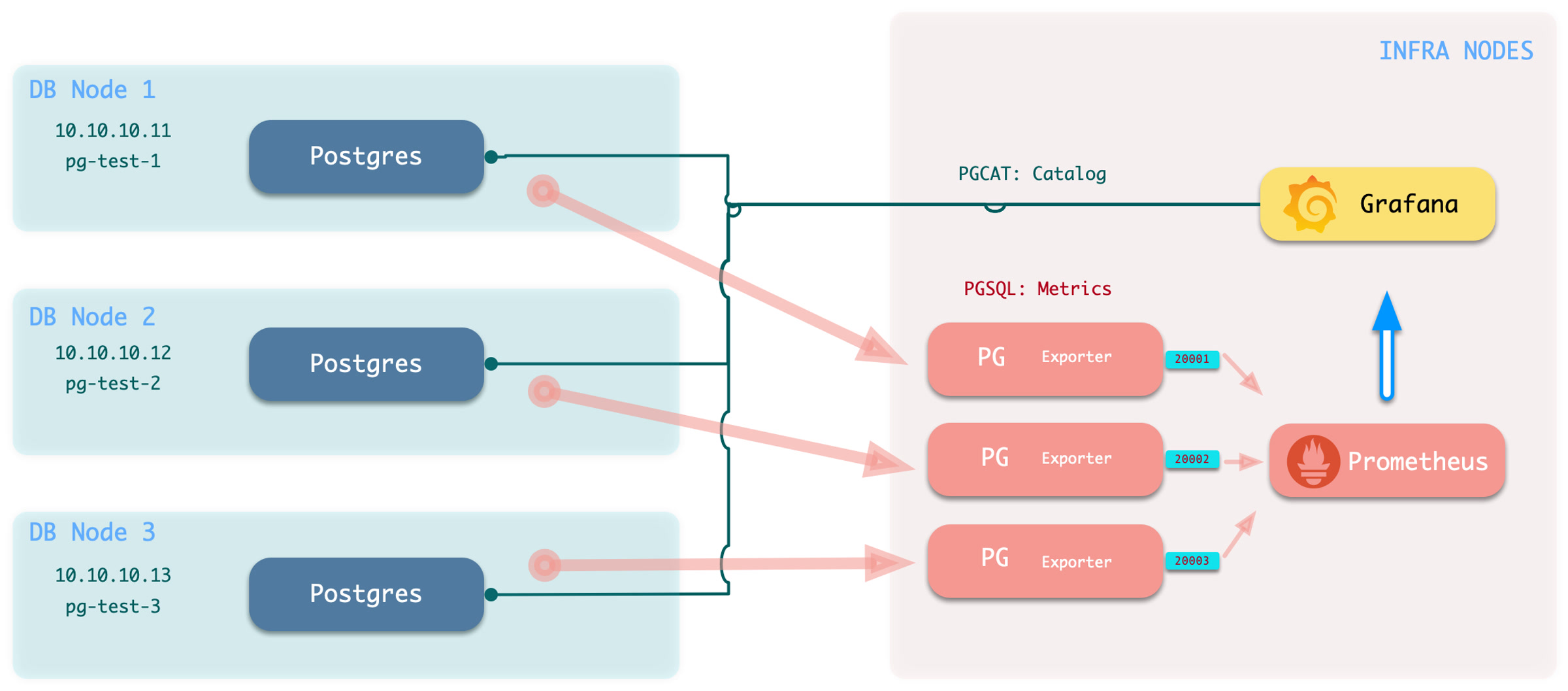
Execute the add monitoring command: bin/pgmon-add <clsname>
bin/pgmon-add pg-foo  # Bring pg-foo cluster into monitoring
bin/pgmon-add pg-bar  # Bring pg-bar cluster into monitoring
To remove remote cluster monitoring targets, use bin/pgmon-rm <clsname>
bin/pgmon-rm pg-foo  # Remove pg-foo from Pigsty monitoring
bin/pgmon-rm pg-bar  # Remove pg-bar from Pigsty monitoring
You can use more parameters to override default pg_exporter options. Here’s an example configuration for monitoring Aliyun RDS for PostgreSQL and PolarDB with Pigsty:
For details, refer to: remote.yml
infra:            # Infra cluster for proxies, monitoring, alerts, etc.
  hosts: { 10.10.10.10: { infra_seq: 1 } }
  vars:
    pg_exporters:   # List all remote RDS PG instances to be monitored here

      20001:        # Assign a unique unused local port for local monitoring agent, this is a PolarDB primary
        pg_cluster: pg-polar                  # RDS cluster name (identity parameter, manually assigned name in monitoring system)
        pg_seq: 1                             # RDS instance number (identity parameter, manually assigned name in monitoring system)
        pg_host: pc-2ze379wb1d4irc18x.polardbpg.rds.aliyuncs.com # RDS host address
        pg_port: 1921                         # RDS port (from console connection info)
        pg_exporter_auto_discovery: true      # Disable new database auto-discovery feature
        pg_exporter_include_database: 'test'  # Only monitor databases in this list (comma-separated)
        pg_monitor_username: dbuser_monitor   # Monitoring username, overrides global config
        pg_monitor_password: DBUser_Monitor   # Monitoring password, overrides global config
        pg_databases: [{ name: test }]        # List of databases to enable PGCAT for, only name field needed, set register_datasource to false to not register

      20002:       # This is a PolarDB standby
        pg_cluster: pg-polar                  # RDS cluster name (identity parameter, manually assigned name in monitoring system)
        pg_seq: 2                             # RDS instance number (identity parameter, manually assigned name in monitoring system)
        pg_host: pe-2ze7tg620e317ufj4.polarpgmxs.rds.aliyuncs.com # RDS host address
        pg_port: 1521                         # RDS port (from console connection info)
        pg_exporter_auto_discovery: true      # Disable new database auto-discovery feature
        pg_exporter_include_database: 'test,postgres'  # Only monitor databases in this list (comma-separated)
        pg_monitor_username: dbuser_monitor   # Monitoring username
        pg_monitor_password: DBUser_Monitor   # Monitoring password
        pg_databases: [ { name: test } ]        # List of databases to enable PGCAT for, only name field needed, set register_datasource to false to not register

      20004: # This is a basic single-node RDS for PostgreSQL instance
        pg_cluster: pg-rds                    # RDS cluster name (identity parameter, manually assigned name in monitoring system)
        pg_seq: 1                             # RDS instance number (identity parameter, manually assigned name in monitoring system)
        pg_host: pgm-2zern3d323fe9ewk.pg.rds.aliyuncs.com  # RDS host address
        pg_port: 5432                         # RDS port (from console connection info)
        pg_exporter_auto_discovery: true      # Disable new database auto-discovery feature
        pg_exporter_include_database: 'rds'   # Only monitor databases in this list (comma-separated)
        pg_monitor_username: dbuser_monitor   # Monitoring username
        pg_monitor_password: DBUser_Monitor   # Monitoring password
        pg_databases: [ { name: rds } ]       # List of databases to enable PGCAT for, only name field needed, set register_datasource to false to not register

      20005: # This is a high-availability RDS for PostgreSQL cluster primary
        pg_cluster: pg-rdsha                  # RDS cluster name (identity parameter, manually assigned name in monitoring system)
        pg_seq: 1                             # RDS instance number (identity parameter, manually assigned name in monitoring system)
        pg_host: pgm-2ze3d35d27bq08wu.pg.rds.aliyuncs.com  # RDS host address
        pg_port: 5432                         # RDS port (from console connection info)
        pg_exporter_include_database: 'rds'   # Only monitor databases in this list (comma-separated)
        pg_databases: [ { name: rds }, {name : test} ]  # Include these two databases in PGCAT management, register as Grafana datasources

      20006: # This is a high-availability RDS for PostgreSQL cluster read-only instance (standby)
        pg_cluster: pg-rdsha                  # RDS cluster name (identity parameter, manually assigned name in monitoring system)
        pg_seq: 2                             # RDS instance number (identity parameter, manually assigned name in monitoring system)
        pg_host: pgr-2zexqxalk7d37edt.pg.rds.aliyuncs.com  # RDS host address
        pg_port: 5432                         # RDS port (from console connection info)
        pg_exporter_include_database: 'rds'   # Only monitor databases in this list (comma-separated)
        pg_databases: [ { name: rds }, {name : test} ]  # Include these two databases in PGCAT management, register as Grafana datasources
When you want to monitor existing instances, whether RDS or self-built PostgreSQL instances, you need to configure the target database so that Pigsty can access them.
To monitor an external existing PostgreSQL instance, you need a connection string that can access that instance/cluster. Any accessible connection string (business user, superuser) can be used, but we recommend using a dedicated monitoring user to avoid permission leaks.
dbuser_monitor, which should belong to the pg_monitor role group or have access to relevant viewsmonitor is used for installing additional monitoring views and extension plugins; optional but recommendedpg_stat_statementsUsing the default monitoring user dbuser_monitor as an example, create the following user on the target database cluster.
CREATE USER dbuser_monitor;                                       -- Create monitoring user
COMMENT ON ROLE dbuser_monitor IS 'system monitor user';          -- Comment on monitoring user
GRANT pg_monitor TO dbuser_monitor;                               -- Grant pg_monitor privilege to monitoring user, otherwise some metrics cannot be collected

ALTER USER dbuser_monitor PASSWORD 'DBUser.Monitor';              -- Modify monitoring user password as needed (strongly recommended! but keep consistent with Pigsty config)
ALTER USER dbuser_monitor SET log_min_duration_statement = 1000;  -- Recommended to avoid logs filling up with monitoring slow queries
ALTER USER dbuser_monitor SET search_path = monitor,public;       -- Recommended to ensure pg_stat_statements extension works properly
Please note that the monitoring user and password created here should be consistent with pg_monitor_username and pg_monitor_password.
Configure the database pg_hba.conf file, adding the following rules to allow the monitoring user to access all databases from localhost and the admin machine using password authentication.
# allow local role monitor with password
local   all  dbuser_monitor                    md5
host    all  dbuser_monitor  127.0.0.1/32      md5
host    all  dbuser_monitor  <admin_machine_IP>/32 md5
If your RDS doesn’t support defining HBA, simply whitelist the internal IP address of the machine running Pigsty.
The monitoring schema is optional; even without it, the main functionality of Pigsty’s monitoring system can work properly, but we strongly recommend creating this schema.
CREATE SCHEMA IF NOT EXISTS monitor;               -- Create dedicated monitoring schema
GRANT USAGE ON SCHEMA monitor TO dbuser_monitor;   -- Allow monitoring user to use it
The monitoring extension is optional, but we strongly recommend enabling the pg_stat_statements extension, which provides important data about query performance.
Note: This extension must be listed in the database parameter shared_preload_libraries to take effect, and modifying that parameter requires a database restart.
CREATE EXTENSION IF NOT EXISTS "pg_stat_statements" WITH SCHEMA "monitor";
Please note that you should install this extension in the default admin database postgres. Sometimes RDS doesn’t allow you to create a monitoring schema in the postgres database. In such cases, you can install the pg_stat_statements plugin in the default public schema, as long as you ensure the monitoring user’s search_path is configured as above so it can find the pg_stat_statements view.
CREATE EXTENSION IF NOT EXISTS "pg_stat_statements";
ALTER USER dbuser_monitor SET search_path = monitor,public; -- Recommended to ensure pg_stat_statements extension works properly
Monitoring views provide several commonly used pre-processed results and encapsulate permissions for monitoring metrics that require high privileges (such as shared memory allocation), making them convenient for querying and use. Strongly recommended to create in all databases requiring monitoring.
----------------------------------------------------------------------
-- Table bloat estimate : monitor.pg_table_bloat
----------------------------------------------------------------------
DROP VIEW IF EXISTS monitor.pg_table_bloat CASCADE;
CREATE OR REPLACE VIEW monitor.pg_table_bloat AS
SELECT CURRENT_CATALOG AS datname, nspname, relname , tblid , bs * tblpages AS size,
       CASE WHEN tblpages - est_tblpages_ff > 0 THEN (tblpages - est_tblpages_ff)/tblpages::FLOAT ELSE 0 END AS ratio
FROM (
         SELECT ceil( reltuples / ( (bs-page_hdr)*fillfactor/(tpl_size*100) ) ) + ceil( toasttuples / 4 ) AS est_tblpages_ff,
                tblpages, fillfactor, bs, tblid, nspname, relname, is_na
         FROM (
                  SELECT
                      ( 4 + tpl_hdr_size + tpl_data_size + (2 * ma)
                          - CASE WHEN tpl_hdr_size % ma = 0 THEN ma ELSE tpl_hdr_size % ma END
                          - CASE WHEN ceil(tpl_data_size)::INT % ma = 0 THEN ma ELSE ceil(tpl_data_size)::INT % ma END
                          ) AS tpl_size, (heappages + toastpages) AS tblpages, heappages,
                      toastpages, reltuples, toasttuples, bs, page_hdr, tblid, nspname, relname, fillfactor, is_na
                  FROM (
                           SELECT
                               tbl.oid AS tblid, ns.nspname , tbl.relname, tbl.reltuples,
                               tbl.relpages AS heappages, coalesce(toast.relpages, 0) AS toastpages,
                               coalesce(toast.reltuples, 0) AS toasttuples,
                               coalesce(substring(array_to_string(tbl.reloptions, ' ') FROM 'fillfactor=([0-9]+)')::smallint, 100) AS fillfactor,
                               current_setting('block_size')::numeric AS bs,
                               CASE WHEN version()~'mingw32' OR version()~'64-bit|x86_64|ppc64|ia64|amd64' THEN 8 ELSE 4 END AS ma,
                               24 AS page_hdr,
                               23 + CASE WHEN MAX(coalesce(s.null_frac,0)) > 0 THEN ( 7 + count(s.attname) ) / 8 ELSE 0::int END
                                   + CASE WHEN bool_or(att.attname = 'oid' and att.attnum < 0) THEN 4 ELSE 0 END AS tpl_hdr_size,
                               sum( (1-coalesce(s.null_frac, 0)) * coalesce(s.avg_width, 0) ) AS tpl_data_size,
                               bool_or(att.atttypid = 'pg_catalog.name'::regtype)
                                   OR sum(CASE WHEN att.attnum > 0 THEN 1 ELSE 0 END) <> count(s.attname) AS is_na
                           FROM pg_attribute AS att
                                    JOIN pg_class AS tbl ON att.attrelid = tbl.oid
                                    JOIN pg_namespace AS ns ON ns.oid = tbl.relnamespace
                                    LEFT JOIN pg_stats AS s ON s.schemaname=ns.nspname AND s.tablename = tbl.relname AND s.inherited=false AND s.attname=att.attname
                                    LEFT JOIN pg_class AS toast ON tbl.reltoastrelid = toast.oid
                           WHERE NOT att.attisdropped AND tbl.relkind = 'r' AND nspname NOT IN ('pg_catalog','information_schema')
                           GROUP BY 1,2,3,4,5,6,7,8,9,10
                       ) AS s
              ) AS s2
     ) AS s3
WHERE NOT is_na;
COMMENT ON VIEW monitor.pg_table_bloat IS 'postgres table bloat estimate';

GRANT SELECT ON monitor.pg_table_bloat TO pg_monitor;

----------------------------------------------------------------------
-- Index bloat estimate : monitor.pg_index_bloat
----------------------------------------------------------------------
DROP VIEW IF EXISTS monitor.pg_index_bloat CASCADE;
CREATE OR REPLACE VIEW monitor.pg_index_bloat AS
SELECT CURRENT_CATALOG AS datname, nspname, idxname AS relname, tblid, idxid, relpages::BIGINT * bs AS size,
       COALESCE((relpages - ( reltuples * (6 + ma - (CASE WHEN index_tuple_hdr % ma = 0 THEN ma ELSE index_tuple_hdr % ma END)
                                               + nulldatawidth + ma - (CASE WHEN nulldatawidth % ma = 0 THEN ma ELSE nulldatawidth % ma END))
                                  / (bs - pagehdr)::FLOAT  + 1 )), 0) / relpages::FLOAT AS ratio
FROM (
         SELECT nspname,idxname,indrelid AS tblid,indexrelid AS idxid,
                reltuples,relpages,
                current_setting('block_size')::INTEGER                                                               AS bs,
                (CASE WHEN version() ~ 'mingw32' OR version() ~ '64-bit|x86_64|ppc64|ia64|amd64' THEN 8 ELSE 4 END)  AS ma,
                24                                                                                                   AS pagehdr,
                (CASE WHEN max(COALESCE(pg_stats.null_frac, 0)) = 0 THEN 2 ELSE 6 END)                               AS index_tuple_hdr,
                sum((1.0 - COALESCE(pg_stats.null_frac, 0.0)) *
                    COALESCE(pg_stats.avg_width, 1024))::INTEGER                                                     AS nulldatawidth
         FROM pg_attribute
                  JOIN (
             SELECT pg_namespace.nspname,
                    ic.relname                                                   AS idxname,
                    ic.reltuples,
                    ic.relpages,
                    pg_index.indrelid,
                    pg_index.indexrelid,
                    tc.relname                                                   AS tablename,
                    regexp_split_to_table(pg_index.indkey::TEXT, ' ') :: INTEGER AS attnum,
                    pg_index.indexrelid                                          AS index_oid
             FROM pg_index
                      JOIN pg_class ic ON pg_index.indexrelid = ic.oid
                      JOIN pg_class tc ON pg_index.indrelid = tc.oid
                      JOIN pg_namespace ON pg_namespace.oid = ic.relnamespace
                      JOIN pg_am ON ic.relam = pg_am.oid
             WHERE pg_am.amname = 'btree' AND ic.relpages > 0 AND nspname NOT IN ('pg_catalog', 'information_schema')
         ) ind_atts ON pg_attribute.attrelid = ind_atts.indexrelid AND pg_attribute.attnum = ind_atts.attnum
                  JOIN pg_stats ON pg_stats.schemaname = ind_atts.nspname
             AND ((pg_stats.tablename = ind_atts.tablename AND pg_stats.attname = pg_get_indexdef(pg_attribute.attrelid, pg_attribute.attnum, TRUE))
                 OR (pg_stats.tablename = ind_atts.idxname AND pg_stats.attname = pg_attribute.attname))
         WHERE pg_attribute.attnum > 0
         GROUP BY 1, 2, 3, 4, 5, 6
     ) est;
COMMENT ON VIEW monitor.pg_index_bloat IS 'postgres index bloat estimate (btree-only)';

GRANT SELECT ON monitor.pg_index_bloat TO pg_monitor;

----------------------------------------------------------------------
-- Relation Bloat : monitor.pg_bloat
----------------------------------------------------------------------
DROP VIEW IF EXISTS monitor.pg_bloat CASCADE;
CREATE OR REPLACE VIEW monitor.pg_bloat AS
SELECT coalesce(ib.datname, tb.datname)                                                   AS datname,
       coalesce(ib.nspname, tb.nspname)                                                   AS nspname,
       coalesce(ib.tblid, tb.tblid)                                                       AS tblid,
       coalesce(tb.nspname || '.' || tb.relname, ib.nspname || '.' || ib.tblid::RegClass) AS tblname,
       tb.size                                                                            AS tbl_size,
       CASE WHEN tb.ratio < 0 THEN 0 ELSE round(tb.ratio::NUMERIC, 6) END                 AS tbl_ratio,
       (tb.size * (CASE WHEN tb.ratio < 0 THEN 0 ELSE tb.ratio::NUMERIC END)) ::BIGINT    AS tbl_wasted,
       ib.idxid,
       ib.nspname || '.' || ib.relname                                                    AS idxname,
       ib.size                                                                            AS idx_size,
       CASE WHEN ib.ratio < 0 THEN 0 ELSE round(ib.ratio::NUMERIC, 5) END                 AS idx_ratio,
       (ib.size * (CASE WHEN ib.ratio < 0 THEN 0 ELSE ib.ratio::NUMERIC END)) ::BIGINT    AS idx_wasted
FROM monitor.pg_index_bloat ib
         FULL OUTER JOIN monitor.pg_table_bloat tb ON ib.tblid = tb.tblid;

COMMENT ON VIEW monitor.pg_bloat IS 'postgres relation bloat detail';
GRANT SELECT ON monitor.pg_bloat TO pg_monitor;

----------------------------------------------------------------------
-- monitor.pg_index_bloat_human
----------------------------------------------------------------------
DROP VIEW IF EXISTS monitor.pg_index_bloat_human CASCADE;
CREATE OR REPLACE VIEW monitor.pg_index_bloat_human AS
SELECT idxname                            AS name,
       tblname,
       idx_wasted                         AS wasted,
       pg_size_pretty(idx_size)           AS idx_size,
       round(100 * idx_ratio::NUMERIC, 2) AS idx_ratio,
       pg_size_pretty(idx_wasted)         AS idx_wasted,
       pg_size_pretty(tbl_size)           AS tbl_size,
       round(100 * tbl_ratio::NUMERIC, 2) AS tbl_ratio,
       pg_size_pretty(tbl_wasted)         AS tbl_wasted
FROM monitor.pg_bloat
WHERE idxname IS NOT NULL;
COMMENT ON VIEW monitor.pg_index_bloat_human IS 'postgres index bloat info in human-readable format';
GRANT SELECT ON monitor.pg_index_bloat_human TO pg_monitor;


----------------------------------------------------------------------
-- monitor.pg_table_bloat_human
----------------------------------------------------------------------
DROP VIEW IF EXISTS monitor.pg_table_bloat_human CASCADE;
CREATE OR REPLACE VIEW monitor.pg_table_bloat_human AS
SELECT tblname                                          AS name,
       idx_wasted + tbl_wasted                          AS wasted,
       pg_size_pretty(idx_wasted + tbl_wasted)          AS all_wasted,
       pg_size_pretty(tbl_wasted)                       AS tbl_wasted,
       pg_size_pretty(tbl_size)                         AS tbl_size,
       tbl_ratio,
       pg_size_pretty(idx_wasted)                       AS idx_wasted,
       pg_size_pretty(idx_size)                         AS idx_size,
       round(idx_wasted::NUMERIC * 100.0 / idx_size, 2) AS idx_ratio
FROM (SELECT datname,
             nspname,
             tblname,
             coalesce(max(tbl_wasted), 0)                         AS tbl_wasted,
             coalesce(max(tbl_size), 1)                           AS tbl_size,
             round(100 * coalesce(max(tbl_ratio), 0)::NUMERIC, 2) AS tbl_ratio,
             coalesce(sum(idx_wasted), 0)                         AS idx_wasted,
             coalesce(sum(idx_size), 1)                           AS idx_size
      FROM monitor.pg_bloat
      WHERE tblname IS NOT NULL
      GROUP BY 1, 2, 3
     ) d;
COMMENT ON VIEW monitor.pg_table_bloat_human IS 'postgres table bloat info in human-readable format';
GRANT SELECT ON monitor.pg_table_bloat_human TO pg_monitor;


----------------------------------------------------------------------
-- Activity Overview: monitor.pg_session
----------------------------------------------------------------------
DROP VIEW IF EXISTS monitor.pg_session CASCADE;
CREATE OR REPLACE VIEW monitor.pg_session AS
SELECT coalesce(datname, 'all') AS datname, numbackends, active, idle, ixact, max_duration, max_tx_duration, max_conn_duration
FROM (
         SELECT datname,
                count(*)                                         AS numbackends,
                count(*) FILTER ( WHERE state = 'active' )       AS active,
                count(*) FILTER ( WHERE state = 'idle' )         AS idle,
                count(*) FILTER ( WHERE state = 'idle in transaction'
                    OR state = 'idle in transaction (aborted)' ) AS ixact,
                max(extract(epoch from now() - state_change))
                FILTER ( WHERE state = 'active' )                AS max_duration,
                max(extract(epoch from now() - xact_start))      AS max_tx_duration,
                max(extract(epoch from now() - backend_start))   AS max_conn_duration
         FROM pg_stat_activity
         WHERE backend_type = 'client backend'
           AND pid <> pg_backend_pid()
         GROUP BY ROLLUP (1)
         ORDER BY 1 NULLS FIRST
     ) t;
COMMENT ON VIEW monitor.pg_session IS 'postgres activity group by session';
GRANT SELECT ON monitor.pg_session TO pg_monitor;


----------------------------------------------------------------------
-- Sequential Scan: monitor.pg_seq_scan
----------------------------------------------------------------------
DROP VIEW IF EXISTS monitor.pg_seq_scan CASCADE;
CREATE OR REPLACE VIEW monitor.pg_seq_scan AS
SELECT schemaname                                                        AS nspname,
       relname,
       seq_scan,
       seq_tup_read,
       seq_tup_read / seq_scan                                           AS seq_tup_avg,
       idx_scan,
       n_live_tup + n_dead_tup                                           AS tuples,
       round(n_live_tup * 100.0::NUMERIC / (n_live_tup + n_dead_tup), 2) AS live_ratio
FROM pg_stat_user_tables
WHERE seq_scan > 0
  and (n_live_tup + n_dead_tup) > 0
ORDER BY seq_scan DESC;
COMMENT ON VIEW monitor.pg_seq_scan IS 'table that have seq scan';
GRANT SELECT ON monitor.pg_seq_scan TO pg_monitor;
DROP FUNCTION IF EXISTS monitor.pg_shmem() CASCADE;
CREATE OR REPLACE FUNCTION monitor.pg_shmem() RETURNS SETOF
    pg_shmem_allocations AS $$ SELECT * FROM pg_shmem_allocations;$$ LANGUAGE SQL SECURITY DEFINER;
COMMENT ON FUNCTION monitor.pg_shmem() IS 'security wrapper for system view pg_shmem';
REVOKE ALL ON FUNCTION monitor.pg_shmem() FROM PUBLIC;
GRANT EXECUTE ON FUNCTION monitor.pg_shmem() TO pg_monitor;
Pigsty provides many out-of-the-box Grafana monitoring dashboards for PostgreSQL
Complete list and explanation of monitoring metrics provided by the Pigsty PGSQL module
Was this page helpful?
Thanks for the feedback! Please let us know how we can improve.
Sorry to hear that. Please let us know how we can improve.