This is the multi-page printable view of this section. Click here to print.
References
- 1: Supported Linux
- 2: Pigsty Modules
- 3: Extensions
- 4: File Hierarchy
- 5: Parameters
- 6: Playbooks
- 7: Port List
1 - Supported Linux
Pigsty runs on Linux, supporting amd64/x86_64 and arm64/aarch64 arch, plus 3 major distros: EL, Debian, Ubuntu.
Pigsty runs bare-metal without containers. Supports latest 2 major releases for each of the 3 major distros across both archs.
Overview
Recommended OS versions: RockyLinux 10.0, Ubuntu 24.04, Debian 13.1.
| Distro | Arch | OS Code | PG18 | PG17 | PG16 | PG15 | PG14 | PG13 |
|---|---|---|---|---|---|---|---|---|
| RHEL / Rocky / Alma 10 | x86_64 | el10.x86_64 | ||||||
| RHEL / Rocky / Alma 10 | aarch64 | el10.aarch64 | ||||||
Ubuntu 24.04 (noble) | x86_64 | u24.x86_64 | ||||||
Ubuntu 24.04 (noble) | aarch64 | u24.aarch64 | ||||||
Debian 13 (trixie) | x86_64 | d13.x86_64 | ||||||
Debian 13 (trixie) | aarch64 | d13.aarch64 |
EL
Pigsty supports RHEL / Rocky / Alma / Anolis / CentOS 8, 9, 10.
| EL Distro | Arch | OS Code | PG18 | PG17 | PG16 | PG15 | PG14 | PG13 |
|---|---|---|---|---|---|---|---|---|
| RHEL10 / Rocky10 / Alma10 | x86_64 | el10.x86_64 | ||||||
| RHEL10 / Rocky10 / Alma10 | aarch64 | el10.aarch64 | ||||||
| RHEL9 / Rocky9 / Alma9 | x86_64 | el9.x86_64 | ||||||
| RHEL9 / Rocky9 / Alma9 | aarch64 | el9.aarch64 | ||||||
| RHEL8 / Rocky8 / Alma8 | x86_64 | el8.x86_64 | ||||||
| RHEL8 / Rocky8 / Alma8 | aarch64 | el8.aarch64 | ||||||
| RHEL7 / CentOS7 | x86_64 | el7.x86_64 | ||||||
| RHEL7 / CentOS7 | aarch64 | - |
RockyLinux 10.0 / 9.6 balances stability and fresh software. Recommended for EL users.
EL8 goes EOL in 2029. Plan upgrade ASAP. EL10 support is ready, EL8 will be dropped in next release.
RHEL 7 EOL since Jun 2024. PGDG stopped providing binary packages for PG 16/17/18 on EL7.
For extended support on legacy OS, consider Enterprise Subscription.
Ubuntu
Pigsty supports Ubuntu 24.04 / 22.04:
| Ubuntu Distro | Arch | OS Code | PG18 | PG17 | PG16 | PG15 | PG14 | PG13 |
|---|---|---|---|---|---|---|---|---|
Ubuntu 24.04 (noble) | x86_64 | u24.x86_64 | ||||||
Ubuntu 24.04 (noble) | aarch64 | u24.aarch64 | ||||||
Ubuntu 22.04 (jammy) | x86_64 | u22.x86_64 | ||||||
Ubuntu 22.04 (jammy) | aarch64 | u22.aarch64 | ||||||
Ubuntu 20.04 (focal) | x86_64 | u20.x86_64 | ||||||
Ubuntu 20.04 (focal) | aarch64 | - |
Ubuntu 24.04 balances stability and fresh software. Recommended for Ubuntu users.
Ubuntu 20.04 EOL since Apr 2025. For extended support on legacy OS, consider Enterprise Subscription.
Debian
Pigsty supports Debian 12 / 13, latest Debian 13.1 recommended:
| Debian Distro | Arch | OS Code | PG18 | PG17 | PG16 | PG15 | PG14 | PG13 |
|---|---|---|---|---|---|---|---|---|
Debian 13 (trixie) | x86_64 | d13.x86_64 | ||||||
Debian 13 (trixie) | aarch64 | d13.aarch64 | ||||||
Debian 12 (bookworm) | x86_64 | d12.x86_64 | ||||||
Debian 12 (bookworm) | aarch64 | d12.aarch64 | ||||||
Debian 11 (bullseye) | x86_64 | d11.x86_64 | ||||||
Debian 11 (bullseye) | aarch64 | - |
Debian 11 EOL since Jul 2024. For extended support on legacy OS, consider Enterprise Subscription.
Vagrant
For local VM deployment, use these Vagrant base images (same as used in Pigsty dev):
generic/rocky8: Rocky 8.10generic/rocky9: Rocky 9.6generic/debian12: Debian 12.11generic/debian13: Debian 13generic/ubuntu2204: Ubuntu 22.04bento/ubuntu-24.04: Ubuntu 24.04.2
Terraform
For cloud deployment, use these Terraform base images (Aliyun example):
- Rocky 8.10 :
rockylinux_8_10_x64_20G_alibase_20240923.vhd - Rocky 9.6 :
rockylinux_9_6_x64_20G_alibase_20250101.vhd - Ubuntu 22.04 :
ubuntu_22_04_x64_20G_alibase_20240926.vhd - Ubuntu 24.04 :
ubuntu_24_04_x64_20G_alibase_20240923.vhd - Debian 12.11 :
debian_12_11_x64_20G_alibase_20241201.vhd - Debian 13 :
debian_13_x64_20G_alibase_20250101.vhd
2 - Pigsty Modules
Core Modules
Pigsty provides four core modules that are essential for delivering fully-featured, highly available PostgreSQL services:
PGSQL: Self-healing PostgreSQL clusters with HA, PITR, IaC, SOP, monitoring, and 440 extensions out of the box.INFRA: Local software repo, VictoriaMetrics, Grafana, VictoriaLogs, AlertManager, PushGateway, Blackbox Exporter…NODE: Tune nodes to desired state: hostname, timezone, NTP, ssh, sudo, haproxy, docker, vector, keepalived.ETCD: Distributed key-value store serving as DCS for HA PostgreSQL clusters: consensus, config management, service discovery.
Kernel Modules
Pigsty provides four kernel modules as optional in-place replacements for the vanilla PostgreSQL kernel, offering different database flavors:
MSSQL: Microsoft SQL Server wire-protocol compatible PG kernel, powered by AWS, WiltonDB & Babelfish!IVORY: Oracle-compatible PostgreSQL 16 kernel, from the IvorySQL open-source project by HighGo.POLAR: “Cloud-native” PostgreSQL kernel open-sourced by Alibaba Cloud, an Aurora-style RAC PostgreSQL fork.CITUS: Distributed PostgreSQL cluster via extension (Azure Hyperscale), with native Patroni HA support!
Pigsty Pro Edition provides Chinese domestic database kernel support: PolarDB-O v2 — an Oracle-compatible domestic database kernel based on PolarPG.
Extension Modules
Pigsty provides four extension modules that are not essential for core functionality but can enhance PostgreSQL capabilities:
MINIO: S3-compatible simple object storage server, serving as optional backup repository for PostgreSQL, with production deployment and monitoring support.REDIS: Redis server, high-performance data structure server, supporting standalone, sentinel, and cluster deployment modes with comprehensive monitoring.MONGO: Native FerretDB deployment support — adding MongoDB wire-protocol level API compatibility to PostgreSQL!DOCKER: Docker daemon service, enabling one-click deployment of containerized stateless software templates to extend Pigsty’s capabilities!
Peripheral Modules
Pigsty also supports peripheral modules that are closely related to the PostgreSQL kernel (extensions, forks, derivatives, wrappers):
DUCKDB: Powerful embedded OLAP database. Pigsty provides binaries, dynamic libraries, and related PG extensions:pg_duckdb,pg_lakehouse, andduckdb_fdw.SUPABASE: Pigsty allows running the popular Firebase open-source alternative — Supabase — on existing HA PostgreSQL clusters!GREENPLUM: MPP data warehouse based on PostgreSQL 12 kernel, currently with monitoring and RPM installation support only. (Beta)CLOUDBERRY: Open-source fork by original Greenplum developers after it went closed-source, based on PG 14 kernel, currently RPM installation support only. (Beta)NEON: Serverless PostgreSQL kernel with database branching capabilities. (WIP)
Pilot Modules
Pigsty is adding support for some pilot modules related to the PostgreSQL ecosystem. These may become official Pigsty modules in the future:
KAFKA: Deploy KRaft-powered Kafka message queues with Pigsty, with out-of-the-box monitoring support. (Beta)MYSQL: Deploy highly available MySQL 8.0 clusters with Pigsty, with out-of-the-box monitoring support (for critique/migration evaluation). (Beta)KUBE: Production-grade Kubernetes deployment and monitoring using SealOS. (Alpha)VICTORIA: Alternative Infra implementation based on VictoriaMetrics and VictoriaLogs, offering better performance and resource utilization. (Alpha)JUPYTER: Out-of-the-box Jupyter Notebook environment for data analysis and machine learning scenarios. (Alpha)
Monitoring Other Databases
Pigsty’s INFRA module can be used standalone as an out-of-the-box monitoring infrastructure to monitor other nodes or existing PostgreSQL databases:
- Existing PostgreSQL Services: Pigsty can monitor external PostgreSQL services not managed by Pigsty, still providing relatively complete monitoring support.
RDS PG: PostgreSQL RDS services provided by cloud vendors can be monitored as standard external Postgres instances.PolarDB: Alibaba Cloud’s cloud-native database can be monitored as external PostgreSQL 11 / 14 instances.KingBase: A Chinese domestic database provided by KINGBASE, monitored as external PostgreSQL 12 instances.Greenplum/YMatrixDBmonitoring: Currently monitored as horizontally sharded PostgreSQL clusters.
3 - Extensions
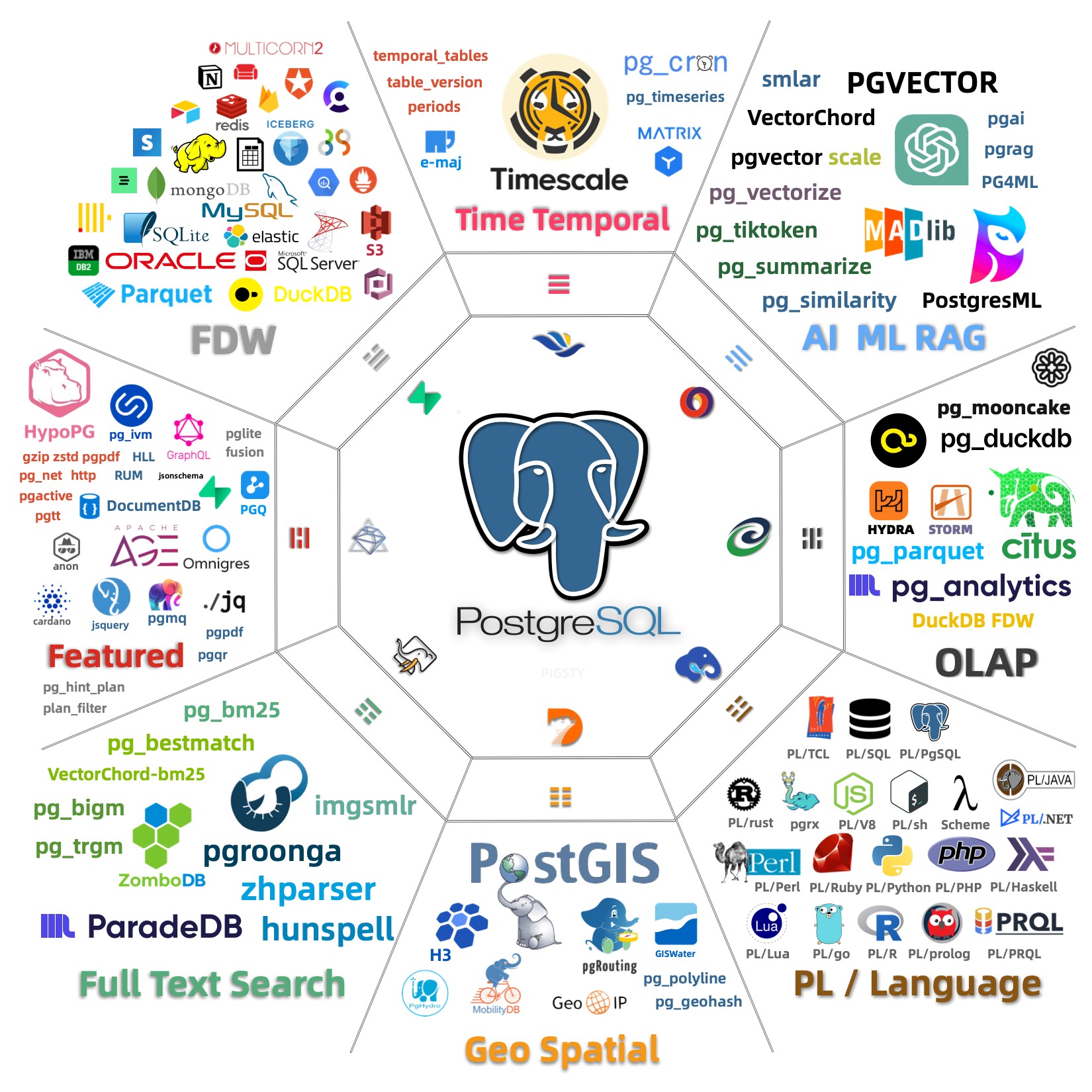
Pigsty has 440 extensions. See PGEXT.CLOUD for details, maintained by PIGSTY.
| Category | All | PGDG | PIGSTY | CONTRIB | MISS | PG18 | PG17 | PG16 | PG15 | PG14 | PG13 |
|---|---|---|---|---|---|---|---|---|---|---|---|
| ALL | 440 | 149 | 268 | 71 | 0 | 408 | 429 | 428 | 430 | 415 | 386 |
| EL | 434 | 143 | 268 | 71 | 6 | 397 | 421 | 422 | 424 | 412 | 382 |
| Debian | 426 | 105 | 250 | 71 | 14 | 394 | 416 | 414 | 416 | 404 | 371 |
4 - File Hierarchy
Pigsty FHS
Pigsty’s home directory is located at ~/pigsty by default. The file structure within this directory is as follows:
#------------------------------------------------------------------------------
# pigsty
#  ^-----@app                    # Extra application resources and examples
#  ^-----@bin                    # Utility scripts
#  ^-----@docs                   # Documentation (docsify-compatible)
#  ^-----@files                  # Ansible file resources
#            ^-----@victoria     # VictoriaMetrics rule definitions
#            ^-----@grafana      # Grafana dashboards
#            ^-----@postgres     # /pg/bin/ scripts
#            ^-----@migration    # PGSQL migration task definitions
#            ^-----@pki          # Self-signed CA and certificates
#  ^-----@roles                  # Ansible role implementations
#  ^-----@templates              # Ansible template files
#  ^-----@vagrant                # Vagrant sandbox VM templates
#  ^-----@terraform              # Terraform cloud VM provisioning templates
#  ^-----configure               # Configuration wizard script
#  ^-----ansible.cfg             # Ansible default configuration
#  ^-----pigsty.yml              # Pigsty default configuration file
#  ^-----*.yml                   # Ansible playbooks
#------------------------------------------------------------------------------
# /etc/pigsty/
#  ^-----@targets                # File-based service discovery targets
#  ^-----@dashboards             # Grafana monitoring dashboards
#  ^-----@datasources            # Grafana data sources
#  ^-----@playbooks              # Ansible playbooks
#------------------------------------------------------------------------------
CA FHS
Pigsty’s self-signed CA is located in files/pki/ under the Pigsty home directory.
You must keep the CA key file secure: files/pki/ca/ca.key. This key is generated by the ca role during deploy.yml or infra.yml execution.
# pigsty/files/pki
#  ^-----@ca                      # Self-signed CA key and certificate
#         ^[email protected]           # CRITICAL: Keep this secret
#         ^[email protected]           # CRITICAL: Trusted everywhere
#  ^-----@csr                     # Certificate signing requests
#  ^-----@misc                    # Miscellaneous certificates, issued certs
#  ^-----@etcd                    # ETCD server certificates
#  ^-----@minio                   # MinIO server certificates
#  ^-----@nginx                   # Nginx SSL certificates
#  ^-----@infra                   # Infra client certificates
#  ^-----@pgsql                   # PostgreSQL server certificates
#  ^-----@mongo                   # MongoDB/FerretDB server certificates
#  ^-----@mysql                   # MySQL server certificates (placeholder)
Nodes managed by Pigsty will have the following certificate files installed:
/etc/pki/ca.crt                             # Root certificate added to all nodes
/etc/pki/ca-trust/source/anchors/ca.crt     # Symlink to system trust anchors
All infra nodes will have the following certificates:
/etc/pki/infra.crt                          # Infra node certificate
/etc/pki/infra.key                          # Infra node private key
When your admin node fails, the files/pki directory and pigsty.yml file should be available on the backup admin node. You can use rsync to achieve this:
# run on meta-1, rsync to meta2
cd ~/pigsty;
rsync -avz ./ meta-2:~/pigsty
NODE FHS
The node data directory is specified by the node_data parameter, defaulting to /data, owned by root with permissions 0777.
Each component’s default data directory is located under this data directory:
/data
#  ^-----@postgres                   # PostgreSQL database directory
#  ^-----@backups                    # PostgreSQL backup directory (when no dedicated backup disk)
#  ^-----@redis                      # Redis data directory (shared by multiple instances)
#  ^-----@minio                      # MinIO data directory (single-node single-disk mode)
#  ^-----@etcd                       # ETCD main data directory
#  ^-----@infra                      # Infra module data directory
#  ^-----@docker                     # Docker data directory
#  ^-----@...                        # Other component data directories
Prometheus FHS
Prometheus main configuration file is located at roles/infra/templates/prometheus/prometheus.yml.j2 and is rendered to /etc/prometheus/prometheus.yml on all infrastructure nodes.
VictoriaMetrics-related scripts and rule definitions are placed in the files/victoria/ directory under the Pigsty home directory, and are copied to /etc/prometheus/ on all infrastructure nodes.
# /etc/prometheus/
#  ^-----prometheus.yml              # Prometheus main configuration file
#  ^-----@bin                        # Utility scripts: check config, show status, reload, rebuild
#  ^-----@rules                      # Recording and alerting rule definitions
#            ^-----infra.yml         # Infra rules and alerts
#            ^-----etcd.yml          # ETCD rules and alerts
#            ^-----node.yml          # Node rules and alerts
#            ^-----pgsql.yml         # PGSQL rules and alerts
#            ^-----redis.yml         # Redis rules and alerts
#            ^-----minio.yml         # MinIO rules and alerts
#            ^-----kafka.yml         # Kafka rules and alerts
#            ^-----mysql.yml         # MySQL rules and alerts
#  ^-----@targets                    # File-based service discovery target definitions
#            ^-----@infra            # Infra static target definitions
#            ^-----@node             # Node static target definitions
#            ^-----@pgsql            # PGSQL static target definitions
#            ^-----@pgrds            # PGSQL remote RDS targets
#            ^-----@redis            # Redis static target definitions
#            ^-----@minio            # MinIO static target definitions
#            ^-----@mongo            # MongoDB static target definitions
#            ^-----@mysql            # MySQL static target definitions
#            ^-----@etcd             # ETCD static target definitions
#            ^-----@ping             # Ping static target definitions
#            ^-----@patroni          # Patroni static targets (used when Patroni SSL is enabled)
#            ^-----@.....            # Other monitoring target definitions
# /etc/alertmanager.yml              # Alertmanager main configuration file
# /etc/blackbox.yml                  # Blackbox exporter main configuration file
PostgreSQL FHS
The following parameters are related to PostgreSQL database directory structure:
- pg_dbsu_home: Postgres default user home directory, defaults to
/var/lib/pgsql - pg_bin_dir: Postgres binary directory, defaults to
/usr/pgsql/bin/ - pg_data: Postgres database directory, defaults to
/pg/data - pg_fs_main: Postgres main data disk mount point, defaults to
/data - pg_fs_backup: Postgres backup disk mount point, defaults to
/data/backups(optional, can also backup to a subdirectory on the main data disk)
# Working assumptions:
#   {{ pg_fs_main }} main data directory, default location: `/data`          [fast SSD]
#   {{ pg_fs_backup }} backup data disk, default location: `/data/backups`     [cheap HDD]
#--------------------------------------------------------------#
# Default configuration:
#     pg_fs_main = /data             High-speed SSD
#     pg_fs_backup = /data/backups     Cheap HDD (optional)
#
#     /pg      -> /data/postgres/pg-test-15    (symlink)
#     /pg/data -> /data/postgres/pg-test-15/data
#--------------------------------------------------------------#
- name: create postgresql directories
  tags: pg_dir
  become: yes
  block:

    - name: make main and backup data dir
      file: path={{ item }} state=directory owner=root mode=0777
      with_items:
        - "{{ pg_fs_main }}"
        - "{{ pg_fs_backup }}"

    # pg_cluster_dir:    "{{ pg_fs_main }}/postgres/{{ pg_cluster }}-{{ pg_version }}"
    - name: create postgres directories
      file: path={{ item }} state=directory owner={{ pg_dbsu }} group=postgres mode=0700
      with_items:
        - "{{ pg_fs_main }}/postgres"
        - "{{ pg_cluster_dir }}"
        - "{{ pg_cluster_dir }}/bin"
        - "{{ pg_cluster_dir }}/log"
        - "{{ pg_cluster_dir }}/tmp"
        - "{{ pg_cluster_dir }}/cert"
        - "{{ pg_cluster_dir }}/conf"
        - "{{ pg_cluster_dir }}/data"
        - "{{ pg_cluster_dir }}/meta"
        - "{{ pg_cluster_dir }}/stat"
        - "{{ pg_cluster_dir }}/change"
        - "{{ pg_backup_dir }}/backup"
Data File Structure
# Physical directories
{{ pg_fs_main }}     /data                      # Top-level data directory, typically fast SSD mount point
{{ pg_dir_main }}    /data/postgres             # Contains all Postgres instance data (may have multiple instances/versions)
{{ pg_cluster_dir }} /data/postgres/pg-test-15  # Contains `pg-test` cluster data (major version 15)
                     /data/postgres/pg-test-15/bin            # PostgreSQL utility scripts
                     /data/postgres/pg-test-15/log            # Logs: postgres/pgbouncer/patroni/pgbackrest
                     /data/postgres/pg-test-15/tmp            # Temporary files, e.g., rendered SQL files
                     /data/postgres/pg-test-15/cert           # PostgreSQL server certificates
                     /data/postgres/pg-test-15/conf           # PostgreSQL configuration file index
                     /data/postgres/pg-test-15/data           # PostgreSQL main data directory
                     /data/postgres/pg-test-15/meta           # PostgreSQL identity information
                     /data/postgres/pg-test-15/stat           # Statistics, log reports, summary digests
                     /data/postgres/pg-test-15/change         # Change records

{{ pg_fs_backup }}     /data/backups                            # Optional backup disk directory/mount point
                     /data/backups/postgres/pg-test-15/backup # Actual storage location for cluster backups

# Symlinks
/pg             ->   /data/postgres/pg-test-15                # pg root symlink
/pg/data        ->   /data/postgres/pg-test-15/data           # pg data directory
/pg/backup      ->   /var/backups/postgres/pg-test-15/backup  # pg backup directory
Binary File Structure
On EL-compatible distributions (using yum), PostgreSQL default installation location is:
/usr/pgsql-${pg_version}/
Pigsty creates a symlink named /usr/pgsql pointing to the actual version specified by the pg_version parameter, for example:
/usr/pgsql -> /usr/pgsql-15
Therefore, the default pg_bin_dir is /usr/pgsql/bin/, and this path is added to the system PATH environment variable, defined in: /etc/profile.d/pgsql.sh.
export PATH="/usr/pgsql/bin:/pg/bin:$PATH"
export PGHOME=/usr/pgsql
export PGDATA=/pg/data
On Ubuntu/Debian, the default PostgreSQL Deb package installation location is:
/usr/lib/postgresql/${pg_version}/bin
Pgbouncer FHS
Pgbouncer runs under the same user as {{ pg_dbsu }} (defaults to postgres), with configuration files located in /etc/pgbouncer.
pgbouncer.ini: Connection pool main configuration filedatabase.txt: Defines databases in the connection pooluserlist.txt: Defines users in the connection poolpgb_hba.conf: Defines access permissions for the connection pool
Redis FHS
Pigsty provides basic support for Redis deployment and monitoring.
Redis binaries are installed in /bin/ via RPM packages or binary copy, including:
redis-server
redis-server
redis-cli
redis-sentinel
redis-check-rdb
redis-check-aof
redis-benchmark
/usr/libexec/redis-shutdown
For a Redis instance named redis-test-1-6379, the related resources are as follows:
/usr/lib/systemd/system/redis-test-1-6379.service               # Service (on Debian: /lib/systemd)
/etc/redis/redis-test-1-6379.conf                               # Configuration
/data/redis/redis-test-1-6379                                   # Database directory
/data/redis/redis-test-1-6379/redis-test-1-6379.rdb             # RDB file
/data/redis/redis-test-1-6379/redis-test-1-6379.aof             # AOF file
/var/log/redis/redis-test-1-6379.log                            # Log
/var/run/redis/redis-test-1-6379.pid                            # PID
For Ubuntu/Debian, the default systemd service directory is /lib/systemd/system/ instead of /usr/lib/systemd/system/.
5 - Parameters
Pigsty provides approximately 380+ configuration parameters distributed across 8 core modules, allowing fine-grained control over all aspects of the system.
Module Navigation
This page provides navigation and overview for all Pigsty configuration parameters. Click on a module name to jump to the detailed parameter documentation.
| Module | Parameter Groups | Total Parameters | Description |
|---|---|---|---|
| PGSQL | 9 | 123 | PostgreSQL database cluster core configuration |
| INFRA | 10 | 82 | Infrastructure components: repo, Nginx, DNS, monitoring, Grafana, etc. |
| NODE | 11 | 83 | Host node tuning: identity, DNS, packages, tuning, security, admin, time, VIP, etc. |
| ETCD | 2 | 13 | Distributed configuration storage and service discovery |
| REDIS | 1 | 21 | Redis cache and data structure server |
| MINIO | 2 | 21 | S3-compatible object storage service |
| FERRET | 1 | 9 | MongoDB-compatible database FerretDB |
| DOCKER | 1 | 8 | Docker container engine |
PGSQL
The PGSQL module provides 9 groups with 123 PostgreSQL-related configuration parameters.
| Parameter Group | Count | Description |
|---|---|---|
PG_ID | 11 | PostgreSQL cluster and instance identity parameters |
PG_BUSINESS | 12 | Business users, databases, services, and access control rules |
PG_INSTALL | 10 | PostgreSQL installation: version, paths, packages |
PG_BOOTSTRAP | 38 | PostgreSQL cluster initialization: Patroni high availability |
PG_PROVISION | 8 | PostgreSQL cluster template provisioning: roles, privileges, extensions |
PG_BACKUP | 6 | pgBackRest backup and recovery configuration |
PG_ACCESS | 17 | Service exposure, connection pool, VIP, DNS client access configuration |
PG_MONITOR | 17 | PostgreSQL monitoring exporter configuration |
PG_REMOVE | 4 | PostgreSQL instance cleanup and uninstallation configuration |
INFRA
The INFRA module provides 10 groups with 82 infrastructure-related configuration parameters.
| Parameter Group | Count | Description |
|---|---|---|
META | 5 | Pigsty meta information: version, admin IP, region, language, proxy |
CA | 3 | Self-signed CA certificate management |
INFRA_ID | 3 | Infrastructure node identity and service portal |
REPO | 10 | Local software repository configuration |
INFRA_PACKAGE | 2 | Infrastructure node package installation |
NGINX | 14 | Nginx web server and reverse proxy configuration |
DNS | 3 | DNSMasq DNS resolution service configuration |
VICTORIA | 19 | VictoriaMetrics/Logs/Traces observability suite |
PROMETHEUS | 7 | Alertmanager and Blackbox Exporter |
GRAFANA | 8 | Grafana visualization platform configuration |
NODE
The NODE module provides 11 groups with 83 host node-related configuration parameters.
| Parameter Group | Count | Description |
|---|---|---|
NODE_ID | 5 | Node identity parameters |
NODE_DNS | 6 | Node DNS configuration |
NODE_PACKAGE | 4 | Node package management |
NODE_TUNE | 10 | Node kernel tuning parameters |
NODE_SEC | 4 | Node security parameters |
NODE_ADMIN | 9 | Node admin user configuration |
NODE_TIME | 5 | Node time synchronization |
NODE_VIP | 8 | Node VIP configuration |
HAPROXY | 10 | HAProxy load balancer configuration |
NODE_EXPORTER | 3 | Node exporter configuration |
VECTOR | 6 | Vector log collector configuration |
ETCD
The ETCD module provides 2 groups with 13 distributed configuration storage parameters.
| Parameter Group | Count | Description |
|---|---|---|
ETCD | 10 | ETCD cluster deployment and configuration |
ETCD_REMOVE | 3 | ETCD cluster removal: safeguard, data cleanup, etc. |
REDIS
The REDIS module provides 21 Redis-related configuration parameters.
| Parameter Group | Count | Description |
|---|---|---|
REDIS | 21 | Redis cluster deployment and configuration |
MINIO
The MINIO module provides 2 groups with 21 MinIO object storage parameters.
| Parameter Group | Count | Description |
|---|---|---|
MINIO | 18 | MinIO cluster deployment and configuration |
MINIO_REMOVE | 3 | MinIO cluster removal: safeguard, data cleanup, etc. |
FERRET
The FERRET module provides 9 FerretDB-related configuration parameters.
| Parameter Group | Count | Description |
|---|---|---|
FERRET | 9 | FerretDB deployment and configuration |
DOCKER
The DOCKER module provides 8 Docker container engine configuration parameters.
| Parameter Group | Count | Description |
|---|---|---|
DOCKER | 8 | Docker container engine configuration |
Parameter Overview
The following tables provide a comprehensive summary of all parameters, organized by module.
PGSQL Parameters
PG_ID parameter group defines PostgreSQL cluster and instance identity, including cluster name, instance number, role, shard, etc.
| Parameter | Type | Description |
|---|---|---|
pg_mode | enum | pgsql cluster mode: pgsql,citus,mssql,mysql,polar,ivory,oracle,gpsql |
pg_cluster | string | pgsql cluster name, required identity parameter |
pg_seq | int | pgsql instance number, required identity parameter |
pg_role | enum | pgsql instance role, required, can be primary, replica, offline |
pg_instances | dict | Define multiple pg instances on one node, using {port:ins_vars} format |
pg_upstream | ip | Upstream node IP for cascaded replica or standby cluster |
pg_shard | string | pgsql shard name, required for citus and gpsql horizontal sharding clusters |
pg_group | int | pgsql shard number, positive integer, required for citus and gpsql clusters |
gp_role | enum | Greenplum role for this cluster, can be master or segment |
pg_exporters | dict | Set up additional pg_exporters on this node to monitor remote postgres instances |
pg_offline_query | bool | Set to true to mark this replica as special offline instance for Offline service |
PG_BUSINESS parameter group defines business users, databases, services, access control rules, and default system user credentials.
| Parameter | Type | Description |
|---|---|---|
pg_users | user[] | Postgres business users |
pg_databases | database[] | Postgres business databases |
pg_services | service[] | Postgres business services |
pg_hba_rules | hba[] | Postgres business HBA rules |
pgb_hba_rules | hba[] | Pgbouncer business HBA rules |
pg_replication_username | username | Postgres replication username, default replicator |
pg_replication_password | password | Postgres replication password, default DBUser.Replicator |
pg_admin_username | username | Postgres admin username, default dbuser_dba |
pg_admin_password | password | Postgres admin password, default DBUser.DBA |
pg_monitor_username | username | Postgres monitor username, default dbuser_monitor |
pg_monitor_password | password | Postgres monitor password, default DBUser.Monitor |
pg_dbsu_password | password | dbsu password, empty string means no dbsu password, best not to set |
PG_INSTALL parameter group configures PostgreSQL installation options, including version, paths, packages, and extensions.
| Parameter | Type | Description |
|---|---|---|
pg_dbsu | username | OS dbsu name, default postgres, best not to change |
pg_dbsu_uid | int | OS dbsu uid and gid, default 26 for postgres user and group |
pg_dbsu_sudo | enum | dbsu sudo privilege: none, limit, all, nopass, default limit |
pg_dbsu_home | path | PostgreSQL home directory, default /var/lib/pgsql |
pg_dbsu_ssh_exchange | bool | Exchange postgres dbsu ssh keys between pgsql cluster |
pg_version | enum | Postgres major version to install, default 18 |
pg_bin_dir | path | Postgres binary directory, default /usr/pgsql/bin |
pg_log_dir | path | Postgres log directory, default /pg/log/postgres |
pg_packages | string[] | pg packages to install, ${pg_version} will be replaced |
pg_extensions | string[] | pg extensions to install, ${pg_version} will be replaced |
PG_BOOTSTRAP parameter group configures PostgreSQL cluster initialization, including Patroni HA, data directory, storage, connections, encoding, etc.
| Parameter | Type | Description |
|---|---|---|
pg_data | path | Postgres data directory, default /pg/data |
pg_fs_main | path | Postgres main data mount point, default /data/postgres |
pg_fs_backup | path | pg backup data mount point, default /data/backups |
pg_storage_type | enum | pg main data storage type: SSD, HDD, default SSD |
pg_dummy_filesize | size | Size of /pg/dummy, default reserves 64MB for emergency |
pg_listen | ip(s) | postgres/pgbouncer listen address, default 0.0.0.0 |
pg_port | port | Postgres listen port, default 5432 |
pg_localhost | path | Postgres Unix socket directory for local connections |
pg_namespace | path | Top-level key namespace in etcd, used by patroni & vip |
patroni_enabled | bool | If disabled, postgres cluster won’t be created during init |
patroni_mode | enum | Patroni working mode: default, pause, remove |
patroni_port | port | Patroni listen port, default 8008 |
patroni_log_dir | path | Patroni log directory, default /pg/log/patroni |
patroni_ssl_enabled | bool | Secure patroni RestAPI with SSL? |
patroni_watchdog_mode | enum | Patroni watchdog mode: automatic, required, off, default off |
patroni_username | username | Patroni restapi username, default postgres |
patroni_password | password | Patroni restapi password, default Patroni.API |
pg_primary_db | string | Primary database name in cluster, used by Citus, default postgres |
pg_parameters | dict | Override PostgreSQL parameters in postgresql.auto.conf |
pg_files | path[] | Extra files to copy to PGDATA directory (e.g., license files) |
pg_conf | enum | Config template: oltp, olap, crit, tiny, default oltp.yml |
pg_max_conn | int | Postgres max connections, auto uses recommended value |
pg_shared_buffer_ratio | float | Postgres shared buffer memory ratio, default 0.25, range 0.1~0.4 |
pg_rto | int | Recovery Time Objective (seconds), default 30s |
pg_rpo | int | Recovery Point Objective (bytes), default 1MiB |
pg_libs | string | Preloaded libraries, default pg_stat_statements,auto_explain |
pg_delay | interval | WAL replay delay for standby cluster, for delayed replica |
pg_checksum | bool | Enable data checksums for postgres cluster? |
pg_pwd_enc | enum | Password encryption algorithm: fixed to scram-sha-256 |
pg_encoding | enum | Database cluster encoding, default UTF8 |
pg_locale | enum | Database cluster locale setting, default C |
pg_lc_collate | enum | Database cluster collation, default C |
pg_lc_ctype | enum | Database character type, default C |
pg_io_method | enum | PostgreSQL IO method: auto, sync, worker, io_uring |
pg_etcd_password | password | Password for this PostgreSQL cluster in etcd, default uses cluster name |
pgsodium_key | string | pgsodium encryption master key, 64-bit hex, default sha256(pg_cluster) |
pgsodium_getkey_script | path | pgsodium getkey script path, default uses template pgsodium_getkey |
PG_PROVISION parameter group configures PostgreSQL cluster template provisioning, including default roles, privileges, schemas, extensions, and HBA rules.
| Parameter | Type | Description |
|---|---|---|
pg_provision | bool | Provision postgres cluster business objects after bootstrap? |
pg_init | string | Cluster template initialization script, default pg-init |
pg_default_roles | role[] | Default predefined roles and system users in postgres cluster |
pg_default_privileges | string[] | Default privileges when admin user creates database objects |
pg_default_schemas | string[] | List of default schemas to create |
pg_default_extensions | extension[] | List of default extensions to create |
pg_reload | bool | Reload postgres config immediately after HBA changes |
pg_default_hba_rules | hba[] | Postgres host-based authentication rules, global PG default HBA |
pgb_default_hba_rules | hba[] | Pgbouncer default host-based authentication rules, global PGB default HBA |
PG_BACKUP parameter group configures pgBackRest backup and recovery, including repository type, path, retention policy, etc.
| Parameter | Type | Description |
|---|---|---|
pgbackrest_enabled | bool | Enable pgbackrest on pgsql host? |
pgbackrest_clean | bool | Delete previous pg backup data during init? |
pgbackrest_log_dir | path | pgbackrest log directory, default /pg/log/pgbackrest |
pgbackrest_method | enum | pgbackrest repo method: local, minio, etc. |
pgbackrest_init_backup | bool | Execute full backup immediately after pgbackrest init? default true |
pgbackrest_repo | dict | pgbackrest repository definition |
PG_ACCESS parameter group configures service exposure, connection pool, VIP, DNS, and other client access options.
| Parameter | Type | Description |
|---|---|---|
pgbouncer_enabled | bool | If disabled, pgbouncer connection pool won’t be configured |
pgbouncer_port | port | pgbouncer listen port, default 6432 |
pgbouncer_log_dir | path | pgbouncer log directory, default /pg/log/pgbouncer |
pgbouncer_auth_query | bool | Use AuthQuery to fetch unlisted business users from postgres? |
pgbouncer_poolmode | enum | Pooling mode: transaction, session, statement, default transaction |
pgbouncer_sslmode | enum | pgbouncer client SSL mode, default disabled |
pgbouncer_ignore_param | string[] | pgbouncer ignore startup parameters list |
pg_weight | int | Relative load balancing weight in service, default 100, range 0-255 |
pg_service_provider | string | Dedicated haproxy node group name, or empty for local haproxy |
pg_default_service_dest | enum | If svc.dest=‘default’, default service points to postgres or pgbouncer |
pg_default_services | service[] | Postgres default service definition list, global shared |
pg_vip_enabled | bool | Enable L2 VIP for pgsql primary node? default disabled |
pg_vip_address | cidr4 | VIP address format <ipv4>/<mask>, required when vip enabled |
pg_vip_interface | string | VIP network interface to listen, default eth0 |
pg_dns_suffix | string | pgsql dns suffix, default empty |
pg_dns_target | enum | PG DNS resolves to: auto, primary, vip, none, or specific IP |
PG_MONITOR parameter group configures PostgreSQL monitoring exporters, including pg_exporter, pgbouncer_exporter, and pgbackrest_exporter.
| Parameter | Type | Description |
|---|---|---|
pg_exporter_enabled | bool | Enable pg_exporter on pgsql host? |
pg_exporter_config | string | pg_exporter config file/template name |
pg_exporter_cache_ttls | string | pg_exporter collector tiered TTL config, default ‘1,10,60,300’ |
pg_exporter_port | port | pg_exporter listen port, default 9630 |
pg_exporter_params | string | Extra URL parameters passed in pg_exporter dsn |
pg_exporter_url | pgurl | If specified, overrides auto-generated postgres DSN connection string |
pg_exporter_auto_discovery | bool | Enable monitoring auto database discovery? default enabled |
pg_exporter_exclude_database | string | Excluded database names when auto discovery enabled, comma-separated |
pg_exporter_include_database | string | Only monitor databases in this list when auto discovery enabled |
pg_exporter_connect_timeout | int | pg_exporter connection timeout in ms, default 200 |
pg_exporter_options | arg | pg_exporter extra command line options |
pgbouncer_exporter_enabled | bool | Enable pgbouncer_exporter on pgsql host? |
pgbouncer_exporter_port | port | pgbouncer_exporter listen port, default 9631 |
pgbouncer_exporter_url | pgurl | If specified, overrides auto-generated pgbouncer dsn connection string |
pgbouncer_exporter_options | arg | pgbouncer_exporter extra command line options |
pgbackrest_exporter_enabled | bool | Enable pgbackrest_exporter on pgsql host? |
pgbackrest_exporter_port | port | pgbackrest_exporter listen port, default 9854 |
pgbackrest_exporter_options | arg | pgbackrest_exporter extra command line options |
PG_REMOVE parameter group configures PostgreSQL instance cleanup and uninstallation behavior, including data directory, backup, and package removal control.
| Parameter | Type | Description |
|---|---|---|
pg_rm_data | bool | Clean postgres data directory when removing pgsql instance? |
pg_rm_backup | bool | Clean pgbackrest backup when removing primary? |
pg_rm_pkg | bool | Uninstall related packages when removing pgsql instance? |
pg_safeguard | bool | Safeguard to prevent accidental pgsql cleanup? default false |
INFRA Parameters
META parameter group defines Pigsty meta information, including version number, admin node IP, repository region, default language, and proxy settings.
| Parameter | Type | Description |
|---|---|---|
version | string | Pigsty version string |
admin_ip | ip | Admin node IP address |
region | enum | Upstream mirror region: default, china, europe |
language | enum | Default language, en or zh |
proxy_env | dict | Global proxy environment variables for package downloads |
CA parameter group configures Pigsty self-signed CA certificate management, including whether to create CA, CA name, and certificate validity.
| Parameter | Type | Description |
|---|---|---|
ca_create | bool | Create CA if not exists? default true |
ca_cn | string | CA CN name, fixed to pigsty-ca |
cert_validity | interval | Certificate validity, default 20 years |
INFRA_ID parameter group defines infrastructure node identity, including node sequence number, service portal configuration, and data directory.
| Parameter | Type | Description |
|---|---|---|
infra_seq | int | Infrastructure node sequence number, required identity parameter |
infra_portal | dict | Infrastructure service list exposed via Nginx portal |
infra_data | path | Infrastructure data directory, default /data/infra |
REPO parameter group configures local software repository, including repository enable switch, directory path, upstream source definitions, and packages to download.
| Parameter | Type | Description |
|---|---|---|
repo_enabled | bool | Create software repository on this infra node? |
repo_home | path | Software repository home directory, default /www |
repo_name | string | Software repository name, default pigsty |
repo_endpoint | url | Repository access point: domain or ip:port format |
repo_remove | bool | Remove existing upstream repo source definition files when building local repo? |
repo_modules | string | Enabled upstream repository module list, comma-separated |
repo_upstream | upstream[] | Upstream repository source definitions: where to download packages |
repo_packages | string[] | Which packages to download from upstream |
repo_extra_packages | string[] | Which extra packages to download from upstream |
repo_url_packages | string[] | Extra packages to download by URL |
INFRA_PACKAGE parameter group defines packages to install on infrastructure nodes, including RPM/DEB and PIP packages.
| Parameter | Type | Description |
|---|---|---|
infra_packages | string[] | Packages to install on infrastructure nodes |
infra_packages_pip | string | Packages to install via pip on infrastructure nodes |
NGINX parameter group configures Nginx web server and reverse proxy, including enable switch, ports, SSL mode, certificates, and basic authentication.
| Parameter | Type | Description |
|---|---|---|
nginx_enabled | bool | Enable nginx on this infra node? |
nginx_clean | bool | Clean existing nginx config during init? |
nginx_exporter_enabled | bool | Enable nginx_exporter on this infra node? |
nginx_exporter_port | port | nginx_exporter listen port, default 9113 |
nginx_sslmode | enum | nginx SSL mode: disable, enable, enforce |
nginx_cert_validity | duration | nginx self-signed certificate validity, default 397d |
nginx_home | path | nginx content directory, default /www, symlinks to nginx_data |
nginx_data | path | nginx actual data directory, default /data/nginx |
nginx_users | dict | nginx basic auth users: username and password dictionary |
nginx_port | port | nginx listen port, default 80 |
nginx_ssl_port | port | nginx SSL listen port, default 443 |
certbot_sign | bool | Use certbot to sign certificates? |
certbot_email | string | certbot notification email address |
certbot_options | string | certbot extra command line arguments |
DNS parameter group configures DNSMasq DNS resolution service, including enable switch, listen port, and dynamic DNS records.
| Parameter | Type | Description |
|---|---|---|
dns_enabled | bool | Set up dnsmasq on this infra node? |
dns_port | port | DNS server listen port, default 53 |
dns_records | string[] | Dynamic DNS records resolved by dnsmasq |
VICTORIA parameter group configures VictoriaMetrics/Logs/Traces observability suite, including enable switches, ports, data retention policies, etc.
| Parameter | Type | Description |
|---|---|---|
vmetrics_enabled | bool | Enable VictoriaMetrics on this infra node? |
vmetrics_clean | bool | Clean VictoriaMetrics data during init? |
vmetrics_port | port | VictoriaMetrics listen port, default 8428 |
vmetrics_scrape_interval | interval | Global scrape interval, default 10s |
vmetrics_scrape_timeout | interval | Global scrape timeout, default 8s |
vmetrics_options | arg | VictoriaMetrics extra command line arguments |
vlogs_enabled | bool | Enable VictoriaLogs on this infra node? |
vlogs_clean | bool | Clean VictoriaLogs data during init? |
vlogs_port | port | VictoriaLogs listen port, default 9428 |
vlogs_options | arg | VictoriaLogs extra command line arguments |
vtraces_enabled | bool | Enable VictoriaTraces on this infra node? |
vtraces_clean | bool | Clean VictoriaTraces data during init? |
vtraces_port | port | VictoriaTraces listen port, default 10428 |
vtraces_options | arg | VictoriaTraces extra command line arguments |
vmalert_enabled | bool | Enable VMAlert on this infra node? |
vmalert_port | port | VMAlert listen port, default 8880 |
vmalert_options | arg | VMAlert extra command line arguments |
PROMETHEUS parameter group configures Alertmanager and Blackbox Exporter, providing alerting management and network probing.
| Parameter | Type | Description |
|---|---|---|
blackbox_enabled | bool | Set up blackbox_exporter on this infra node? |
blackbox_port | port | blackbox_exporter listen port, default 9115 |
blackbox_options | arg | blackbox_exporter extra command line options |
alertmanager_enabled | bool | Set up alertmanager on this infra node? |
alertmanager_port | port | AlertManager listen port, default 9059 |
alertmanager_options | arg | alertmanager extra command line options |
exporter_metrics_path | path | exporter metrics path, default /metrics |
GRAFANA parameter group configures Grafana visualization platform, including enable switch, port, admin credentials, and data source configuration.
| Parameter | Type | Description |
|---|---|---|
grafana_enabled | bool | Enable Grafana on this infra node? |
grafana_port | port | Grafana listen port, default 3000 |
grafana_clean | bool | Clean data during Grafana init? |
grafana_admin_username | username | Grafana admin username, default admin |
grafana_admin_password | password | Grafana admin password, default pigsty |
grafana_auth_proxy | bool | Enable Grafana auth proxy? |
grafana_pgurl | url | External PostgreSQL database URL (for Grafana persistence) |
grafana_view_password | password | Grafana metadb PG datasource password |
NODE Parameters
NODE_ID parameter group defines node identity parameters, including node name, cluster name, and whether to borrow identity from PostgreSQL.
| Parameter | Type | Description |
|---|---|---|
nodename | string | Node instance identifier, uses hostname if missing, optional |
node_cluster | string | Node cluster identifier, uses ’nodes’ if missing, optional |
nodename_overwrite | bool | Overwrite node hostname with nodename? |
nodename_exchange | bool | Exchange nodename between playbook hosts? |
node_id_from_pg | bool | Borrow postgres identity as node identity if possible? |
NODE_DNS parameter group configures node DNS resolution, including static hosts records and dynamic DNS servers.
| Parameter | Type | Description |
|---|---|---|
node_write_etc_hosts | bool | Modify /etc/hosts on target nodes? |
node_default_etc_hosts | string[] | Static DNS records in /etc/hosts |
node_etc_hosts | string[] | Extra static DNS records in /etc/hosts |
node_dns_method | enum | How to handle existing DNS servers: add, none, overwrite |
node_dns_servers | string[] | Dynamic DNS server list in /etc/resolv.conf |
node_dns_options | string[] | DNS resolution options in /etc/resolv.conf |
NODE_PACKAGE parameter group configures node software sources and package installation.
| Parameter | Type | Description |
|---|---|---|
node_repo_modules | enum | Which repo modules to enable on node? default local |
node_repo_remove | bool | Remove existing repos on node when configuring node software repos? |
node_packages | string[] | Packages to install on current node |
node_default_packages | string[] | Default packages to install on all nodes |
NODE_TUNE parameter group configures node kernel parameters, feature switches, and performance tuning templates.
| Parameter | Type | Description |
|---|---|---|
node_disable_numa | bool | Disable node NUMA, requires reboot |
node_disable_swap | bool | Disable node Swap, use with caution |
node_static_network | bool | Preserve DNS resolver settings after reboot, i.e., static network, default enabled |
node_disk_prefetch | bool | Configure disk prefetch on HDD to improve performance |
node_kernel_modules | string[] | Kernel modules to enable on this node |
node_hugepage_count | int | Number of 2MB hugepages allocated on host node, higher priority than ratio |
node_hugepage_ratio | float | Memory hugepage ratio allocated on host node, 0 disables |
node_overcommit_ratio | float | Node memory overcommit ratio (50-100), 0 disables |
node_tune | enum | Node tuning profile: none, oltp, olap, crit, tiny |
node_sysctl_params | dict | Extra sysctl config parameters, k:v format |
NODE_SEC parameter group configures node security options, including SELinux, firewall, etc.
| Parameter | Type | Description |
|---|---|---|
node_selinux_mode | enum | SELinux mode: disabled, permissive, enforcing |
node_firewall_mode | enum | Firewall mode: off, none, zone |
node_firewall_intranet | cidr[] | Intranet CIDR list for firewall rules |
node_firewall_public_port | port[] | Public open port list, default [22, 80, 443, 5432] |
NODE_ADMIN parameter group configures node admin user, data directory, and command aliases.
| Parameter | Type | Description |
|---|---|---|
node_data | path | Node main data directory, default /data |
node_admin_enabled | bool | Create admin user on target node? |
node_admin_uid | int | Node admin user uid and gid |
node_admin_username | username | Node admin user name, default dba |
node_admin_sudo | enum | Admin user sudo privilege: limited, nopass, all, none |
node_admin_ssh_exchange | bool | Exchange admin ssh keys between node clusters? |
node_admin_pk_current | bool | Add current user’s ssh public key to admin’s authorized_keys? |
node_admin_pk_list | string[] | ssh public keys to add to admin user |
node_aliases | dict | Shell alias commands to configure on host, KV dictionary |
NODE_TIME parameter group configures node timezone, NTP time sync, and cron jobs.
| Parameter | Type | Description |
|---|---|---|
node_timezone | string | Set host node timezone, empty string skips |
node_ntp_enabled | bool | Enable chronyd time sync service? |
node_ntp_servers | string[] | NTP server list in /etc/chrony.conf |
node_crontab_overwrite | bool | Append or overwrite when writing /etc/crontab? |
node_crontab | string[] | Crontab entries in /etc/crontab |
NODE_VIP parameter group configures node cluster L2 VIP, implemented by keepalived.
| Parameter | Type | Description |
|---|---|---|
vip_enabled | bool | Enable L2 VIP on this node cluster? |
vip_address | ip | Node VIP address in ipv4 format, required when vip enabled |
vip_vrid | int | Required integer 1-254, should be unique in same VLAN |
vip_role | enum | Optional, master/backup, default backup |
vip_preempt | bool | Optional, true/false, default false, enable vip preemption |
vip_interface | string | Node VIP network interface to listen, default eth0 |
vip_dns_suffix | string | Node VIP DNS name suffix, default empty string |
vip_auth_pass | password | VRRP auth password, auto-generated if empty |
vip_exporter_port | port | keepalived exporter listen port, default 9650 |
HAPROXY parameter group configures HAProxy load balancer and service exposure on nodes.
| Parameter | Type | Description |
|---|---|---|
haproxy_enabled | bool | Enable haproxy on this node? |
haproxy_clean | bool | Clean all existing haproxy config? |
haproxy_reload | bool | Reload haproxy after config? |
haproxy_auth_enabled | bool | Enable haproxy admin page authentication? |
haproxy_admin_username | username | haproxy admin username, default admin |
haproxy_admin_password | password | haproxy admin password, default pigsty |
haproxy_exporter_port | port | haproxy exporter port, default 9101 |
haproxy_client_timeout | interval | haproxy client connection timeout, default 24h |
haproxy_server_timeout | interval | haproxy server connection timeout, default 24h |
haproxy_services | service[] | haproxy service list to expose on node |
NODE_EXPORTER parameter group configures node monitoring exporter.
| Parameter | Type | Description |
|---|---|---|
node_exporter_enabled | bool | Configure node_exporter on this node? |
node_exporter_port | port | node exporter listen port, default 9100 |
node_exporter_options | arg | node_exporter extra server options |
VECTOR parameter group configures Vector log collector.
| Parameter | Type | Description |
|---|---|---|
vector_enabled | bool | Enable vector log collector? |
vector_clean | bool | Clean vector data directory during init? |
vector_data | path | vector data directory, default /data/vector |
vector_port | port | vector metrics listen port, default 9598 |
vector_read_from | enum | vector reads logs from beginning or end |
vector_log_endpoint | string[] | Log send destination endpoint, default sends to infra group |
ETCD Parameters
ETCD parameter group is for etcd cluster deployment and configuration, including instance identity, cluster name, data directory, ports, and authentication password.
| Parameter | Type | Description |
|---|---|---|
etcd_seq | int | etcd instance identifier, required |
etcd_cluster | string | etcd cluster name, default fixed to etcd |
etcd_learner | bool | Initialize etcd instance as learner? |
etcd_data | path | etcd data directory, default /data/etcd |
etcd_port | port | etcd client port, default 2379 |
etcd_peer_port | port | etcd peer port, default 2380 |
etcd_init | enum | etcd initial cluster state, new or existing |
etcd_election_timeout | int | etcd election timeout, default 1000ms |
etcd_heartbeat_interval | int | etcd heartbeat interval, default 100ms |
etcd_root_password | password | etcd root user password for RBAC authentication |
ETCD_REMOVE parameter group controls etcd cluster removal behavior, including safeguard, data cleanup, and package uninstallation.
| Parameter | Type | Description |
|---|---|---|
etcd_safeguard | bool | etcd safeguard to prevent cleaning running etcd instance? |
etcd_rm_data | bool | Delete etcd data when removing? default true |
etcd_rm_pkg | bool | Uninstall etcd package when removing? default false |
REDIS Parameters
REDIS parameter group is for Redis cluster deployment and configuration, including identity, instance definitions, working mode, memory configuration, persistence, and monitoring.
| Parameter | Type | Description |
|---|---|---|
redis_cluster | string | Redis database cluster name, required identity parameter |
redis_instances | dict | Instance definitions on Redis node |
redis_node | int | Redis node number, positive integer, unique in cluster, required |
redis_fs_main | path | Redis main data directory, default /data |
redis_exporter_enabled | bool | Redis Exporter enabled? |
redis_exporter_port | port | Redis Exporter listen port |
redis_exporter_options | string | Redis Exporter command arguments |
redis_safeguard | bool | Prevent erasing existing Redis |
redis_clean | bool | Erase existing instance when initializing Redis |
redis_rmdata | bool | Remove data when removing Redis instance? |
redis_mode | enum | Redis cluster mode: sentinel, cluster, standalone |
redis_conf | string | Redis config file template, except sentinel |
redis_bind_address | ip | Redis listen address, empty binds to host IP |
redis_max_memory | size | Redis max available memory |
redis_mem_policy | enum | Redis memory eviction policy |
redis_password | password | Redis password, empty disables password |
redis_rdb_save | string[] | Redis RDB save directives, empty array disables RDB |
redis_aof_enabled | bool | Redis AOF enabled? |
redis_rename_commands | dict | Redis dangerous command rename list |
redis_cluster_replicas | int | How many replicas per master in Redis native cluster? |
redis_sentinel_monitor | master[] | Master list monitored by Redis sentinel, only for sentinel cluster |
MINIO Parameters
MINIO parameter group is for MinIO cluster deployment and configuration, including identity, storage paths, ports, authentication credentials, and bucket/user provisioning.
| Parameter | Type | Description |
|---|---|---|
minio_seq | int | minio instance identifier, required |
minio_cluster | string | minio cluster name, default minio |
minio_user | username | minio OS user, default minio |
minio_https | bool | Enable HTTPS for MinIO? default true |
minio_node | string | minio node name pattern |
minio_data | path | minio data directory, use {x...y} for multiple disks |
minio_volumes | string | minio core parameter, specifies member nodes and disks |
minio_domain | string | minio external domain, default sss.pigsty |
minio_port | port | minio service port, default 9000 |
minio_admin_port | port | minio console port, default 9001 |
minio_access_key | username | Root access key, default minioadmin |
minio_secret_key | password | Root secret key, default S3User.MinIO |
minio_extra_vars | string | Extra environment variables for minio server |
minio_provision | bool | Execute minio resource provisioning task? default true |
minio_alias | string | minio deployment client alias |
minio_endpoint | string | minio deployment client alias endpoint |
minio_buckets | bucket[] | minio buckets to create |
minio_users | user[] | minio users to create |
MINIO_REMOVE parameter group controls MinIO cluster removal behavior, including safeguard, data cleanup, and package uninstallation.
| Parameter | Type | Description |
|---|---|---|
minio_safeguard | bool | Prevent accidental deletion? default false |
minio_rm_data | bool | Delete minio data when removing? default true |
minio_rm_pkg | bool | Uninstall minio package when removing? default false |
FERRET Parameters
FERRET parameter group is for FerretDB deployment and configuration, including identity, underlying PostgreSQL connection, listen port, and SSL settings.
| Parameter | Type | Description |
|---|---|---|
mongo_seq | int | mongo instance number, required identity parameter |
mongo_cluster | string | mongo cluster name, required identity parameter |
mongo_pgurl | pgurl | PGURL connection string for FerretDB backend |
mongo_ssl_enabled | bool | Enable SSL? default false |
mongo_listen | ip | Listen address, empty listens on all addresses |
mongo_port | port | Service port, default 27017 |
mongo_ssl_port | port | TLS listen port, default 27018 |
mongo_exporter_port | port | Exporter port, default 9216 |
mongo_extra_vars | string | Extra environment variables, default empty string |
DOCKER Parameters
DOCKER parameter group is for Docker container engine deployment and configuration, including enable switch, data directory, storage driver, registry mirrors, and monitoring.
| Parameter | Type | Description |
|---|---|---|
docker_enabled | bool | Enable Docker on current node? default disabled |
docker_data | path | Docker data directory, default /data/docker |
docker_storage_driver | enum | Docker storage driver, default overlay2 |
docker_cgroups_driver | enum | Docker CGroup filesystem driver: cgroupfs, systemd |
docker_registry_mirrors | string[] | Docker registry mirror list |
docker_exporter_port | port | Docker monitoring metrics export port, default 9323 |
docker_image | string[] | Docker images to pull, default empty list |
docker_image_cache | path | Docker image tarball path to import, default /tmp/docker/*.tgz |
6 - Playbooks
Pigsty provides a series of Ansible playbooks for automated deployment and management of various modules. This page provides navigation and summary of all playbooks.
Module Navigation
| Module | Description | |
|---|---|---|
| INFRA | 3 | Infrastructure module playbooks |
| NODE | 2 | Node management module playbooks |
| ETCD | 2 | ETCD cluster management playbooks |
| PGSQL | 7 | PostgreSQL cluster management playbooks |
| REDIS | 2 | Redis cluster management playbooks |
| MINIO | 2 | MinIO object storage management playbooks |
| FERRET | 1 | FerretDB management playbook |
| DOCKER | 1 | Docker management playbook |
Playbook Summary
The following table lists all available preset playbooks in Pigsty:
| Playbook | Module | Function |
|---|---|---|
deploy.yml | ADMIN | Deploy pigsty on current environment |
infra.yml | INFRA | Initialize pigsty infrastructure on infra nodes |
infra-rm.yml | INFRA | Remove infrastructure components from infra nodes |
node.yml | NODE | Manage nodes, adjust nodes to desired state |
node-rm.yml | NODE | Remove managed nodes from Pigsty |
etcd.yml | ETCD | Install and configure Etcd cluster |
etcd-rm.yml | ETCD | Remove Etcd cluster or members |
pgsql.yml | PGSQL | Initialize PostgreSQL cluster or add new replicas |
pgsql-rm.yml | PGSQL | Remove PostgreSQL cluster or instance |
pgsql-user.yml | PGSQL | Add new business users to existing PostgreSQL cluster |
pgsql-db.yml | PGSQL | Add new business databases to existing PostgreSQL cluster |
pgsql-monitor.yml | PGSQL | Monitor remote PostgreSQL instances |
pgsql-migration.yml | PGSQL | Generate migration manuals and scripts for existing PostgreSQL clusters |
pgsql-pitr.yml | PGSQL | Execute PostgreSQL Point-in-Time Recovery (PITR) |
redis.yml | REDIS | Initialize Redis cluster/node/instance |
redis-rm.yml | REDIS | Remove Redis cluster/node/instance |
minio.yml | MINIO | Install MinIO cluster |
minio-rm.yml | MINIO | Remove MinIO cluster |
mongo.yml | FERRET | Install FerretDB on nodes |
docker.yml | DOCKER | Install Docker Daemon and Docker Compose |
Playbook Usage Notes
Protection Mechanism
Multiple modules provide deletion protection through *_safeguard parameters:
- PGSQL:
pg_safeguardprevents accidental deletion of PostgreSQL clusters - ETCD:
etcd_safeguardprevents accidental deletion of Etcd clusters - MINIO:
minio_safeguardprevents accidental deletion of MinIO clusters
By default, these safeguard parameters are not enabled (undefined). It’s recommended to explicitly set them to true for initialized clusters in production environments.
When the protection switch is set to true, the corresponding *-rm.yml playbook will abort immediately. You can force override through command-line parameters:
./pgsql-rm.yml -l pg-test -e pg_safeguard=false
./etcd-rm.yml -e etcd_safeguard=false
./minio-rm.yml -l minio -e minio_safeguard=false
Limiting Execution Scope
When executing playbooks, it’s recommended to use the -l parameter to limit the execution scope:
./pgsql.yml -l pg-meta            # Limit execution to pg-meta cluster
./node.yml -l 10.10.10.10         # Limit execution to specific node
./redis.yml -l redis-test         # Limit execution to redis-test cluster
Idempotency
Most playbooks are idempotent and can be executed repeatedly. However, note:
infra.ymldoes not clear data by default and can be safely re-executed. All clean parameters (vmetrics_clean,vlogs_clean,vtraces_clean,grafana_clean,nginx_clean) default tofalse- To clear infrastructure data for rebuild, you need to explicitly set the corresponding clean parameter to
true - Be extra careful when repeatedly executing
*-rm.ymldeletion playbooks
Task Tags
You can use the -t parameter to execute only specific task subsets:
./pgsql.yml -l pg-test -t pg_service    # Only refresh pg-test cluster services
./node.yml -t haproxy                   # Only set up haproxy on nodes
./etcd.yml -t etcd_launch               # Only restart etcd service
Quick Command Reference
./deploy.yml # One-pass deployment
INFRA Module
./infra.yml                      # Initialize infrastructure
./infra-rm.yml                   # Remove infrastructure
NODE Module
./node.yml -l <cls|ip>           # Add node
./node-rm.yml -l <cls|ip>        # Remove node
bin/node-add <cls|ip>            # Add node (wrapper script)
bin/node-rm <cls|ip>             # Remove node (wrapper script)
ETCD Module
./etcd.yml                       # Initialize etcd cluster
./etcd-rm.yml                    # Remove etcd cluster
bin/etcd-add <ip>                # Add etcd member (wrapper script)
bin/etcd-rm <ip>                 # Remove etcd member (wrapper script)
PGSQL Module
./pgsql.yml -l <cls>                            # Initialize PostgreSQL cluster
./pgsql-rm.yml -l <cls>                         # Remove PostgreSQL cluster
./pgsql-user.yml -l <cls> -e username=<user>    # Create business user
./pgsql-db.yml -l <cls> -e dbname=<db>          # Create business database
./pgsql-monitor.yml -e clsname=<cls>            # Monitor remote cluster
./pgsql-pitr.yml -l <cls> -e '{"pg_pitr": {}}'  # Execute PITR recovery
bin/pgsql-add <cls>              # Initialize cluster (wrapper script)
bin/pgsql-rm <cls>               # Remove cluster (wrapper script)
bin/pgsql-user <cls> <user>      # Create user (wrapper script)
bin/pgsql-db <cls> <db>          # Create database (wrapper script)
REDIS Module
./redis.yml -l <cls>             # Initialize Redis cluster
./redis-rm.yml -l <cls>          # Remove Redis cluster
MINIO Module
./minio.yml -l <cls>             # Initialize MinIO cluster
./minio-rm.yml -l <cls>          # Remove MinIO cluster
FERRET Module
./mongo.yml -l ferret # Install FerretDB
DOCKER Module
./docker.yml -l <host> # Install Docker
7 - Port List
This page lists default ports used by Pigsty module components. Adjust as needed or use as a reference for fine-grained firewall configuration.
| Module | Component | Port | Parameter | Status |
|---|---|---|---|---|
NODE | node_exporter | 9100 | node_exporter_port | Enabled |
NODE | haproxy | 9101 | haproxy_exporter_port | Enabled |
NODE | vector | 9598 | vector_port | Enabled |
NODE | keepalived_exporter | 9650 | vip_exporter_port | Optional |
NODE | chronyd | 123 | - | Enabled |
DOCKER | docker | 9323 | docker_exporter_port | Optional |
INFRA | nginx | 80 | nginx_port | Enabled |
INFRA | nginx | 443 | nginx_ssl_port | Enabled |
INFRA | grafana | 3000 | grafana_port | Enabled |
INFRA | victoriaMetrics | 8428 | vmetrics_port | Enabled |
INFRA | victoriaLogs | 9428 | vlogs_port | Enabled |
INFRA | victoriaTraces | 10428 | vtraces_port | Enabled |
INFRA | vmalert | 8880 | vmalert_port | Enabled |
INFRA | alertmanager | 9059 | alertmanager_port | Enabled |
INFRA | blackbox_exporter | 9115 | blackbox_port | Enabled |
INFRA | dnsmasq | 53 | dns_port | Enabled |
ETCD | etcd | 2379 | etcd_port | Enabled |
ETCD | etcd | 2380 | etcd_peer_port | Enabled |
MINIO | minio | 9000 | minio_port | Enabled |
MINIO | minio | 9001 | minio_admin_port | Enabled |
REDIS | redis | 6379 | redis_port | Optional |
REDIS | redis_exporter | 9121 | redis_exporter_port | Optional |
FERRET | ferretdb | 27017 | mongo_port | Optional |
FERRET | mongo_exporter | 9216 | mongo_exporter_port | Enabled |
PGSQL | postgres | 5432 | pg_port | Enabled |
PGSQL | pgbouncer | 6432 | pgbouncer_port | Enabled |
PGSQL | patroni | 8008 | patroni_port | Enabled |
PGSQL | pg_exporter | 9630 | pg_exporter_port | Enabled |
PGSQL | pgbouncer_exporter | 9631 | pgbouncer_exporter_port | Enabled |
PGSQL | pgbackrest_exporter | 9854 | pgbackrest_exporter_port | Enabled |
PGSQL | {{ pg_cluster }}-primary | 5433 | pg_default_services | Enabled |
PGSQL | {{ pg_cluster }}-replica | 5434 | pg_default_services | Enabled |
PGSQL | {{ pg_cluster }}-default | 5436 | pg_default_services | Enabled |
PGSQL | {{ pg_cluster }}-offline | 5438 | pg_default_services | Enabled |
PGSQL | {{ pg_cluster }}-<service> | 543x | pg_services | Optional |