Single-Node Installation
Get started with Pigsty—complete single-node install on a fresh Linux host!
Pigsty uses a scalable architecture design, suitable for both large-scale production environments and single-node development/demo environments. This guide focuses on the latter.
If you intend to learn about Pigsty, you can start with the Quick Start single-node deployment. A Linux virtual machine with 1C/2G is sufficient to run Pigsty.
You can use a Linux MiniPC, free/discounted virtual machines provided by cloud providers, Windows WSL, or create a virtual machine on your own laptop for Pigsty deployment. Pigsty provides out-of-the-box Vagrant templates and Terraform templates to help you provision Linux VMs with one click locally or in the cloud.
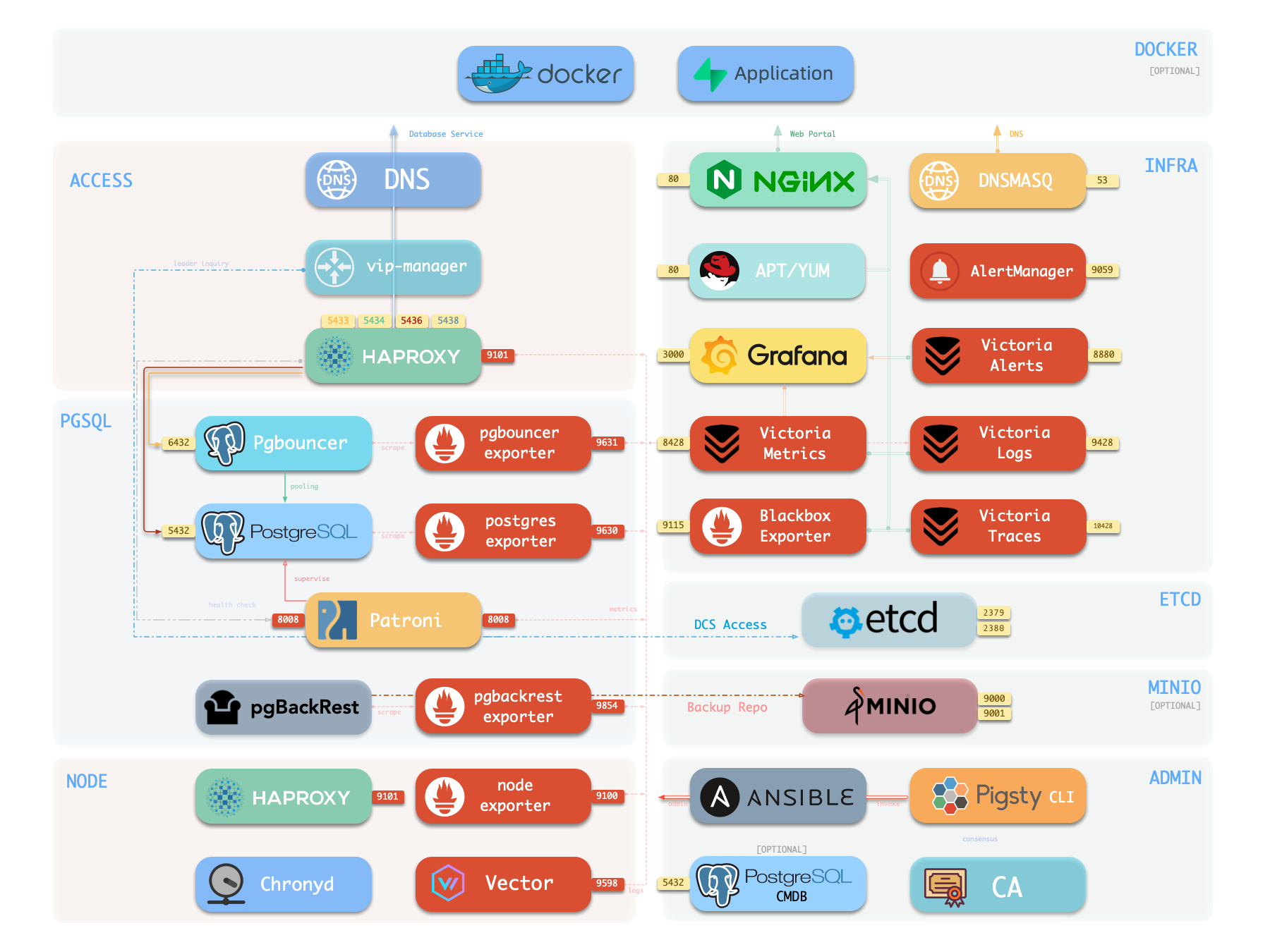
The single-node version of Pigsty includes all core features: 451 PG extensions, self-contained Grafana/Victoria monitoring, IaC provisioning capabilities, and local PITR point-in-time recovery. If you have external object storage (for PostgreSQL PITR backup), then for scenarios like demos, personal websites, and small services, even a single-node environment can provide a certain degree of data persistence guarantee. However, single-node cannot achieve High Availability—automatic failover requires at least 3 nodes.
If you want to install Pigsty in an environment without internet connection, please refer to the Offline Install mode. If you only need the PostgreSQL database itself, please refer to the Slim Install mode. If you are ready to start serious multi-node production deployment, please refer to the Deployment Guide.
Prepare a node with compatible Linux system, and execute as an admin user with passwordless ssh and sudo privileges:
curl -fsSL https://repo.pigsty.io/get | bash  # Install Pigsty and dependencies
cd ~/pigsty; ./configure -g                   # Generate config (with 1-node template, -g generates random passwords)
./deploy.yml                                  # Execute deployment playbook
Yes, it’s that simple. You can use pre-configured templates to bring up Pigsty with one click without understanding any details.
Next, you can explore the Graphical User Interface, access PostgreSQL database services; or perform configuration customization and execute playbooks to deploy more clusters.
Get started with Pigsty—complete single-node install on a fresh Linux host!
Spin up Pigsty in Docker containers for quick testing on macOS/Windows
Explore Pigsty’s Web graphical management interface, Grafana dashboards, and how to access them via domain names and HTTPS.
Get started with PostgreSQL—connect using CLI and graphical clients
Express your infra and clusters with declarative config files
Use Ansible playbooks to deploy and manage Pigsty clusters
Install Pigsty in air-gapped env using offline packages
Install only HA PostgreSQL clusters with minimal dependencies
Three security hardening tips for single-node quick-start deployment
Was this page helpful?
Thanks for the feedback! Please let us know how we can improve.
Sorry to hear that. Please let us know how we can improve.