Single-Node Installation
This guide installs Pigsty on one Linux node. Single Node For production deployments with multiple nodes, use the Deployment Guide.
The procedure has three stages: Install, Configure, and Deploy.
Summary
Prepare a node with a supported operating system. Use an administration account with passwordless SSH and sudo access.
Select a download source and run its command:
The installation script downloads and extracts Pigsty into your home directory. It also installs the deployment dependencies.
Then do these steps:
Enter the Source Directory
Run this command:
Generate the Inventory
Run this command to generate the configuration file and random passwords:
If you already have a prepared pigsty.yml, skip this step.
Run the Deployment Playbook
Run this command:
After deployment, open the Web UI through Nginx on port 80 or 443.
Use the node IP address or domain name.
Connect to the default PostgreSQL service on port 5432.
The procedure usually takes 3–10 minutes. The duration depends on the server resources and network speed. Offline installation can reduce the duration. If you do not need monitoring, use Slim Installation to install fewer components.
Example: online installation on Debian 13, x86_64
Prepare
Review the preparation requirements.
For a single-node installation, first identify the node IP address.
If the node has no static IP address, you can use 127.0.0.1.
| Item | Requirement | Item | Requirement |
|---|---|---|---|
| Node | 1-node, at least 1C2G, no upper limit | Disk | /data mount point, xfs recommended |
| OS | Linux x86_64 / aarch64, EL/Debian/Ubuntu | Network | Static IPv4; single-node without fixed IP can use 127.0.0.1 |
| SSH | nopass SSH login via public key | SUDO | sudo privilege, preferably with nopass option |
The 127.0.0.1 exception applies to single-node installations.
Install
Use one of these commands to install Pigsty into ~/pigsty.
The script also installs Ansible and other deployment dependencies.
You can also download a release or clone the source repository. If you use Git, select a released version before deployment:
If you download or clone the source manually, run bootstrap to install the dependencies:
You can also install Ansible manually.
Configure
The inventory defines the deployment.
Pigsty uses pigsty.yml as the default inventory file.
Edit this file to change the deployment configuration.
The configure script is an optional configuration wizard.
It generates an inventory from your environment and input.
Run it with -g to generate random passwords:
The default output file is ~/pigsty/pigsty.yml.
Examine this file and make the necessary changes before deployment.
Use the configuration templates as examples.
You can also edit pigsty.yml directly without the wizard.
The output below is from v4.5.0. If you install a different version, the first line shows that version.
Configuration output
Common configure Arguments
-i | --ip,Set the primary private IPv4 address of the current node. The script replaces
10.10.10.10in the inventory with this address.-c | --conf,Select a configuration template relative to
conf/. Omit the.ymlsuffix.-v | --version,Select a PostgreSQL major version from
14through19. PostgreSQL 19 is Beta. Use the dedicatedpg19template for that version.-r | --region, ,Select the upstream repository region:
default,china, oreurope. Use the region that gives faster downloads.-n | --non-interactive, ,Supply the primary IP address through command-line arguments. Skip the interactive wizard.
-x | --proxy, ,Use the current environment variables to configure
proxy_env.
If the node has multiple IP addresses, specify the primary address with -i|--ip <ipaddr>.
You can also enter the address at the interactive prompt.
Use a static private IPv4 address.
Do not use a public IP address.
Default credentials are public.
Replace them in pigsty.yml before deployment.
See Security Recommendations for the credentials that configure -g does not replace.
Deploy
The deploy.yml playbook applies the inventory to the target nodes.
Run it from the Pigsty source directory:
Deployment output
At the end, look for pgsql init done and PLAY RECAP.
Make sure that the target nodes report failed=0 and unreachable=0.
Changes to Linux or PGDG repositories can break package dependencies. If installation fails for this reason, wait for the upstream correction. You can also use offline packages.
If Pigsty is already deployed, another run of deploy.yml can restart services.
It can also overwrite configuration files.
Examine the required changes before you run the playbook again.
Interface
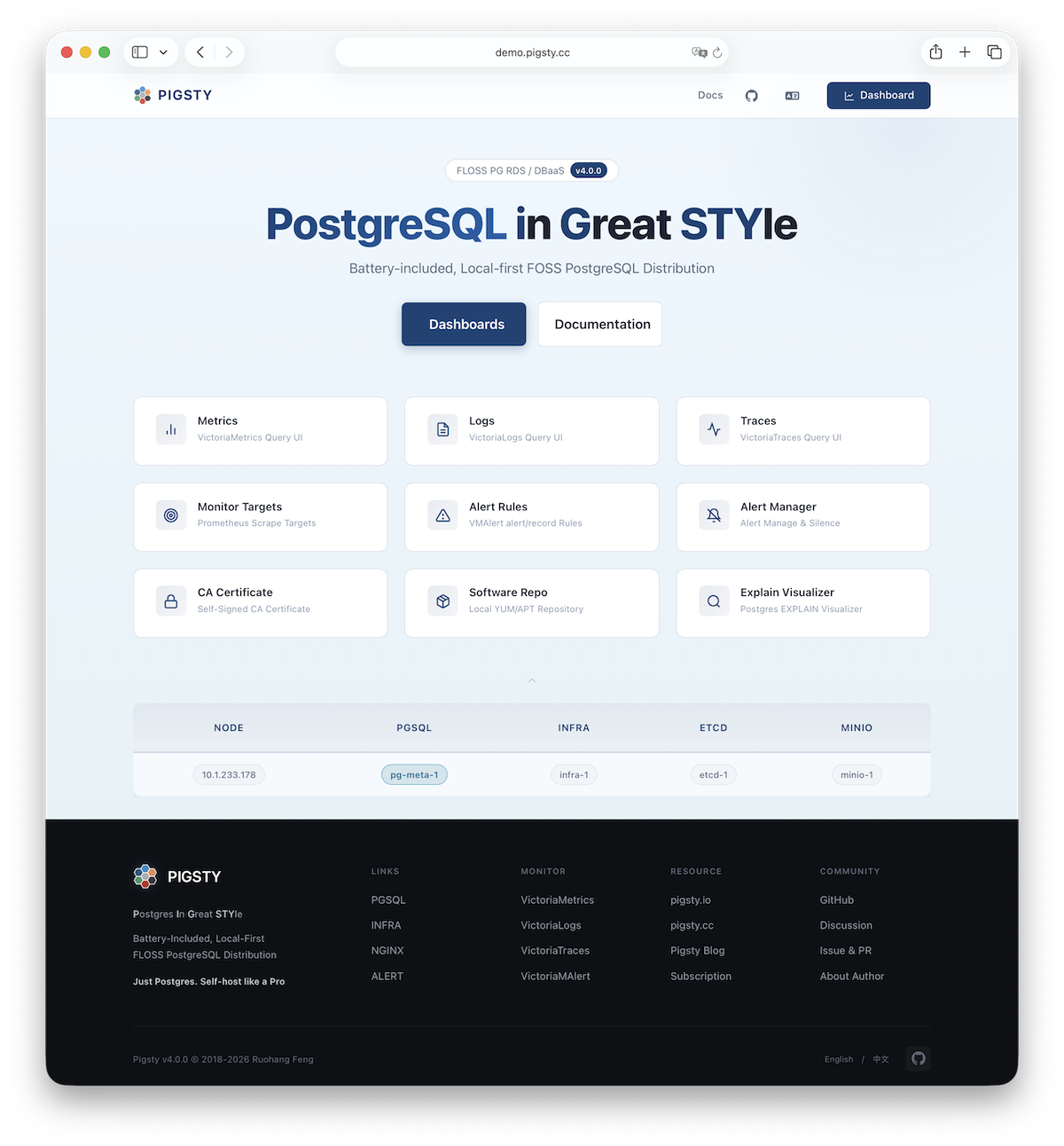
A default single-node installation puts four modules on the current node: PGSQL, INFRA, NODE, and ETCD.
INFRA supplies the Web UI through Nginx on ports 80 and 443.
PGSQL supplies the PostgreSQL service on port 5432.
You can also connect through PgBouncer or HAProxy.
More
Use the current node to deploy and monitor additional clusters. First add their definitions to the inventory. Then run the applicable commands:
Install the NODE module first when the target module requires it. See the module reference for dependencies. Available modules include PGSQL, INFRA, ETCD, MINIO, REDIS, and DOCKER.
Was this page helpful?
Thanks—your feedback helps us improve this page.
What got in the way? (optional)